# Build with Ecwid apps

Explore our guides and examples to integrate Ecwid Ecommerce

<table data-card-size="large" data-view="cards"><thead><tr><th></th><th></th><th></th><th data-hidden></th></tr></thead><tbody><tr><td><strong>Customize your store</strong></td><td><a href="/pages/IhHAmacGKQdbD0Fe0IUw">Get access to API with an app</a></td><td><a href="/pages/SDi2xrLIiTP85lZ31x6n">Learn app settings</a></td><td><h4></h4></td></tr><tr><td><strong>Develop public apps</strong></td><td><a data-mention href="/pages/HzbuZ4r4p9sYwtsjOO5V">/pages/HzbuZ4r4p9sYwtsjOO5V</a></td><td><a href="https://portal.ecwid.com/en-us/app-market-request">Submit your app idea</a></td><td><h4></h4></td></tr></tbody></table>

### Get human support

Ask your questions and get answers from our API specialists.&#x20;

<table data-card-size="large" data-view="cards"><thead><tr><th></th><th></th><th data-hidden data-card-target data-type="content-ref"></th><th data-hidden data-card-cover data-type="files"></th></tr></thead><tbody><tr><td><strong>Contact Ecwid API support</strong></td><td>Get help with API docs, update your app settings and more.</td><td><a href="/pages/5RHGNiwbT8MQJqDNGr6N">/pages/5RHGNiwbT8MQJqDNGr6N</a></td><td></td></tr><tr><td><strong>Join Slack community</strong></td><td>Connect and collaborate with the Ecwid team and fellow developers.</td><td><a href="https://lightspeed-ecom-comm.slack.com/join/shared_invite/zt-1fsgzxsqv-1vmzH0Vb5c1cOG9rIisq4w#/shared-invite/email">https://lightspeed-ecom-comm.slack.com/join/shared_invite/zt-1fsgzxsqv-1vmzH0Vb5c1cOG9rIisq4w#/shared-invite/email</a></td><td></td></tr></tbody></table>

### <img src="/files/kgs1FK2zoZXQd8h5Y8WR" alt="" data-size="line"> Automate integrations

<table data-view="cards"><thead><tr><th></th><th></th><th data-hidden data-card-target data-type="content-ref"></th><th data-hidden data-card-cover data-type="files"></th></tr></thead><tbody><tr><td><strong>Webhooks</strong></td><td>Automate your business logic</td><td><a href="/spaces/Q47kAA1WxNIuWGKG5OiB/pages/4EW8EnGwhLQIm14AtXcG">/spaces/Q47kAA1WxNIuWGKG5OiB/pages/4EW8EnGwhLQIm14AtXcG</a></td><td></td></tr><tr><td><strong>Automation examples</strong></td><td>Check out code and flow for syncing orders or product stock</td><td><a href="/spaces/Q47kAA1WxNIuWGKG5OiB/pages/xm8ZzuyMgtdkTVlEbfcc">/spaces/Q47kAA1WxNIuWGKG5OiB/pages/xm8ZzuyMgtdkTVlEbfcc</a></td><td></td></tr></tbody></table>

### <img src="/files/9RTqfE8JjJfjY4UY4QyC" alt="" data-size="line"> Build websites

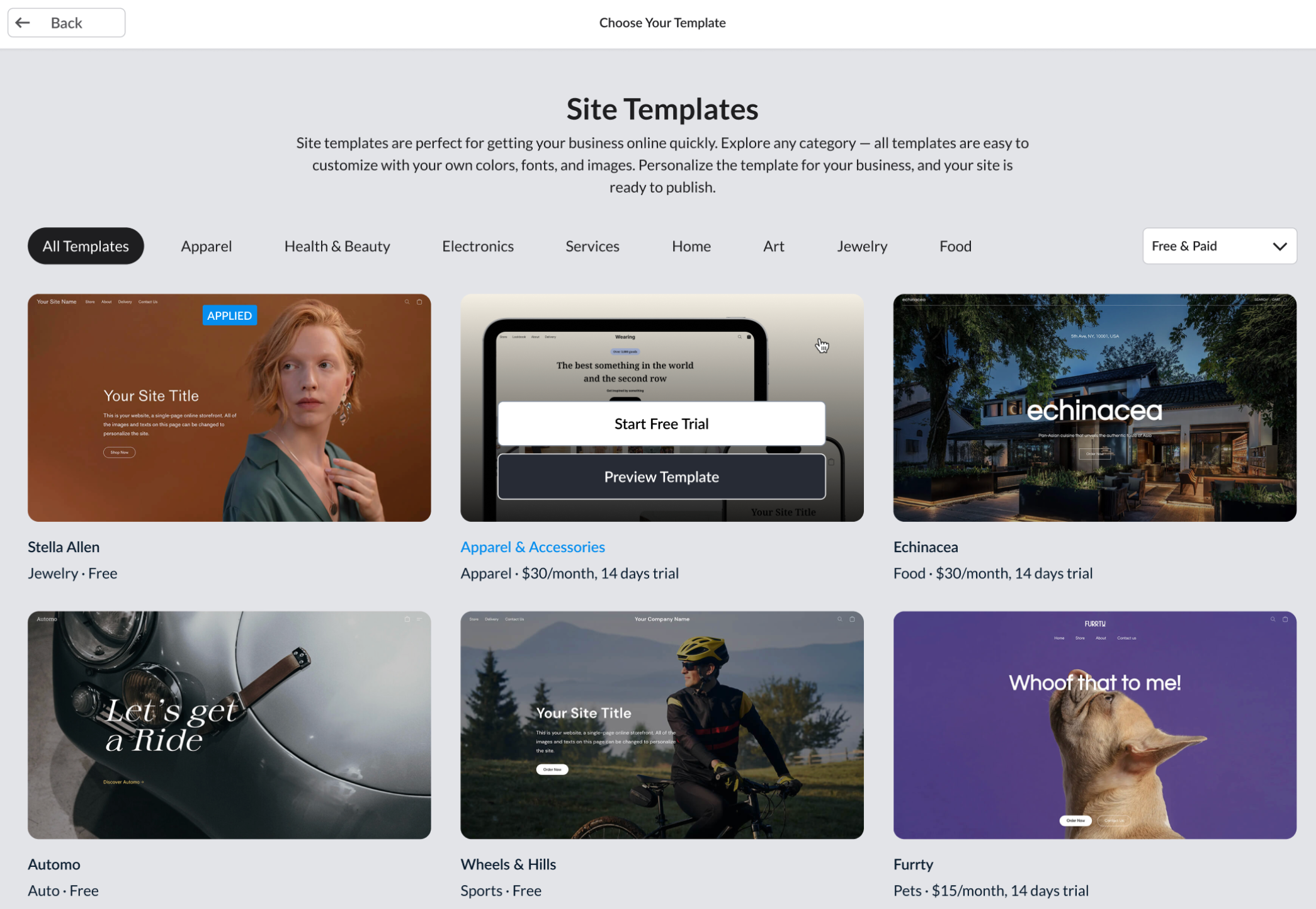
<table data-view="cards"><thead><tr><th></th><th></th><th data-hidden data-card-target data-type="content-ref"></th><th data-hidden data-card-cover data-type="files"></th></tr></thead><tbody><tr><td><strong>Site templates</strong></td><td>Complete website overhaul</td><td><a href="/spaces/kP7oeJaJ4GqXzYswT5rn">/spaces/kP7oeJaJ4GqXzYswT5rn</a></td><td></td></tr><tr><td><strong>Custom sections</strong></td><td>Building blocks for the website</td><td><a href="/spaces/kP7oeJaJ4GqXzYswT5rn/pages/itlOMqoyghiVfk3ndAdH">/spaces/kP7oeJaJ4GqXzYswT5rn/pages/itlOMqoyghiVfk3ndAdH</a></td><td></td></tr></tbody></table>

### <img src="/files/gziqQwtBXYSv9Va5tWaJ" alt="" data-size="line"> Customize storefront

<table data-view="cards"><thead><tr><th></th><th></th><th data-hidden data-card-cover data-type="files"></th><th data-hidden data-card-target data-type="content-ref"></th></tr></thead><tbody><tr><td><strong>List of JS API calls</strong></td><td>Find full list of available JS API calls</td><td></td><td><a href="/spaces/G9n5VxMY9T0Ob3D56PSD/pages/ovZ9Ukf4voZjT1hbWd1z">/spaces/G9n5VxMY9T0Ob3D56PSD/pages/ovZ9Ukf4voZjT1hbWd1z</a></td></tr><tr><td><strong>JS API: track events</strong></td><td>Use pre-built event handlers on the storefront</td><td></td><td><a href="/spaces/aRJpOy0U8IpbjUfcox4D/pages/11735vv8xevGU6CrkRRk">/spaces/aRJpOy0U8IpbjUfcox4D/pages/11735vv8xevGU6CrkRRk</a></td></tr><tr><td><strong>JS API: manage cart and checkout</strong></td><td>Add or remove products from the cart, set customer's email, comments, and more</td><td></td><td><a href="/spaces/aRJpOy0U8IpbjUfcox4D/pages/6U5ZR846lbd2PMMk2EYk">/spaces/aRJpOy0U8IpbjUfcox4D/pages/6U5ZR846lbd2PMMk2EYk</a></td></tr><tr><td><strong>JS API: Open page</strong></td><td>Create redirects to products or search results</td><td></td><td><a href="/spaces/aRJpOy0U8IpbjUfcox4D/pages/Zbm02nJ7o7OJ0nV3EfcQ">/spaces/aRJpOy0U8IpbjUfcox4D/pages/Zbm02nJ7o7OJ0nV3EfcQ</a></td></tr><tr><td><strong>JS API: manage customers</strong></td><td>Check who is logged in, automate logouts and cookie consent</td><td></td><td><a href="/spaces/aRJpOy0U8IpbjUfcox4D/pages/26oqhKw54cCdvh7GD9sa">/spaces/aRJpOy0U8IpbjUfcox4D/pages/26oqhKw54cCdvh7GD9sa</a></td></tr><tr><td><strong>JS API: Generate carts</strong></td><td>Create pre-filled carts as links and share them with your customers</td><td></td><td><a href="/spaces/aRJpOy0U8IpbjUfcox4D/pages/MjZeiMxljzMl6Reew4U1">/spaces/aRJpOy0U8IpbjUfcox4D/pages/MjZeiMxljzMl6Reew4U1</a></td></tr></tbody></table>

### <img src="/files/a7akXeWRLRPoRcX1ltG9" alt="" data-size="line"> Create discounts

<table data-view="cards"><thead><tr><th></th><th></th><th data-hidden data-card-target data-type="content-ref"></th></tr></thead><tbody><tr><td><strong>Accept tips</strong></td><td>Add tips selector to the checkout</td><td><a href="/spaces/pZxwtrnfjGn9RK75zT5A/pages/NDGaYaMEQ9292X1YSU4W">/spaces/pZxwtrnfjGn9RK75zT5A/pages/NDGaYaMEQ9292X1YSU4W</a></td></tr><tr><td><strong>Launch promos</strong></td><td>Highly customizeable discounts for your store</td><td><a href="/spaces/pZxwtrnfjGn9RK75zT5A/pages/Zyaa0N60vsjb7LBKo9UR">/spaces/pZxwtrnfjGn9RK75zT5A/pages/Zyaa0N60vsjb7LBKo9UR</a></td></tr><tr><td><strong>Discount coupons</strong></td><td>Create personal offers for your customers</td><td><a href="/spaces/pZxwtrnfjGn9RK75zT5A/pages/TlUmkXQE0NHgrmTsKeYh">/spaces/pZxwtrnfjGn9RK75zT5A/pages/TlUmkXQE0NHgrmTsKeYh</a></td></tr></tbody></table>

### <img src="/files/uUUPmlmEPX6syOpQQ0pb" alt="" data-size="line"> Browse guides

<table data-view="cards"><thead><tr><th></th><th></th><th data-hidden data-card-target data-type="content-ref"></th></tr></thead><tbody><tr><td><strong>Sync new orders</strong></td><td>Export order data to external services</td><td><a href="/spaces/Q47kAA1WxNIuWGKG5OiB/pages/JNOwEdmnIG9bpysrry2M">/spaces/Q47kAA1WxNIuWGKG5OiB/pages/JNOwEdmnIG9bpysrry2M</a></td></tr><tr><td><strong>Extra fields</strong></td><td>Collect additional data with orders</td><td><a href="/spaces/G9n5VxMY9T0Ob3D56PSD/pages/kxkJhTqcRxUPjNe7YZZX">/spaces/G9n5VxMY9T0Ob3D56PSD/pages/kxkJhTqcRxUPjNe7YZZX</a></td></tr><tr><td><strong>Create orders with API calls</strong></td><td>Calculate order details and place orders in the store on behalf of your clients</td><td><a href="/spaces/wDVIAjl6oqBvzGlms6Vk/pages/L3cCPIApq8q908Ns3lJ6">/spaces/wDVIAjl6oqBvzGlms6Vk/pages/L3cCPIApq8q908Ns3lJ6</a></td></tr><tr><td><strong>Payment API</strong></td><td>Connect any payment provider with your Ecwid store</td><td><a href="/spaces/wDVIAjl6oqBvzGlms6Vk/pages/25xjzpnGgV71uISBEM6u">/spaces/wDVIAjl6oqBvzGlms6Vk/pages/25xjzpnGgV71uISBEM6u</a></td></tr><tr><td><strong>Shipping API</strong></td><td>Calculate online shipping rates at the checkout</td><td><a href="/spaces/wDVIAjl6oqBvzGlms6Vk/pages/pMOc7UrvVfaXbb2bidsy">/spaces/wDVIAjl6oqBvzGlms6Vk/pages/pMOc7UrvVfaXbb2bidsy</a></td></tr></tbody></table>


# Ecwid API features

Ecwid API provides access to all store data and features like custom discounts, live shipping rates, online payments, and even a website builder. Find and learn more about the features here:

### Build websites

With Ecwid Instant Site, you can quickly get a website for your needs: an online store with live checkout tailored for your business niche, a showcase for your offline store or services, or a great landing without a product browser - it's all possible!

Ecwid websites offer a wide range of design settings, layouts, and building elements out of the box. And you can code anything with **sections** and **templates** – API features for Ecwid sites.&#x20;

| [Jump into building Site templates →](/site-themes)                                                                        |
| -------------------------------------------------------------------------------------------------------------------------- |
| Create **custom sections**–building blocks for your website–or completely overhaul website design with **Site templates**. |

### Customize storefront

With Ecwid, your store can work from any website as an integrated widget called **product browser**. It is always synced with the store data and provides customers with every tool to make an order: online checkout, categories and filters for the product catalog, and support for any integrations and customizations applied to the store.

| [Jump into storefront customization →](/storefronts)                                                                                                          |
| ------------------------------------------------------------------------------------------------------------------------------------------------------------- |
| Control the feels and looks of your broduct browser and checkout with **custom scripts**, extensive **JavaScript API**, and store **configuration settings**. |

### Manage store data

Access all of the store data: orders, customers, products, general store settings, discounts, and more. API allows you to read, create, update, and delete any items from your store. It is based on the REST style, HTTP calls, and oAuth 2.0 tokens (simplified for single-store customizations).

| [Jump into API Reference →](https://docs.ecwid.com/api-reference/)                      |
| --------------------------------------------------------------------------------------- |
| Find everything you need to manage the store data in a detailed **REST API reference**. |


# Set up your dev environment in Ecwid

Gaining API access requires you to have a store and a platform where you can configure permissions and generate access tokens. In Ecwid, we refer to this platform as an **application**. A private application that gives you access to store data through API is called a **custom application**.&#x20;

In the following guide, you’ll find instructions on getting yourself a test store with a custom app. Together, they'll allow you to make API requests and manage your store data through the code.

### **Step 1. Sign up with Ecwid**

The first step is to get yourself a store. Only stores on paid plans can access API. If you don’t yet have a store, [sign up with Ecwid](https://my.ecwid.com/cp/#register).

Ecwid provides a **free upgrade to a paid plan** if you:

* Work on a store customization project for your paid store or one of our clients.
* Want to build an integration for your working store in a safe environment, without risks of damaging the data.
* Develop a public application for our App Market.
* Build professional templates for the Ecwid website builder called Instant Site.

[Email us](/contact-ecwid-api-support-team#email-support) to get a free plan upgrade for your test store.

### **Step 2. Get your first application**

You can manage API access to your store data right in the Ecwid admin, through the [app dashboard](https://my.ecwid.com/#develop-apps). Here you can create and manage apps that grant API access only to your store.

When you open the app dashboard for the first time, Ecwid automatically generates the first **custom app** for you.

A custom app is your private way of accessing Ecwid API. It can only work with the store where it's created, but it allows you to completely skip the need for authentication. Just get the app and start making API requests with its **access tokens**. \
\
Custom apps come with some default permissions allowing you to:

* Receive, change, and delete details about products and categories in your store.
* Create new products and categories.
* Receive store profile details.
* Receive and change details of all placed and unfinished orders in your store.

Learn more about app settings:

[App settings](/develop-apps/app-settings)

[Add more features to your custom app](/get-started/add-more-features-to-your-custom-app)


# Make your first API request

All requests to Ecwid REST API require an **access token**. Ecwid uses OAuth 2.0 to provide secure access to the store data for public apps. If you customize your own store, however, you can skip OAuth and easily get an access token for your store.

This guide provides a walkthrough of a basic Ecwid API interaction, specifically, retrieving store profile information. To gain a deeper understanding of Ecwid API objects and their connections, refer to the API reference.

### Before you begin

There is **no test mode** in Ecwid API, so we recommend setting up a separate test store. This way you can safely experiment and develop without impacting your live store and its data. By isolating your testing activities, you can maintain a smooth experience for both development and production environments.

### Step 1. Get your secret app token

API access to the store data is locked behind app authentication and request authorization based on the OAuth 2.0 standard. However, access to your store data is much simpler.

After signing up with Ecwid and getting a custom app, you already have two tokens:

* **Public token** allows only public data to be received and is safe to use in public code.
* **Secret token** grants full access to REST API (provided the app has all required permissions) and therefore must be kept safe.&#x20;

{% hint style="success" %}
Learn more about tokens, permissions, and other application settings in the [App settings](/develop-apps/app-settings) guide.
{% endhint %}

From the [app dashboard](https://my.ecwid.com/#develop-apps), open the **Details** page of the custom app, then copy one of the access tokens:

<figure><img src="https://lh7-rt.googleusercontent.com/docsz/AD_4nXdNwBhLxVmiemZCVBdOYd56HzCSkWeNb2sbmLGz06KIY_sZrBsQmh3Tn1X2TaZFqfiVw-K_jTcYggvqkwn7KKi0UyN9uoWiUi8HePkSGM6eiOm9s6CWJZsLt6l3BfTNS1WOeDeicA?key=18nFffab1qSi-Qn7GXfMEUb2" alt=""><figcaption></figcaption></figure>

If the custom app is uninstalled from the store, you can reinstall it from the **Details** page. Click the **Install** button, then copy access tokens.

### Step 2. Make your first REST API request

Now you have everything to start making REST API requests. Let's start with a simple GET request. Such requests require only two variables: **store ID** and **access token**.

You already have a custom app with access tokens. Get your store ID from any Ecwid admin page from URL or the footer.&#x20;

Now make a simple “Get products” request and execute it using, for example, the [Postman app](https://www.postman.com/).

Add **store ID** to the *request path*, your **secret access token** as a *Bearer Token on the Authorization tab*, and click *Send*:

<figure><img src="https://lh7-rt.googleusercontent.com/docsz/AD_4nXfH7BGOQ7TNpVkg9mBDW_aubmgMw8mxA011JpR6ZXXuuqxBtzF20-D6Dg7sg-1PuZwX3dmS2cqwgPUjhlyQF1eeO3u6ajw6-xoNnQA77GCNhrzWhX7Txms2OdC6IsoXyJWoPNba?key=18nFffab1qSi-Qn7GXfMEUb2" alt=""><figcaption></figcaption></figure>

That’s it. You should receive a JSON-formatted response with details about products in your store.

### **Next steps**

Congratulations on completing the quickstart guide!&#x20;

Now you can make REST API requests, so it’s time to move further:

* [Learn Ecwid API features](/ecwid-api-features)
* [Learn more about app settings: access tokens, scopes, etc.](/develop-apps/app-settings)
* [Add more features to your custom app](/get-started/add-more-features-to-your-custom-app)


# Add more features to your custom app

By default, custom apps have limited access to the store data and features. For example, such apps cannot add new customers through REST API or automate store processes with webhooks. To unlock additional features, you need to update the **app configuration**.

[Learn how to get your first custom app](/get-started/set-up-your-dev-environment-in-ecwid)

### Check out all features available for your app

Check [List of app permissions](/develop-apps/app-settings) and [Ecwid API features](/ecwid-api-features) articles to find what access scopes are enabled for your app by default and what additional permissions you may need for the app.

One application can have any amount of access scopes allowing it, for example, to add widgets on the storefront and manage backend integrations at the same time. \
\
We recommend choosing the minimum amount of scopes for your app.

{% hint style="info" %}
Some features like **webhook automations** require [self-hosted endpoints](/develop-apps/app-settings#self-hosted-endpoints) working on your servers.\
\
Prepare URLs before requesting application update.
{% endhint %}

If you are not yet sure about your app functionality or required access scopes, contact [API Support team](/contact-ecwid-api-support-team) to get help.

### Request application update

Once you prepared a list of required changes (access scopes, endpoint URLs, etc), [request application update](/contact-ecwid-api-support-team#get-assistance-with-your-app) through the Ecwid admin.&#x20;

This way, you'll get access to new features for your app **in 24 hours or less** on business days.


# API glossary

#### Ecwid admin&#x20;

A one-for-all tool, where users can manage all aspects of their store: products, orders, customers, website, integrations, etc.

#### Ecwid app

Extension users can install to their Ecwid stores that adds some new functionality, integration, or a way to customize store content or design.

#### Ecwid user

Anyone who creates an Ecwid store is considered a user: site owners, merchants, and developers helping other users with managing their sites and business.

#### Instant Site

Website builder created by Ecwid that allows creating for both ecommerce and non-ecommerce sites.

#### Instant Site Editor

Native UI for building Ecwid websites available to all Ecwid users right from the Ecwid admin.

#### Ecwid App Market

Marketplace with applications that extend store functionality, add new ways of customization, or integrate a store with another service, for example, payment provider, CRM system, shipping rates calculator, etc.

[Go to App Market](https://www.ecwid.com/apps)

#### Custom app

Private application for accessing Ecwid API in a specific store. Ecwid creates one custom app for any user who visits the app dashboard in Ecwid admin for the first time.

#### Public app

An app available in the [Ecwid App Market](https://www.ecwid.com/apps). Learn more about publishing your app: [Launch apps](/launch-apps/public-apps-overview)

#### App dashboard

Hidden page in Ecwid admin where developers can create new applications, check app settings, get access tokens, and request application updates.&#x20;

Go to the [app dashboard](https://my.ecwid.com/#develop-apps)

#### Access scope

Permission for the app to do a specific action or access some data in the store. For example, the `read_orders` scope allows the app to get information about orders placed in the store and the `add_payment_method` scope allows the app to add a new online payment method to the checkout.

[Learn more about access scopes](/develop-apps/app-settings)

#### API keys

Unchangeable and unique credentials for app authentication and decoding some API requests.&#x20;

Every application has two API keys: `client_id` (app ID) and `client_secret` (app secret).

#### App ID

An app key used to identify the particular application. For public apps, the app ID often matches with the app name. In API, we refer to this ID as the app’s `client_id`.

#### App secret

Unique authentication key of an app that must be kept hidden and secure as it grants access to app authentication. In documentation, reffered as `client_secret`.

#### Access tokens

Secure app credentials for authorizing REST API requests. If an app is installed in several Ecwid stores, it has unique access tokens for every store. \
\
There are two tokens:  `secret_token` and `public_token`. Learn more about app access tokens: [App settings](/develop-apps/app-settings)

#### App endpoint

Link to a self-hosted server URL connected to the app that enables a specific feature. For example, the `paymentUrl` endpoint allows you to receive online payment requests from your store through the app.

<br>


# What is an Ecwid app

**Ecwid application** is an extension users can install to their Ecwid stores. Developers can provide Ecwid users with **any functionality** through applications with dev time and knowledge being the only limitations.

Ecwid applications **do not host the code**. Instead, apps serve as a dev's platform where they can manage available app features and get access to the data of specific stores.

To get a better understanding of what you can do with Ecwid apps, check out the following articles:

{% content-ref url="/pages/Oxkq1OjJ5UssrEeWiAki" %}
[Ecwid API features](/ecwid-api-features)
{% endcontent-ref %}

{% content-ref url="/pages/SDi2xrLIiTP85lZ31x6n" %}
[App settings](/develop-apps/app-settings)
{% endcontent-ref %}

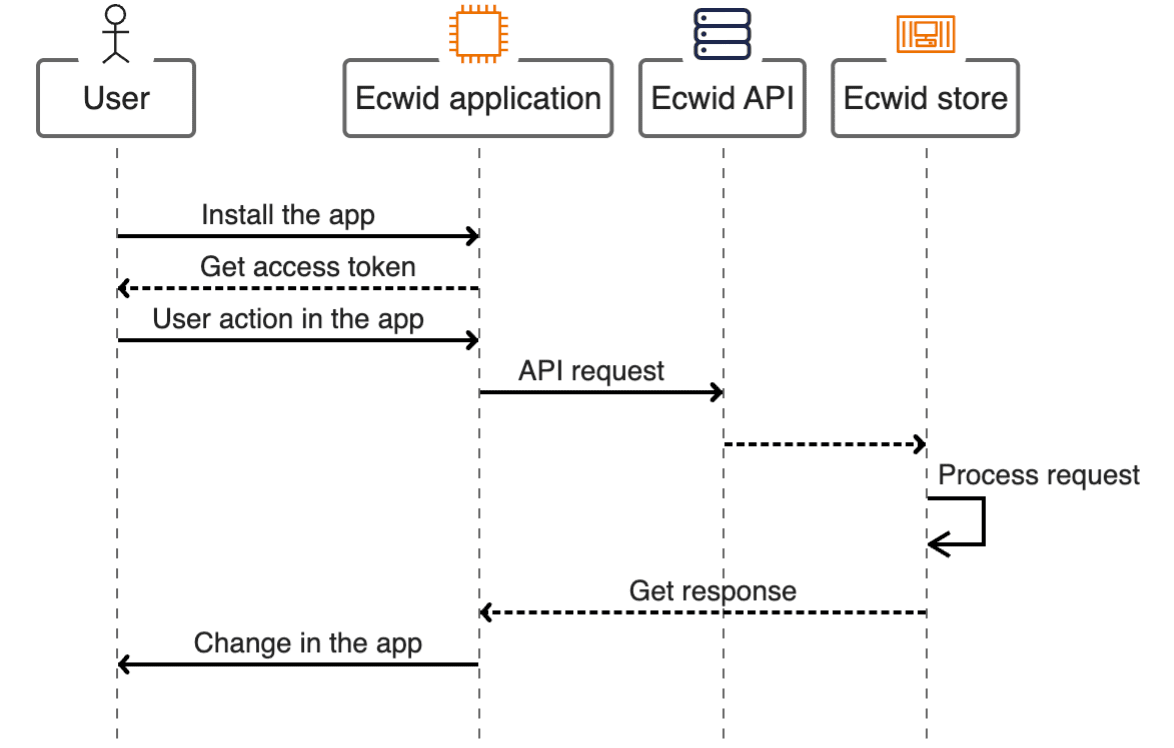
### How Ecwid apps work with API

<figure><img src="/files/kYWI3rrezWCvzILTjSE4" alt=""><figcaption></figcaption></figure>

Applications start working with Ecwid API when they are installed in the store. As a result, the app gets **access tokens** allowing it to access store data through API requests.

With tokens, the app becomes functional. Now the store owner can interact with the app through some form of UI, and the app's logic can transform user actions into working API requests.


# Private and public Ecwid apps

While developing applications for Ecwid, you can decide to keep your app private or make it public so it becomes available to all our clients through the [App Market](https://www.ecwid.com/apps) website.

### Private Ecwid apps

When you start working with the Ecwid API, the first step is to get a custom app named like **“Custom app for <myemail@example.com> #1”**. Such an app is only available in your store, it cannot be installed in other stores or become paid and published. Because of that, you can easily get access tokens and manage store data with REST API calls.&#x20;

Access your custom apps through the [app dashboard](https://my.ecwid.com/#develop-apps) in the Ecwid admin.

{% hint style="info" %}
If you have several stores or develop an app for our reseller partners, we can help you with installing your custom app to multiple stores. \
\
[Contact API Support team](/contact-ecwid-api-support-team) to get help.
{% endhint %}

### Public Ecwid apps

You can offer the app to millions of Ecwid users if you decide to publish it in the [Ecwid App Market](https://www.ecwid.com/apps). They can find your public app in several ways:

* On the App Market website.
* In the App Market, integrated into the Ecwid admin.
* Through related articles in the Help Center
* In search engines' results.&#x20;

Public applications can be free or provide users with different payment options like monthly subscription prices, billing plans, pay-per-use packages, etc.

Read more on [monetizing your public app](/launch-apps/monetize-public-apps).

You can target your audience by limiting a public app to specific countries and App Market categories. For example, if you build a payment integration for the EMEA region, country restrictions will ensure the app won’t be installed by users who can’t use it. The payment category makes the app appear right on the Payments page in the Ecwid admin.

Learn more about [launching apps](/launch-apps/public-apps-overview).

Ecwid apps also allow developers to easily distribute custom functionality, as the same app can be installed in several stores or even become public. Users can search publicly available apps in the marketplace called [Ecwid App Market](https://www.ecwid.com/apps).

We always welcome new apps to our app market. Check out how you can monetize on your app idea in [Launch apps](/launch-apps/monetize-public-apps)


# App dashboard


# App settings

Configuration for all Ecwid apps consists of the following settings:

* **Access scopes** - a list of permissions defining API access for the app.
* **Access tokens** - non-expiring authorization keys for REST API requests.
* **Endpoints** - static URLs on the developer's server interacting with specific Ecwid APIs.
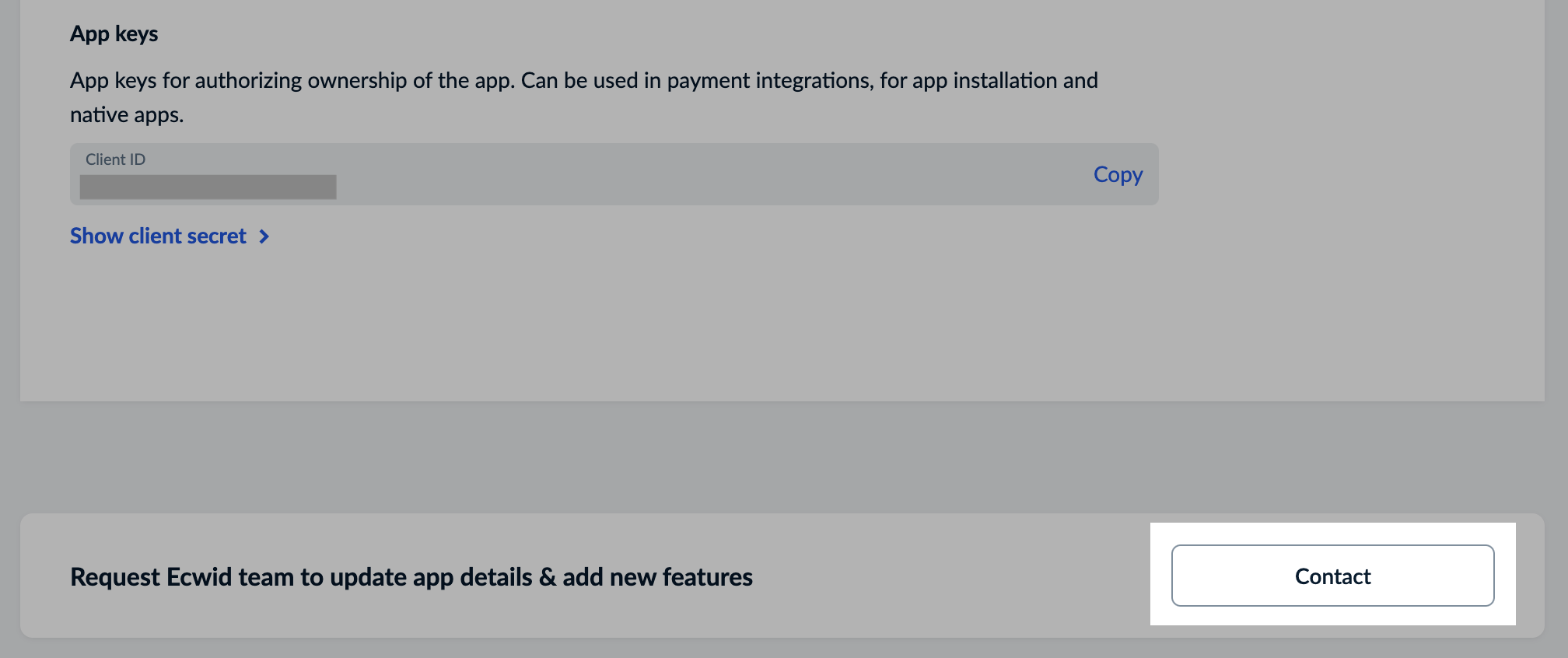
* **App keys** - unique and constant values used in request decoding and public app authentication.

When created, custom applications automatically get default access scopes and both access tokens unlocking some REST API requests. Both app keys are also automatically generated, though they have no use for a custom app with a default configuration.

All app settings are always available on the [Ecwid admin > #develop-apps > Details](https://my.ecwid.com/#develop-apps) page (read-only).

### Access tokens

Access tokens allow you to authorize REST API requests for the specific app in the specific store. Even for the same app, an access token from one store won't work for another one.

Access tokens also **do not expire**, so once you get them for your custom app, save and use these tokens on your side for as long as you need.

{% hint style="info" %}
You can get access tokens for your store without going through oAuth flow
{% endhint %}

Depending on the store data and type of API request, you need to use one of the two access tokens:

* **Secret token**\
  A secret token (`secret_token`) is only limited by the app permissions, so it must not be used in the publically available code. Secret tokens exposed on the storefront put the store data at risk. \
  \
  Secret token example: `secret_EZWiLeBXWsGg82XH3SfSFfdw418QNBBM`.<br>
* **Public token**\
  A public token (`public_token`) is safe to use on the storefront as it can only work with the publically available store data. It grants access **only** to:

  * Receiving details of enabled products and categories.
  * Receiving highly limited store profile data.
  * Placing orders without "Paid" status.

  \
  Public token example: `public_B6mT2teCE55zT2jAeffLjzNJ4se3gfPj`.

### List of access scopes

Access to Ecwid API features is limited by permissions called **access scopes**.

One application can have from one to all scopes at the same time. However, we recommend keeping the minimum amount of permissions required for the app to work.

Find the full list of access scopes available to apps below:

<table><thead><tr><th width="266.7265625">Access scope</th><th>Notes</th></tr></thead><tbody><tr><td>read_store_profile</td><td>Get general store settings like format units, shipping origin address, email notification settings, etc. Receive webhooks about changes in store settings or applications. <br><br><strong>Default scope for custom apps</strong>.</td></tr><tr><td>read_catalog</td><td>Get data about categories, products, product options, variations, and attributes. Receive webhooks about product and category changes. <br><br><strong>Default scope for custom apps</strong>.</td></tr><tr><td>update_catalog</td><td>Update product and category details, upload images and files to products, and delete products or categories. <br><br><strong>Default scope for custom apps</strong>.</td></tr><tr><td>create_catalog</td><td>Add new products and categories to the store. <br><br><strong>Default scope for custom apps</strong>.</td></tr><tr><td>read_orders</td><td>Get data about orders placed in the store and abandoned carts. Receive webhooks about changes in carts and orders. <br><br><strong>Default scope for custom apps</strong>.</td></tr><tr><td>update_orders</td><td>Change order details, update order statuses, and delete orders. <br><br><strong>Default scope for custom apps</strong>.</td></tr><tr><td>public_storefront</td><td>Get a public access token for the app. <br><br><strong>Default scope for custom apps</strong>.</td></tr><tr><td>read_store_profile_extended</td><td>Get additional store settings like billing and channel information. Extends the <code>read_store_profile</code> access scope.</td></tr><tr><td>read_store_limits</td><td>Get store limits and restrictions. Extends the <code>read_store_profile</code> access scope.</td></tr><tr><td>update_store_profile</td><td>Update store settings, manage logo images, and close storefront for maintenance with REST API.</td></tr><tr><td>read_store_stats</td><td>Get store reports details.</td></tr><tr><td>update_catalog_batch_delete</td><td>Delete all products from the store in one request.</td></tr><tr><td>create_orders</td><td>Manually add new orders to the store. Convert abandoned carts to orders.</td></tr><tr><td>add_custom_blocks</td><td>Create new sections – building blocks of website pages – for the Ecwid website builder called  <a href="https://api-docs.ecwid.com/docs/intro-to-instant-site">Instant Site</a>.</td></tr><tr><td>add_custom_templates</td><td>Create new templates – design and functionality overhauls – for your website or all users of the Ecwid website builder called  <a href="https://api-docs.ecwid.com/docs/intro-to-instant-site">Instant Site</a>.</td></tr><tr><td>read_customers</td><td>Get data about store customers and customer groups from your store. Receive webhooks about customer changes.</td></tr><tr><td>update_customers</td><td>Update customer or customer group details and delete them.</td></tr><tr><td>create_customers</td><td>Add new customers to the store.</td></tr><tr><td>read_customers_extrafields</td><td>Get data about customer extra fields in the store.</td></tr><tr><td>update_customers_extrafields</td><td>Update and create new customer extra fields.</td></tr><tr><td>delete_customers_extrafields</td><td>Delete customer extra fields from the store.</td></tr><tr><td>read_discount_coupons</td><td>Get data about discount coupons. Receive webhooks about discount coupon changes.</td></tr><tr><td>update_discount_coupons</td><td>Update discount coupon details and delete coupons.</td></tr><tr><td>create_discount_coupons</td><td>Add new discount coupons to the store.</td></tr><tr><td>read_promotion</td><td>Get data about promotions in the store. Receive webhooks about any changes in promotions.</td></tr><tr><td>update_promotion</td><td>Update promotion conditions and delete them.</td></tr><tr><td>create_promotion</td><td>Add new promotions to the store.</td></tr><tr><td>read_reviews</td><td>Get data about product reviews with REST API. Receive webhooks about product review changes.</td></tr><tr><td>update_reviews</td><td>Update product review status and delete reviews.</td></tr><tr><td>read_sizecharts</td><td>Get data about sizecharts available in the store.</td></tr><tr><td>update_sizecharts</td><td>Update store sizecharts and delete them.</td></tr><tr><td>create_sizecharts</td><td>Add new sizecharts to the store with REST API.</td></tr><tr><td>customize_storefront</td><td>Get access to Ecwid JS API for storefront customization. Modify the storefront with a custom JavaScript code running from a self-hosted endpoint. <br><br>Requires <code>customJsUrl</code> endpoint to function. Optional endpoint: <code>customCssUrl</code>.</td></tr><tr><td>add_to_cp</td><td>Add an integrated user settings page for your app to Ecwid admin. <br><br>Requires a self-hosted <code>iframeUrl</code> endpoint to function.</td></tr><tr><td>add_shipping_method</td><td>Add live shipping rates to the store with Shipping API. The new shipping method provides live rates to customers at the checkout. <br><br>Requires a self-hosted <code>shippingUrl</code> endpoint to function.</td></tr><tr><td>add_payment_method</td><td>Allow customers to pay for orders online at the checkout with Payment API. <br><br>Requires a self-hosted <code>paymentUrl</code> endpoint to function.</td></tr><tr><td>customize_cart_calculation</td><td>Create a custom logic for calculating discounts or surcharges at the checkout. <br><br>Requires a self-hosted <code>discountUrl</code> endpoint to function.</td></tr><tr><td>buy_domains</td><td>Purchase and manage store domains.</td></tr><tr><td>read_invoices</td><td>Get data about order tax invoices. Receive webhooks about changes in order tax invoices.</td></tr><tr><td>read_brands</td><td>Get data about product brands.</td></tr><tr><td>read_subscriptions</td><td>Get data about purchased subscription products.</td></tr><tr><td>update_subscriptions</td><td>Update subscription products' details.</td></tr><tr><td>charge</td><td>Use custom charges in your app to expand monetization options with Ecwid billing. Available only for public apps.</td></tr><tr><td>read_staff</td><td>Get data about additional (staff) accounts in the store.</td></tr><tr><td>invite_staff</td><td>Send and resend staff account invites.</td></tr><tr><td>create_staff</td><td>Add new staff accounts to the store.</td></tr><tr><td>update_staff</td><td>Update staff account details.</td></tr><tr><td>delete_staff</td><td>Cancel the invite for the staff and revoke their access to your store.</td></tr></tbody></table>

### Self-hosted endpoints

{% hint style="info" %}
Access to REST API or storefront/checkout customizations does not require setting up self-hosted endpoints.
{% endhint %}

Some features require you to set up a live server listening to incoming requests from Ecwid API.&#x20;

For example, you need an endpoint called `webhookUrl` to receive webhooks – automatic notifications about any events in the store.&#x20;

Any self-hosted endpoint must work:

* On a static HTTPS URL&#x20;
* On a server that can handle HTTP requests.

List of available endpoints and features requiring them:

* `webhookUrl`: **Webhooks** about events happening in the store.
* `paymentUrl`: Payment API for adding online payment methods for the store.
* `shippingUrl`: Shipping API for adding live shipping rates for the checkout.
* `cartPromotionsUrl`: **Live discounts** for adding custom live discounts to the checkout.
* `customJsUrl`: **Storefront customization** with JavaScript code.
* `customCssUrl`: **Storefront customization** with CSS code.
* `iframeUrl`: **Native app** for creating a user settings page.

### Application keys

{% hint style="info" %}
Access to REST API or storefront/checkout customizations does not require app keys.
{% endhint %}

**App keys** are used in Payment API and app authentication. Values for app keys are unchangeable and unique for each application. There are two app keys:

* `client_id` - Unique application ID.
* `client_secret` - Application secret used for decryption in Native app authentication and Payment API processing.


# Community libraries

### Community libraries by languages

#### HTML/JavaScript

* [Source code of Custom URL for "Thank you" page](https://github.com/Ecwid/custom-thank-you-page-app). \
  Works as a storefront app with settings in Ecwid admin (Native application).
* [Source code of a sample native application for Ecwid](https://github.com/Ecwid/sample-native-app). \
  Use it to start working on your app settings page in Ecwid admin.&#x20;

#### Java/Kotlin

* [Ecwid's Java/Kotlin API client library](https://github.com/Ecwid/ecwid-java-api-client)

#### Ruby

* [A gem to interface with the Ecwid REST APIs](https://github.com/Convead/ecwid_api) by [Convead](https://convead.com/) Last updated: 2020
* [A Ruby gem for the Ecwid REST API](https://github.com/davidbiehl/ecwid_api) by [David Biehl](https://github.com/davidbiehl) Last updated: 2016

#### PHP

* [A simple Ecwid oAuth2 client](https://github.com/Ecwid/ecwid-oauth2-client-php)
* [Alternative Ecwid OAuth 2.0 Client Provider](https://github.com/mugnate/oauth2-ecwid) for The PHP League OAuth2-Client with packagist support
* [Connect your app with MailChimp](https://github.com/jp26jp/Ecwid-Third-Party-App-MailChimp-Integration)

#### C\#

* [C# services for Ecwid API](https://github.com/kroniak/extensions-ecwid)

#### Next.js Commerce

* <https://github.com/Ecwid/ecwid-nextjs-commerce>

### Community libraries by website builders

#### WordPress

* <https://wordpress.org/plugins/ecwid-shopping-cart/>

#### Joomla

* <https://extensions.joomla.org/extension/ecwid/>

#### Drupal

* <https://www.drupal.org/project/ecwid_shopping_cart>


# Public apps overview

**Public applications** can give our clients additional customization tools or add new integrations to their stores. Any custom app can become public. Any developer can come to us and create a public app. We always welcome new additions to our [App Market](https://www.ecwid.com/apps)!

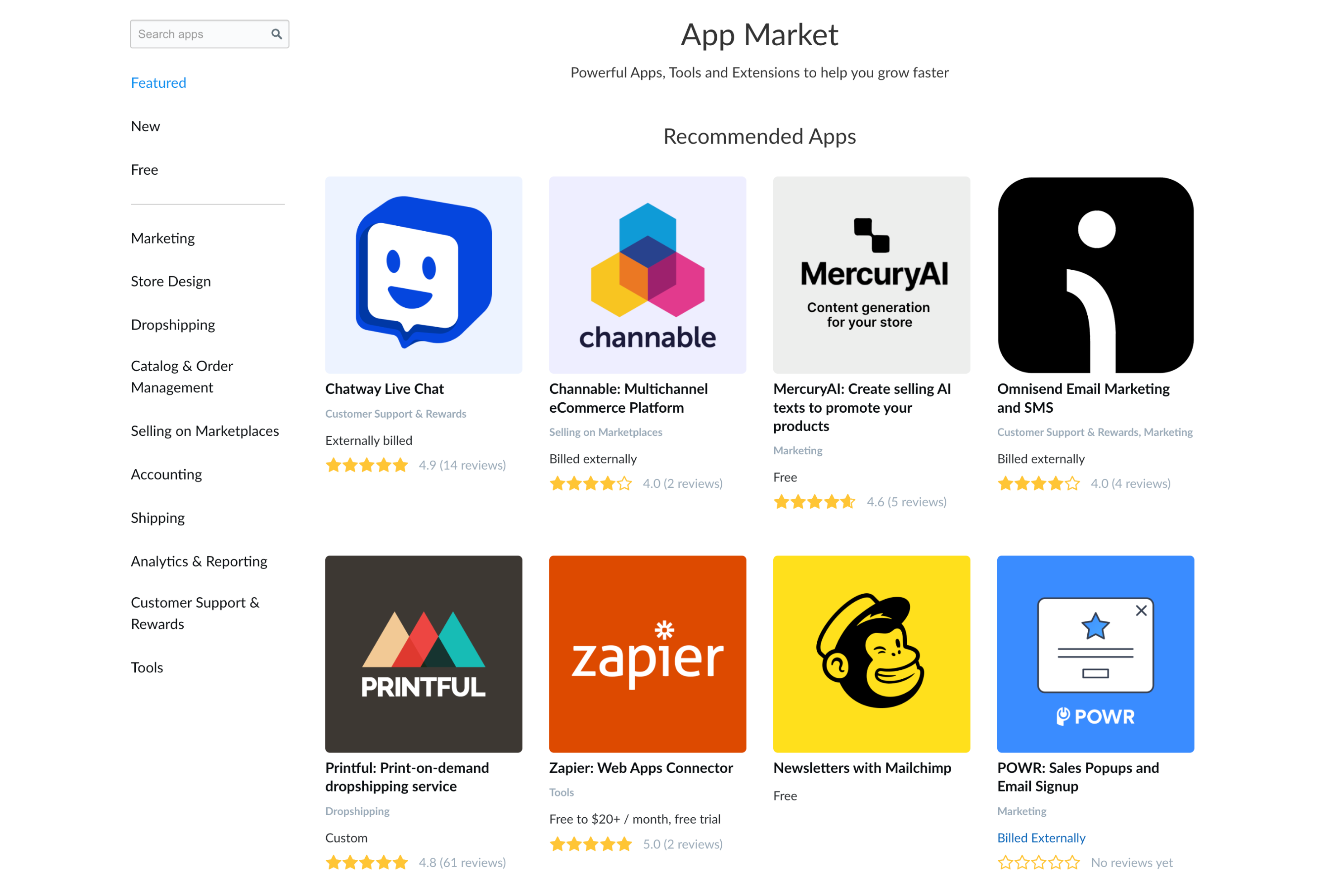
**App Market** is a place where clients can search and install public apps in their stores. It has a search tool, collections, and categories to make it easier to find specific apps.

<figure><img src="/files/8OaTc0aDVbSe24yP2xI2" alt=""><figcaption></figcaption></figure>

We have an automated flow where you start with only an idea of an app and end up with it being published in the App Market.&#x20;

Start with the dev version of your app in the free dev environment and test it with us before publishing the app.

<table data-card-size="large" data-view="cards"><thead><tr><th></th><th data-type="content-ref"></th></tr></thead><tbody><tr><td><strong>Start developing with Ecwid</strong></td><td><a href="/pages/OtQF0UUbGJoyMhxSGiQw">/pages/OtQF0UUbGJoyMhxSGiQw</a></td></tr><tr><td><strong>Get revenue</strong></td><td><a href="/pages/hVTtlgFoa5SC9eI8fQBJ">/pages/hVTtlgFoa5SC9eI8fQBJ</a></td></tr></tbody></table>


# FAQ about public applications

#### Q: What types of apps can I build for the App Market?

A: You can develop apps that help merchants to become visible online and seamlessly move between online and offline sales channels. These can be apps for marketing, store design, inventory management, shipping, analytics, customer service, and more.

#### Q: Are there any types of apps that are not allowed to be exposed in the App Market?

A: The following apps will not be accepted in the App Market (this list is not exhaustive, and we may reject other types of apps as well):

* Payment apps that are not authorized by Lightspeed&#x20;
* Apps that provide integration with a third-party POS
* Apps that offer or promote capital funding
* Apps whose primary function is not related to the main business purpose of the product
* Apps whose main purpose is to advertise third-party products or services without improving the customer experience
* Apps that make little or no use of Ecwid APIs
* Apps that implement deceive practices towards merchants or buyers
* Apps whose primary function is to collect merchant and buyer data and share it with third parties
* Multiple apps with similar functionality created by the same Partner

#### Q: What is the target audience for apps on your platform?

A: Our ideal customer profile includes omni-channel merchants typically operating between 1-150 locations in verticals like home & garden, sports & leisure, jewelry & watches, apparel & footwear, vape & smoke, wine & liquor, health & beauty, and pet products. These businesses typically manage thousands of SKUs, have a strong physical presence, and are also committed to increasing online visibility and outshine local competitors.

#### Q: Can I develop a custom app for a specific store and then make it public?

A: As long as it doesn't violate your agreements with the store owner, you can publish an app that was previously developed for a specific store. An app must follow a standard publication path from submission to its review. To understand the difference between the types of apps, please refer to the article [Private and public Ecwid apps](/develop-apps/private-and-public-ecwid-apps).

#### Q: How long does it take to review an app submission request?

A: Typically, the review of an app submission request takes 1-2 business days. \
[Submit your app idea](https://portal.ecwid.com/en-us/app-market-request)

#### Q: What do I need to have before onboarding and launching my app?

A: You should possess comprehensive skills to create a fully functional and stable app. Additionally, you need to be an individual entrepreneur or represent a legal entity such as a company, and have a PayPal or bank account available to receive USD transfers.

#### Q: Do you provide sandbox or test environments?

A: We provide a developer with a paid subscription account in a test store for development and testing purposes.

#### Q: Is there a cost associated with listing an app on the App Market?

A: Listing an app is free, but a developer should sign a partner contract which includes a revenue-sharing model based on app sales or subscription fees.

#### Q: How do developers earn revenue from apps?

A: Developers can monetize apps through recurring subscriptions or usage-based fees. More information can be found in the documentation - [Monetize public apps](/launch-apps/monetize-public-apps).

#### Q: Can I use my own billing system to monetize an app?

A: We encourage developers to use Ecwid billing system. For apps whose monetization scheme is supported by Ecwid this is a mandatory requirement. We're constantly working on improving the billing system. If your monetization scheme isn't currently supported by it, you can use your own, but if your case is covered in the future, we will ask you to migrate to Ecwid billing system.

#### Q: Where can I review the partner agreement?

A: It will be shared as soon as a developer starts working on their first app.

#### Q: I want to make sure my app won't have competition with other developers' apps or platform functionality.

A: App Market is a competitive platform where anyone can publish an app by going from submission to release and fulfilling the necessary obligations. We never guarantee that an app's functionality will not be replicated by other developers or that the platform will not receive an update that includes similar functionality.

#### Q: How do I receive technical support during app development?

A: We offer comprehensive documentation and dedicated technical support channels for developer inquiries.

#### Q: How can I update my app after it’s published?

A: You can update apps anytime, though changes require approval by our team.

#### Q: What happens if my app experiences downtime or performance issues?

A: You are expected to monitor and maintain high availability, as downtime can negatively impact a merchant's business. Repeated user complaints about app unavailability or malfunction may be a reason to delist the app.

#### Q: Is there an API rate limit or throttling in place?

A: Yes, there are API rate limits in place to ensure stable performance. Detailed information is available in our developer documentation - [Rate limits](/api-reference).

#### Q: Do you support multilingual apps?

A: The API provides a developer with information about the store's language settings, which can be used to create multi-language apps, allowing you to effectively reach a global audience.

#### Q: Are there restrictions on the countries or regions where my app can be available?

A: Generally, your app can be available globally unless you specify otherwise, though certain regional restrictions may apply due to regulatory compliance.<br>


# Monetize public apps

When you build a public application for Ecwid App Market, you get access to thousands of our users who can become your clients. While choosing pricing options, check out Ecwid billing.

{% hint style="success" %}
During onboarding, we'll contact you to discuss a monetization scheme if necessary.
{% endhint %}

### Why Ecwid billing

* Ecwid handles payments: Set a monthly price for your app, and that's it. Ecwid billing will take care of the rest.
* Set up different pricing options: make your application free or with a monthly price. Add Premium or pay-per-use features with custom charges. Combine different options to make unique and flexible billing.
* Choose between several currencies: we can accept payments in USD, EUR, GBP, AUD, MXN, and INR.
* Adjust app price: Set up trial periods from 1 day to half a year, change your application price, and process refunds with our support.
* Get paid quarterly: our team will report your app’s performance and make the payment.
* Track your app and payout stats: We provide automated monthly reports that include stats about app usage and generated revenue.

### Use cases for custom charges

We recommend setting up a monthly price for the app and using **custom charges** for any additional charges, such as a monthly price increase, one-time purchase, or pay-per-use features:

* **Subscription levels**. Add cool features to a higher subscription level and call custom charges once a month. Use the base application's monthly price as a default or a starter plan.
* **Pay-per-use functionalities**. Call custom charges for additional bulk or advanced features in your application. For example, products synced from an XML file are $10 for 1000 products, paid image enhancer.
* **Premium version**. Deliver baseline functionality within the subscription price. Grant access to additional features/higher limits with a one-time paid Premium version.

{% hint style="warning" %}
Due to Reseller Partner stores' limitations, we recommend avoiding making the apps with custom charges baseline free.\
\
If you still want to make your app free with some paid features, please [contact API team](/contact-ecwid-api-support-team).
{% endhint %}

Call custom charges through REST API requests. Ecwid processes them immediately, and you receive the transaction status in the response.

Custom charges have the following **withdrawal limits**:

* Daily withdrawal limit per store: $5000
* Withdrawal limit per transaction: $500

<table data-card-size="large" data-view="cards"><thead><tr><th></th><th data-type="content-ref"></th></tr></thead><tbody><tr><td><strong>Custom charges in REST API</strong></td><td><a href="/spaces/G9n5VxMY9T0Ob3D56PSD/pages/Uql29IVd6KBhwQEz9IOv">/spaces/G9n5VxMY9T0Ob3D56PSD/pages/Uql29IVd6KBhwQEz9IOv</a></td></tr></tbody></table>

### Show custom charges in the app

Ecwid doesn't ask for confirmations when custom charges are triggered. To make sure the store owner understands that he will be charged and accepts it, we recommend the following:

* Highlight triggers for custom charges with a text explaining that it is a paid feature.
* Show a warning message or a pop-up with a confirmation button before sending a charge request.

If customers accidentally click a charge button and you want to give them a refund, please [email us](mailto:ec.apps@lightspeedhq.com) with the details. We will help you.


# Steps to go live with a public app

Thank you for your decision to build an app for Ecwid!

Follow the steps listed below to convert your app idea into a working solution available to more than 100M users around the world.

### Submit your app idea

Send a [Request form](https://portal.ecwid.com/en-us/app-market-request) telling us about the app you want to create: its usefulness to our merchants, preferred billing type, supported regions and platforms, etc.

### Learn more about application types

Public apps can have different business logic or none at all. Depending on what backend and/or website admin you have, we offer two main approaches to handling your users, known as **application types.**

Two types are **Native** and **External** apps. Choose a suitable type for your app to make a secure and reliable application for our mutual users: [Native and external apps](/launch-apps/native-and-external-apps)

### Learn more about monetizing

With an app in our App Market, you gain access to thousands of potential paid users.&#x20;

There are many ways to monetize your work: monthly price, pay-per-use payments, one-time premium purchases, and more. Ecwid provides tools to set up and handle flexible billing: [Monetize public apps](/launch-apps/monetize-public-apps)

### Start working on a dev version

With an approved [Request form](https://portal.ecwid.com/en-us/app-market-request), you get a free test store on a Premium plan and a dev app. From here, you can access all platform features and freely use the store as a playground.

[Email us](mailto:ec.apps@lightspeedhq.com) if your workflow requires an additional staging app or several stores for tests.

### Complete app publishing process

When your app is ready to be published, start the **app validation** process to ensure it meets all requirements. At its end, the app gets published and becomes available in the Ecwid App Market.

To get through the validation process more easily, follow the [Guide to App Validation](/launch-apps/steps-to-go-live-with-a-public-app/guide-to-app-validation)


# Guide to App Validation

To make your application publicly available in the Ecwid App Market, you must complete its technical verification with the App Market team. Completing the verification process ensures that your app is secure, user-friendly, and meets our quality standards.

We recommend following these steps to pass the app review as fast as possible:

1. Go through the **Validation checklist** that covers all technical requirements for Ecwid App Market apps: [Google Sheets](https://docs.google.com/spreadsheets/d/17vtfnvtiE_1OsfGFatCxK8RhOCqJmWaw3v_2pd5YI7c/edit?gid=1360471883#gid=1360471883)\
   \
   Make sure that your application meets all the requirements listed there. If not, the app won't pass the verification.\
   \
   Contact API Support team if you need any help with this step: <ec.apps@lightspeedhq.com>
2. Submit the **App Readiness Form**. You'll find a link to the form in the initial email received from the App Market team.\
   \
   Our team will review your submission in **3 business days**, and then follow up with any questions and the production version of your app. It's not yet publically available, however this version is used to get through the validation process.
3. Once the prod app is set up and works, record a **high-quality video demonstration** showcasing all aspects of your application: usability, speed, security, data handling, etc. To cover all essentials, follow our Guide to recording validation screencast: [Guide to recording app validation screencast](/launch-apps/steps-to-go-live-with-a-public-app/guide-to-recording-app-validation-screencast)\
   \
   Then send this recording to App Market team.
4. That's it, congrats!\
   \
   When the app validation is passed, the app goes live without further ado and becomes available to thousands of our users in the App Market. Our team will additionally notify you when it happens.

<br>


# Guide to recording app validation screencast

The following guide will help you create a clear showcase of your app's functionalities. A well-structured video tour of your app will ensure that it is ready to be used by real Ecwid customers and passes verification with ease.

### Technical Specifications for Your Video

* Resolution: A minimum resolution of Full HD (1920x1080) is required for optimal clarity.
* Video Quality: Maintain high bitrate, avoiding pixelation.
* Audio: Utilize a high-quality microphone to ensure clear audio and minimize background noise.
  * Pro Tip: A smartphone's voice recorder can serve as an effective alternative if a dedicated microphone is unavailable; the audio can be synced with your video later in the editor.
* Format: Please use the MP4 format.
* Length: Aim to keep the video under 15 minutes. While thoroughness is important, please edit out or speed up any pauses or extended loading times.
* Pacing: Speak clearly and at a moderate pace. Move your mouse deliberately to allow us to follow your actions. Highlighting clicks and cursor movements can be very helpful.
* Language: The app interface and speech on the screen recording must be in English. Subtitles are also available.&#x20;
  * Note: if the service to which your app provides access, or the app itself, is available in foreign languages, you should demonstrate switching the interface language in the recording.
* Submission: Share your video via a direct download link from a reputable cloud service (e.g., Google Drive, Dropbox). The link must be publicly accessible, free to download, and valid for a minimum of 30 days. Include this link in your App Readiness Form.

### Screencast Content: Your Script

#### Step 1: Introduction (approximately 30 seconds)

* Begin with a clean desktop displaying your Ecwid test store.
* Introduce yourself and your app: "Hello, I'm \[your name] from \[your company]. This is the validation video for our new application, \[your app's name]."
* Briefly explain your app's purpose: "Our app assists Ecwid merchants in addressing \[the problem] by enabling them to \[main function/value]."

#### Step 2: Installation & Onboarding (approximately 1 minute)

* Demonstrate the installation process (excluding internally billed native apps).
* When the OAuth permissions screen appears, provide a concise explanation for each requested permission.
* Showcase the initial merchant experience post-installation, including any welcome messages, setup wizards, or configuration pages. Guide us through these initial steps.

#### Step 3: Core Functionality Showcase (approximately 3-8 minutes)

* This section is critical for demonstrating your app's operational capabilities.
* Present each main feature from your App Market description, one by one.
* The "Show and Tell" Method:
  * State your action: "First, I will demonstrate our bulk price editor."
  * Perform the action: Utilize your app's interface to modify prices for several products.
  * Verify the action (critically important!): Navigate to the Ecwid Control Panel (e.g., Catalog > Products) and confirm that the prices have been successfully updated. This validates your API's functionality.
* Third-party integrations (if applicable):
  * Illustrate how your app connects to the external service.
  * Demonstrate data sync between Ecwid and the app/3rd party service by changing some data on one side and showing the change on the other.
  * Remember to provide any necessary test credentials for the third-party service in the 'Comments or questions on installation' field of your App Readiness Form, if this does not violate the agreement on application development with a third-party service. In other cases, a screen recording will suffice.
* Showcase your app's error handling and robust behavior in various scenarios: Do not limit your demonstration to ideal situations.
  * Invalid Inputs: Show how your app responds to incorrect input, such as negative numbers in price fields or unusual characters. The app should provide clear error messages and avoid crashing.
  * Common Scenarios: Demonstrate your app's functionality with diverse data types, including free products, products with variations, or large images.

#### Step 4: UI/UX & Responsive Design (approximately 1 minute)

* Demonstrate your app's visual appeal and usability across different devices.
* Open your browser's Developer Tools (F12) and activate the device toolbar.
* Select a mobile device (e.g., an iPhone 12 Pro) and show how your app's layout adapts, maintaining full usability on a smaller screen.

#### Step 5: Security & Data Handling

* Throughout your demonstration, articulate your app's security measures: "All our API communication is encrypted using HTTPS, and we never expose secret keys or access tokens on the client-side. Our Privacy Policy link is conveniently located in the app's footer. We are fully GDPR compliant and have a clear process for addressing merchant data requests."

#### Step 6: Uninstallation & Cleanup (approximately 1 minute)

* Explain your server’s actions upon uninstallation and clearly mention that if the app uses an external billing system, uninstalling the app must automatically cancel the merchant’s subscription to the service.\
  \
  For example: “When a merchant uninstalls the app, we receive a webhook from Ecwid. Our system then automatically deletes all their associated data, including their access token, from our database. If the merchant has an active subscription in our external billing system, it is automatically canceled as well.”

#### Step 7: Conclusion (approximately 20 seconds)

* State the end of your app's demo by sharing contact information: "This concludes the validation walkthrough for \[Your app's name]. Should you have any questions, please do not hesitate to contact us at \[your support email address]."

By following these steps, you will create a compelling screencast that effectively showcases your app and expedites its approval process.

<br>


# Native and external apps

While custom apps work only in one store, **public applications** can be used by thousands of clients. Therefore, they must be able to:

* Have some form of SQL database for managing users and REST API access to their data.
* Provide users with a personal settings page populated with the store data.
* Handle simultaneous access to REST API and settings pages.

When starting public app development, decide how to handle all these processes. Ecwid has two solutions named **Native apps** and **External apps**.

### Native vs External apps comparison table

<table><thead><tr><th width="204">Property</th><th>Native apps</th><th>External apps</th></tr></thead><tbody><tr><td>Integrated to Ecwid admin</td><td>✓</td><td>-</td></tr><tr><td>Access to store data</td><td>Ecwid sendsan encrypted <strong>payload</strong> as a query param <em>every time</em> users open a settings page.<br><br><strong>Payload</strong> contains details for store identification and REST API access.</td><td>Ecwid sends <strong>code</strong> query param <em>only once</em> when a user installs the app.<br><br>The <strong>code</strong> is exchanged for store identification and REST API access which must be safely stored on your side.</td></tr><tr><td>Tools for building a settings page</td><td><strong>CSS Framework</strong> - large collection of functional UI elements, blocks, and page templates following Ecwid admin style guide.<br><br><strong>Native app JS SDK</strong> - collection of JavaScript methods for Native Apps.</td><td>-</td></tr><tr><td>Required self-hosted endpoints</td><td><strong>iframeUrl</strong> - user settings page of your app built on  HTML.<br><br>The page loaded inside Ecwid admin when users open the app and provides you with Ecwid API access every time it''s opened.</td><td><strong>redirectUrl</strong> - handles the authentication process, when users install the app and your app gets access to the store data.<br><br><strong>openAppUrl</strong> - an external settings page/dashboard for your app. <br><br>It's a URL that allows users to click the "Open app" button in Ecwid admin. However, the URL doesn't carry any data for user identification or Ecwid API access.</td></tr><tr><td>Personal user settings storage</td><td><strong>App storage</strong> - secure storage for user data handled by Ecwid.<br><br>It has private (available only through REST API) and public parts (also available on the storefront) allowing you to use it, for example, for storefront customizations.</td><td>-</td></tr></tbody></table>

### Build Native application

Native is the recommended application type for the Ecwid App Market. Check out our guides for managing the store access, user settings page, and storage for user settings below.

* [Access store data](/launch-apps/native-and-external-apps/access-store-data-from-the-app)
* [Create user settings page](/launch-apps/native-and-external-apps/build-user-settings-page-for-ecwid-admin)
* [Manage personal user settings storage](/api-reference/rest-api/application/add-app-storage-data)

### Build External application

If you already have a working UI on your website, Ecwid won't force you to develop an integrated user settings page. Instead, your app passes an authentication process to identify the store and receive REST API access to its data.

The app must authenticate users **only once** when they click the "Install" button. At the end of authentication, you receive a *store ID* and *access token* for REST API access.

To make an External app, provide us with two endpoints:

* **redirectUrl** is used in the authentication process when users click the "Install button".
* **openAppUrl** opens an external dashboard when users click the "Open app" button.

#### Receive temporary `code` and `store_id`

The installation process begins when the user clicks the "Install" button in Ecwid admin. Ecwid installs the app and runs the process of getting an **access token** for the app.

To do so, the user is automatically redirected to your **redirectUrl** after installing the app. When it happens, you also receive a call to **redirectUrl** with additional params.

Example of the call with params:

`https://www.example.com/myapp?code=abcd123456&store_id=1003`

where:

* `https://www.example.com/myapp` part is **redirectUrl**
* `abcd123456` is **code**
* `1003` is **store\_id**

Keep in mind that the **code** is short-lived. It must be exchanged for an *access token* by your app in a few minutes. It can also be used only once in the exchange call.

#### Exchange `code` and `store_id` pair for an access token

This part of the authentication process must be invisible to users. While the **code** is exchanged in the background, users are still sitting on the **redirectUrl**.

Exchange happens through a POST request  `https://my.ecwid.com/api/oauth/token` with a URL-encoded request body. All params in the path and request body are **required** and are encoded with the `Content-Type: application/x-www-form-urlencoded` header.

Example of the exchange request:

```http
POST /api/oauth/token/{store_id} HTTP/1.1
Host: my.ecwid.com
Content-Type: application/x-www-form-urlencoded

client_id={client_id}&client_secret={client_secret}&code={code}&redirect_uri={redirect_uri}&grant_type=authorization_code
```

```curl
curl --location 'https://my.ecwid.com/api/oauth/token/{store_id}' \
--header 'Content-Type: application/x-www-form-urlencoded' \
--data-urlencode 'client_id={client_id}' \
--data-urlencode 'client_secret={client_secret}' \
--data-urlencode 'code={code}' \
--data-urlencode 'redirect_uri={redirect_uri}' \
--data-urlencode 'grant_type=authorization_code'
```

```php
<?php

$curl = curl_init();

curl_setopt_array($curl, array(
  CURLOPT_URL => 'https://my.ecwid.com/api/oauth/token/{store_id}',
  CURLOPT_RETURNTRANSFER => true,
  CURLOPT_ENCODING => '',
  CURLOPT_MAXREDIRS => 10,
  CURLOPT_TIMEOUT => 0,
  CURLOPT_FOLLOWLOCATION => true,
  CURLOPT_HTTP_VERSION => CURL_HTTP_VERSION_1_1,
  CURLOPT_CUSTOMREQUEST => 'POST',
  CURLOPT_POSTFIELDS => '{client_id}&client_secret={client_secret}&code={code}&redirect_uri={redirect_uri}&grant_type=authorization_code',
  CURLOPT_HTTPHEADER => array(
    'Content-Type: application/x-www-form-urlencoded'
  ),
));

$response = curl_exec($curl);

curl_close($curl);
echo $response;

```

Path params:

<table><thead><tr><th width="149.9140625">Parameter</th><th width="149.54296875">Required</th><th>Description</th></tr></thead><tbody><tr><td>store_id</td><td>required</td><td>The <code>store_id</code> received on the previous step.</td></tr></tbody></table>

Request body params:

<table><thead><tr><th width="149.9140625">Parameter</th><th width="149.54296875">Required</th><th>Description</th></tr></thead><tbody><tr><td>client_id</td><td>required</td><td><code>client_id</code> of your application. Find it at the bottom of the application <em>Details</em> page on <a href="https://my.ecwid.com/#develop-apps">#develop-apps</a>.</td></tr><tr><td>client_secret</td><td>required</td><td><code>client_secret</code> of your application. Find it at the bottom of the application <em>Details</em> page on <a href="https://my.ecwid.com/#develop-apps">#develop-apps</a>.</td></tr><tr><td>code</td><td>required</td><td>The temporary <code>code</code> received on the previous step.</td></tr><tr><td>redirect_uri</td><td>required</td><td><strong>redirectUrl</strong> of your application.</td></tr><tr><td>grant_type</td><td>required</td><td>Always <code>authorization_code</code>.</td></tr></tbody></table>

#### Receive store ID and access token

Ecwid responds to an exchange request with JSON containing *store ID* and *access token* details.

Response example:

```json
{
 "access_token":"secret_ab***cd",
 "token_type":"bearer",
 "scope":"read_store_profile update_catalog",
 "store_id":1003,
 "public_token":"public_qKDUqKkNXzcj9DejkMUqEkYLq2E6BXM9"
}
```

Ecwid responds with JSON-formatted data containing the access token and additional information. Response fields are listed below:

| Field         | Description                                                                                                           |
| ------------- | --------------------------------------------------------------------------------------------------------------------- |
| access\_token | Secret *access token* for your app. Use it to authorize REST API requests.                                            |
| token\_type   | Always `bearer`                                                                                                       |
| scope         | List of permissions (Access scopes) given to the app. Find all available scopes in [Access scopes](ref:access-scopes) |
| store\_id     | Ecwid store ID.                                                                                                       |
| public\_token | Public *access token* for your app. Ecwid gives it only if an app has `public_storefront` scope.                      |

#### Show dashboard page to users

Now you have Ecwid store ID and access to its data, so it's time to redirect them to your dashboard from the `redirectUrl`. Show them the UI and populate it with the data from their Ecwid store received through REST API.

We recommend processing as many REST API requests as possible in the background and automating UX. For example, if your service requires syncing store products to get started, do not make clients select "Ecwid" platform and click several buttons to start the sync. You know it's an Ecwid user, and you have REST API access to products after the authentication. Automate this process: select "Ecwid" platform for a user, and start products sync immediately.

#### How to keep users logged in

The `openAppUrl` doesn't support authentication, so it is impossible to identify a specific Ecwid user when the store owner clicks the "Open app" button and goes to `openAppUrl`.

If you want to rely on Ecwid for logging in users, we have a workaround solution for it. [Email us](mailto:ec.apps@lightspeedhq.com) to discuss how it will work for your application.


# Access store data from the app

When users install or open your Native app, Ecwid calls **iframeUrl** with an additional encrypted `payload` query param. As a result, users get to the settings page, and you receive a payload with all the information required to work with a store.

Payload contains store ID, access token, and current store language. **iframe URL** call example:

`https://www.example.com/my-app-iframe-page?payload=353035362c226163636573735f746f6b656e223a22776d6`

Here the `353035362c226163636573735f746f6b656e223a22776d6` is the encrypted payload value with information about the store. Decrypt it to receive *store ID* and *access token* required for REST API access.

Your application needs an **access token** for the Ecwid REST API to read and modify Ecwid store orders, products, and other information.

### Decrypt the payload from the Ecwid admin

Ecwid uses *AES-128* encryption and *base64* encoding. The encryption key is the first 16 symbols (128 bit) of your app's **client\_secret**.

For correct payload decryption in C#, create additional padding to make the payload a multiple of 4:

`base64 = base64.PadRight(base64.Length + (4 - (base64.Length % 4)), '=');`

Use one of the following examples as a template for your application:

{% tabs %}
{% tab title="PHP" %}

```php
<?php
//
//  Get and decrypt the payload from Ecwid
//

// authenticate user in iframe page
function getEcwidPayload($app_secret_key, $data) {
  // Get the encryption key (16 first bytes of the app's client_secret key)
  $encryption_key = substr($app_secret_key, 0, 16);

  // Decrypt payload
  $json_data = aes_128_decrypt($encryption_key, $data);

  // Decode json
  $json_decoded = json_decode($json_data, true);
  return $json_decoded;
}

function aes_128_decrypt($key, $data) {
  // Ecwid sends data in url-safe base64. Convert the raw data to the original base64 first
  $base64_original = str_replace(array('-', '_'), array('+', '/'), $data);

  // Get binary data
  $decoded = base64_decode($base64_original);

  // Initialization vector is the first 16 bytes of the received data
  $iv = substr($decoded, 0, 16);

  // The payload itself is is the rest of the received data
  $payload = substr($decoded, 16);

  // Decrypt raw binary payload
  $json = openssl_decrypt($payload, "aes-128-cbc", $key, OPENSSL_RAW_DATA, $iv);
  //$json = mcrypt_decrypt(MCRYPT_RIJNDAEL_128, $key, $payload, MCRYPT_MODE_CBC, $iv); // You can use this instead of openssl_decrupt, if mcrypt is enabled in your system

  return $json;
}

// Get payload from the GET and process it
$ecwid_payload = $_GET['payload'];
$client_secret = "secret_0123abcd4567efgh1234567890"; // This is a dummy value. Place your client_secret key here. You received it from Ecwid team in email when registering the app 

$result = getEcwidPayload($client_secret, $ecwid_payload);

// Get store info from the payload
$token = $result['access_token'];
$storeId = $result['store_id'];
$lang = $result['lang'];
$viewMode = $result['view_mode'];

if (isset($result['public_token'])){
  $public_token = $result['public_token'];
}

// URL Encoded App state passed to the app
if (isset($_GET['app_state'])){
  $app_state = $_GET['app_state'];
}

//
//  Get store specific data
//

// Get store specific data from storage endpoint
$key = 'color';

$url = 'https://app.ecwid.com/api/v3/' .$storeId. '/storage/' .$key. '?token=' .$token;

$ch = curl_init();

curl_setopt($ch, CURLOPT_RETURNTRANSFER, true);
curl_setopt($ch, CURLOPT_URL,$url);

$curlResult = curl_exec($ch);
curl_close($ch);

$curlResult = (json_decode($curlResult));
$color = $curlResult -> {'value'};

  if ($color !== null ) {
    // set color from storage
    } else {
    // set default colors
  }


//
//  Start the flow of your application
//  ...
?>
```

{% endtab %}

{% tab title="C#" %}

```csharp
public Dictionary<String, Object> DecodePayload(string payload)
{
    byte[] encryptionKey = System.Text.Encoding.ASCII.GetBytes(Environment.GetEnvironmentVariable("ECWID_CLIENT_SECRET").Substring(0, 16));

    string original = payload.Replace("-", "+").Replace("_", "/");

    byte[] decoded = Convert.FromBase64String(original.PadRight(original.Length + (4 - (original.Length % 4)), '='));

    string decodedData = Encoding.UTF8.GetString(decoded
    );

    Aes aes = new AesManaged
    {
        Key = encryptionKey,
        IV = Encoding.ASCII.GetBytes(decodedData.Substring(0, 16)),
        Mode = CipherMode.CBC
    };

    using (ICryptoTransform cipher = aes.CreateDecryptor())
    {
        string decrypted;

        using (MemoryStream memoryStream = new MemoryStream(decoded))
        {
            using (CryptoStream cryptoStream = new CryptoStream((Stream)memoryStream, cipher, CryptoStreamMode.Read))
            {
                using (StreamReader streamReader = new StreamReader((Stream)cryptoStream))
                {
                    decrypted = streamReader.ReadToEnd();
                }
            }
        }

        return JsonConvert.DeserializeObject<Dictionary<String, Object>>(decrypted.Substring(15));
    }

}
```

{% endtab %}
{% endtabs %}

### Get API access data from the payload&#x20;

After you decrypt and parse the payload, you'll get a JSON with some information about the store:

```json
{
  "store_id": 1234567,
  "lang": "en",
  "access_token":"secret_ab***cd",
  "view_mode":"PAGE",
  "public_token":"public_ASDlkDASmasdaslkdASkndasANJKLsAf"
}
```

Available fields:

| Name          | Type   | Description                                                                                                                                                                                                                                                                                                                                                                                                                                                                             |
| ------------- | ------ | --------------------------------------------------------------------------------------------------------------------------------------------------------------------------------------------------------------------------------------------------------------------------------------------------------------------------------------------------------------------------------------------------------------------------------------------------------------------------------------- |
| store\_id     | number | Ecwid store ID in which the app is opened                                                                                                                                                                                                                                                                                                                                                                                                                                               |
| lang          | string | Current Ecwid admin language (ISO 639-1). Use it to translate your application UI.                                                                                                                                                                                                                                                                                                                                                                                                      |
| access\_token | string | Access token (**secret\_token**) for REST API requests.                                                                                                                                                                                                                                                                                                                                                                                                                                 |
| public\_token | string | <p>Public access token (<strong>public\_token</strong>) for REST API requests.<br><br>Safe to use on the storefront.</p>                                                                                                                                                                                                                                                                                                                                                                |
| view\_mode    | string | <p>Mode used to display the application interface.<br><br>One of: </p><p><code>POPUP</code> - App is displayed in a popup on any Ecwid admin page (currently disabled).</p><p><code>PAGE</code> - App is loaded inside the iframe block on a separate page in Ecwid admin (default behavior).</p><p><code>INLINE</code> - app is displayed inside another Ecwid admin page. For example: payment applications can work inside the "Payments" page where the iframe size is smaller.</p> |

### Use REST API to get the data you need

Once you have the *store ID* and *access token*, make REST API requests to receive all required details for the app to start working. For example:

* Get user data saved in App storage to display personal settings.
* Get customer emails for making a custom newsletter
* If some customers made orders, call REST API */orders/{orderId}* to receive order details and use these details to enhance email personalization.


# Build user settings page for Ecwid admin

When users open your Native app, Ecwid opens your **settings page** inside an iframe. The app must go through authentication and initialization to show your settings page.

### Initialize the app

The `EcwidApp.init()` method is **required**. Call it once when the **iframeUrl** is opened. If it's not called, then Ecwid won't show the app. Your **iframeUrl** will load on a separate page but won't work inside Ecwid admin.

```
EcwidApp.init({
  app_id: "client_id", // client_id of your application
  autoloadedflag: true,
  autoheight: true
});
```

Add your app *client\_id* as *app\_id* value. Leave *autoloadedflag* and *autoheight* fields with *true*. For most applications, it will be enough.

Read more about `init()` function and other functions available with [Native app JS SDK](/launch-apps/native-and-external-apps/build-user-settings-page-for-ecwid-admin/use-native-app-js-sdk).

### Show page to users

Now the app can show its **settings page** to users. Add `EcwidApp.init()` and JS file from Native app SDK in the `<head>`. Add JS and CSS files for CSS Framework to `<head>` and `<body>`.

We have an HTML template with up-to-date versions of all required files. Use it to get started:

```html
<!doctype html>
<html>

<head>
  <!-- Include Ecwid JS SDK -->
  <script src="https://djqizrxa6f10j.cloudfront.net/ecwid-sdk/js/1.3.0/ecwid-app.js"></script>
	<!-- Add values from the decrypted payload and initialize the app -->
  <script>
    // Initialize the application
    EcwidApp.init({
      app_id: "client_id", // client_id of your application
      autoloadedflag: true, 
      autoheight: true
    });

    // Get store ID, language, and access token from decrypted payload JSON
    var payload = <?php echo $result; ?>;
    var storeId = payload.store_id;
    var secret_token = payload.access_token;
    var language = payload.lang;

    if (payload.public_token !== undefined){
      var publicToken = payload.public_token;
    }
    
    if (payload.app_state !== undefined){
      var appState = payload.app_state;
    }

    // load additional scripts, styles if necessary...
  </script>

  <!-- Include Ecwid CSS Framework -->
  <link rel="stylesheet" href="https://d35z3p2poghz10.cloudfront.net/ecwid-sdk/css/1.3.19/ecwid-app-ui.css"/>  
</head>

<body class='normalized'>
  <div>Show something</div>

<!-- JS for CSS Framework components -->
  <script src="https://d35z3p2poghz10.cloudfront.net/ecwid-sdk/css/1.3.19/ecwid-app-ui.min.js">
  </script>
</body>

</html>
```

### Use Ecwid CSS Framework

Native apps become a part of an Ecwid admin, so they must look accordingly. Our [CSS Framework](https://developers.ecwid.com/ecwid-css-framework/) has a large collection of ready-to-use UI elements and blocks. Use it to create an interface matching Ecwid admin faster and easier.

To access CSS Framework elements inside the Native app, add the required CSS and JS files to the page:

`<head>`:\
`https://d35z3p2poghz10.cloudfront.net/ecwid-sdk/css/1.3.19/ecwid-app-ui.css`

`<body>`:\
`https://d35z3p2poghz10.cloudfront.net/ecwid-sdk/css/1.3.19/ecwid-app-ui.min.js`

Code example:

```html
<head>
  <link rel="stylesheet" href="https://d35z3p2poghz10.cloudfront.net/ecwid-sdk/css/1.3.19/ecwid-app-ui.css"/>
</head>

<body>
  
  <div>Native app page</div>

  <script type="text/javascript" src="https://d35z3p2poghz10.cloudfront.net/ecwid-sdk/css/1.3.19/ecwid-app-ui.min.js"></script>
</body>
```


# Use Native app JS SDK

Native app JS SDK offers useful JavaScript methods for interacting with Ecwid stores from within your app. Use our HTML template or manually add the required JS file into your **iframeUrl** to use the SDK: `https://djqizrxa6f10j.cloudfront.net/ecwid-sdk/js/1.3.0/ecwid-app.js`

```html
<head>
<!-- Include Ecwid JS SDK -->
<script src="https://djqizrxa6f10j.cloudfront.net/ecwid-sdk/js/1.3.0/ecwid-app.js"></script>
</head>
```

Find the list of available methods below:

### `EcwidApp.init()`

This method initializes your app inside Ecwid admin. Call it once at the beginning of executable code in your app. This method is **required** to make the app work inside the Control Panel.

Code example:

```javascript
// Initialize the application
EcwidApp.init({
  app_id: "my-super-app", // App's client_id
  autoloadedflag: true, 
  autoheight: true
});
```

Available fields:

| Name           | Type    | Description                                                                                                                                                                                                                                                                 |
| -------------- | ------- | --------------------------------------------------------------------------------------------------------------------------------------------------------------------------------------------------------------------------------------------------------------------------- |
| **app\_id**    | string  | <p>Must be <code>client\_id</code> of your application. If you don't know it, go to the application <em>Details</em> page from <a href="https://my.ecwid.com/#develop-apps">#develop-apps</a> and find it there.<br><br>Required</p>                                        |
| autoloadedflag | boolean | <p>Set <code>true</code> if you want Ecwid to detect when the app is loaded, stop the "Loading" animation, and display the settings page to users.</p><p></p><p>Set <code>false</code>if you want to control this moment with the <code>EcwidApp.ready()</code> method.</p> |
| autoheight     | boolean | <p>Set <code>true</code> if you want Ecwid to adjust the iframe height dynamically depending on the settings page content. </p><p></p><p>Set <code>false</code>if you want to control iframe size with the <code>EcwidApp.setSize()</code> method.</p>                      |

Only the `app_id` field is required, but we recommend leaving all three fields and [emailing us](mailto:ec.apps@lightspeedhq.com) if you notice any issues with your app loading or height.

### `EcwidApp.openPage(page)`

Use this method to redirect users to another Ecwid admin page. Specify the page with the hash (#) part in the URL. For example, `billing` will open the *Billing* page, `products` will open the *Catalog - Products* page:

Page URL: `https://my.ecwid.com/store/1003#products`\
Call: `EcwidApp.openPage('products');`

This method supports everything users can see after the hash (#), including order IDs, product IDs, etc:

Page URL: `https://my.ecwid.com/store/5035009#order:id=938&return=orders`\
Call: `EcwidApp.openPage('order:id=938&return=orders');`

### `EcwidApp.ready()`

Use this method to "manually" inform Ecwid when your application is ready to be shown to users.

For example, your app needs some API calls or additional heavy assets before it is ready for display. Pass `false` in the `autoloadedflag` parameter in the `EcwidApp.init()` method and call the `EcwidApp.ready()` function when you are ready.

Code example:

```json
// Initialize the application
EcwidApp.init({
  app_id: "my-super-app", // App's client_id
  autoloadedflag: false, // Disable automatic detection of ready state
  autoheight: true
});

// Show app UI
EcwidApp.ready();
```

### `EcwidApp.setSize(height)`

Use this method to set the application iframe height in pixels manually.

We recommend using the `autoheight: true` in the `EcwidApp.init()` method to let Ecwid dynamically adjust your app iframe size depending on your application content.&#x20;

However, if you want to control the iframe size on your side, omit the `autoheight` param or set it as `false`, then call the `EcwidApp.setSize()` method to specify the iframe height.

Code example:

```json
// Initialize the application
EcwidApp.init({
  app_id: "my-super-app", // App's client_id
  autoloadedflag: true,
});

// Set app height to 800 pixels. 
EcwidApp.setSize({height: 800});
```

### `EcwidApp.sendUserToUpgrade(features)`

Use this method to initiate the plan upgrade process for users right from your app interface. The `features` argument supports multiple values separated by a comma.

Code example:

```javascript
// Send user to upgrade to get Product Variations feature
EcwidApp.sendUserToUpgrade(["COMBINATIONS"]);

// Send user to upgrade to the minimal plan where Order Editor and Marketplaces features are available
EcwidApp.sendUserToUpgrade(["ORDER_EDITOR", "MARKETPLACES"]);
```

Ecwid determines the minimum required plan for the store owner to use the features you pass and then initiates the upgrade process.

Find a list of features in `availableFeatures` field in the [Get store profile](/api-reference/rest-api/store-profile/get-store-profile) endpoint.


# Deep linking

Apps in Ecwid admin can receive specific store information before loading through **deep linking**. When an app is opened from a specific page, Ecwid sends a URI-encoded page slug as an `app_state` query parameter. Use its value to adjust app flow depending on the page users came from.

Default **iframeUrl** example: `https://my.ecwid.com/store/1234567#app:name=my-cool-app&parent-menu=sales`

Example of the **iframeUrl** with **deep linking**: `https://my.ecwid.com/store/1234567/#app:name=my-cool-app&app_state=orderId%3A%2012`

With the `app_state`, you can redirect users to the page they came from with the [EcwidApp.OpenPage()](ref:native-app-js-sdk#ecwidappopenpagepage) method.

### Receive app state when accessing store data

Apps loading in Ecwid admin can receive the `app_state` before the [authentication process](/launch-apps/native-and-external-apps/access-store-data-from-the-app). When users open the app, you'll receive a request on your server:

`GET https://www.example.com/my-app-iframe-page?payload=353035362c226163636573735f746f6b656e223a22776d6&app_state=orderId%3A%2012&cache-killer=13532`

Check `app_state` in your authentication flow and save its value to a variable.

Code example:

```php
<?php

// URL Encoded App state passed to the app
  if (isset($_GET['app_state'])){
    $app_state = $_GET['app_state'];
  }
?>
```

Decoded payload example:

```json
{
  "store_id": 1003,
  "lang": "en",
  "access_token":"xxxxxxxxxxxxxxxx",
  "app_state":"orderId%3A%2012"
}
```


# Manage personal user settings storage

When users fill out settings in an app, the app needs to:

* Store user settings somewhere safe.
* Have access to user settings later.
* Support simultaneous access to user settings in different stores.

For Native apps, Ecwid provides an out-of-the-box storage for the safe storing and managing of personal user data named **Application storage**.

### About App storage

**App storage** allows storing data on Ecwid servers and accessing it using REST API instead of developing SQL databases on your server. Application storage is secure and fast. It also allows you to split private and public user data with only public settings being available on the storefront.

Application storage is a JSON array of objects, where each data entry is a **key-value** object. Every store that installs the app gets its own storage. App storage data entries example:

```yaml
[
  {
    "key": "show_reviews_in_app",
    "value": "true"
  },
  {
    "key": "user_email",
    "value": "ec.apps@lightspeedhq.com"
  },
  {
    "key": "public",
    "value": "{'button_color': 'red', 'button_text': 'Email us', 'corner': 'TOP_RIGHT', 'show': 'true'}"
  }
]
```

### Data types in App storage

App storage has both private and public data entries. Data type is defined by the key used to store it. The "public" key name is reserved for the public data. We recommend using it as the application config. Manage it from the settings page and get it on the storefront with a JavaScript call.

Public key example:

```yaml
  {
    "key": "public",
    "value": "Store public app config for storefront here"
  }
```

Read more about access to the "public" key on the storefront: [Get public app details](/storefronts/get-storefront-details/get-public-app-details)

All other keys are considered private, and therefore their data is unavailable to other applications or users, or through the `Ecwid.getAppPublicConfig()` method on the storefront.

### Limits

Keys you save in the application storage are only available to your app. Other applications cannot read these keys or even know if you have any keys saved.

Accessing keys works through REST API requests. The only exception is the "public" key which is also available on the storefront.

The size limit for private keys is **1MB**, and for public keys - **256KB**.

### Manage user settings with REST API

App storage works through REST API requests with default HTTP request types: GET, PUT, POST, and DELETE.

Find request descriptions for managing App storage below:

<table data-view="cards"><thead><tr><th data-type="content-ref"></th><th data-hidden></th></tr></thead><tbody><tr><td><a href="/spaces/G9n5VxMY9T0Ob3D56PSD/pages/xxbGzoKCDvjpikR0S3m6">/spaces/G9n5VxMY9T0Ob3D56PSD/pages/xxbGzoKCDvjpikR0S3m6</a></td><td></td></tr><tr><td><a href="/spaces/G9n5VxMY9T0Ob3D56PSD/pages/OIUWGUlU7UfqNugW1lEb">/spaces/G9n5VxMY9T0Ob3D56PSD/pages/OIUWGUlU7UfqNugW1lEb</a></td><td></td></tr><tr><td><a href="/spaces/G9n5VxMY9T0Ob3D56PSD/pages/DT07T8I6e9IPFjbGfaSC">/spaces/G9n5VxMY9T0Ob3D56PSD/pages/DT07T8I6e9IPFjbGfaSC</a></td><td></td></tr><tr><td><a href="/spaces/G9n5VxMY9T0Ob3D56PSD/pages/kxarcUHRgwYwI2BnFwE6">/spaces/G9n5VxMY9T0Ob3D56PSD/pages/kxarcUHRgwYwI2BnFwE6</a></td><td></td></tr><tr><td><a href="/spaces/G9n5VxMY9T0Ob3D56PSD/pages/fDyYFQz0KkM0XO3rxWw9">/spaces/G9n5VxMY9T0Ob3D56PSD/pages/fDyYFQz0KkM0XO3rxWw9</a></td><td></td></tr></tbody></table>


# Contact Ecwid API support team

Whether you’re developing an app for your store or Ecwid App Market, you can always count on our API Support team.&#x20;

### Get assistance with your app

If you need to update app settings or have a question about your app or our API, you can contact the API Support team directly from the app settings page in your Ecwid admin.

[**Open app settings page**](https://my.ecwid.com/#develop-apps)

To submit your app update request or a question:

1. Open settings page for the app you want to get help with.
2. Scroll down and click the **Details** button.
3. Scroll down to the **Contact** button:<br>

   <figure><img src="/files/qON6zregVmMcHwBNhyaP" alt=""><figcaption></figcaption></figure>
4. In the opened **one-field form**, enter your questions or describe the changes you need for your app, then click the **Submit** button.

That’s it!

Once your request is submitted, our API support team will review it and respond **within 24 hours or less** on business days. The request will automatically include your store and application IDs, enabling us to locate your app and verify its current settings. You’ll receive our response via email at the address associated with your store registration.

{% hint style="warning" %}
**Changes to access scopes do not affect existing tokens for apps already installed in a store.**\
\
You’ll need to reinstall the app after receiving an email about the app being updated.&#x20;

To do so:

1. **Uninstall the app** from the [Ecwid admin > My apps](https://my.ecwid.com/#my_apps) page to revoke old tokens.
2. **Install the app back** from the [Ecwid admin > #develop-apps > Details](https://my.ecwid.com/#develop-apps) page to get new tokens with updated permissions.
   {% endhint %}

### Email support

Want to onboard and set up a dev environment with Ecwid? Have a question about the API documentation? Reach out to our API Support team anytime. You’ll receive a response within 1–2 business days.

Already have an Ecwid store and an app? Send us your store and application IDs to get a faster response.

[**Email us**](mailto:ec.apps@lightspeedhq.com) or [**Submit a form**](https://portal.ecwid.com/en-us/en-us/contact-the-apps-team)

### Community discussions

Chat with other developers and our API Support team on the official Ecwid Slack Community.

[**Join Ecwid Slack**](https://join.slack.com/t/lightspeed-ecom-comm/shared_invite/zt-1fsgzxsqv-1vmzH0Vb5c1cOG9rIisq4w)


# Introduction to Site themes development

With Ecwid, you can build a website tailored to your business needs, whether or not they require an online store. The website builder called **Instant Site** offers many tools for creating a truly unique multipage and multilingual site. Read more about its built-in features in the [Help Center](https://support.ecwid.com/hc/en-us/articles/207100069-What-is-Instant-Site).

If you want to customize your website even more, you can use dev tools to build **Site themes** or **Sections:**

* **Site themes** allow you to completely overhaul your website's look and feel. Or even offer website designs to all Instant Site users through the theme market. Get started easily with the [Broken mention](broken://pages/U6m5mqE1buf2B1fMg4Vx)
* **Sections** are building blocks for any Instant Site page. You can create **custom sections** that can be used as a part of a Site theme or as a standalone customization, for example, an animated product promo card. Learn [How to use sections without Site themes](/site-themes/develop-custom-sections/how-to-use-sections-without-site-themes)

Incorporate any features and designs into templates, focusing on specific business niches or use cases. For example, add custom widgets, third-party integrations, and unique layouts that are unavailable within the default functionality.

The themes in the market are offered as a paid feature, giving you the chance to earn money from your efforts. Ecwid handles all billing and distribution, allowing you to stay focused on your work. [Launch Site themes](/site-themes/launch-site-themes/themes-design-requirements)

Collection of Site themes available in the website editor:

<figure><img src="/files/PH9fYjSd9yoj6mxMIpAE" alt=""><figcaption></figcaption></figure>


# Site themes glossary

**Instant Site**\
Website builder created by Ecwid that allows creating for both ecommerce and non-ecommerce sites.

Read more about Instant Site in the [**Help Center**](https://support.ecwid.com/hc/en-us/sections/360001694100-Instant-Site).

**Instant Site Editor**\
Native UI for building Ecwid websites available to all Ecwid users right from the Ecwid admin.

**Ecwid admin**\
A one-for-all tool, where users can manage all aspects of their store: products, orders, customers, website, integrations, etc.

**Site theme**\
A pre-defined configuration for the website that includes design and content settings, overall style, and in some cases custom widgets that extend the store functionality.

**Theme file**\
A `theme-name.ts` file inside the `themes` folder that contains the custom sections – building blocks for the website – with different demo data and default values.

**Preview store**\
A store with the Site template applied that serves as a fully set up working example for public Site templates. It allows merchants to see how the template can be used before committing to the purchase decision.


# Introduction to designing themes

Ecwid’s goal is to provide merchants with sites that help their businesses stand out from dozens of others. That’s why the Instant Site team focuses on a wide range of modern, high-quality website templates. The better the theme, the more often merchants will choose it.&#x20;

To create themes like these, you need a basic understanding of design and knowledge of the most in-demand site design trends.

In the Design Site Themes section, you’ll find guides for developers with different levels of design experience:

* [Design successful site theme from scratch](/site-themes/design-site-themes/design-successful-site-theme-from-scratch)\
  A detailed step-by-step guide with algorithms for creating site templates. Includes Ecwid requirements for site creation.

{% hint style="success" %}
&#x20;Useful for building a site theme the first time or when knowledge of site design is limited.
{% endhint %}

* [Aesthetic Spectrum](/site-themes/dev-launch-site-themes/resources/aesthetic-spectrum)\
  An overview of key visual styles to use when creating a site theme. It outlines the visual directions to follow and the types of websites expected from public Ecwid themes. Feel free to grab one of the described approaches to theme design as a base for your work.\
  \
  **For whom:** Useful for those who understand design principles and need visual guidance to capture the intended look and feel of the sites.
* [Themes Design Requirements](/site-themes/design-site-themes/themes-design-requirements)\
  A complete guide from the Ecwid Design team covering all aspects of building professional websites.\
  \
  **For whom:** Useful for developers who want to strengthen their design knowledge and excel at Ecwid Theme market with their themes.


# Design successful site theme from scratch

This is your starting point for building a site theme. This article covers Ecwid requirements and gives clear, practical steps for designing a site theme **before you move to development**.

The focus is on structure, visuals, and consistency, so you can build a theme that meets platform standards and helps you monetize your work.

### Step 1. Define the vertical

Decide which vertical your theme should support.

Primary focus in Ecwid are:

* Apparel & Footwear
* Sports & Outdoor
* Bike and Golf
* Home & Garden
* Vape & Smoke
* Wine & Liquor
* Jewelry & Accessories

{% hint style="success" %}
Check out pre-built themes from the Ecwid team for inspiration!
{% endhint %}

### Step 2. Decide on the content strategy

Before applying any rules, decide which one of the content strategies your theme will use:

* **Brand-driven narratives**.\
  Rich, expressive storytelling to create a vivid sense of identity and atmosphere. \
  \
  They show how the theme performs when filled with immersive, cohesive brand content. The goal is to present a believable “mini-brand” that sells through mood and character.<br>

  <figure><img src="/files/HpgicyqVn5LrJNXHLE0T" alt=""><figcaption></figcaption></figure>

  \
  Do:

  * Build a coherent narrative world, complete with values, history, voice, or mood.
  * Use expressive language that enhances the aesthetic.
  * Add brand details to the text when it feels appropriate.

  Don’t:

  * Lock the theme into a single industry niche.
  * Mix unrelated tones or break narrative consistency.
* **Brand-independent narratives**\
  Stays broadly compatible with any brand, as they don’t construct a specific brand reality. The text should be coherent on its own, yet easy to replace. The goal is to illustrate theme structure using neutral, functional texts.\
  \
  Do:

  * Keep language simple, neutral, and brand-agnostic.
  * Use content that illustrates the type of information a merchant might place there without leaning into brand specifics or a distinct brand-focused tone of voice.
  * Use placeholders like “your company” instead of a brand name if needed.

  Don’t:

  * Use directive placeholders (“Add headline,” “Describe your product”).
  * Fill space with texts like “Lorem ipsum.”

  <figure><img src="/files/fmj2koZjMfdUBKkvoizi" alt=""><figcaption></figcaption></figure>

### Step 3. Create pseudo-brand

If you choose a brand-driven narrative, your theme will need a consistent style and a story to encourage users to try it out.

To create a brand:

* Define category/vertical and matching tone of voice for your brand.
* Fill in the texts: choose a name for your brand and add a short description.
* Choose the logo format (text or visual).

If it's a **visual logo**, generate a demo one. Check the following examples for inspiration: [LogoArchive](https://www.logo-archive.org/), [bpando.org](http://bpando.org/), [Namelix](https://namelix.com/), [brandmark.io](http://brandmark.io)&#x20;

<figure><img src="/files/hCAo4jhPlQRNGPoJS9Vm" alt=""><figcaption></figcaption></figure>

If it's a **text logo**, pick one of the following font styles:

* Minimal/Quiet: clean text-only wordmark.
* Lifestyle/Soft: gentle serif or soft sans.
* Playful/Experimental: expressive or characterful wordmark.

Creating your brand logo early helps maintain consistency in demo content and ensures the theme's header and hero layout are designed appropriately. \
\
Do not forget about a favicon. It can be based on the logo, use the first letter of the brand name, or even be a simple icon without any text.

<figure><img src="/files/Z1dHxgprqt0KyguShr85" alt=""><figcaption></figcaption></figure>

### Step 4. Choose featured products

Now that you have your content strategy, choose еhe products your theme will demonstrate by default.

You can use real photos or generated illustrations/images, but whatever you choose must fit the aesthetic. The way products look is one of the key factors merchants consider when choosing a theme.

Use sources like: <https://unsplash.com/>, <https://www.pexels.com/>, <https://www.lummi.ai> for photos, or <https://nanabanana.ai/> for generated content.

<figure><img src="/files/VPP4j3Rw7qqEw0rkTi8s" alt=""><figcaption></figcaption></figure>

### Step 5. Choose the aesthetic style

Site themes should have their own mood and unique style.&#x20;

To help you decide, read detailed recommendations on aesthetic choices for a site and check out a pattern library for any visual elements you might need.

Use the [Aesthetic Spectrum](/site-themes/dev-launch-site-themes/resources/aesthetic-spectrum) and [Pattern Library](/site-themes/dev-launch-site-themes/resources/pattern-library) articles for inspiration to pick the style direction.

Review references and save 2–3 key websites that match the desired mood. Working with references can be a quick and easy way to choose the right design direction for a future theme.&#x20;

### Step 6. Define site structure

Outline the site structure that will be used later to build specific sections of your theme.

You can rely on the following proven layout structure:

* Hero
* Product grid
* Collection blocks
* Value/benefits
* Reviews
* Story/about block
* Footer

It’s best to check out the [Selling Ability](https://docs.ecwid.com/site-themes/design-site-themes/pages/B1bXQDgHS1excH88s5Qr#id-3.-selling-ability-conversion-oriented-design) guideline to shape a clear, conversion-friendly flow. Add draft demo text for each section.

Here’s an example of a site structure:

<figure><img src="/files/aMQCf3eBXhgC9FNgOYMF" alt=""><figcaption></figcaption></figure>

### Step 7. Build the color palette

To create a modern and stylish theme, you need to:

* Define the 6-color palette: Lightest, Light, Soft Accent, Strong Accent, Dark, Darkest.
* Decide which color schemes are used for each section and whether your theme should support light/dark/accented modes.

Learn more: [How the 6-color brand palette works](https://docs.ecwid.com/site-themes/design-site-themes/pages/B1bXQDgHS1excH88s5Qr#id-4.1-how-the-6-color-brand-palette-works)

### 8. Select imagery for the theme

Choose or generate images that support the chosen style. Images may come before or after color selection — both approaches work, as long as they harmonize.

Use sources <https://unsplash.com/>, <https://www.pexels.com/>, <https://www.lummi.ai>  or generate <https://nanabanana.ai/>

### 9. Assemble the theme

Place structure, texts, images, and palette. Refine spacing, hierarchy, rhythm, and visual cohesion. Compare your result with the 2–3 reference sites that you can find here.

If your design concept works, proceed to devloping: [Broken mention](broken://pages/U6m5mqE1buf2B1fMg4Vx)&#x20;

### 10. Run a final quality check

Before calling the theme complete, review it using the [Checklist for public Site themes](/site-themes/dev-launch-site-themes/checklist-for-public-site-themes)

It will help you quickly verify:

* content stability,
* visual quality,
* color-system compatibility,
* and basic selling ability.

If all checklist points pass, the theme is ready for internal review or handoff.

#### Summary and next steps

Now that you know the design requirements and have knowledge about Ecwid design resources, you can start working on your public theme:

* Bookmark guidelines and requirements for designing themes: [Aesthetic Spectrum](/site-themes/dev-launch-site-themes/resources/aesthetic-spectrum), [Pattern Library](/site-themes/dev-launch-site-themes/resources/pattern-library), [Themes Design Requirements](/site-themes/design-site-themes/themes-design-requirements)
* Learn more about getting paid: [Monetize Site themes](/site-themes/launch-site-themes/monetize-site-themes)
* Start working on a technical realisation of your theme: [Technical guide for publishing Site themes](/site-themes/dev-launch-site-themes/technical-guide-for-publishing-site-themes)
* Once your theme is ready, self-review it with the [Checklist for public Site themes](/site-themes/dev-launch-site-themes/checklist-for-public-site-themes)
* If passed, submit your theme to the Ecwid Apps team.<br>


# Themes Design Requirements

### Purpose

This document defines the design must-have requirements for the Lightspeed themes. The requirements ensure that themes are designed not only ‘as is’, as demo showcases, but for the real merchants' use and adaptation. In other words, they are:

* Easy to brand and customize — many merchants only have a logo, a preferred mood, or a few product photos. The system should make branding simple, even without design experience.
* Resilient with imperfect content — most merchants upload phone-shot photos, uneven descriptions, or incomplete text. Themes must remain stable, clean, and trustworthy regardless.

{% hint style="info" %}
Use [Checklist for public Site themes](/site-themes/launch-site-themes/checklist-for-public-site-themes)to ensure your theme meets the requirements
{% endhint %}

### Image Quality & Image Tolerance

Demo images\
All images, graphics, and icons used in the themes must be sharp, properly sized, and visually aligned to each other (e.g. have similar colors matching the template style). Avoid low-quality, stretched, pixelated, or clipart-level visuals.

Merchants’ content resilience\
The layout must work well with various content: mixed lighting and backgrounds, inconsistent product photography, multiple image proportions (1:1, 3:4, 16:9), photos taken on the mobile devices.\
Product cards and media sections must remain visually stable regardless of input. The design should not depend on perfect professional photo materials and should look good even with unprofessional, daily photos.

### Text Flexibility & CTA Standards

#### Texts’ length

Layouts must support text of different length: long and short headlines (1 or 2 lines), short and long CTA labels, minimal or detailed product descriptions. There should be no overflow, clipping, spacing misalignments, or broken layouts because of the difference in the texts’ length.

For example, if there are similar sections/elements and there is different spacing in them between the content chunks, it is more likely that something went wrong, or, there shouldn't be any cases when you fill the text input with a larger text and the layouts get distorted and broken.

#### Demo Texts

Demo content sets an example of structure and tone. It should be: neutral and broadly adaptable, meaningful but easily replaceable.

Avoid: Lorem Ipsum, niche-specific references (“your bakery”, “your vape brand”), overly emotional or aggressive language, jokes, metaphors, or strong personality writing. You can try to add invented stories or slogans.

#### Content hierarchy

Clear heading distinction (using H1, H2, H3 carefully and stably) and short, purposeful paragraphs should demonstrate good content structure for merchants.

#### CTAs principles

CTAs must follow two principles

1. They are action-based (“Shop Now”, “View Collection”, “Add to Cart”).
2. Similar actions use consistent wording across the theme (e.g if you use Shop Now, it should be Shop Now all the way).
3. Avoid vague labels such as “Click Here”.

### Accessibility

All themes must follow [WCAG 2.1](https://www.w3.org/TR/WCAG22/) AA contrast standards.\
To check if your theme is compliant with the WCAG 2.1, use the t[ools approved by the W3C consortium](https://www.w3.org/WAI/test-evaluate/tools/list/).

### Verticals Universality

Design for a specific vertical, but try not to lock the theme into it. A strong theme can be adapted across different businesses without breaking. The goal is not to perfectly fit every vertical, but to ensure the structure and aesthetic are flexible enough for different businesses: lifestyle and technical goods, emotional and benefit-driven descriptions.

Checks if the template will fit verticals flexibly:

* Content adaptability:\
  Supports various types of descriptions, benefits, CTAs, feature blocks.
* Photo tolerance:\
  Remains usable with different backgrounds, photo styles, and content quality. Keep in mind that the merchants may not have high quality images. The theme should not be photo-centric, and the design should not only rely on the photo.

### Style Cohesion

#### Overall cohesion

Spacing, typography, and composition should be applied consistently and with clear intent. Consistency in these details contributes directly to overall visual cohesion.

Avoid:&#x20;

* Arbitrary spacings/gaps between sections/elements with no clear intent to support design language
* Inconsistent font types and sizes. In general, no more than 2 fonts/types are recommended to use
* Icons from different sets and with different color palettes
* Inconsistent button styles (primary + secondary)


# Resources


# Pattern Library

**Pattern Library** collects recurring visual techniques, layout ideas, and stylistic moves found across high-quality modern websites.

It should help you explore proven, contemporary patterns within different aesthetic directions: from quiet minimalism to expressive experimental design.

Not to copy, but to inspire. Use this library to create your own unique style for themes:

* to understand what makes each aesthetic spectrum feel authentic and modern,
* to find visual approaches that fit a chosen spectrum,
* to discover compositional tricks, typography styles, or layout structures that elevate themes,
* to avoid outdated design solutions by using fresher, more relevant patterns.

Review and utilise the patterns below to create themes that feel intentional, current, and competitive.&#x20;

{% hint style="success" %}
Don’t hesitate to borrow ideas, even if you’re not a designer! Taking a few solutions from different sources and combining them thoughtfully already creates a strong, unique result.
{% endhint %}

This section is split between clean and experimental patterns:

* **Clean patterns** represent clarity, harmony, structure, and refinement.
* **Experimental patterns** are to express identity, show cultural energy, and visualise controlled chaos.

Together, these two sets cover the full range of modern web aesthetics recently seen across all top-tier design inspiration platforms.

### Clean/premium/universal patterns

These patterns form the core language of modern, clean, commercial, premium design.

#### Clean Typography Patterns

* Large, confident headings (not aggressive)
* Soft neo-grotesk or geometric sans-serif fonts
* Clear hierarchy (Regular → Medium → Semi/Bold)
* Balanced line-height and spacing
* No compressed or distorted type
* Typography aligns perfectly with the grid
* Designed to feel quiet, premium, and effortless

Purpose: clarity, sophistication, calm confidence.

Examples: [prose.com](http://prose.com/) ·[ organicbasics.com](http://organicbasics.com/) ·[ olderstudio.com](http://olderstudio.com/) ·[ onceuntold.com](http://onceuntold.com/) ·[ feldspar.studio](https://feldspar.studio/) ·[ ](http://ker.fr/)[ker.fr](http://ker.fr)

#### Composition & Layout Patterns

* Generous whitespace
* Predictable modular grid
* 2–3 column systems with consistent pacing
* Clear breathing zones around major sections
* Large anchor imagery blocks
* Proportional padding (8/16/48px rhythm)
* Smooth vertical rhythm

Result: stability, structure, modern premium look.

Examples: [fredhome.com.au](http://fredhome.com.au/) ·[ sanaskinstudio.com](http://sanaskinstudio.com/) ·[ livewelly.co](http://livewelly.co/) ·[ velorahome.com](http://velorahome.com/) ·[ pedestal.com](http://pedestal.com/) ·[ ](http://sezane.com/)[sezane.com](http://sezane.com)

* Soft natural light or gentle studio light
* Clean backgrounds, minimal distractions
* Even exposure
* Neutral color temperature
* Editorial lifestyle shots when needed
* No heavy filters
* Consistency > complexity

Result: visually trustworthy, polished presentation.

Examples: [springandmulberry.com](http://springandmulberry.com/) ·[ nimuroma.com](http://nimuroma.com/) ·[ nestig.com](http://nestig.com/) ·[ wearedancing.com](http://wearedancing.com/) ·[ ](http://goodweatherskin.com/)[goodweatherskin.com](http://goodweatherskin.com)

#### Color Use Patterns

* Neutral bases (white, cream, grey)
* 1–2 well-controlled accents
* High contrast in CTAs but subtle elsewhere
* Tonal harmony, no “rainbow noise”
* Colors support mood, do not compete with content

Key rule: simplicity = premium.

Examples: [okalobeauty.com](http://okalobeauty.com/) ·[ innerworkhealth.com](http://innerworkhealth.com/) ·[ knownworkstudio.com](http://knownworkstudio.com/) ·[ madeinslovenia.design](https://madeinslovenia.design/)

#### Micro-detail & UI Patterns

* Soft radii
* Minimal shadows (or none)
* Liquid glass
* Clean icons
* Light transitions (fade, slide, subtle parallax)
* Buttons with elegant proportions
* Uniform padding and spacing

Outcome: smooth, refined, high-trust design.

It is important to keep consistency in details.

Examples: [drinkdouze.com](http://drinkdouze.com/) ·[ drinkproxies.com](http://drinkproxies.com/) ·[ ](http://tryooma.com/)[tryooma.com](http://tryooma.com)

#### Emotional Patterns

Clean aesthetics convey:

* trust
* professionalism
* clarity
* calmness
* sophistication
* universal appeal

This is why clean themes fit many verticals naturally.

Examples: [nestig.com](http://nestig.com/) ·[ springandmulberry.com](http://springandmulberry.com/) ·[ wearedancing.com](http://wearedancing.com/) ·[ ](http://velorahome.com/)[velorahome.com](http://velorahome.com)

### Experimental/art-driven patterns

These patterns represent the contemporary art-first, editorial, post-internet design world.

#### Typography Patterns

* Typography used as a visual object, not just text
* Oversized display type
* Extreme weights, tight or loose spacing
* Serif + sans combinations
* Brutal contrasts and unexpected alignments
* Handcrafted imperfections: shifts, overlaps, rotations

Purpose: cultural expression > readability.

Examples: [counter-forms.com](http://counter-forms.com/) ·[ gass.zone](https://www.gass.zone/) ·[ kostasmurkudis.org](http://kostasmurkudis.org/) ·[ stu-b-io.com](http://stu-b-io.com/) ·[ ](http://fantasticman.com/)[fantasticman.com](http://fantasticman.com)

#### Composition & Layout Patterns

* Controlled chaos (not random)
* Intentional asymmetry
* Breaking the grid, but with logic
* Layering: text over images, patterns over blocks
* Nonstandard proportions: huge heroes, tiny captions
* Zine/editorial spreads as inspiration

Rule: asymmetry must feel intentional, not sloppy.

Examples: [fantasticman.com](http://fantasticman.com/) ·[ middleplane.com](http://middleplane.com/) ·[ negeurra.com](http://negeurra.com/) ·[ txtbooks.us](http://txtbooks.us/) ·[ ](http://julesesick.com/)[julesesick.com](http://julesesick.com)

#### Image Style Patterns

* Grain, noise, analog textures
* Harsh lighting or flash photography
* Documentary-style angles
* Collages, cutouts, mixed media
* High-fashion editorial aesthetics
* Emotional, raw, expressive imagery

Imagery defines the brand personality.

Examples: [cormio.com](http://cormio.com/) ·[ syeranyrvana.com](http://syeranyrvana.com/) ·[ aintnotrash.com](http://aintnotrash.com/) ·[ cavempt.com](http://cavempt.com/) ·[ ](http://2022.madebynull.com/)[2022.madebynull.com](http://2022.madebynull.com)

#### Color Use Patterns

* Color chosen for emotion, not safety
* Unexpected combinations
* Neon + neutral hybrids
* Monochrome tints
* Dark/light extremes
* “Beautifully wrong” color usage

Key principle: color as cultural statement.

Examples: [helloyowie.com](http://helloyowie.com/) ·[ geleegelee.com](http://geleegelee.com/) ·[ plantstotherescue.co](http://plantstotherescue.co/) ·[ essesi.com](http://essesi.com/)

#### Graphic Elements & Effects

* Scanned elements
* Poster-like layouts
* Rough edges, visible artifacts
* High-contrast strokes
* Mixed textures
* Artistic overlays
* Noise, grain, motion distortions

Digital treated as printed matter.

Examples: [studio-job.com](http://studio-job.com/) ·[ temporarymark.com](http://temporarymark.com/) ·[ pitchfestival.com.au](http://pitchfestival.com.au/) ·[ ](http://kseniaschnaider.com/)[kseniaschnaider.com](http://kseniaschnaider.com)

#### Emotional Patterns

Experimental aesthetics communicate:

* artistic confidence
* youth culture
* intentional rawness
* rebellion against standard UI
* cultural depth
* uniqueness

These designs are less universal but far more iconic.

Examples: [gass.zone](https://www.gass.zone/) ·[ ossa.wine](https://ossa.wine/) ·[ noon.world](https://noon.world/) ·[ ](http://syeranyrvana.com/)[syeranyrvana.com](http://syeranyrvana.com)

### Additional pattern collections

Where to explore more patterns and references.

#### Web Inspiration

* <https://land-book.com/>
* <https://www.siteinspire.com/>
* <https://godly.website/>
* <https://httpster.net/>
* <https://brutalistwebsites.com/>

#### Typography & Layout

* <https://pangrampangram.com/>
* <https://www.typewolf.com/>
* <https://typespiration.com/>
* <https://www.collletttivo.it/>
* <https://uncut.wtf/>

#### Editorial & Print

* <https://are.na>
* <https://www.designspiration.com/>
* <https://aessestudio.tumblr.com/>
* <https://mindsparklemag.com/>

#### Motion / Interaction

* <https://www.awwwards.com/>
* <https://hoverstat.es/>
* <https://loadmo.re/>

#### UI Patterns

* <https://mobbin.com/>

#### Logo & Brand Name

* [LogoArchive](https://www.logo-archive.org/)
* [bpando.org](http://bpando.org/)
* [Namelix](https://namelix.com/) (name generator)
* [brandmark.io](http://brandmark.io) (logo generator)

#### Image sources

* <https://unsplash.com/>
* <https://www.pexels.com/>
* <https://www.lummi.ai>&#x20;
* <https://ainanobanana.io/> (generator of product images)


# Aesthetic Spectrum

Our vision of the modern web design is built around several main aesthetic styles. Each represents a complete aesthetic world with its own rules, emotional tone, and typical vertical use cases.

We encourage you to align your theme with one of these to provide users with a modern and aesthetically pleasing experience. Explore them all and find the one that matches your vision.

{% hint style="success" %}
Use search to find the style you seek: keywords, style directions, verticals, mood/emotion definitions.
{% endhint %}

### Quiet Luxury Minimalism

Clean, calm, expensive minimalism with generous whitespace and neutral tones.

#### Extended Definition

Quiet Luxury is built on silence and restraint.

It uses spacious layouts, soft neutral colors, elegant but understated typography, and extremely clean compositions. Nothing tries to impress through complexity. Instead, the luxury comes from simplicity and perfect execution.

This style signals confidence: the brand feels premium without needing decoration.

#### Where It’s Commonly Used

* luxury skincare
* minimalist apparel
* interior & home goods
* boutique wellness
* high-end lifestyle products
* architecture and design studios

#### Examples

* [prose.com](http://prose.com/) (cold, restrained palette and gallery-like product photography create a quiet, premium, architectural minimalism)
* [fredhome.com.au](http://fredhome.com.au/) (spacious compositions, refined materials, and a calm neutral palette signal luxury without decoration)
* [feldspar.studio](https://feldspar.studio/) (high-end still-life photography and ultra-clean layouts form a pure quiet-luxury tone)
* [ker.fr](http://ker.fr/) (sharp Swiss-modernist structure and icy neutrality give the site an elevated, understated feel)
* [olderstudio.com](http://olderstudio.com/) (cool-toned minimalism with precise spacing produces a quiet, expensive visual calm)
* [onceuntold.com](http://onceuntold.com/) (airy compositions and emotionless premium photography create a soft, quiet luxury presence)
* [innerworkhealth.com](http://innerworkhealth.com/) (clinical clarity, cold neutrals, and restrained typography evoke clean luxury)
* [organicbasics.com](http://organicbasics.com/) (iconic quiet-luxury minimalism: cold neutrals, slow rhythm, and absolute typographic restraint)
* [okolobeauty.com](http://okolobeauty.com/) (clinical-clean minimalism and controlled neutral tones communicate premium calm)
* [sanaskinstudio.com](http://sanaskinstudio.com) (cool, muted, and highly composed layouts deliver a quiet, refined beauty aesthetic)
* [madeinslovenia.design](https://www.madeinslovenia.design/en) (gallery-like presentation, architectural spacing, and cold precision reflect luxury minimalism)
* [knownworkstudio.com](http://knownworkstudio.com) (strict grid and calm greys create a mature, understated premium modernism)

### Soft Premium Lifestyle

Warm, emotional premium aesthetics: soft tones, lifestyle photos, cozy atmosphere.

#### Extended Definition

Soft Premium Lifestyle blends gentle colors, warm lighting, natural textures, and lifestyle photography that feels lived-in.

Compared to Quiet Luxury, it's less cold and more emotionally engaging. It presents home, wellness, food, kids, and beauty products as part of daily life — warm, human, tactile.

The mood is comforting and sensory, almost atmospheric.

#### Where It’s Commonly Used

* wellness and self-care
* home goods, candles, textiles
* kids & baby brands
* food and pantry DTC (Design-Relevant Definition)
* gentle lifestyle products
* boutique cafés and restaurants

#### Examples

* [nestig.com](http://nestig.com/) (warm family-friendly palette and soft lifestyle visuals create an approachable premium tone)
* [nimuroma.com](http://nimuroma.com/) (cozy warmth, daylight tones, and soft editorial photography form a premium lifestyle mood)
* [springandmulberry.com](http://springandmulberry.com/) (rich food textures and warm berry tones create emotional, sensory premium lifestyle)
* [livewelly.co](http://livewelly.co/) (soft wellness palette and friendly photography communicate a warm, premium lifestyle brand)
* [wearedancing.com](http://wearedancing.com/) (expressive fashion photography with warm tones produces a modern lifestyle richness)
* [lalospirits.com](http://lalospirits.com/) (warm storytelling and emotional bottle scenes give the brand a friendly luxury-lifestyle feel)
* [buddleskincare.com](http://buddleskincare.com/) (youthful soft neutrals and warm wellness photography place it firmly in lifestyle premium)
* [sometimesalways.com.au](http://sometimesalways.com.au/) (warm, sensory wine imagery creates a soft, emotional premium feel)
* [velorahome.com](http://velorahome.com/) (inviting interior photography and calm warm neutrals signal premium home lifestyle)
* [morgenmete.com](http://morgenmete.com/) (soft illustrations, warm tones, and a gentle pace create a cozy premium lifestyle aesthetic)
* [sherylinbirth.com](http://sherylinbirth.com)
* [pedestal.com](http://pedestal.com) (premium interior lifestyle mood with warm product scenes and soft editorial clarity)
* [sezane.com/eu-en](http://sezane.com/eu-en) (iconic French warm lifestyle fashion with emotional photography and soft neutrals)
* [goodweatherskin.com](http://goodweatherskin.com) (warm wellness minimalism with human-centered imagery places)
* [drinkdouze.com/en](http://drinkdouze.com/en) (warm drink-focused lifestyle storytelling with premium atmospherics)
* [escape.cafe](https://escape.cafe/) (cozy warm coffee-shop atmosphere with soft lifestyle composition)

### Editorial Modernism

Modern magazine-like aesthetic with strong typography, grids, and clear editorial tone.

#### Extended Definition

Editorial Modernism is influenced by printed magazines, architecture, and gallery culture.

It relies on strict grids, large typographic compositions, clean imagery, and a clear visual rhythm. Everything feels structured, intellectual, and design-forward and sophisticated.

It prioritizes hierarchy and precision over emotional warmth.

#### Where It’s Commonly Used

* fashion houses
* architectural and design studios
* art galleries and cultural institutions
* premium furniture and interiors
* photography portfolios
* high-end editorial DTC brands

#### Examples

* [osorno.fr](http://osorno.fr/) (architectural grid and calm editorial tone evoke high-end printed magazine design)
* [acla.ch](http://acla.ch/) (pure Swiss modernism with clean typography and strict structural logic)
* [arsenijsfabrica.com](http://arsenijsfabrica.com/) (strong editorial hierarchy and minimal photography create a printed-publication feeling)
* [svenskttenn.com](http://svenskttenn.com/) (cultural heritage layout with structured editorial rhythm and clear typographic identity)
* [mishmash.pt](http://mishmash.pt/) (refined printed-magazine mood with architectural whitespace and clean typesetting)
* [redbrick.coffee](https://redbrick.coffee/) (balanced editorial layouts with strong typographic clarity and neutral palette)
* [possiblemonuments.se](http://possiblemonuments.se/) (documentary, archival mood and strict grid align with cold editorial modernism)
* [fantasticman.com](http://fantasticman.com/) (classic editorial structure: large imagery, clear hierarchy, magazine logic)
* [middleplane.com](http://middleplane.com/) (gallery-editorial aesthetic with intentional rhythm and cultural presentation)
* [utrecht.jp](http://utrecht.jp/) (architectural clarity and restrained typography deliver a printed-modernist feel)
* [kostasmurkudis.org](http://kostasmurkudis.org/) (fashion-editorial grid with gallery-scale imagery and cultural minimalism)
* [moooor.com](http://moooor.com/) (clean modernist editorial layouts with cultural neutrality and structured rhythm)
* [dinnerladies.com.au](http://dinnerladies.com.au) (calm, warm editorial compositions with a structured, magazine-like layout)<br>

### Confident DTC Modern

DTC stands for **design-relevant definition**. It is a bold, energetic direct-to-consumer style with big type, strong accents, and visible product focus.

#### Extended Definition

Confident DTC Modern is fast, clear, commercial, and loud in a contemporary way.

It uses large typography, bright or high-contrast accents, modular sections, and direct messaging. This is a style designed to sell quickly, not to express artistic identity.

It feels optimistic, energetic, and conversion-oriented.

#### Where It’s Commonly Used

* supplements, vitamins
* fitness & activewear
* consumer tech & gadgets
* beverage and snack brands
* mainstream DTC launch brands
* subscription services

#### Examples

* [delta-board.com](http://delta-board.com/) (bold modular layout and strong CTA patterns clearly reflect modern DTC energy)
* [drinkproxies.com](http://drinkproxies.com/) (bright accents, large type, and direct product storytelling embody classic DTC clarity)
* [publicspiritco.com](http://publicspiritco.com/) (upbeat branding, strong calls-to-action, and modular structure signal confident DTC)
* [tryooma.com](http://tryooma.com/) (oversized typography and energetic product-first modules are core DTC characteristics)
* [getphils.com](http://getphils.com/) (bold color blocks and modern, high-energy retail structure make it unmistakably DTC)
* [eisku.com](http://eisku.com/) (punchy visuals and product-focused layout create a contemporary DTC experience)
* [eshop.bonjour.paris](https://eshop.bonjour.paris/en) (commercial modularity and clear shopping flows place it firmly in DTC)
* [basic.space](https://basic.space/) (marketplace-style, CTA-driven structure and bold type define high-end DTC modernism)
* [clevrblends.com](http://clevrblends.com) (vibrant color, dynamic modules, and wellness-retail tone match confident DTC)
* [nativepet.com](http://nativepet.com) (modern DTC color system and product-first homepage reflect commercial design logic)
* [drinkunwell.com](http://drinkunwell.com) (bright bold modules and high-energy retail communication identify it as DTC)

### Cinematic Mood

Dark, atmospheric, dramatic aesthetics inspired by film lighting.

#### Extended Definition

Cinematic Mood uses deep shadows, rich colors, emotional lighting, close-up textures, and storytelling imagery.

It creates a sense of drama and immersion, as if the brand lives inside a movie scene. It is darker, moodier, and more artistic than lifestyle styles, which enhances emotional depth.

#### Where It’s Commonly Used

* wine & spirits
* specialty food brands
* luxury fashion
* fragrance & beauty
* coffee, cocktails, craft brands
* high-end editorial DTC

#### Examples

* [noon.world](https://noon.world/) (moody lighting and surreal deep gradients create a cinematic digital atmosphere)
* [ossa.wine](https://ossa.wine/) (dark, velvety bottle photography and rich shadows give it a cinematic luxury tone)
* [malaproject.com](http://malaproject.com/) (warm, dramatic restaurant lighting builds a rich, filmic dining mood)
* [symbolaudio.com](http://symbolaudio.com) (deep natural materials and dramatic product lighting form a premium cinematic feel)
* [haistergin.com](http://haistergin.com) (rich bar-like atmosphere and deep color tones evoke crafted cinematic mood)
* [kenfulk.com](http://kenfulk.com) (theatrical interiors, ornate staging, and dramatic shadow play make it fully cinematic)

### Playful Post-Internet

Colorful, expressive, friendly, youthful chaos with internet-culture influences.

#### Extended Definition

Playful Post-Internet mixes bright colors, fun shapes, loose typography, illustrations, stickers, and modern digital playfulness.

It celebrates personality, humor, and friendliness. In contrast to brutalism, it’s approachable and lighthearted: “fun, but designed.”

It feels extremely modern, vibrant, and culturally connected to Gen Z aesthetics.

#### Where It’s Commonly Used

* youth lifestyle brands
* toys and creative goods
* playful DTC brands
* skincare with character
* accessible fashion
* art prints and stationery

#### Examples

* [helloyowie.com](http://helloyowie.com/) (bright shapes and cartoonish compositions deliver pure playful youth energy)
* [geleegelee.com](http://geleegelee.com/) (cheerful pastel worlds and soft pop shapes define a modern playful aesthetic)
* [itserly.com](http://itserly.com/) (friendly, soft, rounded visuals give it a warm, youth-driven playful tone)
* [plantstotherescue.co](http://plantstotherescue.co/) (sweet illustrations and cute, friendly compositions create soft playful charm)

### Brutalist/art-driven/experimental

Bold, raw, culturally expressive design with controlled chaos and artistic intent.

#### Extended Definition

Brutalist/experimental aesthetics break conventional rules on purpose.&#x20;

Typography becomes an object. Layouts become collages. Noise, grain, glitches, rough textures, poster-like compositions, misalignments, extreme proportions - all of it is intentional. It’s the opposite of safe design: it’s expressive, cultural, editorial, post-internet, and often provocative.

The key is intentionality; nothing here is sloppy, and everything serves an artistic idea.

#### Where It’s Commonly Used

* avant-garde fashion
* art collectives
* cultural magazines
* design studios
* experimental e-commerce
* music, culture, youth movements

#### Examples

* [counter-forms.com](http://counter-forms.com/) (graphic design brutalism with oversized type and raw compositions)
* [gass.zone](https://www.gass.zone/) (punk-inspired grit and collage-driven visual chaos create experimental intensity)
* [txtbooks.us](http://txtbooks.us/) (zine culture aesthetic with rough collage and DIY visual language)
* [aintnotrash.com](http://aintnotrash.com/) (chaotic, expressive collage and intentionally rough post-internet brutalism)
* [cavempt.com](http://cavempt.com/) (post-cyberpunk rawness and editorial fragmentation reflect strong art direction)
* [syeranyrvana.com](http://syeranyrvana.com/) (raw experimental visual narrative with collage-driven, unconventional layouts)
* [studio-job.com](http://studio-job.com/) (maximalist art chaos with bright expressive forms and museum-like eccentricity)
* [temporarymark.com](http://temporarymark.com/) (conceptual minimalism with quiet, artistic editorial tension)
* [cormio.com](http://cormio.com/) (fashion-art eclecticism mixing chaos and curated experimental editorialism)
* [kseniaschnaider.com](http://kseniaschnaider.com/) (raw fashion editorial vibe with gritty, art-driven modernism)
* [negeurra.com](http://negeurra.com/) (harp, cold editorial-art minimalism with brutalist undertones)
* [stu-b-io.com](http://stu-b-io.com/) (motion-first experimental design with digital-sculpture aesthetics)
* [pitchfestival.com.au](http://pitchfestival.com.au/) (bold festival graphics with aggressive expressive forms)
* [2022.madebynull.com](http://2022.madebynull.com/) (advanced generative motion and computational experimentation)
* [zentrale-karlsruhe.com](http://zentrale-karlsruhe.com/) (strict architectural brutalism with cold modernist geometry)
* [essesi.com](http://essesi.com/) (conceptual art minimalism with stark editorial tone)
* [julesesick.com](http://julesesick.com/) (interactive digital-art environment with experimental motion)
* [kidsuper.world](http://kidsuper.world/) (theatrical collage chaos and hyper-expressive visuals define strong art-driven energy)


# Getting started

Thank you for your decision to contribute to Ecwid Theme market!

To help you with the task, we prepared a series of articles covering all of the major steps in building your first public theme.

### Define your design system

The first step in your journey is not the development itself!

It is to find your verticals, design rules, palettes, and overall vision for the theme you want to create. Our experience shows that most successful themes are developed when a design system is ready before any code line is written.

While it is not a "coding guide", we highly recommend checking out the [Design Site Themes](/site-themes/design-site-themes/introduction-to-designing-themes) guides. These are tailored by our own design team to help you with finding and refining your design system for the theme.

### Develop a working theme

Now that you have an established design system, it is time to start coding.&#x20;

Creating themes for Ecwid requires the use of the **Crane framework**, which includes tools and methods for building your themes locally, importing additional libs and features, fast previews, and pushing themes to Ecwid.

All of the following articles in this section will guide you from the theory and the initial setup to a working theme:

* [Crane overview](/site-themes/develop-site-themes/getting-started/crane-overview)
* [Install Crane to your system](/site-themes/develop-site-themes/getting-started/install-crane-to-your-system)
* [Start with Crane app](/site-themes/develop-site-themes/getting-started/start-with-crane-app)
* [Make your first section](/site-themes/develop-site-themes/getting-started/make-your-first-section)
* [Make your first template](/site-themes/develop-site-themes/getting-started/make-your-first-template)

{% hint style="success" %}
**LLM-ready docs**

This documentation is fully LLM-ready! Go to <https://docs.ecwid.com/llms-full.txt> and use the <kbd>#Getting started</kbd> tag as the entry point for LLM use of Crane docs.
{% endhint %}

The goal here is to get a working theme and a basic understanding of its functions. Once you set it up, jump into the docs to unlock the full potential of Crane:

* [Templates](/site-themes/develop-site-themes/templates)
* [Sections](/site-themes/develop-site-themes/sections)

{% hint style="info" icon="comments-question-check" %}
**Got any questions along the way?**&#x20;

[Contact Ecwid API support team](/contact-ecwid-api-support-team)
{% endhint %}

### Launch theme to Theme Market

Congratulations on getting a working theme worthy of its price!

About the price... It's time to launch your theme in Market. Jump into the [Launch Site themes](/site-themes/launch-site-themes/themes-design-requirements) section to:

* Ensure that the theme meets all the design, technical, and accessibility requirements
* Learn about your pricing options
* Submit theme to Market and start getting revenue


# Crane overview

To start building Site themes, you must have a clear view of your design system, backend dev environment, and the ability to push your code to Ecwid. To help you on the journey, Ecwid developed the **Crane framework**.

Let's learn what it can do and how you can use it to speed up your development!

### What is Crane <a href="#what-is-crane" id="what-is-crane"></a>

Crane is a specialized framework for building Server-Side Rendered (SSR) e-commerce themes on the Lightspeed Online Presence (E-Series/Ecwid) platform using Vue 3 and Vite.

### Key Features <a href="#key-features" id="key-features"></a>

* **Fast Development**: Quickly scaffold, develop, and preview custom sections with hot module replacement and TypeScript support
* **Fully Customizable**: Build sections with complete control over HTML, CSS, and JavaScript while leveraging powerful APIs
* **Developer Experience**: Built-in TypeScript support, ESLint configurations, and comprehensive tooling for modern web development
* **Headless API Client**: Access Ecwid's public API with a fully-typed, headless JavaScript client for building custom integrations
* **Modern Stack**: Powered by Vite for lightning-fast builds and development experience

{% hint style="success" %}
**LLM-ready docs**

This documentation is fully LLM-ready! Go to <https://docs.ecwid.com/llms-full.txt> and use the <kbd>#Getting started</kbd> tag as the entry point for LLM use of Crane docs.
{% endhint %}

### Glossary <a href="#glossary" id="glossary"></a>

* **Instant Site:** Website builder created by Ecwid. Read more: [**Help Center**](https://support.ecwid.com/hc/en-us/sections/360001694100-Instant-Site).
* **Instant Site Editor:** Native UI for building Ecwid websites.
* **Ecwid admin:** A one-for-all tool, where users can manage all aspects of their store.
* **Theme**: A pre-configured design for the whole website.
* **Template**: A defined store structure and appearance distributable as a deployable theme.
* **Preview store:** Theme draft visible only to the store owner.
* **Custom Application**: Project defining boundaries of custom building blocks for a specific topic.
* **Custom Section**: Essential building block for custom functionality.
* **Default Section**: Existing building block in Lightspeed E-Commerce.
* **Content Settings**: Section configuration for content (titles, buttons, texts).
* **Design Settings**: Section configuration for design (colors, font sizes).
* **Showcase**: Section highlight with specific configuration values.
* **Section layout**: Configuration for elements' placement and arrangement in a section.
* **Storefront**: The storefront is the public-facing part of your e-commerce website where customers can browse products, add them to their cart, and complete transactions.
* **Slot**: A slot is a placeholder for a custom section in a storefront layout.
* **Storefront layout**: The layout of a whole storefront page.

### Prerequisites <a href="#prerequisites" id="prerequisites"></a>

Before you begin, ensure you have:

* **Node.js**: Version 22.x or higher
* **npm**: Version 10 or higher
* **Lightspeed Application Credentials**: Contact your Partner Manager for:
  * Application client ID and secret key
  * Required permissions for deployment
  * Test site access (optional)

### Packages <a href="#packages" id="packages"></a>

Crane is organised into four packages:

| Package                           | Description                                                                 |
| --------------------------------- | --------------------------------------------------------------------------- |
| `@lightspeed/crane`               | CLI tool for scaffolding, building, previewing, and deploying applications  |
| `@lightspeed/crane-api`           | Runtime library providing Vue 3 composables for content and design settings |
| `@lightspeed/ecom-headless`       | Fully-typed headless JavaScript client for the Ecwid public API             |
| `@lightspeed/eslint-config-crane` | Preconfigured ESLint setup for section development                          |

### Project Structure <a href="#project-structure" id="project-structure"></a>

A typical Crane application structure:

```
my-app/
├── crane.config.json      # Application credentials
├── package.json           # Node.js dependencies
├── sections/              # Custom sections
│   ├── example-section/   # Default example section
│   └── my-section/        # Your custom sections
├── headers/               # Custom header components
│   └── example-header/    # Your custom header
├── footers/               # Custom footer components
│   └── example-footer/    # Your custom footer
├── preview/               # Local development preview server
│   ├── sections/          # Section preview setup
│   ├── shared/            # Shared preview utilities
│   ├── ssr-server.ts      # SSR server for local testing
│   └── vite.config.js     # Vite configuration for preview
├── shared/                # Shared components and utilities
├── dist/                  # Built output (generated)
└── node_modules/          # Dependencies (generated)
```

### Factory Methods <a href="#factory-methods" id="factory-methods"></a>

All configuration objects in Crane are created using factory functions from `@lightspeed/crane-api`. Factories accept a typed config object, auto-inject the `type` discriminator field, and return a fully typed result.

| Factory       | Purpose                                                    | Details                                                                               |
| ------------- | ---------------------------------------------------------- | ------------------------------------------------------------------------------------- |
| `content`     | Content editor definitions                                 | [Content Editors](/site-themes/develop-site-themes/sections/settings/content-editors) |
| `design`      | Design editor definitions                                  | [Design Editors](/site-themes/develop-site-themes/sections/settings/design-editors)   |
| `layout`      | Layout configurations and design overrides                 | [Layout](/site-themes/develop-site-themes/sections/settings/layout)                   |
| `showcase`    | Showcase configurations                                    | [Showcases](/site-themes/develop-site-themes/sections/showcases)                      |
| `template`    | Template configuration and page definitions                | [Templates](/site-themes/develop-site-themes/templates)                               |
| `section`     | Section references in pages (`default`, `custom`, `store`) | [Templates — Pages](/site-themes/develop-site-themes/templates/pages)                 |
| `translation` | Translation settings                                       | [Translations](/site-themes/develop-site-themes/sections/settings/translations)       |

The `content` and `design` factories also provide `content.default.*()` and `design.default.*()` sub-factories for creating standalone default values used in [showcases](/site-themes/develop-site-themes/sections/showcases).

```typescript
import { content, design, layout, showcase, template, section, translation } from '@lightspeed/crane-api';
```


# Install Crane to your system

To start working with the Crane tool, you need to install Crane and its dependencies on your system.

### Check system requirements <a href="#system-requirements" id="system-requirements"></a>

Before installing, ensure your system meets the following requirements:

* **Node.js**: Version 22 or higher
* **npm**: Version 10 or higher (comes with Node.js 22+)

{% hint style="success" icon="rectangle-terminal" %}
Use [nvm](https://github.com/nvm-sh/nvm) or [fnm](https://github.com/Schniz/fnm) to manage multiple Node.js versions.
{% endhint %}

### Create a project <a href="#create-a-project" id="create-a-project"></a>

Create a new directory for your application and install the required dependencies:

```bash
mkdir my-workspace && cd my-workspace
npm init -y
```

### Install dependencies <a href="#install-dependencies" id="install-dependencies"></a>

Install Crane and its required packages:

```bash
npm install vite vue @lightspeed/crane@latest @lightspeed/eslint-config-crane@latest
```

### Verify installation <a href="#verify-installation" id="verify-installation"></a>

Check that Crane is installed correctly:

```bash
npx @lightspeed/crane@latest --help
```

You should see a list of available commands including `init`, `build`, `preview`, and `deploy`.

### Troubleshooting <a href="#troubleshooting" id="troubleshooting"></a>

#### Command Not Found <a href="#command-not-found" id="command-not-found"></a>

If `npx @lightspeed/crane@latest` is not recognized, verify that Node.js and npm are installed and available in your `PATH`:

```bash
node --version   # Should print v22.x.x or higher
npm --version    # Should print 10.x.x or higher
```

#### Version Conflicts <a href="#version-conflicts" id="version-conflicts"></a>

If you have multiple Node.js versions installed, make sure the active version is 22 or higher:

```bash
nvm use 22
# or
fnm use 22
```

### Next Steps <a href="#next-steps" id="next-steps"></a>

* [Start with Crane app](/site-themes/develop-site-themes/getting-started/start-with-crane-app) — scaffold and preview your first application


# Start with Crane app

With the Crane installed in your system, it should take about 5 minutes to get a running Crane application.

{% hint style="success" %}
**Need some examples?**

Check out Theme examples built by our team: [**Github repo**](https://github.com/LightspeedHQ/crane-example-themes)
{% endhint %}

### Create Your Application <a href="#create-your-application" id="create-your-application"></a>

{% hint style="info" icon="folder" %}
Make sure you are in the directory you created in the [Installation step](/site-themes/develop-site-themes/getting-started/install-crane-to-your-system)
{% endhint %}

Scaffold a new Crane application:

```bash
npx @lightspeed/crane@latest init --app my-app
cd my-app
```

This generates a ready-to-use project with a default configuration, an example section, and the required project structure.

### Project Structure <a href="#project-structure" id="project-structure"></a>

After initialisation, your project should look like this:

```
my-app/
├── crane.config.json      # Application credentials
├── package.json           # Node.js dependencies
├── sections/              # Custom sections
│   └── example-section/   # Default example section
├── headers/               # Custom header components
├── footers/               # Custom footer components
├── preview/               # Local development preview server
│   ├── sections/          # Section preview setup
│   ├── shared/            # Shared preview utilities
│   ├── ssr-server.ts      # SSR server for local testing
│   └── vite.config.js     # Vite configuration for preview
├── shared/                # Shared components and utilities
└── dist/                  # Built output (generated)
```

### Configure Credentials <a href="#configure-credentials" id="configure-credentials"></a>

Before deploying, you'll need application credentials. Create or edit `crane.config.json` in your application root:

```json
{
  "app_client_id": "your-client-id",
  "app_secret_key": "your-secret-key"
}
```

{% hint style="warning" icon="sliders" %}
Find the `client_id` and `client_secret` values for your custom application to the file. Find these values at the bottom of the [**Ecwid admin > #develop-apps > Details**](https://my.ecwid.com/#develop-apps) page.
{% endhint %}

### Build <a href="#build" id="build"></a>

Compile your custom sections and prepare them for deployment:

```bash
npx @lightspeed/crane@latest build
```

{% hint style="info" icon="book-open" %}
**Want to know more about Crane CLI commands?**

Jump into [Deep dive into Crane CLI](/site-themes/develop-site-themes/getting-started/deep-dive-into-crane-cli)
{% endhint %}

### Preview Locally <a href="#preview-locally" id="preview-locally"></a>

Start a local development server to see your sections in action:

```bash
npx @lightspeed/crane@latest preview
```

Open the URL shown in your terminal in a browser. After making changes, rebuild and refresh your browser to see the updates.

### Deploy <a href="#deploy" id="deploy"></a>

Once you're happy with your sections, deploy to Lightspeed:

```bash
npx @lightspeed/crane@latest deploy
```

{% hint style="success" %}
**To push changes to Ecwid:**

Call `build` and `deploy` commands every time you need to push some changes into your Crane app.
{% endhint %}

{% hint style="warning" icon="sliders" %}
Make sure your `crane.config.json` has valid `app_client_id` and `app_secret_key` before deploying.
{% endhint %}

### Summary <a href="#summary" id="summary"></a>

The core workflow is:

1. **`init --app`** — scaffold a new application
2. **`build`** — compile your sections
3. **`preview`** — test locally
4. **`deploy`** — push to production

### Next Steps <a href="#next-steps" id="next-steps"></a>

* [Make your first section](/site-themes/develop-site-themes/getting-started/make-your-first-section) — build a hero banner with an image and CTA button from scratch
* [Make your first template](/site-themes/develop-site-themes/getting-started/make-your-first-template) — build a template using previously created hero banner


# Make your first section

In this tutorial, you'll build a **hero banner section** with a background, title, description, image, and a call-to-action button. By the end, you'll understand how Crane sections are structured and how content and design composables work together.

### What You're Building

A hero banner that a store owner can customize through the Lightspeed editor:

* **Background** — solid color or gradient
* **Title** — customizable text, font, size, and color
* **Description** — multi-line text with styling
* **Image** — responsive hero image
* **CTA Button** — configurable label and link

### Download Assets

This tutorial uses sample images for the hero banner and showcase. Download them and keep them ready — you'll copy them into the right directories as you go:

* hero\_webp-2000x1500.jpeg — high-resolution hero image
* hero\_webp-200x150.jpeg — low-resolution hero image
* hero\_banner\_section\_showcase\_1\_preview\.jpeg — showcase preview thumbnail
* reference\_template\_cover\_image.jpeg — template cover image

### Scaffold the Section

From your application root, generate a new section:

```bash
npx @lightspeed/crane@latest init --section hero-banner
```

This creates the following structure inside `sections/hero-banner/`:

```
sections/hero-banner/
├── ExampleSection.vue       # Main Vue component
├── server.ts                # SSR entry point
├── client.ts                # Client hydration entry point
├── type.ts                  # TypeScript type definitions
├── settings/
│   ├── content.ts           # Content editor settings
│   ├── design.ts            # Design editor settings
│   ├── layout.ts            # Layout configuration
│   └── translations.ts      # Translation strings (i18n)
├── component/               # Sub-components used by the section
│   ├── button/
│   ├── image/
│   ├── selectbox/
│   ├── title/
│   └── toggle/
├── entity/                  # Shared types and enums
│   └── color.ts
├── assets/                  # Static assets (images, icons)
└── showcases/               # Showcase configurations (preview presets)
    ├── 1.ts
    ├── 2.ts
    ├── 3.ts
    └── translations.ts
```

Let's walk through the key files.

### Entry Points

#### `server.ts`

The SSR entry point creates the Vue app on the server:

```typescript
import { createVueServerApp } from '@lightspeed/crane-api';
import ExampleSection from './ExampleSection.vue';
import { Content, Design } from './type.ts';

export default createVueServerApp<Content, Design>(ExampleSection);
```

#### `client.ts`

The client entry point hydrates the server-rendered HTML in the browser:

```typescript
import { createVueClientApp } from '@lightspeed/crane-api';
import ExampleSection from './ExampleSection.vue';
import { Content, Design } from './type.ts';

export default createVueClientApp<Content, Design>(ExampleSection);
```

Both entry points pass the `Content` and `Design` types as generics, ensuring full type safety across the SSR pipeline. These files rarely need changes beyond updating the component import.

### Define Content Settings

Edit `settings/content.ts` to define what the store owner can edit. For our hero banner, we need a title, description, image, and button:

```typescript
// settings/content.ts
import { content } from '@lightspeed/crane-api';

export default {
  hero_title: content.inputbox({
    label: '$label.hero_title.label',
    placeholder: '$label.hero_title.placeholder',
  }),
  hero_description: content.textarea({
    label: '$label.hero_description.label',
    placeholder: '$label.hero_description.placeholder',
  }),
  hero_image: content.image({
    label: '$label.hero_image.label',
  }),
  cta_button: content.button({
    label: '$label.cta_button.label',
    defaults: {
      title: '$label.cta_button.defaults.title',
      buttonType: 'HYPER_LINK',
      link: 'https://www.example.com',
    },
  }),
};
```

Each key becomes a content editor field in the Lightspeed admin panel. The `content` builder provides typed factory functions for each editor type. Labels use translation keys (defined in `translations.ts`) for i18n support.

### Define Design Settings

Edit `settings/design.ts` to define the visual customization options:

```typescript
// settings/design.ts
import { design } from '@lightspeed/crane-api';

export default {
  title_design: design.text({
    label: '$label.title_design.label',
    colors: ['#FFFFFF66', '#0000004D', '#00000099'],
    sizes: [18, 20, 22, 24, 26, 28, 30, 32, 34, 36, 38, 40],
    defaults: {
      font: 'global.fontFamily.body',
      size: 40,
      bold: true,
      italic: false,
      color: '#313131',
      visible: true,
    },
  }),
  description_design: design.text({
    label: '$label.description_design.label',
    colors: ['#FFFFFF66', '#0000004D', '#00000099'],
    sizes: [12, 13, 14, 15, 16, 17, 18, 20],
    defaults: {
      font: 'global.fontFamily.body',
      size: 18,
      bold: false,
      italic: false,
      color: '#313131',
      visible: true,
    },
  }),
  background_design: design.background({
    label: '$label.background_design.label',
    colors: ['#FFFFFF66', '#0000004D', '#00000099'],
    defaults: {
      style: 'COLOR',
      color: 'global.color.background',
    },
  }),
};
```

The `design` builder provides factory functions for each design editor type. You can specify allowed colors, font sizes, and defaults. These give the store owner control over fonts, colors, and the section background through the Lightspeed editor.

### Define Translations

Edit `settings/translations.ts` to provide the human-readable strings for every `$label.*` key used in your content and design settings. Each language is a separate object keyed by locale code:

```typescript
// settings/translations.ts
import { translation } from '@lightspeed/crane-api';

export default translation.init({
  en: {
    '$label.hero_title.label': 'Title',
    '$label.hero_title.placeholder': 'Enter the hero banner title',
    '$label.hero_description.label': 'Description',
    '$label.hero_description.placeholder': 'Enter a description for the hero banner',
    '$label.hero_image.label': 'Hero Image',
    '$label.cta_button.label': 'Call to Action',
    '$label.cta_button.defaults.title': 'Shop Now',
    '$label.title_design.label': 'Title Style',
    '$label.description_design.label': 'Description Style',
    '$label.background_design.label': 'Background',
  }
});
```

Every `$label.*` key referenced in `content.ts` and `design.ts` must have a corresponding entry here. The `translation.init()` builder takes an object keyed by locale code (`en`, `nl`, `fr`, etc.) — each locale maps every `$label.*` key to its translated string. This is what the store owner sees in the Lightspeed editor UI.

{% hint style="info" %}
**Locales**

The scaffolded section comes with `en`, `nl`, and `fr` locales pre-configured. You can add more locales by adding additional keys to the object.
{% endhint %}

### Define Layout

Edit `settings/layout.ts` to define the available layouts for your section. Each layout is a different arrangement of the section's content — for example, text overlaid on an image vs. text below the image. For a getting-started hero banner, a single layout with empty overrides is sufficient:

```typescript
// settings/layout.ts
import { layout } from '@lightspeed/crane-api';

export default [
  layout.init({
    layoutId: 'Hero_Banner',
    selectedContentSettings: [],
    selectedDesignSettings: [],
  }),
];
```

The file exports an array of layouts created with `layout.init()`. Each layout has:

* **`layoutId`** — a unique identifier for the layout
* **`selectedContentSettings`** — content setting overrides for this layout (empty means use the defaults from `content.ts`)
* **`selectedDesignSettings`** — design setting overrides for this layout (empty means use the defaults from `design.ts`)

{% hint style="info" %}
**Design Overrides**

Layouts let you offer multiple visual variations of the same section. When `selectedDesignSettings` is empty, the layout uses the base design settings as-is. You can add overrides with `layout.designOverride.text()`, `layout.designOverride.background()`, etc. to customize defaults per layout.
{% endhint %}

### Type Definitions

Edit `type.ts` to infer TypeScript types from your settings:

```typescript
// type.ts
import ContentSettings from './settings/content.ts';
import DesignSettings from './settings/design.ts';

export type Content = InferContentType<typeof ContentSettings>;
export type Design = InferDesignType<typeof DesignSettings>;
```

{% hint style="info" %}
**Global Types**&#x20;

`InferContentType` and `InferDesignType` are globally available — no import needed.
{% endhint %}

### Build the Component

Now for the main part — edit `ExampleSection.vue` to bring everything together:

```vue
<!-- ExampleSection.vue -->
<script setup lang="ts">
import { computed } from 'vue';
import {
  useInputboxElementContent,
  useTextareaElementContent,
  useImageElementContent,
  useButtonElementContent,
  useTextElementDesign,
  useBackgroundElementDesign,
  Color,
} from '@lightspeed/crane-api';
import { Content, Design } from './type.ts';

// Content composables — reactive data from the editor
const title = useInputboxElementContent<Content>('hero_title');
const description = useTextareaElementContent<Content>('hero_description');
const image = useImageElementContent<Content>('hero_image');
const cta = useButtonElementContent<Content>('cta_button');

// Design composables — style settings from the editor
const titleDesign = useTextElementDesign<Design>('title_design');
const descriptionDesign = useTextElementDesign<Design>('description_design');
const backgroundDesign = useBackgroundElementDesign<Design>('background_design');

// Computed styles
const backgroundStyle = computed(() => {
  if (backgroundDesign.background?.type === 'gradient') {
    return {
      backgroundImage: `linear-gradient(to right, ${backgroundDesign.background.gradient?.fromColor.hex}, ${backgroundDesign.background.gradient?.toColor.hex})`
    };
  }
  return { backgroundColor: backgroundDesign.background?.solid?.color?.hex };
});

const titleStyle = computed(() => ({
  fontSize: `${titleDesign.size}px`,
  fontFamily: titleDesign.font,
  color: (titleDesign.color as Color).hex,
  fontStyle: titleDesign.italic ? 'italic' : 'normal',
  fontWeight: titleDesign.bold ? 'bold' : 'normal'
}));

const descriptionStyle = computed(() => ({
  fontSize: `${descriptionDesign.size}px`,
  fontFamily: descriptionDesign.font,
  color: (descriptionDesign.color as Color).hex,
  fontStyle: descriptionDesign.italic ? 'italic' : 'normal',
  fontWeight: descriptionDesign.bold ? 'bold' : 'normal',
}));

// Visibility checks
const showTitle = computed(() => titleDesign.visible && title.hasContent);
const showDescription = computed(() => descriptionDesign.visible && description.hasContent);
</script>

<template>
  <section class="hero-section" :style="backgroundStyle">
    <div class="hero-content">
      <img
        v-if="image.hasContent"
        :src="image.highResolutionDesktopImage"
        class="hero-image"
      />
      <h1 v-if="showTitle" :style="titleStyle">
        {{ title.value }}
      </h1>
      <p v-if="showDescription" :style="descriptionStyle">
        {{ description.value }}
      </p>
      <button
        v-if="cta?.hasTitle && cta?.hasLink"
        class="cta-button"
        @click="cta.performAction"
      >
        {{ cta.title }}
      </button>
    </div>
  </section>
</template>

<style scoped>
.hero-section {
  min-height: 500px;
  display: flex;
  align-items: center;
  justify-content: center;
  padding: 2rem;
}

.hero-content {
  max-width: 800px;
  text-align: center;
}

.hero-image {
  max-width: 100%;
  height: auto;
  margin-bottom: 2rem;
}

.cta-button {
  display: inline-block;
  padding: 1rem 2rem;
  text-decoration: none;
  margin-top: 1rem;
  cursor: pointer;
}
</style>
```

#### Key patterns to note

* **Content composables** (`useInputboxElementContent`, `useImageElementContent`, etc.) return reactive data from the store owner's editor input
* **Design composables** (`useTextElementDesign`, `useBackgroundElementDesign`, etc.) return style settings like font, color, and visibility
* **`hasContent`** and **`visible`** — always check these before rendering to handle empty or hidden elements
* **`(titleDesign.color as Color).hex`** — color properties may be global color strings or `Color` objects, so cast when accessing `.hex`
* **Settings use builder functions** — `content.inputbox()`, `design.text()`, etc. imported from `@lightspeed/crane-api`
* **Translation keys** — labels use `$label.*` keys defined in `settings/translations.ts` for i18n support

### Define a Showcase

Showcases are preview presets that demonstrate your section with pre-filled content and design values. They appear in the Lightspeed editor when a store owner browses available sections. You need at least one showcase.

Create `showcases/1.ts`:

```typescript
// showcases/1.ts
import {
  content,
  design,
  showcase,
} from '@lightspeed/crane-api';

export default showcase.init({
  showcaseId: '1',
  previewImage: {
    set: {
      ORIGINAL: {
        url: 'hero_banner_section_showcase_1_preview.jpeg',
        width: 500,
        height: 300,
      },
    },
  },
  blockName: '$label.showcase_1.blockName',
  layoutId: 'Hero_Banner',
  content: {
    hero_title: content.default.inputbox({
      text: '$label.showcase_1.hero_title.text',
    }),
    hero_description: content.default.textarea({
      text: '$label.showcase_1.hero_description.text',
    }),
    hero_image: content.default.image({
      imageData: {
        set: {
          MOBILE_WEBP_LOW_RES: {
            url: 'hero_webp-200x150.jpeg',
          },
          MOBILE_WEBP_HI_RES: {
            url: 'hero_webp-2000x1500.jpeg',
          },
          WEBP_LOW_RES: {
            url: 'hero_webp-200x150.jpeg',
          },
          WEBP_HI_2X_RES: {
            url: 'hero_webp-2000x1500.jpeg',
          },
        },
        borderInfo: {},
      },
    }),
    cta_button: content.default.button({
      title: '$label.showcase_1.cta_button.title',
      buttonType: 'HYPER_LINK',
      link: 'https://www.example.com',
    }),
  },
  design: {
    title_design: design.default.text({
      font: 'global.fontFamily.body',
      size: 40,
      bold: true,
      italic: false,
      color: '#313131',
    }),
    description_design: design.default.text({
      font: 'global.fontFamily.body',
      size: 18,
      bold: false,
      italic: false,
      color: '#313131',
    }),
    background_design: design.default.background({
      style: 'COLOR',
      color: 'global.color.background',
    }),
  },
});
```

Key things to note:

* **`showcase.init()`** — creates a showcase with a unique `showcaseId`
* **`previewImage`** — a preview thumbnail shown in the editor (place the image in `assets/`). Include `width` and `height` to control the preview card's aspect ratio
* **`blockName`** — the display name (uses a translation key)
* **`layoutId`** — must match a layout ID defined in `settings/layout.ts`
* **`content` / `design`** — use `content.default.*()` and `design.default.*()` builders (note: `default` namespace, not the same builders as in settings)
* Content and design keys must match the keys in your `settings/content.ts` and `settings/design.ts`

{% hint style="info" %}
**Cleanup**

You should remove `2.ts` and `3.ts` from the `showcases/` folder. We don't need them for this section.
{% endhint %}

#### Showcase Translations

Create `showcases/translations.ts` with the translated strings for the showcase:

```typescript
// showcases/translations.ts
import { translation } from '@lightspeed/crane-api';

export default translation.init({
  en: {
    '$label.showcase_1.blockName': 'Hero Banner — Default',
    '$label.showcase_1.hero_title.text': 'Welcome to Our Store',
    '$label.showcase_1.hero_description.text': 'Discover our latest collection of products, curated just for you.',
    '$label.showcase_1.cta_button.title': 'Shop Now',
  },
});
```

{% hint style="info" %}
**Translation Scope**

Showcase translations are separate from section translations. Section translations (`settings/translations.ts`) provide labels for the editor UI, while showcase translations (`showcases/translations.ts`) provide the pre-filled content values for each showcase.
{% endhint %}

### Learn more <a href="#next-steps" id="next-steps"></a>

* [Sections](/site-themes/develop-site-themes/sections) — Master your knowledge on section components and configurations
* [Section collections](/site-themes/develop-site-themes/sections/section-collections) — Create redistributable section packages


# Make your first template

Templates define the page layouts for your store. A template ties together your custom sections with a header, footer, and page configurations.

In this tutorial, you'll create a template that uses the hero banner section from [Make your first section](/site-themes/develop-site-themes/getting-started/make-your-first-section) on the home page.

### Scaffold the Template

```bash
npx @lightspeed/crane@latest init --template my-store
```

This creates the following structure inside `templates/my-store/`:

```
templates/my-store/
├── configuration.ts     # Template metadata, header, and footer
└── pages/
    ├── home.ts          # Home page layout
    ├── catalog.ts       # Catalog page layout
    ├── category.ts      # Category page layout
    ├── custom.ts        # Custom page layout
    └── product.ts       # Product page layout
```

### Template Configuration

Edit `templates/my-store/configuration.ts` to define the template metadata:

```typescript
// templates/my-store/configuration.ts
export default {
  metadata: {
    name: 'My Store Template',
    description: 'A custom template featuring a hero banner on the home page.',
    preview_url: 'https://my-store.company.site/',
    cover_image: {
      set: {
        ORIGINAL: {
           url: 'reference_template_cover_image.jpeg',
        },
      },
    },
  },
  header: {
    type: 'default',
    id: 'header',
  },
  footer: {
    type: 'default',
    id: 'footer',
  },
};
```

The `cover_image` URL references an image in `templates/assets/`.

### Add the Section to a Page

Edit `templates/my-store/pages/home.ts` to place the hero banner on the home page:

```typescript
// templates/my-store/pages/home.ts
import { template, section } from '@lightspeed/crane-api';

export default template.page({
  sections: [
    section.custom({
      id: 'hero-banner',
      showcase_id: '1',
    }),
  ],
});
```

Each section entry has:

* **`type`** — set automatically by the factory function. There are three section types:
  * `'custom'` — your own sections from `sections/`
  * `'default'` — pre-defined Lightspeed sections (slider, cover, etc.). See the default sections reference for the full list.
  * `'store'` — a storefront page placeholder, used exclusively on storefront pages (`product.ts`, `catalog.ts`, `category.ts`)
* **`id`** — the section folder name (e.g., `hero-banner` matches `sections/hero-banner/`)
* **`showcase_id`** — which showcase to use as the default content (matches the `showcaseId` in your showcase file)

#### Storefront Pages

Storefront pages (`product.ts`, `catalog.ts`, `category.ts`) **must** contain exactly one section of type `store`.&#x20;

These pages are managed by the platform and only accept a `store` section placeholder:

```typescript
// templates/my-store/pages/catalog.ts
import { template, section } from '@lightspeed/crane-api';

export default template.page({
  sections: [
    section.store(),
  ],
});
```

{% hint style="info" %}
**Page Types**

The `home.ts` and any custom pages accept `custom` and `default` sections. Storefront pages (`product.ts`, `catalog.ts`, `category.ts`) accept only `store` sections. See Pages for full details.
{% endhint %}

### Build and Preview

Build your application and start the preview server:

```bash
npx @lightspeed/crane@latest build
npx @lightspeed/crane@latest preview
```

Open the preview URL in your browser. You should see your hero banner section rendered with the showcase content on the home page.

{% hint style="info" icon="book-open" %}
**Want to know more about Crane CLI commands?**

Jump into [Deep dive into Crane CLI](/site-themes/develop-site-themes/getting-started/deep-dive-into-crane-cli)
{% endhint %}

### Next steps <a href="#next-steps" id="next-steps"></a>

You now know how to create a template and wire sections into pages. To go deeper:

* [Deep dive into Crane CLI](/site-themes/develop-site-themes/getting-started/deep-dive-into-crane-cli) — full command reference, workflow examples, and troubleshooting
* [Templates](/site-themes/develop-site-themes/templates) — full template documentation
* [Pages](/site-themes/develop-site-themes/templates/pages) — page types, section types, and validation rules


# Deep dive into Crane CLI

Crane is a **command line interface** for creating, building, and deploying custom sections within the Lightspeed E-Commerce ecosystem.&#x20;

Follow this article to learn all CLI features provided by this tool.

### Prerequisites <a href="#prerequisites" id="prerequisites"></a>

Before using Crane CLI, you need:

1. **Node.js 22.x** - Recommended for best compatibility
2. **Lightspeed Application** - Contact your Partner Manager for:
   * Application credentials (client ID and secret)
   * Test site access for verification
   * Required permissions

### Installation <a href="#installation" id="installation"></a>

Install Crane and its dependencies in your project:

```bash
npm install vite vue @lightspeed/crane@latest @lightspeed/eslint-config-crane@latest
```

### Commands <a href="#commands" id="commands"></a>

Find a list of available Crane CLI commands below.&#x20;

{% hint style="success" %}
**To push changes to Ecwid:**

Call `build` and `deploy` commands every time you need to push some changes into your Crane app.
{% endhint %}

#### Initialize a New Application <a href="#initialize-a-new-application" id="initialize-a-new-application"></a>

Create a new Crane application:

```bash
npx @lightspeed/crane@latest init --app app-name
```

{% hint style="info" icon="keyboard" %}
**Interactive Prompt**

If you omit the `app-name`, you'll be prompted to enter it interactively.
{% endhint %}

This creates:

* Application folder with default resources
* Configuration files
* Assets and TypeScript files
* One example section in `sections/example-section`

**Example with specified app name:**

```bash
npx @lightspeed/crane@latest init --app my-app
cd my-app
```

**Example with no specified app name:**

```bash
npx @lightspeed/crane@latest init --app
## Please specify a name for your app: ›
```

#### Create a New Section <a href="#create-a-new-section" id="create-a-new-section"></a>

Add a custom section to your application:

{% hint style="warning" %}
**Working Directory**

Run this command from your application folder (created with `init --app`).
{% endhint %}

```bash
npx @lightspeed/crane@latest init --section section-name
```

{% hint style="info" icon="keyboard" %}
**Interactive Prompt**

If you omit the `section-name` name, you'll be prompted to enter it interactively.
{% endhint %}

Creates section files in `sections/<section-name>` directory.

**Example:**

```bash
npx @lightspeed/crane@latest init --section my-custom-section
```

By providing the `--blank` flag, you can create a section with the minimum required files for the section to work.

```bash
npx @lightspeed/crane@latest init --section my-custom-section --blank
```

#### Create a new template <a href="#build-the-application" id="build-the-application"></a>

{% hint style="warning" %}
**Working Directory**

Run this command from your application folder (created with `init --app`).
{% endhint %}

```bash
npx @lightspeed/crane@latest init --template template-name
```

{% hint style="info" icon="keyboard" %}
**Interactive Prompt**

If you omit the `template-name` name, you'll be prompted to enter it interactively.
{% endhint %}

Creates section files in `sections/<template-name>` directory.

**Example:**

```bash
npx @lightspeed/crane@latest init --section my-custom-template
```

#### Build the Application <a href="#build-the-application" id="build-the-application"></a>

Build your application for deployment:

```bash
npx @lightspeed/crane@latest build
```

Creates `dist` and `node_modules` directories with compiled output.

#### Preview Locally <a href="#preview-locally" id="preview-locally"></a>

Start a local development server:

```bash
npx @lightspeed/crane@latest preview
```

Features:

* Opens preview URL in your terminal
* Hot reload - build once, refresh browser to see changes
* No need to restart after subsequent builds

#### Deploy to Lightspeed <a href="#deploy-to-lightspeed" id="deploy-to-lightspeed"></a>

Deploy your application to production:

```bash
npx @lightspeed/crane@latest deploy
```

{% hint style="warning" %}
**Prerequisites**

Ensure `crane.config.json` is properly configured before deploying.
{% endhint %}

#### Get Help <a href="#get-help" id="get-help"></a>

Display available commands and options:

```bash
npx @lightspeed/crane@latest --help
```

### Configuration <a href="#configuration" id="configuration"></a>

#### crane.config.json <a href="#crane-config-json" id="crane-config-json"></a>

Configure your application credentials in `crane.config.json`:

```json
{
  "app_client_id": "{your_client_id}",
  "app_secret_key": "{your_client_secret}"
}
```

{% hint style="warning" icon="sliders" %}
Find the `client_id` and `client_secret` values for your custom application to the file. Find these values at the bottom of the [**Ecwid admin > #develop-apps > Details**](https://my.ecwid.com/#develop-apps) page.
{% endhint %}

{% hint style="danger" %}
**Keep Credentials Safe**

Never commit `crane.config.json` with real credentials to version control. Add it to `.gitignore`.
{% endhint %}

### Complete Workflow Example <a href="#complete-workflow-example" id="complete-workflow-example"></a>

Here's a typical workflow for creating and deploying a Crane application:

#### 1. Create Application <a href="#id-1-create-application" id="id-1-create-application"></a>

```bash
npx @lightspeed/crane@latest init --app my-store-app
cd my-store-app
```

#### 2. Add Custom Templates <a href="#id-2-add-custom-templates" id="id-2-add-custom-templates"></a>

```bash
npx @lightspeed/crane@latest init --template custom-template
```

#### 3. Add Custom Sections (Optional) <a href="#id-3-add-custom-sections-optional" id="id-3-add-custom-sections-optional"></a>

```bash
npx @lightspeed/crane@latest init --section product-showcase
npx @lightspeed/crane@latest init --section custom-cart
```

#### 4. Configure Credentials <a href="#id-4-configure-credentials" id="id-4-configure-credentials"></a>

Edit `crane.config.json`:

```json
{
  "app_client_id": "your-client-id-here",
  "app_secret_key": "your-secret-key-here"
}
```

#### 5. Develop and Preview <a href="#id-5-develop-and-preview" id="id-5-develop-and-preview"></a>

```bash
# Build your application
npx @lightspeed/crane@latest build

# Start preview server
npx @lightspeed/crane@latest preview
```

Open the preview URL in your browser and test your sections.

#### 6. Deploy <a href="#id-6-deploy" id="id-6-deploy"></a>

```bash
npx @lightspeed/crane@latest deploy
```

### Troubleshooting <a href="#troubleshooting" id="troubleshooting"></a>

#### Build Failures <a href="#build-failures" id="build-failures"></a>

If the build command fails:

```bash
npm install
npx @lightspeed/crane@latest build
```

#### HTTP 401 Error During Deployment <a href="#http-401-error-during-deployment" id="http-401-error-during-deployment"></a>

**Cause:** Invalid credentials

**Solution:** Verify `crane.config.json` has correct `app_client_id` and `app_secret_key`

#### HTTP 403 Error During Deployment <a href="#http-403-error-during-deployment" id="http-403-error-during-deployment"></a>

**Cause:** Insufficient permissions

**Solution:** Contact your Partner Manager to grant the necessary permissions

#### Preview Not Working <a href="#preview-not-working" id="preview-not-working"></a>

**Cause:** Build artifacts are missing or outdated

**Solution:**

```bash
npx @lightspeed/crane@latest build
npx @lightspeed/crane@latest preview
```

### Use Crane CLI in your project <a href="#next-steps" id="next-steps"></a>

* [Install Crane to your system](/site-themes/develop-site-themes/getting-started/install-crane-to-your-system)
* [Start with Crane app](/site-themes/develop-site-themes/getting-started/start-with-crane-app)


# Templates

Templates define the overall structure and appearance of your store. A template ties together a header, footer, page definitions, and storefront layouts into a single deployable theme.

{% hint style="success" %}
**Need some examples?**

Check out Theme examples built by our team: [**Github repo**](https://github.com/LightspeedHQ/crane-example-themes)
{% endhint %}

{% hint style="info" %}
**Want to build public Theme?**

Make sure to go through [Design Site Themes](/site-themes/design-site-themes/introduction-to-designing-themes)section first
{% endhint %}

### Structure <a href="#structure" id="structure"></a>

Each template lives in its own directory under `templates/`:

```
templates/
├── my-store/
│   ├── configuration.ts     # Metadata, header, and footer
│   └── pages/
│       ├── home.ts          # Home page sections
│       ├── product.ts       # Product page (storefront)
│       ├── catalog.ts       # Catalog page (storefront)
│       ├── category.ts      # Category page (storefront)
│       └── about.ts         # Custom page
├── assets/                  # Shared template assets (cover images, etc.)
layouts/
├── product/                 # Product page layouts
├── catalog/                 # Catalog page layouts
└── category/                # Category page layouts
```

### Key Concepts <a href="#key-concepts" id="key-concepts"></a>

* **Configuration** — every template has a `configuration.ts` that defines its metadata (name, description, cover image), header section, and footer section. See [Configuration](/site-themes/develop-site-themes/templates/configuration)
* **Pages** — each `.ts` file in the `pages/` directory defines which sections appear on that page. File names map to page types: `home.ts`, `product.ts`, `catalog.ts`, `category.ts`, or any custom name. See [Pages](/site-themes/develop-site-themes/templates/pages)
* **Storefront Layouts** — storefront pages (product, catalog, category) require a corresponding layout that defines how the platform's built-in content areas are arranged using named slots. See [Layouts](/site-themes/develop-site-themes/templates/layouts)

### Scaffolding <a href="#scaffolding" id="scaffolding"></a>

Create a new template with the CLI:

```bash
npx @lightspeed/crane@latest init --template my-store
```

This generates the configuration file, page files for all built-in page types, and the required layout directories.


# Configuration

Every template requires a `configuration.ts` file at its root. This file defines the template's metadata, header/footer sections, and global design settings (colors, typography, alignment, layout, and corner radius).

Full code example:

```typescript
import { template, section } from '@lightspeed/crane-api';

import { template, section } from '@lightspeed/crane-api';

export default template.configuration({
  metadata: {
    name: 'My Store Template',
    description: 'A modern template designed for apparel and footwear stores',
    categories: ['apparel_footwear', 'sport_outdoor'],
    preview_url: 'https://my-store-template.company.site',
    cover_image: {
      set: {
        ORIGINAL: {
          url: 'cover_image.jpg',
          width: 1200,
          height: 800,
        },
      },
    },
  },
  header: section.custom({
    id: 'my-custom-header',
    showcase_id: '001',
  }),
  footer: section.default({
    id: 'footer',
  }),
  styleId: 'customName-001',
  globalSettings: {
    colorPalette: {
      colorA: '#111111',
      colorB: '#FFFFFF',
      colorC: '#F5F5F5',
      colorD: '#D9D9D9',
      colorE: '#666666',
      colorF: '#FF5A00',
    },
    fonts: {
      fontPair: {
        headingFont: 'inter',
        headingFontStyle: 'bold',
        bodyFont: 'roboto',
        bodyFontStyle: 'regular',
      },
      general: {
        heading1: { fontSize: 48 },
        heading2: { fontSize: 40 },
        heading3: { fontSize: 32 },
        heading4: { fontSize: 24 },
        body1: { fontSize: 20 },
        body2: { fontSize: 18 },
        body3: { fontSize: 16 },
        body4: { fontSize: 14 },
      },
    },
    alignment: 'center',
    pageLayout: {
      contentWidth: 1128,
    },
    cornerRadius: 'sharp',
  },
});
```

The configuration file must default-export the result of the `template.configuration()` factory from `@lightspeed/crane-api`.

### Factory Functions <a href="#factory-functions" id="factory-functions"></a>

The `@lightspeed/crane-api` package exports the following factory functions used in configuration files:

| Factory                    | Description                                                                                                                                                                     |
| -------------------------- | ------------------------------------------------------------------------------------------------------------------------------------------------------------------------------- |
| `template.configuration()` | Creates a template configuration object with full type safety. Accepts `metadata`, `header`, and `footer`, plus optional all-or-none `styleId` and `globalSettings` properties. |
| `section.default()`        | Creates a default section referencing a pre-defined Lightspeed section. Sets `type` to `'default'` automatically.                                                               |
| `section.custom()`         | Creates a custom section referencing your own section implementation. Sets `type` to `'custom'` automatically.                                                                  |

{% hint style="info" %}
**Recommended**

Using factory functions is recommended over plain objects. They provide type safety and automatically set the `type` discriminator field for you.
{% endhint %}

### Properties <a href="#properties" id="properties"></a>

The configuration object has three top-level properties, all required:

| Property   | Required | Description                                  |
| ---------- | -------- | -------------------------------------------- |
| `metadata` | Yes      | Display information shown to store owners    |
| `header`   | Yes      | Header section for all pages in the template |
| `footer`   | Yes      | Footer section for all pages in the template |

#### `metadata` <a href="#metadata" id="metadata"></a>

The `metadata` object describes how your template appears in the Lightspeed template gallery.

| Property      | Required | Description                                          |
| ------------- | -------- | ---------------------------------------------------- |
| `name`        | Yes      | Display name of the template (2–60 characters)       |
| `description` | Yes      | Short description of the template (2–150 characters) |
| `cover_image` | Yes      | Cover image shown in the template gallery (object)   |
| `preview_url` | No       | URL where the template can be previewed live         |
| `categories`  | No       | Array of unique category tags for the template       |

**`metadata.cover_image`**

An object with a required `set` property and an optional `borderInfo` property.

| Property     | Required | Description                                  |
| ------------ | -------- | -------------------------------------------- |
| `set`        | Yes      | Object containing one or more image variants |
| `borderInfo` | No       | Border metadata for the image (object)       |

The `set` object must contain at least one image variant. Available variants:

| Variant               | Required | Description                                  |
| --------------------- | -------- | -------------------------------------------- |
| `ORIGINAL`            | No       | Original full-size image (object)            |
| `WEBP_LOW_RES`        | No       | Low-resolution WebP for desktop (object)     |
| `WEBP_HI_2X_RES`      | No       | High-resolution 2x WebP for desktop (object) |
| `MOBILE_WEBP_LOW_RES` | No       | Low-resolution WebP for mobile (object)      |
| `MOBILE_WEBP_HI_RES`  | No       | High-resolution WebP for mobile (object)     |

{% hint style="info" %}
At least one variant must be present in the `set` object. Typically you provide `ORIGINAL` at a minimum.
{% endhint %}

Each image variant object has:

| Property | Required | Description                                   |
| -------- | -------- | --------------------------------------------- |
| `url`    | Yes      | Path or URL to the image file (string)        |
| `width`  | No       | Image width in pixels (non-negative integer)  |
| `height` | No       | Image height in pixels (non-negative integer) |

**`metadata.preview_url`**

When provided, the preview URL must be a valid URL on an allowed domain. Invalid domains will be rejected during validation.

**`metadata.categories`**

An optional array of unique category tags.

{% hint style="info" %}
**Discoverability**

The available category values are defined in the factory types. Use your editor's autocompletion on the `categories` array to discover all valid values.
{% endhint %}

#### `header` <a href="#header" id="header"></a>

The header section applied to every page in the template. Can be a **default** section or a **custom** section.

**Default Header Section**

| Property      | Required | Description                                                                      |
| ------------- | -------- | -------------------------------------------------------------------------------- |
| `type`        | Auto     | Set automatically by `section.default()`                                         |
| `id`          | Yes      | Must be `'header'` or match the pattern `header_XXX` where `XXX` is three digits |
| `showcase_id` | No       | Three-digit showcase identifier (string)                                         |

**Custom Header Section**

| Property             | Required | Description                                          |
| -------------------- | -------- | ---------------------------------------------------- |
| `type`               | Auto     | Set automatically by `section.custom()`              |
| `id`                 | Yes      | Identifier for your custom header section (string)   |
| `showcase_id`        | No       | Showcase identifier (string)                         |
| `showcase_overrides` | No       | Override showcase content and design values (object) |
| `category`           | No       | Category for collection sections (string)            |

#### `footer` <a href="#footer" id="footer"></a>

The footer section applied to every page in the template. Accepts the same structure as `header`.

**Default Footer Section**

| Property      | Required | Description                                                                      |
| ------------- | -------- | -------------------------------------------------------------------------------- |
| `type`        | Auto     | Set automatically by `section.default()`                                         |
| `id`          | Yes      | Must be `'footer'` or match the pattern `footer_XXX` where `XXX` is three digits |
| `showcase_id` | No       | Three-digit showcase identifier (string)                                         |

**Custom Footer Section**

| Property             | Required | Description                                          |
| -------------------- | -------- | ---------------------------------------------------- |
| `type`               | Auto     | Set automatically by `section.custom()`              |
| `id`                 | Yes      | Identifier for your custom footer section (string)   |
| `showcase_id`        | No       | Showcase identifier (string)                         |
| `showcase_overrides` | No       | Override showcase content and design values (object) |
| `category`           | No       | Category for collection sections (string)            |

#### `styleId`

The optional style identifier for the template's theme. Generated templates set it to `customName-001`. If you provide `styleId`, you must also provide a complete `globalSettings` object.

#### `globalSettings`

Optionally defines global design values that can be reused by template pages and sections. If the template does not need style settings, delete the `globalSettings` object from `configuration.ts` instead of leaving it empty.

| Property       | Required | Description                                         |
| -------------- | -------- | --------------------------------------------------- |
| `colorPalette` | Yes      | Six-color global palette (`colorA`-`colorF`)        |
| `fonts`        | Yes      | Typography system (font pair + font sizes)          |
| `alignment`    | Yes      | Default content alignment. One of: `left`, `center` |
| `pageLayout`   | Yes      | Default page layout settings                        |
| `cornerRadius` | Yes      | Required default corner radius token                |

**`globalSettings.colorPalette`**

`colorPalette` must contain exactly six hex colors.

| Property | Required | Description               |
| -------- | -------- | ------------------------- |
| `colorA` | Yes      | Hex color, e.g. `#111111` |
| `colorB` | Yes      | Hex color, e.g. `#FFFFFF` |
| `colorC` | Yes      | Hex color                 |
| `colorD` | Yes      | Hex color                 |
| `colorE` | Yes      | Hex color                 |
| `colorF` | Yes      | Hex color                 |

**`globalSettings.fonts`**

`fonts` contains a base font pair and default sizes for typography tokens.

| Property   | Required | Description                                                      |
| ---------- | -------- | ---------------------------------------------------------------- |
| `fontPair` | Yes      | Base heading/body font family and style                          |
| `general`  | Yes      | Default font sizes for `heading1`-`heading4` and `body1`-`body4` |

**`globalSettings.fonts.fontPair`**

| Property           | Required | Description                                                                                                          |
| ------------------ | -------- | -------------------------------------------------------------------------------------------------------------------- |
| `headingFont`      | Yes      | Font family. Allowed values are validated by Crane's built-in font enum lists (system, Google, and custom set).      |
| `headingFontStyle` | Yes      | One of: `regular`, `medium`, `semibold`, `bold`, `regular-italic`, `medium-italic`, `semibold-italic`, `bold-italic` |
| `bodyFont`         | Yes      | Font family. Same allowed set as `headingFont`                                                                       |
| `bodyFontStyle`    | Yes      | One of: `regular`, `medium`, `semibold`, `bold`, `regular-italic`, `medium-italic`, `semibold-italic`, `bold-italic` |

**`globalSettings.fonts.general`**

Each token (`heading1`, `heading2`, `heading3`, `heading4`, `body1`, `body2`, `body3`, `body4`) requires a `fontSize` value.

Allowed `fontSize` values are:

`12`, `14`, `16`, `18`, `20`, `24`, `32`, `36`, `40`, `48`, `56`, `64`, `80`, `96`, `112`.

**`globalSettings.alignment`**

Required default alignment for theme content when `globalSettings` is provided. Allowed values are `left` and `center`.

**`globalSettings.pageLayout`**

Required default page layout settings when `globalSettings` is provided.

| Property       | Required | Description                              |
| -------------- | -------- | ---------------------------------------- |
| `contentWidth` | Yes      | Content width as an integer, e.g. `1128` |

**`globalSettings.cornerRadius`**

Required default corner radius token. Allowed values are:

`sharp`, `softened`, `slightly_rounded`, `rounded`, `greatly_rounded`.

{% hint style="warning" %}
`globalSettings` is optional as a whole. However, if you keep it in `configuration.ts`, all of its fields are **mandatory**.\
`globalSettings: {}` with partially filled style settings fail validation during `crane build`.
{% endhint %}

### Validation Errors <a href="#validation-errors" id="validation-errors"></a>

Crane validates your `configuration.ts` during the build step. Below are the errors you may encounter and how to resolve them.

#### Metadata Errors <a href="#metadata-errors" id="metadata-errors"></a>

| Error                                        | Cause                            | Resolution                                            |
| -------------------------------------------- | -------------------------------- | ----------------------------------------------------- |
| `name must be at least 2 characters`         | `name` is too short              | Provide a name with at least 2 characters             |
| `name must be at most 60 characters`         | `name` is too long               | Shorten the name to 60 characters or fewer            |
| `description must be at least 2 characters`  | `description` is too short       | Provide a description with at least 2 characters      |
| `description must be at most 150 characters` | `description` is too long        | Shorten the description to 150 characters or fewer    |
| `preview_url must be a valid URL`            | Invalid URL format               | Use a valid URL starting with `http://` or `https://` |
| `preview_url must match pattern ...`         | URL is not on an allowed domain  | Use an allowed domain for the preview URL             |
| `categories must contain unique items`       | Duplicate values in `categories` | Remove duplicate category entries                     |

#### Style Settings Errors

| Error                                                 | Cause                                     | Resolution                                                       |
| ----------------------------------------------------- | ----------------------------------------- | ---------------------------------------------------------------- |
| `globalSettings is required when styleId is provided` | `styleId` is set without `globalSettings` | Add a complete `globalSettings` object or remove `styleId`       |
| `styleId is required when globalSettings is provided` | `globalSettings` is set without `styleId` | Add `styleId` or remove `globalSettings`                         |
| Required field errors under `globalSettings`          | `globalSettings` is empty or incomplete   | Fill all style fields or delete `globalSettings` from the config |

#### Image Errors <a href="#image-errors" id="image-errors"></a>

| Error                                 | Cause                              | Resolution                                       |
| ------------------------------------- | ---------------------------------- | ------------------------------------------------ |
| `set must have at least one property` | `cover_image.set` is empty         | Add at least one image variant (e.g. `ORIGINAL`) |
| `must be a non-negative integer`      | Negative `width` or `height` value | Use a non-negative integer for image dimensions  |

#### Section Errors <a href="#section-errors" id="section-errors"></a>

| Error                                                                         | Cause                                                   | Resolution                                                                      |
| ----------------------------------------------------------------------------- | ------------------------------------------------------- | ------------------------------------------------------------------------------- |
| `Header section must have id "header" when type is "default"`                 | Default header has a non-matching id                    | Set `id` to `'header'` or use the `header_XXX` pattern                          |
| `Footer section must have id "footer" when type is "default"`                 | Default footer has a non-matching id                    | Set `id` to `'footer'` or use the `footer_XXX` pattern                          |
| `Custom header section with id "..." must exist in headers directory`         | Referenced custom header not found                      | Create the matching section in the `headers/` directory                         |
| `Custom footer section with id "..." must exist in footers directory`         | Referenced custom footer not found                      | Create the matching section in the `footers/` directory                         |
| `id must match pattern: [default_section_name] or [default_section_name]_XXX` | Default section id doesn't follow the naming convention | Use a valid default section name, optionally suffixed with `_` and three digits |
| `showcase_id must be a three digit string`                                    | `showcase_id` is not three digits                       | Use a three-digit string like `'001'`                                           |

#### Schema Errors <a href="#schema-errors" id="schema-errors"></a>

| Error                           | Cause                                 | Resolution                                  |
| ------------------------------- | ------------------------------------- | ------------------------------------------- |
| `Unrecognized key(s) in object` | Extra properties in the configuration | Remove properties not defined in the schema |

#### Global Settings Errors

| Error                                          | Cause                                            | Resolution                                                                                                              |
| ---------------------------------------------- | ------------------------------------------------ | ----------------------------------------------------------------------------------------------------------------------- |
| `Invalid enum value`                           | Unsupported `headingFontStyle` / `bodyFontStyle` | Use one of `regular`, `medium`, `semibold`, `bold`, `regular-italic`, `medium-italic`, `semibold-italic`, `bold-italic` |
| `Invalid input`                                | Unsupported font family name                     | Use a font value from Crane's supported font lists                                                                      |
| `Invalid input: expected one of ...`           | Unsupported `fontSize` value                     | Use one of the allowed font size tokens listed in this guide                                                            |
| `must be a valid hex color` / `Invalid string` | Invalid `colorPalette` hex value                 | Use valid hex color format, for example `#1A1A1A`                                                                       |
| `Invalid option` / `Invalid input`             | Unsupported `alignment` or `cornerRadius` value  | Use one of the documented theme values                                                                                  |
| `Invalid input: expected int`                  | `pageLayout.contentWidth` is not an integer      | Use an integer content width, for example `1128`                                                                        |

{% hint style="warning" %}
**Strict Mode**

The configuration schema uses strict mode. Only documented properties are allowed — any extra fields will cause a validation error.
{% endhint %}


# Pages

Template pages define which sections appear on each page of your storefront. Every page is a separate `.ts` file inside the `pages/` directory of your template.

```
my-template/
├── configuration.ts
└── pages/
    ├── home.ts          # HOME page
    ├── product.ts       # PRODUCT storefront page
    ├── catalog.ts       # CATALOG storefront page
    ├── category.ts      # CATEGORY storefront page
    └── about.ts         # CUSTOM page
```

Full code example:

```typescript
import { template, section } from '@lightspeed/crane-api';

export default template.page({
  sections: [
    section.default({
      id: 'slider',
      showcase_id: '001',
    }),
    section.custom({
      id: 'hero-banner',
      showcase_id: '1',
    }),
    section.custom({
      id: 'featured-products',
      showcase_id: '1',
    }),
  ],
});
```

Each page file must default-export the result of the `template.page()` factory from `@lightspeed/crane-api`. The file name determines the page type.

### Page Types <a href="#page-types" id="page-types"></a>

The file name (without extension) maps to one of the built-in page types. Names that do not match a reserved name are treated as custom pages.

| File name      | Page type  | Description                                |
| -------------- | ---------- | ------------------------------------------ |
| `home.ts`      | `HOME`     | The storefront home page                   |
| `product.ts`   | `PRODUCT`  | Product detail pages (storefront page)     |
| `catalog.ts`   | `CATALOG`  | The product catalog page (storefront page) |
| `category.ts`  | `CATEGORY` | Category listing pages (storefront page)   |
| Any other name | `CUSTOM`   | A custom page defined by your template     |

{% hint style="info" %}
**Storefront pages**

`PRODUCT`, `CATALOG`, and `CATEGORY` are **storefront pages**. They have special constraints — see [Validation Errors](#validation-errors) below.
{% endhint %}

### Factory Functions <a href="#factory-functions" id="factory-functions"></a>

The `@lightspeed/crane-api` package exports the following factory functions used in page files:

| Factory             | Description                                                                                                       |
| ------------------- | ----------------------------------------------------------------------------------------------------------------- |
| `template.page()`   | Creates a page configuration object with full type safety. Accepts `sections` and optionally `metadata`.          |
| `section.default()` | Creates a default section referencing a pre-defined Lightspeed section. Sets `type` to `'default'` automatically. |
| `section.custom()`  | Creates a custom section referencing your own section implementation. Sets `type` to `'custom'` automatically.    |
| `section.store()`   | Creates a storefront section placeholder. Sets `type` to `'store'` automatically.                                 |

{% hint style="info" %}
**Recommended**

Using factory functions is recommended over plain objects. They provide type safety and automatically set the `type` discriminator field for you.
{% endhint %}

### Properties <a href="#properties" id="properties"></a>

The page configuration object has the following properties:

| Property   | Required    | Description                                             |
| ---------- | ----------- | ------------------------------------------------------- |
| `sections` | Yes         | Array of sections displayed on this page                |
| `metadata` | Conditional | Required for `CUSTOM` pages, must be omitted for others |

#### `metadata` <a href="#metadata" id="metadata"></a>

Only used on custom pages. Provides display information for the page.

| Property | Required | Description                        |
| -------- | -------- | ---------------------------------- |
| `title`  | Yes      | Display title of the page (string) |

<details>

<summary>Code example</summary>

```typescript
import { template } from '@lightspeed/crane-api';

export default template.page({
  metadata: {
    title: 'About Us',
  },
  sections: [],
});
```

</details>

#### `sections` <a href="#sections" id="sections"></a>

An array of section objects. Each section must be one of three types: **default**, **custom**, or **store**.

**Default Section**

References a pre-defined Lightspeed section.

| Property      | Required | Description                                                                                             |
| ------------- | -------- | ------------------------------------------------------------------------------------------------------- |
| `type`        | Auto     | Set automatically by `section.default()`                                                                |
| `id`          | Yes      | Must match a default section name, optionally suffixed with `_XXX` where `XXX` is three digits (string) |
| `showcase_id` | No       | Three-digit showcase identifier (string)                                                                |

#### Default section list

| ID                          | Description               |
| --------------------------- | ------------------------- |
| `header`                    | Site header               |
| `footer`                    | Site footer               |
| `cover`                     | Cover image / hero banner |
| `announcement_bar`          | Announcement bar          |
| `slider`                    | Image slider / carousel   |
| `special_offer`             | Special offer / promotion |
| `customer_review`           | Customer reviews          |
| `company_info`              | Company information       |
| `shipping_payment`          | Shipping and payment info |
| `location`                  | Store location / map      |
| `store`                     | Store product listing     |
| `video`                     | Video embed               |
| `image_gallery`             | Image gallery             |
| `contact_info`              | Contact information       |
| `contacts_widget_whatsapp`  | WhatsApp contact widget   |
| `contacts_widget_instagram` | Instagram contact widget  |
| `contacts_widget_facebook`  | Facebook contact widget   |
| `contacts_widget_phone`     | Phone contact widget      |

To use multiple instances of the same default section, append `_XXX` (three digits) to the ID, e.g., `slider_001`, `slider_002`.

{% hint style="info" %}
**Discoverability**

Use your editor's autocompletion on the `id` field of `section.default()` to discover all valid values.
{% endhint %}

**Custom Section**

References one of your own section implementations.

| Property             | Required | Description                                                          |
| -------------------- | -------- | -------------------------------------------------------------------- |
| `type`               | Auto     | Set automatically by `section.custom()`                              |
| `id`                 | Yes      | Identifier matching a section in your `sections/` directory (string) |
| `showcase_id`        | No       | Showcase identifier (string)                                         |
| `showcase_overrides` | No       | Override showcase content and design values (object)                 |
| `category`           | No       | Category for collection sections (string)                            |

**Store Section**

A placeholder for storefront-managed content. Used exclusively on storefront pages.

| Property | Required | Description                            |
| -------- | -------- | -------------------------------------- |
| `type`   | Auto     | Set automatically by `section.store()` |
| `id`     | No       | Optional identifier (string)           |

<details>

<summary>Code example</summary>

```typescript
import { template, section } from '@lightspeed/crane-api';

export default template.page({
  sections: [
    section.store(),
  ],
});
```

</details>

### Validation Errors <a href="#validation-errors" id="validation-errors"></a>

Crane validates your page files during the build step. Below are the errors you may encounter and how to resolve them.

#### Storefront Page Errors <a href="#storefront-page-errors" id="storefront-page-errors"></a>

Storefront pages (`PRODUCT`, `CATALOG`, `CATEGORY`) follow strict rules: the `sections` array must contain **exactly one** section of type `store`.

| Error                                                 | Cause                                          | Resolution                                 |
| ----------------------------------------------------- | ---------------------------------------------- | ------------------------------------------ |
| `sections must contain at least one section`          | `sections` array is empty on a storefront page | Add a `section.store()` entry              |
| `Page type "..." must have exactly one section`       | Storefront page has more than one section      | Keep only one `section.store()` entry      |
| `Page type "..." must have a section of type "store"` | Storefront page section is not of type `store` | Replace the section with `section.store()` |

#### Non-Storefront Page Errors <a href="#non-storefront-page-errors" id="non-storefront-page-errors"></a>

Non-storefront pages (`HOME`, `CUSTOM`) cannot contain `store` sections and must not use `'header'` or `'footer'` as section ids (those belong in `configuration.ts`).

| Error                                                             | Cause                                               | Resolution                                                 |
| ----------------------------------------------------------------- | --------------------------------------------------- | ---------------------------------------------------------- |
| `Page type "..." cannot contain store sections`                   | Non-storefront page contains a `store` section      | Remove the `store` section or move it to a storefront page |
| `Section "header" or "footer" is not allowed among page sections` | A section uses `'header'` or `'footer'` as its `id` | Move header/footer sections to `configuration.ts`          |

#### Metadata Errors <a href="#metadata-errors" id="metadata-errors"></a>

`CUSTOM` pages **must** include a `metadata` property with a `title`. All other page types **must not** include `metadata`.

| Error                                               | Cause                               | Resolution                             |
| --------------------------------------------------- | ----------------------------------- | -------------------------------------- |
| `Page type "CUSTOM" must have a metadata property`  | Custom page is missing `metadata`   | Add a `metadata` object with a `title` |
| `Page type "..." must not have a metadata property` | Non-custom page includes `metadata` | Remove the `metadata` property         |

#### Section Errors <a href="#section-errors" id="section-errors"></a>

| Error                                                                         | Cause                                                   | Resolution                                                                      |
| ----------------------------------------------------------------------------- | ------------------------------------------------------- | ------------------------------------------------------------------------------- |
| `Custom section with id "..." must exist in sections directory`               | Referenced custom section not found                     | Create the matching section in the `sections/` directory                        |
| `id must match pattern: [default_section_name] or [default_section_name]_XXX` | Default section id doesn't follow the naming convention | Use a valid default section name, optionally suffixed with `_` and three digits |
| `showcase_id must be a three digit string`                                    | `showcase_id` is not three digits                       | Use a three-digit string like `'001'`                                           |

#### Schema Errors <a href="#schema-errors" id="schema-errors"></a>

| Error                           | Cause                               | Resolution                                  |
| ------------------------------- | ----------------------------------- | ------------------------------------------- |
| `Unrecognized key(s) in object` | Extra properties in the page object | Remove properties not defined in the schema |

{% hint style="warning" %}
**Strict Mode**

The page schema uses strict mode. Only documented properties are allowed — any extra fields will cause a validation error.
{% endhint %}


# Layouts

Storefront layouts define the visual structure of storefront pages — how product, catalog, and category pages arrange their content areas. Each layout is a Vue component that distributes content into named slots.

Structure example:

```
layouts/
├── product/
│   └── example-product/
│       ├── Main.vue
│       ├── type.ts
│       ├── settings/
│       │   ├── content.ts
│       │   ├── design.ts
│       │   └── translations.ts
│       └── assets/
├── catalog/
│   └── example-catalog/
│       ├── Main.vue
│       ├── type.ts
│       ├── settings/
│       │   ├── content.ts
│       │   └── design.ts
│       └── slots/
│           └── custom-bottom-bar/
│               ├── CustomBottomBar.vue
│               ├── server.ts
│               └── client.ts
└── category/
    └── example-category/
        ├── Main.vue
        ├── type.ts
        └── settings/
            ├── content.ts
            └── design.ts
```

Each layout directory must be placed under one of the three storefront page directories: `product/`, `catalog/`, or `category/`. A storefront page in your template is linked to a storefront layout — when a template page of type `PRODUCT`, `CATALOG`, or `CATEGORY` is defined, a corresponding layout must exist.

### How Layouts Work <a href="#how-layouts-work" id="how-layouts-work"></a>

A layout is a Vue component (`Main.vue`) that uses named `<slot>` elements to define where the storefront places its built-in content areas. Each storefront page type has a predefined set of slot names.

Product layout example:

```vue
<template>
  <div>
    <slot :name="Slot.TOP_BAR" />
    <div class="product-main">
      <slot :name="Slot.GALLERY" />
      <slot :name="Slot.SIDEBAR" />
      <slot :name="Slot.DESCRIPTION" />
    </div>
    <slot :name="Slot.REVIEW_LIST" />
    <slot :name="Slot.RELATED_PRODUCTS" />
    <slot :name="Slot.BOTTOM_BAR" />
  </div>
</template>

<script setup lang="ts">
import { ProductLayoutSlot as Slot } from '@lightspeed/crane-api';
</script>
```

Catalog layout with a custom slot:

```vue
<template>
  <div>
    <slot :name="Slot.PRODUCT_LIST" />
    <slot :name="Slot.CUSTOM_SLOT" slot-id="custom-bottom-bar" />
  </div>
</template>

<script setup lang="ts">
import { CatalogLayoutSlot as Slot } from '@lightspeed/crane-api';
</script>
```

### Storefront Pages <a href="#storefront-pages" id="storefront-pages"></a>

Each layout must be placed in a directory matching a storefront page type. The page type determines which slot names are available in the layout component.

#### Product <a href="#product" id="product"></a>

Layouts under `layouts/product/`. Import `ProductLayoutSlot` from `@lightspeed/crane-api`.

| Slot name          | Description                             |
| ------------------ | --------------------------------------- |
| `TOP_BAR`          | Area above the product details          |
| `GALLERY`          | Product image gallery                   |
| `SIDEBAR`          | Sidebar alongside the gallery           |
| `DESCRIPTION`      | Product description area                |
| `REVIEW_LIST`      | Customer reviews                        |
| `RELATED_PRODUCTS` | Related product suggestions             |
| `BOTTOM_BAR`       | Area below the product details          |
| `CUSTOM_SLOT`      | Placeholder for a custom slot component |

#### Catalog <a href="#catalog" id="catalog"></a>

Layouts under `layouts/catalog/`. Import `CatalogLayoutSlot` from `@lightspeed/crane-api`.

| Slot name      | Description                             |
| -------------- | --------------------------------------- |
| `PRODUCT_LIST` | Product listing grid or list            |
| `BOTTOM_BAR`   | Area below the product list             |
| `CUSTOM_SLOT`  | Placeholder for a custom slot component |

#### Category <a href="#category" id="category"></a>

Layouts under `layouts/category/`. Import `CategoryLayoutSlot` from `@lightspeed/crane-api`.

| Slot name        | Description                             |
| ---------------- | --------------------------------------- |
| `CATEGORY_TITLE` | Category heading area                   |
| `PRODUCT_LIST`   | Product listing grid or list            |
| `BOTTOM_BAR`     | Area below the product list             |
| `CUSTOM_SLOT`    | Placeholder for a custom slot component |

### Layout Files <a href="#layout-files" id="layout-files"></a>

Each layout directory can contain the following files:

| File                       | Required | Description                                                                                       |
| -------------------------- | -------- | ------------------------------------------------------------------------------------------------- |
| `Main.vue`                 | Yes      | Vue component defining the layout structure                                                       |
| `type.ts`                  | Yes      | Type definitions for content and design editors                                                   |
| `settings/content.ts`      | Yes      | Content editor settings for the layout                                                            |
| `settings/design.ts`       | Yes      | Design editor settings for the layout                                                             |
| `settings/translations.ts` | No       | Translation keys for the layout                                                                   |
| `assets/`                  | No       | Static assets used by the layout (images, icons)                                                  |
| `slots/`                   | No       | Custom slot components (see [Slots](https://ecwid.github.io/crane/guide/templates/layouts/slots)) |

{% hint style="info" %}
**No server/client entry points**

Unlike sections, layouts do not have `server.ts` or `client.ts` entry points at their root. Only custom slots within a layout have their own server and client entry points.
{% endhint %}

The `settings/content.ts`, `settings/design.ts`, and `settings/translations.ts` files use the same editor factories and follow the same conventions as section settings. Refer to the section settings documentation for details:

* [Content Editors](/site-themes/develop-site-themes/sections/settings/content-editors)
* [Design Editors](/site-themes/develop-site-themes/sections/settings/design-editors)
* [Translations](/site-themes/develop-site-themes/sections/settings/translations)

### Validation Errors <a href="#validation-errors" id="validation-errors"></a>

Crane validates your layouts during the build step. Below are the errors you may encounter and how to resolve them.

#### Layout Errors <a href="#layout-errors" id="layout-errors"></a>

| Error                                                                                      | Cause                                                     | Resolution                                                             |
| ------------------------------------------------------------------------------------------ | --------------------------------------------------------- | ---------------------------------------------------------------------- |
| `Store layout sectionId "..." must be one of: catalog, category, product`                  | Layout is placed in an invalid directory                  | Move the layout directory under `product/`, `catalog/`, or `category/` |
| `Asset size ... exceeds threshold of ...`                                                  | A layout asset file exceeds 2 MiB                         | Reduce the file size or compress the asset                             |
| `Store section with id "..." and page type "..." must have a corresponding layout defined` | A storefront page in your template has no matching layout | Create a layout for the corresponding storefront page type             |

#### Schema Errors <a href="#schema-errors" id="schema-errors"></a>

| Error                           | Cause                                        | Resolution                                  |
| ------------------------------- | -------------------------------------------- | ------------------------------------------- |
| `Unrecognized key(s) in object` | Extra properties in the layout configuration | Remove properties not defined in the schema |

{% hint style="warning" %}
**Asset Size Limit**

Each individual layout asset must not exceed **2 MiB**. Oversized assets will cause a validation error during the build step.
{% endhint %}

Learn more:

* [Slots](/site-themes/develop-site-themes/templates/layouts/slots) — Slots withing layouts


# Slots

Slots are custom Vue components that you can inject into a storefront layout. A layout can include any number of `CUSTOM_SLOT` placeholders, positioned anywhere in its template — letting you add custom UI at any point within product, catalog, or category pages.

Sctructure example:

```
layouts/
└── catalog/
    └── example-catalog/
        ├── Main.vue
        └── slots/
            └── custom-bottom-bar/
                ├── CustomBottomBar.vue
                ├── server.ts
                └── client.ts
```

Slots live inside the `slots/` directory of a layout, organised by slot id. The slot id (directory name) is referenced in the layout's `Main.vue` via the `slot-id` attribute.

### How Slots Work <a href="#how-slots-work" id="how-slots-work"></a>

A layout component uses the `CUSTOM_SLOT` slot name to define where custom content can appear. The `slot-id` attribute connects the placeholder to a specific slot directory.

Layout with a custom slot:

```vue
<template>
  <div>
    <slot :name="Slot.PRODUCT_LIST" />
    <slot :name="Slot.CUSTOM_SLOT" slot-id="custom-bottom-bar" />
  </div>
</template>

<script setup lang="ts">
import { CatalogLayoutSlot as Slot } from '@lightspeed/crane-api';
</script>
```

The `slot-id="custom-bottom-bar"` value must match a directory name under `slots/` in the same layout.

The slot component itself is a regular Vue component, rendered both on the server (SSR) and on the client (hydration) — just like a section.

Slot component with entry points:

* **`CustomBottomBar.vue`**

```vue
<template>
  <div class="custom-bottom-bar">
    <button @click="handleClick">
      Go to Account
    </button>
  </div>
</template>

<script setup lang="ts">
const handleClick = () => {
  // Custom client-side logic
};
</script>
```

* **`server.ts`**

```typescript
import { createVueServerApp } from '@lightspeed/crane-api';
import CustomBottomBar from './CustomBottomBar.vue';
import { Content, Design } from '../../type.ts';

export default createVueServerApp<Content, Design>(CustomBottomBar);
```

* **`client.ts`**

```typescript
import { createVueClientApp } from '@lightspeed/crane-api';
import CustomBottomBar from './CustomBottomBar.vue';
import { Content, Design } from '../../type.ts';

export default createVueClientApp<Content, Design>(CustomBottomBar);
```

{% hint style="info" %}
**Inherited settings**

Slots inherit their content and design types from the parent layout's `type.ts`. The `Content` and `Design` types are imported from `../../type.ts` relative to the slot directory.
{% endhint %}

### Slot Files <a href="#slot-files" id="slot-files"></a>

Each slot directory must contain the following files:

| File                   | Required | Description                                        |
| ---------------------- | -------- | -------------------------------------------------- |
| Vue component (`.vue`) | Yes      | The slot's UI component                            |
| `server.ts`            | Yes      | Server-side entry point using `createVueServerApp` |
| `client.ts`            | Yes      | Client-side entry point using `createVueClientApp` |

Both entry points follow the same pattern as section entry points. Refer to the section documentation for details:

* [Server](/site-themes/develop-site-themes/sections/server)
* [Client](/site-themes/develop-site-themes/sections/client)

### Connecting a Slot to a Layout <a href="#connecting-a-slot-to-a-layout" id="connecting-a-slot-to-a-layout"></a>

To add a custom slot to a layout:

1. Create a directory under `slots/` in your layout (e.g. `slots/my-widget/`).
2. Add a Vue component, `server.ts`, and `client.ts` to the directory.
3. In the layout's `Main.vue`, use `<slot :name="Slot.CUSTOM_SLOT" slot-id="my-widget" />` where the `slot-id` matches the directory name.

{% hint style="info" %}
**Multiple slots**

You can add multiple custom slots to a single layout by creating multiple directories under `slots/` and referencing each one with a separate `<slot>` element using a different `slot-id`.
{% endhint %}

### Validation Errors <a href="#validation-errors" id="validation-errors"></a>

Crane validates your slots during the build step. Below are the errors you may encounter and how to resolve them.

#### Slot Errors <a href="#slot-errors" id="slot-errors"></a>

| Error                                                                     | Cause                                                     | Resolution                                                                    |
| ------------------------------------------------------------------------- | --------------------------------------------------------- | ----------------------------------------------------------------------------- |
| `Store layout sectionId "..." must be one of: catalog, category, product` | Slot is placed under an invalid storefront page directory | Move the slot's parent layout under `product/`, `catalog/`, or `category/`    |
| `Size of individual server file [...] must not exceed threshold [...]`    | The slot's server bundle exceeds 500 KB (uncompressed)    | Reduce the server bundle size — simplify the component or extract shared code |
| `Cannot find client entrypoint file for slot ...`                         | The slot directory is missing a `client.ts` file          | Add a `client.ts` entry point to the slot directory                           |

#### Schema Errors <a href="#schema-errors" id="schema-errors"></a>

| Error                           | Cause                                      | Resolution                                  |
| ------------------------------- | ------------------------------------------ | ------------------------------------------- |
| `Unrecognized key(s) in object` | Extra properties in the slot configuration | Remove properties not defined in the schema |

{% hint style="warning" %}
Server Bundle Size Limit

Each slot's server bundle must not exceed **500 KB** (uncompressed). Oversized bundles will cause a validation error during the build step.
{% endhint %}


# Sections

Sections are the building blocks of pages — self-contained UI components that define their own content, design, and rendering logic. Merchants interact with sections through the Instant Site Editor, where they can customize content (text, images, buttons) and design (colors, fonts, backgrounds) based on settings you define.

### Section Types <a href="#section-types" id="section-types"></a>

Every section has a `type` that determines where it can be used:

| Type      | Purpose                                                                                                  |
| --------- | -------------------------------------------------------------------------------------------------------- |
| `SECTION` | Standard page section — used within template pages                                                       |
| `HEADER`  | Site header — appears at the top of every page. Has [#mandatory-settings](#mandatory-settings "mention") |
| `FOOTER`  | Site footer — appears at the bottom of every page                                                        |

{% hint style="info" %}
Headers and footers are structurally identical to sections with a few additional constraints. See [Headers](/site-themes/develop-site-themes/headers) and [Footers](/site-themes/develop-site-themes/footers) for details.
{% endhint %}

### Folder Structure <a href="#folder-structure" id="folder-structure"></a>

Each section lives in its own directory under `sections/`:

```
sections/<section-name>/
├── client.ts            # Client-side hydration entry point
├── server.ts            # Server-side rendering entry point
├── Section.vue          # Vue component
├── type.ts              # TypeScript type definitions (Content, Design)
├── settings/
│   ├── content.ts       # Content editor definitions
│   ├── design.ts        # Design editor definitions
│   ├── layout.ts        # Layout configurations (optional)
│   └── translations.ts  # Translation strings (optional)
└── showcases/           # Showcase configurations (optional)
    ├── 1.ts
    ├── 2.ts
    └── translations.ts  # Showcase-specific translations (optional)
```

### Files Overview <a href="#files-overview" id="files-overview"></a>

#### Entry Points <a href="#entry-points" id="entry-points"></a>

* **`server.ts`** — Server-side rendering entry point. Uses `createVueServerApp` to render the section to HTML on the server. See [Server](/site-themes/develop-site-themes/sections/server)
* **`client.ts`** — Client-side hydration entry point. Uses `createVueClientApp` to hydrate the server-rendered HTML in the browser. See [Client](/site-themes/develop-site-themes/sections/client)

#### Component and Types <a href="#component-and-types" id="component-and-types"></a>

* **`Section.vue`** — The Vue 3 component that renders the section UI. Uses [Composables](/site-themes/develop-site-themes/sections/ui-helpers/composables) to access content and design data.
* **`type.ts`** — TypeScript type definitions using `InferContentType` and `InferDesignType` to derive types from your settings files.

#### Settings <a href="#settings" id="settings"></a>

Settings files define what merchants can customize in the Editor. They determine which editors appear (text inputs, image uploaders, color pickers, etc.) and their default values.

* **`content.ts`** — Defines content editors (text, images, buttons, etc.)
* **`design.ts`** — Defines design editors (colors, fonts, backgrounds, etc.)
* **`layout.ts`** — Defines layout variations for the section (optional)
* **`translations.ts`** — Multi-language text for editor labels and defaults (optional)

See [Settings](/site-themes/develop-site-themes/sections/settings) for full documentation.

#### Showcases <a href="#showcases" id="showcases"></a>

Showcases define pre-configured variations of a section with specific default content and design values. They appear as selectable presets when merchants add the section to a page.

See [Showcases](/site-themes/develop-site-themes/sections/showcases) for details.

### Mandatory Settings <a href="#mandatory-settings" id="mandatory-settings"></a>

Sections with type `HEADER` have mandatory settings that must be present:

**Content:** `menu` (type `NAVIGATION_MENU`) and `logo` (type `LOGO`)

**Design:** `logo` (type `LOGO`)

These are enforced at build time. Standard `SECTION` and `FOOTER` types have no mandatory settings.

### Linting <a href="#linting" id="linting"></a>

Crane provides `@lightspeed/eslint-config-crane` — a preconfigured ESLint setup for section development. The template scaffolds an `eslint.config.cjs` that consumes it as a one-liner:

```cjs
// eslint.config.cjs
module.exports = require('@lightspeed/eslint-config-crane');
```

#### What It Includes <a href="#what-it-includes" id="what-it-includes"></a>

* **Vue 3** — `eslint-plugin-vue` with recommended rules
* **TypeScript** — `@vue/eslint-config-typescript` recommended rules
* **Scoped CSS** — `eslint-plugin-vue-scoped-css` recommended rules
* **Accessibility** — `eslint-plugin-vuejs-accessibility`

#### Notable Rules <a href="#notable-rules" id="notable-rules"></a>

| Rule                      | Setting                       | Description                                        |
| ------------------------- | ----------------------------- | -------------------------------------------------- |
| `vue/component-api-style` | `script-setup`, `composition` | Only Composition API with `<script setup>` allowed |
| `max-len`                 | 160                           | Maximum line length for `.ts` and `.vue` files     |
| `no-console`              | warn                          | Console statements produce warnings                |
| `no-debugger`             | warn                          | Debugger statements produce warnings               |

#### Running the Linter <a href="#running-the-linter" id="running-the-linter"></a>

The template does not include a lint script by default. Run ESLint directly:

```bash
npx eslint "./**/*.{js,ts}"
```

Or add a script to your `package.json`:

```json
{
  "scripts": {
    "lint": "eslint \"./**/*.{js,ts}\""
  }
}
```

### Advanced Composables <a href="#advanced-composables" id="advanced-composables"></a>

These composables are exported from `@lightspeed/crane-api` for advanced use cases. Most sections won't need them.

#### `useVueBaseProps` <a href="#usevuebaseprops" id="usevuebaseprops"></a>

Low-level composable providing reactive access to the full section context:

* `context` — store and environment information
* `content` — raw content data
* `design` — raw design data
* `defaults` — default values
* `site` — site configuration (languages, currency, etc.)
* `category` — current category data (on category pages)
* `storeData` — store metadata
* `globalDesign` — global design settings (colors, fonts, text sizes)
* `tileId` — the section's tile identifier

Use this when the typed content/design composables are not sufficient — for example, when accessing global design tokens directly or reading site-level configuration.

#### `useInstantsiteJsApi` <a href="#useinstantsitejsapi" id="useinstantsitejsapi"></a>

Returns `window.instantsite` — the platform's JavaScript API for interacting with the storefront runtime (e.g., triggering cart updates, navigation events).

```typescript
import { useInstantsiteJsApi } from '@lightspeed/crane-api';

const api = useInstantsiteJsApi();
```

{% hint style="info" %}
**Client-Only**

This is a client-only API. Guard usage with `typeof window !== 'undefined'` or call it inside `onMounted`. See [SSR vs Client-Only Rendering](https://ecwid.github.io/crane/guide/sections/ui-composables#ssr-vs-client-only-rendering).
{% endhint %}

### Learn more <a href="#next-steps" id="next-steps"></a>

* [Client](/site-themes/develop-site-themes/sections/client) — Client-side hydration
* [Server](/site-themes/develop-site-themes/sections/server) — Server-side rendering
* [Settings](/site-themes/develop-site-themes/sections/settings) — Define content and design editors
* [Showcases](/site-themes/develop-site-themes/sections/showcases) — Pre-configured section variations
* [Composables](/site-themes/develop-site-themes/sections/ui-helpers/composables) — Access content and design data in Vue components


# Client

The `client.ts` file is the client-side entry point for your section. It handles **hydration** — taking the server-rendered HTML and making it interactive in the browser by attaching Vue's reactivity system and event listeners.

### How It Works <a href="#how-it-works" id="how-it-works"></a>

When a page loads, the server-rendered HTML is displayed immediately. The client entry point then:

1. Initializes a Vue app instance with your section component
2. Mounts it onto the existing server-rendered DOM (hydration)
3. Handles live updates when merchants edit content/design in the Editor
4. Unmounts cleanly when the section is removed

### Usage <a href="#usage" id="usage"></a>

```typescript
// client.ts
import { createVueClientApp } from '@lightspeed/crane-api';
import Section from './Section.vue';
import type { Content, Design } from './type';

export default createVueClientApp<Content, Design>(Section);
```

The generic parameters `<Content, Design>` provide type safety for the state passed during mount and update cycles.

### Extensions <a href="#extensions" id="extensions"></a>

`createVueClientApp` accepts an optional second argument for hooking into the app lifecycle:

```typescript
createVueClientApp<Content, Design>(Section, {
  init(app) {
    // Called after the Vue app is created, before mounting.
    // Use this to register plugins, directives, or global components.
  },
  mount(app, rootContainer, state) {
    // Called just before the app mounts to the DOM.
    // Access the initial state (context, content, design data).
  },
  update(app, state) {
    // Called when content or design data changes (e.g., merchant edits in the Editor).
  },
  unmount(app) {
    // Called before the app is unmounted.
    // Clean up any resources not managed by Vue.
  },
});
```

All extension callbacks are optional.

{% hint style="info" %}
For most sections, the basic usage without extensions is sufficient. Extensions are useful when you need to register Vue plugins, set up third-party libraries, or manage resources outside Vue's lifecycle.
{% endhint %}


# Server

The `server.ts` file is the server-side rendering (SSR) entry point for your section. It renders your Vue component to HTML on the server, producing the initial markup that is sent to the browser before JavaScript loads.

### How It Works <a href="#how-it-works" id="how-it-works"></a>

During a build or server request, the SSR entry point:

1. Initializes a Vue app instance with your section component
2. Receives the context (store info, global design) and data (content, design values)
3. Renders the component to an HTML string using Vue's server renderer
4. Returns the HTML along with the serialized state for client-side hydration

This ensures the section is visible immediately on page load, before any JavaScript executes.

### Usage <a href="#usage" id="usage"></a>

```typescript
// server.ts
import { createVueServerApp } from '@lightspeed/crane-api';
import Section from './Section.vue';
import type { Content, Design } from './type';

export default createVueServerApp<Content, Design>(Section);
```

The generic parameters `<Content, Design>` provide type safety for the data passed during rendering.

### Extensions <a href="#extensions" id="extensions"></a>

`createVueServerApp` accepts an optional second argument for hooking into the app lifecycle:

```typescript
createVueServerApp<Content, Design>(Section, {
  init(app) {
    // Called after the Vue app is created, before rendering.
    // Use this to register plugins, directives, or global components.
  },
  render(app, context, data) {
    // Called just before the component renders to HTML.
    // Access the context (store info, global design) and data (content, design).
  },
});
```

All extension callbacks are optional.

{% hint style="info" %}
For most sections, the basic usage without extensions is sufficient. Extensions are useful when you need to register Vue plugins or perform setup before the render pass.
{% endhint %}

### SSR Considerations <a href="#ssr-considerations" id="ssr-considerations"></a>

Since server-side rendering runs in Node.js, browser APIs are not available:

* **No `window`, `document`, or `navigator`** — guard any browser-specific code with `typeof window !== 'undefined'` or move it to `onMounted` in your Vue component
* **No event listeners** — attach them in `onMounted` on the client side
* **No DOM measurements** — use safe defaults during SSR and update in `onMounted`

See [Composables](/site-themes/develop-site-themes/sections/ui-helpers/composables#best-practices) for patterns.


# Settings

Settings files define the Editor UI for your section — they control what merchants can customize through the Instant Site Editor. Each setting maps to a specific editor widget (text input, image uploader, color picker, toggle, etc.) and specifies its configuration and default values.

### Folder Structure <a href="#folder-structure" id="folder-structure"></a>

```
sections/<section-name>/settings/
├── content.ts       # Content editor definitions (required)
├── design.ts        # Design editor definitions (required)
├── layout.ts        # Layout configurations (optional)
└── translations.ts  # Multi-language text for editor labels and defaults (optional)
```

### Core Concepts <a href="#core-concepts" id="core-concepts"></a>

#### Settings as Records <a href="#settings-as-records" id="settings-as-records"></a>

Both content and design settings are defined as `Record<string, Editor>` objects. The **keys** you choose become the field identifiers used throughout your section — in composables, showcases, and layout configurations.

```typescript
// ContentSettings = Record<string, ContentEditor>
// DesignSettings = Record<string, DesignEditor>
```

#### Factory Functions <a href="#factory-functions" id="factory-functions"></a>

All editors are created using factory functions from `@lightspeed/crane-api`. These factories auto-inject the correct `type` discriminant and provide type safety:

```typescript
import { content, design } from '@lightspeed/crane-api';
```

#### Build-Time Validation <a href="#build-time-validation" id="build-time-validation"></a>

Crane validates all settings files at build time. Invalid configurations (missing required fields, type mismatches, invalid default values) produce clear error messages. Relevant validation errors are documented in each sub-page.

### Minimal Example <a href="#minimal-example" id="minimal-example"></a>

A simple section with a title and background color:

**`settings/content.ts`**

```typescript
import { content } from '@lightspeed/crane-api';

export default {
  title: content.inputbox({
    label: '$label.content.title',
    defaults: { text: '$label.defaults.title' },
  }),
  hero_image: content.image({
    label: '$label.content.hero_image',
  }),
};
```

**`settings/design.ts`**

```typescript
import { design } from '@lightspeed/crane-api';

export default {
  title_style: design.text({
    label: '$label.design.title_style',
    defaults: { font: 'global.fontFamily.heading', size: 32, bold: true, color: '#000000', visible: true },
  }),
  section_background: design.background({
    label: '$label.design.background',
    defaults: { style: 'COLOR', color: '#FFFFFF' },
  }),
};
```

{% hint style="info" icon="sliders" %}
**Key Mapping**

The string keys (`title`, `hero_image`, `title_style`, `section_background`) are the same identifiers you pass to composables like `useInputboxElementContent('title')` and `useTextElementDesign('title_style')`.
{% endhint %}


# Content Editors

Content editors define the merchant-editable content fields for your section. Each editor maps to a specific input widget in the Instant Site Editor — text inputs, image uploaders, toggles, dropdown selects, and more.

### Overview <a href="#overview" id="overview"></a>

All content editors are created using factory functions from `@lightspeed/crane-api`:

```typescript
import { content } from '@lightspeed/crane-api';
```

| Type                                      | Factory                      | Purpose                            |
| ----------------------------------------- | ---------------------------- | ---------------------------------- |
| [`INPUTBOX`](#inputbox)                   | `content.inputbox()`         | Single-line text input             |
| [`TEXTAREA`](#textarea)                   | `content.textarea()`         | Multi-line text input              |
| [`BUTTON`](#button)                       | `content.button()`           | Button with text, link, and action |
| [`IMAGE`](#image)                         | `content.image()`            | Image upload                       |
| [`TOGGLE`](#toggle)                       | `content.toggle()`           | Boolean on/off switch              |
| [`SELECTBOX`](#selectbox)                 | `content.selectbox()`        | Dropdown selection                 |
| [`DECK`](#deck)                           | `content.deck()`             | Collection of repeatable cards     |
| [`MENU`](#menu)                           | `content.menu()`             | Menu items list                    |
| [`NAVIGATION_MENU`](#navigation-menu)     | `content.navigationMenu()`   | Navigation menu (header)           |
| [`LOGO`](#logo)                           | `content.logo()`             | Logo (text or image)               |
| [`DIVIDER`](#divider)                     | `content.divider()`          | Visual separator in the editor     |
| [`INFO`](#info)                           | `content.info()`             | Informational text in the editor   |
| [`PRODUCT_SELECTOR`](#product-selector)   | `content.productSelector()`  | Product picker                     |
| [`CATEGORY_SELECTOR`](#category-selector) | `content.categorySelector()` | Category picker                    |

{% hint style="info" icon="tag" %}
**Label Convention**

All `label`, `placeholder`, and `description` properties must be translation keys starting with `$` (e.g., `'$label.content.title'`). These are resolved from your [translation files](/site-themes/develop-site-themes/sections/settings/translations).
{% endhint %}

### INPUTBOX <a href="#inputbox" id="inputbox"></a>

Single-line text input for short content like titles and headings.

#### Properties <a href="#properties" id="properties"></a>

| Property      | Type     | Required | Description                          |
| ------------- | -------- | -------- | ------------------------------------ |
| `label`       | `string` | Yes      | Translation key for the editor label |
| `placeholder` | `string` | Yes      | Translation key for placeholder text |
| `defaults`    | `object` | No       | Default values                       |

#### Defaults <a href="#defaults" id="defaults"></a>

| Property | Type     | Required | Description                          |
| -------- | -------- | -------- | ------------------------------------ |
| `text`   | `string` | Yes      | Default text value (translation key) |

#### Factory <a href="#factory" id="factory"></a>

```typescript
content.inputbox({
  label: '$label.content.title',
  placeholder: '$label.content.title_placeholder',
  defaults: { text: '$label.defaults.title' },
})
```

### TEXTAREA <a href="#textarea" id="textarea"></a>

Multi-line text input for longer content like descriptions and paragraphs.

#### Properties <a href="#properties-1" id="properties-1"></a>

| Property      | Type     | Required | Description                          |
| ------------- | -------- | -------- | ------------------------------------ |
| `label`       | `string` | Yes      | Translation key for the editor label |
| `placeholder` | `string` | Yes      | Translation key for placeholder text |
| `defaults`    | `object` | No       | Default values                       |

#### Defaults <a href="#defaults-1" id="defaults-1"></a>

| Property | Type     | Required | Description                          |
| -------- | -------- | -------- | ------------------------------------ |
| `text`   | `string` | Yes      | Default text value (translation key) |

#### Factory <a href="#factory-1" id="factory-1"></a>

```typescript
content.textarea({
  label: '$label.content.description',
  placeholder: '$label.content.description_placeholder',
  defaults: { text: '$label.defaults.description' },
})
```

### BUTTON <a href="#button" id="button"></a>

Button with configurable text, action type, and target. The button action type determines which additional fields are required.

#### Properties <a href="#properties-2" id="properties-2"></a>

| Property   | Type     | Required | Description                          |
| ---------- | -------- | -------- | ------------------------------------ |
| `label`    | `string` | Yes      | Translation key for the editor label |
| `defaults` | `object` | No       | Default values                       |

#### Defaults <a href="#defaults-2" id="defaults-2"></a>

| Property     | Type     | Required | Description                            |
| ------------ | -------- | -------- | -------------------------------------- |
| `title`      | `string` | Yes      | Default button text (translation key)  |
| `buttonType` | `string` | Yes      | Action type (see table below)          |
| `link`       | `string` | No       | URL for `HYPER_LINK` type              |
| `linkTarget` | `string` | No       | Link target (e.g., `_blank`)           |
| `email`      | `string` | No       | Email address for `MAIL_LINK` type     |
| `phone`      | `string` | No       | Phone number for `TEL_LINK` type       |
| `tileId`     | `string` | No       | Section ID for `SCROLL_TO_TILE` type   |
| `categoryId` | `number` | No       | Category ID for `GO_TO_CATEGORY` types |

#### Button Types <a href="#button-types" id="button-types"></a>

| Type                  | Required Fields | Description                     |
| --------------------- | --------------- | ------------------------------- |
| `HYPER_LINK`          | `link`          | Navigate to a URL               |
| `MAIL_LINK`           | `email`         | Open email client               |
| `TEL_LINK`            | `phone`         | Open phone dialer               |
| `SCROLL_TO_TILE`      | `tileId`        | Scroll to a section on the page |
| `GO_TO_CATEGORY`      | `categoryId`    | Navigate to a store category    |
| `GO_TO_CATEGORY_LINK` | `categoryId`    | Link to a store category        |
| `GO_TO_STORE`         | —               | Navigate to the store page      |
| `GO_TO_STORE_LINK`    | —               | Link to the store page          |
| `GO_TO_PAGE`          | —               | Navigate to a specific page     |

#### Factory <a href="#factory-2" id="factory-2"></a>

```typescript
content.button({
  label: '$label.content.cta_button',
  defaults: {
    title: '$label.defaults.cta',
    buttonType: 'HYPER_LINK',
    link: 'https://example.com',
  },
})
```

{% hint style="warning" %}
**Validation**

Crane validates that the required fields are present based on `buttonType`. \
For example, `link` is required when `buttonType` is `HYPER_LINK`, and `email` is required when `buttonType` is `MAIL_LINK`. Missing required fields produce build errors.
{% endhint %}

### IMAGE <a href="#image" id="image"></a>

Image upload with optional static flag. Images support multiple resolutions for responsive rendering.

#### Properties <a href="#properties-3" id="properties-3"></a>

| Property   | Type      | Required | Description                                                                                                                  |
| ---------- | --------- | -------- | ---------------------------------------------------------------------------------------------------------------------------- |
| `label`    | `string`  | Yes      | Translation key for the editor label                                                                                         |
| `static`   | `boolean` | No       | If `true`, marks the image as static (non-editable by merchants). Must match the corresponding design editor's `static` flag |
| `defaults` | `object`  | No       | Default values                                                                                                               |

#### Defaults <a href="#defaults-3" id="defaults-3"></a>

| Property    | Type     | Required | Description                                                                |
| ----------- | -------- | -------- | -------------------------------------------------------------------------- |
| `imageData` | `object` | Yes      | Image data with `set` (image URLs by resolution) and optional `borderInfo` |

The `imageData.set` object must contain at least one key from: `ORIGINAL`, `WEBP_LOW_RES`, `WEBP_HI_2X_RES`, `MOBILE_WEBP_LOW_RES`, `MOBILE_WEBP_HI_RES`. Each value has `url` (required), `width` (optional), and `height` (optional).

#### Factory <a href="#factory-3" id="factory-3"></a>

```typescript
content.image({
  label: '$label.content.hero_image',
})
```

{% hint style="warning" %}
Validation

If both a content `IMAGE` editor and a design `IMAGE` editor reference the same field, their `static` property values must match. Mismatches produce the error: *"Both content and design editor need to have same value for attribute static."*
{% endhint %}

### TOGGLE <a href="#toggle" id="toggle"></a>

Boolean on/off switch for enabling or disabling features.

#### Properties <a href="#properties-4" id="properties-4"></a>

| Property      | Type     | Required | Description                                |
| ------------- | -------- | -------- | ------------------------------------------ |
| `label`       | `string` | Yes      | Translation key for the editor label       |
| `description` | `string` | Yes      | Translation key for the toggle description |
| `defaults`    | `object` | No       | Default values                             |

#### Defaults <a href="#defaults-4" id="defaults-4"></a>

| Property  | Type      | Required | Description          |
| --------- | --------- | -------- | -------------------- |
| `enabled` | `boolean` | Yes      | Default toggle state |

#### Factory <a href="#factory-4" id="factory-4"></a>

```typescript
content.toggle({
  label: '$label.content.show_overlay',
  description: '$label.content.show_overlay_description',
  defaults: { enabled: true },
})
```

### SELECTBOX <a href="#selectbox" id="selectbox"></a>

Dropdown selection with predefined options.

#### Properties <a href="#properties-5" id="properties-5"></a>

| Property      | Type     | Required | Description                          |
| ------------- | -------- | -------- | ------------------------------------ |
| `label`       | `string` | Yes      | Translation key for the editor label |
| `placeholder` | `string` | Yes      | Translation key for placeholder text |
| `description` | `string` | Yes      | Translation key for description text |
| `options`     | `array`  | Yes      | Array of selectable options (min 1)  |
| `defaults`    | `object` | No       | Default values                       |

Each option in `options`:

| Property | Type     | Required | Description                          |
| -------- | -------- | -------- | ------------------------------------ |
| `value`  | `string` | Yes      | Option value (must not be empty)     |
| `label`  | `string` | Yes      | Translation key for the option label |

#### Defaults <a href="#defaults-5" id="defaults-5"></a>

| Property | Type     | Required | Description                                                     |
| -------- | -------- | -------- | --------------------------------------------------------------- |
| `value`  | `string` | Yes      | Default selected value (must match one of the `options` values) |

#### Factory <a href="#factory-5" id="factory-5"></a>

```typescript
content.selectbox({
  label: '$label.content.alignment',
  placeholder: '$label.content.alignment_placeholder',
  description: '$label.content.alignment_description',
  options: [
    { value: 'left', label: '$label.options.left' },
    { value: 'center', label: '$label.options.center' },
    { value: 'right', label: '$label.options.right' },
  ],
  defaults: { value: 'center' },
})
```

{% hint style="warning" %}
**Validation**

In [showcases](/site-themes/develop-site-themes/sections/showcases), selectbox default values must match one of the options defined in the content editor. Invalid option values produce the error: *"Option value is not defined in content.ts options."*
{% endhint %}

### DECK <a href="#deck" id="deck"></a>

Collection of repeatable cards. Merchants can add, remove, and reorder cards. Each card contains its own set of content editors.

#### Properties <a href="#properties-6" id="properties-6"></a>

| Property         | Type      | Required | Description                               |
| ---------------- | --------- | -------- | ----------------------------------------- |
| `label`          | `string`  | Yes      | Translation key for the editor label      |
| `addButtonLabel` | `string`  | Yes      | Translation key for the "Add card" button |
| `maxCards`       | `integer` | Yes      | Maximum number of cards (min 1)           |
| `cards`          | `object`  | Yes      | Card configuration (see below)            |
| `defaults`       | `object`  | No       | Default values                            |

#### Card Configuration <a href="#card-configuration" id="card-configuration"></a>

The `cards` object has the following structure:

```typescript
cards: {
  defaultCardContent: {
    label: string;       // Translation key for the card label
    settings: Record<string, ContentEditor>;  // Editors within each card
  }
}
```

The `settings` record can contain any content editor type except `MENU`, `NAVIGATION_MENU`, or `LOGO`. Each card gets a copy of these settings.

{% hint style="info" %}
**Nested `DECK`**

Card settings may include a `DECK` editor – slides with nested link decks. Nesting is limited to **one level**: a top-level `DECK` can contain cards whose settings have a `DECK`, but that inner `DECK`’s card settings cannot contain another `DECK` (max depth 2). Exceeding the limit produces a validation error.
{% endhint %}

#### Factory <a href="#factory-6" id="factory-6"></a>

```typescript
content.deck({
  label: '$label.content.slides',
  addButtonLabel: '$label.content.add_slide',
  maxCards: 10,
  cards: {
    defaultCardContent: {
      label: '$label.content.slide',
      settings: {
        slide_image: content.image({ label: '$label.content.slide_image' }),
        slide_title: content.inputbox({
          label: '$label.content.slide_title',
          placeholder: '$label.content.slide_title_placeholder',
          defaults: { text: '$label.defaults.slide_title' },
        }),
      },
    },
  },
})
```

{% hint style="warning" %}
**Validation**

In [showcases](/site-themes/develop-site-themes/sections/showcases), deck card settings are validated against the `defaultCardContent.settings` definition. Settings keys that don't exist in the deck definition produce errors.
{% endhint %}

### MENU <a href="#menu" id="menu"></a>

Menu items list. The `label` property is optional for this editor.

#### Properties <a href="#properties-7" id="properties-7"></a>

| Property   | Type     | Required | Description                          |
| ---------- | -------- | -------- | ------------------------------------ |
| `label`    | `string` | No       | Translation key for the editor label |
| `defaults` | `object` | No       | Default values                       |

#### Defaults <a href="#defaults-6" id="defaults-6"></a>

| Property | Type    | Required | Description         |
| -------- | ------- | -------- | ------------------- |
| `items`  | `array` | No       | Array of menu items |

Each menu item:

| Property              | Type      | Required | Description                                           |
| --------------------- | --------- | -------- | ----------------------------------------------------- |
| `id`                  | `string`  | Yes      | Unique identifier                                     |
| `title`               | `string`  | No       | Display text                                          |
| `type`                | `string`  | No       | Action type (same as button types, plus `GO_TO_PAGE`) |
| `link`                | `string`  | No       | URL (for `HYPER_LINK`)                                |
| `email`               | `string`  | No       | Email (for `MAIL_LINK`)                               |
| `phone`               | `string`  | No       | Phone (for `TEL_LINK`)                                |
| `tileIdForScroll`     | `string`  | No       | Section ID (for `SCROLL_TO_TILE`)                     |
| `pageIdForNavigate`   | `string`  | No       | Page ID (for `GO_TO_PAGE`)                            |
| `showStoreCategories` | `boolean` | No       | Show category submenu                                 |
| `isSubmenuOpened`     | `boolean` | No       | Submenu expanded state                                |
| `categoryId`          | `number`  | No       | Category ID (for `GO_TO_CATEGORY`)                    |

#### Factory <a href="#factory-7" id="factory-7"></a>

```typescript
content.menu({
  label: '$label.content.footer_links',
  defaults: {
    items: [
      { id: 'about', title: 'About', type: 'HYPER_LINK', link: '/about' },
      { id: 'contact', title: 'Contact', type: 'MAIL_LINK', email: 'info@example.com' },
    ],
  },
})
```

### NAVIGATION\_MENU <a href="#navigation-menu" id="navigation-menu"></a>

Navigation menu for site headers. Similar to MENU but without a configurable label — it is always rendered as the main navigation.

#### Properties <a href="#properties-8" id="properties-8"></a>

| Property   | Type     | Required | Description    |
| ---------- | -------- | -------- | -------------- |
| `defaults` | `object` | No       | Default values |

#### Defaults <a href="#defaults-7" id="defaults-7"></a>

Same structure as [#menu](#menu "mention") defaults.

#### Factory <a href="#factory-8" id="factory-8"></a>

```typescript
content.navigationMenu({
  defaults: {
    items: [
      { id: 'home', title: 'Home', type: 'GO_TO_PAGE', pageIdForNavigate: 'home' },
      { id: 'shop', title: 'Shop', type: 'GO_TO_STORE' },
    ],
  },
})
```

{% hint style="info" %}
**Mandatory for Headers**

The `NAVIGATION_MENU` editor is mandatory for sections with type `HEADER`. It must be defined with the key `menu`. See [Sections](/site-themes/develop-site-themes/sections)
{% endhint %}

### LOGO <a href="#logo" id="logo"></a>

Logo element supporting both text and image modes.

#### Properties <a href="#properties-9" id="properties-9"></a>

| Property   | Type     | Required | Description                          |
| ---------- | -------- | -------- | ------------------------------------ |
| `label`    | `string` | No       | Translation key for the editor label |
| `defaults` | `object` | No       | Default values                       |

#### Defaults <a href="#defaults-8" id="defaults-8"></a>

| Property    | Type     | Required | Description                                                                |
| ----------- | -------- | -------- | -------------------------------------------------------------------------- |
| `logoType`  | `string` | No       | `"TEXT"` or `"IMAGE"`                                                      |
| `text`      | `string` | No       | Default logo text (translation key)                                        |
| `imageData` | `object` | No       | Default logo image (same structure as [#image](#image "mention") defaults) |

#### Factory <a href="#factory-9" id="factory-9"></a>

```typescript
content.logo({
  label: '$label.content.store_logo',
  defaults: { logoType: 'TEXT', text: '$label.defaults.store_name' },
})
```

{% hint style="info" %}
**Mandatory for Headers**

The `LOGO` editor is mandatory for sections with type `HEADER`. It must be defined with the key `logo`. See [Sections](/site-themes/develop-site-themes/sections)
{% endhint %}

### DIVIDER <a href="#divider" id="divider"></a>

Visual separator in the editor UI. Does not render any content in the storefront — it is purely for organizing the editor panel.

#### Properties <a href="#properties-10" id="properties-10"></a>

| Property   | Type     | Required | Description                           |
| ---------- | -------- | -------- | ------------------------------------- |
| `label`    | `string` | Yes      | Translation key for the divider label |
| `defaults` | `object` | No       | Default values (empty, type only)     |

#### Factory <a href="#factory-10" id="factory-10"></a>

```typescript
content.divider({
  label: '$label.content.advanced_section',
})
```

### INFO <a href="#info" id="info"></a>

Informational text displayed in the editor UI. Like the `DIVIDER`, this does not render in the storefront — it provides guidance to merchants.

#### Properties <a href="#properties-11" id="properties-11"></a>

| Property      | Type     | Required | Description                              |
| ------------- | -------- | -------- | ---------------------------------------- |
| `label`       | `string` | Yes      | Translation key for the info title       |
| `description` | `string` | Yes      | Translation key for the info description |
| `button`      | `object` | No       | Optional link button in the editor       |
| `defaults`    | `object` | No       | Default values                           |

The `button` object:

| Property | Type     | Required | Description                     |
| -------- | -------- | -------- | ------------------------------- |
| `label`  | `string` | Yes      | Translation key for button text |
| `link`   | `string` | Yes      | URL (must be a valid URL)       |

#### Defaults <a href="#defaults-9" id="defaults-9"></a>

| Property | Type     | Required | Description                         |
| -------- | -------- | -------- | ----------------------------------- |
| `text`   | `string` | No       | Default info text (translation key) |
| `button` | `object` | No       | `{ title?: string, link?: string }` |

#### Factory <a href="#factory-11" id="factory-11"></a>

```typescript
content.info({
  label: '$label.content.help_info',
  description: '$label.content.help_description',
  button: { label: '$label.content.learn_more', link: 'https://docs.example.com' },
})
```

### PRODUCT\_SELECTOR <a href="#product-selector" id="product-selector"></a>

Product picker allowing merchants to select products from their store catalog.

#### Properties <a href="#properties-12" id="properties-12"></a>

| Property      | Type      | Required | Description                          |
| ------------- | --------- | -------- | ------------------------------------ |
| `label`       | `string`  | Yes      | Translation key for the editor label |
| `maxProducts` | `integer` | Yes      | Maximum number of products (1–32)    |
| `defaults`    | `object`  | No       | Default values (empty, type only)    |

#### Factory <a href="#factory-12" id="factory-12"></a>

```typescript
content.productSelector({
  label: '$label.content.featured_products',
  maxProducts: 8,
})
```

### CATEGORY\_SELECTOR <a href="#category-selector" id="category-selector"></a>

Category picker allowing merchants to select store categories.

#### Properties <a href="#properties-13" id="properties-13"></a>

| Property        | Type      | Required | Description                          |
| --------------- | --------- | -------- | ------------------------------------ |
| `label`         | `string`  | Yes      | Translation key for the editor label |
| `maxCategories` | `integer` | Yes      | Maximum number of categories (1–32)  |
| `defaults`      | `object`  | No       | Default values (empty, type only)    |

#### Factory <a href="#factory-13" id="factory-13"></a>

```typescript
content.categorySelector({
  label: '$label.content.featured_categories',
  maxCategories: 6,
})
```

### Showcase Default Factories <a href="#showcase-default-factories" id="showcase-default-factories"></a>

When defining [showcase](/site-themes/develop-site-themes/sections/showcases) configurations, you need to provide default values for content fields independently of the editor definition. The `content.default.*()` factories create these standalone defaults:

```typescript
import { content } from '@lightspeed/crane-api';

// Used in showcase files, not in content.ts
content.default.inputbox({ text: '$label.showcase.title' });
content.default.textarea({ text: '$label.showcase.description' });
content.default.button({ title: '$label.showcase.cta', buttonType: 'HYPER_LINK', link: '/' });
content.default.image({ imageData: { set: { ORIGINAL: { url: '/assets/hero.webp' } } } });
content.default.toggle({ enabled: false });
content.default.selectbox({ value: 'left' });
```

These factories auto-inject the `type` discriminant. See [Showcases](/site-themes/develop-site-themes/sections/showcases) for usage in showcase files.

### Complete Example <a href="#complete-example" id="complete-example"></a>

```typescript
// settings/content.ts
import { content } from '@lightspeed/crane-api';

export default {
  title: content.inputbox({
    label: '$label.content.title',
    placeholder: '$label.content.title_placeholder',
    defaults: { text: '$label.defaults.title' },
  }),
  description: content.textarea({
    label: '$label.content.description',
    placeholder: '$label.content.description_placeholder',
    defaults: { text: '$label.defaults.description' },
  }),
  hero_image: content.image({
    label: '$label.content.hero_image',
  }),
  cta_button: content.button({
    label: '$label.content.cta_button',
    defaults: {
      title: '$label.defaults.cta',
      buttonType: 'HYPER_LINK',
      link: 'https://example.com',
    },
  }),
  show_overlay: content.toggle({
    label: '$label.content.show_overlay',
    description: '$label.content.show_overlay_desc',
    defaults: { enabled: true },
  }),
};
```


# Design Editors

Design editors define the styling options merchants can adjust in the Instant Site Editor. Each editor maps to a specific design widget — color pickers, font selectors, background controls, and more.

### Overview <a href="#overview" id="overview"></a>

All design editors are created using factory functions from `@lightspeed/crane-api`:

```typescript
import { design } from '@lightspeed/crane-api';
```

| Type                            | Factory                | Purpose                                                    |
| ------------------------------- | ---------------------- | ---------------------------------------------------------- |
| [`TEXT`](#text)                 | `design.text()`        | Text styling (font, size, color, bold, italic, visibility) |
| [`BUTTON`](#button)             | `design.button()`      | Button appearance, size, shape, color, font                |
| [`IMAGE`](#image)               | `design.image()`       | Image overlay (color, gradient, or none)                   |
| [`TOGGLE`](#toggle)             | `design.toggle()`      | Boolean design toggle                                      |
| [`SELECTBOX`](#selectbox)       | `design.selectbox()`   | Design dropdown selection                                  |
| [`BACKGROUND`](#background)     | `design.background()`  | Background color or gradient                               |
| [`COLOR_PICKER`](#color-picker) | `design.colorPicker()` | Standalone color selection                                 |
| [`LOGO`](#logo)                 | `design.logo()`        | Logo styling (font, spacing, frame, capitalization)        |
| [`DIVIDER`](#divider)           | `design.divider()`     | Visual separator in the editor                             |
| [`INFO`](#info)                 | `design.info()`        | Informational text in the editor                           |
| [`ACCORDION`](#accordion)       | `design.accordion()`   | Collapsible group of design editors                        |

### Color Values <a href="#color-values" id="color-values"></a>

Several design editors accept color values. Colors can be:

* **Hex colors**: `'#RGB'`, `'#RRGGBB'`, or `'#RRGGBBAA'` format
* **Global colors**: Reference the store's global color palette:
  * `'global.color.title'`
  * `'global.color.body'`
  * `'global.color.button'`
  * `'global.color.link'`
  * `'global.color.background'`

#### Color Configuration Options <a href="#color-configuration-options" id="color-configuration-options"></a>

Several editors support these optional properties for controlling color selection:

| Property           | Type       | Description                                              |
| ------------------ | ---------- | -------------------------------------------------------- |
| `colors`           | `string[]` | Restricts the color picker to a specific set of colors   |
| `enableAlphaColor` | `boolean`  | Enables transparency (alpha channel) in the color picker |
| `enableAutoColor`  | `boolean`  | Enables the "auto" color option (uses global color)      |

### Global Text Sizes <a href="#global-text-sizes" id="global-text-sizes"></a>

Text size defaults can be a specific integer (pixels) or a reference to a global text size:

* `'global.textSize.title'`
* `'global.textSize.subtitle'`
* `'global.textSize.body'`

### TEXT <a href="#text" id="text"></a>

Text styling for headings, paragraphs, and other text content.

#### Properties <a href="#properties" id="properties"></a>

| Property            | Type        | Required | Description                               |
| ------------------- | ----------- | -------- | ----------------------------------------- |
| `label`             | `string`    | Yes      | Translation key for the editor label      |
| `colors`            | `string[]`  | No       | Restrict available colors                 |
| `sizes`             | `integer[]` | No       | Restrict available font sizes (each >= 1) |
| `enableAlphaColor`  | `boolean`   | No       | Enable transparency in color picker       |
| `enableAutoColor`   | `boolean`   | No       | Enable auto color option                  |
| `hideVisibleToggle` | `boolean`   | No       | Hide the visibility toggle in the editor  |
| `hideSize`          | `boolean`   | No       | Hide the size selector in the editor      |
| `defaults`          | `object`    | No       | Default values                            |

#### Defaults <a href="#defaults" id="defaults"></a>

| Property  | Type                | Required | Description                                          |
| --------- | ------------------- | -------- | ---------------------------------------------------- |
| `font`    | `string`            | No       | Font family                                          |
| `size`    | `integer \| string` | No       | Font size in pixels, or a global text size reference |
| `bold`    | `boolean`           | No       | Bold text                                            |
| `italic`  | `boolean`           | No       | Italic text                                          |
| `color`   | `string`            | No       | Hex color or global color reference                  |
| `visible` | `boolean`           | No       | Whether the element is visible                       |

#### Factory <a href="#factory" id="factory"></a>

```typescript
design.text({
  label: '$label.design.title_style',
  defaults: {
    font: 'global.fontFamily.heading',
    size: 'global.textSize.title',
    bold: true,
    italic: false,
    color: 'global.color.title',
    visible: true,
  },
})
```

### BUTTON <a href="#button" id="button"></a>

Button styling including appearance, size, shape, color, and font.

#### Properties <a href="#properties-1" id="properties-1"></a>

| Property            | Type       | Required | Description                          |
| ------------------- | ---------- | -------- | ------------------------------------ |
| `label`             | `string`   | Yes      | Translation key for the editor label |
| `colors`            | `string[]` | No       | Restrict available colors            |
| `enableAutoColor`   | `boolean`  | No       | Enable auto color option             |
| `enableAlphaColor`  | `boolean`  | No       | Enable transparency in color picker  |
| `hideVisibleToggle` | `boolean`  | No       | Hide the visibility toggle           |
| `hideSize`          | `boolean`  | No       | Hide the size selector               |
| `defaults`          | `object`   | No       | Default values                       |

#### Defaults <a href="#defaults-1" id="defaults-1"></a>

| Property     | Type      | Required | Description                                  |
| ------------ | --------- | -------- | -------------------------------------------- |
| `appearance` | `string`  | No       | `"SOLID"`, `"OUTLINE"`, or `"TEXT"`          |
| `size`       | `string`  | No       | `"SMALL"`, `"MEDIUM"`, or `"LARGE"`          |
| `shape`      | `string`  | No       | `"ROUND_CORNER"`, `"RECTANGLE"`, or `"PILL"` |
| `font`       | `string`  | No       | Font family                                  |
| `color`      | `string`  | No       | Hex color or global color reference          |
| `visible`    | `boolean` | No       | Whether the button is visible                |

#### Factory <a href="#factory-1" id="factory-1"></a>

```typescript
design.button({
  label: '$label.design.button_style',
  defaults: {
    appearance: 'SOLID',
    size: 'MEDIUM',
    shape: 'ROUND_CORNER',
    color: 'global.color.button',
    visible: true,
  },
})
```

### IMAGE <a href="#image" id="image"></a>

Image design controls for overlay effects.

#### Properties <a href="#properties-2" id="properties-2"></a>

| Property            | Type       | Required | Description                                          |
| ------------------- | ---------- | -------- | ---------------------------------------------------- |
| `label`             | `string`   | Yes      | Translation key for the editor label                 |
| `static`            | `boolean`  | No       | Must match the content IMAGE editor's `static` value |
| `colors`            | `string[]` | No       | Restrict available colors (hex only)                 |
| `enableAlphaColor`  | `boolean`  | No       | Enable transparency in color picker                  |
| `hideVisibleToggle` | `boolean`  | No       | Hide the visibility toggle                           |
| `defaults`          | `object`   | No       | Default values                                       |

#### Defaults <a href="#defaults-2" id="defaults-2"></a>

| Property  | Type                 | Required | Description                          |
| --------- | -------------------- | -------- | ------------------------------------ |
| `overlay` | `string`             | No       | `"COLOR"`, `"GRADIENT"`, or `"NONE"` |
| `color`   | `string \| string[]` | No       | Overlay color(s) — see rules below   |
| `visible` | `boolean`            | No       | Whether the image is visible         |

#### Overlay Color Rules <a href="#overlay-color-rules" id="overlay-color-rules"></a>

| Overlay             | Color Requirement                                            |
| ------------------- | ------------------------------------------------------------ |
| `"COLOR"`           | `color` is required and must be a single color value         |
| `"GRADIENT"`        | `color` is required and must be an array of exactly 2 colors |
| `"NONE"` or not set | `color` must not be defined                                  |

#### Factory <a href="#factory-2" id="factory-2"></a>

```typescript
design.image({
  label: '$label.design.hero_image',
  defaults: { overlay: 'COLOR', color: '#00000066' },
})
```

{% hint style="warning" %}
**Validation**

* The `static` flag must match between content and design `IMAGE` editors for the same field. Mismatch produces: *"Both content and design editor need to have same value for attribute static."*
* Invalid color/overlay combinations produce specific errors. For example, providing a single color when overlay is `GRADIENT` produces: *"color must be an array when overlay is GRADIENT."*
  {% endhint %}

### TOGGLE <a href="#toggle" id="toggle"></a>

Boolean design toggle for enabling or disabling design features.

#### Properties <a href="#properties-3" id="properties-3"></a>

| Property   | Type     | Required | Description                          |
| ---------- | -------- | -------- | ------------------------------------ |
| `label`    | `string` | Yes      | Translation key for the editor label |
| `defaults` | `object` | No       | Default values                       |

#### Defaults <a href="#defaults-3" id="defaults-3"></a>

| Property  | Type      | Required | Description          |
| --------- | --------- | -------- | -------------------- |
| `enabled` | `boolean` | No       | Default toggle state |

#### Factory <a href="#factory-3" id="factory-3"></a>

```typescript
design.toggle({
  label: '$label.design.enable_animation',
  defaults: { enabled: true },
})
```

### SELECTBOX <a href="#selectbox" id="selectbox"></a>

Dropdown selection for design options.

#### Properties <a href="#properties-4" id="properties-4"></a>

| Property      | Type     | Required | Description                          |
| ------------- | -------- | -------- | ------------------------------------ |
| `label`       | `string` | Yes      | Translation key for the editor label |
| `description` | `string` | No       | Translation key for description text |
| `options`     | `array`  | No       | Array of selectable options          |
| `defaults`    | `object` | No       | Default values                       |

Each option:

| Property | Type     | Required | Description                      |
| -------- | -------- | -------- | -------------------------------- |
| `value`  | `string` | No       | Option value                     |
| `label`  | `string` | No       | Translation key for option label |

#### Defaults <a href="#defaults-4" id="defaults-4"></a>

| Property | Type     | Required | Description            |
| -------- | -------- | -------- | ---------------------- |
| `value`  | `string` | No       | Default selected value |

#### Factory <a href="#factory-4" id="factory-4"></a>

```typescript
design.selectbox({
  label: '$label.design.layout_style',
  description: '$label.design.layout_style_desc',
  options: [
    { value: 'compact', label: '$label.options.compact' },
    { value: 'spacious', label: '$label.options.spacious' },
  ],
  defaults: { value: 'compact' },
})
```

### BACKGROUND <a href="#background" id="background"></a>

Background color or gradient controls.

#### Properties <a href="#properties-5" id="properties-5"></a>

| Property           | Type       | Required | Description                          |
| ------------------ | ---------- | -------- | ------------------------------------ |
| `label`            | `string`   | Yes      | Translation key for the editor label |
| `colors`           | `string[]` | No       | Restrict available colors            |
| `enableAlphaColor` | `boolean`  | No       | Enable transparency in color picker  |
| `enableAutoColor`  | `boolean`  | No       | Enable auto color option             |
| `defaults`         | `object`   | No       | Default values                       |

#### Defaults <a href="#defaults-5" id="defaults-5"></a>

| Property | Type                 | Required | Description                           |
| -------- | -------------------- | -------- | ------------------------------------- |
| `style`  | `string`             | No       | `"COLOR"` or `"GRADIENT"`             |
| `color`  | `string \| string[]` | No       | Background color(s) — see rules below |

#### Background Color Rules <a href="#background-color-rules" id="background-color-rules"></a>

| Style        | Color Requirement                                            |
| ------------ | ------------------------------------------------------------ |
| `"COLOR"`    | `color` is required and must be a single color value         |
| `"GRADIENT"` | `color` is required and must be an array of exactly 2 colors |

#### Factory <a href="#factory-5" id="factory-5"></a>

```typescript
// Solid color
design.background({
  label: '$label.design.section_background',
  defaults: { style: 'COLOR', color: '#FFFFFF' },
})

// Gradient
design.background({
  label: '$label.design.section_background',
  defaults: { style: 'GRADIENT', color: ['#FF0000', '#0000FF'] },
})
```

{% hint style="warning" %}
**Validation**

Invalid color/style combinations produce errors:

* *"color is required when style is GRADIENT"*
* *"color must be an array when style is GRADIENT"*
* *"color array must have exactly 2 items when style is GRADIENT"*
* *"color must be a single value when style is COLOR"*
  {% endhint %}

### COLOR\_PICKER <a href="#color-picker" id="color-picker"></a>

Standalone color picker for custom color settings that don't fit into other editor types.

#### Properties <a href="#properties-6" id="properties-6"></a>

| Property           | Type       | Required | Description                                                                                                                                            |
| ------------------ | ---------- | -------- | ------------------------------------------------------------------------------------------------------------------------------------------------------ |
| `label`            | `string`   | Yes      | Translation key for the editor label                                                                                                                   |
| `description`      | `string`   | No       | Translation key for optional helper copy the site editor shows with this color picker (placement and styling are defined by the editor, not the theme) |
| `colors`           | `string[]` | No       | Restrict available colors                                                                                                                              |
| `enableAlphaColor` | `boolean`  | No       | Enable transparency in color picker                                                                                                                    |
| `enableAutoColor`  | `boolean`  | No       | Enable auto color option                                                                                                                               |
| `defaults`         | `object`   | No       | Default values                                                                                                                                         |

#### Defaults <a href="#defaults-6" id="defaults-6"></a>

| Property | Type     | Required | Description                         |
| -------- | -------- | -------- | ----------------------------------- |
| `color`  | `string` | No       | Hex color or global color reference |

#### Factory <a href="#factory-6" id="factory-6"></a>

{% hint style="success" %}
Use **`design.colorPicker()`** from `@lightspeed/crane-api` so section design config stays aligned with validation and types.
{% endhint %}

```typescript
design.colorPicker({
  label: '$label.design.accent_color',
  description: '$label.design.accent_color_help',
  defaults: { color: '#FF5733' },
})
```

### LOGO <a href="#logo" id="logo"></a>

Logo styling controls, including text formatting, spacing, frame, and capitalization. This editor is specific to logo elements.

#### Properties <a href="#properties-7" id="properties-7"></a>

| Property   | Type        | Required | Description                               |
| ---------- | ----------- | -------- | ----------------------------------------- |
| `label`    | `string`    | Yes      | Translation key for the editor label      |
| `colors`   | `string[]`  | No       | Restrict available colors                 |
| `sizes`    | `integer[]` | No       | Restrict available font sizes (each >= 1) |
| `defaults` | `object`    | No       | Default values                            |

#### Defaults <a href="#defaults-7" id="defaults-7"></a>

| Property         | Type                | Required | Description                                          |
| ---------------- | ------------------- | -------- | ---------------------------------------------------- |
| `font`           | `string`            | No       | Font family                                          |
| `size`           | `integer \| string` | No       | Font size in pixels, or a global text size reference |
| `bold`           | `boolean`           | No       | Bold text                                            |
| `italic`         | `boolean`           | No       | Italic text                                          |
| `color`          | `string`            | No       | Hex color or global color reference                  |
| `visible`        | `boolean`           | No       | Whether the logo is visible                          |
| `spacing`        | `integer`           | No       | Letter spacing (1–9)                                 |
| `frame`          | `object`            | No       | Logo frame configuration                             |
| `capitalization` | `string`            | No       | `"none"`, `"all"`, or `"small"`                      |

The `frame` object:

| Property  | Type      | Required | Description                         |
| --------- | --------- | -------- | ----------------------------------- |
| `visible` | `boolean` | Yes      | Whether the frame is visible        |
| `width`   | `integer` | No       | Frame width (1–49)                  |
| `color`   | `string`  | No       | Hex color or global color reference |

#### Factory <a href="#factory-7" id="factory-7"></a>

```typescript
design.logo({
  label: '$label.design.logo_style',
  defaults: {
    font: 'global.fontFamily.heading',
    size: 24,
    bold: true,
    color: 'global.color.title',
    visible: true,
    spacing: 2,
    capitalization: 'none',
    frame: { visible: false },
  },
})
```

{% hint style="info" %}
**Mandatory for Headers**

The `LOGO` design editor is mandatory for sections with type `HEADER`. It must be defined with the key `logo`. See [Sections](/site-themes/develop-site-themes/sections)
{% endhint %}

### DIVIDER <a href="#divider" id="divider"></a>

Visual separator in the design editor UI. Does not affect storefront rendering.

#### Properties <a href="#properties-8" id="properties-8"></a>

| Property   | Type     | Required | Description                           |
| ---------- | -------- | -------- | ------------------------------------- |
| `label`    | `string` | Yes      | Translation key for the divider label |
| `defaults` | `object` | No       | Default values (empty, type only)     |

#### Factory <a href="#factory-8" id="factory-8"></a>

```typescript
design.divider({
  label: '$label.design.advanced_options',
})
```

### INFO

Informational text displayed in the design editor UI. Like DIVIDER, this does not affect storefront rendering — it provides guidance or contextual help to merchants within the design panel.

#### Properties

| Property      | Type     | Required | Description                              |
| ------------- | -------- | -------- | ---------------------------------------- |
| `label`       | `string` | Yes      | Translation key for the info title       |
| `description` | `string` | Yes      | Translation key for the info description |
| `button`      | `object` | No       | Optional link button in the editor       |

The `button` object:

| Property | Type     | Required | Description                     |
| -------- | -------- | -------- | ------------------------------- |
| `label`  | `string` | Yes      | Translation key for button text |
| `link`   | `string` | Yes      | URL (must be a valid URL)       |

#### Defaults

| Property       | Type     | Required | Description                              |
| -------------- | -------- | -------- | ---------------------------------------- |
| `description`  | `string` | No       | Default info text (translation key)      |
| `button`       | `object` | No       | Default button configuration (optional)  |
| `button.label` | `string` | No       | Default button text (translation key)    |
| `button.link`  | `string` | No       | Default button URL (must be a valid URL) |

#### Factory

```typescript
design.info({
  label: '$label.design.help_info',
  description: '$label.design.help_description',
  button: {
    label: '$label.design.learn_more',
    link: 'https://docs.example.com',
  },
})
```

### ACCORDION

Groups multiple design editors into collapsible accordion sections in the Instant Site Editor. Each accordion item has a label and contains a set of nested design editors. This is purely an organizational tool for the editor UI — it does not affect storefront rendering directly. The nested editors within the accordion are what control the actual styling. This is useful for organizing complex design panels with many settings into logical, expandable categories.

#### Properties

| Property   | Type      | Required | Description                                                                                                                         |
| ---------- | --------- | -------- | ----------------------------------------------------------------------------------------------------------------------------------- |
| `items`    | `object`  | Yes      | Map of accordion items keyed by unique item identifier                                                                              |
| `sortable` | `boolean` | No       | If `true`, merchants can reorder items within this accordion group; when enabled, each item must define its own `positionFieldName` |

Each accordion item:

| Property            | Type     | Required    | Description                                                                                                                                  |
| ------------------- | -------- | ----------- | -------------------------------------------------------------------------------------------------------------------------------------------- |
| `label`             | `string` | Yes         | Translation key for the accordion item header                                                                                                |
| `positionFieldName` | `string` | Conditional | Key of the editor within this item that stores the sort position for that item (required when the accordion's `sortable` property is `true`) |
| `editors`           | `object` | Yes         | Map of design editors within this accordion item                                                                                             |

Within an accordion item, the `editors` object can contain standard design editors such as `TEXT`, `BUTTON`, `IMAGE`, `TOGGLE`, `SELECTBOX`, `BACKGROUND`, `COLOR_PICKER`, `LOGO`, and `DIVIDER` (for example, `design.selectbox()`, `design.toggle()`, `design.divider()`, `design.text()`, etc.), but it cannot contain another `ACCORDION` or an `INFO` editor.

{% hint style="info" %}
Nested Editor Access Use the `useAccordionElementDesign` composable to access nested editor values from within your Vue component. See [Composables](/site-themes/develop-site-themes/sections/ui-helpers/composables) for details.
{% endhint %}

#### Factory

```typescript
design.accordion({
  sortable: true,
  items: {
    page_settings: {
      label: '$label.accordion.page_settings',
      positionFieldName: 'sortPosition',
      editors: {
        sortPosition: design.selectbox({
          label: '$label.sort_position.label',
          options: [
            { value: '1', label: '$label.sort_position.first' },
            { value: '2', label: '$label.sort_position.second' },
          ],
          defaults: { value: '1' },
        }),
        layout: design.selectbox({
          label: '$label.layout_style.label',
          options: [
            { value: 'GRID', label: '$label.layout_style.grid' },
            { value: 'LIST', label: '$label.layout_style.list' },
          ],
          defaults: { value: 'GRID' },
        }),
        showFilters: design.toggle({
          label: '$label.show_filters.label',
          defaults: { enabled: true },
        }),
      },
    },
    card_settings: {
      label: '$label.accordion.card_settings',
      positionFieldName: 'sortPosition',
      editors: {
        sortPosition: design.selectbox({
          label: '$label.sort_position.label',
          options: [
            { value: '1', label: '$label.sort_position.first' },
            { value: '2', label: '$label.sort_position.second' },
          ],
          defaults: { value: '1' },
        }),
        cardSize: design.selectbox({
          label: '$label.card_size.label',
          options: [
            { value: 'SMALL', label: '$label.card_size.small' },
            { value: 'LARGE', label: '$label.card_size.large' },
          ],
          defaults: { value: 'LARGE' },
        }),
        showBorder: design.toggle({
          label: '$label.show_border.label',
          defaults: { enabled: false },
        }),
      },
    },
  },
})
```

### Showcase Default Factories <a href="#showcase-default-factories" id="showcase-default-factories"></a>

When defining [showcase](/site-themes/develop-site-themes/sections/showcases) configurations, the `design.default.*()` factories create standalone default values:

```typescript
import { design } from '@lightspeed/crane-api';

design.default.text({ font: 'Arial', size: 18, bold: false, color: '#333333', visible: true });
design.default.button({ appearance: 'SOLID', size: 'MEDIUM', shape: 'PILL', color: '#000000', visible: true });
design.default.background({ style: 'COLOR', color: '#F5F5F5' });
design.default.image({ overlay: 'NONE' });
design.default.colorPicker({ color: '#FF0000' });
design.default.logo({ font: 'Arial', size: 20, color: '#000000', visible: true });
design.default.toggle({ enabled: true });
design.default.selectbox({ value: 'default' });
design.default.info({ description: '$label.showcase.info_text' });
design.default.accordion({
  items: {
    page_settings: {
      editors: {
        layout: design.default.selectbox({ value: 'GRID' }),
      },
    },
    card_settings: {
      editors: {
        showBorder: design.default.toggle({ enabled: false }),
      },
    },
  },
});
```

See [Showcases](/site-themes/develop-site-themes/sections/showcases) for usage in showcase files.

### Complete Example <a href="#complete-example" id="complete-example"></a>

```typescript
// settings/design.ts
import { design } from '@lightspeed/crane-api';

export default {
  title_style: design.text({
    label: '$label.design.title_style',
    defaults: {
      font: 'global.fontFamily.heading',
      size: 'global.textSize.title',
      bold: true,
      italic: false,
      color: 'global.color.title',
      visible: true,
    },
  }),
  description_style: design.text({
    label: '$label.design.description_style',
    defaults: {
      font: 'global.fontFamily.body',
      size: 'global.textSize.body',
      bold: false,
      color: 'global.color.body',
      visible: true,
    },
  }),
  button_style: design.button({
    label: '$label.design.button_style',
    defaults: {
      appearance: 'SOLID',
      size: 'MEDIUM',
      shape: 'ROUND_CORNER',
      color: 'global.color.button',
      visible: true,
    },
  }),
  section_background: design.background({
    label: '$label.design.background',
    defaults: { style: 'COLOR', color: '#FFFFFF' },
  }),
  hero_image: design.image({
    label: '$label.design.hero_image',
    defaults: { overlay: 'NONE' },
  }),
  help_info: design.info({
    label: '$label.design.help_info',
    description: '$label.design.help_description',
    button: {
      label: '$label.design.learn_more',
      link: 'https://docs.example.com',
    },
  }),
  styling: design.accordion({
    items: {
      page_settings: {
        label: '$label.accordion.page_settings',
        editors: {
          layout: design.selectbox({
            label: '$label.layout_style.label',
            options: [
              { value: 'GRID', label: '$label.layout_style.grid' },
              { value: 'LIST', label: '$label.layout_style.list' },
            ],
            defaults: { value: 'GRID' },
          }),
          showFilters: design.toggle({
            label: '$label.show_filters.label',
            defaults: { enabled: true },
          }),
        },
      },
    },
  }),
};
```


# Layout

Layouts allow a single section to offer multiple visual arrangements. Each layout can show a different subset of content fields and override design defaults, giving merchants a way to switch between predefined looks.

When two or more layouts are defined in `layout.ts`, a **layout selector** appears in the Design tab of the Instant Site Editor. If fewer than two layouts are defined, the selector is hidden, and the default layout is applied.

### Layout Settings <a href="#layout-settings" id="layout-settings"></a>

Each layout is an object created with the `layout.init()` factory:

```typescript
import { layout } from '@lightspeed/crane-api';
```

#### Properties <a href="#properties" id="properties"></a>

| Property                  | Type       | Required | Description                                                                                                                                   |
| ------------------------- | ---------- | -------- | --------------------------------------------------------------------------------------------------------------------------------------------- |
| `layoutId`                | `string`   | Yes      | Unique identifier for this layout                                                                                                             |
| `layoutIcon`              | `string`   | No       | Icon displayed in the layout selector. If not set, a default icon with the layout index is used. See [#layout-icons](#layout-icons "mention") |
| `selectedContentSettings` | `string[]` | Yes      | Content field keys visible in this layout. If empty, all content settings are shown                                                           |
| `selectedDesignSettings`  | `array`    | Yes      | Design settings for this layout, with optional default overrides. If empty, all design settings are shown                                     |

### Design Overrides <a href="#design-overrides" id="design-overrides"></a>

The `selectedDesignSettings` array contains design override objects. Each override references a design field by name and can optionally provide different default values for that layout.

#### Design Override Properties <a href="#design-override-properties" id="design-override-properties"></a>

| Property    | Type     | Required | Description                                                                                                                                                         |
| ----------- | -------- | -------- | ------------------------------------------------------------------------------------------------------------------------------------------------------------------- |
| `type`      | `string` | Yes      | Design editor type (`TEXT`, `BUTTON`, `IMAGE`, `TOGGLE`, `SELECTBOX`, `BACKGROUND`, `COLOR_PICKER`, `LOGO`, `DIVIDER`)                                              |
| `fieldName` | `string` | Yes      | Key name from your `design.ts` settings                                                                                                                             |
| `defaults`  | `object` | No       | Override defaults for this layout. Structure matches the corresponding [Design Editors](/site-themes/develop-site-themes/sections/settings/design-editors) defaults |

Design override factories are available for each type:

```typescript
layout.designOverride.text({ fieldName: '...', defaults: { ... } })
layout.designOverride.button({ fieldName: '...', defaults: { ... } })
layout.designOverride.image({ fieldName: '...' })
layout.designOverride.toggle({ fieldName: '...' })
layout.designOverride.selectbox({ fieldName: '...' })
layout.designOverride.background({ fieldName: '...', defaults: { ... } })
layout.designOverride.colorPicker({ fieldName: '...' })
layout.designOverride.logo({ fieldName: '...' })
layout.designOverride.divider({ fieldName: '...' })
```

### Example <a href="#example" id="example"></a>

A section with two layouts — one centered with title and image, another left-aligned with title, description, and button:

```typescript
// settings/layout.ts
import { layout } from '@lightspeed/crane-api';

export default [
  layout.init({
    layoutId: 'centered',
    layoutIcon: 'COVER_FULLSCREEN_CENTER',
    selectedContentSettings: ['title', 'hero_image'],
    selectedDesignSettings: [
      layout.designOverride.text({
        fieldName: 'title_style',
        defaults: { size: 48, bold: true, color: '#FFFFFF', visible: true },
      }),
      layout.designOverride.image({ fieldName: 'hero_image' }),
      layout.designOverride.background({
        fieldName: 'section_background',
        defaults: { style: 'COLOR', color: '#000000' },
      }),
    ],
  }),
  layout.init({
    layoutId: 'sidebar_left',
    layoutIcon: 'COVER_SIDEBAR_LEFT',
    selectedContentSettings: ['title', 'description', 'cta_button'],
    selectedDesignSettings: [
      layout.designOverride.text({ fieldName: 'title_style' }),
      layout.designOverride.text({
        fieldName: 'description_style',
        defaults: { size: 16, color: '#666666', visible: true },
      }),
      layout.designOverride.button({ fieldName: 'button_style' }),
      layout.designOverride.background({ fieldName: 'section_background' }),
    ],
  }),
];
```

{% hint style="info" %}
**Key Mapping**

The `fieldName` values (`title_style`, `hero_image`, etc.) must match keys defined in your `design.ts` file. The `selectedContentSettings` values must match keys from your `content.ts` file.
{% endhint %}

{% hint style="warning" %}
**Validation**

In [showcase overrides](https://ecwid.github.io/crane/guide/sections/showcases), if a `layoutId` is specified, it must match one of the layout IDs defined in this file. Invalid layout IDs produce the error: *"LayoutId must exist in section's layout configuration file."*
{% endhint %}

### Layout Icons <a href="#layout-icons" id="layout-icons"></a>

Icons are grouped by category. Use any of these values for the `layoutIcon` property:

**Header:**

`HEADER_LEFT`, `HEADER_CENTER_LOGO_BURGER`, `HEADER_CENTER_LOGO_COMPACT`, `HEADER_CENTER_LOGO_DETAILED`, `HEADER_LEFT_LOGO_BURGER`, `HEADER_LEFT_LOGO_COMPACT`, `HEADER_LEFT_LOGO_DETAILED`, `HEADER_LEFT_LOGO_SEARCH`, `HEADER_LEFT_LOGO_TEXT`

**Text:**

`TEXT_ONE_COLUMN`, `TEXT_TITLE_LEFT`, `TEXT_SUBTITLE_RIGHT`, `TEXT_TWO_COLUMNS`, `TEXT_CENTER`, `TEXT_DESCRIPTION_RIGHT`

**CTA:**

`CTA_BANNER_LEFT`, `CTA_BANNER_RIGHT`, `CTA_BANNER_CENTER`, `CTA_BANNER_BOTTOM`, `CTA_PROMO_BAR_LEFT`, `CTA_PROMO_BAR_RIGHT`, `CTA_STORY_LEFT`, `CTA_STORY_RIGHT`, `CTA_FULLWIDTH_CENTER`, `CTA_FULLWIDTH_LEFT`, `CTA_FULLWIDTH_NO_IMAGE`

**Cover:**

`COVER_FULLSCREEN_CENTER`, `COVER_FULLSCREEN_LEFT`, `COVER_FULLSCREEN_CENTER_LEFT`, `COVER_FULLSCREEN_RIGHT`, `COVER_FULLSCREEN_BOTTOM`, `COVER_FULLSCREEN_BOTTOM_RIGHT`, `COVER_FULLSCREEN_BOTTOM_LEFT`, `COVER_FULLSCREEN_TOP`, `COVER_SIDEBAR_RIGHT`, `COVER_SIDEBAR_LEFT`, `COVER_HALFSCREEN_LEFT`, `COVER_HALFSCREEN_CENTER`, `COVER_COLLAGE_BOTTOM`, `COVER_COLLAGE_LEFT`

**Image:**

`IMAGE_SUBTITLE_RIGHT`, `IMAGE_TITLE_LEFT`, `IMAGE_LEFT`, `IMAGE_RIGHT`, `IMAGE_CENTER`, `IMAGE_SIDE_TITLE`

**Location:**

`LOCATION_MAP_RIGHT`, `LOCATION_MAP_LEFT`, `LOCATION_IMAGE_RIGHT`, `LOCATION_IMAGE_LEFT`, `LOCATION_BACKGROUND_RIGHT`, `LOCATION_BACKGROUND_LEFT`, `LOCATION_FULL`, `LOCATION_SHORT`

**Reviews:**

`REVIEWS_MINIMAL`, `REVIEWS_CARDS`, `REVIEWS`, `REVIEWS_CLASSIC`, `REVIEWS_FULLSCREEN_BG`, `REVIEWS_FULLSCREEN_SIDEBAR_LEFT`, `REVIEWS_FULLSCREEN_SIDEBAR_RIGHT`, `REVIEWS_CARDS_PHOTO`, `REVIEWS_PHOTO_SPEECH_RIGHT`, `REVIEWS_PHOTO_SPEECH_LEFT`, `REVIEWS_SOCIAL_FEED`, `REVIEWS_ADAPTIVE`

**Features:**

`FEATURES_CLASSIC_CENTER`, `FEATURES_CLASSIC_LEFT`, `FEATURES_ACCORDION`, `FEATURES_MINIMAL`, `FEATURES_SMALL_ICONS`, `FEATURES_CAROUSEL`, `FEATURES_IMAGE_LEFT`, `FEATURES_IMAGE_RIGHT`

**Announcement:**

`ANNOUNCEMENT_CENTER`

**Slider:**

`SLIDER_FULLSCREEN_CENTER`, `SLIDER_FULLSCREEN_LEFT`


# Translations

Translation settings enable multi-language support for editor labels and default values in your sections. All labels, placeholders, descriptions, and default text values used in [Content Editors](/site-themes/develop-site-themes/sections/settings/content-editors) and [Design Editors](/site-themes/develop-site-themes/sections/settings/design-editors) are resolved from translation keys defined here. These strings are visible to merchants in the Instant Site Editor and can be customized by them.

### Overview <a href="#overview" id="overview"></a>

Translations are defined in a single `translations.ts` file inside the `settings/` directory:

```
sections/<section-name>/settings/
└── translations.ts
```

The file exports a `TranslationSettings` object — a record keyed by language code, where each language maps translation keys to their localized strings.

### Type Definition <a href="#type-definition" id="type-definition"></a>

```vue
TranslationSettings = Record<LanguageCode, Record<LabelKey, string>>
```

Where:

* **`LanguageCode`** — A valid language code matching the pattern: `xx` or `xx_XX` (e.g., `en`, `fr`, `nl`, `en_US`, `zh_Hans`, `pt_BR`)
* **`LabelKey`** — A string starting with `$` followed by at least one character (e.g., `$label.content.title`)

### Validation Rules <a href="#validation-rules" id="validation-rules"></a>

| Rule                 | Constraint                                     | Examples                                      |
| -------------------- | ---------------------------------------------- | --------------------------------------------- |
| Language code format | `^[a-z]{2}(_([a-z]{2}\|[A-Z]{2}\|[0-9]{3}))?$` | `en`, `fr`, `nl`, `en_US`, `en_GB`, `zh_Hans` |
| Label key format     | Must start with `$`                            | `$label.content.title`, `$label.defaults.cta` |

### Factory <a href="#factory" id="factory"></a>

Use the `translation.init()` factory from `@lightspeed/crane-api`:

```typescript
import { translation } from '@lightspeed/crane-api';
```

### Example <a href="#example" id="example"></a>

**`settings/translations.ts`**

```typescript
import { translation } from '@lightspeed/crane-api';

export default translation.init({
  en: {
    '$label.content.title': 'Title',
    '$label.content.title_placeholder': 'Enter a title...',
    '$label.content.description': 'Description',
    '$label.content.description_placeholder': 'Enter a description...',
    '$label.content.hero_image': 'Hero Image',
    '$label.content.cta_button': 'Call to Action',
    '$label.defaults.title': 'Welcome to Our Store',
    '$label.defaults.description': 'Discover our latest products',
    '$label.defaults.cta': 'Shop Now',
    '$label.design.title_style': 'Title Style',
    '$label.design.background': 'Background',
  },

  fr: {
    '$label.content.title': 'Titre',
    '$label.content.title_placeholder': 'Entrez un titre...',
    '$label.content.description': 'Description',
    '$label.content.description_placeholder': 'Entrez une description...',
    '$label.content.hero_image': 'Image principale',
    '$label.content.cta_button': 'Appel à l\'action',
    '$label.defaults.title': 'Bienvenue dans notre boutique',
    '$label.defaults.description': 'Découvrez nos derniers produits',
    '$label.defaults.cta': 'Acheter maintenant',
    '$label.design.title_style': 'Style du titre',
    '$label.design.background': 'Arrière-plan',
  },
});
```

### Showcase Translations <a href="#showcase-translations" id="showcase-translations"></a>

Showcases can also have their own translations in a separate `translations.ts` file inside the `showcases/` directory:

```
sections/<section-name>/showcases/
├── 1.ts
├── 2.ts
└── translations.ts
```

These translations provide localized `blockName` values and other showcase-specific text. See [Showcases](/site-themes/develop-site-themes/sections/showcases) for details.

### Shared Translations <a href="#shared-translations" id="shared-translations"></a>

Templates can define shared translations at the template level that apply across all sections. These are configured in the template's configuration and follow the same key/value format.

Shared translations are useful for common text that appears in multiple sections (e.g., "Read More", "Add to Cart").

### Usage in Components <a href="#usage-in-components" id="usage-in-components"></a>

Use the `useTranslation` composable to access translations in your Vue components:

```vue
<script setup lang="ts">
import { useTranslation } from '@lightspeed/crane-api';

const { t } = useTranslation();
</script>

<template>
  <h1>{{ t('$label.shared.title') }}</h1>
</template>
```

### Static vs. Merchant-Editable Text

The `useTranslation` composable reads from `shared/translation.ts` and is for **static text only** — developer-defined text that merchants cannot change.&#x20;

This is different from the `settings/translations.ts`, which provides merchant-visible labels and defaults that appear in the Instant Site Editor. For merchant-editable content, use [Composables](/site-themes/develop-site-themes/sections/ui-helpers/composables) like `useInputboxElementContent` and `useTextareaElementContent`.


# Showcases

Showcases are pre-configured variations of a section. When merchants add a section to a page through the Instant Site Editor, they see showcases as selectable presets — each with different default content, design values, and optionally a specific layout. Showcases let you demonstrate multiple visual styles for the same section.

### Folder Structure <a href="#folder-structure" id="folder-structure"></a>

Showcase files live in the `showcases/` directory alongside your section files:

```
sections/<section-name>/showcases/
├── 1.ts               # First showcase
├── 2.ts               # Second showcase
├── 3.ts               # Third showcase
└── translations.ts    # Showcase-specific translations
```

{% hint style="info" %}
**Naming Convention**

Both the filename and `showcaseId` are user-defined strings. The `showcaseId` is the identifier used throughout the product to reference a specific showcase.
{% endhint %}

### Showcase Properties <a href="#showcase-properties" id="showcase-properties"></a>

Each showcase is created using the `showcase.init()` factory:

```typescript
import { showcase } from '@lightspeed/crane-api';
```

| Property       | Type                                    | Required | Description                                                                            |
| -------------- | --------------------------------------- | -------- | -------------------------------------------------------------------------------------- |
| `showcaseId`   | `string`                                | Yes      | Unique identifier for this showcase                                                    |
| `blockName`    | `string`                                | Yes      | Display name in the editor (translation key)                                           |
| `previewImage` | `object`                                | Yes      | Preview thumbnail shown in the editor                                                  |
| `content`      | `Record<string, ContentEditorDefaults>` | Yes      | Content default overrides                                                              |
| `design`       | `Record<string, DesignEditorDefaults>`  | Yes      | Design default overrides                                                               |
| `layoutId`     | `string`                                | No       | Selects a specific [Layout](/site-themes/develop-site-themes/sections/settings/layout) |

#### Preview Image <a href="#preview-image" id="preview-image"></a>

The `previewImage` object has the same structure as the [IMAGE editor's `imageData`](/site-themes/develop-site-themes/sections/settings/content-editors#image) — a `set` with at least one image resolution key, and an optional `borderInfo`.

Each image entry supports the following properties:

| Property | Type     | Required | Description                                                                                                        |
| -------- | -------- | -------- | ------------------------------------------------------------------------------------------------------------------ |
| `url`    | `string` | Yes      | Image file name referencing a file in the section's `assets/` directory                                            |
| `width`  | `number` | No       | Image width — together with `height`, defines the preview card aspect ratio (`paddingTop = height / width × 100%`) |
| `height` | `number` | No       | Image height — together with `width`, defines the preview card aspect ratio                                        |

Code example:

```typescript
previewImage: {
  set: {
    ORIGINAL: { url: 'custom_section_showcase_1_preview.jpg' },
    ORIGINAL: {
      url: 'custom_section_showcase_1_preview.jpg',
      width: 500,
      height: 300,
    },
  },
},
```

Image URLs reference files in the section's `assets/` directory.

#### Preview Card Aspect Ratio

The `width` and `height` values determine the aspect ratio of the preview card in the Instant Site Editor. The ratio is calculated as:

```typescript
paddingTop = (height / width) × 100%
```

For example, an image with `width: 500` and `height: 300` produces a `60%` ratio — a landscape preview card.

{% hint style="info" %}
Use actual image dimensions Set `width` and `height` to the real pixel dimensions of your preview image to ensure the card accurately represents the section's appearance.
{% endhint %}

### Content and Design Defaults <a href="#content-and-design-defaults" id="content-and-design-defaults"></a>

The `content` and `design` records provide default values for the section's fields. Keys must match those defined in your [`content.ts`](/site-themes/develop-site-themes/sections/settings/content-editors) and [`design.ts`](/site-themes/develop-site-themes/sections/settings/design-editors) files.

Use the `content.default.*()` and `design.default.*()` factories to create these defaults:

```typescript
import { content, design, showcase } from '@lightspeed/crane-api';

export default showcase.init({
  showcaseId: '1',
  blockName: '$label.showcase_1.blockName',
  previewImage: {
    set: { ORIGINAL: { url: 'showcase_1_preview.jpg', width: 500, height: 300 } },
  },
  content: {
    title: content.default.inputbox({
      text: '$label.showcase_1.title',
    }),
    description: content.default.textarea({
      text: '$label.showcase_1.description',
    }),
    cta_button: content.default.button({
      title: '$label.showcase_1.cta',
      buttonType: 'HYPER_LINK',
      link: 'https://example.com',
    }),
  },
  design: {
    title_style: design.default.text({
      font: 'global.fontFamily.heading',
      size: 44,
      bold: true,
      italic: false,
      color: '#333333',
    }),
    section_background: design.default.background({
      style: 'COLOR',
      color: 'global.color.background',
    }),
  },
});
```

### DECK in Showcases <a href="#deck-in-showcases" id="deck-in-showcases"></a>

For [DECK](/site-themes/develop-site-themes/sections/settings/content-editors#deck) editors, showcase defaults provide a `cards` array where each card has a `settings` record matching the deck's `defaultCardContent.settings` keys:

```typescript
content: {
  images: content.default.deck({
    cards: [
      {
        settings: {
          image_text: content.default.textarea({
            text: '$label.showcase_1.image_text_1',
          }),
          image_content: content.default.image({
            imageData: {
              set: {
                WEBP_LOW_RES: { url: 'slide_1_low.jpeg' },
                WEBP_HI_2X_RES: { url: 'slide_1_high.jpeg' },
              },
              borderInfo: {},
            },
          }),
        },
      },
      {
        settings: {
          image_text: content.default.textarea({
            text: '$label.showcase_1.image_text_2',
          }),
          image_content: content.default.image({
            imageData: {
              set: {
                WEBP_LOW_RES: { url: 'slide_2_low.jpeg' },
                WEBP_HI_2X_RES: { url: 'slide_2_high.jpeg' },
              },
              borderInfo: {},
            },
          }),
        },
      },
    ],
  }),
},
```

### Showcase Translations <a href="#showcase-translations" id="showcase-translations"></a>

Showcase-specific translations live in a separate `translations.ts` file inside the `showcases/` directory. This file follows the same format as [settings translations](/site-themes/develop-site-themes/sections/settings/translations) — a record keyed by language code:

```typescript
// showcases/translations.ts
import { translation } from '@lightspeed/crane-api';

export default translation.init({
  en: {
    '$label.showcase_1.blockName': 'Hero — Retail',
    '$label.showcase_1.title': 'Trending collections',
    '$label.showcase_1.description': 'Discover our favorite pieces this season.',
    '$label.showcase_1.cta': 'Shop Now',
    '$label.showcase_2.blockName': 'Hero — Minimal',
    '$label.showcase_2.title': 'New arrivals',
  },
  fr: {
    '$label.showcase_1.blockName': 'Héros — Vente au détail',
    '$label.showcase_1.title': 'Collections tendance',
    '$label.showcase_1.description': 'Découvrez nos pièces préférées de cette saison.',
    '$label.showcase_1.cta': 'Acheter maintenant',
    '$label.showcase_2.blockName': 'Héros — Minimal',
    '$label.showcase_2.title': 'Nouveautés',
  },
});
```

### Showcase Overrides <a href="#showcase-overrides" id="showcase-overrides"></a>

Showcases can also be overridden at the **template page level** using `showcase_overrides` on custom sections. This allows a template to reuse a section but adjust its showcase defaults without creating a new showcase file. See [Templates — Pages](/site-themes/develop-site-themes/templates/pages) for details.

### Validation <a href="#validation" id="validation"></a>

Crane validates showcases at build time. The following rules are enforced:

#### Content Validation

* Every key in `content` must exist in the section's `content.ts`. Unknown keys produce: *"Element is not defined in content.ts."*
* Editor types must match between showcase and `content.ts`. Mismatches produce: *"Element type mismatch: showcase has type X but content.ts has type Y."*
* Selectbox default values must match one of the options defined in `content.ts`. Invalid values produce: *"Option value is not defined in content.ts options."*
* DECK card settings keys must exist in `content.ts` `defaultCardContent.settings`. Invalid keys produce: *"Setting is not defined in content.ts defaultCardContent.settings."*

#### Design Validation

* Every key in `design` must exist in the section's `design.ts`. Unknown keys produce: *"Element is not defined in design.ts."*
* Editor types must match between showcase and `design.ts`. Mismatches produce: *"Element type mismatch: showcase has type X but design.ts has type Y."*

#### Layout Validation

* If `layoutId` is specified, it must match a layout defined in the section's `layout.ts`. Invalid IDs produce: *"LayoutId must exist in section's layout configuration file."*

#### Asset Validation

* Image URLs in showcase content must reference files that exist in the section's `assets/` directory. Missing images produce: *"Image is missing from assets folder."*


# UI helpers

Higher-level composables and utilities that reduce boilerplate in template development. Import from `@lightspeed/crane-api`:

```typescript
import {
  useCurrentLanguage,
  useBackgroundStyle,
  useButtonStyles,
  createTextStyle,
  getColorHex,
  getBackgroundStyle,
  getContrastTextColor,
  isColorDark,
} from '@lightspeed/crane-api';
```

### TypeScript Types

Use inferred section types to keep keys and returned data strongly typed.

```typescript
import type { InferContentType, InferDesignType } from '@lightspeed/crane-api';
import content from './settings/content';
import design from './settings/design';

type Content = InferContentType<typeof content>;
type Design = InferDesignType<typeof design>;

// Now all composable calls are fully typed:
const title = useInputboxElementContent<Content>('title');
const titleStyle = useTextElementDesign<Design>('title_text');
```

This approach ensures TypeScript will catch misspelled keys and type mismatches at compile time.


# Utility functions

This page documents non-composable helper functions.\
For all `use*` APIs, see [Composables](/site-themes/develop-site-themes/sections/ui-helpers/composables)

```typescript
import {
  createTextStyle,
  getColorHex,
  getBackgroundStyle,
  getContrastTextColor,
  isColorDark,
  getCurrentLanguageCode,
} from '@lightspeed/crane-api';
```

### Reference

| Function                                                                 | Arguments                                                                                                               | Purpose                                                                                          |
| ------------------------------------------------------------------------ | ----------------------------------------------------------------------------------------------------------------------- | ------------------------------------------------------------------------------------------------ |
| `createTextStyle(design, options?)`                                      | `design`: TextDesignData; `options?`: style defaults/overrides                                                          | Build CSS text styles                                                                            |
| `getColorHex(color, fallback?)`                                          | `color`: color-like value; `fallback?`: hex fallback                                                                    | Extract color hex string                                                                         |
| `getBackgroundStyle(design, options?)`                                   | `design`: BackgroundDesignData; `options?`: gradient direction/fallbacks                                                | Build CSS background style value                                                                 |
| `isColorDark(color)`                                                     | `color`: color-like value                                                                                               | Check if color is dark                                                                           |
| `getContrastTextColor(backgroundColor, darkTextColor?, lightTextColor?)` | `backgroundColor`: required; `darkTextColor?`: text for light backgrounds; `lightTextColor?`: text for dark backgrounds | Return readable contrast text color                                                              |
| `getCurrentLanguageCode(languages)`                                      | `languages`: `Language[] \| undefined`                                                                                  | Return current language code from site languages array. Fallback chain: selected → main → `'en'` |

### Examples

```typescript
const titleDesign = useTextElementDesign<Design>('title');
const titleStyle = computed(() =>
  createTextStyle(titleDesign, { defaultSize: 24 }),
);

const dark = isColorDark('#1F2937');
const textColor = getContrastTextColor('#1F2937');
const textColorCustom = getContrastTextColor('#1F2937', '#111111', '#FAFAFA');

const bgDesign = useBackgroundElementDesign<Design>('section_bg');
const bgValue = getBackgroundStyle(bgDesign, { fallbackColor: '#FFFFFF' });
```

### Notes

#### `getBackgroundStyle` — gradient fallback behaviour

When `background.type === 'gradient'`, `fromColor` and `toColor` are each resolved independently via `getColorHex`:

* If a colour is missing and **`fallbackColor` is omitted** (defaults to `''`), `getColorHex` returns `''` and the function returns `{}` (no style applied).
* If a colour is missing and **`fallbackColor` is a non-empty string**, the missing stop is replaced by that fallback. This can produce a gradient where both stops are identical (e.g. `linear-gradient(to right, #FFFFFF, #FFFFFF)`), which is valid CSS but visually equivalent to a solid colour.

Keep this in mind when debugging unexpected gradient output.

#### `useButtonStyles` — font weight is always `400`

Unlike `createTextStyle`, which respects the `bold` property from `TextDesignData`, `useButtonStyles` always sets `fontWeight: '400'` regardless of any bold-related properties in `ButtonDesignData`. This is intentional — button typography weight is considered a concern of the consuming component's own CSS, not of the design data.


# Composables

The Crane API provides Vue 3 composables for accessing content and design data inside your section components. These composables return reactive objects that update automatically when merchants edit values in the Instant Site Editor.

```typescript
import { useInputboxElementContent, useTextElementDesign } from '@lightspeed/crane-api';
```

### Content Composables <a href="#content-composables" id="content-composables"></a>

Content composables provide access to user-editable content defined in [Content Editors](/site-themes/develop-site-themes/sections/settings/content-editors).

#### Available Composables <a href="#available-composables" id="available-composables"></a>

<table><thead><tr><th width="302.1796875">Composable</th><th>Editor Type</th><th width="147.09765625">Return Type</th><th>Purpose</th></tr></thead><tbody><tr><td><code>useInputboxElementContent</code></td><td>INPUTBOX</td><td><code>Reactive&#x3C;InputBoxContent></code></td><td>Single-line text input</td></tr><tr><td><code>useTextareaElementContent</code></td><td>TEXTAREA</td><td><code>Reactive&#x3C;TextAreaContent></code></td><td>Multi-line text input</td></tr><tr><td><code>useButtonElementContent</code></td><td>BUTTON</td><td><code>Reactive&#x3C;ButtonContentData></code></td><td>Button with text and link</td></tr><tr><td><code>useImageElementContent</code></td><td>IMAGE</td><td><code>Reactive&#x3C;ImageContent></code></td><td>Image upload and settings</td></tr><tr><td><code>useToggleElementContent</code></td><td>TOGGLE</td><td><code>Reactive&#x3C;ToggleContent></code></td><td>Boolean toggle switch</td></tr><tr><td><code>useSelectboxElementContent</code></td><td>SELECTBOX</td><td><code>Reactive&#x3C;SelectBoxContent></code></td><td>Dropdown selection</td></tr><tr><td><code>useDeckElementContent</code></td><td>DECK</td><td><code>Reactive&#x3C;DeckContent></code></td><td>Collection of cards</td></tr><tr><td><code>useCategorySelectorElementContent</code></td><td>CATEGORY_SELECTOR</td><td><code>Reactive&#x3C;CategorySelector></code></td><td>Category picker</td></tr><tr><td><code>useProductSelectorElementContent</code></td><td>PRODUCT_SELECTOR</td><td><code>Reactive&#x3C;ProductSelector></code></td><td>Product picker</td></tr><tr><td><code>useLogoElementContent</code></td><td>LOGO</td><td><code>Reactive&#x3C;LogoContent></code></td><td>Logo image</td></tr><tr><td><code>useAccordionElementDesign</code></td><td>ACCORDION</td><td><code>Reactive&#x3C;AccordionDesignData></code></td><td>Accordion nested editors</td></tr><tr><td><code>useMenuElementContent</code></td><td>MENU</td><td><code>Reactive&#x3C;MenuContent></code></td><td>Menu items</td></tr><tr><td><code>useNavigationMenuElementContent</code></td><td>NAVIGATION_MENU</td><td><code>Reactive&#x3C;MenuContent></code></td><td>Navigation menu</td></tr><tr><td><code>useTranslation</code></td><td>—</td><td>Translation helper</td><td>Multi-language support</td></tr></tbody></table>

#### Return Properties <a href="#return-properties" id="return-properties"></a>

**Text Composables** (`useInputboxElementContent`, `useTextareaElementContent`):

* `hasContent` — `true` if field has non-empty text
* `value` — the text string

**Button Composable** (`useButtonElementContent`):

* `title` — button text label
* `hasTitle` — `true` if button has text
* `hasLink` — `true` if button has a link configured
* `performAction()` — triggers the button action (navigation, scroll, etc.)
* `type` — action type (`HYPER_LINK`, `MAIL_LINK`, `TEL_LINK`, etc.)
* `link`, `email`, `phone` — target values based on type

**Image Composable** (`useImageElementContent`):

* `hasContent` — `true` if an image is uploaded
* `lowResolutionMobileImage` — URL for mobile placeholder (100x200)
* `highResolutionMobileImage` — URL for mobile full quality (1000x2000)
* `lowResolutionDesktopImage` — URL for desktop placeholder (200x200)
* `highResolutionDesktopImage` — URL for desktop full quality (2000x2000)

#### Example <a href="#example" id="example"></a>

```typescript
<script setup lang="ts">
import {
  useInputboxElementContent,
  useImageElementContent,
  useButtonElementContent
} from '@lightspeed/crane-api';
import type { Content } from './type';

const title = useInputboxElementContent<Content>('title');
const heroImage = useImageElementContent<Content>('hero_image');
const ctaButton = useButtonElementContent<Content>('call_to_action');
</script>

<template>
  <section class="hero">
    <img
      v-if="heroImage.hasContent"
      :src="heroImage.highResolutionDesktopImage"
    />
    <h1 v-if="title.hasContent">{{ title.value }}</h1>
    <button
      v-if="ctaButton?.hasTitle && ctaButton?.hasLink"
      @click="ctaButton.performAction"
    >
      {{ ctaButton.title }}
    </button>
  </section>
</template>
```

{% hint style="info" icon="sliders" %}
**Key Mapping**

The string passed to each composable (e.g., `'title'`, `'hero_image'`) must match a key in your `content.ts` settings file.
{% endhint %}

### Design Composables <a href="#design-composables" id="design-composables"></a>

Design composables provide access to styling settings defined in [Design Editors](/site-themes/develop-site-themes/sections/settings/design-editors)

#### Available Composables <a href="#available-composables-1" id="available-composables-1"></a>

<table><thead><tr><th width="239.68359375">Composable</th><th width="139.6328125">Editor Type</th><th width="221.91796875">Return Type</th><th>Purpose</th></tr></thead><tbody><tr><td><code>useTextElementDesign</code></td><td>TEXT</td><td><code>Reactive&#x3C;TextDesignData></code></td><td>Text styling (font, size, color)</td></tr><tr><td><code>useTextareaElementDesign</code></td><td>TEXTAREA</td><td><code>Reactive&#x3C;TextareaDesignData></code></td><td>Textarea styling</td></tr><tr><td><code>useButtonElementDesign</code></td><td>BUTTON</td><td><code>Reactive&#x3C;ButtonDesignData></code></td><td>Button styling</td></tr><tr><td><code>useBackgroundElementDesign</code></td><td>BACKGROUND</td><td><code>Reactive&#x3C;BackgroundDesignData></code></td><td>Background color/image</td></tr><tr><td><code>useImageElementDesign</code></td><td>IMAGE</td><td><code>Reactive&#x3C;ImageDesignData></code></td><td>Image styling</td></tr><tr><td><code>useToggleElementDesign</code></td><td>TOGGLE</td><td><code>Reactive&#x3C;ToggleDesignData></code></td><td>Toggle styling</td></tr><tr><td><code>useSelectboxElementDesign</code></td><td>SELECTBOX</td><td><code>Reactive&#x3C;SelectboxDesignData></code></td><td>Selectbox styling</td></tr><tr><td><code>useLayoutElementDesign</code></td><td>—</td><td><code>Reactive&#x3C;LayoutDesignData></code></td><td>Layout settings</td></tr><tr><td><code>useLogoElementDesign</code></td><td>LOGO</td><td><code>ComputedRef&#x3C;LogoDesignData></code></td><td>Logo styling</td></tr></tbody></table>

#### Return Properties <a href="#return-properties-1" id="return-properties-1"></a>

**Text Composables** (`useTextElementDesign`, `useTextareaElementDesign`):

* `visible` — `true` if element should be displayed
* `size` — font size as number (append `'px'` for CSS)
* `font` — font family string
* `color` — Color object with `.hex`, `.rgba`, `.hsl` properties
* `bold` — `true` if text should be bold
* `italic` — `true` if text should be italic
* `whiteSpace` — (textarea only) white-space CSS value

**Background Composable** (`useBackgroundElementDesign`):

* `background.type` — `'solid'` or `'gradient'`
* `background.solid.color` — Color object for solid backgrounds
* `background.gradient.fromColor` / `toColor` — Color objects for gradients

**Button Composable** (`useButtonElementDesign`):

* `visible` — `true` if button should be displayed
* `appearance` — `'solid-button'`, `'outline-button'`, or `'text-link'`
* `size` — `'small'`, `'medium'`, or `'large'`
* `style` — `'pill'`, `'rectangle'`, or `'round-corner'`
* `color` — Color object
* `font` — font family string

#### Example <a href="#example-1" id="example-1"></a>

```typescript
<script setup lang="ts">
import { computed } from 'vue';
import {
  useTextElementDesign,
  useBackgroundElementDesign,
} from '@lightspeed/crane-api';
import type { Design } from './type';

const titleDesign = useTextElementDesign<Design>('title_style');
const backgroundDesign = useBackgroundElementDesign<Design>('section_background');

const backgroundStyle = computed(() => {
  if (backgroundDesign.background?.type === 'gradient') {
    return {
      backgroundImage: `linear-gradient(to right, ${backgroundDesign.background.gradient?.fromColor.hex}, ${backgroundDesign.background.gradient?.toColor.hex})`
    };
  }
  return { backgroundColor: backgroundDesign.background?.solid?.color?.hex };
});

const titleStyle = computed(() => ({
  fontSize: `${titleDesign.size}px`,
  fontFamily: titleDesign.font,
  color: (titleDesign.color as Color).hex,
  fontStyle: titleDesign.italic ? 'italic' : 'normal',
  fontWeight: titleDesign.bold ? 'bold' : 'normal'
}));
</script>

<template>
  <section :style="backgroundStyle">
    <h1 v-if="titleDesign.visible" :style="titleStyle">
      Welcome
    </h1>
  </section>
</template>
```

### Accordion Composable

The `useAccordionElementDesign` composable provides access to design editors nested inside an ACCORDION design editor. It returns a reactive object containing `items`, where each item holds a `label` and an `editors` map of nested design editor values.

#### Usage

```vue
<script setup lang="ts">
import {
  useAccordionElementDesign,
  SelectboxDesignData,
  ToggleDesignData,
} from '@lightspeed/crane-api';
import type { Design } from './type';

const styling = useAccordionElementDesign<Design>('styling');

const layout = styling.items?.['page_settings']?.editors?.layout as SelectboxDesignData | undefined;
const showFilters = styling.items?.['page_settings']?.editors?.showFilters as ToggleDesignData | undefined;
const cardSize = styling.items?.['card_settings']?.editors?.cardSize as SelectboxDesignData | undefined;
</script>

<template>
  <div :class="['catalog', `layout-${layout?.value}`]">
    <aside v-if="showFilters?.enabled" class="filters">
      <!-- filter panel -->
    </aside>
    <div :class="['products', `card-${cardSize?.value}`]">
      <!-- product grid -->
    </div>
  </div>
</template>
```

{% hint style="info" icon="tag" %}
Key Mapping

The first argument to `useAccordionElementDesign` (e.g., `'styling'`) must match the key in your `design.ts` settings file. Access nested editors via `items?.['itemKey']?.editors?.editorKey`.
{% endhint %}

### Responsive Images <a href="#responsive-images" id="responsive-images"></a>

The image composable provides multiple resolution variants for responsive designs:

```vue
<template>
  <picture v-if="image.hasContent">
    <source media="(max-width: 768px)" :srcset="image.highResolutionMobileImage" />
    <img :src="image.highResolutionDesktopImage" alt="Hero" />
  </picture>
</template>
```

For programmatic control, use a reactive width check:

```typescript
<script setup lang="ts">
import { ref, computed, onMounted, onBeforeUnmount } from 'vue';
import { useImageElementContent } from '@lightspeed/crane-api';
import type { Content } from './type';

const image = useImageElementContent<Content>('hero_image');

const windowWidth = ref<number>(typeof window !== 'undefined' ? window.innerWidth : 0);

function onResize() { windowWidth.value = window.innerWidth; }

onMounted(() => { window.addEventListener('resize', onResize); });
onBeforeUnmount(() => { window.removeEventListener('resize', onResize); });

const isMobile = computed(() => windowWidth.value <= 768);
const imageUrl = computed(() =>
  isMobile.value ? image.highResolutionMobileImage : image.highResolutionDesktopImage
);
</script>
```

### Working with DECK <a href="#working-with-deck" id="working-with-deck"></a>

The `DECK` composable returns a collection of cards. Use `getReactiveRef` to access individual card fields. When a card’s settings include a nested `DECK` – slides with link decks – pass `EditorTypes.DECK` as the editor type to get a reactive deck content object with the same shape (`hasContent`, `cards`, `getReactiveRef`), subject to the max nesting depth of one level.

```typescript
<script setup lang="ts">
import { computed } from 'vue';
import {
  useDeckElementContent,
  Card,
  EditorTypes,
  ImageContent,
  TextAreaContent,
  InputBoxContent
} from '@lightspeed/crane-api';
import type { Content } from './type';

const imagesRaw = useDeckElementContent<Content>('images');

const images = computed(() => (
  imagesRaw?.cards?.map((card: Card) => ({
    text: imagesRaw.getReactiveRef(card, EditorTypes.TEXTAREA, 'image_text') as unknown as TextAreaContent | undefined,
    content: imagesRaw.getReactiveRef(card, EditorTypes.IMAGE, 'image_content') as unknown as ImageContent | undefined,
    link: imagesRaw.getReactiveRef(card, EditorTypes.INPUTBOX, 'image_link') as unknown as InputBoxContent | undefined,
  })).filter((image) => (image.content !== undefined && image.content.hasContent))
));
</script>

<template>
  <div class="gallery">
    <div v-for="(image, index) in images" :key="index" class="gallery-item">
      <img :src="image.content?.highResolutionDesktopImage" />
      <p v-if="image.text?.hasContent">{{ image.text.value }}</p>
    </div>
  </div>
</template>
```

{% hint style="info" %}
**Type Casting**

Use the `as unknown as Type` casting pattern for `getReactiveRef` results, as shown above.
{% endhint %}

### Translation <a href="#translation" id="translation"></a>

Use `useTranslation` for static multi-language text defined in your [translations file](/site-themes/develop-site-themes/sections/settings/translations):

```typescript
<script setup lang="ts">
import { useTranslation } from '@lightspeed/crane-api';

const { t } = useTranslation();
</script>

<template>
  <h1>{{ t('$label.shared.title') }}</h1>
  <p>{{ t('$label.shared.description') }}</p>
</template>
```

{% hint style="info" %}
**Static Text Only**

Use `useTranslation` for **static text only** — text that is the same across all instances of the section. For merchant-editable text, use content composables like `useInputboxElementContent`.
{% endhint %}

### TypeScript Types <a href="#typescript-types" id="typescript-types"></a>

Use `InferContentType` and `InferDesignType` to derive types from your settings files:

```typescript
// type.ts
import ContentSettings from './settings/content.ts';
import DesignSettings from './settings/design.ts';

export type Content = InferContentType<typeof ContentSettings>;
export type Design = InferDesignType<typeof DesignSettings>;
```

These utility types ensure type safety — the generic parameter on composables (e.g., `useInputboxElementContent<Content>('title')`) validates that the key exists in your settings.

{% hint style="info" %}
**Global Types**

`InferContentType` and `InferDesignType` are globally available — no import needed.
{% endhint %}

### Advanced Composables

These composables are exported from `@lightspeed/crane-api` for advanced use cases. Most sections won't need them.

#### `useVueBaseProps`

Low-level composable providing reactive access to the full section context:

* `context` — store and environment information
* `content` — raw content data
* `design` — raw design data
* `defaults` — default values
* `site` — site configuration (languages, currency, etc.)
* `category` — current category data (on category pages)
* `storeData` — store metadata
* `globalDesign` — global design settings (colors, fonts, text sizes)
* `tileId` — the section's tile identifier

Use this when the typed content/design composables are not sufficient — for example, when accessing global design tokens directly or reading site-level configuration.

#### `useInstantsiteJsApi`

Returns `window.instantsite` — the platform's JavaScript API for interacting with the storefront runtime (e.g., triggering cart updates, navigation events).

```typescript
import { useInstantsiteJsApi } from '@lightspeed/crane-api';

const api = useInstantsiteJsApi();
```

{% hint style="warning" %}
**Client-Only**

This is a client-only API. Guard usage with `typeof window !== 'undefined'` or call it inside `onMounted`. See SSR vs Client-Only Rendering.
{% endhint %}

### Best Practices <a href="#best-practices" id="best-practices"></a>

#### Conditional Rendering <a href="#conditional-rendering" id="conditional-rendering"></a>

Always check `hasContent` or `visible` before rendering elements:

```typescript
<h1 v-if="titleDesign.visible && title.hasContent" :style="titleStyle">
  {{ title.value }}
</h1>
```

#### Computed Styles <a href="#computed-styles" id="computed-styles"></a>

Use computed properties for style objects to ensure reactivity:

```typescript
<script setup lang="ts">
const titleStyle = computed(() => ({
  fontSize: `${titleDesign.size}px`,
  fontFamily: titleDesign.font,
  color: (titleDesign.color as Color).hex
}));
</script>
```

#### SSR vs Client-Only Rendering <a href="#ssr-vs-client-only-rendering" id="ssr-vs-client-only-rendering"></a>

Sections use server-side rendering (SSR) — the Vue component renders to HTML on the server first, then hydrates in the browser. Browser APIs like `window`, `document`, and `addEventListener` are **not available during SSR**.

**Guard browser values with `typeof window`:**

```typescript
const windowWidth = ref<number>(typeof window !== 'undefined' ? window.innerWidth : 0);
```

**Use `onMounted` for client-only logic:**

Code inside `onMounted` only runs in the browser after hydration. Use it for event listeners, DOM measurements, animations, and any browser-API-dependent setup:

```typescript
import { onMounted, onBeforeUnmount } from 'vue';

onMounted(() => {
  initializeSlider();
  window.addEventListener('resize', onResize);
});

onBeforeUnmount(() => {
  window.removeEventListener('resize', onResize);
});
```

**General rule:** Keep `<script setup>` top-level code SSR-safe — composables, computed properties, and reactive refs with safe defaults. Move all browser-specific logic into `onMounted`. If a piece of UI should only render on the client, guard it with a ref that flips in `onMounted`:

```vue
<script setup lang="ts">
import { ref, onMounted } from 'vue';

const isMounted = ref(false);
onMounted(() => { isMounted.value = true; });
</script>

<template>
  <div v-if="isMounted">
    <!-- Client-only content -->
  </div>
</template>

```


# Lottie animations

This guide explains how to add **Lottie animations** to your custom Crane sections using the same pattern as `vape_template/cover-section` section template.

### Overview

The pattern has three parts:

1. **The animation JSON file** — placed in the section's `assets/` folder.
2. **The `useLottieAnimationLocal` composable** — handles lazy-loading of both the library and the animation data, and manages the animation lifecycle.
3. **A client/server component split** — the actual animation lives in a client-only component; the server counterpart renders an empty placeholder to avoid SSR mismatches.

### 1. Add dependency

`lottie-web` must be listed as a direct dependency in your theme's `package.json`:

```json
"dependencies": {
  "lottie-web": "^5.13.0"
}
```

### 2. Place animation file

Put your Lottie JSON file inside the section's `assets/` folder:

```
sections/
  my-section/
    assets/
      my-animation.json   ← here
```

The animation file can be exported from After Effects (via Bodymovin) or any other Lottie-compatible tool.

### 3. Add composable file

Create a new file and put it in your project like this: `sections/my-section/utils/use-lottie-animation-local.ts`:

```typescript
import type { AnimationItem } from 'lottie-web';
import { ref, onMounted, onUnmounted, watch, type ComputedRef } from 'vue';

const IDLE_FALLBACK_DELAY_MS = 200;
const IDLE_TIMEOUT_MS = 2000;

const scheduleIdle = (fn: () => void): void => {
  if (typeof window === 'undefined') return;
  if ('requestIdleCallback' in window) {
    window.requestIdleCallback(fn, { timeout: IDLE_TIMEOUT_MS });
  } else {
    setTimeout(fn, IDLE_FALLBACK_DELAY_MS);
  }
};

export const useLottieAnimationLocal = (
  loadAnimationData: () => Promise<object>,
  showAnimation: ComputedRef<boolean>,
) => {
  const lottieContainer = ref<HTMLElement>();
  const lottieAnimationInitialized = ref(false);
  let lottieInstance: AnimationItem | null = null;

  const initializeLottieAnimation = async () => {
    if (lottieContainer.value && !lottieAnimationInitialized.value) {
      try {
        const [{ default: lottie }, animationData] = await Promise.all([
          import('lottie-web'),
          loadAnimationData(),
        ]);

        if (!lottieContainer.value) return;

        lottieInstance = lottie.loadAnimation({
          container: lottieContainer.value,
          renderer: 'svg',
          loop: true,
          autoplay: true,
          animationData,
          rendererSettings: {
            preserveAspectRatio: 'xMidYMid slice',
          },
        });

        lottieAnimationInitialized.value = true;
      } catch (error) {
        if (process.env.NODE_ENV === 'development') {
          console.warn('Failed to initialize Lottie animation:', error);
        }
      }
    }
  };

  watch(showAnimation, (newValue) => {
    if (newValue && !lottieAnimationInitialized.value) {
      scheduleIdle(initializeLottieAnimation);
    }
  });

  onMounted(() => {
    if (showAnimation.value) {
      scheduleIdle(initializeLottieAnimation);
    }
  });

  onUnmounted(() => {
    lottieInstance?.destroy();
  });

  return { lottieContainer };
};
```

**Notes:**

* **Why `requestIdleCallback`?**\
  Loading and decoding a Lottie JSON (which can be 1–2 MB) is expensive. Deferring it to idle time prevents it from competing with the hero image for bandwidth and main-thread time during LCP.
* **Why dynamic `import('lottie-web')`?**\
  The library is only needed on the client and only when the animation is actually shown. Dynamic import keeps it out of the initial JS bundle.

### 4. Add `sectionAssetUrl` helper

Similarly, create a new file here: `shared/utils/section-asset-url.ts`:

```typescript
export function sectionAssetUrl(filename: string, moduleUrl: string): string {
  let base = moduleUrl;
  const clientIdx = base.lastIndexOf('/client/');
  if (clientIdx !== -1) {
    base = base.slice(0, clientIdx);
  }
  base = base.replace(/\/js\/main$/, '');
  return `${base}/assets/${encodeURIComponent(filename)}`;
}
```

Then import and use it in any component that needs to fetch a section asset:

```typescript
import { sectionAssetUrl } from '../../../shared/utils/section-asset-url';

async function loadAnimationData() {
  const url = sectionAssetUrl('my-animation.json', import.meta.url);
  const response = await fetch(url);
  return response.json();
}
```

**Important:** always pass `import.meta.url` from the **calling component file**, not from inside a shared helper. Rollup can move shared chunks to a different path, so reading `import.meta.url` inside the helper would resolve to the wrong location.

### 5. Add client and server components

Create a new file for the **client component** in `sections/my-section/components/AnimatedBackground.vue`:

```vue
<template>
  <div v-show="show" class="my-section__animated-bg">
    <div ref="lottieContainer" class="my-section__lottie-animation"></div>
  </div>
</template>

<script setup lang="ts">
import { computed } from 'vue';
import { sectionAssetUrl } from '../../../shared/utils/section-asset-url';
import { useLottieAnimationLocal } from '../utils/use-lottie-animation-local';

interface Props {
  show: boolean;
}

const props = defineProps<Props>();

async function loadAnimationData() {
  const url = sectionAssetUrl('my-animation.json', import.meta.url);
  const response = await fetch(url);
  return response.json();
}

const showAnimation = computed(() => props.show);
const { lottieContainer } = useLottieAnimationLocal(loadAnimationData, showAnimation);
</script>
```

And a file for the **server component** in:\
`sections/my-section/components/AnimatedBackgroundServer.vue`.

**Note:** The server component is a no-op placeholder. It must exist to prevent SSR hydration mismatches — the client component must not render on the server.

```vue
<template>
  <div v-show="show" class="my-section__animated-bg">
    <div class="my-section__lottie-animation"></div>
  </div>
</template>

<script setup lang="ts">
interface Props {
  show: boolean;
}
defineProps<Props>();
</script>
```

You also need to import new components in your client/server section files:

```vue
<!-- MyClient.vue -->
<script setup lang="ts">
import AnimatedBackground from './components/AnimatedBackground.vue';
</script>

<!-- MyServer.vue -->
<script setup lang="ts">
import AnimatedBackground from './components/AnimatedBackgroundServer.vue';
</script>
```

Both use `<AnimatedBackground :show="showAnimation" />` in the template.

### 6. Add a CMS toggle (optional)

If you want the end user to be able to enable/disable the animation in the theme editor, add a `TOGGLE` setting in your section's content file `sections/my-section/settings/content.ts`:

```typescript
showAnimatedBackground: {
  type: 'TOGGLE',
  label: '$label.show_animated_background.label',
  description: '$label.show_animated_background.description',
  defaults: {
    enabled: true,
  },
},
```

Then derive a computed prop from it and pass it to the component:

```typescript
const showAnimation = computed(() => settings.showAnimatedBackground.enabled);
```


# Section collections

Section collections group custom sections into reusable, distributable packages. They bundle multiple sections with metadata (name, description, cover image) so they can be offered as a set in the Instant Site Editor.

### Creating a Collection <a href="#creating-a-collection" id="creating-a-collection"></a>

Use the CLI to scaffold a new collection:

```bash
crane init --collection <name>
```

This creates the directory structure under `collections/`. The command fails if a collection with that name already exists.

### Folder Structure <a href="#folder-structure" id="folder-structure"></a>

```
collections/
├── assets/                          # Shared assets (cover images)
│   └── collection_cover_image.png
└── <collection-name>/
    └── configuration.ts             # Collection descriptor
```

### Configuration <a href="#configuration" id="configuration"></a>

The `configuration.ts` file defines the collection's metadata and the sections it includes.

### Factory Functions

The `@lightspeed/crane-api` package exports the following factory functions used in configuration files:

| Factory                      | Description                                                                                                     |
| ---------------------------- | --------------------------------------------------------------------------------------------------------------- |
| `collection.configuration()` | Creates a collection configuration object with full type safety. Accepts `metadata`, and `sections` properties. |
| `section.custom()`           | Creates a custom section referencing your own section implementation. Sets `type` to `'custom'` automatically.  |

### Properties

#### Metadata Properties <a href="#metadata-properties" id="metadata-properties"></a>

<table><thead><tr><th width="200.4609375">Property</th><th width="99.79296875">Type</th><th width="119.8984375">Required</th><th>Description</th></tr></thead><tbody><tr><td><code>metadata.name</code></td><td><code>string</code></td><td>Yes</td><td>Display name (2–60 characters)</td></tr><tr><td><code>metadata.description</code></td><td><code>string</code></td><td>Yes</td><td>Description text (2–150 characters)</td></tr><tr><td><code>metadata.cover_image</code></td><td><code>ImageData</code></td><td>Yes</td><td>Cover image with <code>set</code> containing at least one resolution</td></tr><tr><td><code>metadata.preview_url</code></td><td><code>string</code></td><td>No</td><td>Preview URL for the collection</td></tr><tr><td><code>metadata.categories</code></td><td><code>string[]</code></td><td>No</td><td>Template categories (unique values, see below)</td></tr></tbody></table>

#### Template Categories <a href="#template-categories" id="template-categories"></a>

Available values for `metadata.categories`:

* `apparel_footwear`
* `vape_smoke`
* `home_garden`
* `sport_outdoor`
* `jewelry_accessories`
* `pet_animals`
* `bikes`
* `health_beauty`
* `gift_shop`
* `electronics`
* `other`

### Sections <a href="#sections" id="sections"></a>

The `sections` array defines which custom sections are included in the collection. Each entry references a section from your `sections/` directory.

#### Section Properties <a href="#section-properties" id="section-properties"></a>

<table><thead><tr><th width="200.265625">Property</th><th width="100.41015625">Type</th><th width="120.1640625">Required</th><th>Description</th></tr></thead><tbody><tr><td><code>type</code></td><td><code>'custom'</code></td><td>Yes</td><td>Always <code>'custom'</code></td></tr><tr><td><code>id</code></td><td><code>string</code></td><td>Yes</td><td>Section ID (must exist in the <code>sections/</code> directory)</td></tr><tr><td><code>showcase_id</code></td><td><code>string</code></td><td>No</td><td>Default <a href="/pages/8AFXuroY3zKcdYdCVoer">showcase</a> to use</td></tr><tr><td><code>showcase_overrides</code></td><td><code>object</code></td><td>No</td><td>Override showcase defaults (see <a href="/pages/8AFXuroY3zKcdYdCVoer#showcase-overrides">Showcases — Showcase Overrides</a>)</td></tr><tr><td><code>category</code></td><td><code>string</code></td><td>No</td><td>Section category for classification in the editor</td></tr></tbody></table>

#### Section Categories <a href="#section-categories" id="section-categories"></a>

Available values for the `category` field:

`COVER`, `ANNOUNCEMENT`, `STORE`, `SLIDER`, `VIDEO`, `SPECIAL_OFFER`, `CUSTOMER_REVIEW`, `COMPANY_INFO`, `SHIPPING_PAYMENT`, `LOCATION`, `COLLECTIONS`, `BRANDS`, `CONTACT_INFO`

### Example <a href="#example" id="example"></a>

```typescript
// collections/my-collection/configuration.ts
import { collection, section } from '@lightspeed/crane-api';

export default collection.configuration({
  metadata: {
    name: 'Example Collection',
    description: 'Example Collection with custom sections',
    cover_image: {
      set: {
        ORIGINAL: {
          url: 'collection_cover_image.png',
        },
      },
    },
  },
  sections: [
    section.custom({
      type: 'custom',
      id: 'example-section',
      showcase_id: '1',
      category: 'COLLECTIONS',
    }),
  ],
});
```

{% hint style="info" %}
Asset Path

The `cover_image` URL references a file in the `collections/assets/` directory.
{% endhint %}

### Build and Deploy <a href="#build-and-deploy" id="build-and-deploy"></a>

Collections are built and deployed alongside sections and templates — no additional commands needed:

```bash
crane build    # Builds sections, templates, and collections
crane deploy   # Deploys everything to the platform
```


# Headers

Headers are specialized sections that appear at the top of every page in the storefront. They follow the same structure as regular sections — same folder layout, settings files, entry points, and composables — but with a few additional constraints.

### Differences from Sections <a href="#differences-from-sections" id="differences-from-sections"></a>

| Aspect                | Section               | Header                                      |
| --------------------- | --------------------- | ------------------------------------------- |
| Type                  | `SECTION`             | `HEADER`                                    |
| Mandatory content     | None                  | `menu` (NAVIGATION\_MENU) and `logo` (LOGO) |
| Mandatory design      | None                  | `logo` (LOGO)                               |
| Placement             | Inside template pages | Template configuration `header` slot only   |
| Used in page sections | Yes                   | No                                          |

#### Mandatory Settings <a href="#mandatory-settings" id="mandatory-settings"></a>

Header sections **must** define the following settings with exact key names:

**Content (`content.ts`):**

* `menu` — type `NAVIGATION_MENU` (the site's main navigation)
* `logo` — type `LOGO` (the store's logo)

**Design (`design.ts`):**

* `logo` — type `LOGO` (logo styling: font, size, color, spacing, frame, capitalization)

These are enforced at build time. See [Content Editors](/site-themes/develop-site-themes/sections/settings/content-editors) and [Design Editors](/site-themes/develop-site-themes/sections/settings/design-editors) for details on these editor types.

### Template Configuration <a href="#template-configuration" id="template-configuration"></a>

Headers are referenced in the template's `configuration.ts`, not in page sections:

**Default header** (built-in):

```typescript
header: { type: 'default', id: 'header', showcase_id: '1' }
```

**Custom header** (your own section with type `HEADER`):

```typescript
header: { type: 'custom', id: 'my-custom-header', showcase_id: '1' }
```

When using `type: 'custom'`, the referenced section must exist in the `headers/` directory and have `type: 'HEADER'`.

{% hint style="info" %}
**Logo and Menu Carry-Over**

When a merchant applies a new header or a new template with a different header, the existing logo and menu configuration carry over to the new header automatically. This means merchants won't lose their logo or navigation setup when switching headers.
{% endhint %}

### Validation Errors <a href="#validation-errors" id="validation-errors"></a>

| Error                                                           | Cause                                     | Resolution                                     |
| --------------------------------------------------------------- | ----------------------------------------- | ---------------------------------------------- |
| *"Header section must have id 'header' when type is 'default'"* | Default header must use the id `"header"` | Set `id` to `'header'`                         |
| *"Custom header section must exist in headers directory"*       | Referenced custom section not found       | Create the section in the `headers/` directory |
| *"Custom header section must be of type 'HEADER'"*              | Custom section exists but has wrong type  | Set the section's type to `'HEADER'`           |

### Learn more <a href="#further-reading" id="further-reading"></a>

For everything else — settings, showcases, entry points, composables — see [Sections](/site-themes/develop-site-themes/sections)


# Footers

Footers are specialized sections that appear at the bottom of every page in the storefront. They follow the same structure as regular sections — same folder layout, settings files, entry points, and composables — but are placed in the template configuration's `footer` slot instead of in page sections.

### Differences from Sections <a href="#differences-from-sections" id="differences-from-sections"></a>

| Aspect                | Section               | Footer                                    |
| --------------------- | --------------------- | ----------------------------------------- |
| Type                  | `SECTION`             | `FOOTER`                                  |
| Mandatory content     | None                  | None                                      |
| Mandatory design      | None                  | None                                      |
| Placement             | Inside template pages | Template configuration `footer` slot only |
| Used in page sections | Yes                   | No                                        |

Unlike [Headers](/site-themes/develop-site-themes/headers), footers have **no mandatory settings** — you are free to define any content and design editors you need.

### Template Configuration <a href="#template-configuration" id="template-configuration"></a>

Footers are referenced in the template's `configuration.ts`, not in page sections:

**Default footer** (built-in):

```
footer: { type: 'default', id: 'footer', showcase_id: '1' }
```

**Custom footer** (your own section with type `FOOTER`):

```
footer: { type: 'custom', id: 'my-custom-footer', showcase_id: '1' }
```

When using `type: 'custom'`, the referenced section must exist in the `footers/` directory and have `type: 'FOOTER'`.

### Validation Errors <a href="#validation-errors" id="validation-errors"></a>

| Error                                                           | Cause                                     | Resolution                                     |
| --------------------------------------------------------------- | ----------------------------------------- | ---------------------------------------------- |
| *"Footer section must have id 'footer' when type is 'default'"* | Default footer must use the id `"footer"` | Set `id` to `'footer'`                         |
| *"Custom footer section must exist in footers directory"*       | Referenced custom section not found       | Create the section in the `footers/` directory |
| *"Custom footer section must be of type 'FOOTER'"*              | Custom section exists but has wrong type  | Set the section's type to `'FOOTER'`           |

### Learn more <a href="#further-reading" id="further-reading"></a>

For everything else — settings, showcases, entry points, composables — see [Sections](/site-themes/develop-site-themes/sections)


# Local preview

Local preview lets you see sections, headers, and footers in real-time, without deploying them to the server.

### Starting the local preview server

To start the local preview server, run the following command:

```bash
npx @lightspeed/crane@latest preview
```

This will start a Vite dev server, which is responsible for displaying sections, headers, and footers. The URL where resources are available is printed in the terminal logs. Open it in a browser, and you will see all the available resources with their corresponding showcases.

#### Verbose mode

To enable debug logging, use the `--verbose` flag:

```bash
npx @lightspeed/crane@latest preview --verbose
```

This enables additional debug logs that can help troubleshoot issues during local development.

### Hot Reload

The local preview server picks up any changes you make to your sections, headers and footers. It will automatically rebuild the necessary resources and refresh the page. You will see your changes are reflected in real time without any manual rebuilds or refreshes.

### Stop the local preview server

Once you are done with the development of sections, headers and footers, you can stop the local preview server by pressing `Ctrl+C` in the terminal where it is running.

### Preview with browser extension

The Chrome browser extension called [Crane Dev Tools](https://chromewebstore.google.com/detail/crane-devtools/dlfmlicbfjebcgpboleillocookdkifo), developed by Lightspeed, lets you preview your local Crane theme in the Instant Site Editor without deployment or starting a local preview server.

By connecting to your local server, the extension renders your local theme directly in the Instant Site Editor, allowing you to test theme code, adjust settings, and review changes immediately using real site data.

To preview your local Crane theme in the Instant Site Editor, follow these steps:

1. Install [Crane Dev Tools](https://chromewebstore.google.com/detail/crane-devtools/dlfmlicbfjebcgpboleillocookdkifo) by Lightspeed from the Chrome Web Store.
2. Deploy your section once to register it in Instant Site.
3. Start your local Crane development server.
4. Open your theme in the Instant Site Editor.
5. Turn on the [Crane Dev Tools](https://chromewebstore.google.com/detail/crane-devtools/dlfmlicbfjebcgpboleillocookdkifo) extension.
6. Select the section or sections you want to preview.
7. Edit your code locally and see changes live in the Instant Site Editor.


# Shared Translations

Shared translations provide common static text that is available across all sections in your project. Use them for repeated phrases like "Read More", "Add to Cart", or other text shared between multiple sections.

Shared translations live in a single file at the project root:

```
shared/
└── translation.ts
```

The format is the same as [section-level translations](/site-themes/develop-site-themes/sections/settings/translations) — a record keyed by language code:

```typescript
// shared/translation.ts
export default {
  en: {
    '$label.shared.title': 'Title',
    '$label.shared.description': 'Description',
    '$label.shared.read_more': 'Read More',
  },
  fr: {
    '$label.shared.title': 'Titre',
    '$label.shared.description': 'Description',
    '$label.shared.read_more': 'Lire la suite',
  },
} as const;
```

{% hint style="info" %}
**Convention**

Use the `$label.shared.*` prefix for shared translation keys to distinguish them from section-specific keys.
{% endhint %}

Shared translations are automatically injected into every section at build time. Access them in your Vue components using the `useTranslation` composable:

```vue
<template>
  <a>{{ t('$label.shared.read_more') }}</a>
</template>
```

{% hint style="info" %}
**Hot Reload**

Changes to `shared/translation.ts` trigger a full rebuild in preview mode.
{% endhint %}


# CSS Support

Crane uses **Vite** and **Vue** for builds. CSS is processed by Vite’s pipeline and Vue SFCs. No Crane-specific CSS config; support follows Vite’s defaults and app dependencies.

### Pipeline <a href="#pipeline" id="pipeline"></a>

| Mechanism    | Behavior                                                                                   |
| ------------ | ------------------------------------------------------------------------------------------ |
| **Vue SFCs** | `<style>` in `.vue` files; optional `lang="scss"`, `lang="less"`, or plain CSS             |
| **Imports**  | `.css`, `.scss`, `.sass`, `.less`, `.module.css` imported from JS/TS are processed by Vite |
| **PostCSS**  | If `postcss.config.js` or `postcss.config.cjs` exists in app root, Vite runs it on CSS     |

{% hint style="info" %}
`crane build` does **not** load your app’s `vite.config.js`. All options below rely on Vite’s default behavior and the dependencies you install.
{% endhint %}

Section CSS shares the page with Ecwid’s storefront. To avoid CSS variable clashes, prefix your custom properties — see [#css-variable-conflict-prevention](#css-variable-conflict-prevention "mention").

### Reference <a href="#reference" id="reference"></a>

#### Plain CSS <a href="#plain-css" id="plain-css"></a>

* **Install:** none
* **Files:** `.css`; `<style>` or `<style scoped>` in SFCs
* **Usage:** Import or inline in SFC

```vue
<style scoped>
.card { padding: 1rem; }
</style>
```

```scheme
import './styles.css';
```

#### Sass / SCSS <a href="#sass-scss" id="sass-scss"></a>

* **Install:** `npm install -D sass`
* **Files:** `.scss`, `.sass`; SFC `lang="scss"` or `lang="sass"`
* **Usage:** Import or `<style lang="scss" scoped>`

```vue
<style lang="scss" scoped>
$primary: #3498db;
.card { background: $primary; }
</style>
```

```vue
import './section.scss';
```

Crane uses the modern Sass compiler for internal builds where applicable.

#### Less <a href="#less" id="less"></a>

* **Install:** `npm install -D less`
* **Files:** `.less`; SFC `lang="less"`
* **Usage:** Import or `<style lang="less" scoped>`

```less
<style lang="less" scoped>
@primary: #3498db;
.card { background: @primary; }
</style>
```

```vue
import './section.less';
```

#### PostCSS <a href="#postcss" id="postcss"></a>

* **Install:** Any PostCSS plugins you use (e.g. `autoprefixer`); config in app root
* **Config:** `postcss.config.js` or `postcss.config.cjs` next to `package.json`
* **Usage:** All CSS is run through PostCSS when config exists

```javascript
// postcss.config.js
export default {
  plugins: {
    autoprefixer: {},
  },
};
```

#### CSS Modules <a href="#css-modules" id="css-modules"></a>

* **Install:** none
* **Files:** `*.module.css` (naming convention)
* **Usage:** Import default; use returned object for class names (scoped by Vite)

```css
/* styles.module.css */
.card { padding: 1rem; }
.badge { font-weight: bold; }
```

```typescript
<script setup lang="ts">
import styles from './styles.module.css';
</script>
<template>
  <div :class="styles.card"><span :class="styles.badge">New</span></div>
</template>
```

#### Tailwind CSS <a href="#tailwind-css" id="tailwind-css"></a>

**Tailwind v3 (works with `crane build`):** Use PostCSS. Add `postcss.config.js` in app root and Tailwind directives in your CSS.

* **Install:** `npm install -D tailwindcss postcss autoprefixer` then `npx tailwindcss init -p`
* **Config:** `postcss.config.js` with `tailwindcss` and `autoprefixer`
* **Usage:** In CSS: `@tailwind base;` `@tailwind components;` `@tailwind utilities;` — import that CSS from section client or Vue entry

**Tailwind v4 (Vite plugin):** Requires the `@tailwindcss/vite` plugin in Vite config. `crane build` does not load `vite.config.js`, so for Tailwind processing during `crane build` use the v3 + PostCSS approach above.

#### Bootstrap <a href="#bootstrap" id="bootstrap"></a>

* **Install:** `npm install bootstrap`; for SCSS also `npm install -D sass`
* **Usage:** Import built CSS or Bootstrap SCSS

```vue
import 'bootstrap/dist/css/bootstrap.min.css';
```

```vue
@import 'bootstrap/scss/bootstrap';
```

#### Lightning CSS <a href="#lightning-css" id="lightning-css"></a>

* **Install:** Use as a PostCSS plugin; add to `postcss.config.js`
* **Usage:** Vite runs PostCSS; Lightning CSS runs as part of that pipeline

### Summary table <a href="#summary-table" id="summary-table"></a>

| Approach      | Install                         | Usage / file pattern                            |
| ------------- | ------------------------------- | ----------------------------------------------- |
| Plain CSS     | —                               | `.css`, `<style>` in SFCs                       |
| Sass/SCSS     | `sass`                          | `.scss`/`.sass`, `lang="scss"`                  |
| Less          | `less`                          | `.less`, `lang="less"`                          |
| PostCSS       | plugins + `postcss.config.js`   | All CSS (Vite runs PostCSS when config present) |
| CSS Modules   | —                               | `*.module.css` + default import                 |
| Tailwind v3   | `tailwindcss`, PostCSS          | `postcss.config.js` + `@tailwind` in CSS        |
| Tailwind v4   | `@tailwindcss/vite`             | Vite config only (not applied in `crane build`) |
| Bootstrap     | `bootstrap` (+ `sass` for SCSS) | Import CSS or SCSS                              |
| Lightning CSS | PostCSS plugin                  | Via `postcss.config.js`                         |

### CSS variable conflict prevention <a href="#css-variable-conflict-prevention" id="css-variable-conflict-prevention"></a>

Section CSS is loaded alongside Ecwid’s storefront styles. Custom properties (CSS variables) cascade globally; if you use the same names as Ecwid, load order is not guaranteed and styles can break.

**Rule:** Prefix all your CSS variables with a unique namespace (e.g. agency or project name).

| Do                          | Don’t          |
| --------------------------- | -------------- |
| `--acme-primary`            | `--primary`    |
| `--myapp-spacing`           | `--spacing`    |
| `--acme-section-background` | `--background` |

**Names Ecwid uses (do not define these yourself):**

* **`--global-*`** — theme/site tokens (e.g. `--global-title-font-family-stack`, `--global-body-font-size`, `--global-tile-max-width`, `--global-background-color`, `--global-button-color`, `--global-link-color`).
* **`--ls-*`** — editor UI (e.g. `--ls-color-fg-go-default`, `--ls-color-bg-neutral-top`, `--ls-color-border-neutral-strong`).
* **Unprefixed names** — layout and colors, e.g. `--vh`, `--max-width-regular`, `--max-width-wide`, `--bg-static-light-color`, `--fg-static-dark-color`, `--white-color`, `--button-color`, `--link-color`, `--header-height`, `--cover-height`, `--grid-gap`, `--grid-padding`, `--grid-max-width`.

Prefix your own variables (e.g. `--acme-*`) and avoid defining any of the names above.

**Example — safe:**

```
:root {
  --acme-primary: #ff0000;
  --acme-spacing: 1rem;
  --acme-background: white;
}
.my-section { background: var(--acme-background); }
```

**Example — avoid:**

```
:root {
  --primary: #ff0000;      /* can conflict with Ecwid */
  --spacing: 1rem;
  --background: white;
}
```

Recommendation: use a short, consistent prefix in every variable (e.g. `--acme-*` or `--projectname-*`).


# Headless API

`@lightspeed/ecom-headless` is a typed TypeScript client for accessing Ecwid store data. It wraps two official Ecwid APIs into a single package with type safety, automatic authentication, and a consistent developer experience.

### API Surface <a href="#api-surface" id="api-surface"></a>

The package provides typed wrappers for two distinct Ecwid APIs:

|                  | REST API Client                                        | Storefront JS API                                                |
| ---------------- | ------------------------------------------------------ | ---------------------------------------------------------------- |
| **Wraps**        | [Ecwid REST API](https://docs.ecwid.com/api-reference) | [Ecwid Storefront JS API](https://docs.ecwid.com/storefronts)    |
| **Runs in**      | Browser + Node.js                                      | Browser only                                                     |
| **What it does** | Fetch products, categories, store profile, reviews     | Cart management, customer data, page navigation, event callbacks |
| **How it works** | Typed `fetch` wrapper with auto Bearer token           | Promise wrappers around callback-based `window.Ecwid` methods    |

Both sides share a single initialization call.

### Installation <a href="#installation" id="installation"></a>

```bash
npm install @lightspeed/ecom-headless
```

### Setup <a href="#setup" id="setup"></a>

Before using any API function, initialize the client with a public token:

```typescript
import { initStorefrontApi } from '@lightspeed/ecom-headless'

await initStorefrontApi({
  publicToken: 'YOUR_PUBLIC_TOKEN',
  storeId: 12345,
})
```

If you omit `storeId`, it is auto-detected from `window.Ecwid`. This only works in a browser after the Ecwid storefront widget has loaded. In Node.js, or if initialization runs before `window.Ecwid` is available, you must pass `storeId` explicitly.

#### `ApiConfig` <a href="#apiconfig" id="apiconfig"></a>

| Property      | Type     | Required | Description                                                                                                                                                                      |
| ------------- | -------- | -------- | -------------------------------------------------------------------------------------------------------------------------------------------------------------------------------- |
| `publicToken` | `string` | Yes      | Public access token for the store API                                                                                                                                            |
| `storeId`     | `number` | No       | Store ID. If omitted, it is auto-detected from `window.Ecwid` in a browser context after the storefront widget loads; required in Node.js and before `window.Ecwid` is available |
| `baseURL`     | `string` | No       | API base URL. Defaults to `https://app.ecwid.com/api/v3/`                                                                                                                        |

{% hint style="success" %}
In a Crane theme, you get the public token and store ID from the Crane runtime via `useInstantsiteJsApi()`. See the [Examples](https://ecwid.github.io/crane/headless-api/examples) page for a ready-to-use init composable that wires this up.
{% endhint %}

#### `getApiConfig` <a href="#getapiconfig" id="getapiconfig"></a>

After initialization, you can retrieve the resolved config:

```typescript
import { getApiConfig } from '@lightspeed/ecom-headless'

const config = getApiConfig()
// { publicToken: '...', storeId: 12345, baseURL: 'https://app.ecwid.com/api/v3/' }
```

Throws an error if called before `initStorefrontApi()`.

### Entry Points <a href="#entry-points" id="entry-points"></a>

The package provides four entry points for tree-shaking:

| Import Path                            | What It Provides                                                                            |
| -------------------------------------- | ------------------------------------------------------------------------------------------- |
| `@lightspeed/ecom-headless`            | Everything — REST functions, storefront methods, Cart/Customer namespaces, constants, types |
| `@lightspeed/ecom-headless/api`        | REST API functions only                                                                     |
| `@lightspeed/ecom-headless/storefront` | Storefront JS API wrappers only                                                             |
| `@lightspeed/ecom-headless/types`      | TypeScript types only (empty at runtime)                                                    |


# REST API Client

The REST API client provides typed functions that wrap [Ecwid REST API](https://docs.ecwid.com/api-reference) endpoints. All functions use GET requests, native `fetch`, and automatically attach the Bearer token from your `initStorefrontApi()` config.

{% hint style="info" %}
You must call `initStorefrontApi()` before using any of these functions. See [Setup](https://ecwid.github.io/crane/headless-api/#setup).
{% endhint %}

### Products <a href="#products" id="products"></a>

#### `searchProducts` <a href="#searchproducts" id="searchproducts"></a>

Search for products in a store. [Ecwid API docs →](https://docs.ecwid.com/api-reference/rest-api/products/search-products)

```typescript
import { searchProducts } from '@lightspeed/ecom-headless'

const response = await searchProducts({ keyword: 'laptop', enabled: true })
// response.items — Product[]
// response.total — total count
```

Params:

```typescript
SearchProductsParams // optional — keyword, category, limit, offset, sort, etc.
```

Response:

```typescript
SearchProductsResponse // PaginatedResponse<Product>
```

#### `getProduct` <a href="#getproduct" id="getproduct"></a>

Fetch a single product by ID. [Ecwid API docs →](https://docs.ecwid.com/api-reference/rest-api/products/get-product)

```typescript
import { getProduct } from '@lightspeed/ecom-headless'

const product = await getProduct({ productId: 123 })
```

Params:

```typescript
GetProductParams // { productId: number }
```

Response:

```typescript
GetProductResponse // Product
```

#### `downloadProductFile` <a href="#downloadproductfile" id="downloadproductfile"></a>

Download a product file (e-goods). [Ecwid API docs →](https://docs.ecwid.com/api-reference/rest-api/products/product-files/download-product-file)

```typescript
import { downloadProductFile } from '@lightspeed/ecom-headless'

const file = await downloadProductFile({ productId: 123, fileId: 456 })
```

Params:

```typescript
DownloadProductFileParams // { productId: number, fileId: number }
```

Response:

```typescript
DownloadProductFileResponse // Blob
```

#### `searchProductVariations` <a href="#searchproductvariations" id="searchproductvariations"></a>

Search variations (combinations) for a product. [Ecwid API docs →](https://docs.ecwid.com/api-reference/rest-api/products/product-variations/search-product-variations)

```typescript
import { searchProductVariations } from '@lightspeed/ecom-headless'

const variations = await searchProductVariations({ productId: 123 })
```

Params:

```typescript
SearchProductVariationsParams // { productId: number }
```

Response:

```typescript
SearchProductVariationsResponse // ProductCombination[]
```

#### `getProductVariation` <a href="#getproductvariation" id="getproductvariation"></a>

Get a single product variation. [Ecwid API docs →](https://docs.ecwid.com/api-reference/rest-api/products/product-variations/get-product-variation)

```typescript
import { getProductVariation } from '@lightspeed/ecom-headless'

const variation = await getProductVariation({ productId: 123, combinationId: 456 })
```

Params

```typescript
GetProductVariationParams // { productId: number, combinationId: number }
```

Response:

```typescript
GetProductVariationResponse // ProductCombination
```

#### `searchProductTypes` <a href="#searchproducttypes" id="searchproducttypes"></a>

Get all product types (classes) in the store. [Ecwid API docs →](https://docs.ecwid.com/api-reference/rest-api/products/product-types-and-attributes/search-product-types)

```typescript
import { searchProductTypes } from '@lightspeed/ecom-headless'

const types = await searchProductTypes()
```

Params: none

Response:

```typescript
SearchProductTypesResponse // ProductType[]
```

#### `getProductType` <a href="#getproducttype" id="getproducttype"></a>

Get a single product type. [Ecwid API docs →](https://docs.ecwid.com/api-reference/rest-api/products/product-types-and-attributes/get-product-type)

```typescript
import { getProductType } from '@lightspeed/ecom-headless'

const type = await getProductType({ classId: 0 })
```

Params:

```typescript
GetProductTypeParams // { classId: number }
```

Response:

```typescript
GetProductTypeResponse // ProductType
```

#### `searchProductBrands` <a href="#searchproductbrands" id="searchproductbrands"></a>

Search product brands in the store. [Ecwid API docs →](https://docs.ecwid.com/api-reference/rest-api/products/search-product-brands)

```typescript
import { searchProductBrands } from '@lightspeed/ecom-headless'

const brands = await searchProductBrands({ limit: 10 })
```

Params:

```typescript
SearchProductBrandsParams // optional — limit, offset, etc.
```

Response:

```typescript
SearchProductBrandsResponse // PaginatedResponse<ProductBrand>
```

### Categories <a href="#categories" id="categories"></a>

#### `searchCategories` <a href="#searchcategories" id="searchcategories"></a>

Search categories in the store. [Ecwid API docs →](https://docs.ecwid.com/api-reference/rest-api/categories/search-categories)

```typescript
import { searchCategories } from '@lightspeed/ecom-headless'

const categories = await searchCategories({ lang: 'en' })
// categories.items — Category[]
```

Params:

```typescript
SearchCategoriesParams // optional — parent, limit, offset, lang, etc.
```

Response:

```typescript
SearchCategoriesResponse // PaginatedResponse<Category>
```

#### `searchCategoriesByPath` <a href="#searchcategoriesbypath" id="searchcategoriesbypath"></a>

Search categories by a delimiter-separated path string. [Ecwid API docs →](https://docs.ecwid.com/api-reference/rest-api/categories/search-categories-by-path)

```typescript
import { searchCategoriesByPath } from '@lightspeed/ecom-headless'

const categories = await searchCategoriesByPath({
  path: 'Electronics/Phones/Smartphones',
  delimiter: '/',
})
```

Params:

```typescript
SearchCategoriesByPathParams // { path: string, delimiter: string }
```

Response:

```typescript
SearchCategoriesByPathResponse // PaginatedResponse<Category>
```

### Store Profile <a href="#store-profile" id="store-profile"></a>

#### `getStoreProfile` <a href="#getstoreprofile" id="getstoreprofile"></a>

Get basic store information: settings, location, email, etc. [Ecwid API docs →](https://docs.ecwid.com/api-reference/rest-api/store-profile/get-store-profile)

```typescript
import { getStoreProfile } from '@lightspeed/ecom-headless'

const profile = await getStoreProfile()
```

Params:

```typescript
GetStoreProfileParams // optional
```

Response:

```typescript
GetStoreProfileResponse // StoreProfile
```

### Reviews <a href="#reviews" id="reviews"></a>

#### `getReviews` <a href="#getreviews" id="getreviews"></a>

Get product reviews from the store. Returns published reviews when accessed with a public token. [Ecwid API docs →](https://docs.ecwid.com/api-reference/rest-api/products/product-reviews/search-product-reviews)

```typescript
import { getReviews } from '@lightspeed/ecom-headless'

const response = await getReviews({ limit: 3 })
response.items.forEach(review => {
  console.log(`${review.rating}⭐ - ${review.review}`)
})
```

Params:

```
GetReviewsParams // optional — offset, limit, productId
```

Response:

```typescript
GetReviewsResponse // PaginatedResponse shape with inline review item type
```

See [Ecwid API docs](https://docs.ecwid.com/api-reference/rest-api/products/product-reviews/search-product-reviews) for the full review object shape.

### Shared Types <a href="#shared-types" id="shared-types"></a>

#### `PaginatedResponse<T>` <a href="#paginatedresponse-t" id="paginatedresponse-t"></a>

All search/list endpoints return this shape:

```typescript
interface PaginatedResponse<T> {
  total: number
  count: number
  offset: number
  limit: number
  items: T[]
}
```

#### Constants <a href="#constants" id="constants"></a>

| Constant       | Description                                                                                                                                                                                                                                       |
| -------------- | ------------------------------------------------------------------------------------------------------------------------------------------------------------------------------------------------------------------------------------------------- |
| `SortByValues` | Product sort options — `RELEVANCE`, `PRICE_ASC`, `PRICE_DESC`, `NAME_ASC`, `NAME_DESC`, `ADDED_TIME_DESC`, and more. See the [Ecwid search products docs](https://docs.ecwid.com/api-reference/rest-api/products/search-products) for all values. |

Import from `@lightspeed/ecom-headless`:

```typescript
import { SortByValues } from '@lightspeed/ecom-headless'

await searchProducts({ sortBy: SortByValues.PRICE_ASC })
```


# Storefront JS

The Storefront JS API provides typed wrappers around the [Ecwid Storefront JS API](https://docs.ecwid.com/storefronts) (`window.Ecwid`). It turns the callback-based Ecwid API into **async/await-friendly** functions with full TypeScript support.

{% hint style="warning" %}
These functions only work in the **browser**. They require the Ecwid storefront widget to be loaded on the page. The wrappers automatically wait for the Ecwid API to be ready before executing.&#x20;
{% endhint %}

### Cart

The `Cart` namespace wraps the [Ecwid Cart JS API](https://docs.ecwid.com/storefronts/manage-cart-and-checkout/get-cart-details). Import it as a namespace:

```typescript
import { Cart } from '@lightspeed/ecom-headless'
```

Many Cart methods accept an optional callback and also return a promise, but these are not always two equivalent ways to receive data.&#x20;

For methods such as `Cart.get()` and `Cart.calculateTotal()`, data is provided only through the callback — the returned promise resolves to `void`. In those cases, `await` is useful for sequencing (waiting for Ecwid to be ready and for the operation to complete), not for receiving data. Other methods, such as `Cart.canGotoCheckout()`, return a non-void promise and do not accept a callback:

```typescript
// Data is received through the callback
Cart.get((cart) => console.log(cart.productsQuantity))

// await sequences the call (waits for Ecwid readiness + completion)
// but does NOT return cart data — the callback still provides it
await Cart.get((cart) => console.log(cart.productsQuantity))

// canGotoCheckout returns data via the promise (no callback)
const canCheckout = await Cart.canGotoCheckout()
```

#### `Cart.get`

Get full information about the current shopping cart. [Ecwid docs →](https://docs.ecwid.com/storefronts/manage-cart-and-checkout/get-cart-details)

```typescript
Cart.get((cart) => {
  console.log(`Cart has ${cart.productsQuantity} products`)
  cart.items.forEach(item => {
    console.log(`${item.product.name} - Qty: ${item.quantity}`)
  })
})
```

Callback:

```ts
(cart: CartData) => void
```

#### `Cart.addProduct`

Add a product to the cart by ID or with extended options. [Ecwid docs →](https://docs.ecwid.com/storefronts/manage-cart-and-checkout/add-product-to-the-cart)

```typescript
// Simple — by product ID
Cart.addProduct(10)

// With options
Cart.addProduct({
  id: 10,
  quantity: 3,
  options: { Size: 'L' },
})

// With completion callback
Cart.addProduct(10, (success, product, cart, error) => {
  if (success) console.log(`Added ${product.name}`)
})
```

Callback:

```ts
(success: boolean, product: CartProduct, cart: CartData, error?: string) => void
```

#### `Cart.removeProduct`

Remove a product from the cart by its index in the cart items array. [Ecwid docs →](https://docs.ecwid.com/storefronts/manage-cart-and-checkout/remove-products-from-the-cart)

```typescript
Cart.removeProduct(0) // removes first item

Cart.removeProduct(0, (success, removedCount, product, cart) => {
  if (success) console.log(`Removed ${removedCount} item(s)`)
})
```

Callback:

```ts
(success: boolean, itemsRemovedQuantity: number, product: CartProduct, cart: CartData, error?: string) => void
```

#### `Cart.removeProducts`

Remove multiple products at once by their indices. [Ecwid docs →](https://docs.ecwid.com/storefronts/manage-cart-and-checkout/remove-products-from-the-cart)

```typescript
Cart.removeProducts([0, 2, 3])
```

Callback (same as `Cart.removeProduct()`):

```ts
(success: boolean, itemsRemovedQuantity: number, product: CartProduct, cart: CartData, error?: string) => void
```

#### `Cart.clear`

Clear all items from the cart. [Ecwid docs →](https://docs.ecwid.com/storefronts/manage-cart-and-checkout/fully-clear-the-cart)

```typescript
Cart.clear((success, error) => {
  if (success) console.log('Cart cleared')
})
```

Callback:

```ts
(success: boolean, error?: string) => void
```

#### `Cart.calculateTotal`

Calculate the current cart total and get an order snapshot. [Ecwid docs →](https://docs.ecwid.com/storefronts/manage-cart-and-checkout/calculate-cart-details)

```typescript
Cart.calculateTotal((order) => {
  console.log(`Total: ${order.total}`)
  console.log(`Tax: ${order.tax}`)
})
```

Callback:

```ts
(order: Order) => void
```

#### `Cart.canGotoCheckout`

Check if the cart is ready for checkout. Returns a `Promise<boolean>`.

```typescript
const canCheckout = await Cart.canGotoCheckout()
```

#### `Cart.gotoCheckout`

Send the customer to the checkout page. [Ecwid docs →](https://docs.ecwid.com/storefronts/manage-cart-and-checkout/send-customer-to-the-checkout)

```typescript
Cart.gotoCheckout()

// With callback
Cart.gotoCheckout(() => {
  console.log('Navigated to checkout')
})
```

Callback:

```ts
() => void
```

### Customer

The `Customer` namespace wraps the [Ecwid Customer JS API](https://docs.ecwid.com/storefronts/manage-customers-on-the-storefront/get-logged-in-customers-details). Import it as a namespace:

```typescript
import { Customer } from '@lightspeed/ecom-headless'
```

#### `Customer.get`

Get details of the currently logged-in customer. Returns `null` if no customer is logged in. [Ecwid docs →](https://docs.ecwid.com/storefronts/manage-customers-on-the-storefront/get-logged-in-customers-details)

```typescript
Customer.get((customer) => {
  if (customer === null) {
    console.log('No customer logged in')
  } else {
    console.log(customer.email)
  }
})
```

#### `Customer.signOut`

Sign out the current customer. [Ecwid docs →](https://docs.ecwid.com/storefronts/manage-customers-on-the-storefront/log-out-customer)

```typescript
Customer.signOut((success, error) => {
  if (success) console.log('Signed out')
})
```

### Callbacks

Callbacks let you listen to storefront events. They all follow the same pattern:

```typescript
CallbackName.add((data) => { /* handle event */ })
```

Import directly from the package:

```typescript
import { OnCartChanged, OnPageLoaded } from '@lightspeed/ecom-headless'
```

#### `OnCartChanged`

Fires on any cart change — product added/removed, coupon applied, shipping updated, etc. [Ecwid docs →](https://docs.ecwid.com/storefronts/track-storefront-events/cart-details-are-changed-event)

```typescript
OnCartChanged.add((cart) => {
  console.log(`Items: ${cart.productsQuantity}, Total: ${cart.total}`)
})
```

#### `OnPageLoaded`

Fires when a storefront page is fully loaded (DOM + product browser ready). [Ecwid docs →](https://docs.ecwid.com/storefronts/track-storefront-events/page-is-loaded-events)

```typescript
import { OnPageLoaded, JsApiPageValues } from '@lightspeed/ecom-headless'

OnPageLoaded.add((page) => {
  if (page.type === JsApiPageValues.PRODUCT) {
    console.log(`Product page: ${page.name}`)
  }
})
```

#### `OnPageLoad`

Fires when a storefront page **starts** loading (before DOM is ready). [Ecwid docs →](https://docs.ecwid.com/storefronts/track-storefront-events/page-is-loaded-events)

```typescript
OnPageLoad.add(() => {
  console.log('Page loading...')
})
```

**Callback:** none (`void`)

#### `OnPageSwitch`

Fires on storefront page navigation. Same `JsApiPage` data as `OnPageLoaded`.

```typescript
import { OnPageSwitch } from '@lightspeed/ecom-headless'

OnPageSwitch.add((page) => {
  console.log(`Navigating to: ${page.type}`)
})
```

Callback:

```ts
JsApiPage
```

#### `OnConsentChanged`

Fires when the customer changes their cookie consent. [Ecwid docs →](https://docs.ecwid.com/storefronts/manage-customers-on-the-storefront/manage-customers-cookie-consent)

```typescript
import { OnConsentChanged } from '@lightspeed/ecom-headless'

OnConsentChanged.add((consent) => {
  console.log(`Consent: ${consent}`)
})
```

Callback:

```ts
CustomerCookieConsentType
```

#### `OnSetProfile`

Fires when the store profile is set. Returns `null` if no customer is logged in.

```typescript
import { OnSetProfile } from '@lightspeed/ecom-headless'

OnSetProfile.add((customer) => {
  if (customer) console.log(`Profile set: ${customer.email}`)
})
```

Callback:

```ts
CustomerData | null
```

### Utility Methods

These are standalone async functions. Import them directly:

```typescript
import { getStoreId, formatCurrency, openPage } from '@lightspeed/ecom-headless'
```

#### `getStoreId` / `getOwnerId`

Get the store ID. [Ecwid docs →](https://docs.ecwid.com/storefronts/get-storefront-details/get-ecwid-store-id)

```typescript
const storeId = await getStoreId()
// 1003
```

#### `getStorefrontLang`

Get the current storefront language (ISO 639-1). [Ecwid docs →](https://docs.ecwid.com/storefronts/get-storefront-details/get-storefront-language-and-currency)

```typescript
const lang = await getStorefrontLang()
// "en"
```

#### `formatCurrency`

Format a number as a price using the store's currency settings. [Ecwid docs →](https://docs.ecwid.com/storefronts/get-storefront-details/get-storefront-language-and-currency)

```typescript
const price = await formatCurrency(12.99)
// "$12.99"
```

#### `openPage`

Navigate to a storefront page. [Ecwid docs →](https://docs.ecwid.com/storefronts/open-page-on-the-storefront/overview-of-open-page-options)

```typescript
openPage('cart')

openPage('search', { keyword: 'shoes', attribute_Brand: 'Nike' })
```

#### `getAppPublicToken`

Get a public token for an app by its client ID. [Ecwid docs →](https://docs.ecwid.com/storefronts/get-storefront-details/get-public-app-details)

```typescript
const token = await getAppPublicToken('client_id')
```

#### `getAppPublicConfig`

Get the public config for an app by its client ID. [Ecwid docs →](https://docs.ecwid.com/storefronts/get-storefront-details/get-public-app-details)

```typescript
const config = await getAppPublicConfig('client_id')
```

#### `getVisitorLocation`

Get the visitor's location based on shipping/billing address or IP. [Ecwid docs →](https://docs.ecwid.com/storefronts/get-storefront-details/get-visitor-location)

```typescript
const location = await getVisitorLocation()
// { countryCode: "US", stateCode: "NE", source: "IP_ADDRESS" }
```

#### `getTrackingConsent`

Get the customer's cookie consent status. [Ecwid docs →](https://docs.ecwid.com/storefronts/manage-customers-on-the-storefront/manage-customers-cookie-consent)

```typescript
const consent = await getTrackingConsent()
// { userResponse: "ACCEPTED", askConsent: true }
```

#### `setTrackingConsent`

Set the customer's cookie consent. [Ecwid docs →](https://docs.ecwid.com/storefronts/manage-customers-on-the-storefront/manage-customers-cookie-consent)

```typescript
import { setTrackingConsent, CustomerCookieConsentValues } from '@lightspeed/ecom-headless'

await setTrackingConsent(CustomerCookieConsentValues.DECLINED)
```

#### `getInitializedWidgets`

Get a list of Ecwid widgets currently loaded on the page.

```typescript
const widgets = await getInitializedWidgets()
// ["Minicart", "SearchPanel", "ProductBrowser"]
```

#### `isStorefrontV3`

Check if the store uses the V3 storefront. Useful for apps supporting pre-2024 stores.

```typescript
const isV3 = await isStorefrontV3()
```

### Constants

| Constant                      | Description                                                                   |
| ----------------------------- | ----------------------------------------------------------------------------- |
| `CustomerCookieConsentValues` | `UNDEFINED`, `ACCEPTED`, `DECLINED`, `ANALYTICS_ONLY`, `PERSONALIZATION_ONLY` |
| `EcwidWidgetValues`           | `Minicart`, `SearchPanel`, `ProductBrowser`, `Categories`, `Product`          |
| `JsApiPageValues`             | `CART`, `PRODUCT`, `CATEGORY`, `SEARCH`, `ACCOUNT_REGISTRATION`, etc.         |
| `LegalPageTypeValues`         | `about`, `privacy-policy`, `returns`, `shipping-payment`, `terms`             |
| `VisitorLocationSourceValues` | `SHIPPING_ADDRESS`, `BILLING_ADDRESS`, `IP_ADDRESS`                           |


# Use examples

These patterns show how to use `@lightspeed/ecom-headless` in Vue composables within a Crane theme.

All examples below assume you have a shared init composable in your project at `shared/composables/useInitStorefrontApi.ts`:

```typescript
// shared/composables/useInitStorefrontApi.ts
import { useInstantsiteJsApi } from '@lightspeed/crane'
import { initStorefrontApi } from '@lightspeed/ecom-headless'

const ECWID_CONFIG = {
  clientId: 'your-app-client-id',
  baseURL: undefined, // only set for non-production environments
}

export async function useInitStorefrontApi() {
  const publicToken = useInstantsiteJsApi()?.getAppPublicToken(ECWID_CONFIG.clientId) ?? ''
  const storeId = useInstantsiteJsApi()?.getSiteId()

  if (!publicToken) {
    throw new Error('Missing public token — ensure the app is installed and has a valid client ID')
  }

  await initStorefrontApi({
    publicToken,
    storeId,
    ...(ECWID_CONFIG.baseURL ? { baseURL: ECWID_CONFIG.baseURL } : {}),
  })

  return { publicToken, storeId }
}
```

This calls `initStorefrontApi` once with credentials from the Crane runtime. All composables below call it before making API requests. See Overview & Setup for what each config field does.

### Fetching Products

A composable that fetches products on mount and provides reactive data:

```typescript
import { searchProducts, type Product } from '@lightspeed/ecom-headless'
import { ref, computed, onMounted } from 'vue'
import { useInitStorefrontApi } from '../shared/composables/useInitStorefrontApi'

export function useProducts(
  filter: (product: Product) => boolean = () => true,
  limit?: number,
) {
  const productsList = ref<Product[]>([])
  const isLoading = ref(true)
  const hasError = ref(false)
  const errorMessage = ref<string | null>(null)

  const products = computed(() => {
    const filtered = productsList.value.filter(filter)
    const limited = limit ? filtered.slice(0, limit) : filtered
    return limited.map((product) => ({
      id: product.id,
      name: product.name,
      price: product.price,
      formattedPrice: product.defaultDisplayedPriceFormatted,
      imageUrl: product.originalImage?.url,
      url: product.url,
      inStock: product.inStock,
    }))
  })

  const fetchProducts = async (lang?: string) => {
    isLoading.value = true
    hasError.value = false
    errorMessage.value = null

    try {
      await useInitStorefrontApi()
      const response = await searchProducts({
        ...(lang ? { lang } : {}),
        enabled: true,
      })
      productsList.value = (response.items || []) as Product[]
    } catch (error) {
      hasError.value = true
      errorMessage.value = error instanceof Error ? error.message : 'Unknown error'
    } finally {
      isLoading.value = false
    }
  }

  onMounted(() => fetchProducts())

  return { products, isLoading, hasError, errorMessage, fetchProducts }
}
```

**Key patterns:**

* Always call `useInitStorefrontApi()` before API calls
* Use `response.items || []` defensively
* Pass `enabled: true` to only get published products
* Pass `lang` for localized content
* Map raw API data to a view-friendly shape in a `computed`

### Fetching Categories

Same pattern as products, adapted for categories:

```typescript
import { searchCategories, type Category } from '@lightspeed/ecom-headless'
import { ref, computed, onMounted } from 'vue'
import { useInitStorefrontApi } from '../shared/composables/useInitStorefrontApi'

export function useCategories(limit?: number, rootOnly = true) {
  const categoriesList = ref<Category[]>([])
  const isLoading = ref(true)
  const hasError = ref(false)
  const errorMessage = ref<string | null>(null)

  const categories = computed(() => {
    let filtered = categoriesList.value.filter((cat) => cat.enabled)

    if (rootOnly) {
      filtered = filtered.filter((cat) => !cat.parentId)
    }

    const limited = limit ? filtered.slice(0, limit) : filtered
    return limited.map((cat) => ({
      id: cat.id,
      name: cat.name,
      url: cat.url,
      imageUrl: cat.originalImageUrl || cat.imageUrl,
      productCount: cat.productCount,
    }))
  })

  const fetchCategories = async (lang?: string) => {
    isLoading.value = true
    hasError.value = false
    errorMessage.value = null

    try {
      await useInitStorefrontApi()
      const response = await searchCategories({ lang })
      categoriesList.value = (response.items || []) as Category[]
    } catch (error) {
      hasError.value = true
      errorMessage.value = error instanceof Error ? error.message : 'Unknown error'
    } finally {
      isLoading.value = false
    }
  }

  onMounted(() => fetchCategories())

  return { categories, isLoading, hasError, errorMessage, fetchCategories }
}
```


# Themes Design Requirements

### Purpose

This document defines the design must-have requirements for the Lightspeed themes. The requirements ensure that themes are designed not only ‘as is’, as demo showcases, but for the real merchants' use and adaptation. In other words, they are:

* Easy to brand and customize — many merchants only have a logo, a preferred mood, or a few product photos. The system should make branding simple, even without design experience.
* Resilient with imperfect content — most merchants upload phone-shot photos, uneven descriptions, or incomplete text. Themes must remain stable, clean, and trustworthy regardless.

{% hint style="info" %}
Use [Checklist for public Site themes](/site-themes/launch-site-themes/checklist-for-public-site-themes) to ensure your theme meets the requirements
{% endhint %}

### Image Quality & Image Tolerance

#### Demo images

All images, graphics, and icons used in the themes must be sharp, properly sized, and visually aligned to each other (e.g. have similar colors matching the template style). Avoid low-quality, stretched, pixelated, or clipart-level visuals.

#### Merchants’ content resilience

The layout must work well with various content: mixed lighting and backgrounds, inconsistent product photography, multiple image proportions (1:1, 3:4, 16:9), photos taken on the mobile devices.\
Product cards and media sections must remain visually stable regardless of input. The design should not depend on perfect professional photo materials and should look good even with unprofessional, daily photos.

### Text Flexibility & CTA Standards

#### Texts’ length

Layouts must support text of different length: long and short headlines (1 or 2 lines), short and long CTA labels, minimal or detailed product descriptions. There should be no overflow, clipping, spacing misalignments, or broken layouts because of the difference in the texts’ length.

For example, if there are similar sections/elements and there is different spacing in them between the content chunks, it is more likely that something went wrong, or, there shouldn't be any cases when you fill the text input with a larger text and the layouts get distorted and broken.

#### Demo Texts

Demo content sets an example of structure and tone. It should be: neutral and broadly adaptable, meaningful but easily replaceable.

Avoid: Lorem Ipsum, niche-specific references (“your bakery”, “your vape brand”), overly emotional or aggressive language, jokes, metaphors, or strong personality writing. You can try to add invented stories or slogans.

#### Content hierarchy

Clear heading distinction (using H1, H2, H3 carefully and stably) and short, purposeful paragraphs should demonstrate good content structure for merchants.

#### CTAs principles

CTAs must follow two principles

1. They are action-based (“Shop Now”, “View Collection”, “Add to Cart”).
2. Similar actions use consistent wording across the theme (e.g if you use Shop Now, it should be Shop Now all the way).
3. Avoid vague labels such as “Click Here”.

### Accessibility

All themes must follow [WCAG 2.1](https://www.w3.org/TR/WCAG22/) AA contrast standards. To ensure compliance, use the [tools approved by the W3C consortium](https://www.w3.org/WAI/test-evaluate/tools/list/).

### Verticals Universality

Design for a specific vertical, but try not to lock the theme into it. A strong theme can be adapted across different businesses without breaking. The goal is not to perfectly fit every vertical, but to ensure the structure and aesthetic are flexible enough for different businesses: lifestyle and technical goods, emotional and benefit-driven descriptions.

Checks if the template will fit verticals flexibly:

* Content adaptability:\
  Supports various types of descriptions, benefits, CTAs, feature blocks.
* Photo tolerance:\
  Remains usable with different backgrounds, photo styles, and content quality. Keep in mind that the merchants may not have high quality images. The theme should not be photo-centric, and the design should not only rely on the photo.

### Style Cohesion

#### Overall cohesion

Spacing, typography, and composition should be applied consistently and with clear intent. Consistency in these details contributes directly to overall visual cohesion.

Avoid:&#x20;

* Arbitrary spacings/gaps between sections/elements with no clear intent to support design language
* Inconsistent font types and sizes. In general, no more than 2 fonts/types are recommended to use
* Icons from different sets and with different color palettes
* Inconsistent button styles (primary + secondary)


# Technical guide for publishing Site themes

Thank you for your decision to contribute to our Themes store!

With our recommended flow, you'll start with just an idea and end up with a monetized Instant Site theme available to all Ecwid users worldwide!

### Sign up with Ecwid

Start your journey by submitting a new dev form from the following link: <https://portal.ecwid.com/en-us/app-market-request>

Specify that you are working on a theme, leave some contact details, and share some of your existing projects/apps here.

Our App team will review the form shortly and contact you by email.

### Set up dev environment

After getting approval from the App team, you'll receive a follow-up email telling you how to set up a dev environment with Ecwid. You'll only need to register a free Ecwid store and share its ID with us.

Ecwid Apps team will provide you with the **dev app** and a **free premium plan for your store**.

### Go through design requirements and guidelines

Site themes are all about the design and aesthetics.

To ensure the quality of public themes available in Ecwid Theme store, we prepared guidelines, internal and external inspiration resources, and a self-review checklist to help you on your journey.

{% hint style="success" %}
Be sure to go through [Design Site Themes](/site-themes/design-site-themes/introduction-to-designing-themes) section before starting coding!
{% endhint %}

### Start developing

Now you can start working on the code: [Getting started](/site-themes/develop-site-themes/getting-started)

From this point, you have full control over the theme code. Push and instantly check any changes to your theme with the Instant Site editor – a website editor tool integrated into Ecwid store admin.

### Check your app before submission

When you feel like your theme is ready for launch, make a simple self-review using the provided checklist and adjust the theme to pass all of the requirements outlined there: [Checklist for public Site themes](/site-themes/dev-launch-site-themes/checklist-for-public-site-themes)

### Submit your theme

With the themes ready, prepare promo materials for publishing and submit your theme to the review process performed by our Apps team: <https://portal.ecwid.com/en-us/app-readiness-form>

Ecwid Apps team will reach back to you in 1-2 working days.


# Monetize Site themes

With public Site themes, you get access to a new feature available to thousands of Ecwid clients. Clients are offered both free and paid Site themes, and you have full control over setting the price for your themes.

When published, your themes become available to all merchants right in the website editor. Ecwid will take care of billing and payouts for you.

Here’s why selling your themes on Ecwid is a great opportunity:

* **Brand-new market**: Site themes are a fresh feature with an open market, offering great potential for early contributors.
* **High demand for new themes**: Most Ecwid users are potentially your users too.
* **Hassle-free payments**: Simply set your monthly price during the publishing process, and Ecwid takes care of billing merchants and paying out revenue to you.
* **Flexible pricing**: You can adjust the themes price anytime. Our Support team will help you with processing any necessary refunds.
* **Detailed reports**: Receive automated monthly reports that include stats about usage and generated revenue from your themes.
* **Multiple payout currency**: Choose to receive payments in USD, EUR, GBP, AUD, MXN, and INR.

### How to start getting payouts with themes

You can build a Site theme and offer it on a paid basis. Ecwid billing allows you to set up a monthly price for the theme during the publishing process. The one-time purchase model is not supported.

Once a theme is published, it becomes available in the website builder, where clients can see the theme preview and its price. If they decide to install your theme, Ecwid will offer a 14-day trial period after which a merchant will be charged for it.

Want to start selling your Site themes? Jump into the [Broken mention](broken://pages/U6m5mqE1buf2B1fMg4Vx)

The billing process is fully automated on our side, so you don’t need to build any kind of billing system. Before going live, you’ll set a monthly price for your Site theme in the publishing form:

<figure><img src="/files/AF0toPPE55pQrojQ0HWE" alt=""><figcaption></figcaption></figure>

When the theme goes live, you’ll get access to automated monthly reports that include installs, usage, and generated revenue stats.

Payouts are made quarterly to your PayPal account or bank account in supported payout currencies. You can leave your PayPal address in the publishing form:

<figure><img src="/files/vFhw2dqeAljsUpbMpXHv" alt=""><figcaption></figcaption></figure>


# Checklist for public Site themes

All Site themes eligible for publishing must meet our minimum technical and design requirements. We prepared a checklist so you can self-review your theme before submitting it to the Ecwid API team.

Checklist includes both technical and design requirements:

* [ ] Structural stability
* [ ] Text localization
* [ ] Image tolerance and quality
* [ ] Storefront availability
* [ ] Storefront performance

Find the detailed checklists for each section below.&#x20;

### Structural stability&#x20;

Ensure your themes look good with different content or without any in some places. Structural stability requirements ensure themes are ready for real merchants — each with their own unique content.

* [ ] Theme grids and layouts keep shape under real content.
* [ ] Columns don’t jump, spacing stays balanced.
* [ ] No section breaks when text or image changes.
* [ ] Long/short headlines don’t break layout.
* [ ] CTAs fit both short and long labels.
* [ ] Descriptions can be minimal or rich — no overflow.

### Merchant-friendly text rules

Store owners should be able to deduce the functionality of your sections/themes from the design, without reading any smaller texts. At the same time, all texts and headings must have a meaning and a clear structure.

* [ ] No Lorem Ipsum or meaningless filler text.
* [ ] Tone stays neutral and broadly usable (no slang, niche language, cultural assumptions, hype tone).
* [ ] Headings concise; paragraphs short (2–4 lines).
* [ ] CTAs are action-based (“Shop Now”, “Learn More”, no jokes or long phrases).
* [ ] Clean hierarchy: a clear primary heading structure, consistent use of large and secondary headings (H1/H2/H3), and well-structured paragraphs.
* [ ] Optional content must be clearly labeled (“Optional: Add a subtitle”).
* [ ] No fictional brand identity, invented stories, jokes, rhymes, or over-personalized copy. Keep the fictional brand narrative short and easy to replace.

### Text localization

**Lightspeed eCom (Ecwid)** officially supports **English**, **French**, **Canadian French**, and **Dutch**. Although more languages are available in the control panel of E-Series, you are only required to keep your localization requirements for the three official languages:

* [ ] The main dev store for developing themes must be in **English**.
* [ ] All theme descriptions and documentation are available in official languages.
* [ ] All settings for your custom sections users can see in Instant Site Editor must be available in the three official languages.
* [ ] When displaying product prices, themes must use the correct currency symbol or currency code and support any active advanced discounts and "Compare to" prices.

{% hint style="info" %}
Find the actual product price in the `defaultDisplayedPriceFormatted` field available with the [Get Product](/api-reference/rest-api/products/get-product) call.
{% endhint %}

* [ ] Any major updates to the theme should be referenced in a changelog available in official languages.\
  \
  The changelog can be published on your side or in the theme description visible in the website editor.

### Image tolerance and quality

Real customers will most certainly replace default images with their own. Therefore, your sections/themes must support any user images, even if low-quality ones, with different proportions and styles.

* [ ] The theme should work with images of different proportions (1:1, 3:4, 16:9), different colors, and styles.
* [ ] When default images are changed, theme elements like product cards must keep their proportions and alignment.&#x20;
* [ ] Theme layout and design survives not-the-best-quality photos (phone-shot, inconsistent ratios and lightning, etc.).

### Storefront availability

Requirements for website design ensure Ecwid users do not miss website functionality and their customers can navigate storefronts without problems.

* The following storefront elements must be available directly or through the menu on all pages: Cart icon, Search bar, "Sign in" link, Legal Pages links, and supported languages list/selector.
* All storefront elements should have sufficient contrast — 4.5:1 or better as per W3C AA standards.
* All storefront elements must have a visible focus state.
* No color-only meaning.
* The website design must be responsive and optimized for mobile view: button and text sizes should adjust automatically to make mobile navigation easier.

Full typography Reference: <https://www.w3.org/WAI/WCAG21/quickref/>

### Instant Site Editor

Themes must provide users of Instant Site editor with a stable and thorough UX:

* All settings have titles, descriptions, and placeholder texts where possible. Such texts should explain the setting clearly and in a detailed manner.
* All colors in section settings must be customizable through section design settings.
* Design and content settings inside your section should have a clear outline and categorization.
* If the app has several themes, every theme must have a clear screenshot for the Instant Site Editor listing (`cover_image` attribute inside the theme file).

### Storefront performance

All themes must meet performance requirements to ensure that applying the theme doesn't slow down the website.

* All sections used in the theme must be W3C validated. Link to the validator: <https://validator.w3.org/>
* Google PageSpeed score should be **above 70**, preferably in the **Pass** category. Link to the PageSpeed Insights: <https://pagespeed.web.dev/>
* The theme and its sections must not cause any errors in the browser console upon rendering. This includes warning messages on JS or HTML errors.
* If the theme adds structured data, there should not be any Google Structured Data errors in it. Link to the Structured Data test tools: <https://developers.google.com/search/docs/appearance/structured-data>


# Settings Naming Guidelines

This document outlines recommended naming conventions for public Instant Site theme settings. Consistent terminology across built-in and custom themes helps maintain a familiar experience. Using clear, widely recognized terminology in IS settings ensures that merchants encounter wording that aligns with common industry standards.

In practice, this means using predictable, easy-to-scan setting names that remain consistent with in-house Lightspeed themes.

### Quick checklist &#x20;

Before submitting your theme, take a moment to review the following:

**Overall consistency:**

* [ ] The terminology feels consistent with the Lightspeed Instant Site themes
* [ ] Similar functionality uses similar wording across sections

**Capitalization:**

* [ ] Section names use Title Case
* [ ] Button text uses Title Case
* [ ] Field text uses Sentence Case
* [ ] Helper text and placeholder text use Sentence Case

**Clarity & simplicity:**

* [ ] Field text is short and easy to scan
* [ ] Text describes what the merchants edit (not how it behaves)
* [ ] Unnecessary qualifiers are avoided (like Main, Promo, etc.)
* [ ] Section names aren’t repeated inside field labels&#x20;
* [ ] Slides, cards, and tabs use simple numbering or clear nouns<br>

### Core principles&#x20;

#### 1. Keep the names short and clear

Name fields/tabs after what the user edits, not how it’s used or where it appears. The section already provides context, so additional qualifiers are usually unnecessary.

| Recommended | Not recommended    |
| ----------- | ------------------ |
| Title       | Section - Title    |
| Description | Footer Description |

#### 2. Capitalization

Use Title Case (capitalize the first letter of each word) for&#x20;

* Section names;
* Buttons.

| Recommended                      | Not recommended   |
| -------------------------------- | ----------------- |
| Featured Products (section name) | featured products |
| Delete Image (button)            | Delete image      |

Use Sentence case (capitalize only the first word and proper nouns; articles, prepositions, and conjunctions are not capitalized) for:

* Field labels;
* Input names;
* Dropdown labels;
* Toggle labels;
* Placeholder text.

| Recommended       | Not recommended   |
| ----------------- | ----------------- |
| Main title        | main title        |
| Category selector | Category Selector |

#### 3. Use natural, functional language for placeholders

Use descriptive language that clearly indicates what the field controls or what type of information it contains, rather than promotional or editorial language.&#x20;

| Recommended | Not recommended           |
| ----------- | ------------------------- |
| Description | Premium Hero Message      |
| Image       | Eye-catching banner image |

#### 4. Avoid unnecessary qualifiers

Avoid adjectives like main, long, advanced, promo, featured, unless they clearly distinguish between two similar settings (e.g., Primary button / Secondary button).

| Recommended | Not recommended  |
| ----------- | ---------------- |
| Title       | Featured title   |
| Image       | Main promo image |

#### 5. Name sections based on purpose, not layout

Section names should reflect the business purpose or value of the section, not its position, structure, or visual layout.&#x20;

| Recommended      | Not recommended      |
| ---------------- | -------------------- |
| Announcement     | Second section       |
| Customer Reviews | Square with an image |

#### 6. Avoid repeating section names in the field names

The section title already provides context, so repeating it in field names creates redundancy and visual noise. This keeps labels clean and reduces redundancy.&#x20;

| Recommended | Not recommended            |
| ----------- | -------------------------- |
| Title       | Company Info Section Title |
| Description | Promo section description  |

#### 7. Reuse existing terminology

When possible, reuse wording from built-in Instant Site themes. This helps to ensure that the user experience stays consistent across themes.

| Recommended | Not recommended     |
| ----------- | ------------------- |
| Title       | Heading             |
| Description | Copy, text          |
| Button      | CTA, Primary Action |

## Instant Site settings glossary

This glossary defines the standard naming used in built-in Instant Site themes. Custom theme developers are encouraged to reuse this terminology to maintain consistency and reduce cognitive load for Lightspeed merchants.

If your theme introduces new section types or functionality, you may define new names as needed, while keeping alignment with established Instant Site terminology where possible.

### Global structure

* Section - a configurable content block on a page (e.g., Header & Menu, Collection, About Us).
* Content (tab) - settings that control text, images, and data shown in a section.
* Design (tab) - settings that control the layout, appearance, alignment, and styling of a section.

### Common section names&#x20;

* Announcement&#x20;
* Cover
* Header & Menu
* Collection
* Logo Gallery
* Category Showcase
* Sale
* Product Collection
* Promo Slider
* New Collection
* Video
* Customer Reviews
* About us
* Our Mission
* Company Info
* Delivery
* Payment Info
* Delivery & Payment
* Contacts
* Our Location

### Common Content tab fields

* Title (avoid “Heading”)
* Subtitle
* Description (avoid “Copy”)
* Button/Primary button/Secondary button (avoid “CTA”)
* Tagline
* Announcement text
* Image
* Contact information
* Social profiles
* Review text
* Author
* Rating
* Address
* Hours
* Logo

### Common Design tab fields

* Layout
* Mobile layout
* Background
* Content alignment&#x20;
* Image
* Button

### Button labels

* Add Button
* Add Social Link
* Add Contact Info
* Change Image
* Delete Image
* Add Hours
* Add Review


# Requirements for public Site themes

All Site themes built for publishing must meet the list of requirements described below before submitting for technical review.

### Text localization

**Lightspeed eCom (Ecwid)** officially supports **English**, **French**, and **Dutch** languages. Although more languages are available in the control panel of E-Series, you are only required to keep your localization requirements for three official languages:

* The main dev store for developing themes must be in **English**.
* Any documentation provided with the theme must be available in official languages.
* The description of the theme or any non-name words inside the theme name must be available in official languages.
* All settings for your custom sections users can see in Instant Site Editor must be available in the three official languages.
* Any major updates to the theme should be referenced in a changelog available in official languages. The changelog can be published on your side or in the theme description visible in the website editor.
* When displaying product prices, themes must use the correct currency symbol or currency code and support any active advanced discounts and "Compare to" prices.

{% hint style="info" %}
Find the actual product price in the `defaultDisplayedPriceFormatted` field available with the [Get Product](/api-reference/rest-api/products/get-product) call.
{% endhint %}

### Storefront availability

Requirements for website design ensure Ecwid users do not miss website functionality and their customers can navigate storefronts without problems.

* The following storefront elements must be available directly or through the menu on all pages: Cart icon, Search bar, "Sign in" link, Legal Pages links, and supported languages list/selector.
* *Powered by* label and report abuse links are visible in the footer for all pages. These links must be created using Crane variables and not hardcoded.
* All storefront elements should have sufficient contrast — 4.5:1 or better as per W3C AA standards.
* All storefront elements must be properly aligned.
* Any text fields added by the theme must be able to handle long text values.
* The website design must be responsive and optimized for mobile view: button and text sizes should adjust automatically to make mobile navigation easier.

If the app has several themes, every theme must:

* Use different color palettes.
* Have a configured navigation bar with working links (categories, website sections).
* Use some of your custom sections. In total, all of your custom sections must be used in at least one theme file.
* Have its own preview store, where merchants can check its feels and looks.

### Instant Site Editor

Requirements for the Instant Site Editor ensure that users have great UX while building websites:

* All settings have titles, descriptions, and placeholder texts where possible. Such texts should explain the setting clearly and in a detailed manner.
* All colors in section settings must be customizable through section design settings.
* Design and content settings inside your section should have a clear outline and categorization.
* If the app has several themes, every theme must have a clear screenshot for the Instant Site Editor listing (`cover_image` attribute inside the theme file).

### Storefront performance

All themes must meet performance requirements to ensure that applying the theme doesn't slow down the website.

* All sections used in the theme must be W3C validated. Link to the validator: <https://validator.w3.org/>
* Google PageSpeed score should be **above 70**, preferably in the **Pass** category. Link to the PageSpeed Insights: <https://pagespeed.web.dev/>
* The theme and its sections must not cause any errors in the browser console upon rendering. This includes warning messages on JS or HTML errors.
* If the theme adds structured data, there should not be any Google Structured Data errors in it. Link to the Structured Data test tools: <https://developers.google.com/search/docs/appearance/structured-data>


# Recommendations for building public Site themes

Use the following recommendations when building a public Site theme.

### Build multiple themes for different business niches

One theme can satisfy merchants from different verticals with little tweaks and adjustments. The functionality of themes allows you to incorporate completely different setups, layouts, sections, and design choices for creating multiple themes out of the built assets.

We recommend you to try combining default Ecwid sections with some of your custom-built ones and tailor your website theme for merchants of different verticals. For example, if the app has 20 sections in the Crane project, you can make the following 3 themes:

* **My Theme — Bikes**:\
  The `template-bike.ts` uses 6 of your custom sections + 2 default sections. It has images and content that showcase a bike store.
* **My Theme — Cosmetics**:\
  The `template-cosmetics.ts` uses 10 of your custom sections + 1 default section. Its images and content reflect a cosmetics store.
* **My Theme — Apparel**:\
  The `template-apparel.ts` uses 15 of your custom sections. It can have images and content for showcasing shoes or a clothing store.

Depending on the installed theme, the merchant will see different sections in the website Editor. However, regardless installed theme, all 20 custom sections that you built as part of the theme will be available to the merchant in the **Add section** menu.

The order and content available in the sections also depend on the currently installed theme. Installing a new theme overrides all sections and their content. After that, the merchant can rearrange sections and change the content and design settings provided you defined them in the `content.ts` and `design.ts` files for each section.

### Create bright preview stores for themes

Before publishing your themes app, you’ll need to create a preview store for each of your themes. These stores are available for merchants through the **Preview Theme** button in the website Editor. Setting up exciting preview stores is a great opportunity to encourage clients to start with your design.

Combine it with the previous recommendation, and you get a handful of bright previews for your work, that can attract merchants with different needs and verticals.

### Name your themes right

Following the focus on the business solutions rather than general design or colors, name your themes by their niche or use case and not by their color scheme or layout.

For example, names **My theme - Light** and **My theme - Dark** are considered bad as they don't cover the merchant's need for an apparel store. Names specific to the verticals, for example, **My theme - Bikes** and **My theme - Home decor**, will attract more clients.

We recommend using the following format for all theme names: **Brand/dev name - Theme vertical**.

This way, merchants can clearly define your themes among others or even search them by your brand.


# Step-by-step guide for building a successful theme design

Creating a great website theme is all about **design and aesthetics**. As a theme developer, you must refine your design system before jumping into the coding. This way, you'll get a much more consistent and successful theme in the end.&#x20;

We recommend starting your journey to a published theme from this article and following all the guidelines mentioned along the way. Together, these guides empower you to build themes that are modern, visually pleasing, and successful among our users.

### Step 1. Define the vertical(s)

Decide which vertical(s) your theme should support — with primary focus on Apparel & Footwear, Sports & Outdoor, Vape & Smoke, Bike, and Golf, and optional support for Wine & Liquor, Home & Garden, Jewelry & Accessories, Pet, and other verticals as needed.

{% hint style="success" %}
Check out pre-built themes from the Ecwid team for inspiration!
{% endhint %}

### Step 2. Decide on the content strategy

Before applying any rules, decide which one of the content strategies your theme will use:

* **Brand-driven narratives** that use rich, expressive storytelling to create a vivid sense of identity and atmosphere. \
  \
  They show how the theme performs when filled with immersive, cohesive brand content. The goal is to present a believable “mini-brand” that sells through mood and character.\
  \
  Do:

  * Build a coherent narrative world, complete with values, history, voice, or mood.
  * Use expressive language that enhances the aesthetic.
  * Add brand details to the text when it feels appropriate.

  Don’t:

  * Lock the theme into a single industry niche.
  * Mix unrelated tones or break narrative consistency.
* **Brand-independent narratives** stay broadly compatible with any brand, as they don’t construct a specific brand reality. The text should be coherent on its own, yet easy to replace. The goal is to illustrate theme structure using neutral, functional texts.\
  \
  Do:

  * Keep language simple, neutral, and brand-agnostic.
  * Use content that illustrates the type of information a merchant might place there without leaning into brand specifics or a distinct brand-focused tone of voice.
  * Use placeholders like “your company” instead of a brand name if needed.

  Don’t:

  * Use directive placeholders (“Add headline,” “Describe your product”).
  * Fill space with texts like “Lorem ipsum.”

### Step 3. Create the pseudo-brand (if applicable)

If you choose a brand-driven narrative, your theme will need a consistent style and a story to encourage users try it out. We recommend the following approach to creating such a brand:

* Define category/vertical and matching tone of voice for your brand.
* Fill in the texts: choose a name for your brand and add a short description.
* Choose the logo format (text or visual).\
  \
  If it's a **visual logo**, generate a demo one. Check the following examples for inspiration: [LogoArchive](https://www.logo-archive.org/), [bpando.org](http://bpando.org/), [Namelix](https://namelix.com/), [brandmark.io](http://brandmark.io) <br>

  If it's a **text logo**, we recommend picking one of the following font styles:

  * Minimal/Quiet: clean text-only wordmark.
  * Lifestyle/Soft: gentle serif or soft sans.
  * Playful/Experimental: expressive or characterful wordmark.

  Creating your brand logo early helps maintain consistency in demo content and ensures the theme's header and hero layout are designed appropriately. \
  \
  Do not forget about a favicon. It can be based on the logo, use the first letter of the brand name, or even be a simple icon without any text.

### Step 4. Define product showcases

Now that you have your content strategy (and a brand demo if applicable), choose how you would like to showcase usage of your theme. Choose the products your theme will demonstrate by default.

You can use real photos or generated illustrations/images, but whatever you choose must fit the aesthetic. Use sources like: <https://unsplash.com/>, <https://www.pexels.com/>, <https://www.lummi.ai> for photos, or <https://nanabanana.ai/> for generated content.

### Step 5. Choose the aesthetic style

We encourage you to build modern themes with their own mood and unique style.&#x20;

To help you with this task, we prepared detailed recommendations on aesthetic choices and a pattern library for any visual elements you might need.

Use the [Aesthetic Spectrum](/site-themes/dev-launch-site-themes/resources/aesthetic-spectrum) + [Pattern Library](/site-themes/dev-launch-site-themes/resources/pattern-library) for inspiration to pick the style direction: Quiet Luxury, Soft Lifestyle, Editorial, Confident DTC, Cinematic, Playful, Brutalist/Experimental, etc.

Review references and save 2–3 key websites that match the desired mood. Working with references can be a quick and easy way to choose the right design direction for a future theme.&#x20;

### Step 6. Define the theme structure

Outline the full theme structure, for example:

* Hero
* Product grid
* Collection blocks
* Value/benefits
* Reviews
* Story/about block
* Footer

We recommend checking out Selling Ability guidelines to shape a clear, conversion-friendly flow. Add draft demo text for each section.

{% hint style="success" %}
This structure will be later used to build specific sections of your theme.
{% endhint %}

### Step 7. Build the color palette

To create a modern and stylish theme, you need to:

* Define the 6-color palette: Lightest, Light, Soft Accent, Strong Accent, Dark, Darkest.
* Decide which color schemes are used for each section and whether your theme should support light/dark/accented modes.

Learn more: [/pages/B1bXQDgHS1excH88s5Qr#id-4.1-how-the-6-color-brand-palette-works](https://docs.ecwid.com/site-themes/dev-launch-site-themes/pages/B1bXQDgHS1excH88s5Qr#id-4.1-how-the-6-color-brand-palette-works "mention")

### 8. Select imagery for the theme

Choose or generate images that support the chosen style. Images may come before or after color selection — both approaches work, as long as they harmonize.

Use sources <https://unsplash.com/>, <https://www.pexels.com/>, <https://www.lummi.ai>  or generate <https://nanabanana.ai/>

### 9. Assemble the theme

Place structure + text + images + palette. Refine spacing, hierarchy, rhythm, and visual cohesion. Compare your result with the 2–3 reference sites chosen earlier.

### 10. Run a final quality check

Before calling the theme complete, review it using the [Checklist for public Site themes](/site-themes/dev-launch-site-themes/checklist-for-public-site-themes)

It will help you quickly verify:

* content stability,
* visual quality,
* color-system compatibility,
* and basic selling ability.

If all checklist points pass, the theme is ready for internal review or handoff.

#### 11. Next steps

* Check out our libraries and guides for designing themes: [Aesthetic Spectrum](/site-themes/dev-launch-site-themes/resources/aesthetic-spectrum), [Pattern Library](/site-themes/dev-launch-site-themes/resources/pattern-library), [Theme Quality Guidelines](/site-themes/dev-launch-site-themes/resources/theme-quality-guidelines)
* Learn more about monetization of your work: [Monetize Site themes](/site-themes/dev-launch-site-themes/monetize-site-themes)
* Start working on a technical realisation of your theme: [Technical guide for publishing Site themes](/site-themes/dev-launch-site-themes/technical-guide-for-publishing-site-themes)
* Once you feel your theme is ready, go through the [Checklist for public Site themes](/site-themes/dev-launch-site-themes/checklist-for-public-site-themes)
* Make necessary adjustments if needed to complete the checklist. Then submit your theme to Ecwid Apps team.

<br>


# Technical guide for publishing Site themes

Thank you for your decision to contribute to our Themes market!

With our recommended flow, you'll start with just an idea and end up with a paid Instant Site theme available to all Ecwid users worldwide!

### Sign up with Ecwid

Start your journey by submitting a new dev form from the following link: <https://portal.ecwid.com/en-us/app-market-request>

Specify that you are working on a theme, leave some contact details, and share some of your existing projects/apps here.

Our App team will review the form shortly and contact you by email.

### Get a dev store and a dev app

After getting approval from the App team, you'll receive a follow-up email telling you how to set up a dev environment with Ecwid. You'll only need to register a free Ecwid store and share its ID with us.

Then API Support team will provide you with the dev app and a free premium plan for your store.

### Jump to the quickstart section

Now you can start working on the project.

Set up a fully working theme in your store with our [Quickstart guide](broken://pages/U6m5mqE1buf2B1fMg4Vx). From this point, you have full control over the theme code and check any changes live in the Instant Site Editor – a website editor tool integrated into Ecwid store admin.

### Check your app before submission

* Test the theme in your store across both desktop and mobile.
* Self-review your theme to ensure it meets our minimum technical and design requirements: [Checklist for public Site themes](/site-themes/dev-launch-site-themes/checklist-for-public-site-themes)
* Adjust your theme if needed to complete the checklist.

### Submit your theme

With the themes ready, prepare promo materials for publishing and submit your theme to the review process performed by our Apps team: <https://portal.ecwid.com/en-us/app-readiness-form>

Ecwid Apps team will reach back to you in 1-2 working days.


# Checklist for public Site themes

All Site themes eligible for publishing must meet our minimum technical and design requirements. We prepared a checklist so you can self-review your theme before submitting it to the Ecwid API team.

Checklist includes both technical and design requirements:

* [ ] Structural stability
* [ ] Text localization
* [ ] Image tolerance and quality
* [ ] Storefront availability
* [ ] Storefront performance

Find the detailed checklists for each section below.&#x20;

### Structural stability&#x20;

Ensure your themes look good with different content or without any in some places. Structural stability requirements ensure themes are ready for real merchants — each with their own unique content.

* [ ] Theme grids and layouts keep shape under real content.
* [ ] Columns don’t jump, spacing stays balanced.
* [ ] No section breaks when text or image changes.
* [ ] Long/short headlines don’t break layout.
* [ ] CTAs fit both short and long labels.
* [ ] Descriptions can be minimal or rich — no overflow.

### Merchant-friendly text rules

Store owners should be able to deduce the functionality of your sections/themes from the design, without reading any smaller texts. At the same time, all texts and headings must have a meaning and a clear structure.

* [ ] No Lorem Ipsum or meaningless filler text.
* [ ] Tone stays neutral and broadly usable (no slang, niche language, cultural assumptions, hype tone).
* [ ] Headings concise; paragraphs short (2–4 lines).
* [ ] CTAs are action-based (“Shop Now”, “Learn More”, no jokes or long phrases).
* [ ] Clean hierarchy: a clear primary heading structure, consistent use of large and secondary headings (H1/H2/H3), and well-structured paragraphs.
* [ ] Optional content must be clearly labeled (“Optional: Add a subtitle”).
* [ ] No fictional brand identity, invented stories, jokes, rhymes, or over-personalized copy. Keep the fictional brand narrative short and easy to replace.

### Text localization

**Lightspeed eCom (Ecwid)** officially supports **English**, **French**, and **Dutch**. Although more languages are available in the control panel of E-Series, you are only required to keep your localization requirements for the three official languages:

* [ ] The main dev store for developing themes must be in **English**.
* [ ] All theme descriptions and documentation are available in official languages.
* [ ] All settings for your custom sections users can see in Instant Site Editor must be available in the three official languages.
* [ ] When displaying product prices, themes must use the correct currency symbol or currency code and support any active advanced discounts and "Compare to" prices.

{% hint style="info" %}
Find the actual product price in the `defaultDisplayedPriceFormatted` field available with the [Get Product](/api-reference/rest-api/products/get-product) call.
{% endhint %}

* [ ] Any major updates to the theme should be referenced in a changelog available in official languages.\
  \
  The changelog can be published on your side or in the theme description visible in the website editor.

### Image tolerance and quality

Real customers will most certainly replace default images with their own. Therefore, your sections/themes must support any user images, even if low-quality ones, with different proportions and styles.

* [ ] The theme should work with images of different proportions (1:1, 3:4, 16:9), different colors, and styles.
* [ ] When default images are changed, theme elements like product cards must keep their proportions and alignment.&#x20;
* [ ] Theme layout and design survives not-the-best-quality photos (phone-shot, inconsistent ratios and lightning, etc.).

### Storefront availability

Requirements for website design ensure Ecwid users do not miss website functionality and their customers can navigate storefronts without problems.

* The following storefront elements must be available directly or through the menu on all pages: Cart icon, Search bar, "Sign in" link, Legal Pages links, and supported languages list/selector.
* All storefront elements should have sufficient contrast — 4.5:1 or better as per W3C AA standards.
* All storefront elements must have a visible focus state.
* No color-only meaning.
* The website design must be responsive and optimized for mobile view: button and text sizes should adjust automatically to make mobile navigation easier.

Full typography Reference: <https://www.w3.org/WAI/WCAG21/quickref/>

### Instant Site Editor

Themes must provide users of Instant Site editor with a stable and thorough UX:

* All settings have titles, descriptions, and placeholder texts where possible. Such texts should explain the setting clearly and in a detailed manner.
* All colors in section settings must be customizable through section design settings.
* Design and content settings inside your section should have a clear outline and categorization.
* If the app has several themes, every theme must have a clear screenshot for the Instant Site Editor listing (`cover_image` attribute inside the theme file).

### Storefront performance

All themes must meet performance requirements to ensure that applying the theme doesn't slow down the website.

* All sections used in the theme must be W3C validated. Link to the validator: <https://validator.w3.org/>
* Google PageSpeed score should be **above 70**, preferably in the **Pass** category. Link to the PageSpeed Insights: <https://pagespeed.web.dev/>
* The theme and its sections must not cause any errors in the browser console upon rendering. This includes warning messages on JS or HTML errors.
* If the theme adds structured data, there should not be any Google Structured Data errors in it. Link to the Structured Data test tools: <https://developers.google.com/search/docs/appearance/structured-data>


# Monetize Site themes

With public Site themes, you get access to a new feature available to thousands of Ecwid clients. Clients are offered both free and paid Site themes, and you have full control over setting the price for your themes.

When published, your themes become available to all merchants right in the website editor. Ecwid will take care of billing and payouts for you.

Here’s why selling your themes on Ecwid is a great opportunity:

* **Brand-new market**: Site themes are a fresh feature with an open market, offering great potential for early contributors.
* **High demand for new themes**: Most Ecwid users are potentially your users too.
* **Hassle-free payments**: Simply set your monthly price during the publishing process, and Ecwid takes care of billing merchants and paying out revenue to you.
* **Flexible pricing**: You can adjust the themes price anytime. Our Support team will help you with processing any necessary refunds.
* **Detailed reports**: Receive automated monthly reports that include stats about usage and generated revenue from your themes.
* **Multiple payout currency**: Choose to receive payments in USD, EUR, GBP, AUD, MXN, and INR.

### How to start getting payouts with themes

You can build a Site theme and offer it on a paid basis. Ecwid billing allows you to set up a monthly price for the theme during the publishing process. The one-time purchase model is not supported.

Once a theme is published, it becomes available in the website builder, where clients can see the theme preview and its price. If they decide to install your theme, Ecwid will offer a 14-day trial period after which a merchant will be charged for it.

Want to start selling your Site themes? Jump into the [Broken mention](broken://pages/U6m5mqE1buf2B1fMg4Vx)

The billing process is fully automated on our side, so you don’t need to build any kind of billing system. Before going live, you’ll set a monthly price for your Site theme in the publishing form:

<figure><img src="/files/AF0toPPE55pQrojQ0HWE" alt=""><figcaption></figcaption></figure>

When the theme goes live, you’ll get access to automated monthly reports that include installs, usage, and generated revenue stats.

Payouts are made quarterly to your PayPal account or bank account in supported payout currencies. You can leave your PayPal address in the publishing form:

<figure><img src="/files/vFhw2dqeAljsUpbMpXHv" alt=""><figcaption></figcaption></figure>


# Resources

Check out our guidelines and libraries created by the Ecwid team to help you with building modern and visually pleasing themes:

* [Pattern Library](/site-themes/dev-launch-site-themes/resources/pattern-library)
* [Aesthetic Spectrum](/site-themes/dev-launch-site-themes/resources/aesthetic-spectrum)
* [Theme Quality Guidelines](/site-themes/dev-launch-site-themes/resources/theme-quality-guidelines)


# Pattern Library

**Pattern Library** collects recurring visual techniques, layout ideas, and stylistic moves found across high-quality modern websites.

It should help you explore proven, contemporary patterns within different aesthetic directions: from quiet minimalism to expressive experimental design.

Not to copy, but to inspire. Use this library to create your own unique style for themes:

* to understand what makes each aesthetic spectrum feel authentic and modern,
* to find visual approaches that fit a chosen spectrum,
* to discover compositional tricks, typography styles, or layout structures that elevate themes,
* to avoid outdated design solutions by using fresher, more relevant patterns.

Review and utilise the patterns below to create themes that feel intentional, current, and competitive.&#x20;

{% hint style="success" %}
Don’t hesitate to borrow ideas, even if you’re not a designer! Taking a few solutions from different sources and combining them thoughtfully already creates a strong, unique result.
{% endhint %}

This section is split between clean and experimental patterns:

* **Clean patterns** represent clarity, harmony, structure, and refinement.
* **Experimental patterns** are to express identity, show cultural energy, and visualise controlled chaos.

Together, these two sets cover the full range of modern web aesthetics recently seen across all top-tier design inspiration platforms.

### Clean/premium/universal patterns

These patterns form the core language of modern, clean, commercial, premium design.

#### Clean Typography Patterns

* Large, confident headings (not aggressive)
* Soft neo-grotesk or geometric sans-serif fonts
* Clear hierarchy (Regular → Medium → Semi/Bold)
* Balanced line-height and spacing
* No compressed or distorted type
* Typography aligns perfectly with the grid
* Designed to feel quiet, premium, and effortless

Purpose: clarity, sophistication, calm confidence.

Examples: [prose.com](http://prose.com/) ·[ organicbasics.com](http://organicbasics.com/) ·[ olderstudio.com](http://olderstudio.com/) ·[ onceuntold.com](http://onceuntold.com/) ·[ feldspar.studio](https://feldspar.studio/) ·[ ](http://ker.fr/)[ker.fr](http://ker.fr)

#### Composition & Layout Patterns

* Generous whitespace
* Predictable modular grid
* 2–3 column systems with consistent pacing
* Clear breathing zones around major sections
* Large anchor imagery blocks
* Proportional padding (8/16/48px rhythm)
* Smooth vertical rhythm

Result: stability, structure, modern premium look.

Examples: [fredhome.com.au](http://fredhome.com.au/) ·[ sanaskinstudio.com](http://sanaskinstudio.com/) ·[ livewelly.co](http://livewelly.co/) ·[ velorahome.com](http://velorahome.com/) ·[ pedestal.com](http://pedestal.com/) ·[ ](http://sezane.com/)[sezane.com](http://sezane.com)

* Soft natural light or gentle studio light
* Clean backgrounds, minimal distractions
* Even exposure
* Neutral color temperature
* Editorial lifestyle shots when needed
* No heavy filters
* Consistency > complexity

Result: visually trustworthy, polished presentation.

Examples: [springandmulberry.com](http://springandmulberry.com/) ·[ nimuroma.com](http://nimuroma.com/) ·[ nestig.com](http://nestig.com/) ·[ wearedancing.com](http://wearedancing.com/) ·[ ](http://goodweatherskin.com/)[goodweatherskin.com](http://goodweatherskin.com)

#### Color Use Patterns

* Neutral bases (white, cream, grey)
* 1–2 well-controlled accents
* High contrast in CTAs but subtle elsewhere
* Tonal harmony, no “rainbow noise”
* Colors support mood, do not compete with content

Key rule: simplicity = premium.

Examples: [okalobeauty.com](http://okalobeauty.com/) ·[ innerworkhealth.com](http://innerworkhealth.com/) ·[ knownworkstudio.com](http://knownworkstudio.com/) ·[ madeinslovenia.design](https://madeinslovenia.design/)

#### Micro-detail & UI Patterns

* Soft radii
* Minimal shadows (or none)
* Liquid glass
* Clean icons
* Light transitions (fade, slide, subtle parallax)
* Buttons with elegant proportions
* Uniform padding and spacing

Outcome: smooth, refined, high-trust design.

It is important to keep consistency in details.

Examples: [drinkdouze.com](http://drinkdouze.com/) ·[ drinkproxies.com](http://drinkproxies.com/) ·[ ](http://tryooma.com/)[tryooma.com](http://tryooma.com)

#### Emotional Patterns

Clean aesthetics convey:

* trust
* professionalism
* clarity
* calmness
* sophistication
* universal appeal

This is why clean themes fit many verticals naturally.

Examples: [nestig.com](http://nestig.com/) ·[ springandmulberry.com](http://springandmulberry.com/) ·[ wearedancing.com](http://wearedancing.com/) ·[ ](http://velorahome.com/)[velorahome.com](http://velorahome.com)

### Experimental/art-driven patterns

These patterns represent the contemporary art-first, editorial, post-internet design world.

#### Typography Patterns

* Typography used as a visual object, not just text
* Oversized display type
* Extreme weights, tight or loose spacing
* Serif + sans combinations
* Brutal contrasts and unexpected alignments
* Handcrafted imperfections: shifts, overlaps, rotations

Purpose: cultural expression > readability.

Examples: [counter-forms.com](http://counter-forms.com/) ·[ gass.zone](https://www.gass.zone/) ·[ kostasmurkudis.org](http://kostasmurkudis.org/) ·[ stu-b-io.com](http://stu-b-io.com/) ·[ ](http://fantasticman.com/)[fantasticman.com](http://fantasticman.com)

#### Composition & Layout Patterns

* Controlled chaos (not random)
* Intentional asymmetry
* Breaking the grid, but with logic
* Layering: text over images, patterns over blocks
* Nonstandard proportions: huge heroes, tiny captions
* Zine/editorial spreads as inspiration

Rule: asymmetry must feel intentional, not sloppy.

Examples: [fantasticman.com](http://fantasticman.com/) ·[ middleplane.com](http://middleplane.com/) ·[ negeurra.com](http://negeurra.com/) ·[ txtbooks.us](http://txtbooks.us/) ·[ ](http://julesesick.com/)[julesesick.com](http://julesesick.com)

#### Image Style Patterns

* Grain, noise, analog textures
* Harsh lighting or flash photography
* Documentary-style angles
* Collages, cutouts, mixed media
* High-fashion editorial aesthetics
* Emotional, raw, expressive imagery

Imagery defines the brand personality.

Examples: [cormio.com](http://cormio.com/) ·[ syeranyrvana.com](http://syeranyrvana.com/) ·[ aintnotrash.com](http://aintnotrash.com/) ·[ cavempt.com](http://cavempt.com/) ·[ ](http://2022.madebynull.com/)[2022.madebynull.com](http://2022.madebynull.com)

#### Color Use Patterns

* Color chosen for emotion, not safety
* Unexpected combinations
* Neon + neutral hybrids
* Monochrome tints
* Dark/light extremes
* “Beautifully wrong” color usage

Key principle: color as cultural statement.

Examples: [helloyowie.com](http://helloyowie.com/) ·[ geleegelee.com](http://geleegelee.com/) ·[ plantstotherescue.co](http://plantstotherescue.co/) ·[ essesi.com](http://essesi.com/)

#### Graphic Elements & Effects

* Scanned elements
* Poster-like layouts
* Rough edges, visible artifacts
* High-contrast strokes
* Mixed textures
* Artistic overlays
* Noise, grain, motion distortions

Digital treated as printed matter.

Examples: [studio-job.com](http://studio-job.com/) ·[ temporarymark.com](http://temporarymark.com/) ·[ pitchfestival.com.au](http://pitchfestival.com.au/) ·[ ](http://kseniaschnaider.com/)[kseniaschnaider.com](http://kseniaschnaider.com)

#### Emotional Patterns

Experimental aesthetics communicate:

* artistic confidence
* youth culture
* intentional rawness
* rebellion against standard UI
* cultural depth
* uniqueness

These designs are less universal but far more iconic.

Examples: [gass.zone](https://www.gass.zone/) ·[ ossa.wine](https://ossa.wine/) ·[ noon.world](https://noon.world/) ·[ ](http://syeranyrvana.com/)[syeranyrvana.com](http://syeranyrvana.com)

### Additional pattern collections

Where to explore more patterns and references.

#### Web Inspiration

* <https://land-book.com/>
* <https://www.siteinspire.com/>
* <https://godly.website/>
* <https://httpster.net/>
* <https://brutalistwebsites.com/>

#### Typography & Layout

* <https://pangrampangram.com/>
* <https://www.typewolf.com/>
* <https://typespiration.com/>
* <https://www.collletttivo.it/>
* <https://uncut.wtf/>

#### Editorial & Print

* <https://are.na>
* <https://www.designspiration.com/>
* <https://aessestudio.tumblr.com/>
* <https://mindsparklemag.com/>

#### Motion / Interaction

* <https://www.awwwards.com/>
* <https://hoverstat.es/>
* <https://loadmo.re/>

#### UI Patterns

* <https://mobbin.com/>

#### Logo & Brand Name

* [LogoArchive](https://www.logo-archive.org/)
* [bpando.org](http://bpando.org/)
* [Namelix](https://namelix.com/) (name generator)
* [brandmark.io](http://brandmark.io) (logo generator)

#### Image sources

* <https://unsplash.com/>
* <https://www.pexels.com/>
* <https://www.lummi.ai>&#x20;
* <https://ainanobanana.io/> (generator of product images)


# Aesthetic Spectrum

Our vision of the modern web design is built around several main aesthetic styles. Each represents a complete aesthetic world with its own rules, emotional tone, and typical vertical use cases.

We encourage you to align your theme with one of these to provide users with a modern and aesthetically pleasing experience. Explore them all and find the one that matches your vision.

{% hint style="success" %}
Use search to find the style you seek: keywords, style directions, verticals, mood/emotion definitions.
{% endhint %}

### Quiet Luxury Minimalism

Clean, calm, expensive minimalism with generous whitespace and neutral tones.

#### Extended Definition

Quiet Luxury is built on silence and restraint.

It uses spacious layouts, soft neutral colors, elegant but understated typography, and extremely clean compositions. Nothing tries to impress through complexity. Instead, the luxury comes from simplicity and perfect execution.

This style signals confidence: the brand feels premium without needing decoration.

#### Where It’s Commonly Used

* luxury skincare
* minimalist apparel
* interior & home goods
* boutique wellness
* high-end lifestyle products
* architecture and design studios

#### Examples

* [prose.com](http://prose.com/) (cold, restrained palette and gallery-like product photography create a quiet, premium, architectural minimalism)
* [fredhome.com.au](http://fredhome.com.au/) (spacious compositions, refined materials, and a calm neutral palette signal luxury without decoration)
* [feldspar.studio](https://feldspar.studio/) (high-end still-life photography and ultra-clean layouts form a pure quiet-luxury tone)
* [ker.fr](http://ker.fr/) (sharp Swiss-modernist structure and icy neutrality give the site an elevated, understated feel)
* [olderstudio.com](http://olderstudio.com/) (cool-toned minimalism with precise spacing produces a quiet, expensive visual calm)
* [onceuntold.com](http://onceuntold.com/) (airy compositions and emotionless premium photography create a soft, quiet luxury presence)
* [innerworkhealth.com](http://innerworkhealth.com/) (clinical clarity, cold neutrals, and restrained typography evoke clean luxury)
* [organicbasics.com](http://organicbasics.com/) (iconic quiet-luxury minimalism: cold neutrals, slow rhythm, and absolute typographic restraint)
* [okolobeauty.com](http://okolobeauty.com/) (clinical-clean minimalism and controlled neutral tones communicate premium calm)
* [sanaskinstudio.com](http://sanaskinstudio.com) (cool, muted, and highly composed layouts deliver a quiet, refined beauty aesthetic)
* [madeinslovenia.design](https://www.madeinslovenia.design/en) (gallery-like presentation, architectural spacing, and cold precision reflect luxury minimalism)
* [knownworkstudio.com](http://knownworkstudio.com) (strict grid and calm greys create a mature, understated premium modernism)

### Soft Premium Lifestyle

Warm, emotional premium aesthetics: soft tones, lifestyle photos, cozy atmosphere.

#### Extended Definition

Soft Premium Lifestyle blends gentle colors, warm lighting, natural textures, and lifestyle photography that feels lived-in.

Compared to Quiet Luxury, it's less cold and more emotionally engaging. It presents home, wellness, food, kids, and beauty products as part of daily life — warm, human, tactile.

The mood is comforting and sensory, almost atmospheric.

#### Where It’s Commonly Used

* wellness and self-care
* home goods, candles, textiles
* kids & baby brands
* food and pantry DTC (Design-Relevant Definition)
* gentle lifestyle products
* boutique cafés and restaurants

#### Examples

* [nestig.com](http://nestig.com/) (warm family-friendly palette and soft lifestyle visuals create an approachable premium tone)
* [nimuroma.com](http://nimuroma.com/) (cozy warmth, daylight tones, and soft editorial photography form a premium lifestyle mood)
* [springandmulberry.com](http://springandmulberry.com/) (rich food textures and warm berry tones create emotional, sensory premium lifestyle)
* [livewelly.co](http://livewelly.co/) (soft wellness palette and friendly photography communicate a warm, premium lifestyle brand)
* [wearedancing.com](http://wearedancing.com/) (expressive fashion photography with warm tones produces a modern lifestyle richness)
* [lalospirits.com](http://lalospirits.com/) (warm storytelling and emotional bottle scenes give the brand a friendly luxury-lifestyle feel)
* [buddleskincare.com](http://buddleskincare.com/) (youthful soft neutrals and warm wellness photography place it firmly in lifestyle premium)
* [sometimesalways.com.au](http://sometimesalways.com.au/) (warm, sensory wine imagery creates a soft, emotional premium feel)
* [velorahome.com](http://velorahome.com/) (inviting interior photography and calm warm neutrals signal premium home lifestyle)
* [morgenmete.com](http://morgenmete.com/) (soft illustrations, warm tones, and a gentle pace create a cozy premium lifestyle aesthetic)
* [sherylinbirth.com](http://sherylinbirth.com)
* [pedestal.com](http://pedestal.com) (premium interior lifestyle mood with warm product scenes and soft editorial clarity)
* [sezane.com/eu-en](http://sezane.com/eu-en) (iconic French warm lifestyle fashion with emotional photography and soft neutrals)
* [goodweatherskin.com](http://goodweatherskin.com) (warm wellness minimalism with human-centered imagery places)
* [drinkdouze.com/en](http://drinkdouze.com/en) (warm drink-focused lifestyle storytelling with premium atmospherics)
* [escape.cafe](https://escape.cafe/) (cozy warm coffee-shop atmosphere with soft lifestyle composition)

### Editorial Modernism

Modern magazine-like aesthetic with strong typography, grids, and clear editorial tone.

#### Extended Definition

Editorial Modernism is influenced by printed magazines, architecture, and gallery culture.

It relies on strict grids, large typographic compositions, clean imagery, and a clear visual rhythm. Everything feels structured, intellectual, and design-forward and sophisticated.

It prioritizes hierarchy and precision over emotional warmth.

#### Where It’s Commonly Used

* fashion houses
* architectural and design studios
* art galleries and cultural institutions
* premium furniture and interiors
* photography portfolios
* high-end editorial DTC brands

#### Examples

* [osorno.fr](http://osorno.fr/) (architectural grid and calm editorial tone evoke high-end printed magazine design)
* [acla.ch](http://acla.ch/) (pure Swiss modernism with clean typography and strict structural logic)
* [arsenijsfabrica.com](http://arsenijsfabrica.com/) (strong editorial hierarchy and minimal photography create a printed-publication feeling)
* [svenskttenn.com](http://svenskttenn.com/) (cultural heritage layout with structured editorial rhythm and clear typographic identity)
* [mishmash.pt](http://mishmash.pt/) (refined printed-magazine mood with architectural whitespace and clean typesetting)
* [redbrick.coffee](https://redbrick.coffee/) (balanced editorial layouts with strong typographic clarity and neutral palette)
* [possiblemonuments.se](http://possiblemonuments.se/) (documentary, archival mood and strict grid align with cold editorial modernism)
* [fantasticman.com](http://fantasticman.com/) (classic editorial structure: large imagery, clear hierarchy, magazine logic)
* [middleplane.com](http://middleplane.com/) (gallery-editorial aesthetic with intentional rhythm and cultural presentation)
* [utrecht.jp](http://utrecht.jp/) (architectural clarity and restrained typography deliver a printed-modernist feel)
* [kostasmurkudis.org](http://kostasmurkudis.org/) (fashion-editorial grid with gallery-scale imagery and cultural minimalism)
* [moooor.com](http://moooor.com/) (clean modernist editorial layouts with cultural neutrality and structured rhythm)
* [dinnerladies.com.au](http://dinnerladies.com.au) (calm, warm editorial compositions with a structured, magazine-like layout)<br>

### Confident DTC Modern

DTC stands for **design-relevant definition**. It is a bold, energetic direct-to-consumer style with big type, strong accents, and visible product focus.

#### Extended Definition

Confident DTC Modern is fast, clear, commercial, and loud in a contemporary way.

It uses large typography, bright or high-contrast accents, modular sections, and direct messaging. This is a style designed to sell quickly, not to express artistic identity.

It feels optimistic, energetic, and conversion-oriented.

#### Where It’s Commonly Used

* supplements, vitamins
* fitness & activewear
* consumer tech & gadgets
* beverage and snack brands
* mainstream DTC launch brands
* subscription services

#### Examples

* [delta-board.com](http://delta-board.com/) (bold modular layout and strong CTA patterns clearly reflect modern DTC energy)
* [drinkproxies.com](http://drinkproxies.com/) (bright accents, large type, and direct product storytelling embody classic DTC clarity)
* [publicspiritco.com](http://publicspiritco.com/) (upbeat branding, strong calls-to-action, and modular structure signal confident DTC)
* [tryooma.com](http://tryooma.com/) (oversized typography and energetic product-first modules are core DTC characteristics)
* [getphils.com](http://getphils.com/) (bold color blocks and modern, high-energy retail structure make it unmistakably DTC)
* [eisku.com](http://eisku.com/) (punchy visuals and product-focused layout create a contemporary DTC experience)
* [eshop.bonjour.paris](https://eshop.bonjour.paris/en) (commercial modularity and clear shopping flows place it firmly in DTC)
* [basic.space](https://basic.space/) (marketplace-style, CTA-driven structure and bold type define high-end DTC modernism)
* [clevrblends.com](http://clevrblends.com) (vibrant color, dynamic modules, and wellness-retail tone match confident DTC)
* [nativepet.com](http://nativepet.com) (modern DTC color system and product-first homepage reflect commercial design logic)
* [drinkunwell.com](http://drinkunwell.com) (bright bold modules and high-energy retail communication identify it as DTC)

### Cinematic Mood

Dark, atmospheric, dramatic aesthetics inspired by film lighting.

#### Extended Definition

Cinematic Mood uses deep shadows, rich colors, emotional lighting, close-up textures, and storytelling imagery.

It creates a sense of drama and immersion, as if the brand lives inside a movie scene. It is darker, moodier, and more artistic than lifestyle styles, which enhances emotional depth.

#### Where It’s Commonly Used

* wine & spirits
* specialty food brands
* luxury fashion
* fragrance & beauty
* coffee, cocktails, craft brands
* high-end editorial DTC

#### Examples

* [noon.world](https://noon.world/) (moody lighting and surreal deep gradients create a cinematic digital atmosphere)
* [ossa.wine](https://ossa.wine/) (dark, velvety bottle photography and rich shadows give it a cinematic luxury tone)
* [malaproject.com](http://malaproject.com/) (warm, dramatic restaurant lighting builds a rich, filmic dining mood)
* [symbolaudio.com](http://symbolaudio.com) (deep natural materials and dramatic product lighting form a premium cinematic feel)
* [haistergin.com](http://haistergin.com) (rich bar-like atmosphere and deep color tones evoke crafted cinematic mood)
* [kenfulk.com](http://kenfulk.com) (theatrical interiors, ornate staging, and dramatic shadow play make it fully cinematic)

### Playful Post-Internet

Colorful, expressive, friendly, youthful chaos with internet-culture influences.

#### Extended Definition

Playful Post-Internet mixes bright colors, fun shapes, loose typography, illustrations, stickers, and modern digital playfulness.

It celebrates personality, humor, and friendliness. In contrast to brutalism, it’s approachable and lighthearted: “fun, but designed.”

It feels extremely modern, vibrant, and culturally connected to Gen Z aesthetics.

#### Where It’s Commonly Used

* youth lifestyle brands
* toys and creative goods
* playful DTC brands
* skincare with character
* accessible fashion
* art prints and stationery

#### Examples

* [helloyowie.com](http://helloyowie.com/) (bright shapes and cartoonish compositions deliver pure playful youth energy)
* [geleegelee.com](http://geleegelee.com/) (cheerful pastel worlds and soft pop shapes define a modern playful aesthetic)
* [itserly.com](http://itserly.com/) (friendly, soft, rounded visuals give it a warm, youth-driven playful tone)
* [plantstotherescue.co](http://plantstotherescue.co/) (sweet illustrations and cute, friendly compositions create soft playful charm)

### Brutalist/art-driven/experimental

Bold, raw, culturally expressive design with controlled chaos and artistic intent.

#### Extended Definition

Brutalist/experimental aesthetics break conventional rules on purpose.&#x20;

Typography becomes an object. Layouts become collages. Noise, grain, glitches, rough textures, poster-like compositions, misalignments, extreme proportions - all of it is intentional. It’s the opposite of safe design: it’s expressive, cultural, editorial, post-internet, and often provocative.

The key is intentionality; nothing here is sloppy, and everything serves an artistic idea.

#### Where It’s Commonly Used

* avant-garde fashion
* art collectives
* cultural magazines
* design studios
* experimental e-commerce
* music, culture, youth movements

#### Examples

* [counter-forms.com](http://counter-forms.com/) (graphic design brutalism with oversized type and raw compositions)
* [gass.zone](https://www.gass.zone/) (punk-inspired grit and collage-driven visual chaos create experimental intensity)
* [txtbooks.us](http://txtbooks.us/) (zine culture aesthetic with rough collage and DIY visual language)
* [aintnotrash.com](http://aintnotrash.com/) (chaotic, expressive collage and intentionally rough post-internet brutalism)
* [cavempt.com](http://cavempt.com/) (post-cyberpunk rawness and editorial fragmentation reflect strong art direction)
* [syeranyrvana.com](http://syeranyrvana.com/) (raw experimental visual narrative with collage-driven, unconventional layouts)
* [studio-job.com](http://studio-job.com/) (maximalist art chaos with bright expressive forms and museum-like eccentricity)
* [temporarymark.com](http://temporarymark.com/) (conceptual minimalism with quiet, artistic editorial tension)
* [cormio.com](http://cormio.com/) (fashion-art eclecticism mixing chaos and curated experimental editorialism)
* [kseniaschnaider.com](http://kseniaschnaider.com/) (raw fashion editorial vibe with gritty, art-driven modernism)
* [negeurra.com](http://negeurra.com/) (harp, cold editorial-art minimalism with brutalist undertones)
* [stu-b-io.com](http://stu-b-io.com/) (motion-first experimental design with digital-sculpture aesthetics)
* [pitchfestival.com.au](http://pitchfestival.com.au/) (bold festival graphics with aggressive expressive forms)
* [2022.madebynull.com](http://2022.madebynull.com/) (advanced generative motion and computational experimentation)
* [zentrale-karlsruhe.com](http://zentrale-karlsruhe.com/) (strict architectural brutalism with cold modernist geometry)
* [essesi.com](http://essesi.com/) (conceptual art minimalism with stark editorial tone)
* [julesesick.com](http://julesesick.com/) (interactive digital-art environment with experimental motion)
* [kidsuper.world](http://kidsuper.world/) (theatrical collage chaos and hyper-expressive visuals define strong art-driven energy)


# Theme Quality Guidelines

This document defines quality standards for creating truly successful Instant Site themes. If your themes follow all of these guidelines, they become:

* **Easy for merchants to brand and customize**\
  Themes must adapt quickly to each merchant’s brand — often with only a logo, a preferred mood, or a few product photos. The system must make branding simple, even for merchants with no design experience.
* **Visually modern and professional**\
  Themes should reflect contemporary web and graphic design standards across different styles and spectrums.
* **Reliable even with unoptimized merchant content**\
  Most merchants upload phone-shot photos, uneven descriptions, or incomplete text. Themes must stay stable, clean, and trustworthy even with imperfect content — this dramatically increases their real-world usability.
* **Conversion-oriented and retail-friendly**\
  Themes should not only look good but help merchants communicate value, build trust, and guide shoppers toward purchase — especially when branding is minimal.
* **Compatible with the global color, typography, and layout systems**\
  Themes must integrate smoothly with our automated style mapping, palette system, and layout logic.

{% hint style="info" %}
[Step-by-step guide for building a successful theme design](/site-themes/dev-launch-site-themes/step-by-step-guide-for-building-a-successful-theme-design)includes minimum requirements for public themes and redirects to this guideline whenever necessary.
{% endhint %}

### 1. Content resilience & merchant adaptability

How well does the theme adapt to real merchant content?

A strong theme must remain stable, readable, and attractive even when filled with imperfect real-world merchant content.

Most merchants have low-quality photos, minimal branding, and uneven text. Your theme must support such things.

#### 1.1 Content strategy

Before applying any rules, decide which content model your theme uses.

This choice affects tone, demo text, and the way merchants understand the layout and replace content.

Both strategies are equally important because different merchants work in different ways:

* Some want a finished, atmospheric theme that already “feels like a brand,” and they prefer to adjust it slightly rather than write everything from scratch;
* Others prefer a clean, neutral foundation — a blank but well-guided structure they can easily adapt to their own brand, photos, and tone.

The theme should clearly follow one of these storytelling approaches:

* **Brand-Driven Narrative**\
  Brand-driven narratives use rich, expressive storytelling to create a vivid sense of identity and atmosphere. They show how the theme performs when filled with immersive, cohesive brand content. The goal is to present a believable “mini-brand” that sells through mood and character

  \
  Do:

  * Build a coherent narrative world, complete with values, history, voice, or mood.
  * Use expressive language that enhances the aesthetic.
  * Add brand details to the text when it feels appropriate

  Don’t:

  * Lock the theme into a single industry niche.
  * Mix unrelated tones or break narrative consistency
* **Brand-Independent Narrative**\
  Brand-independent narratives stay broadly compatible with any brand; they don’t construct a specific brand reality. The text should be coherent on its own, yet easy to replace. The goal is to illustrate theme structure using neutral, functional texts.\
  \
  Do:

  * Keep language simple, neutral, and brand-agnostic.
  * Use content that illustrates the type of information a merchant might place there without leaning into brand specifics or a distinct brand-focused tone of voice.
  * Use placeholders like “your company” instead of a brand name if needed.

  Don’t:

  * Use directive placeholders (“Add headline,” “Describe your product”).&#x20;
  * Fill space with texts like “Lorem ipsum.”

Both approaches are valid as long as the content remains removable and the theme stays flexible.

#### 1.2 Image quality

The theme should work with:

* mixed lighting, mixed backgrounds
* different proportions (1:1, 3:4, 16:9)
* inconsistent product image styles

Product cards must remain visually consistent regardless of input. Sections shouldn’t rely only on “perfect” editorial photography.

#### 1.3 Text flexibility

The layout should remain stable with:

* long or short headlines
* short or long CTA labels
* minimal or rich product descriptions

There should be no text overflow, no unaesthetic text clipping, no uneven spacing inside and around the section.

Two principles of effective CTAs:

* CTAs should be action-based. No: “Our location.” Yes: “Find us on a map.”
* CTAs with consistent function should have consistent wording. A good example is when all the buttons that invite users to buy something are labelled “Buy now.”

#### 1.4 Structural stability &#x20;

* The layouts should not rely on “ideal” demo content.&#x20;
* The structure must keep its shape: cards stay aligned, columns don’t break, spacing remains consistent, and long or short text does not distort the layouts. &#x20;
* Sections should stay visually tidy and structured, even if some content is shorter, longer, or not provided.

#### 1.5 Vertical universality

A theme that works across different product types (for example Apparel, Home & Garden, Jewelry & Accessories, etc.) is more likely to be chosen by a wider range of merchants and perform better commercially.

The goal is not to fit every vertical perfectly, but to ensure the design is flexible enough so that several of the key verticals can use it comfortably.

Key verticals:

* Apparel & Footwear
* Sports & Outdoor
* Vape & Smoke
* Bike
* Golf
* Wine & Liquor
* Home & Garden
* Jewelry & Accessories
* Pet
* Others

Checks to ensure the theme fits verticals flexibly:

* [ ] **Structural flexibility**\
  The layout supports different types of products (small, large, technical, fashion, lifestyle).
* [ ] **Aesthetic adaptability**\
  The theme may have a strong style, but it may not be locked into one narrow niche. For example, neon cyberpunk works almost only for vape/gaming, while a clean editorial style fits apparel, beauty, home, lifestyle, and more.
* [ ] **Content adaptability**\
  Supports various types of descriptions, benefits, CTAs, and feature blocks.
* [ ] **Photo tolerance**\
  Remains usable with different backgrounds, photo styles, and content quality.

#### 1.6 Ease of content replacement&#x20;

Make sure that your theme allows users to change content without breaking the theme's narrative or its technical execution:

* Merchants should be able to add their own photos and text without breaking the visual balance. &#x20;
* The design should not depend on professional branding or art-direction. &#x20;
* Content areas must be clear and predictable, so replacement does not change the look and feel of the section.

#### 1.7 Universal, safe, merchant-friendly text rules

* **Keep sample texts simple yet meaningful**\
  Avoid:

  * Space fillers like Lorem Ipsum
  * Nonsensical words and phrases
  * Descriptions of the section's functionality

  Try to keep the functionality of the section deducible from the design, not described in words.<br>

* **Keep the default tone neutral and broadly usable**\
  This way, a theme works for different types of merchants.\
  Avoid:

  * Slang or niche-specific language (“your bakery”, “your gym”, “your vape brand”)
  * Overly emotional or biased statements
  * Culturally loaded assumptions
  * Aggressive promotional language

  A neutral baseline makes it easier for merchants from different verticals to adapt the content quickly, without rewriting everything from scratch.<br>

* **Balanced text length**\
  Demo texts should have a balanced structure:

  * Concise but meaningful headings
  * Short paragraphs (2–4 lines max)

  Use demo texts to set an example of optimal content: concise, helpful, and easy to read. At the same time, ensure your design is minimally affected by non-optimal content.

* **CTA rules**\
  CTAs (call to action elements) should be action-based and descriptive.\
  Recommended:

  * “Shop Now”
  * “Learn More”
  * “View Collection”
  * “Explore Products”
  * “Add to Cart”

  Not recommended:

  * “Click Here”
  * overly long CTAs
  * jokey or whimsical CTAs (unless stylistically required)

* **Consistent content hierarchy**\
  Your theme must show good examples of:

  * Clear primary heading structure
  * Simple H2/H3 hierarchy
  * Short paragraphs, each with a clear purpose

  Merchants should understand how to structure their content just by looking at the demo.<br>

* **Optionality is allowed, but must be explicit**\
  If a block is optional, placeholders should say so:

  * “Optional: Add a short subtitle”
  * “Optional: Add a testimonial or rating”

  This minimizes uncertainty (“what should I put here?”).<br>

* **Do not hardcode brand identity into text**\
  Not recommend:

  * Invented slogans
  * Content too specific (“our sustainable factory in LA…”)
  * Overly stylized writing
  * Jokes, rhymes, metaphors

  Merchants must feel the theme is a neutral vessel, not someone else’s personality.

### 2. Visual design quality

A modern website is not defined by a single visual style. It can be minimal, playful, raw, editorial, luxurious, experimental, or bold. Modernity is not about “clean vs. noisy” or “simple vs. complex.” Modernity is the quality of execution, not the aesthetic itself.

A modern theme feels:

* intentional — every visual decision looks deliberate, not accidental
* cohesive — all sections speak the same visual language
* structured — spacing, grids, and proportions feel considered
* emotional — the site creates atmosphere, not just layout
* visually confident — strong in identity, consistent in tone
* technically reliable — readable, accessible, visually clear

Today’s web draws from both contemporary graphic design and editorial culture; it borrows ideas from magazines, posters, branding systems, and digital installations.

A theme is considered modern when it creates a strong, unified visual experience — regardless of whether its style is quiet, expressive, experimental, or playful.

This is the foundation for evaluating Visual Design Quality.

#### 2.1 Visual intent

The design must look intentional — not accidental, not random.

Check that:

* Cpacing, compositions, and shapes feel purposefully chosen.
* Bold or chaotic elements still appear controlled.
* All elements should feel intentional — nothing accidental or out of place.

Examples:\
Yes: playful, chaotic layout with clear alignment logic.\
No: uneven gaps, random image crops, inconsistent font sizes.

#### 2.2 Cohesion

All parts of the theme must feel like they belong to the same world. Cohesion refers to stylistic unity, not just the correctness of spacing.

Check that:

* Typography, colors, spacing, and visuals are stylistically consistent
* The chosen aesthetic is maintained across all sections
* No section feels outdated or disconnected from the rest

Examples:\
Yes: consistent editorial tone from hero to footer.\
No: clean minimal hero + cluttered product grid + random playful icons.

#### 2.3 Grid and rhythm

Regardless of style, the layout must have a readable internal structure. This evaluates visual craft, not technical stability (covered in Level 1).

Check that:

* Spacing is predictable
* Alignment is clean
* Proportions feel intentional
* Cards and blocks follow a consistent rhythm

Examples:\
Yes: even on expressive sites, grid lines are respected.\
No: blocks of inconsistent height, floating elements, broken alignments.

#### 2.4 Readability and contrast

Users must be able to read the content clearly in all sections.

Check that:

* Text is readable over images and backgrounds
* Accent colors don’t compromise clarity
* Headings and CTAs remain visible in all content scenarios

Examples:\
Yes: white text over noisy image, but with gradient/overlay.\
No: thin light text over saturated gradient → illegible.

#### 2.5 Image aesthetics and integration

Images of different shapes and styles must visually integrate into the design without breaking its aesthetic quality.

This is not about technical stability (covered in Level 1) — it evaluates how well the visual character of the layout holds up when real merchant photos are used.

Check that:

* 1:1, 3:4, and 16:9 images look balanced within the layout
* Cropping feels intentional and aesthetically consistent
* Image containers preserve their visual proportions
* Mixed-quality photos do not ruin the overall mood or tone
* The theme still looks polished even with uneven photography

Examples:

Yes: A tall portrait photo still feels harmonious within a product card.\
No:  One unusual image distorts the aesthetic rhythm or disrupts visual harmony.

#### 2.6 Style–function balance

Aesthetic expression must not hide what the store sells.

Check that:

* CTAs are visible
* products remain identifiable
* text isn’t overshadowed by decoration
* artistic choices don’t block shopping logic

Examples:\
Yes: experimental typography paired with clear buttons.\
No: hero image so artistic that it’s unclear what the brand is.

#### 2.7 Spectrum alignment

Every theme should fit naturally into one of our aesthetic spectrums. Read more: [Aesthetic Spectrum](/site-themes/dev-launch-site-themes/resources/aesthetic-spectrum)

#### 2.8 Accessibility and contrast standards

To ensure theme remain usable for all merchants and customers — especially in the NA region — all designs must follow essential accessibility principles.

Accessibility is not a limitation on creativity; it is a baseline that ensures clarity, readability, and trust across all palette choices and themes.

Themes should follow these rules:

* Text must remain readable with sufficient color contrast in all palette variations
* CTAs and buttons must be clearly distinguishable from surrounding content
* Interactive elements must have visible focus states (hover, active, focus)
* Essential information cannot rely on color alone
* Typography must stay legible across both light and dark configurations
* Iconography and UI elements must maintain clear visibility against their backgrounds

Our minimum requirement is to follow WCAG 2.1 AA contrast standards for text and interactive elements.

For detailed accessibility and contrast guidelines, refer to the official W3C documentation (free and publicly available):

WCAG 2.1 Guidelines (W3C) <https://www.w3.org/TR/WCAG21/>

WCAG Quick Reference <https://www.w3.org/WAI/WCAG21/quickref/>

### 3. Selling ability (conversion-oriented design)

Most of our merchants don’t have strong branding, high-quality photos, or a clear story — the theme has to do part of the selling work for them.

Beautiful visuals inspire, but they don’t guarantee conversion.

A good theme must provide clear, simple, built-in selling points that help the merchant explain what they sell, why it matters, and why the customer should trust them — even when they don't have a lot of high-quality content.

This is why we evaluate every theme not only for aesthetics, but for its ability to help merchants actually sell.

#### 3.1 Essential selling practices

These are simple, reliable elements that help any theme support conversion — especially for merchants who have limited branding, not best quality photos, or very little content.

They are not strict requirements, but strong, proven practices that make themes clearer, more trustworthy, and easier to shop.

* **Strong Hero Section**\
  The hero must quickly answer, “What is this store?”\
  Include:

  * Clear headline (what the store sells)
  * Simple positioning statement
  * High-contrast CTA
  * Readable background that does not overpower content

* **Visible Products**\
  The theme should show products early and clearly.\
  \
  At least one proper product section:

  * Clear photo
  * Visible price
  * Strong action button (Buy / Shop / View)

  A shopper can understand the offer within seconds.<br>

* Trust / Value Block\
  At least one block that builds trust or explains value.\
  \
  This may include:

  * Benefits
  * Guarantees
  * Badges/certifications
  * Reviews
  * Security or delivery info

  Even one small trust element can dramatically increase conversion.<br>

* **Clear Navigation**\
  Navigation must not create friction.\
  \
  Check that:

  * Menu is simple
  * Cart is visible
  * Path to checkout is obvious
  * Navigation elements are not hidden by design choices

* **Product Cards That Sell (Regardless of Image Quality)**\
  Product cards must remain sellable even when photos are dark, inconsistent, or phone-shot.\
  \
  Minimal tools that make any card work:

  * Clear product name
  * Visible price
  * Simple, strong CTA
  * Consistent image container that hides bad cropping
  * Neutral background or soft shadow to support lower-quality photos

  Goal: even imperfect images still look trustworthy and shopper-friendly.

#### 3.2 Optional enhancers

These elements reinforce conversion but are not mandatory:

* Storytelling blocks (about, mission, team etc.)
* Promotions, offers, discount banners
* Bundles
* Category blocks
* Decorative visual anchors
* Animations
* Loyalty and gift cards featuring

### 4. Color system and brand adaptability

Most merchants don’t have a full brand book.

Very often, they only have:

* Logo or even just a name.
* Rough idea of “warm/cold" or "bright/soft”.
* Few product photos.

Our color system solves this by letting us define one 6-color brand palette per site.

Based on this palette, the system can:

* apply predefined themes (light, dark, accented),
* recolor the entire theme consistently using the same mapping rules,
* support multiple palette variations (“skins”) created by designers for the same theme.

Don’t pick colors for every button or card manually. Define the 6 core colors; the system already knows how to apply them.

This means themes must be designed to work well with any valid 6-color palette, and allow the whole site to change mood simply by switching palettes.

#### 4.1 How the 6-color brand palette works

Each site uses one brand palette at a time.

This palette always consists of six roles:

1. Lightest – primary light background
2. Light – secondary light surface / card background
3. Soft Accent – light accent (can be used as a soft colored background)
4. Strong Accent – strong accent (buttons, links, accent text)
5. Dark – soft dark (primary text, muted text, icons)
6. Darkest – the darkest tone (strong contrast, dark backgrounds)

The color system works across three layers:

1. Brand Palette — defines the six base colors
2. Presets — define how these six colors are assigned to backgrounds, accents, and surfaces
3. Theme Modes — apply stylistic variations on top of presets (e.g., swapping hero background, emphasizing accent, adjusting contrast behavior)

Presets and themes never change the six colors — they only change how they are used.

Examples:

* Light Preset → Lightest as main background, Strong Accent for CTAs
* Dark Preset → Darkest as main background, Lightest for text
* Accented Preset → Soft Accent + Strong Accent CTAs
* Editorial Mode → Uses palette differently in hero/typography-heavy sections

Switching to another palette (another set of 6 colors) should visually “reskin” the theme without breaking structure or readability.

For technical mapping details (which tokens use which roles), see the separate \[Color System Specification].

#### 4.2 Requirements for the 6 colors

To keep themes safe and adaptable, each color role must follow some basic rules of tone and contrast.

* **Lightest — primary light background**

  * Very light, close to white or soft off-white.
  * Neutral or slightly tinted.
  * High contrast with Dark and Darkest.
  * Used as main page background in light modes.

  Goal: everything looks clean and breathable on top of it.<br>
* **Light — secondary light surface**

  * Also light, but clearly different from Lightest.
  * Can be slightly warmer / cooler / more tinted.
  * Still light enough for Dark text to be readable.
  * Used for cards, sections, panels.

  Goal: create subtle depth and layering without heavy blocks.<br>
* **Soft Accent — light accent background**

  * A light, colored tone (not too dark, not neon).
  * Can be used as background with Dark or Darkest text.
  * Should feel softer than Strong Accent, but clearly related in hue.
  * Must keep good readability in sections with text.

  Goal: add personality and mood (e.g. soft pink, pale blue, warm beige) without killing readability.<br>
* **Strong Accent — brightest accent**

  * Saturated, clearly visible, emotionally expressive.
  * Used for primary CTAs, active states, key highlights.
  * Must have strong contrast on Lightest / Light backgrounds.
  * Should not be so dark that it merges with Darkest, and not so light that it loses power.

  Goal: be the “brand color” that catches the eye and drives action.<br>
* **Dark — soft dark for text**

  * Dark, but clearly lighter than Darkest.
  * Used for primary text, muted text, icons, some borders.
  * Must be readable on Lightest, Light, and Soft Accent.
  * Should not be a pure black if Darkest is already very dark — it’s a softer dark.

  Goal: readable, comfortable text and subtle dark elements without feeling too harsh.<br>
* **Darkest — deepest dark tone**

  * The darkest color in the palette.
  * Used for strong dark backgrounds, some typography in dark sections, high-contrast elements.
  * Needs strong contrast with Lightest, Light, Soft Accent.
  * Should be clearly darker than Dark.

  Goal: provide depth, drama, and strong contrast for dark sections and themes.

#### 4.3 How to use 6-colors in theme design

When designing a theme, assume:

* You only get six input colors from the brand.
* You do not control individual element colors at runtime — only the mapping to roles.
* A site can switch between palettes, presets, and modes without redesign.

Using the 6 colors, designers can create:

* Light versions
* Dark versions
* Accent versions
* Colored Light variations
* Colored Dark variations
* Additional mixed versions for different atmosphere

Presets allow you to shift emphasis:

* Use Soft Accent for big sections,
* Use Strong Accent sparingly or heavily,
* Invert surfaces in dark mode,
* Create hero variations without adding extra colors.

To ensure themes survive palette changes:

* Rely on the six roles for all color decisions
* Avoid standalone hardcoded colors
* Avoid “rainbow” color usage
* Keep sections readable under warm, cool, bright, or muted palettes
* Ensure colors look intentional in both light-leaning and dark-leaning configurations

#### 4.4 Using decorative color and effects safely

Designers can use the following elements:

* Gradients (ready-made or vertical),
* Textures,
* Noise,
* Glitch,
* Shadows,
* Illustrations,
* Colored shapes or overlays,

However, these must:

* Not affect readability or text contrast,
* Remain visually compatible with different palette choices,
* Keep the layout/hierarchy unchanged when removed or changed.

Decorative elements should support the color system, not replace it.


# How to use sections without Site themes

Any page on any Ecwid website is built from **sections**. When you create a Site themes, you basically build a one-column page couple from **Custom sections** whose order is specified in the theme file. &#x20;

However, custom sections can be used on their own, without a theme, thus allowing you to add new functionality and enhance the website's look without rebuilding it from scratch.&#x20;

### Create a project with sections without Site themes&#x20;

When you start working on a site customization project, you can skip importing theme files. In that case, all custom sections will become available in the Editor.

Find detailed instructions in the [Quickstart guide for building sections](/site-themes/develop-custom-sections/quickstart-with-custom-sections-without-building-site-themes).

### Use Custom sections in the Editor

When your project doesn't have theme files, its custom sections can be freely used in the website editor.

To see all available custom sections, in the editor, click <kbd>**+ Add section**</kbd>**,** then click on the **Sections from App Market** in the left menu:

<figure><img src="/files/lAhbuz7lKxmRcbUihn1K" alt=""><figcaption></figcaption></figure>

Custom sections, when built without a theme, are always available in the editor, even if a user applied a custom Site theme.

### Learn project structure without themes

The diagram below shows the folder structure of a project with one custom section:

{% @mermaid/diagram content="block-beta
columns 15
z\["Crane project folder"]:15
a\["Crane app"]:13
b\["node\_modules"]
style b fill:#696
c\["packages"]
style c fill:#696
d\["sections"]:12
f\["packages"]
space:2
l\["assets"]
m\["component"]
n\["entity"]
o\["settings"]:3
p\["showcases"]:2
q\["client.ts"]
style q fill:#696
r\["server.ts"]
style r fill:#696
k\["type.ts"]
style k fill:#696
i\["Section.vue"]
style i fill:yellow
x\["crane-config.json"]
style x fill:yellow
space:5
gg\["content.ts"]
ff\["design.ts"]
dd\["translations.ts"]
style gg fill:yellow
style ff fill:yellow
style dd fill:yellow
ss\["1.ts"]
style ss fill:yellow
aa\["translations.ts"]
style aa fill:yellow" fullWidth="true" %}

Files and folders marked as <mark style="background-color:green;">**green**</mark> are internal; they shouldn't be touched.

Files marked with the <mark style="background-color:yellow;">**yellow**</mark> color are the ones you interact with:

* **../packages/crane-config.json** contains keys from your Ecwid app required for deploying the project.
* **../Section.vue** is the main file with the code that builds a section on the storefront.
* **../settings/content.ts** contains the content settings visible to the store owner in the Site editor. For example, such settings allow changing texts and images in the section.
* **../settings/design.ts** contains the design settings allowing the store owner to customize the content's colors, fonts, etc.
* **../settings/translations.ts** contains texts and translations for content and design settings visible in the Site editor.
* **../showcases/1.ts** sets content/design settings to define how the section preview looks. If you want to add multiple showcases for your section, add more files to the same folder. For example, **../2.ts**.
* **../showcases/translations.ts** contains texts and translations for the showcase files.

We recommend getting an Ecwid-built example section and using it to learn all the file and code dependencies.

### Start building sections

Now that you know how custom sections can work without theme, jump into building your own sections: [Quickstart with custom sections without building Site themes](/site-themes/develop-custom-sections/quickstart-with-custom-sections-without-building-site-themes)


# Quickstart with custom sections without building Site themes

**Custom section** is a building block of the website page created by you or your developer. Sections are not limited in their content and therefore can cover any functionality. You can develop and publish sections without building fully functional themes as long as each of your sections has a completed style and functionality.

Sections are based on **Typescript** language and its **Vue** framework. You need proper knowledge of TypeScript to uncover the full potential of the feature.

Sections are built locally and then deployed to the Ecwid environment. After deploying, your custom sections will become available in the website editor. To apply any changes deployed to the existing section, remove and then reinstall the section in the editor.

### Step 1. Sign up with Ecwid

To work with sections and themes, you need a store and API access.

Start your journey by submitting a new dev form from the following link: <https://portal.ecwid.com/en-us/app-market-request>.

Specify that you are working on a theme, leave some contact details, and share some of your existing projects/apps here. Our App team will review the form shortly and contact you by email to give a **free test store with API access**.&#x20;

Feel free to [email us](mailto:ec.apps@lightspeedhq.com) anytime.

### Step 2. Set up an application

Working with Site sections requires authorization and access to Ecwid API. We have a platform called **application** where you can configure permissions called access scopes and authorize different APIs. A private application that gives access to your store API only is called a **custom application**.

Set up a custom application for your Ecwid store right from the admin, it only takes a few seconds: [**#develop-apps**](https://my.ecwid.com/#develop-apps)

### Step 3. Get access scope

With the app, you can access store data with API. However, you need to request additional permission to build sections: `add_custom_blocks`.

[**Email us**](mailto:ec.apps@lightspeedhq.com) with your application name or *client\_id* and required access scope, so we can update the app for you.

### Step 4. Initialize project files

Use CLI (Command Line Interface) to deploy the theme code to Ecwid. If your CLI doesn't yet support `npm`/`npx` commands, install the required package from the Node.js official website.

Please make sure that your local node version matches the minimum version required by the `crane` tool. Check the node and npm version by running the following commands:

```sh
node -v
npm -v
```

{% hint style="success" %}
We recommend using **Node.js LTS version 22+** to ensure stability and avoid compatibility issues.
{% endhint %}

**Crane** is a CLI tool for developing Site themes. Learn more about the Crane tool

With Crane, you can run sections locally and control their deployment with CLI. Use the following commands to set up a project folder, install all dependencies, and get the section template code.

* Create a project folder, go into it, and install dependencies:

```sh
mkdir my-theme-project
cd my-theme-project
npm install vite vue sass @lightspeed/crane@latest @lightspeed/eslint-config-crane@latest
```

* Initialize a new app inside the project folder (change `my-app` with your name for the app):

```sh
npx @lightspeed/crane@latest init --app my-app
```

* Go to the app folder and initialize a new section (change `my-section` with your name for the section):

```sh
cd my-app
npx @lightspeed/crane@latest init --section my-section
```

Now you are ready to start developing a section.

### Step 5. Set up a project in IDE

We recommend using the free [**VS Code**](https://code.visualstudio.com/download) application with **Vue** and **TypeScript** extensions. Open the project folder there and check the file structure inside. [**Learn more about the structure**](broken://pages/cWOioSpFY8Nt4Z27JcY5)

First, you need to set up the `crane.config.json` file, it will connect the sections you build locally with the application on Ecwid side. Open the file and copy the `client_id` and `client_secret` from your custom application to the file. Find these values at the bottom of the [**Ecwid admin > #develop-apps > Details**](https://my.ecwid.com/#develop-apps) page.

After the changes, your file should look like this:

```json
{
    "app_client_id": "client_id", //replace with client_id from your app settings
    "app_secret_key": "client_secret" //replace with client_secret from your app settings
}
```

### Step 6. Deploy example section to Ecwid

{% hint style="info" %}
Before deploying, make sure your application is installed in the Ecwid admin. Go to [**Ecwid admin > My apps**](https://my.ecwid.com/#my_apps) and check if your custom app is listed there.
{% endhint %}

Once you are ready to check how your code works in the store, go into the project folder and use the following commands to preview and build the section locally, then publish it to your Ecwid store:

```sh
cd ~/{proj_folder}/my-app 
npx @lightspeed/crane@latest preview
npx @lightspeed/crane@latest build
npx @lightspeed/crane@latest deploy
```

You should see a success message in CLI. [**Email us**](mailto:ec.apps@lightspeedhq.com) with details about your application and store if you have any errors in this step.

After that, check the version in the `package.json` file. You should see something like this:

```json
{
  "name": "example-section",
  "private": true,
  "version": "0.0.2",
  ...
}
```

Version value starts with `0.0.1` and iterates automatically with each successful deployment. The value from the `package.json` file is the next deployment version. We recommend not editing it manually.

Now you can find your custom sections in the website editor in your Ecwid admin. Go to the editor and click the **+ Add section** button in the side menu.


# REST API overview

Ecwid REST API allows you to access and manage any store data, payment and shipping methods, and storefront settings.

We use OAuth 2.0 authorization simplified for single-store customizations, JSON-formatted data, and a clear structure.&#x20;

Please note that our REST API has **rate limits**.

We accept up to **600 requests per minute** **per token**. If you exceed the limit, all subsequent requests will be ignored with an error 429 and a **"Retry-After": N** header (number **N** is a cooldown) . If more requests continue to come from a non-working token, Ecwid will block it for much longer after 20 requests per minute or a total of 600 requests with non-working tokens per IP.

Ecwid API also supports **gzip** encoding through the `"Accept-Encoding": "gzip"` header.

### Get access to REST API

If you don't yet have access to Ecwid API, follow the detailed instructions in these articles:

1. [Set up your dev environment in Ecwid](/get-started/set-up-your-dev-environment-in-ecwid)
2. [Make your first API request](/get-started/make-your-first-api-request)
3. [Add more features to your custom app](/get-started/add-more-features-to-your-custom-app)

### Get started with the popular API calls

<table data-view="cards"><thead><tr><th></th><th data-type="content-ref"></th><th data-type="content-ref"></th><th data-type="content-ref"></th></tr></thead><tbody><tr><td><strong>General store settings:</strong></td><td><a href="/pages/4eQUb3Z4KrDb2CiEHvGI">/pages/4eQUb3Z4KrDb2CiEHvGI</a></td><td><a href="/pages/iPBc698i21vs0LCxCchj">/pages/iPBc698i21vs0LCxCchj</a></td><td><a href="/pages/BdY6i62ccIey4dpfSeAa">/pages/BdY6i62ccIey4dpfSeAa</a></td></tr><tr><td><strong>Orders:</strong></td><td><a href="/pages/fJ6TlRX1njJ0QuUs4jUZ">/pages/fJ6TlRX1njJ0QuUs4jUZ</a></td><td><a href="/pages/2DohuqDI42XmyVx7QWZU">/pages/2DohuqDI42XmyVx7QWZU</a></td><td><a href="/pages/SuOTKtcWgc8vLUruQG0C">/pages/SuOTKtcWgc8vLUruQG0C</a></td></tr><tr><td><strong>Products:</strong></td><td><a href="/pages/E1FL8BOLRXb6w5opqDUP">/pages/E1FL8BOLRXb6w5opqDUP</a></td><td><a href="/pages/hPBqbS3449uGgZHIL3HM">/pages/hPBqbS3449uGgZHIL3HM</a></td><td><a href="/pages/TxXYj4OWjfSZcGtFECDY">/pages/TxXYj4OWjfSZcGtFECDY</a></td></tr><tr><td><strong>Customers:</strong></td><td><a href="/pages/hbRp1dxx1gy3LypDyWa2">/pages/hbRp1dxx1gy3LypDyWa2</a></td><td><a href="/pages/5MfdMGmxEeFtxOFLf4p0">/pages/5MfdMGmxEeFtxOFLf4p0</a></td><td><a href="/pages/Tcy85UPQCNtLR9lEpZlZ">/pages/Tcy85UPQCNtLR9lEpZlZ</a></td></tr><tr><td><strong>Categories:</strong></td><td><a href="/pages/pxYwNnhOzc4I9EOgld2s">/pages/pxYwNnhOzc4I9EOgld2s</a></td><td><a href="/pages/0f4idZ0O50huTFIGT1wX">/pages/0f4idZ0O50huTFIGT1wX</a></td><td><a href="/pages/0G8DnPLF7n14qU5lBFZS">/pages/0G8DnPLF7n14qU5lBFZS</a></td></tr><tr><td><strong>Discounts:</strong></td><td><a href="/pages/wZpkn8Be2UQ0eBwkopXo">/pages/wZpkn8Be2UQ0eBwkopXo</a></td><td><a href="/pages/9hRrRL3BKHHMbzRoJGX2">/pages/9hRrRL3BKHHMbzRoJGX2</a></td><td><a href="/pages/fWjLgaAquWTDr8nqPwWw">/pages/fWjLgaAquWTDr8nqPwWw</a></td></tr></tbody></table>


# REST API error codes

Find the full list of REST API error codes in the tables below.

### General REST API errors

<table><thead><tr><th>Error message</th><th width="99.921875">Code</th><th>Description</th></tr></thead><tbody><tr><td>WRONG_PARAMETER</td><td>400</td><td>Wrong request parameter.</td></tr><tr><td>INCORRECT_IMAGE_SIZE</td><td>400</td><td>Incorrect image size (more than 20 MB).</td></tr><tr><td>NOT_AVAILABLE_ON_CURRENT_PLAN</td><td>402</td><td>Feature not available on current plan</td></tr><tr><td>STORE_IS_SUSPENDED</td><td>402</td><td>Store with specified ID is currently suspended.<br><br>Learn more about store suspension in <a href="https://support.ecwid.com/hc/en-us/articles/17029785836828-Pausing-your-Ecwid-store-for-maintenance">Help Center</a>.</td></tr><tr><td>INSUFFICIENT_APP_SCOPE</td><td>403</td><td>Application doesn't have a required scope for the request.<br><br><a data-mention href="/spaces/uOzT5egoVTAjMJwRuMQT/pages/SDi2xrLIiTP85lZ31x6n#list-of-access-scopes">/spaces/uOzT5egoVTAjMJwRuMQT/pages/SDi2xrLIiTP85lZ31x6n#list-of-access-scopes</a></td></tr><tr><td>INVALID_API_TOKEN</td><td>403</td><td>Invalid access token in the request.<br><br><a data-mention href="/spaces/uOzT5egoVTAjMJwRuMQT/pages/SDi2xrLIiTP85lZ31x6n#access-tokens">/spaces/uOzT5egoVTAjMJwRuMQT/pages/SDi2xrLIiTP85lZ31x6n#access-tokens</a></td></tr><tr><td>STORE_NOT_FOUND</td><td>404</td><td>Store with specified ID was not found.</td></tr><tr><td>PROFILE_NOT_FOUND</td><td>404</td><td>User store profile not found.</td></tr><tr><td>ORDER_NOT_FOUND</td><td>404</td><td>Order with specified ID was not found.</td></tr><tr><td>CHECKOUT_NOT_FOUND</td><td>404</td><td>Checkout with specified ID was not found.</td></tr><tr><td>METHOD_NOT_ALLOWED</td><td>405</td><td>HTTP request type is not supperted for the specified endpoint.</td></tr><tr><td>TIMEOUT</td><td>408</td><td>Request failed due to timeout.</td></tr><tr><td>RATE_LIMITED</td><td>429</td><td>Too many requests, rate limit exceeded. Access token of the app will be temporarily blocked.</td></tr><tr><td>INTERNAL_ERROR</td><td>500</td><td>Internal server error. <br><br><a href="/spaces/uOzT5egoVTAjMJwRuMQT/pages/5RHGNiwbT8MQJqDNGr6N">Report issue to Ecwid API support team</a></td></tr><tr><td>EXTERNAL_ID_ALREADY_USED</td><td>409</td><td>Entity with this external ID already exists in the store.</td></tr><tr><td>CONSTRAINT_VIOLATION</td><td>409</td><td>Internal constraint violation.<br><br><a href="/spaces/uOzT5egoVTAjMJwRuMQT/pages/5RHGNiwbT8MQJqDNGr6N">Report issue to Ecwid API support team</a></td></tr><tr><td>LANGUAGES_NOT_ALLOWED</td><td>400</td><td>Specified languages are disabled in the store.</td></tr><tr><td>WRONG_URL</td><td>422</td><td>Wrong URL provided</td></tr><tr><td>MULTILINGUAL_STORE_FEATURE_NOT_ACTIVE</td><td>400</td><td>Can't add translation due to multilingual feature being disabled in the store.</td></tr></tbody></table>

### Products/categories

<table><thead><tr><th>Error message</th><th width="99.921875">Code</th><th>Description</th></tr></thead><tbody><tr><td>MAX_PRODUCTS_FOR_API_REQUEST_LIMIT_EXCEEDED</td><td>402</td><td>Too many products in the product update/create request (more than 100).</td></tr><tr><td>MAX_CATEGORIES_FOR_API_REQUEST_LIMIT_EXCEEDED</td><td>402</td><td>Too many categories in the product update/create request (more than 100).</td></tr><tr><td>COMBINATION_LIMIT_PER_REQUEST_EXCEEDED</td><td>400</td><td>Too many product variations in the product update/create request (more than 200).</td></tr><tr><td>PRODUCT_NOT_FOUND</td><td>404</td><td>Product with specified ID was not found.</td></tr><tr><td>COMBINATION_NOT_FOUND</td><td>404</td><td>Product combination with specified ID was not found.</td></tr><tr><td>CATEGORIES_NOT_FOUND</td><td>404</td><td>Categories with specified IDs were not found.</td></tr><tr><td>SKU_ALREADY_EXISTS</td><td>409</td><td>Produuct with specified SKU already exists.<br><br>This error only appears for stores with disabled "non-unique SKUs" feature.</td></tr><tr><td>COST_PRICE_CANT_BE_NEGATIVE</td><td>400</td><td>Product cost price can't be negative.</td></tr><tr><td>WHOLESALE_PRICES_CANT_BE_NULL</td><td>400</td><td>Wholesale product price can't be zero.</td></tr><tr><td>WHOLESALE_PRICES_CANT_BE_NEGATIVE</td><td>400</td><td>Wholesale product price can't be negative.</td></tr><tr><td>WHOLESALE_PRICES_TOO_BIG</td><td>400</td><td>Wholesale product prices can't be higher than the default price.</td></tr><tr><td>WHOLESALE_PRICES_QUANTITY_TOO_SMALL</td><td>400</td><td>Wholesale product price must require at least two products.</td></tr><tr><td>OPTIONS_IS_NOT_FILES_TYPE</td><td>400</td><td>Options type must be "FILE".</td></tr><tr><td>DIFFERENT_COMBINATION_STOCK</td><td>400</td><td>Product variation with the same SKU as the main product must have the same stock.</td></tr><tr><td>DIFFERENT_COMBINATION_DIMENSIONS</td><td>400</td><td>Product variation with the same SKU as the main product must have the same dimensions.</td></tr><tr><td>COMBINATION_CONTAINS_REMOVED_OPTION</td><td>409</td><td>Product variation has removed product options.</td></tr><tr><td>COMBINATION_CONTAINS_REMOVED_OPTION_VALUE</td><td>409</td><td>Product variation has removed product option values.</td></tr><tr><td>COMBINATION_DUPLICATED</td><td>409</td><td>Product combination with this internal ID already exists.</td></tr><tr><td>NOT_ALLOWED_TO_UPDATE_EXTERNAL_CATEGORIES</td><td>409</td><td>Changing assigned products of external categories is not allowed.</td></tr><tr><td>NOT_ALLOWED_TO_UPDATE_PARAMETER</td><td>409</td><td>Changing product location inventory is not allowed in the store.</td></tr><tr><td>NOT_VIDEO_URL</td><td>422</td><td>Specified URL is not a video file.</td></tr><tr><td>VIDEO_NOT_SUPPORTED</td><td>422</td><td>Video format is not supported.</td></tr><tr><td>VIDEO_UNAVAILABLE</td><td>422</td><td>Product video is unavailable.</td></tr></tbody></table>

### Domains

<table><thead><tr><th>Error message</th><th width="100.0234375">Code</th><th>Description</th></tr></thead><tbody><tr><td>DOMAIN_ALREADY_TAKEN</td><td>400</td><td>Domain already taken by another store.</td></tr><tr><td>ILLEGAL_DOMAIN_NAME</td><td>400</td><td>Illegal domain name.</td></tr><tr><td>EMPTY_DOMAIN_NAME</td><td>403</td><td>Domain name must not be empty.</td></tr><tr><td>LONG_DOMAIN_NAME</td><td>403</td><td>Domain name is too long.</td></tr><tr><td>DOMAIN_FEATURE_NOT_AVAILABLE</td><td>403</td><td>Domain feature not available for the store.</td></tr><tr><td>NOT_ALLOWED_ON_CURRENT_PLAN</td><td>403</td><td>Domain feature not available on current plan.</td></tr><tr><td>WRONG_DOMAIN_FORMAT</td><td>403</td><td>Invalid domain format.</td></tr><tr><td>PAYMENT_METHOD_PROBLEM</td><td>403</td><td>Domain can't be bpught due to payment problems.</td></tr><tr><td>OPEN_SRS_WRONG_RESPONSE</td><td>403</td><td>Invalid response from domain provider.</td></tr><tr><td>REGISTRANT_CONTACT_DATA_VERIFICATION_ERROR</td><td>403</td><td>Verification error.</td></tr><tr><td>NOT_VALID_DOMAIN_ORDER_UPDATE_DATA</td><td>409</td><td>Invalid data in the domain update request.</td></tr></tbody></table>

### Product reviews

<table><thead><tr><th>Error message</th><th width="100.39453125">Code</th><th>Description</th></tr></thead><tbody><tr><td>PRODUCT_REVIEWS_FEATURE_NOT_AVAILABLE</td><td>403</td><td>Product reviews feature is disabled in the store.</td></tr><tr><td>PRODUCT_REVIEW_NOT_FOUND</td><td>404</td><td>Product reviews with specified ID was not found.</td></tr></tbody></table>

### Promotions/discount coupons

<table><thead><tr><th>Error message</th><th width="100.39453125">Code</th><th>Description</th></tr></thead><tbody><tr><td>MAX_PROMOTIONS_LIMIT_EXCEEDED</td><td>402</td><td>Maximum promotions limit in one request was exceeded (more than 100).</td></tr><tr><td>ADVANCED_DISCOUNTS_FEATURE_NOT_AVAILABLE</td><td>403</td><td>Promotions feature is disabled in the store.</td></tr><tr><td>DISCOUNTS_FEATURE_NOT_AVAILABLE</td><td>403</td><td>Discount coupons feature is disabled in the store.</td></tr><tr><td>SHIPPING_DISCOUNTS_FEATURE_NOT_AVAILABLE</td><td>403</td><td>Shipping discounts feature is disabled in the store.</td></tr><tr><td>CUSTOMER_GROUPS_FEATURE_NOT_AVAILABLE</td><td>403</td><td>Discounts for customer groups are disabled in the store.</td></tr><tr><td>PROMOTION_NOT_FOUND</td><td>404</td><td>Promotion with specified ID was not found.</td></tr><tr><td>DISCOUNT_COUPON_NOT_FOUND</td><td>404</td><td>Discount coupon with specified ID was not found.</td></tr><tr><td>READ_ONLY_PROMOTION_FIELD_CHANGE</td><td>422</td><td>Read-only fields cannot be changed.</td></tr></tbody></table>

### Page slugs

<table><thead><tr><th>Error message</th><th width="100.1640625">Code</th><th>Description</th></tr></thead><tbody><tr><td>SLUG_PARAMETER_NOT_FOUND</td><td>400</td><td>Specified page slug was not found.</td></tr><tr><td>SLUG_PARAMETER_EMPTY</td><td>400</td><td>Specified page slug is empty.</td></tr></tbody></table>

### Ecwid billing for public apps

<table><thead><tr><th>Error message</th><th width="99.921875">Code</th><th>Description</th></tr></thead><tbody><tr><td>CHARGE_AMOUNT_INVALID</td><td>400</td><td>Invalid charge amount. Learn more about <a href="/spaces/uOzT5egoVTAjMJwRuMQT/pages/hVTtlgFoa5SC9eI8fQBJ">Ecwid billing for apps</a>.</td></tr><tr><td>CHARGE_CURRENCY_INVALID</td><td>400</td><td>Invalid charge currency.</td></tr><tr><td>CHARGE_DESCRIPTION_INVALID</td><td>400</td><td>Invalid charge description. </td></tr><tr><td>CHARGE_IDEMPOTENCY_KEY_INVALID</td><td>400</td><td>Invalid idempotency key. </td></tr><tr><td>CHARGE_IDEMPOTENCY_KEY_NOT_UNIQUE</td><td>400</td><td>Non-unique idempotency key.</td></tr><tr><td>CHARGE_PURPOSE_INVALID</td><td>400</td><td>Invalid charge purpose. </td></tr><tr><td>CHARGE_PAYMENT_SOURCE_MISSING</td><td>402</td><td>Payment source missing. </td></tr><tr><td>CHARGE_LIMIT_EXCEEDED</td><td>402</td><td>Charge limit exceeded. </td></tr><tr><td>CHARGE_DECLINED</td><td>402</td><td>Charge declined. </td></tr></tbody></table>

### Shipping/payment

<table><thead><tr><th>Error message</th><th width="99.921875">Code</th><th>Description</th></tr></thead><tbody><tr><td>SHIPPING_OPTION_TITLE_REQUIRED</td><td>400</td><td>Shipping option can't be created with empty title.</td></tr><tr><td>SHIPPING_CARRIER_NAME_REQUIRED</td><td>400</td><td>Shipping option can't be created with empty carrier name.</td></tr><tr><td>SHIPPING_TYPE_CARRIER_REQUIRED</td><td>400</td><td>Shipping option can't be created without a type.</td></tr><tr><td>SHIPPING_OPTION_ADDRESS_MISMATCH</td><td>409</td><td>Shipping option can't be created with this origin address.</td></tr><tr><td>SHIPPING_BAD_TITLE_LENGTH</td><td>400</td><td>Shipping title exceeds limit (100 characters).</td></tr><tr><td>SHIPPING_NOT_FOUND</td><td>404</td><td>Shipping option was not found in the store.</td></tr><tr><td>PAYMENT_OPTION_TITLE_REQUIRED</td><td>400</td><td>Payment option can't be created with empty title.</td></tr><tr><td>PAYMENT_GATEWAY_NAME_REQUIRED</td><td>400</td><td>Payment option can't be created with empty gateway name.</td></tr><tr><td>PAYMENT_GATEWAY_NAME_UNKNOWN</td><td>400</td><td>Payment option can't be created with the specified gateway name.</td></tr><tr><td>PAYMENT_GATEWAY_MISSING_SETTINGS</td><td>400</td><td>Payment option can't be created with mising settings.</td></tr><tr><td>PAYMENT_OPTION_BAD_TITLE_LENGTH</td><td>400</td><td>Payment option title exceeds limit (64 characters).</td></tr><tr><td>PAYMENT_GATEWAY_SETTING_VALUE_LENGTH_OUT_OF_BOUNDARIES</td><td>400</td><td>Payment gateway name exceeds limit (200 characters).</td></tr><tr><td>PAYMENT_GATEWAY_MALFORMED_SETTINGS_SIGNATURE_KEY_TOO_LONG</td><td>400</td><td>Payment gateway signature exceeds limit (128 characters).</td></tr><tr><td>PAYMENT_GATEWAY_IS_ALREADY_ADDED</td><td>409</td><td>This payment gateway is alread added to the store.</td></tr></tbody></table>


# Store Profile


# Get store profile

Get basic information about an Ecwid store: settings, store location, email, etc.

<mark style="color:green;">`GET`</mark> `https://app.ecwid.com/api/v3/{storeId}/profile`

<details>

<summary>Request and response example</summary>

Request:

```http
GET /api/v3/1003/profile HTTP/1.1
Authorization: Bearer secret_token
Host: app.ecwid.com
```

Response:

```json
{
    "generalInfo": {
        "storeId": 1003,
        "storeUrl": "https://store1003.company.site/products",
        "websitePlatform": "instantsite",
        "profileId": "p3855016",
        "starterSite": {
            "ecwidSubdomain": "demostore",
            "generatedUrl": "https://store1003.company.site",
            "storeLogoUrl": "https://d2j6dbq0eux0bg.cloudfront.net/images/15695068/1107529597.jpg",
            "ecwidSubdomainSuffix": "company.site",
            "slugsWithoutIdsEnabled": true
        }
    },
    "account": {
        "accountName": "API Team Store",
        "accountNickName": "Support team",
        "accountEmail": "ec.apps@lightspeedhq.com",
        "whiteLabel": false,
        "brandName": "Ecwid",
        "supportEmail": "support@ecwid.com",
        "suspended": false,
        "itunesSubscriptionsAvailable": false,
        "googlePlaySubscriptionsAvailable": true,
        "trackStorefrontStats": true,
        "availableFeatures": [
            "AFFILIATE",
            "BULK_INVOICE_PRINTING",
            "BULK_PRICES",
            "CDN",
            "COMBINATIONS",
            "COMPARE_TO_PRICE",
            "CSV_EXPORT",
            "CUSTOM_NOTIFICATIONS",
            "CUSTOMER_GROUPS",
            "DESTINATION_ZONES_LIMIT",
            "DISCOUNT_COUPONS",
            "DISCOUNTS",
            "EBAY_AMAZON_THIRD_PARTY",
            "GOOGLE_SHOPPING",
            "EDIT_INVOICE",
            "EGOODS",
            "EGOODS_LIMITS",
            "FACEBOOK_STORE",
            "FB_SYNC_PRODUCTS",
            "TRACKING_PIXELS",
            "AUTO_FACEBOOK_ADS",
            "GOOGLE_REMARKETING",
            "INVENTORY_TRACKING",
            "LOCAL_PICKUP",
            "MARKETPLACES",
            "ORDER_AMOUNT_LIMITS",
            "PREMIUM",
            "API",
            "SHIPMENT_TRACKING",
            "CUSTOM_DOMAIN",
            "CUSTOM_DOMAIN_STARTER_SITE",
            "HIDE_POWERED_BY_ECWID_BADGE_INSTANTSITE",
            "LINKUP_HIDE_BRANDING",
            "LINKUP_ACTIVATE_ANALYTICS",
            "STORE_STATS",
            "XERO",
            "PRODUCT_FILTERS",
            "FAVORITES",
            "HIDE_POWERED_BY_ECWID_NOTIFICATIONS",
            "VEND",
            "SQUARE_PAYMENTS",
            "HANDLING_FEE",
            "CHECKOUT",
            "ORDER_EDITOR",
            "PRIVATE_ADMIN_NOTES",
            "STRIPE_PAYMENTS",
            "STRIPE_STORED_CREDIT_CARD",
            "MOBILE",
            "ECWID_LIVE_CHAT",
            "ECWID_LIVE_CHAT_TRIAL",
            "AUTOMATIC_TAXES_US",
            "AUTOMATIC_TAXES_REST_OF_THE_WORLD",
            "VK_MARKET",
            "PRODUCT_DIMENSIONS",
            "PRINT_SHIPPING_LABELS",
            "SEO_FIELDS",
            "TAX_EXEMPT_CUSTOMERS",
            "CUSTOMER_TAX_ID",
            "FB_MESSENGER",
            "AUTO_ABANDONED_SALES_RECOVERY",
            "LEGACY_ABANDONED_SALES_VIEW",
            "MULTIADMIN",
            "SCHEDULED_PICKUP_OR_DELIVERY",
            "INSTAGRAM_SHOPPING",
            "STARTERSITE_SITEMAP",
            "INSTANT_SITE_VERIFICATION_CODE",
            "INSTANT_SITE_VERIFICATION_CODE_API",
            "INSTANT_SITE_CUSTOM_JS_CODE",
            "EXPORT_CONTACTS",
            "SHIPPING_PER_PRODUCT",
            "PRINTFUL",
            "CLOVER_PAY",
            "MULTILINGUAL_STORE",
            "GIFT_CARDS",
            "AUTO_YANDEX_ADS",
            "TRIGGERED_EMAILS",
            "MAILCHIMP",
            "WHOLESALE2B",
            "STOREFRONT_LABEL_EDITOR",
            "SET_DELIVERY_REGION_ON_MAP",
            "TIPS",
            "INSTANT_SITE_SALE_FEATURE",
            "WEBSITES_SALE_FEATURE",
            "BUY_BUTTONS_SALE_FEATURE",
            "WORDPRESS_SALE_FEATURE",
            "JOOMLA_SALE_FEATURE",
            "WIX_SALE_FEATURE",
            "WEEBLY_SALE_FEATURE",
            "SQUARESPACE_SALE_FEATURE",
            "RAPID_WEAVER_SALE_FEATURE",
            "PRODUCT_SUBTITLES_FEATURE",
            "PRODUCT_RIBBONS_FEATURE",
            "NAME_YOUR_PRICE_FEATURE",
            "TAX_INVOICES_FEATURE",
            "RECURRING_SUBSCRIPTION_FEATURE",
            "TIKTOK_SHOPS",
            "CHECKOUT_CUSTOM_FIELDS",
            "PRODUCT_DELIVERY_TIME_FEATURE",
            "COST_PRICE_FEATURE",
            "PREORDERS_FEATURE",
            "PRODUCT_PURCHASE_LIMITS_FEATURE",
            "DOMAIN_PURCHASE_FEATURE",
            "PAYMENT_METHOD_SURCHARGE_FEATURE",
            "PAYPAL_GUEST_CHECKOUT_FEATURE",
            "CUSTOM_ORDER_STATUSES",
            "STAFF_SCOPES",
            "VIDEO_EMBED_IN_GALLERY_FEATURE",
            "CUSTOM_REDIRECTS_FOR_INSTANT_SITES",
            "CUSTOM_URL_SLUGS_FOR_CATALOG_PAGES",
            "INVITE_STAFF_FEATURE",
            "ADVANCED_DISCOUNTS_FEATURE",
            "NEW_INSTANT_SITE_PAGES",
            "LOWEST_PRICE_FEATURE",
            "PRODUCT_REVIEWS_FEATURE",
            "BASIC_ECOMMERCE_FEATURE",
            "LINKUP_EXTERNAL_LINKS",
            "FACEBOOK_PIXEL",
            "ALL_TRAFFIC",
            "NEW_VS_RETURNING_VISITORS",
            "VISITORS_BY_DEVICE",
            "VISITORS_BY_LANGUAGE",
            "VISITORS_BY_COUNTRY",
            "ALL_ORDERS",
            "NEW_ORDERS_VS_REPEAT_ORDERS",
            "INVENTORY_REPORT",
            "TOP_OF_SHIPPING_METHODS_BY_ORDERS",
            "TOP_OF_PAYMENT_METHODS_BY_ORDERS",
            "ALL_REVENUE",
            "ALL_EXPENSES",
            "CONVERSION_REPORT",
            "ADD_TO_CART_CONVERSION",
            "CHECKOUT_SALES_FUNNEL",
            "TOP_OF_MARKETING_SOURCES",
            "CUSTOMERS_BY_MARKETING_CONSENT"
        ],
        "registrationDate": "2018-11-23 14:39:14 +0000",
        "paid": true,
        "limitsAndRestrictions": {
            "maxProductLimit": 2500
        }
    },
    "settings": {
        "closed": false,
        "storeName": "API Team Store",
        "storeDescription": "",
        "storeDescriptionTranslated": {
            "cs": "",
            "en": ""
        },
        "invoiceLogoUrl": "https://d2j6dbq0eux0bg.cloudfront.net/images/15695068/1107529597.jpg",
        "emailLogoUrl": "https://d2j6dbq0eux0bg.cloudfront.net/images/15695068/1107529597.jpg",
        "googleRemarketingEnabled": false,
        "googleAnalyticsId": "UA-132449871-2",
        "orderCommentsEnabled": false,
        "orderCommentsCaption": "Leave order comments here:",
        "orderCommentsCaptionTranslated": {
            "en": "Leave order comments here:"
        },
        "orderCommentsRequired": true,
        "hideOutOfStockProductsInStorefront": false,
        "askCompanyName": true,
        "favoritesEnabled": true,
        "defaultProductSortOrder": "DEFINED_BY_STORE_OWNER",
        "productSortOrderInCart": "TIME_ADDED_TO_CART_ASC",
        "abandonedSales": {
            "autoAbandonedSalesRecovery": true
        },
        "salePrice": {
            "displayOnProductList": true,
            "oldPriceLabel": "",
            "oldPriceLabelTranslated": {
                "cs": "",
                "en": ""
            },
            "displayDiscount": "PERCENT",
            "displayLowestPrice": true
        },
        "showAcceptMarketingCheckbox": false,
        "acceptMarketingCheckboxDefaultValue": true,
        "acceptMarketingCheckboxCustomText": "",
        "acceptMarketingCheckboxCustomTextTranslated": {
            "cs": "",
            "en": ""
        },
        "askConsentToTrackInStorefront": false,
        "wixExternalTrackingEnabled": false,
        "openBagOnAddition": false,
        "requirePhoneOnCheckout": true,
        "askZipCode": true,
        "showPricePerUnit": true,
        "askTaxId": false,
        "googleProductCategory": 412,
        "googleProductCategoryName": "Food, Beverages & Tobacco",
        "productCondition": "NEW",
        "recurringSubscriptionsSettings": {
            "showRecurringSubscriptionsInControlPanel": true,
            "supportedPaymentMethodsStatuses": {
                "supportedPaymentMethodsAreAvailable": true,
                "supportedPaymentMethodsAreConnected": false
            }
        },
        "allowPreordersForOutOfStockProducts": false,
        "showCostPriceInControlPanel": false,
        "rootCategorySeoTitle": "",
        "rootCategorySeoTitleTranslated": {
            "cs": "",
            "en": ""
        },
        "rootCategorySeoDescription": "",
        "rootCategorySeoDescriptionTranslated": {
            "cs": "",
            "en": ""
        },
        "showRepeatOrderButton": false,
        "productReviewsFeatureEnabled": false,
        "linkUpEnabled": true
    },
    "mailNotifications": {
        "adminNotificationEmails": [
            "ec.apps@lightspeedhq.com"
        ],
        "customerNotificationFromEmail": "ec.support@lightspeedhq.com",
        "customerOrderMessages": {
            "orderConfirmation": {
                "enabled": true,
                "marketingBlockEnabled": true
            },
            "orderStatusChanged": {
                "enabled": true
            },
            "orderIsReadyForPickup": {
                "enabled": true
            },
            "downloadEgoods": {
                "enabled": true
            },
            "orderShipped": {
                "enabled": true
            },
            "orderDelivered": {
                "enabled": false
            }
        },
        "adminMessages": {
            "newOrderPlaced": {
                "enabled": true
            },
            "lowStockNotification": {
                "enabled": true
            },
            "weeklyStatsReport": {
                "enabled": true
            }
        },
        "customerMarketingMessages": {
            "abandonedCartRecovery": {
                "enabled": true,
                "marketingBlockEnabled": false
            },
            "favoriteProductsReminder": {
                "enabled": false
            },
            "feedbackRequest": {
                "enabled": true
            },
            "customerLoyaltyAppreciation": {
                "enabled": false
            },
            "inactiveCustomerReminder": {
                "enabled": false
            },
            "purchaseAnniversary": {
                "enabled": true
            }
        }
    },
    "phoneNotifications": {
        "adminNotificationPhones": []
    },
    "company": {
        "companyName": "Ecwid API Team Store",
        "email": "ec.apps@lightspeedhq.com",
        "street": "Test st., 1",
        "city": "Tbilisi",
        "countryCode": "GE",
        "postalCode": "0164",
        "stateOrProvinceCode": "TB",
        "phone": "0123456789"
    },
    "formatsAndUnits": {
        "currency": "EUR",
        "currencyPrefix": "€",
        "currencySuffix": "",
        "currencyGroupSeparator": " ",
        "currencyDecimalSeparator": ",",
        "currencyPrecision": 2,
        "currencyTruncateZeroFractional": false,
        "currencyRate": 1.060951674,
        "weightUnit": "KILOGRAM",
        "weightGroupSeparator": " ",
        "weightDecimalSeparator": ".",
        "weightTruncateZeroFractional": false,
        "timeFormat": "HH:mm:ss",
        "dateFormat": "dd.MM.yyyy",
        "timezone": "Europe/London",
        "dimensionsUnit": "CM",
        "volumeUnit": "ML",
        "orderNumberPrefix": "",
        "orderNumberSuffix": "",
        "addressFormat": {
            "plain": "%NAME%, %COMPANY_NAME%, %STREET%, %POSTAL% %CITY% %STATE_NAME%, %COUNTRY_NAME%",
            "multiline": "%NAME%\n%COMPANY_NAME%\n%STREET%\n%POSTAL% %CITY% %STATE_NAME%\n%COUNTRY_NAME%"
        }
    },
    "languages": {
        "enabledLanguages": [
            "en",
            "cs"
        ],
        "facebookPreferredLocale": "en_US",
        "defaultLanguage": "en"
    },
    "shipping": {
        "handlingFee": {
            "value": 0
        },
        "shippingOrigin": {
            "street": "Industrieweg 9-C",
            "city": "Oirschot",
            "countryCode": "NL",
            "countryName": "Netherlands",
            "postalCode": "5688 DP",
            "stateOrProvinceCode": "NBR"
        },
        "shippingOptions": [
            {
                "id": "6589-1709547151586",
                "title": "Standard shipping",
                "titleTranslated": {
                    "cs": "",
                    "en": "Standard shipping"
                },
                "enabled": true,
                "orderby": 30,
                "fulfilmentType": "shipping",
                "ratesCalculationType": "flat",
                "destinationZone": {
                    "id": "WORLD",
                    "name": "WORLD"
                },
                "businessHours": "{\"THU\":[[\"00:00\",\"00:00\"]],\"TUE\":[[\"00:00\",\"00:00\"]],\"WED\":[[\"00:00\",\"00:00\"]],\"SAT\":[[\"00:00\",\"00:00\"]],\"FRI\":[[\"00:00\",\"00:00\"]],\"MON\":[[\"00:00\",\"00:00\"]],\"SUN\":[[\"00:00\",\"00:00\"]]}",
                "minimumOrderSubtotal": 0,
                "businessHoursLimitationType": "ALLOW_ORDERS_AND_DONT_INFORM_CUSTOMERS",
                "flatRate": {
                    "rateType": "ABSOLUTE",
                    "rate": 20
                },
                "carrier": "",
                "estimatedShippingTimeAtCheckoutSettings": {
                    "estimatedDeliveryDateAtCheckoutEnabled": true,
                    "estimatedTransitTimeInDays": [
                        2,
                        4
                    ],
                    "fulfillmentTimeInDays": [
                        3,
                        3
                    ],
                    "cutoffTimeForSameDayPacking": "16:00",
                    "shippingBusinessDays": [
                        "MON",
                        "TUE",
                        "WED",
                        "THU",
                        "FRI"
                    ],
                    "deliveryDays": [
                        "MON",
                        "TUE",
                        "WED",
                        "THU",
                        "FRI",
                        "SAT"
                    ]
                }
            },
            {
                "id": "3919-1640004025851",
                "title": "FREE Shipping",
                "titleTranslated": {
                    "cs": "",
                    "en": "FREE Shipping"
                },
                "enabled": true,
                "orderby": 40,
                "fulfilmentType": "shipping",
                "destinationZone": {
                    "id": "WORLD",
                    "name": "WORLD"
                },
                "businessHours": "{\"THU\":[[\"00:00\",\"00:00\"]],\"TUE\":[[\"00:00\",\"00:00\"]],\"WED\":[[\"00:00\",\"00:00\"]],\"SAT\":[[\"00:00\",\"00:00\"]],\"FRI\":[[\"00:00\",\"00:00\"]],\"MON\":[[\"00:00\",\"00:00\"]],\"SUN\":[[\"00:00\",\"00:00\"]]}",
                "minimumOrderSubtotal": 0,
                "businessHoursLimitationType": "ALLOW_ORDERS_AND_DONT_INFORM_CUSTOMERS",
                "estimatedShippingTimeAtCheckoutSettings": {
                    "estimatedDeliveryDateAtCheckoutEnabled": false,
                    "estimatedTransitTimeInDays": [
                        null,
                        null
                    ],
                    "fulfillmentTimeInDays": [
                        2,
                        2
                    ],
                    "cutoffTimeForSameDayPacking": "16:00",
                    "shippingBusinessDays": [
                        "MON",
                        "TUE",
                        "WED",
                        "THU",
                        "FRI"
                    ],
                    "deliveryDays": []
                }
            },
            {
                "id": "4959-1595934622523",
                "title": "Pickup",
                "titleTranslated": {
                    "cs": "",
                    "en": "Pickup"
                },
                "enabled": true,
                "orderby": 50,
                "fulfilmentType": "pickup",
                "destinationZone": {
                    "id": "WORLD",
                    "name": "WORLD"
                },
                "businessHours": "{\"MON\":[[\"00:00\",\"00:00\"]], \"TUE\":[[\"00:00\",\"00:00\"]], \"WED\":[[\"00:00\",\"00:00\"]], \"THU\":[[\"00:00\",\"00:00\"]], \"FRI\":[[\"00:00\",\"00:00\"]]}",
                "scheduled": false,
                "fulfillmentTimeInMinutes": 0,
                "pickupInstruction": "",
                "pickupInstructionTranslated": {
                    "cs": "",
                    "en": ""
                },
                "scheduledPickup": false,
                "pickupPreparationTimeHours": 0,
                "pickupBusinessHours": "{\"MON\":[[\"00:00\",\"00:00\"]], \"TUE\":[[\"00:00\",\"00:00\"]], \"WED\":[[\"00:00\",\"00:00\"]], \"THU\":[[\"00:00\",\"00:00\"]], \"FRI\":[[\"00:00\",\"00:00\"]]}",
                "flatRate": {
                    "rateType": "ABSOLUTE",
                    "rate": 0
                }
            }
        ]
    },
    "zones": [
        {
            "id": "2686-1580712192121",
            "name": "Весь мир",
            "countryCodes": [
                "AF",
                "AL",
                "DZ",
                "AS",
                "AD",
                "AO",
                "AI",
                "AQ",
                "AG",
                "AR",
                "AM",
                "AW",
                "AU",
                "AT",
                "AZ",
                "BS",
                "BH",
                "BD",
                "BB",
                "BY",
                "BE",
                "BZ",
                "BJ",
                "BM",
                "BT",
                "BO",
                "BQ",
                "BA",
                "BW",
                "BV",
                "BR",
                "IO",
                "BN",
                "BG",
                "BF",
                "BI",
                "KH",
                "CM",
                "CA",
                "CV",
                "KY",
                "CF",
                "TD",
                "CL",
                "CN",
                "CX",
                "CC",
                "CO",
                "KM",
                "CG",
                "CD",
                "CK",
                "CR",
                "HR",
                "CW",
                "CY",
                "CZ",
                "CI",
                "DK",
                "DJ",
                "DM",
                "DO",
                "EC",
                "EG",
                "SV",
                "GQ",
                "ER",
                "EE",
                "ET",
                "FK",
                "FO",
                "FJ",
                "FI",
                "FR",
                "GF",
                "PF",
                "TF",
                "GA",
                "GM",
                "GE",
                "DE",
                "GH",
                "GI",
                "GR",
                "GL",
                "GD",
                "GP",
                "GU",
                "GT",
                "GG",
                "GN",
                "GW",
                "GY",
                "HT",
                "HM",
                "VA",
                "HN",
                "HK",
                "HU",
                "IS",
                "IN",
                "ID",
                "IQ",
                "IE",
                "IM",
                "IL",
                "IT",
                "JM",
                "JP",
                "JE",
                "JO",
                "KZ",
                "KE",
                "KI",
                "KR",
                "KW",
                "KG",
                "LA",
                "LV",
                "LB",
                "LS",
                "LR",
                "LY",
                "LI",
                "LT",
                "LU",
                "MO",
                "MG",
                "MW",
                "MY",
                "MV",
                "ML",
                "MT",
                "MH",
                "MQ",
                "MR",
                "MU",
                "YT",
                "MX",
                "FM",
                "MD",
                "MC",
                "MN",
                "ME",
                "MS",
                "MA",
                "MZ",
                "MM",
                "NA",
                "NR",
                "NP",
                "NL",
                "NC",
                "NZ",
                "NI",
                "NE",
                "NG",
                "NU",
                "NF",
                "MK",
                "MP",
                "NO",
                "OM",
                "PK",
                "PW",
                "PS",
                "PA",
                "PG",
                "PY",
                "PE",
                "PH",
                "PN",
                "PL",
                "PT",
                "PR",
                "QA",
                "RO",
                "RU",
                "RW",
                "RE",
                "BL",
                "SH",
                "KN",
                "LC",
                "MF",
                "PM",
                "VC",
                "WS",
                "SM",
                "ST",
                "SA",
                "SN",
                "RS",
                "SC",
                "SL",
                "SG",
                "SX",
                "SK",
                "SI",
                "SB",
                "SO",
                "ZA",
                "GS",
                "ES",
                "IC",
                "LK",
                "SD",
                "SR",
                "SJ",
                "SZ",
                "SE",
                "CH",
                "TW",
                "TJ",
                "TZ",
                "TH",
                "TL",
                "TG",
                "TK",
                "TO",
                "TT",
                "TN",
                "TR",
                "TM",
                "TC",
                "TV",
                "UG",
                "UA",
                "AE",
                "GB",
                "US",
                "UM",
                "UY",
                "UZ",
                "VU",
                "VE",
                "VN",
                "VG",
                "VI",
                "WF",
                "EH",
                "YE",
                "ZM",
                "ZW",
                "AX"
            ]
        },
        {
            "id": "WORLD",
            "name": "WORLD"
        }
    ],
    "taxes": [
        {
            "id": 947976181,
            "name": "10% Tax",
            "enabled": true,
            "includeInPrice": true,
            "useShippingAddress": true,
            "taxShipping": false,
            "appliedByDefault": true,
            "defaultTax": 10,
            "rules": []
        }
    ],
    "taxSettings": {
        "automaticTaxEnabled": false,
        "euIossEnabled": false,
        "ukVatRegistered": false,
        "taxes": [
            {
                "id": 947976181,
                "name": "10% Tax",
                "enabled": true,
                "includeInPrice": true,
                "useShippingAddress": true,
                "taxShipping": false,
                "appliedByDefault": true,
                "defaultTax": 10,
                "rules": []
            }
        ],
        "pricesIncludeTax": true,
        "taxExemptBusiness": false,
        "b2b_b2c": "b2c",
        "electronicInvoiceFieldsAtCheckoutEnabled": false,
        "taxOnShippingCalculationScheme": "AUTOMATIC"
    },
    "payment": {
        "paymentOptions": [
            {
                "id": "13379-1606718590771",
                "enabled": true,
                "configured": true,
                "checkoutTitle": "Offline",
                "checkoutTitleTranslated": {
                    "cs": "",
                    "en": "Offline"
                },
                "checkoutDescription": "",
                "paymentProcessorId": "offline",
                "paymentProcessorTitle": "",
                "orderBy": 0,
                "appClientId": "",
                "appNamespace": "",
                "paymentSurcharges": {
                    "type": "ABSOLUTE",
                    "value": 0
                },
                "instructionsForCustomer": {
                    "instructionsTitle": "",
                    "instructions": "<p>TEST</p>",
                    "instructionsTranslated": {
                        "cs": "",
                        "en": "<p>TEST</p>"
                    }
                },
                "methods": []
            },
            {
                "id": "110084370-1655211194360",
                "enabled": true,
                "configured": true,
                "checkoutTitle": "Amazon Pay",
                "checkoutTitleTranslated": {
                    "cs": "",
                    "en": "Amazon Pay"
                },
                "checkoutDescription": "",
                "paymentProcessorId": "customPaymentApp",
                "paymentProcessorTitle": "CUSTOM_PAYMENT_APP-infiniteapps-dev",
                "orderBy": 10,
                "appClientId": "infiniteapps-dev",
                "appNamespace": "infiniteapps-dev",
                "instructionsForCustomer": {
                    "instructionsTitle": "",
                    "instructions": "",
                    "instructionsTranslated": {
                        "cs": "",
                        "en": ""
                    }
                },
                "methods": []
            },
            {
                "id": "217779581-1724151534488",
                "enabled": true,
                "configured": true,
                "checkoutTitle": "TEST PAYMENT",
                "checkoutTitleTranslated": {
                    "cs": "",
                    "en": "TEST PAYMENT"
                },
                "checkoutDescription": "",
                "paymentProcessorId": "customPaymentApp",
                "paymentProcessorTitle": "CUSTOM_PAYMENT_APP-custom-app-15695068-1",
                "orderBy": 20,
                "appClientId": "custom-app-15695068-1",
                "appNamespace": "custom-app-15695068-1",
                "instructionsForCustomer": {
                    "instructionsTitle": "",
                    "instructions": "",
                    "instructionsTranslated": {
                        "cs": "",
                        "en": ""
                    }
                },
                "methods": []
            }
        ],
        "applePay": {
            "enabled": false,
            "available": false
        },
        "applePayOptions": []
    },
    "featureToggles": [
        {
            "name": "ALLOW_EMPTY_AND_NON_UNIQUE_SKU",
            "visible": false,
            "enabled": false
        },
        {
            "name": "CONSECUTIVE_ORDER_IDS",
            "visible": false,
            "enabled": false
        },
        {
            "name": "INSTANT_SITE_V2",
            "visible": true,
            "enabled": true
        },
        {
            "name": "NEW_STARTERSITE",
            "visible": false,
            "enabled": true
        },
        {
            "name": "RANDOM_ORDER_IDS",
            "visible": false,
            "enabled": true
        },
        {
            "name": "REGIONAL_ADDRESS_RULES_ON_CHECKOUT",
            "visible": true,
            "enabled": true
        }
    ],
    "legalPagesSettings": {
        "requireTermsAgreementAtCheckout": false,
        "legalPages": []
    },
    "designSettings": {
        "enable_catalog_on_one_page": false,
        "product_list_image_size": "SMALL",
        "product_list_image_aspect_ratio": "LANDSCAPE_15",
        "product_list_image_position": "FIT",
        "product_list_category_image_aspect_ratio": "LANDSCAPE_1333",
        "product_list_category_image_position": "AUTO",
        "product_list_show_product_images": true,
        "product_list_product_info_layout": "CENTER",
        "product_list_show_frame": false,
        "product_list_show_additional_image_on_hover": false,
        "product_list_title_behavior": "SHOW",
        "product_list_price_behavior": "SHOW",
        "product_list_sku_behavior": "HIDE",
        "product_list_buybutton_behavior": "SHOW",
        "product_list_category_title_behavior": "SHOW_BELOW_IMAGE",
        "product_list_image_has_shadow": false,
        "show_signin_link": true,
        "show_signin_link_with_unified_account_page": false,
        "show_footer_menu": true,
        "show_breadcrumbs": true,
        "product_list_show_sort_viewas_options": true,
        "product_filters_position_search_page": "LEFT",
        "product_filters_position_category_page": "RIGHT",
        "product_filters_opened_by_default_on_category_page": true,
        "product_details_show_product_sku": true,
        "product_details_layout": "TWO_COLUMNS_SIDEBAR_ON_THE_RIGHT",
        "product_details_two_columns_with_right_sidebar_show_product_description_on_sidebar": false,
        "product_details_two_columns_with_left_sidebar_show_product_description_on_sidebar": true,
        "product_details_show_product_name": true,
        "product_details_show_breadcrumbs": true,
        "product_details_show_product_price": true,
        "product_details_show_sale_price": true,
        "product_details_show_tax": true,
        "product_details_show_attributes": true,
        "product_details_show_weight": false,
        "product_details_show_product_description": true,
        "product_details_show_delivery_time": true,
        "product_details_show_product_options": true,
        "product_details_show_wholesale_prices": true,
        "product_details_show_save_for_later": true,
        "product_details_show_share_buttons": true,
        "product_details_position_product_name": 200,
        "product_details_position_breadcrumbs": 100,
        "product_details_position_product_sku": 300,
        "product_details_position_product_price": 400,
        "product_details_position_product_options": 600,
        "product_details_position_buy_button": 700,
        "product_details_position_wholesale_prices": 800,
        "product_details_position_product_description": 2147483647,
        "product_details_position_save_for_later": 1000,
        "product_details_position_share_buttons": 1100,
        "product_details_show_price_per_unit": true,
        "product_details_show_qty": true,
        "product_details_show_in_stock_label": true,
        "product_details_show_number_of_items_in_stock": true,
        "product_details_gallery_layout": "IMAGE_SINGLE_THUMBNAILS_HORIZONTAL",
        "cart_widget_layout": "SMALL_ICON_COUNTER",
        "shopping_cart_show_qty_inputs_on_mobile": true,
        "enable_page_transitions": true,
        "product_list_subtitles_behavior": "SHOW",
        "product_details_show_subtitle": true,
        "product_details_position_subtitle": 500,
        "product_details_show_navigation_arrows": true,
        "product_details_show_product_photo_zoom": true,
        "product_details_show_breadcrumbs_position": "PRODUCT_DETAILS_SIDEBAR",
        "product_details_position_review_section": 950,
        "product_details_show_rating_section": true,
        "product_details_show_reviews_section": true,
        "product_list_rating_section_behavior": "SHOW",
        "show_numeric_rating_in_five_stars_view": true,
        "show_rating_section_in_single_star_view": false,
        "show_review_count_in_five_stars_view": true,
        "show_review_section_in_single_review_view": true
    },
    "productFiltersSettings": {
        "enabledInStorefront": true,
        "filterSections": [
            {
                "type": "IN_STOCK",
                "enabled": true
            },
            {
                "type": "ON_SALE",
                "enabled": true
            },
            {
                "type": "PRICE",
                "enabled": true
            },
            {
                "type": "CATEGORIES",
                "enabled": true
            },
            {
                "type": "SEARCH",
                "enabled": true
            },
            {
                "name": "Custom Attribute 1",
                "type": "ATTRIBUTE",
                "enabled": true
            }
        ]
    },
    "orderInvoiceSettings": {
        "invoiceLogoUrl": "https://d2j6dbq0eux0bg.cloudfront.net/images/15695068/1107529597.jpg",
        "attachInvoiceToOrderEmailNotifications": "DO_NOT_ATTACH"
    },
    "socialLinksSettings": {
        "facebook": {},
        "instagram": {},
        "twitter": {},
        "youtube": {},
        "vk": {},
        "pinterest": {}
    },
    "registrationAnswers": {
        "alreadySelling": "offline_only",
        "goods": "health",
        "forSomeone": "yes",
        "website": "no"
    },
    "tipsSettings": {
        "enabled": false,
        "type": "PERCENT",
        "options": [
            0,
            5,
            10
        ],
        "defaultOption": 0,
        "title": "Support us with a donation",
        "subtitle": "We appreciate all donations, and even the tiniest bit helps us continue what we’re doing.",
        "titleTranslated": {
            "cs": "",
            "en": "Support us with a donation"
        },
        "subtitleTranslated": {
            "cs": "",
            "en": "We appreciate all donations, and even the tiniest bit helps us continue what we’re doing."
        }
    },
    "taxInvoiceSettings": {
        "taxInvoiceLogoUrl": "https://d2j6dbq0eux0bg.cloudfront.net/images/15695068/1107529597.jpg",
        "attachTaxInvoiceToOrderEmailNotifications": "ATTACH_TO_ALL_EMAILS",
        "enableTaxInvoices": true,
        "generateInvoicesAutomatically": "ON_ORDER_PLACED",
        "taxInvoiceIdPrefix": "",
        "taxInvoiceIdSuffix": "",
        "taxInvoiceIdMinDigitsAmount": 2,
        "taxInvoiceIdNextNumber": 28
    }
}
```

</details>

### Required access scopes

Your app must have the following **access scopes** to make this request: `read_store_profile`

Additional scopes include `read_store_limits` granting access to [store limits](#limitsandrestrictions) and `read_store_profile_extended` granting access to [detailed store billing](#accountbilling) data.

### Path params

All path params are required.

| Param   | Type   | Description     |
| ------- | ------ | --------------- |
| storeId | number | Ecwid store ID. |

### Query params

All query params are optional.

<table data-full-width="false"><thead><tr><th width="187">Name</th><th width="97">Type</th><th>Description</th></tr></thead><tbody><tr><td>showExtendedInfo</td><td>boolean</td><td>Set <code>true</code> to receive additional store profile data including account/billing data. Requires <code>read_store_profile_extended</code> access scope.</td></tr><tr><td>lang</td><td>string</td><td>Language ISO code for translations in JSON response, e.g. <code>en</code>, <code>fr</code>. Translates fields like: <code>title</code>, <code>description</code>, <code>pickupInstruction</code>, <code>text</code>, etc.</td></tr><tr><td>getReportAvailabilityStatus</td><td>boolean</td><td>Set <code>true</code> to receive <code>account</code> > <code>reportAvailabilityDetails</code> field in response.</td></tr><tr><td>getStoreVertical</td><td>boolean</td><td>Set <code>true</code> to receive <code>account</code> > <code>storeVertical</code> field in response.</td></tr><tr><td>getFeaturesByPlans</td><td>boolean</td><td>Set <code>true</code> to receive <code>account</code> > <code>featuresByPlans</code> object in response.</td></tr><tr><td>responseFields</td><td>string</td><td>Specify the exact fields to receive in response JSON. If not specified, the response JSON will have all available fields for the entity.<br>Example: <code>?responseFields=generalInfo(storeId,storeUrl)</code></td></tr></tbody></table>

Example of using `responseFields` param:

{% tabs %}
{% tab title="Request" %}

```
curl --location 'https://app.ecwid.com/api/v3/1003/profile?responseFields=generalInfo(storeId,storeUrl)' \
--header 'Authorization: Bearer secret_ab***cd'
```

{% endtab %}

{% tab title="Response" %}

```json
{
    "generalInfo": {
        "storeId": 1003,
        "storeUrl": "https://store1003.company.site/"
    }
}
```

{% endtab %}
{% endtabs %}

### Headers

The **Authorization** header is required. Request works with **any access token**, though the public token receives limited data.

<table><thead><tr><th>Header</th><th width="252">Format</th><th>Description</th></tr></thead><tbody><tr><td>Authorization</td><td><code>Bearer secret_ab***cd</code></td><td>Access token of the application.</td></tr></tbody></table>

### Response JSON

A JSON object with the following fields:

<table data-full-width="false"><thead><tr><th width="201.94921875">Field</th><th width="245.859375">Type</th><th>Description</th></tr></thead><tbody><tr><td>generalInfo</td><td>Object <a href="#generalinfo">generalInfo</a></td><td>Basic data about Ecwid store: ID, website URL, website platform, Instant Site settings.</td></tr><tr><td>account</td><td>Object <a href="#account">account</a></td><td>Store owner's account details.</td></tr><tr><td>settings</td><td>Object <a href="#settings">settings</a></td><td>Store general settings.</td></tr><tr><td>mailNotifications</td><td>Object <a href="#mailnotifications">mailNotifications</a></td><td>Mail notifications settings.</td></tr><tr><td>phoneNotifications</td><td>Object <a href="#phonenotifications">phoneNotifications</a></td><td>Phone notifications settings.</td></tr><tr><td>company</td><td>Object <a href="#company">company</a></td><td>Information about physical store: company name, phone, address.</td></tr><tr><td>formatsAndUnits</td><td>Object <a href="#formatsandunits">formatsAndUnits</a></td><td>Store formats/untis settings.</td></tr><tr><td>languages</td><td>Object <a href="#languages">languages</a></td><td>Store language settings.</td></tr><tr><td>shipping</td><td>Object <a href="#shipping">shipping</a></td><td>Store shipping settings.</td></tr><tr><td>zones</td><td>Array <a href="#taxsettings">taxSettings</a></td><td>List of store destination zones.</td></tr><tr><td>taxes</td><td>Array <a href="#taxes">taxes</a></td><td>List of store taxes.</td></tr><tr><td>taxSettings</td><td>Object <a href="#taxsettings">taxSettings</a></td><td>Detailed settings for store taxes.</td></tr><tr><td>businessRegistrationID</td><td>Object <a href="#businessregistrationid">businessRegistrationID</a></td><td>Company registration ID, e.g. VAT reg number or company ID, which is set under Settings / Invoice in Control panel.</td></tr><tr><td>payment</td><td>Object <a href="#payment">payment</a></td><td>Store payment settings information.<br><strong>Read only</strong></td></tr><tr><td>featureToggles</td><td>Array <a href="#featuretoggles">featureToggles</a></td><td>Information about enabled/disabled new store features and their visibility in Ecwid Control Panel. Not provided via public token. Some of them are available in Ecwid JS API.<br><strong>Read only</strong></td></tr><tr><td>legalPagesSettings</td><td>Object <a href="#legalpagessettingsdetails">legalPagesSettings</a></td><td>Legal pages settings for a store (<em>System Settings → General → Legal Pages</em>).</td></tr><tr><td>designSettings</td><td>Object <a href="#designsettings">designSettings</a></td><td>Design settings of an Ecwid store. Can be overriden by updating store profile or by customizing design via JS config in storefront.</td></tr><tr><td>productFiltersSettings</td><td>Object <a href="#productfilterssettings">productFiltersSettings</a></td><td>Settings for product filters in a store.</td></tr><tr><td>verticalSettings</td><td>Object <a href="#verticalsettings">verticalSettings</a></td><td>Store vertical info.</td></tr><tr><td>fbMessengerSettings</td><td>Object <a href="#fbmessengersettings">fbMessengerSettings</a></td><td>Store settings for FB Messenger feature. <br><strong>Read only</strong></td></tr><tr><td>mailchimpSettings</td><td>Object <a href="#mailchimpsettings">mailchimpSettings</a></td><td>Store settings for Mailchimp integration. <br><strong>Read only</strong></td></tr><tr><td>orderInvoiceSettings</td><td>Object <a href="#orderinvoicesettings">orderInvoiceSettings</a></td><td>Store settings for order invoices.</td></tr><tr><td>socialLinksSettings</td><td>Object <a href="#sociallinkssettings">socialLinksSettings</a></td><td>Store settings for social media accounts.</td></tr><tr><td>registrationAnswers</td><td>Object <a href="#registrationanswers">registrationAnswers</a></td><td>Merchants' answers provided while registering their Ecwid accounts.</td></tr><tr><td>giftCardSettings</td><td>Object <a href="#giftcardsettings">giftCardSettings</a></td><td>Store settings for gift cards.<br><strong>Read only</strong></td></tr><tr><td>tipsSettings</td><td>Object <a href="ref:get-store-profile#tipssettings">tipsSettings</a></td><td>Store settings for tips.</td></tr><tr><td>accountBilling</td><td>Object <a href="#accountbilling">accountBilling</a></td><td>Store billing and plan info. Requires <code>read_store_profile_extended</code> access scope.<br><strong>Read only</strong></td></tr></tbody></table>

#### **generalInfo**

<table><thead><tr><th width="208.97265625">Field</th><th width="114.25390625">Type</th><th>Description</th></tr></thead><tbody><tr><td>storeId</td><td>number</td><td>Ecwid Store ID.</td></tr><tr><td>profileId</td><td>string</td><td>Internal profile ID in the store. <br><br>Profile ID is unique for every staff account in the store and is assigned to custom apps. For example, if a staff account creates a custom app, they'll see their profile ID and not the storo owner's ID. </td></tr><tr><td>storeUrl</td><td>string</td><td>Main website URL.</td></tr><tr><td>starterSite</td><td>Object <a href="#startersite">starterSite</a></td><td>Details of Ecwid Instant site for account. Learn more about <a href="https://support.ecwid.com/hc/en-us/articles/207100069-Instant-site">Instant site</a>.</td></tr><tr><td>websitePlatform</td><td>string</td><td>Website platform that store is added to. Possible values: <code>"wix"</code>, <code>"wordpress"</code>, <code>"iframe"</code>, <code>"joomla"</code>, <code>"yola"</code>, etc. Default is <code>"unknown"</code>.</td></tr><tr><td>instantSiteV2Enabled</td><td>boolean</td><td>Shows if Instant Site V2 is enabled for this store.</td></tr><tr><td>storefrontUrlFormat</td><td>string</td><td><p>Format of the product browser links (URLs of catalog, account, cart, and checkout pages) on the storefront.<br><br>One of: </p><p><code>IFRAME</code> - Store is added to an external website through iframe window.<br><code>WIX</code> - Store works on a Wix website.<br><code>QUERY</code> - Store uses [deprecated] query-based URL format.<br><code>HASH</code> - Store uses old URL format with "hashbangs".<br><code>CLEAN</code> - Store uses modern clean URL format.<br><br><strong>Read-only</strong></p></td></tr><tr><td>storefrontUrlSlugFormat</td><td>string</td><td><p>Format of product and category page URLs on the storefront. Reflects state of the "slugs without IDs" feature in the store.<br><br>One of:<br><code>WITH_IDS</code> - Old URL format with category/product ID included in the URLs.<br><code>WITHOUT_IDS</code> - New URL format with category/product URLs without IDs.<br><br>For example: </p><ul><li>Product link with ID: </li></ul><p><code>{domain}/products/my_product-p123456</code> </p><ul><li>Product link without ID: </li></ul><p><code>{domain}/products/my_product</code><br><br><strong>Read-only</strong></p></td></tr></tbody></table>

#### **account**

| Field                 | Type                                                   | Description                                                                                                                                                                                                                                   |
| --------------------- | ------------------------------------------------------ | --------------------------------------------------------------------------------------------------------------------------------------------------------------------------------------------------------------------------------------------- |
| accountName           | string                                                 | Full store owner name                                                                                                                                                                                                                         |
| accountNickName       | string                                                 | Store owner nickname on the Ecwid forums                                                                                                                                                                                                      |
| accountEmail          | string                                                 | Store owner email. **Note:** Not WL-friendly. If you want to send notifications/emails to customers, use `adminNotificationEmails`field instead.                                                                                              |
| whiteLabel            | boolean                                                | `true` if Ecwid brand is not mentioned in merchant's interface, `false` otherwise. Read only                                                                                                                                                  |
| suspended             | boolean                                                | `true` if Ecwid account is suspended (prevents the storefront from showing any products or creating orders), `false` otherwise. Read only                                                                                                     |
| availableFeatures     | Array of strings                                       | List of the features available on the store's pricing plan                                                                                                                                                                                    |
| registrationDate      | string                                                 | The store registration date                                                                                                                                                                                                                   |
| limitsAndRestrictions | Object [limitsAndRestrictions](#limitsandrestrictions) | Store limits and restrictions, e.g. maximum number of available products. Requires `read_store_limits` access scope.                                                                                                                          |
| featuresByPlans       | Object `featuresByPlans`                               | <p>Map of feature name to the minimum plan name where the feature is available for this user.<br><br>Features not available on any plan for the current user are excluded.<br><br>Returned only when <code>getFeaturesByPlans=true</code></p> |

#### **limitsAndRestrictions**

| Field           | Type   | Description                                                                                                                                                                                    |
| --------------- | ------ | ---------------------------------------------------------------------------------------------------------------------------------------------------------------------------------------------- |
| maxProductLimit | number | Maximum number of individual products available in the store, e.g. `2500`. This number doesn't include product options or variations. Requires `read_store_profile_extended` scope, read only. |

#### **settings**

| Field                                       | Type                                                                     | Description                                                                                                                                                                                                                                                                                       |
| ------------------------------------------- | ------------------------------------------------------------------------ | ------------------------------------------------------------------------------------------------------------------------------------------------------------------------------------------------------------------------------------------------------------------------------------------------- |
| closed                                      | boolean                                                                  | `true` if the store is closed for maintenance, `false` otherwise                                                                                                                                                                                                                                  |
| storeName                                   | string                                                                   | The store name displayed in Instant Site                                                                                                                                                                                                                                                          |
| storeDescription                            | string                                                                   | HTML description for the main store page – Store Front page                                                                                                                                                                                                                                       |
| invoiceLogoUrl                              | string                                                                   | Company logo displayed on the invoice                                                                                                                                                                                                                                                             |
| emailLogoUrl                                | string                                                                   | Company logo displayed in the store email notifications                                                                                                                                                                                                                                           |
| googleRemarketingEnabled                    | boolean                                                                  | `true` if Remarketing with Google Analytics is enabled, `false` otherwise                                                                                                                                                                                                                         |
| googleAnalyticsId                           | string                                                                   | [Google Analytics ID](https://help.ecwid.com/customer/en/portal/articles/1170264-google-analytics) connected to a store                                                                                                                                                                           |
| fbPixelId                                   | string                                                                   | Your Facebook Pixel ID. This field is not returned if it is empty in the Ecwid Control Panel. [Learn more](https://support.ecwid.com/hc/en-us/articles/115004303345-Step-2-Implement-Facebook-pixel)                                                                                              |
| orderCommentsEnabled                        | boolean                                                                  | `true` if order comments feature is enabled, `false` otherwise                                                                                                                                                                                                                                    |
| orderCommentsCaption                        | string                                                                   | Caption for order comments field in storefront                                                                                                                                                                                                                                                    |
| orderCommentsCaptionTranslated              | Object [translations](#translations)                                     | Available translations for the caption for order comments field.                                                                                                                                                                                                                                  |
| orderCommentsRequired                       | boolean                                                                  | `true` if order comments are required to be filled, `false` otherwise                                                                                                                                                                                                                             |
| askZipCode                                  | boolean                                                                  | `true` if the zip code field is shown on the checkout ('Ask for a ZIP/postal code' in checkout settings is enabled), `false` otherwise                                                                                                                                                            |
| showPricePerUnit                            | boolean                                                                  | `true` if the "Show price per unit" option is turned on, otherwise `false`                                                                                                                                                                                                                        |
| hideOutOfStockProductsInStorefront          | boolean                                                                  | `true` if out of stock products are hidden in storefront, `false` otherwise. This setting is located in Ecwid Control Panel > Settings > General > Cart                                                                                                                                           |
| askCompanyName                              | boolean                                                                  | `true` if "Ask for the company name" in checkout settings is enabled, `false` otherwise                                                                                                                                                                                                           |
| favoritesEnabled                            | boolean                                                                  | `true` if favorites feature is enabled for storefront, `false` otherwise                                                                                                                                                                                                                          |
| productReviewsFeatureEnabled                | boolean                                                                  | `true` if product reviews feature is enabled in the store, `false` otherwise.                                                                                                                                                                                                                     |
| defaultProductSortOrder                     | string                                                                   | <p>Default products sorting from <em>Settings > Cart & Checkout</em>. Possible values: <code>"DEFINED\_BY\_STORE\_OWNER"</code><br>, (default), <code>"ADDED\_TIME\_DESC"</code>, <code>"PRICE\_ASC"</code>, <code>"PRICE\_DESC"</code>, <code>"NAME\_ASC"</code>, <code>"NAME\_DESC"</code></p>  |
| defaultAllProductsViewSortOrder             | string                                                                   | <p>Default products sorting when the "one-page catalog" is enabled. <br><br>Possible values: <code>"DEFINED\_BY\_STORE\_OWNER"</code>, <code>"ADDED\_TIME\_DESC"</code>, <code>"PRICE\_ASC"</code>, <code>"PRICE\_DESC"</code>, <code>"NAME\_ASC"</code> (default), <code>"NAME\_DESC"</code></p> |
| abandonedSales                              | Object [abandonedSales](#abandonedsales)                                 | Abandoned sales settings                                                                                                                                                                                                                                                                          |
| salePrice                                   | Object [salePrice](#saleprice)                                           | Sale (compare to) price settings                                                                                                                                                                                                                                                                  |
| showAcceptMarketingCheckbox                 | boolean                                                                  | `true` if merchant shows the checkbox to accept marketing. `false` otherwise                                                                                                                                                                                                                      |
| acceptMarketingCheckboxDefaultValue         | boolean                                                                  | Default value for the checkbox at checkout to accept marketing                                                                                                                                                                                                                                    |
| acceptMarketingCheckboxCustomText           | string                                                                   | Custom text label for the checkbox to accept marketing at checkout                                                                                                                                                                                                                                |
| acceptMarketingCheckboxCustomTextTranslated | Object [translations](#translations)                                     | Available translations for custom text label for the checkbox to accept marketing at checkout.                                                                                                                                                                                                    |
| askConsentToTrackInStorefront               | boolean                                                                  | `true` if merchant shows warning to accept cookies in storefront. `false` otherwise                                                                                                                                                                                                               |
| snapPixelId                                 | string                                                                   | Snapchat pixel ID from your [Snapchat business account](https://ads.snapchat.com/)                                                                                                                                                                                                                |
| pinterestTagId                              | string                                                                   | Pinterest Tag Id from your [Pinterest business account](https://ads.pinterest.com/)                                                                                                                                                                                                               |
| googleTagId                                 | string                                                                   | Global site tag from your [Google Ads account](https://ads.google.com/intl/en_US/home/)                                                                                                                                                                                                           |
| googleEventId                               | string                                                                   | Event snippet from your [Google Ads account](https://ads.google.com/intl/en_US/home/)                                                                                                                                                                                                             |
| recurringSubscriptionsSettings              | Object [recurringSubscriptionsSettings](#recurringsubscriptionssettings) | Recurring subscription settings information.                                                                                                                                                                                                                                                      |
| allowPreordersForOutOfStockProducts         | boolean                                                                  | `true` if pre-orders for out of stock products are allowed, `false` otherwise.                                                                                                                                                                                                                    |
| highlightCompositeProductsOnStorefront      | boolean                                                                  | `true` if composite products are highlited on the storefront.                                                                                                                                                                                                                                     |
| linkUpEnabled                               | boolean                                                                  | `true` if [LinkUp integration](https://support.ecwid.com/hc/en-us/articles/8987228834460) is enabled, `false` otherwise                                                                                                                                                                           |

#### **mailNotifications**

| Field                     | Type                                                           | Description                                                                                                                                       |
| ------------------------- | -------------------------------------------------------------- | ------------------------------------------------------------------------------------------------------------------------------------------------- |
| adminNotificationEmails   | Array of strings                                               | Email addresses, which the store admin notifications are sent to                                                                                  |
| customerOrderMessages     | Object [customerOrderMessages](#customerordermessages)         | Settings for email notifications that are automatically sent to customers to confirm their orders and keep them informed about the order progress |
| adminMessages             | Object [adminMessages](#adminmessages)                         | Settings for email notifications that are automatically sent to the store owner and staff members                                                 |
| customerMarketingMessages | Object [customerMarketingMessages](#customermarketingmessages) | Settings for email notifications that are automatically sent to customers to engage them and increase store sales                                 |

#### **customerOrderMessages**

| Field                 | Type                                                                                | Description                                                                                                          |
| --------------------- | ----------------------------------------------------------------------------------- | -------------------------------------------------------------------------------------------------------------------- |
| orderConfirmation     | Object [MailNotificationsSettings](#mailnotificationssettings)                      | Settings for `Order confirmation` emails. Supported settings: `enabled`, `marketingBlockEnabled`, `discountCouponId` |
| orderStatusChanged    | Object [MailNotificationsSettings](ref:get-store-profile#mailnotificationssettings) | Settings for `Order status changed` emails. Supported settings: `enabled`                                            |
| orderIsReadyForPickup | Object [MailNotificationsSettings](ref:get-store-profile#mailnotificationssettings) | Settings for `Order is ready for pickup` emails. Supported settings: `enabled`                                       |
| downloadEgoods        | Object [MailNotificationsSettings](ref:get-store-profile#mailnotificationssettings) | Settings for `Download e-goods` emails. Supported settings: `enabled`                                                |
| orderShipped          | Object [MailNotificationsSettings](ref:get-store-profile#mailnotificationssettings) | Settings for `Order shipped` emails. Supported settings: `enabled`                                                   |

#### **adminMessages**

| Field                | Type                                                                                | Description                                                                 |
| -------------------- | ----------------------------------------------------------------------------------- | --------------------------------------------------------------------------- |
| newOrderPlaced       | Object [MailNotificationsSettings](ref:get-store-profile#mailnotificationssettings) | Settings for `New order placed` emails. Supported settings: `enabled`       |
| lowStockNotification | Object [MailNotificationsSettings](ref:get-store-profile#mailnotificationssettings) | Settings for `Low stock notification` emails. Supported settings: `enabled` |
| weeklyStatsReport    | Object [MailNotificationsSettings](ref:get-store-profile#mailnotificationssettings) | Settings for weekly stats reports. Supported settings: `enabled`            |

#### **customerMarketingMessages**

| Field                       | Type                                                           | Description                                                                                                          |
| --------------------------- | -------------------------------------------------------------- | -------------------------------------------------------------------------------------------------------------------- |
| abandonedCartRecovery       | Object [MailNotificationsSettings](#mailnotificationssettings) | Settings for `Order confirmation` emails. Supported settings: `enabled`, `marketingBlockEnabled`, `discountCouponId` |
| favoriteProductsReminder    | Object [MailNotificationsSettings](#mailnotificationssettings) | Settings for `Order status changed` emails. Supported settings: `enabled`, `discountCouponId`                        |
| feedbackRequest             | Object [MailNotificationsSettings](#mailnotificationssettings) | Settings for `Order is ready for pickup` emails. Supported settings: `enabled`, `discountCouponId`                   |
| customerLoyaltyAppreciation | Object [MailNotificationsSettings](#mailnotificationssettings) | Settings for `Order confirmation` emails. Supported settings: `enabled`, `discountCouponId`                          |
| inactiveCustomerReminder    | Object [MailNotificationsSettings](#mailnotificationssettings) | Settings for `Order status changed` emails. Supported settings: `enabled`, `discountCouponId`                        |
| purchaseAnniversary         | Object [MailNotificationsSettings](#mailnotificationssettings) | Settings for `Order is ready for pickup` emails. Supported settings: `enabled`, `discountCouponId`                   |

#### **MailNotificationsSettings**

| Field                 | Type    | Description                                                            |
| --------------------- | ------- | ---------------------------------------------------------------------- |
| enabled               | boolean | `true` if emails are enabled, `false` otherwise                        |
| marketingBlockEnabled | boolean | `true` if the marketing block for emails is enabled, `false` otherwise |
| discountCouponId      | number  | `id` of the discount coupon added to emails                            |

#### **phoneNotifications**

| Field                   | Type             | Description                                                                                                           |
| ----------------------- | ---------------- | --------------------------------------------------------------------------------------------------------------------- |
| adminNotificationPhones | Array of strings | Phone numbers that are used for store admin notifications, supports up to 100 phone numbers ***(for future usage)***. |

#### **recurringSubscriptionsSettings**

| Field                                    | Type                                                                       | Description                                                                             |
| ---------------------------------------- | -------------------------------------------------------------------------- | --------------------------------------------------------------------------------------- |
| showRecurringSubscriptionsInControlPanel | boolean                                                                    | `true` if recurring subscriptions feature is visible in admin panel, `false` otherwise. |
| supportedPaymentMethodsStatuses          | Object [supportedPaymentMethodsStatuses](#supportedpaymentmethodsstatuses) | Supported payment methods statuses information.                                         |

#### **supportedPaymentMethodsStatuses**

| Field                               | Type    | Description                                                                                                       |
| ----------------------------------- | ------- | ----------------------------------------------------------------------------------------------------------------- |
| supportedPaymentMethodsAreAvailable | boolean | `true` if Stripe payment method can be set up in the store, `false` otherwise. Depends on a country. *Read only.* |
| supportedPaymentMethodsAreConnected | boolean | `true` if Stripe payment method it set up in the store, `false` otherwise. *Read only.*                           |

#### **company**

*System Settings → General → Store Profile*

| Field               | Type   | Description                                                            |
| ------------------- | ------ | ---------------------------------------------------------------------- |
| companyName         | string | The company name displayed on the invoice                              |
| email               | string | Company (store administrator) email                                    |
| street              | string | Company address. 1 or 2 lines separated by a new line character        |
| city                | string | Company city                                                           |
| countryCode         | string | A two-letter ISO code of the country                                   |
| postalCode          | string | Postal code or ZIP code                                                |
| stateOrProvinceCode | string | [State code](ref:state-codes-by-country) (e.g. `NY`) or a region name. |
| phone               | string | Company phone number                                                   |

#### **formatsAndUnits**

*System settings → General → Formats & Units.*

| Field                          | Type                                   | Description                                                                                                                                                                                                                                                                                      |
| ------------------------------ | -------------------------------------- | ------------------------------------------------------------------------------------------------------------------------------------------------------------------------------------------------------------------------------------------------------------------------------------------------ |
| currency                       | string                                 | 3-letters code of the store currency (ISO 4217). Examples: `USD`, `CAD`                                                                                                                                                                                                                          |
| currencyPrefix                 | string                                 | Currency prefix (e.g. $)                                                                                                                                                                                                                                                                         |
| currencySuffix                 | string                                 | Currency suffix                                                                                                                                                                                                                                                                                  |
| currencyPrecision              | number                                 | Numbers of digits after decimal point in the store prices. E.g. `2` ($2.99) or `0` (¥500).                                                                                                                                                                                                       |
| currencyGroupSeparator         | string                                 | Price thousands separator. Supported values: space `" "`, dot `"."`, comma `","` or empty value `""`.                                                                                                                                                                                            |
| currencyDecimalSeparator       | string                                 | Price decimal separator. Possible values: `.` or `,`                                                                                                                                                                                                                                             |
| currencyTruncateZeroFractional | boolean                                | Hide zero fractional part of the prices in storefront. `true` or `false` .                                                                                                                                                                                                                       |
| currencyRate                   | number                                 | Currency rate in U.S. dollars, as set in the merchant control panel                                                                                                                                                                                                                              |
| weightUnit                     | string                                 | Weight unit. Supported values: `CARAT`, `GRAM`, `OUNCE`, `POUND`, `KILOGRAM`                                                                                                                                                                                                                     |
| weightPrecision                | number                                 | Numbers of digits after decimal point in weights displayed in the store                                                                                                                                                                                                                          |
| weightGroupSeparator           | string                                 | Weight thousands separator. Supported values: space `" "`, dot `"."`, comma `","` or empty value `""`                                                                                                                                                                                            |
| weightDecimalSeparator         | string                                 | Weight decimal separator. Possible values: `.` or `,`                                                                                                                                                                                                                                            |
| weightTruncateZeroFractional   | boolean                                | Hide zero fractional part of the weight values in storefront. `true` or `false` .                                                                                                                                                                                                                |
| dateFormat                     | string                                 | Date format. Only these formats are accepted: `"dd-MM-yyyy"`, `"dd/MM/yyyy"`, `"dd.MM.yyyy"`, `"MM-dd-yyyy"`, `"MM/dd/yyyy"`, `"yyyy/MM/dd"`, `"MMM d, yyyy"`, `"MMMM d, yyyy"`, `"EEE, MMM d, ''yy"`, `"EEE, MMMM d, yyyy"`                                                                     |
| timeFormat                     | string                                 | Time format. Only these formats are accepted: `"HH:mm:ss"`, `"HH:mm"`, `"hh.mm.ss a"`, `"hh:mm a"`                                                                                                                                                                                               |
| timezone                       | string                                 | Store timezone, e.g. `Europe/Moscow`                                                                                                                                                                                                                                                             |
| dimensionsUnit                 | string                                 | Product dimensions units. Supported values: `MM`, `CM`, `IN`, `YD`                                                                                                                                                                                                                               |
| orderNumberPrefix              | string                                 | <p>Prefix for the order ID. Max length: 20 symbols.<br><br>For example, if a prefix is "01\_", then order ID "XGX7J" becomes "01\_XGX7J" in all customer nofications and in Ecwid admin.</p>                                                                                                     |
| orderNumberSuffix              | string                                 | <p>Suffix for the order ID. Max length: 20 symbols.<br><br>For example, if a suffix is "\_25", then order ID "XGX7J" becomes "XGX7J\_25" in all customer nofications and in Ecwid admin.</p>                                                                                                     |
| orderNumberMinDigitsAmount     | number                                 | Minimum digits amount of an order number (can be 0-19 digits).                                                                                                                                                                                                                                   |
| orderNumberNextNumber          | number                                 | Next order number in a store (should be more than 0).                                                                                                                                                                                                                                            |
| addressFormat                  | Object [addressFormat](#addressformat) | Address format: `plain` and `multiline` formats. Displays the way address is written according to the requirements of the country set up in the profile settings. Supports the following variables: `%NAME%`, `%COMPANY_NAME%`, `%STREET%`, `%CITY%`, `%STATE_NAME% %POSTAL%`, `%COUNTRY_NAME%`. |

#### **addressFormat**

| Field     | Type   | Description                                   |
| --------- | ------ | --------------------------------------------- |
| plain     | string | Single line address format, with a delimiter. |
| multiline | string | Multiline address format.                     |

#### **languages**

*System Settings → General → Languages*

| Field                   | Type             | Description                                                                                               |
| ----------------------- | ---------------- | --------------------------------------------------------------------------------------------------------- |
| enabledLanguages        | Array of strings | A list of enabled languages in the storefront. First language code is the default language for the store. |
| facebookPreferredLocale | string           | Language automatically chosen be default in Facebook storefront (if any)                                  |
| defaultLanguage         | string           | ISO code of the default language in store                                                                 |

#### **shipping**

*System Settings → Shipping*

| Field           | Type                                      | Description                                                                                                                                   |
| --------------- | ----------------------------------------- | --------------------------------------------------------------------------------------------------------------------------------------------- |
| handlingFee     | Object [handlingFee](#handlingfee)        | Handling fee settings                                                                                                                         |
| shippingOrigin  | Object [shippingOrigin](#shippingorigin)  | Shipping origin address. If matches company address, company address is returned. Available in read-only mode only                            |
| shippingOptions | Array [shippingOptions](#shippingoptions) | Details of each shipping option present in a store. **For public tokens enabled methods are returned** only. Available in read-only mode only |

#### **handlingFee**

*System Settings → Shipping → Handling Fee*

| Field       | Type   | Description                                           |
| ----------- | ------ | ----------------------------------------------------- |
| name        | string | Handling fee name set by store admin. E.g. `Wrapping` |
| value       | number | Handling fee value                                    |
| description | string | Handling fee description for customer                 |

#### **shippingOrigin**

*Settings → Shipping & Pickup → Origin address*

| Field               | Type   | Description                                                     |
| ------------------- | ------ | --------------------------------------------------------------- |
| companyName         | string | The company name displayed on the invoice                       |
| email               | string | Company (store administrator) email                             |
| street              | string | Company address. 1 or 2 lines separated by a new line character |
| city                | string | Company city                                                    |
| countryCode         | string | A two-letter ISO code of the country                            |
| postalCode          | string | Postal code or ZIP code                                         |
| stateOrProvinceCode | string | State code (e.g. `NY`) or a region name                         |
| phone               | string | Company phone number                                            |

#### **shippingOptions**

| Field                        | Type                                       | Description                                                                                                                                                                                                                                                                                                                                                                                                                                                                                                                                                                                                                                                                                                                                                 |
| ---------------------------- | ------------------------------------------ | ----------------------------------------------------------------------------------------------------------------------------------------------------------------------------------------------------------------------------------------------------------------------------------------------------------------------------------------------------------------------------------------------------------------------------------------------------------------------------------------------------------------------------------------------------------------------------------------------------------------------------------------------------------------------------------------------------------------------------------------------------------- |
| id                           | string                                     | Unique ID of shipping option                                                                                                                                                                                                                                                                                                                                                                                                                                                                                                                                                                                                                                                                                                                                |
| title                        | string                                     | Title of shipping option in store settings                                                                                                                                                                                                                                                                                                                                                                                                                                                                                                                                                                                                                                                                                                                  |
| titleTranslated              | Object [translations](#translations)       | Available translations for shipping option title.                                                                                                                                                                                                                                                                                                                                                                                                                                                                                                                                                                                                                                                                                                           |
| enabled                      | boolean                                    | `true` if shipping option is used at checkout to calculate shipping. `false` otherwise                                                                                                                                                                                                                                                                                                                                                                                                                                                                                                                                                                                                                                                                      |
| orderby                      | number                                     | Sort position or shipping option at checkout and in store settings. The smaller the number, the higher the position                                                                                                                                                                                                                                                                                                                                                                                                                                                                                                                                                                                                                                         |
| fulfilmentType               | string                                     | Fulfillment type. `"pickup"` for in-store pickup methods, `"delivery"` for local delivery methods, `"shipping"` for everything else                                                                                                                                                                                                                                                                                                                                                                                                                                                                                                                                                                                                                         |
| locationId                   | number                                     | ID of the pickup location for Lightspeed X-Series integration                                                                                                                                                                                                                                                                                                                                                                                                                                                                                                                                                                                                                                                                                               |
| minimumOrderSubtotal         | number                                     | Order subtotal before discounts. The delivery method won’t be available at checkout for orders below that amount. The field is displayed if the value is not 0                                                                                                                                                                                                                                                                                                                                                                                                                                                                                                                                                                                              |
| destinationZone              | Array [zones](#zones)                      | Destination zone set for shipping option. **Empty for public token**                                                                                                                                                                                                                                                                                                                                                                                                                                                                                                                                                                                                                                                                                        |
| deliveryTimeDays             | string                                     | Estimated delivery time in days. Currently, it is equal to the `description` value.                                                                                                                                                                                                                                                                                                                                                                                                                                                                                                                                                                                                                                                                         |
| description                  | string                                     | Shipping method description.                                                                                                                                                                                                                                                                                                                                                                                                                                                                                                                                                                                                                                                                                                                                |
| descriptionTranslated        | Object [translations](#translations)       | Available translations for shipping option description.                                                                                                                                                                                                                                                                                                                                                                                                                                                                                                                                                                                                                                                                                                     |
| carrier                      | string                                     | Carrier used for shipping the order. Is provided for carrier-calculated shipping options                                                                                                                                                                                                                                                                                                                                                                                                                                                                                                                                                                                                                                                                    |
| carrierMethods               | Array [carrierMethods](#carriermethods)    | Carrier-calculated shipping methods available for this shipping option                                                                                                                                                                                                                                                                                                                                                                                                                                                                                                                                                                                                                                                                                      |
| carrierSettings              | Object [carrierSettings](#carriersettings) | Carrier-calculated shipping option settings                                                                                                                                                                                                                                                                                                                                                                                                                                                                                                                                                                                                                                                                                                                 |
| ratesCalculationType         | string                                     | Rates calculation type. One of `"carrier-calculated"`, `"table"`, `"flat"`, `"app"`                                                                                                                                                                                                                                                                                                                                                                                                                                                                                                                                                                                                                                                                         |
| shippingCostMarkup           | number                                     | Shipping cost markup for carrier-calculated methods                                                                                                                                                                                                                                                                                                                                                                                                                                                                                                                                                                                                                                                                                                         |
| flatRate                     | Object [flatRate](#flatrate)               | Flat rate details                                                                                                                                                                                                                                                                                                                                                                                                                                                                                                                                                                                                                                                                                                                                           |
| ratesTable                   | Object [ratesTable](#ratestable)           | Custom table rates details                                                                                                                                                                                                                                                                                                                                                                                                                                                                                                                                                                                                                                                                                                                                  |
| appClientId                  | string                                     | `client_id` value of the app (for custom shipping apps only)                                                                                                                                                                                                                                                                                                                                                                                                                                                                                                                                                                                                                                                                                                |
| pickupInstruction            | string                                     | String of HTML code of instructions on in-store pickup                                                                                                                                                                                                                                                                                                                                                                                                                                                                                                                                                                                                                                                                                                      |
| pickupInstructionTranslated  | Object [translations](#translations)       | Available translations for pickup instruction.                                                                                                                                                                                                                                                                                                                                                                                                                                                                                                                                                                                                                                                                                                              |
| scheduledPickup              | boolean                                    | `true` if pickup time is scheduled, `false` otehrwise. (*Ask for Pickup Date and Time at Checkout* option in pickup settings)                                                                                                                                                                                                                                                                                                                                                                                                                                                                                                                                                                                                                               |
| pickupPreparationTimeHours   | number                                     | Amount of time required for store to prepare pickup (*Order Fulfillment Time* setting) **DEPRECATED**                                                                                                                                                                                                                                                                                                                                                                                                                                                                                                                                                                                                                                                       |
| fulfillmentTimeInMinutes     | number                                     | Amount of time (in minutes) required for store to prepare pickup or to deliver an order (*Order Fulfillment Time* setting)                                                                                                                                                                                                                                                                                                                                                                                                                                                                                                                                                                                                                                  |
| businessHours                | Object [businessHours](#businesshours)     | Available and scheduled times to pickup orders                                                                                                                                                                                                                                                                                                                                                                                                                                                                                                                                                                                                                                                                                                              |
| pickupBusinessHours          | Object [businessHours](#businesshours)     | \[Deprecated] Available and scheduled times to pickup orders (duplicates `businessHours` field)                                                                                                                                                                                                                                                                                                                                                                                                                                                                                                                                                                                                                                                             |
| businessHoursLimitationType  | string                                     | One of: `ALLOW_ORDERS_AND_INFORM_CUSTOMERS` - makes it possible to place an order using this delivery method at any time, but if delivery doesn't work at the moment when the order is being placed, a warning will be shown to a customer. `DISALLOW_ORDERS_AND_INFORM_CUSTOMERS` - makes it possible to place an order using this delivery method only during the operational hours. If delivery doesn't work when an order is placed, this delivery method will be shown at the checkout as a disabled one and will contain a note about when delivery will start working again. `ALLOW_ORDERS_AND_DONT_INFORM_CUSTOMERS` - makes it possible to place an order using this delivery method at any time. Works only for delivery methods with a schedule. |
| scheduled                    | boolean                                    | `true` if "Allow to select delivery date or time at checkout" or "Ask for Pickup Date and Time at Checkout" setting is enabled. `false` otherwise.                                                                                                                                                                                                                                                                                                                                                                                                                                                                                                                                                                                                          |
| scheduledTimePrecisionType   | string                                     | Format of how delivery date is chosen at the checkout - date or date and time. One of: `DATE`, `DATE_AND_TIME_SLOT`.                                                                                                                                                                                                                                                                                                                                                                                                                                                                                                                                                                                                                                        |
| timeSlotLengthInMinutes      | number                                     | Length of the delivery time slot in minutes.                                                                                                                                                                                                                                                                                                                                                                                                                                                                                                                                                                                                                                                                                                                |
| allowSameDayDelivery         | boolean                                    | `true` if same-day delivery is allowed. `false` otherwise.                                                                                                                                                                                                                                                                                                                                                                                                                                                                                                                                                                                                                                                                                                  |
| cutoffTimeForSameDayDelivery | string                                     | Orders placed after this time (in a 24-hour format) will be scheduled for delivery the next business day.                                                                                                                                                                                                                                                                                                                                                                                                                                                                                                                                                                                                                                                   |
| availabilityPeriod           | string                                     | The merchant can specify the maximum possible delivery date for [local delivery and pickup shipping options](https://support.ecwid.com/hc/en-us/articles/115000252285-Order-pickup#setting-up-pickup-date-and-time) ("Allow choosing pickup date within"). Values: `THREE_DAYS`, `SEVEN_DAYS`, `ONE_MONTH`, `THREE_MONTHS`, `SIX_MONTHS`, `ONE_YEAR`, `UNLIMITED`.                                                                                                                                                                                                                                                                                                                                                                                          |
| blackoutDates                | Object [blackoutDates](#blackoutdates)     | Dates when the store doesn’t work, so customers can't choose these dates for local delivery. Each period of dates is a JSON object.                                                                                                                                                                                                                                                                                                                                                                                                                                                                                                                                                                                                                         |

#### **carrierMethods**

| Field   | Type    | Description                          |
| ------- | ------- | ------------------------------------ |
| id      | string  | Carrier ID and specific method name  |
| name    | string  | Carrier method name                  |
| enabled | boolean | `true` if enabled, `false` otherwise |
| orderBy | number  | Position of that carrier method      |

#### **carrierSettings**

| Field                        | Type                                                         | Description                                                                          |
| ---------------------------- | ------------------------------------------------------------ | ------------------------------------------------------------------------------------ |
| defaultCarrierAccountEnabled | boolean                                                      | `true` if default Ecwid account is enabled to calculate the rates. `false` otherwise |
| defaultPostageDimensions     | Object [defaultPostageDimensions](#defaultpostagedimensions) | Default postage dimensions for this shipping option                                  |

#### **defaultPostageDimensions**

| Field  | Type   | Description       |
| ------ | ------ | ----------------- |
| length | number | Length of postage |
| width  | number | Width of postage  |
| height | number | Height of postage |

#### **flatRate**

| Field    | Type   | Description                      |
| -------- | ------ | -------------------------------- |
| rateType | string | One of `"ABSOLUTE"`, `"PERCENT"` |
| rate     | number | Shipping rate                    |

#### **ratesTable**

| Field        | Type                   | Description                                                                                         |
| ------------ | ---------------------- | --------------------------------------------------------------------------------------------------- |
| tableBasedOn | string                 | What is this table rate based on. Possible values: `"subtotal"`, `"discountedSubtotal"`, `"weight"` |
| rates        | Object [rates](#rates) | Details of table rate                                                                               |

#### **rates**

| Field      | Type                             | Description                                       |
| ---------- | -------------------------------- | ------------------------------------------------- |
| conditions | Object [conditions](#conditions) | Conditions for this shipping rate in custom table |
| rate       | Object [rate](#rate)             | Table rate details                                |

#### **conditions**

| Field                  | Type   | Description                                |
| ---------------------- | ------ | ------------------------------------------ |
| weightFrom             | number | "Weight from" condition value              |
| weightTo               | number | "Weight to" condition value                |
| subtotalFrom           | number | "Subtotal from" condition value            |
| subtotalTo             | number | "Subtotal to" condition value              |
| discountedSubtotalFrom | number | "Discounted subtotal from" condition value |
| discountedSubtotalTo   | number | "Discounted subtotal from" condition value |

#### **rate**

| Field     | Type   | Description              |
| --------- | ------ | ------------------------ |
| perOrder  | number | Absolute per order rate  |
| percent   | number | Percent per order rate   |
| perItem   | number | Absolute per item rate   |
| perWeight | number | Absolute per weight rate |

#### **businessHours**

| Field | Type             | Description                                                                                             |
| ----- | ---------------- | ------------------------------------------------------------------------------------------------------- |
| MON   | Array time range | Array of time ranges in format `["FROM TIME", "TO TIME"]`. Ex: `['08:30', '13:30'], ['13:30', '19:00']` |
| TUE   | Array time range | Array of time ranges in format `["FROM TIME", "TO TIME"]`. Ex: `['08:30', '13:30'], ['13:30', '19:00']` |
| WED   | Array time range | Array of time ranges in format `["FROM TIME", "TO TIME"]`. Ex: `['08:30', '13:30'], ['13:30', '19:00']` |
| THU   | Array time range | Array of time ranges in format `["FROM TIME", "TO TIME"]`. Ex: `['08:30', '13:30'], ['13:30', '19:00']` |
| FRI   | Array time range | Array of time ranges in format `["FROM TIME", "TO TIME"]`. Ex: `['08:30', '13:30'], ['13:30', '19:00']` |
| SAT   | Array time range | Array of time ranges in format `["FROM TIME", "TO TIME"]`. Ex: `['08:30', '13:30'], ['13:30', '19:00']` |
| SUN   | Array time range | Array of time ranges in format `["FROM TIME", "TO TIME"]`. Ex: `['08:30', '13:30'], ['13:30', '19:00']` |

#### **taxSettings**

*System Settings → Taxes*

| Field                          | Type                  | Description                                                                                                                                                                                                               |
| ------------------------------ | --------------------- | ------------------------------------------------------------------------------------------------------------------------------------------------------------------------------------------------------------------------- |
| automaticTaxEnabled            | boolean               | `true` if store taxes are calculated automatically, `else` otherwise. As seen in the *Ecwid Control Panel > Settings > Taxes > Automatic*                                                                                 |
| taxes                          | Array [taxes](#taxes) | Manual tax settings for a store                                                                                                                                                                                           |
| pricesIncludeTax               | boolean               | `true` if store has "gross prices" setting enabled. `false` if store has "net prices" setting enabled.                                                                                                                    |
| taxExemptBusiness              | boolean               | Defines if your business is tax-exempt under § 19 UStG. When `true`, it will display the “Tax exemption § 19 UStG” message to customers to explain the zero VAT rate.                                                     |
| ukVatRegistered                | boolean               | If `true` and order is sent from EU to UK - charges VAT for orders less than GBP 135.                                                                                                                                     |
| euIossEnabled                  | boolean               | If `true` and order is sent to EU - charges VAT for orders less than EUR 150. For Import One-Stop Shop (IOSS).                                                                                                            |
| taxOnShippingCalculationScheme | string                | Shipping tax calculation schemes. Default value: `AUTOMATIC`. Possible values: `AUTOMATIC`, `BASED_ON_PRODUCT_TAXES_PROPORTION_BY_PRICE`, `BASED_ON_PRODUCT_TAXES_PROPORTION_BY_WEIGHT`, `TAXED_SEPARATELY_FROM_PRODUCTS` |

#### **taxes**

| Field              | Type                  | Description                                                                                                                                        |
| ------------------ | --------------------- | -------------------------------------------------------------------------------------------------------------------------------------------------- |
| id                 | number                | Unique internal ID of the tax                                                                                                                      |
| name               | string                | Displayed tax name                                                                                                                                 |
| enabled            | boolean               | Whether tax is enabled `true` / `false`                                                                                                            |
| includeInPrice     | boolean               | `true` if the tax rate is included in product prices. More details: [Taxes in Ecwid](http://help.ecwid.com/customer/portal/articles/1182159-taxes) |
| useShippingAddress | boolean               | `true` if the tax is calculated based on shipping address, `false` if billing address is used                                                      |
| taxShipping        | boolean               | `true` is the tax applies to subtotal+shipping cost . `false` if the tax is applied to subtotal only                                               |
| appliedByDefault   | boolean               | `true` if the tax is applied to all products. `false` is the tax is only applied to thos product that have this tax enabled                        |
| defaultTax         | number                | Tax value, in %, when none of the destination zones match                                                                                          |
| rules              | Array [rules](#rules) | Tax rates                                                                                                                                          |

#### **rules**

| Field  | Type   | Description                 |
| ------ | ------ | --------------------------- |
| zoneId | string | Destination zone ID         |
| tax    | number | Tax rate for this zone in % |

#### **zones**

*System Settings → Zones*

| Field                | Type                               | Description                                                                                                                                                                                                               |
| -------------------- | ---------------------------------- | ------------------------------------------------------------------------------------------------------------------------------------------------------------------------------------------------------------------------- |
| name                 | string                             | Zone displayed name.                                                                                                                                                                                                      |
| countryCodes         | Array of strings                   | Country codes this zone includes .                                                                                                                                                                                        |
| stateOrProvinceCodes | Array of strings                   | State or province codes the zone includes.                                                                                                                                                                                |
| postCodes            | Array of strings                   | Postcode (or zip code) templates this zone includes. More details: [Destination zones in Ecwid](http://help.ecwid.com/customer/portal/articles/1163922-destination-zones).                                                |
| geoPolygons          | Object [geoPolygons](#geopolygons) | Dot coordinates of the polygon (if destination zone is created using [Zone on Map](https://support.ecwid.com/hc/en-us/articles/207100279-Adding-and-managing-destination-zones#adding-a-shipping-zone-using-google-map)). |

#### **geoPolygons**

| Field           | Type            | Description                                                                                                                                                        |
| --------------- | --------------- | ------------------------------------------------------------------------------------------------------------------------------------------------------------------ |
| <*COORDINATES*> | Array of arrays | Each array contains coordinates of a single dot of the polygon. (E.g. `[ [37.036539581171105, -95.66864041664617], [37.07548018723009, -95.6404782452158], ...]`). |

#### **businessRegistrationID**

| Field | Type   | Description                            |
| ----- | ------ | -------------------------------------- |
| name  | string | ID name, e.g. `Vat ID`, `P.IVA`, `ABN` |
| value | string | ID value                               |

#### **starterSite**

*System Settings → General → Instant site*

| Field          | Type   | Description                                                                          |
| -------------- | ------ | ------------------------------------------------------------------------------------ |
| ecwidSubdomain | string | Store subdomain on ecwid.com domain, e.g. `mysuperstore` in `mysuperstore.ecwid.com` |
| customDomain   | string | Custom Instant site domain, e.g. `www.mysuperstore.com`                              |
| generatedUrl   | string | Instant Site generated URL, e.g. `http://mysuperstore.ecwid.com/`                    |
| storeLogoUrl   | string | Instant Site logo URL                                                                |

#### **legalPagesSettings**

*System Settings → General → Legal Pages*

| Field                           | Type                            | Description                                                            |
| ------------------------------- | ------------------------------- | ---------------------------------------------------------------------- |
| requireTermsAgreementAtCheckout | boolean                         | `true` if customers must agree to store's terms of service at checkout |
| legalPages                      | Array [legalPages](#legalpages) | Information about the legal pages set up in a store                    |

#### **legalPages**

| Field                 | Type                                 | Description                                                                                                                     |
| --------------------- | ------------------------------------ | ------------------------------------------------------------------------------------------------------------------------------- |
| type                  | string                               | Legal page type. One of: `"LEGAL_INFO"`, `"SHIPPING_COST_PAYMENT_INFO"`, `"REVOCATION_TERMS"`, `"TERMS"`, `"PRIVACY_STATEMENT"` |
| enabled               | boolean                              | `true` if legal page is shown at checkout process, `false` otherwise                                                            |
| title                 | string                               | Legal page title                                                                                                                |
| titleTranslated       | Object [translations](#translations) | Available translations for legal page title.                                                                                    |
| display               | string                               | Legal page display mode – in a popup or on external URL. One of: `"INLINE"`, `"EXTERNAL_URL"`                                   |
| displayTranslated     | Object [translations](#translations) | Legal translated page display mode – in a popup or on external URL. One of: `"INLINE"`, `"EXTERNAL_URL"`                        |
| text                  | string                               | HTML contents of a legal page                                                                                                   |
| textTranslated        | Object [translations](#translations) | Available translations for legal page text.                                                                                     |
| externalUrl           | string                               | URL to external location of a legal page                                                                                        |
| externalUrlTranslated | Object [translations](#translations) | URL to external location of a translated legal page                                                                             |

#### **payment**

| Field           | Type                                    | Description                                            |
| --------------- | --------------------------------------- | ------------------------------------------------------ |
| paymentOptions  | Array [paymentOptions](#paymentoptions) | Details about all payment methods set up in that store |
| applePay        | Object [applePay](#applepay)            | Details about Apple Pay setup in that store            |
| applePayOptions | Object [applePay](#applepay)            | Details about payment processors accepting Apple Pay   |

#### **paymentOptions**

| Field                   | Type                                                       | Description                                                                                                                                                                                                                                        |
| ----------------------- | ---------------------------------------------------------- | -------------------------------------------------------------------------------------------------------------------------------------------------------------------------------------------------------------------------------------------------- |
| id                      | string                                                     | Payment method ID in a store                                                                                                                                                                                                                       |
| enabled                 | boolean                                                    | `true` if payment method is enabled and shown in storefront, `false` otherwise                                                                                                                                                                     |
| configured              | boolean                                                    | Contains the payment method setup status. Read-only for in-built payment methods (where `"appClientId": ""`). Can be set for payment applications and will affect the payment method list in a store dashboard, see <https://ecwid.d.pr/i/FpeCIb>. |
| checkoutTitle           | string                                                     | Payment method title at checkout                                                                                                                                                                                                                   |
| checkoutTitleTranslated | Object [translations](#translations)                       | Available translations for payment option title.                                                                                                                                                                                                   |
| checkoutDescription     | string                                                     | Payment method description at checkout (subtitle)                                                                                                                                                                                                  |
| paymentProcessorId      | string                                                     | Payment processor ID in Ecwid                                                                                                                                                                                                                      |
| paymentProcessorTitle   | string                                                     | Payment processor title. The same as `paymentModule` in order details in REST API                                                                                                                                                                  |
| orderBy                 | number                                                     | Payment method position at checkout and in Ecwid Control Panel. The smaller the number, the higher the position is                                                                                                                                 |
| appClientId             | string                                                     | client\_id value of payment application. `""` if not an application                                                                                                                                                                                |
| paymentSurcharges       | Array [paymentSurcharges](#paymentsurcharges)              | Payment method fee added to the order as a set amount or as a percentage of the order total                                                                                                                                                        |
| instructionsForCustomer | Object [instructionsForCustomer](#instructionsforcustomer) | Customer instructions details                                                                                                                                                                                                                      |
| shippingSettings        | Object [shippingSettings](#shippingsettings)               | Shipping settings of the payment option                                                                                                                                                                                                            |

#### **paymentSurcharges**

| Field | Type   | Description                             |
| ----- | ------ | --------------------------------------- |
| type  | string | Supported values: `ABSOLUTE`, `PERCENT` |
| value | number | Surcharge value                         |

#### **applePay**

| Field            | Type    | Description                                                                        |
| ---------------- | ------- | ---------------------------------------------------------------------------------- |
| enabled          | boolean | `true` if Apple Pay is enabled and shown in storefront, `false` otherwise          |
| available        | boolean | `true` if Stripe payment method is set up, `false` otherwise                       |
| gateway          | string  | Always `"stripe"`                                                                  |
| verificationFile | string  | <https://stripe.com/files/apple-pay/apple-developer-merchantid-domain-association> |

```json
"payment": {
        "paymentOptions": [
            ...
        ],
        "applePay": {
            "enabled": false,
            "available": true,
            "gateway": "stripe",
            "verificationFileUrl": "https://stripe.com/files/apple-pay/apple-developer-merchantid-domain-association"
        }
```

```json
"payment": {
        "paymentOptions": [
            ...
        ],
        "applePay": {
            "enabled": false,
            "available": false
        }
```

#### **instructionsForCustomer**

| Field                  | Type                                 | Description                                         |
| ---------------------- | ------------------------------------ | --------------------------------------------------- |
| instructionsTitle      | string                               | Payment instructions title                          |
| instructions           | string                               | Payment instructions content. Can contain HTML tags |
| instructionsTranslated | Object [translations](#translations) | Available translations for instructions.            |

#### **shippingSettings**

| Field                  | Type             | Description                                                                                                                         |
| ---------------------- | ---------------- | ----------------------------------------------------------------------------------------------------------------------------------- |
| enabledShippingMethods | Array of strings | Contains IDs of shipping methods, if payment method is available for certain shipping methods only ("Payment Per Shipping" feature) |

#### **featureToggles**

| Field   | Type    | Description                                                                                                |
| ------- | ------- | ---------------------------------------------------------------------------------------------------------- |
| name    | string  | Feature name                                                                                               |
| visible | boolean | `true` if feature is shown to merchant in *Ecwid Control Panel > Settings > What's new*. `false` otherwise |
| enabled | boolean | `true` if feature is enabled and active in store                                                           |

#### **designSettings**

| Field                       | Type              | Description                                                                                                                                                      |
| --------------------------- | ----------------- | ---------------------------------------------------------------------------------------------------------------------------------------------------------------- |
| DESIGN\_CONFIG\_FIELD\_NAME | string or boolean | Store design settings as seen in [storefront design customization](ref:customize-appearance). If a specific config field is not provided, it will not be changed |

#### **productFiltersSettings**

| Field               | Type                                               | Description                                                             |
| ------------------- | -------------------------------------------------- | ----------------------------------------------------------------------- |
| enabledInStorefront | boolean                                            | `true` if product filters are enabled in storefront. `false` otherwise. |
| filterSections      | array of objects [filterSections](#filtersections) | Specific product filters                                                |

#### **filterSections**

<table><thead><tr><th width="199.6875">Field</th><th width="199.984375">Type</th><th>Description</th></tr></thead><tbody><tr><td>type</td><td>string</td><td>Type of specific product filter. Possible values: <code>IN_STOCK</code>, <code>ON_SALE</code>, <code>PRICE</code>, <code>CATEGORIES</code>, <code>SEARCH</code>, <code>SKU</code>, <code>OPTION</code>, <code>ATTRIBUTE</code>, <code>LOCATIONS</code>.</td></tr><tr><td>name</td><td>string</td><td>Name of the product field. Works only with <code>OPTION</code> and <code>ATTRIBUTE</code> filter types and is required for them.</td></tr><tr><td>displayComponent</td><td>string</td><td><p>Style of displaying <code>OPTION</code> filters on the storefront. </p><p></p><p>One of: </p><ul><li><code>CHECKBOXES</code> - Default checkboxes style.</li><li><code>BUTTON_GRID</code> - Grid with buttons that better suits product options like "Size".</li></ul></td></tr><tr><td>enabled</td><td>boolean</td><td><code>true</code> if specific product filter is enabled. <code>false</code> otherwise</td></tr></tbody></table>

#### verticalSettings

| Field              | Type             | Description                                           |
| ------------------ | ---------------- | ----------------------------------------------------- |
| vertical           | string           | Primary vertical (e.g., "apparel", "food", "sports"). |
| primarySubvertical | string           | Primary subvertical (e.g., "clothing" for "apparel"). |
| subverticals       | array of strings | List of subverticals.                                 |
| productTypes       | array of strings | List of product types.                                |

#### **abandonedSales**

| Field                      | Type    | Description                                                                        |
| -------------------------- | ------- | ---------------------------------------------------------------------------------- |
| autoAbandonedSalesRecovery | boolean | `true` if abandoned sale recovery emails are sent automatically, `false` otherwise |

#### **salePrice**

| Field                   | Type                                 | Description                                                                                                                                 |
| ----------------------- | ------------------------------------ | ------------------------------------------------------------------------------------------------------------------------------------------- |
| displayOnProductList    | boolean                              | `true` if sale price is displayed on product list and product details page. `false` if sale price is displayed on product details page only |
| oldPriceLabel           | string                               | Text label for sale price name                                                                                                              |
| oldPriceLabelTranslated | Object [translations](#translations) | Translations for sale price text labels                                                                                                     |
| displayDiscount         | string                               | Show discount in three modes: `"NONE"`, `"ABS"` and `"PERCENT`                                                                              |

#### **fbMessengerSettings**

| Field                           | Type    | Description                                     |
| ------------------------------- | ------- | ----------------------------------------------- |
| enabled                         | boolean | `true` if enabled, `false` otherwise            |
| fbMessengerPageId               | string  | Page ID of the connected page on Facebook       |
| fbMessengerThemeColor           | string  | Chat color theme for FB Messenger               |
| fbMessengerMessageUsButtonColor | string  | Color for the FB Messenger button in storefront |

#### **mailchimpSettings**

| Field  | Type   | Description                                                                               |
| ------ | ------ | ----------------------------------------------------------------------------------------- |
| script | string | JS script for the Mailchimp integration, e.g. `"<script id="mcjs">!function...</script>"` |

#### **socialLinksSettings**

| Field     | Type                                | Description                     |
| --------- | ----------------------------------- | ------------------------------- |
| facebook  | Object [facebook](#sociallinksurl)  | Settings for the Facebook page  |
| instagram | Object [instagram](#sociallinksurl) | Settings for the Instagram page |
| twitter   | Object [twitter](#sociallinksurl)   | Settings for the Twitter page   |
| youtube   | Object [youtube](#sociallinksurl)   | Settings for the Youtube page   |
| vk        | Object [vk](#sociallinksurl)        | Settings for the VK page        |
| pinterest | Object [pinterest](#sociallinksurl) | Settings for the Pinterest page |

#### **socialLinksUrl**

| Field | Type   | Description                   |
| ----- | ------ | ----------------------------- |
| url   | string | URL for the social media page |

#### **orderInvoiceSettings**

| Field                                  | Type    | Description                                                                                                                                                     |
| -------------------------------------- | ------- | --------------------------------------------------------------------------------------------------------------------------------------------------------------- |
| displayOrderInvoices                   | boolean | If `false`, Ecwid will disable printing and viewing order invoices for customer and store admin. If `true`, order invoices will be available to view and print. |
| attachInvoiceToOrderEmailNotifications | string  | Possible values: `"ATTACH_TO_ALL_EMAILS"`, `"DO_NOT_ATTACH"`.                                                                                                   |
| invoiceLogoUrl                         | string  | Invoice logo URL.                                                                                                                                               |

#### translations

Object with text field translations in the `"lang": "text"` format, where the `"lang"` is an ISO 639-1 language code. For example:

```
{
    "en": "Sample text",
    "nl": "Voorbeeldtekst"
}
```

Translations are available for all active store languages. Only the default language translations are returned if no other translations are provided for the field. Find active store languages with <mark style="color:green;">`GET`</mark> `/profile` request > `languages` > `enabledLanguages`.

#### **registrationAnswers**

| Field          | Type   | Description                                                                                                                                                                                                                                                                                                                                                |
| -------------- | ------ | ---------------------------------------------------------------------------------------------------------------------------------------------------------------------------------------------------------------------------------------------------------------------------------------------------------------------------------------------------------- |
| alreadySelling | string | Answer to the question "Do you already have experience selling online?", supported values: `getting_started`, `offline_only`, `online_different`, `looking_around`                                                                                                                                                                                         |
| goods          | string | Answer to the question "What type of products will you be selling?", supported values: `apparel`, `art`, `auto`, `books`, `electronics`, `food_restaurant`, `food_ecommerce`, `gifts`, `hardware`, `health`, `home`, `jewelry`, `office`, `pet`, `services`, `sports`, `streaming`, `subscription_product`, `toys`, `tobacco`, `adult`, `notsure`, `other` |
| otherGoods     | string | Applicable if the field `goods` has value `other`. Merchant's text answer to the question "Your goods?"                                                                                                                                                                                                                                                    |
| forSomeone     | string | Answer to the question "Are you setting up a store for someone else?", supported values: `yes` or `no`                                                                                                                                                                                                                                                     |
| website        | string | Answer to the question "Do you already have a website?", supported values: `yes` or `no`                                                                                                                                                                                                                                                                   |
| platform       | string | Applicable if the previous answer is `yes`. Answer to the question "What website platform do you use?", supported values: `joomla`, `rapid_weaver`, `wordpress`, `wix`, `weebly`, `blogspot`, `drupal`, `custom_site`, `not_sure`, `other`                                                                                                                 |
| customPlatform | string | Applicable if the field `platform` has value `other`. Merchant's text answer to the question "Your platform?"                                                                                                                                                                                                                                              |
| useFor         | string | Answer to the question "What are you planning to use Ecwid for?"                                                                                                                                                                                                                                                                                           |
| shopEase       | string | Answer to the question "How would you like your shop to be?"                                                                                                                                                                                                                                                                                               |
| costAttitude   | string | Answer to the question "What are your budget preferences?"                                                                                                                                                                                                                                                                                                 |
| pos            | string | Answer to the question "What point-of-sale system are you using?"                                                                                                                                                                                                                                                                                          |
| salesChannels  | string | Answer to the question Where do you sell online?"                                                                                                                                                                                                                                                                                                          |
| ecom           | string | Answer to the question "What e-commerce platform do you use to sell?"                                                                                                                                                                                                                                                                                      |

#### **giftCardSettings**

| Field           | Type                        | Description                                                                                            |
| --------------- | --------------------------- | ------------------------------------------------------------------------------------------------------ |
| products        | Array [products](#products) | Basic information of gift card products in a store                                                     |
| displayLocation | string                      | Display location for gift cards on storefront: `"CATALOG_AND_FOOTER"` and `"CATALOG"`. Read only field |

#### **products**

| Field | Type   | Description                      |
| ----- | ------ | -------------------------------- |
| id    | number | Product ID                       |
| name  | string | Gift card product name           |
| url   | string | Gift card product URL in a store |

#### **tipsSettings**

| Field              | Type                                 | Description                                                                                                                                                                                                |
| ------------------ | ------------------------------------ | ---------------------------------------------------------------------------------------------------------------------------------------------------------------------------------------------------------- |
| enabled            | boolean                              | `true` if enabled, `false` otherwise                                                                                                                                                                       |
| type               | string                               | <p>Tip type that defines how its value is calculated. Supported values:<br><code>ABSOLUTE</code> - tip is added as a flat value<br><code>PERCENT</code> - tip is added as a percent of the order total</p> |
| options            | Array of numbers                     | Three number values, e.g. `[0, 5, 10]`. Each value defines tip amount.                                                                                                                                     |
| defaultOption      | number                               | Default tip amount. It must match with any value from the `options` array.                                                                                                                                 |
| customTipSettings  | object customTipSettings             | Custom tip settings ("Another amount" option)..                                                                                                                                                            |
| title              | string                               | Text displayed above the tip input field.                                                                                                                                                                  |
| subTitle           | string                               | Grayed-out text displayed upder the tip input field.                                                                                                                                                       |
| titleTranslated    | Object [translations](#translations) | Available translations for tip title.                                                                                                                                                                      |
| subtitleTranslated | Object [translations](#translations) | Available translations for tip subtitle.                                                                                                                                                                   |

#### customTipSettings

| Field   | Type    | Description                                                                                                            |
| ------- | ------- | ---------------------------------------------------------------------------------------------------------------------- |
| enabled | boolean | <p>Defines if customers can input custom tip amount on the storefront. <br><br><code>true</code> if it's possible.</p> |

#### **accountBilling**

| Field                                | Type    | Description                                                                                                                  |
| ------------------------------------ | ------- | ---------------------------------------------------------------------------------------------------------------------------- |
| channelid                            | string  | Store channel id info                                                                                                        |
| pricingPlanId                        | string  | Store plan id                                                                                                                |
| pricingPlanName                      | string  | Store plan name                                                                                                              |
| pricingPlanPeriod                    | string  | Store plan billing period                                                                                                    |
| nextRecurringChargeDate              | string  | Next charge date                                                                                                             |
| nextRecurringChargeAmount            | string  | Next charge amount                                                                                                           |
| nextRecurringChargeCurrency          | string  | Charge currency                                                                                                              |
| nextRecurringChargeAmountFormatted   | string  | Next charge in the amount and currency format                                                                                |
| inGracePeriod                        | boolean | `true` if store is on the 'grace' period, `false` otherwise                                                                  |
| willDowngradeAt                      | string  | Date when the 'grace' period will expire in UTC. `null` if an account is not on the 'grace' period                           |
| internalBilling                      | boolean | Store billing. `true` if the store is on the internal billing, `false` otherwise                                             |
| paymentMethod                        | string  | Store billing payment method                                                                                                 |
| billingPageVisibleInCP               | boolean | Store’s ‘Billing and Plans’ page in the Control Panel. `true` if the page is visible in the Control Panel, `false` otherwise |
| itunesSubscriptionAvailableOnChannel | boolean | Store’s interface for iTunes subscription. `true` if the interface is available, `false` otherwise                           |

#### **blackoutDates**

| Field            | Type    | Description                                                         |
| ---------------- | ------- | ------------------------------------------------------------------- |
| fromDate         | string  | Starting date of the period, e.g. `2022-04-28`.                     |
| toDate           | string  | The end date of the period, e.g. `2022-04-30`.                      |
| repeatedAnnually | boolean | Specifies whether the period repeats in the following years or not. |


# Update store profile

Update main store settings, for example: store location, available languages, contact info, etc.

<mark style="color:purple;">`PUT`</mark> `https://app.ecwid.com/api/v3/{storeId}/profile`

<details>

<summary>Request and response example</summary>

Request:

```http
PUT /api/v3/1003/profile HTTP/1.1
Authorization: Bearer secret_token
Host: app.ecwid.com
Content-Type: application/json
Cache-Control: no-cache

{
  "settings": {
    "closed": false,
    "storeDescription": "<p>Welcome to my store!</p>",
    "googleRemarketingEnabled": false,
    "googleAnalyticsId": "UA-654321-1",
    "fbPixelId": "12305215151521",
    "hideOutOfStockProductsInStorefront": false,
    "askCompanyName": true,
    "askConsentToTrackInStorefront": false,
    "askZipCode": true,
    "allowPreordersForOutOfStockProducts": true,
    "showPricePerUnit": false,
    "pinterestTagId": "1251515431215"
  },
  "company": {
    "companyName": "My Company, Inc.",
    "email": "store@example.com",
    "street": "144 West D Street",
    "city": "Encinitas",
    "countryCode": "US",
    "postalCode": "92024",
    "stateOrProvinceCode": "CA",
    "phone": "1(800)5555555"
  },
  "designSettings": {
    "product_list_image_size": "MEDIUM",
    "product_list_image_aspect_ratio": "SQUARE",
    "product_list_product_info_layout": "CENTER",
    "product_list_show_additional_image_on_hover": true,
    "product_list_title_behavior": "SHOW",
    "product_filters_opened_by_default_on_category_page": true
  },
  "socialLinksSettings": {
    "facebook": {
      "url": "https://facebook.com/0123456789012"
    }
  }
}
```

Response:

```json
{
    "updateCount": 1
}
```

</details>

### Required access scopes

Your app must have the following **access scopes** to make this request: `update_store_profile`

### Path params

| Param   | Type   | Description     |
| ------- | ------ | --------------- |
| storeId | number | Ecwid store ID. |

### Headers

The **Authorization** header is required.

<table><thead><tr><th>Header</th><th width="252">Format</th><th>Description</th></tr></thead><tbody><tr><td>Authorization</td><td><code>Bearer secret_ab***cd</code></td><td>Access token of the application.</td></tr></tbody></table>

### Request JSON

A JSON object with the following fields:

<table data-full-width="false"><thead><tr><th width="225">Field</th><th>Type</th><th>Description</th></tr></thead><tbody><tr><td>generalInfo</td><td>Object <a href="#generalinfo">generalInfo</a></td><td>Basic data about Ecwid store: ID, website URL, website platform, Instant Site settings.</td></tr><tr><td>account</td><td>Object <a href="#account">account</a></td><td>Store owner's account details.</td></tr><tr><td>settings</td><td>Object <a href="#settings">settings</a></td><td>Store general settings.</td></tr><tr><td>mailNotifications</td><td>Object <a href="#mailnotifications">mailNotifications</a></td><td>Mail notifications settings.</td></tr><tr><td>phoneNotifications</td><td>Object <a href="#phonenotifications">phoneNotifications</a></td><td>Phone notifications settings.</td></tr><tr><td>company</td><td>Object <a href="#company">company</a></td><td>Information about physical store: company name, phone, address.</td></tr><tr><td>formatsAndUnits</td><td>Object <a href="#formatsandunits">formatsAndUnits</a></td><td>Store formats/untis settings.</td></tr><tr><td>languages</td><td>Object <a href="#languages">languages</a></td><td>Store language settings.</td></tr><tr><td>shipping</td><td>Object <a href="#shipping">shipping</a></td><td>Store shipping settings.</td></tr><tr><td>zones</td><td>Array <a href="#taxsettings">taxSettings</a></td><td>List of store destination zones.</td></tr><tr><td>taxes</td><td>Array <a href="#taxes">taxes</a></td><td>List of store taxes.</td></tr><tr><td>taxSettings</td><td>Object <a href="#taxsettings">taxSettings</a></td><td>Detailed settings for store taxes.</td></tr><tr><td>businessRegistrationID</td><td>Object <a href="#businessregistrationid">businessRegistrationID</a></td><td>Company registration ID, e.g. VAT reg number or company ID, which is set under Settings / Invoice in Control panel</td></tr><tr><td>legalPagesSettings</td><td>Object <a href="#legalpagessettingsdetails">legalPagesSettings</a></td><td>Legal pages settings for a store (<em>System Settings → General → Legal Pages</em>).</td></tr><tr><td>designSettings</td><td>Object <a href="#designsettings">designSettings</a></td><td>Design settings of an Ecwid store. Can be overriden by updating store profile or by customizing design via JS config in storefront.</td></tr><tr><td>productFiltersSettings</td><td>Object <a href="#productfilterssettings">productFiltersSettings</a></td><td>Settings for product filters in a store.</td></tr><tr><td>orderInvoiceSettings</td><td>Object <a href="#orderinvoicesettings">orderInvoiceSettings</a></td><td>Store settings for order invoices.</td></tr><tr><td>socialLinksSettings</td><td>Object <a href="#sociallinkssettings">socialLinksSettings</a></td><td>Store settings for social media accounts.</td></tr><tr><td>registrationAnswers</td><td>Object <a href="#registrationanswers">registrationAnswers</a></td><td>Merchants' answers provided while registering their Ecwid accounts.</td></tr><tr><td>tipsSettings</td><td>Object <a href="ref:get-store-profile#tipssettings">tipsSettings</a></td><td>Store settings for tips.</td></tr></tbody></table>

#### **generalInfo**

<table><thead><tr><th width="187">Field</th><th width="167">Type</th><th>Description</th></tr></thead><tbody><tr><td>storeUrl</td><td>string</td><td>Main website URL.</td></tr><tr><td>starterSite</td><td>Object <a href="#startersite">starterSite</a></td><td>Details of Ecwid Instant site for account. Learn more about <a href="https://support.ecwid.com/hc/en-us/articles/207100069-Instant-site">Instant site</a>.</td></tr><tr><td>websitePlatform</td><td>string</td><td>Website platform that store is added to. Possible values: <code>"wix"</code>, <code>"wordpress"</code>, <code>"iframe"</code>, <code>"joomla"</code>, <code>"yola"</code>, etc. Default is <code>"unknown"</code>.</td></tr></tbody></table>

#### **account**

| Field       | Type   | Description           |
| ----------- | ------ | --------------------- |
| accountName | string | Full store owner name |

#### **settings**

| Field                                       | Type                                                                     | Description                                                                                                                                                                                          |
| ------------------------------------------- | ------------------------------------------------------------------------ | ---------------------------------------------------------------------------------------------------------------------------------------------------------------------------------------------------- |
| closed                                      | boolean                                                                  | `true` if the store is closed for maintenance, `false` otherwise                                                                                                                                     |
| storeName                                   | string                                                                   | The store name displayed in Instant Site                                                                                                                                                             |
| storeDescription                            | string                                                                   | HTML description for the main store page – Store Front page                                                                                                                                          |
| googleRemarketingEnabled                    | boolean                                                                  | `true` if Remarketing with Google Analytics is enabled, `false` otherwise                                                                                                                            |
| googleAnalyticsId                           | string                                                                   | [Google Analytics ID](https://help.ecwid.com/customer/en/portal/articles/1170264-google-analytics) connected to a store                                                                              |
| fbPixelId                                   | string                                                                   | Your Facebook Pixel ID. This field is not returned if it is empty in the Ecwid Control Panel. [Learn more](https://support.ecwid.com/hc/en-us/articles/115004303345-Step-2-Implement-Facebook-pixel) |
| orderCommentsEnabled                        | boolean                                                                  | `true` if order comments feature is enabled, `false` otherwise                                                                                                                                       |
| orderCommentsCaption                        | string                                                                   | Caption for order comments field in storefront                                                                                                                                                       |
| orderCommentsCaptionTranslated              | Object [translations](#translations)                                     | Available translations for the caption for order comments field.                                                                                                                                     |
| orderCommentsRequired                       | boolean                                                                  | `true` if order comments are required to be filled, `false` otherwise                                                                                                                                |
| askZipCode                                  | boolean                                                                  | `true` if the zip code field is shown on the checkout ('Ask for a ZIP/postal code' in checkout settings is enabled), `false` otherwise                                                               |
| showPricePerUnit                            | boolean                                                                  | `true` if the "Show price per unit" option is turned on, otherwise `false`                                                                                                                           |
| hideOutOfStockProductsInStorefront          | boolean                                                                  | `true` if out of stock products are hidden in storefront, `false` otherwise. This setting is located in Ecwid Control Panel > Settings > General > Cart                                              |
| askCompanyName                              | boolean                                                                  | `true` if "Ask for the company name" in checkout settings is enabled, `false` otherwise                                                                                                              |
| favoritesEnabled                            | boolean                                                                  | `true` if favorites feature is enabled for storefront, `false` otherwise                                                                                                                             |
| productReviewsFeatureEnabled                | boolean                                                                  | `true` if product reviews feature is enabled in the store, `false` otherwise.                                                                                                                        |
| defaultProductSortOrder                     | string                                                                   | Default products sort order setting from *Settings > Cart & Checkout*. Possible values: `"DEFINED_BY_STORE_OWNER"`, `"ADDED_TIME_DESC"`, `"PRICE_ASC"`, `"PRICE_DESC"`, `"NAME_ASC"`, `"NAME_DESC"`  |
| abandonedSales                              | Object [abandonedSales](#abandonedsales)                                 | Abandoned sales settings                                                                                                                                                                             |
| salePrice                                   | Object [salePrice](#saleprice)                                           | Sale (compare to) price settings                                                                                                                                                                     |
| showAcceptMarketingCheckbox                 | boolean                                                                  | `true` if merchant shows the checkbox to accept marketing. `false` otherwise                                                                                                                         |
| acceptMarketingCheckboxDefaultValue         | boolean                                                                  | Default value for the checkbox at checkout to accept marketing                                                                                                                                       |
| acceptMarketingCheckboxCustomText           | string                                                                   | Custom text label for the checkbox to accept marketing at checkout                                                                                                                                   |
| acceptMarketingCheckboxCustomTextTranslated | Object [translations](#translations)                                     | Available translations for custom text label for the checkbox to accept marketing at checkout.                                                                                                       |
| askConsentToTrackInStorefront               | boolean                                                                  | `true` if merchant shows warning to accept cookies in storefront. `false` otherwise                                                                                                                  |
| snapPixelId                                 | string                                                                   | Snapchat pixel ID from your [Snapchat business account](https://ads.snapchat.com/)                                                                                                                   |
| pinterestTagId                              | string                                                                   | Pinterest Tag Id from your [Pinterest business account](https://ads.pinterest.com/)                                                                                                                  |
| googleTagId                                 | string                                                                   | Global site tag from your [Google Ads account](https://ads.google.com/intl/en_US/home/)                                                                                                              |
| googleEventId                               | string                                                                   | Event snippet from your [Google Ads account](https://ads.google.com/intl/en_US/home/)                                                                                                                |
| recurringSubscriptionsSettings              | Object [recurringSubscriptionsSettings](#recurringsubscriptionssettings) | Recurring subscription settings information.                                                                                                                                                         |
| allowPreordersForOutOfStockProducts         | boolean                                                                  | `true` if pre-orders for out of stock products are allowed, `false` otherwise.                                                                                                                       |
| linkUpEnabled                               | boolean                                                                  | `true` if [LinkUp integration](https://support.ecwid.com/hc/en-us/articles/8987228834460) is enabled, `false` otherwise                                                                              |

#### **mailNotifications**

| Field                     | Type                                                           | Description                                                                                                                                       |
| ------------------------- | -------------------------------------------------------------- | ------------------------------------------------------------------------------------------------------------------------------------------------- |
| adminNotificationEmails   | Array of strings                                               | Email addresses, which the store admin notifications are sent to                                                                                  |
| customerOrderMessages     | Object [customerOrderMessages](#customerordermessages)         | Settings for email notifications that are automatically sent to customers to confirm their orders and keep them informed about the order progress |
| adminMessages             | Object [adminMessages](#adminmessages)                         | Settings for email notifications that are automatically sent to the store owner and staff members                                                 |
| customerMarketingMessages | Object [customerMarketingMessages](#customermarketingmessages) | Settings for email notifications that are automatically sent to customers to engage them and increase store sales                                 |

#### **customerOrderMessages**

| Field                 | Type                                                                                | Description                                                                                                          |
| --------------------- | ----------------------------------------------------------------------------------- | -------------------------------------------------------------------------------------------------------------------- |
| orderConfirmation     | Object [MailNotificationsSettings](#mailnotificationssettings)                      | Settings for `Order confirmation` emails. Supported settings: `enabled`, `marketingBlockEnabled`, `discountCouponId` |
| orderStatusChanged    | Object [MailNotificationsSettings](ref:get-store-profile#mailnotificationssettings) | Settings for `Order status changed` emails. Supported settings: `enabled`                                            |
| orderIsReadyForPickup | Object [MailNotificationsSettings](ref:get-store-profile#mailnotificationssettings) | Settings for `Order is ready for pickup` emails. Supported settings: `enabled`                                       |
| downloadEgoods        | Object [MailNotificationsSettings](ref:get-store-profile#mailnotificationssettings) | Settings for `Download e-goods` emails. Supported settings: `enabled`                                                |
| orderShipped          | Object [MailNotificationsSettings](ref:get-store-profile#mailnotificationssettings) | Settings for `Order shipped` emails. Supported settings: `enabled`                                                   |

#### **adminMessages**

| Field                | Type                                                                                | Description                                                                 |
| -------------------- | ----------------------------------------------------------------------------------- | --------------------------------------------------------------------------- |
| newOrderPlaced       | Object [MailNotificationsSettings](ref:get-store-profile#mailnotificationssettings) | Settings for `New order placed` emails. Supported settings: `enabled`       |
| lowStockNotification | Object [MailNotificationsSettings](ref:get-store-profile#mailnotificationssettings) | Settings for `Low stock notification` emails. Supported settings: `enabled` |
| weeklyStatsReport    | Object [MailNotificationsSettings](ref:get-store-profile#mailnotificationssettings) | Settings for weekly stats reports. Supported settings: `enabled`            |

#### **customerMarketingMessages**

| Field                       | Type                                                           | Description                                                                                                          |
| --------------------------- | -------------------------------------------------------------- | -------------------------------------------------------------------------------------------------------------------- |
| abandonedCartRecovery       | Object [MailNotificationsSettings](#mailnotificationssettings) | Settings for `Order confirmation` emails. Supported settings: `enabled`, `marketingBlockEnabled`, `discountCouponId` |
| favoriteProductsReminder    | Object [MailNotificationsSettings](#mailnotificationssettings) | Settings for `Order status changed` emails. Supported settings: `enabled`, `discountCouponId`                        |
| feedbackRequest             | Object [MailNotificationsSettings](#mailnotificationssettings) | Settings for `Order is ready for pickup` emails. Supported settings: `enabled`, `discountCouponId`                   |
| customerLoyaltyAppreciation | Object [MailNotificationsSettings](#mailnotificationssettings) | Settings for `Order confirmation` emails. Supported settings: `enabled`, `discountCouponId`                          |
| inactiveCustomerReminder    | Object [MailNotificationsSettings](#mailnotificationssettings) | Settings for `Order status changed` emails. Supported settings: `enabled`, `discountCouponId`                        |
| purchaseAnniversary         | Object [MailNotificationsSettings](#mailnotificationssettings) | Settings for `Order is ready for pickup` emails. Supported settings: `enabled`, `discountCouponId`                   |

#### **MailNotificationsSettings**

| Field                 | Type    | Description                                                            |
| --------------------- | ------- | ---------------------------------------------------------------------- |
| enabled               | boolean | `true` if emails are enabled, `false` otherwise                        |
| marketingBlockEnabled | boolean | `true` if the marketing block for emails is enabled, `false` otherwise |
| discountCouponId      | number  | `id` of the discount coupon added to emails                            |

#### **phoneNotifications**

| Field                   | Type             | Description                                                                                                           |
| ----------------------- | ---------------- | --------------------------------------------------------------------------------------------------------------------- |
| adminNotificationPhones | Array of strings | Phone numbers that are used for store admin notifications, supports up to 100 phone numbers ***(for future usage)***. |

#### **recurringSubscriptionsSettings**

| Field                                    | Type    | Description                                                                             |
| ---------------------------------------- | ------- | --------------------------------------------------------------------------------------- |
| showRecurringSubscriptionsInControlPanel | boolean | `true` if recurring subscriptions feature is visible in admin panel, `false` otherwise. |

#### **company**

| Field               | Type   | Description                                                     |
| ------------------- | ------ | --------------------------------------------------------------- |
| companyName         | string | The company name displayed on the invoice                       |
| email               | string | Company (store administrator) email                             |
| street              | string | Company address. 1 or 2 lines separated by a new line character |
| city                | string | Company city                                                    |
| countryCode         | string | A two-letter ISO code of the country                            |
| postalCode          | string | Postal code or ZIP code                                         |
| stateOrProvinceCode | string | State code (e.g. `NY`) or a region name.                        |
| phone               | string | Company phone number                                            |

#### **formatsAndUnits**

| Field                          | Type                                   | Description                                                                                                                                                                                                                                                                                      |
| ------------------------------ | -------------------------------------- | ------------------------------------------------------------------------------------------------------------------------------------------------------------------------------------------------------------------------------------------------------------------------------------------------ |
| currency                       | string                                 | 3-letters code of the store currency (ISO 4217). Examples: `USD`, `CAD`                                                                                                                                                                                                                          |
| currencyPrefix                 | string                                 | Currency prefix (e.g. $)                                                                                                                                                                                                                                                                         |
| currencySuffix                 | string                                 | Currency suffix                                                                                                                                                                                                                                                                                  |
| currencyPrecision              | number                                 | Numbers of digits after decimal point in the store prices. E.g. `2` ($2.99) or `0` (¥500).                                                                                                                                                                                                       |
| currencyGroupSeparator         | string                                 | Price thousands separator. Supported values: space `" "`, dot `"."`, comma `","` or empty value `""`.                                                                                                                                                                                            |
| currencyDecimalSeparator       | string                                 | Price decimal separator. Possible values: `.` or `,`                                                                                                                                                                                                                                             |
| currencyTruncateZeroFractional | boolean                                | Hide zero fractional part of the prices in storefront. `true` or `false` .                                                                                                                                                                                                                       |
| currencyRate                   | number                                 | Currency rate in U.S. dollars, as set in the merchant control panel                                                                                                                                                                                                                              |
| weightUnit                     | string                                 | Weight unit. Supported values: `CARAT`, `GRAM`, `OUNCE`, `POUND`, `KILOGRAM`                                                                                                                                                                                                                     |
| weightPrecision                | number                                 | Numbers of digits after decimal point in weights displayed in the store                                                                                                                                                                                                                          |
| weightGroupSeparator           | string                                 | Weight thousands separator. Supported values: space `" "`, dot `"."`, comma `","` or empty value `""`                                                                                                                                                                                            |
| weightDecimalSeparator         | string                                 | Weight decimal separator. Possible values: `.` or `,`                                                                                                                                                                                                                                            |
| weightTruncateZeroFractional   | boolean                                | Hide zero fractional part of the weight values in storefront. `true` or `false` .                                                                                                                                                                                                                |
| dateFormat                     | string                                 | Date format. Only these formats are accepted: `"dd-MM-yyyy"`, `"dd/MM/yyyy"`, `"dd.MM.yyyy"`, `"MM-dd-yyyy"`, `"MM/dd/yyyy"`, `"yyyy/MM/dd"`, `"MMM d, yyyy"`, `"MMMM d, yyyy"`, `"EEE, MMM d, ''yy"`, `"EEE, MMMM d, yyyy"`                                                                     |
| timeFormat                     | string                                 | Time format. Only these formats are accepted: `"HH:mm:ss"`, `"HH:mm"`, `"hh.mm.ss a"`, `"hh:mm a"`                                                                                                                                                                                               |
| timezone                       | string                                 | Store timezone, e.g. `Europe/Moscow`                                                                                                                                                                                                                                                             |
| dimensionsUnit                 | string                                 | Product dimensions units. Supported values: `MM`, `CM`, `IN`, `YD`                                                                                                                                                                                                                               |
| orderNumberPrefix              | string                                 | <p>Prefix for the order ID. Max length: 20 symbols.<br><br>For example, if a prefix is "01\_", then order ID "XGX7J" becomes "01\_XGX7J" in all customer nofications and in Ecwid admin.</p>                                                                                                     |
| orderNumberSuffix              | string                                 | <p>Suffix for the order ID. Max length: 20 symbols.<br><br>For example, if a suffix is "\_25", then order ID "XGX7J" becomes "XGX7J\_25" in all customer nofications and in Ecwid admin.</p>                                                                                                     |
| orderNumberMinDigitsAmount     | number                                 | Minimum digits amount of an order number (can be 0-19 digits).                                                                                                                                                                                                                                   |
| orderNumberNextNumber          | number                                 | Next order number in a store (should be more than 0).                                                                                                                                                                                                                                            |
| addressFormat                  | Object [addressFormat](#addressformat) | Address format: `plain` and `multiline` formats. Displays the way address is written according to the requirements of the country set up in the profile settings. Supports the following variables: `%NAME%`, `%COMPANY_NAME%`, `%STREET%`, `%CITY%`, `%STATE_NAME% %POSTAL%`, `%COUNTRY_NAME%`. |

#### **addressFormat**

| Field     | Type   | Description                                   |
| --------- | ------ | --------------------------------------------- |
| plain     | string | Single line address format, with a delimiter. |
| multiline | string | Multiline address format.                     |

#### **languages**

| Field            | Type             | Description                                                                                               |
| ---------------- | ---------------- | --------------------------------------------------------------------------------------------------------- |
| enabledLanguages | Array of strings | A list of enabled languages in the storefront. First language code is the default language for the store. |
| defaultLanguage  | string           | ISO code of the default language in store                                                                 |

#### **shipping**

| Field           | Type                                      | Description                                                                                                                                   |
| --------------- | ----------------------------------------- | --------------------------------------------------------------------------------------------------------------------------------------------- |
| handlingFee     | Object [handlingFee](#handlingfee)        | Handling fee settings                                                                                                                         |
| shippingOrigin  | Object [shippingOrigin](#shippingorigin)  | Shipping origin address. If matches company address, company address is returned. Available in read-only mode only                            |
| shippingOptions | Array [shippingOptions](#shippingoptions) | Details of each shipping option present in a store. **For public tokens enabled methods are returned** only. Available in read-only mode only |

#### **handlingFee**

| Field       | Type   | Description                                           |
| ----------- | ------ | ----------------------------------------------------- |
| name        | string | Handling fee name set by store admin. E.g. `Wrapping` |
| value       | number | Handling fee value                                    |
| description | string | Handling fee description for customer                 |

#### **shippingOrigin**

| Field               | Type   | Description                                                     |
| ------------------- | ------ | --------------------------------------------------------------- |
| companyName         | string | The company name displayed on the invoice                       |
| email               | string | Company (store administrator) email                             |
| street              | string | Company address. 1 or 2 lines separated by a new line character |
| city                | string | Company city                                                    |
| countryCode         | string | A two-letter ISO code of the country                            |
| postalCode          | string | Postal code or ZIP code                                         |
| stateOrProvinceCode | string | State code (e.g. `NY`) or a region name                         |
| phone               | string | Company phone number                                            |

#### **taxSettings**

<table><thead><tr><th width="188.359375">Field</th><th width="111.703125">Type</th><th>Description</th></tr></thead><tbody><tr><td>automaticTaxEnabled</td><td>boolean</td><td><code>true</code> if store taxes are calculated automatically, <code>else</code> otherwise. As seen in the <em>Ecwid Control Panel > Settings > Taxes > Automatic</em></td></tr><tr><td>taxes</td><td>Array <a href="#taxes">taxes</a></td><td>Manual tax settings for a store</td></tr><tr><td>pricesIncludeTax</td><td>boolean</td><td><code>true</code> if store has "gross prices" setting enabled. <code>false</code> if store has "net prices" setting enabled.</td></tr><tr><td>taxExemptBusiness</td><td>boolean</td><td>Defines if your business is tax-exempt under § 19 UStG. When <code>true</code>, it will display the “Tax exemption § 19 UStG” message to customers to explain the zero VAT rate.</td></tr><tr><td>ukVatRegistered</td><td>boolean</td><td>If <code>true</code> and order is sent from EU to UK - charges VAT for orders less than GBP 135.</td></tr><tr><td>euIossEnabled</td><td>boolean</td><td>If <code>true</code> and order is sent to EU - charges VAT for orders less than EUR 150. For Import One-Stop Shop (IOSS).</td></tr><tr><td>taxOnShippingCalculationScheme</td><td>string</td><td>Shipping tax calculation schemes. Default value: <code>AUTOMATIC</code>. Possible values: <code>AUTOMATIC</code>, <code>BASED_ON_PRODUCT_TAXES_PROPORTION_BY_PRICE</code>, <code>BASED_ON_PRODUCT_TAXES_PROPORTION_BY_WEIGHT</code>, <code>TAXED_SEPARATELY_FROM_PRODUCTS</code></td></tr></tbody></table>

#### **taxes**

| Field              | Type                  | Description                                                                                                                                        |
| ------------------ | --------------------- | -------------------------------------------------------------------------------------------------------------------------------------------------- |
| id                 | number                | Unique internal ID of the tax                                                                                                                      |
| name               | string                | Displayed tax name                                                                                                                                 |
| enabled            | boolean               | Whether tax is enabled `true` / `false`                                                                                                            |
| includeInPrice     | boolean               | `true` if the tax rate is included in product prices. More details: [Taxes in Ecwid](http://help.ecwid.com/customer/portal/articles/1182159-taxes) |
| useShippingAddress | boolean               | `true` if the tax is calculated based on shipping address, `false` if billing address is used                                                      |
| taxShipping        | boolean               | `true` is the tax applies to subtotal+shipping cost . `false` if the tax is applied to subtotal only                                               |
| appliedByDefault   | boolean               | `true` if the tax is applied to all products. `false` is the tax is only applied to thos product that have this tax enabled                        |
| defaultTax         | number                | Tax value, in %, when none of the destination zones match                                                                                          |
| rules              | Array [rules](#rules) | Tax rates                                                                                                                                          |

#### **rules**

| Field  | Type   | Description                 |
| ------ | ------ | --------------------------- |
| zoneId | string | Destination zone ID         |
| tax    | number | Tax rate for this zone in % |

#### **zones**

| Field                | Type                               | Description                                                                                                                                                                                                               |
| -------------------- | ---------------------------------- | ------------------------------------------------------------------------------------------------------------------------------------------------------------------------------------------------------------------------- |
| name                 | string                             | Zone displayed name.                                                                                                                                                                                                      |
| countryCodes         | Array of strings                   | Country codes this zone includes .                                                                                                                                                                                        |
| stateOrProvinceCodes | Array of strings                   | State or province codes the zone includes.                                                                                                                                                                                |
| postCodes            | Array of strings                   | Postcode (or zip code) templates this zone includes. More details: [Destination zones in Ecwid](http://help.ecwid.com/customer/portal/articles/1163922-destination-zones).                                                |
| geoPolygons          | Object [geoPolygons](#geopolygons) | Dot coordinates of the polygon (if destination zone is created using [Zone on Map](https://support.ecwid.com/hc/en-us/articles/207100279-Adding-and-managing-destination-zones#adding-a-shipping-zone-using-google-map)). |

#### **geoPolygons**

| Field           | Type            | Description                                                                                                                                                        |
| --------------- | --------------- | ------------------------------------------------------------------------------------------------------------------------------------------------------------------ |
| <*COORDINATES*> | Array of arrays | Each array contains coordinates of a single dot of the polygon. (E.g. `[ [37.036539581171105, -95.66864041664617], [37.07548018723009, -95.6404782452158], ...]`). |

#### **businessRegistrationID**

| Field | Type   | Description                            |
| ----- | ------ | -------------------------------------- |
| name  | string | ID name, e.g. `Vat ID`, `P.IVA`, `ABN` |
| value | string | ID value                               |

#### **starterSite**

| Field          | Type   | Description                                                                          |
| -------------- | ------ | ------------------------------------------------------------------------------------ |
| ecwidSubdomain | string | Store subdomain on ecwid.com domain, e.g. `mysuperstore` in `mysuperstore.ecwid.com` |
| customDomain   | string | Custom Instant site domain, e.g. `www.mysuperstore.com`                              |

#### **legalPagesSettings**

| Field                           | Type                            | Description                                                            |
| ------------------------------- | ------------------------------- | ---------------------------------------------------------------------- |
| requireTermsAgreementAtCheckout | boolean                         | `true` if customers must agree to store's terms of service at checkout |
| legalPages                      | Array [legalPages](#legalpages) | Information about the legal pages set up in a store                    |

#### **legalPages**

| Field                 | Type                                 | Description                                                                                                                     |
| --------------------- | ------------------------------------ | ------------------------------------------------------------------------------------------------------------------------------- |
| type                  | string                               | Legal page type. One of: `"LEGAL_INFO"`, `"SHIPPING_COST_PAYMENT_INFO"`, `"REVOCATION_TERMS"`, `"TERMS"`, `"PRIVACY_STATEMENT"` |
| enabled               | boolean                              | `true` if legal page is shown at checkout process, `false` otherwise                                                            |
| title                 | string                               | Legal page title                                                                                                                |
| titleTranslated       | Object [translations](#translations) | Available translations for legal page title.                                                                                    |
| display               | string                               | Legal page display mode – in a popup or on external URL. One of: `"INLINE"`, `"EXTERNAL_URL"`                                   |
| displayTranslated     | Object [translations](#translations) | Legal translated page display mode – in a popup or on external URL. One of: `"INLINE"`, `"EXTERNAL_URL"`                        |
| text                  | string                               | HTML contents of a legal page                                                                                                   |
| textTranslated        | Object [translations](#translations) | Available translations for legal page text.                                                                                     |
| externalUrl           | string                               | URL to external location of a legal page                                                                                        |
| externalUrlTranslated | Object [translations](#translations) | URL to external location of a translated legal page                                                                             |

#### **designSettings**

<table><thead><tr><th>Field</th><th width="169.27734375">Type</th><th>Description</th></tr></thead><tbody><tr><td>DESIGN_CONFIG_FIELD_NAME</td><td>string or boolean</td><td>Store design settings as seen in <a href="ref:customize-appearance">storefront design customization</a>. If a specific config field is not provided, it will not be changed</td></tr></tbody></table>

#### **productFiltersSettings**

| Field               | Type                                    | Description                                                             |
| ------------------- | --------------------------------------- | ----------------------------------------------------------------------- |
| enabledInStorefront | boolean                                 | `true` if product filters are enabled in storefront. `false` otherwise. |
| filterSections      | Array [filterSections](#filtersections) | Specific product filters                                                |

#### **filterSections**

<table><thead><tr><th width="199.6875">Field</th><th width="199.984375">Type</th><th>Description</th></tr></thead><tbody><tr><td>type</td><td>string</td><td>Type of specific product filter. Possible values: <code>IN_STOCK</code>, <code>ON_SALE</code>, <code>PRICE</code>, <code>CATEGORIES</code>, <code>SEARCH</code>, <code>SKU</code>, <code>OPTION</code>, <code>ATTRIBUTE</code>, <code>LOCATIONS</code>.</td></tr><tr><td>name</td><td>string</td><td>Name of the product field. Works only with <code>OPTION</code> and <code>ATTRIBUTE</code> filter types and is required for them.</td></tr><tr><td>displayComponent</td><td>string</td><td><p>Style of displaying <code>OPTION</code> filters on the storefront. </p><p></p><p>One of: </p><ul><li><code>CHECKBOXES</code> - Default checkboxes style.</li><li><code>BUTTON_GRID</code> - Grid with buttons that better suits product options like "Size".</li></ul></td></tr><tr><td>enabled</td><td>boolean</td><td><code>true</code> if specific product filter is enabled. <code>false</code> otherwise</td></tr></tbody></table>

#### **abandonedSales**

| Field                      | Type    | Description                                                                        |
| -------------------------- | ------- | ---------------------------------------------------------------------------------- |
| autoAbandonedSalesRecovery | boolean | `true` if abandoned sale recovery emails are sent automatically, `false` otherwise |

#### **salePrice**

| Field                   | Type                                 | Description                                                                                                                                 |
| ----------------------- | ------------------------------------ | ------------------------------------------------------------------------------------------------------------------------------------------- |
| displayOnProductList    | boolean                              | `true` if sale price is displayed on product list and product details page. `false` if sale price is displayed on product details page only |
| oldPriceLabel           | string                               | Text label for sale price name                                                                                                              |
| oldPriceLabelTranslated | Object [translations](#translations) | Translations for sale price text labels                                                                                                     |
| displayDiscount         | string                               | Show discount in three modes: `"NONE"`, `"ABS"` and `"PERCENT`                                                                              |

#### **socialLinksSettings**

| Field     | Type                                | Description                     |
| --------- | ----------------------------------- | ------------------------------- |
| facebook  | Object [facebook](#sociallinksurl)  | Settings for the Facebook page  |
| instagram | Object [instagram](#sociallinksurl) | Settings for the Instagram page |
| twitter   | Object [twitter](#sociallinksurl)   | Settings for the Twitter page   |
| youtube   | Object [youtube](#sociallinksurl)   | Settings for the Youtube page   |
| vk        | Object [vk](#sociallinksurl)        | Settings for the VK page        |
| pinterest | Object [pinterest](#sociallinksurl) | Settings for the Pinterest page |

#### **socialLinksUrl**

| Field | Type   | Description                   |
| ----- | ------ | ----------------------------- |
| url   | string | URL for the social media page |

#### **orderInvoiceSettings**

| Field                                  | Type    | Description                                                                                                                                                     |
| -------------------------------------- | ------- | --------------------------------------------------------------------------------------------------------------------------------------------------------------- |
| displayOrderInvoices                   | boolean | If `false`, Ecwid will disable printing and viewing order invoices for customer and store admin. If `true`, order invoices will be available to view and print. |
| attachInvoiceToOrderEmailNotifications | string  | Possible values: `"ATTACH_TO_ALL_EMAILS"`, `"DO_NOT_ATTACH"`.                                                                                                   |
| invoiceLogoUrl                         | string  | Invoice logo URL.                                                                                                                                               |

#### translations

Object with text field translations in the `"lang": "text"` format, where the `"lang"` is an ISO 639-1 language code. For example:

```
{
    "en": "Sample text",
    "nl": "Voorbeeldtekst"
}
```

Translations are available for all active store languages. Only the default language translations are returned if no other translations are provided for the field. Find active store languages with <mark style="color:green;">`GET`</mark> `/profile` request > `languages` > `enabledLanguages`.

#### **registrationAnswers**

| Field          | Type   | Description                                                                                                                                                                                                                                                                                                                                                |
| -------------- | ------ | ---------------------------------------------------------------------------------------------------------------------------------------------------------------------------------------------------------------------------------------------------------------------------------------------------------------------------------------------------------- |
| alreadySelling | string | Answer to the question "Do you already have experience selling online?", supported values: `getting_started`, `offline_only`, `online_different`, `looking_around`                                                                                                                                                                                         |
| goods          | string | Answer to the question "What type of products will you be selling?", supported values: `apparel`, `art`, `auto`, `books`, `electronics`, `food_restaurant`, `food_ecommerce`, `gifts`, `hardware`, `health`, `home`, `jewelry`, `office`, `pet`, `services`, `sports`, `streaming`, `subscription_product`, `toys`, `tobacco`, `adult`, `notsure`, `other` |
| otherGoods     | string | Applicable if the field `goods` has value `other`. Merchant's text answer to the question "Your goods?"                                                                                                                                                                                                                                                    |
| forSomeone     | string | Answer to the question "Are you setting up a store for someone else?", supported values: `yes` or `no`                                                                                                                                                                                                                                                     |
| website        | string | Answer to the question "Do you already have a website?", supported values: `yes` or `no`                                                                                                                                                                                                                                                                   |
| platform       | string | Applicable if the previous answer is `yes`. Answer to the question "What website platform do you use?", supported values: `joomla`, `rapid_weaver`, `wordpress`, `wix`, `weebly`, `blogspot`, `drupal`, `custom_site`, `not_sure`, `other`                                                                                                                 |
| customPlatform | string | Applicable if the field `platform` has value `other`. Merchant's text answer to the question "Your platform?"                                                                                                                                                                                                                                              |
| useFor         | string | Answer to the question "What are you planning to use Ecwid for?"                                                                                                                                                                                                                                                                                           |
| shopEase       | string | Answer to the question "How would you like your shop to be?"                                                                                                                                                                                                                                                                                               |
| costAttitude   | string | Answer to the question "What are your budget preferences?"                                                                                                                                                                                                                                                                                                 |
| pos            | string | Answer to the question "What point-of-sale system are you using?"                                                                                                                                                                                                                                                                                          |
| salesChannels  | string | Answer to the question Where do you sell online?"                                                                                                                                                                                                                                                                                                          |
| ecom           | string | Answer to the question "What e-commerce platform do you use to sell?"                                                                                                                                                                                                                                                                                      |

#### **tipsSettings**

| Field              | Type                                 | Description                                                                                                                                                                                                |
| ------------------ | ------------------------------------ | ---------------------------------------------------------------------------------------------------------------------------------------------------------------------------------------------------------- |
| enabled            | boolean                              | `true` if enabled, `false` otherwise                                                                                                                                                                       |
| type               | string                               | <p>Tip type that defines how its value is calculated. Supported values:<br><code>ABSOLUTE</code> - tip is added as a flat value<br><code>PERCENT</code> - tip is added as a percent of the order total</p> |
| options            | Array of numbers                     | Three number values, e.g. `[0, 5, 10]`. Each value defines tip amount.                                                                                                                                     |
| defaultOption      | number                               | Default tip amount. It must match with any value from the `options` array.                                                                                                                                 |
| customTipSettings  | object customTipSettings             | Custom tip settings ("Another amount" option)..                                                                                                                                                            |
| title              | string                               | Text displayed above the tip input field.                                                                                                                                                                  |
| subTitle           | string                               | Grayed-out text displayed upder the tip input field.                                                                                                                                                       |
| titleTranslated    | Object [translations](#translations) | Available translations for tip title.                                                                                                                                                                      |
| subtitleTranslated | Object [translations](#translations) | Available translations for tip subtitle.                                                                                                                                                                   |

#### customTipSettings

| Field   | Type    | Description                                                                                                            |
| ------- | ------- | ---------------------------------------------------------------------------------------------------------------------- |
| enabled | boolean | <p>Defines if customers can input custom tip amount on the storefront. <br><br><code>true</code> if it's possible.</p> |

### Response JSON

A JSON object with the following fields:

| Field       | Type   | Description                                                                                                                                                                                   |
| ----------- | ------ | --------------------------------------------------------------------------------------------------------------------------------------------------------------------------------------------- |
| updateCount | number | <p>The number of updated items that defines if the request was successful.<br><br>One of:</p><p><code>1</code> if the item was updated,</p><p><code>0</code> if the item was not updated.</p> |


# Upload store logo image

Update one of the store logo image with an image URL passed as the 'externalUrl' query parameter.

<mark style="color:purple;">`PUT`</mark> `https://app.ecwid.com/api/v3/{storeId}/profile/{logo}?externalUrl={externalUrl}`

### Required access scopes

Requires the following access scope: `update_store_profile`

### Path params

All path params are required.

| Param   | Type   | Description                                                                                                                                                                                                                                         |
| ------- | ------ | --------------------------------------------------------------------------------------------------------------------------------------------------------------------------------------------------------------------------------------------------- |
| storeId | number | Ecwid store ID.                                                                                                                                                                                                                                     |
| logo    | string | <p>Type of logo you want to update. Must be one of:<br><code>logo</code>  - Main store logo visible on the storefront.<br><code>invoicelogo</code> - Logo image for invoices/receipts.<br><code>emaillogo</code> - Logo for other store emails.</p> |

### Query params

All query params are optional.

| Param       | Type   | Description                              |
| ----------- | ------ | ---------------------------------------- |
| externalUrl | string | Image URL available for public download. |

### Headers

The **Authorization** header is required.

<table><thead><tr><th>Header</th><th width="252">Format</th><th>Description</th></tr></thead><tbody><tr><td>Authorization</td><td><code>Bearer secret_ab***cd</code></td><td>Access token of the application.</td></tr></tbody></table>

### Response JSON

A JSON object with the following fields:

| Field | Type   | Description        |
| ----- | ------ | ------------------ |
| id    | number | Internal image ID. |


# Delete store logo image

Delete one of the store logo images.

<mark style="color:red;">`DELETE`</mark> `https://app.ecwid.com/api/v3/{storeId}/profile/{logo}`

### Required access scopes

Requires the following access scope: `update_store_profile`

### Path params

All path params are required.

| Param   | Type   | Description                                                                                                                                                                                                                                         |
| ------- | ------ | --------------------------------------------------------------------------------------------------------------------------------------------------------------------------------------------------------------------------------------------------- |
| storeId | number | Ecwid store ID.                                                                                                                                                                                                                                     |
| logo    | string | <p>Type of logo you want to update. Must be one of:<br><code>logo</code>  - Main store logo visible on the storefront.<br><code>invoicelogo</code> - Logo image for invoices/receipts.<br><code>emaillogo</code> - Logo for other store emails.</p> |

### Headers

The **Authorization** header is required.

<table><thead><tr><th>Header</th><th width="252">Format</th><th>Description</th></tr></thead><tbody><tr><td>Authorization</td><td><code>Bearer secret_ab***cd</code></td><td>Access token of the application.</td></tr></tbody></table>

### Response JSON

A JSON object with the following fields:

| Field       | Type   | Description                                                                                                                                                                                   |
| ----------- | ------ | --------------------------------------------------------------------------------------------------------------------------------------------------------------------------------------------- |
| deleteCount | number | <p>The number of deleted items that defines if the request was successful.<br><br>One of:</p><p><code>1</code> if the item was deleted,</p><p><code>0</code> if the item was not deleted.</p> |


# Store reports


# Get store reports

Get store stats used for creating reports in Ecwid admin.

<mark style="color:green;">`GET`</mark> `https://app.ecwid.com/api/v3/{storeId}/reports/{reportType}`

### Access scopes

Your app must have the following **access scopes** to make this request: `read_store_stats`

### Path params

All path params are required.

| Param      | Type                             | Description                                                                                                     |
| ---------- | -------------------------------- | --------------------------------------------------------------------------------------------------------------- |
| storeId    | number                           | Ecwid store ID.                                                                                                 |
| reportType | string [reportType](#reporttype) | Report type that defines what data will be received in response. Find the full list of available reports below. |

#### reportType

A list of available reports. Chart types include:

* Chart — Default line chart.
* Piechart — Sliced round chart.
* Table — Table with the data.
* Barchart — Vertical bar chart.

**Visitors:**

| reportType                   | Сhart type                                                |
| ---------------------------- | --------------------------------------------------------- |
| allTraffic                   | chart                                                     |
| siteUniqueNewVisitorsByGroup | table                                                     |
| newVsReturningVisitors       | piechart                                                  |
| visitorsByCities             | <p>piechart<br><br><strong>Not available yet</strong></p> |
| visitorsByCountry            | barchart OR piechart                                      |
| visitorsByDevice             | piechart                                                  |
| visitorsByLanguage           | piechart                                                  |
| siteEmailActivity            | piechart                                                  |
| siteAggregatedActivity       | piechart                                                  |
| siteGroupActivity            | piechart                                                  |
| siteGroupActivityNew         | piechart                                                  |
| siteGroupActivityReturn      | piechart                                                  |
| siteSocialActivity           | piechart                                                  |
| siteContactWidgetActivity    | chart                                                     |
| sitePhoneActivity            | chart                                                     |
| siteAddressActivity          | chart                                                     |
| siteLocationMapActivity      | chart                                                     |
| sitePotentialLeads           | chart                                                     |

**Conversions:**

| reportType                  | Сhart type                                             |
| --------------------------- | ------------------------------------------------------ |
| salesFunnel                 | barchart                                               |
| topOfCategoriesByViews      | <p>table<br><br><strong>Not available yet</strong></p> |
| topOfProductsByViews        | <p>table<br><br><strong>Not available yet</strong></p> |
| topOfProductsByAddingToCart | <p>table<br><br><strong>Not available yet</strong></p> |

**Orders:**

| reportType                   | Сhart type                                             |
| ---------------------------- | ------------------------------------------------------ |
| allOrders                    | chart                                                  |
| newOrdersVsRepeatOrders      | piechart                                               |
| topOfProductsByOrders        | <p>table<br><br><strong>Not available yet</strong></p> |
| topOfCustomersByOrders       | <p>table<br><br><strong>Not available yet</strong></p> |
| topOfPaymentMethodsByOrders  | table                                                  |
| topOfShippingMethodsByOrders | table                                                  |
| topOfProductsByAvailability  | <p>table<br><br><strong>Not available yet</strong></p> |

**Finances:**

| reportType            | Сhart type                                             |
| --------------------- | ------------------------------------------------------ |
| allRevenue            | chart                                                  |
| allExpenses           | table                                                  |
| allProfit             | <p>chart<br><br><strong>Not available yet</strong></p> |
| topOfProductsByProfit | table                                                  |
| tips                  | <p>table<br><br><strong>Not available yet</strong></p> |

**Marketing:**

| reportType             | Сhart type                                                |
| ---------------------- | --------------------------------------------------------- |
| topOfMarketingSources  | piechart                                                  |
| abandonedCarts         | <p>table<br><br><strong>Not available yet</strong></p>    |
| automatedEmails        | <p>table<br><br><strong>Not available yet</strong></p>    |
| acceptMarketing        | <p>piechart<br><br><strong>Not available yet</strong></p> |
| mailchimpCampaigns     | <p>table<br><br><strong>Not available yet</strong></p>    |
| topOfCouponsByOrders   | <p>table<br><br><strong>Not available yet</strong></p>    |
| topOfDiscountsByOrders | <p>table<br><br><strong>Not available yet</strong></p>    |
| giftCards              | <p>piechart<br><br><strong>Not available yet</strong></p> |

### Query params

All query params are optional.

<table data-full-width="false"><thead><tr><th width="187">Name</th><th width="97">Type</th><th>Description</th></tr></thead><tbody><tr><td>startedFrom</td><td>number</td><td>Lower bound of a time interval for report generation. If not specified, report will be generated from the store creation date. <br><br>Supported value: <code>UNIX timestamp</code>, for example: <code>1591646400</code></td></tr><tr><td>endedAt</td><td>number</td><td>Upper bound of a time interval for report generation. If not specified, report will be generated up to the request date and time. <br><br>Supported value: <code>UNIX timestamp</code>, for example: <code>1591679000</code></td></tr><tr><td>timeScaleValue</td><td>string</td><td>Time scale of the chart in response. <br><br>Must be one of: <code>hour</code>, <code>day</code>, <code>week</code>, <code>month</code>, <code>year</code>.</td></tr><tr><td>comparePeriod</td><td>string</td><td><p>Period for comparing and calculating the period-over-period metrics in a received report. If not specified, no such metric will be added to the report.</p><p></p><p>Must be one of:</p><ul><li><code>noComparePeriod</code></li><li><code>similarPeriodInPreviousWeek</code></li><li><code>similarPeriodInPreviousMonth</code></li><li><code>similarPeriodInPreviousYear</code></li><li><code>previousPeriod</code> </li></ul></td></tr></tbody></table>

### Headers

The **Authorization** header is required.

<table><thead><tr><th>Header</th><th width="252">Format</th><th>Description</th></tr></thead><tbody><tr><td>Authorization</td><td><code>Bearer secret_ab***cd</code></td><td>Access token of the application.</td></tr></tbody></table>

### Response JSON

A JSON object with the following fields:

<table><thead><tr><th width="260.8359375">Name</th><th width="152.5078125">Type</th><th>Description</th></tr></thead><tbody><tr><td>reportType</td><td>string</td><td>Type of the received report.</td></tr><tr><td>startedFrom</td><td>number</td><td>Lower bound of time interval used for report generation. Only present if it was passed as a request query param.</td></tr><tr><td>endedAt</td><td>number</td><td>Upper bound of time interval used for report generation. Only present if it was passed as a request query param.</td></tr><tr><td>timeScaleValue</td><td>string</td><td>Time scale of the chart in response. Only present if it was passed as a request query param.</td></tr><tr><td>firstDayOfWeek</td><td>string</td><td>First day of the week used in the report. One of: <code>MONDAY</code>, <code>SUNDAY</code>.</td></tr><tr><td>comparePeriod</td><td>string</td><td><p>Compare period for the report. </p><p></p><p>One of: </p><p><code>PREVIOUS_PERIOD</code>, </p><p><code>SIMILAR_PERIOD_IN_PREVIOUS_WEEK</code>, </p><p><code>SIMILAR_PERIOD_IN_PREVIOUS_MONTH</code>, </p><p><code>SIMILAR_PERIOD_IN_PREVIOUS_YEAR</code>, </p><p><code>NO_COMPARE_PERIOD</code>.</p></td></tr><tr><td>aggregatedData</td><td>array of objects <a href="#aggregateddata">aggregatedData</a></td><td>Metric values aggregated for the set period.</td></tr><tr><td>dataset</td><td>array of objects <a href="#dataset">dataSet</a></td><td>Part of the report defined by the time/device/region/etc. that depends on the report type (except <code>table</code> chart type).</td></tr><tr><td>comparePeriodAggregatedData</td><td>object comparePeriodAggregatedData</td><td>Metric values aggregated for the specified compare period.<br><br>Requires any <code>comparePeriod</code> except for the <code>NO_COMPARE_PERIOD</code>.</td></tr><tr><td>comparePeriodDataset</td><td>object comparePeriodDataset</td><td>Partial report defined by the compare period and the report type.<br><br> (except <code>table</code> chart type).<br><br>Requires any <code>reportType</code> except for the <code>table</code> and any <code>comparePeriod</code> except for the <code>NO_COMPARE_PERIOD</code>.</td></tr></tbody></table>

#### aggregatedData

| Name      | Type   | Description              |
| --------- | ------ | ------------------------ |
| dataId    | string | ID of the passed metric. |
| dataValue | number | Metric value.            |

#### dataSet

<table><thead><tr><th width="231">Name</th><th width="145">Type</th><th>Description</th></tr></thead><tbody><tr><td>orderBy</td><td>number</td><td>Sorting number for the datasets in the report.</td></tr><tr><td>datapointId</td><td>string</td><td>Name of the graph, pie segment, or position at the top that describes the data inside. <br><br>Example 1: <code>"Mobile"</code> and <code>"Desktop"</code> are two IDs for the <code>visitorsByDeviceReport</code> report.<br><br>Example 2: <code>"June 1, 2024"</code> and <code>"June 2, 2024"</code> are IDs for the <code>allTraffic</code> report.</td></tr><tr><td>startTimeStamp</td><td>number</td><td>Starting datetime of the specific dataset.<br><br>Available only for the <code>chart</code> chart type.</td></tr><tr><td>endTimeStamp</td><td>number</td><td>Final datetime of the specific dataset.<br><br>Available only for the <code>chart</code> chart type.</td></tr><tr><td>percentage</td><td>number</td><td>Percentage of the "slice" in the report.<br><br>Available only for the <code>piechart</code> report type.</td></tr><tr><td>data</td><td>array of objects</td><td>Aggregated data for the specific dataset in the report. Matches its structure with the <code>aggregatedData</code> field.</td></tr></tbody></table>


# Get latest store update stats

<mark style="color:green;">`GET`</mark> `https://app.ecwid.com/api/v3/{storeId}/latest-stats`&#x20;

### Required access scopes

Your app must have the following **access scopes** to make this request: `read_store_profile`

### Path params

All path params are required.

| Param   | Type   | Description     |
| ------- | ------ | --------------- |
| storeId | number | Ecwid store ID. |

### Query params

All query params are optional.

<table data-full-width="false"><thead><tr><th width="247">Name</th><th width="97">Type</th><th>Description</th></tr></thead><tbody><tr><td>reviewsUpdatesRequired</td><td>boolean</td><td>Send <code>true</code> to get the datetime of the latest review update in the store.</td></tr><tr><td>domainsRequired</td><td>boolean</td><td>Send <code>true</code> to get stats about the latest store domain update.</td></tr><tr><td>subscriptionRequired</td><td>boolean</td><td>Send <code>true</code> to get stats about the latest store subscription updates.</td></tr><tr><td>productCountRequired</td><td>boolean</td><td>Send <code>true</code> to get the number of products in the store (excluding demo products).</td></tr><tr><td>categoryCountRequired</td><td>boolean</td><td>Send <code>true</code> to get the number of categories in the store.</td></tr></tbody></table>

### Headers

The **Authorization** header is required.

<table><thead><tr><th>Header</th><th width="252">Format</th><th>Description</th></tr></thead><tbody><tr><td>Authorization</td><td><code>Bearer secret_ab***cd</code></td><td>Access token of the application.</td></tr></tbody></table>

### Response JSON

A JSON object with the following fields:

| Name                   | Type   | Description                                                                                          |
| ---------------------- | ------ | ---------------------------------------------------------------------------------------------------- |
| productsUpdated        | string | Date of the latest changes in store catalog (products, categories), e.g. `2014-10-15 16:54:11 +0400` |
| ordersUpdated          | string | Date of the latest changes in store orders, e.g. `2014-10-15 16:54:11 +0400`                         |
| reviewsUpdated         | string | Date of the latest changes in product reviews, e.g. `2024-10-15 16:54:11 +0400`                      |
| domainsUpdated         | string | Date of the latest changes in store domains, e.g. `2021-04-27 13:13:55 +0000`                        |
| profileUpdated         | string | Date of the latest changes in store information, e.g. `2014-10-15 16:54:11 +0400`                    |
| categoriesUpdated      | string | Date of the latest changes in store categories, e.g. `2014-10-19 12:23:12 +0400`                     |
| discountCouponsUpdated | string | Date of the latest changes in store discount coupons, e.g. `2014-10-19 12:23:12 +0400`               |
| abandonedSalesUpdated  | string | Date of the latest changes to abandoned carts in a store, e.g. `2014-10-19 12:23:12 +0400`           |
| customersUpdated       | string | Date of the latest changes to customers in a store, e.g. `2014-10-19 12:23:12 +0400`                 |
| subscriptionsUpdated   | string | Date of the latest changes to subscriptions in a store, e.g. `2021-04-27 13:13:55 +0000`             |
| productCountRequired   | number | The number of all products in the store (demo excluded). See above to get it.                        |
| categoryCountRequired  | number | The number of all categories in the store. See above how to get it.                                  |


# Get deleted items history

<mark style="color:green;">`GET`</mark> `https://app.ecwid.com/api/v3/{storeId}/{entity}/deleted`&#x20;

### Required access scopes

Your app must have the following **access scopes** to make this request: `read_store_profile` , `read_orders`, `read_catalog`, `read_discount_coupons`, `read_customers`, `read_reviews`

### Path params

All path params are required.

| Param   | Type   | Description                                                                                                                                                                                  |
| ------- | ------ | -------------------------------------------------------------------------------------------------------------------------------------------------------------------------------------------- |
| storeId | number | Ecwid store ID.                                                                                                                                                                              |
| entity  | string | <p>Defines which item's history will be received. <br><br>Must be one of: <code>orders</code>, <code>products</code>, <code>coupons</code>, <code>customers</code>, <code>reviews</code></p> |

### Query params

All query params are optional.

<table data-full-width="false"><thead><tr><th width="133">Name</th><th width="97">Type</th><th>Description</th></tr></thead><tbody><tr><td>from_date</td><td>string</td><td><p>Item deletion date lower bound. Supported formats:</p><ul><li>UNIX timestamp</li><li>yyyy-MM-dd HH:mm:ss Z</li><li>yyyy-MM-dd HH:mm:ss</li><li>yyyy-MM-dd</li></ul><p>Examples:</p><ul><li><code>1447804800</code></li><li><code>2015-04-22 18:48:38 -0500</code></li><li><code>2015-04-22</code> (matches 2015-04-22 00:00:00 UTC)</li></ul></td></tr><tr><td>to_date</td><td>string</td><td>Item deletion date upper bound.</td></tr><tr><td>offset</td><td>number</td><td>Offset from the beginning of the returned items list (for paging). Used when the number of returned items is higher than the <code>limit</code> of a single request.</td></tr><tr><td>limit</td><td>number</td><td>Maximum number of returned items. Default value: <code>100</code></td></tr></tbody></table>

### Headers

The **Authorization** header is required.

<table><thead><tr><th>Header</th><th width="252">Format</th><th>Description</th></tr></thead><tbody><tr><td>Authorization</td><td><code>Bearer secret_ab***cd</code></td><td>Access token of the application.</td></tr></tbody></table>

### Response JSON

A JSON object with the following fields:

<table><thead><tr><th width="118">Field</th><th width="158">Type</th><th>Description</th></tr></thead><tbody><tr><td>total</td><td>number</td><td>Total number of found items (might be more than the number of returned items).</td></tr><tr><td>count</td><td>number</td><td>Total number of items returned in the response.</td></tr><tr><td>offset</td><td>number</td><td>Offset from the beginning of the returned items list specified in the request.</td></tr><tr><td>limit</td><td>number</td><td>Maximum number of returned items specified in the request. Maximum allowed value: <code>100</code>. Default value: <code>10</code></td></tr><tr><td>items</td><td>array of objects <a href="#removeditem">removedItem</a></td><td>List of removed items where each "item" contains ID and a deletion date.</td></tr></tbody></table>

#### removedItem

<table><thead><tr><th width="186">Field</th><th width="157">Type</th><th>Description</th></tr></thead><tbody><tr><td>id</td><td>number</td><td>Internal item ID that depends on the request. For example, product ID, customer ID, etc.</td></tr><tr><td>date</td><td>string</td><td>Item deletion date.</td></tr></tbody></table>


# Orders


# Search orders

<mark style="color:green;">`GET`</mark> `https://app.ecwid.com/api/v3/{storeId}/orders`&#x20;

<details>

<summary>Request and response example</summary>

Request:

```http
GET /api/v3/1003/orders HTTP/1.1
Authorization: Bearer secret_token
Host: app.ecwid.com
```

Response:

```json
{
  "total": 23,
  "count": 1,
  "offset": 0,
  "limit": 1,
  "items": [
    {
      "id": "EBJFT",
      "internalId": 492512057,
      "refundedAmount": 0,
      "subtotal": 500,
      "subtotalWithoutTax": 500,
      "total": 600,
      "totalWithoutTax": 590,
      "giftCardRedemption": 0,
      "totalBeforeGiftCardRedemption": 600,
      "giftCardDoubleSpending": false,
      "email": "",
      "tax": 10,
      "customerTaxExempt": false,
      "customerTaxIdValid": true,
      "b2b_b2c": "b2c",
      "reversedTaxApplied": false,
      "customerRequestedInvoice": false,
      "customerFiscalCode": "",
      "electronicInvoicePecEmail": "",
      "electronicInvoiceSdiCode": "",
      "couponDiscount": 10,
      "paymentStatus": "PAID",
      "fulfillmentStatus": "SHIPPED",
      "orderNumber": 492512057,
      "vendorOrderNumber": "EBJFT",
      "publicUid": "EBJFT",
      "volumeDiscount": 0,
      "membershipBasedDiscount": 0,
      "totalAndMembershipBasedDiscount": 0,
      "customSurcharges": [],
      "discount": 0,
      "usdTotal": 642.404477130936,
      "createDate": "2024-05-01 05:26:28 +0000",
      "updateDate": "2024-05-01 05:26:28 +0000",
      "createTimestamp": 1714541188,
      "updateTimestamp": 1714541188,
      "discountCoupon": {
        "id": 215189589,
        "name": "Test Coupon",
        "code": "DISC",
        "discountType": "ABS",
        "status": "ACTIVE",
        "discount": 10,
        "launchDate": "2024-04-30 23:00:00 +0000",
        "usesLimit": "UNLIMITED",
        "repeatCustomerOnly": false,
        "applicationLimit": "UNLIMITED",
        "creationDate": "2024-05-01 05:26:28 +0000",
        "updateDate": "2024-05-01 05:26:28 +0000",
        "orderCount": 0
      },
      "items": [
        {
          "id": 1741253497,
          "productId": 439710255,
          "price": 500,
          "priceWithoutTax": 500,
          "productPrice": 0,
          "sku": "000001",
          "quantity": 1,
          "shortDescriptionTranslated": {
            "ru": "",
            "en": ""
          },
          "tax": 0,
          "shipping": 0,
          "quantityInStock": 0,
          "name": "Pizza",
          "nameTranslated": {
            "ru": "",
            "en": "Pizza"
          },
          "isShippingRequired": true,
          "weight": 0,
          "trackQuantity": false,
          "fixedShippingRateOnly": false,
          "imageUrl": "https://d2j6dbq0eux0bg.cloudfront.net/images/15695068/2870741131.jpg",
          "smallThumbnailUrl": "https://d2j6dbq0eux0bg.cloudfront.net/images/15695068/2870741133.jpg",
          "hdThumbnailUrl": "https://d2j6dbq0eux0bg.cloudfront.net/images/15695068/2870741134.jpg",
          "fixedShippingRate": 0,
          "digital": false,
          "productAvailable": true,
          "couponApplied": false,
          "files": [
            {
              "productFileId": 92603033,
              "maxDownloads": 0,
              "remainingDownloads": 0,
              "expire": "2024-05-04 05:26:28 +0000",
              "name": "header.png",
              "description": "",
              "size": 99304,
              "adminUrl": "https://app.ecwid.com/api/v3/15695068/products/439710255/files/92603033",
              "customerUrl": "https://app.ecwid.com/download/15695068/d23f0e4ae9368716687f51b9d53820e2/header.png"
            },
            {
              "productFileId": 92603034,
              "maxDownloads": 0,
              "remainingDownloads": 0,
              "expire": "2024-05-04 05:26:28 +0000",
              "name": "logo.png",
              "description": "",
              "size": 9487,
              "adminUrl": "https://app.ecwid.com/api/v3/15695068/products/439710255/files/92603034",
              "customerUrl": "https://app.ecwid.com/download/15695068/dac5865171876f936e90391236228a94/logo.png"
            },
            {
              "productFileId": 92603035,
              "maxDownloads": 0,
              "remainingDownloads": 0,
              "expire": "2024-05-04 05:26:28 +0000",
              "name": "screen1.png",
              "description": "",
              "size": 56497,
              "adminUrl": "https://app.ecwid.com/api/v3/15695068/products/439710255/files/92603035",
              "customerUrl": "https://app.ecwid.com/download/15695068/6cb52be701b4181b733d42dfe1306e18/screen1.png"
            }
          ],
          "taxable": true,
          "isCustomerSetPrice": false,
          "attributes": []
        }
      ],
      "refunds": [],
      "shippingOption": {
        "shippingMethodId": "customShippingId",
        "shippingMethodName": "Shipping",
        "shippingRate": 110,
        "shippingRateWithoutTax": 110,
        "isPickup": false,
        "fulfillmentType": "SHIPPING",
        "isShippingLimit": false
      },
      "predictedPackage": [],
      "shippingLabelAvailableForShipment": false,
      "shipments": [],
      "additionalInfo": {

      },
      "paymentParams": {

      },
      "extraFields": {

      },
      "ticket": -160802399,
      "hidden": false,
      "taxesOnShipping": [
        {
          "name": "Custom tax",
          "value": 10,
          "total": 10
        }
      ],
      "disableAllCustomerNotifications": false,
      "externalFulfillment": false,
      "utmDataSets": [],
      "invoices": [],
      "pricesIncludeTax": false
    }
  ]
}
```

</details>

### Required access scopes

Your app must have the following **access scopes** to make this request: `read_orders`

### Path params

All path params are required.

| Param   | Type   | Description     |
| ------- | ------ | --------------- |
| storeId | number | Ecwid store ID. |

### Query params

All query params are optional.

<table data-full-width="false"><thead><tr><th width="204.296875">Name</th><th width="138.41015625">Type</th><th>Description</th></tr></thead><tbody><tr><td>ids</td><td>string</td><td>List of order identifiers. Works with order ID, internal order ID, order prefixes, and suffixes. <br><br>Supports multiple values, for example: <code>EG4H2,J77J8,SALE-G01ZG</code></td></tr><tr><td>offset</td><td>number</td><td><p>Offset from the beginning of the returned items list. Used when the response contains more items than <code>limit</code> allows to receive in one request.<br><br>Usually used to receive all items in several requests with multiple of a hundred, for example:<br><code>?offset=0</code> for the first request,</p><p><code>?offset=100</code>, for the second request,</p><p><code>?offset=200</code>, for the third request, etc.</p></td></tr><tr><td>limit</td><td>number</td><td>Limit to the number of returned items. Maximum and default value (if not specified) is <code>100</code>.</td></tr><tr><td>keywords</td><td>string</td><td>Search term that supports: order ID, external transaction ID, billing and shipping address, customer email, shipping tracking code, item SKUs, names, selected options, and private admin notes. <br><br>Any special characters must be URI-encoded.</td></tr><tr><td>email</td><td>string</td><td>Search term for customer email.</td></tr><tr><td>customerId</td><td>number</td><td>Search term for customer's internal ID.</td></tr><tr><td>productId</td><td>number/string</td><td>Search term for IDs of products in order. Supports multiple values separated by comma, for example: <code>10031004,86427531</code>.</td></tr><tr><td>totalFrom</td><td>number</td><td>Search term for minimum order total.</td></tr><tr><td>totalTo</td><td>number</td><td>Search term for maximum order total.</td></tr><tr><td>createdFrom</td><td>number/string</td><td>Order placement datetime (lower bound). Supported formats: UNIX timestamp, date/time. Examples: <code>1447804800</code>, <code>2023-01-15 19:27:50</code></td></tr><tr><td>createdTo</td><td>number/string</td><td>Order placement datetime (upper bound). Supported formats: UNIX timestamp, date/time. Examples: <code>1447804800</code>, <code>2023-01-15 21:30:00</code></td></tr><tr><td>updatedFrom</td><td>number/string</td><td>Order latest update datetime (lower bound). Supported formats: UNIX timestamp, date/time. Examples: <code>1447804800</code>, <code>2023-01-15 19:27:50</code></td></tr><tr><td>updatedTo</td><td>number/string</td><td>Order latest update date/time (upper bound). Supported formats: UNIX timestamp, date/time. Examples: <code>1447804800</code>, <code>2023-01-15 21:30:00</code></td></tr><tr><td>pickupTimeFrom</td><td>number/string</td><td>Order pickup datetime (lower bound). Supported formats: UNIX timestamp, date/time. Examples: <code>1447804800</code>, <code>2023-01-15 19:27:50</code></td></tr><tr><td>pickupTimeTo</td><td>number/string</td><td>Order pickup datetime (upper bound). Supported formats: UNIX timestamp, date/time. Examples: <code>1447804800</code>, <code>2023-01-15 21:30:00</code></td></tr><tr><td>shippingMethod</td><td>string</td><td>Search term for the shipping method name selected on the checkout.</td></tr><tr><td>fulfillmentStatus</td><td>string</td><td>Order shipping status. Supports multiple values separated by a comma. <br><br>Supported values: <code>AWAITING_PROCESSING</code>, <code>PROCESSING</code>, <code>SHIPPED</code>, <code>DELIVERED</code>, <code>WILL_NOT_DELIVER</code>, <code>RETURNED</code>, <code>READY_FOR_PICKUP</code>, <code>OUT_FOR_DELIVERY</code>, <code>CUSTOM_FULFILLMENT_STATUS_1</code>, <code>CUSTOM_FULFILLMENT_STATUS_2</code>, <code>CUSTOM_FULFILLMENT_STATUS_3</code>.<br><br>Read more about order statuses in <a href="https://support.ecwid.com/hc/en-us/articles/207806235-Order-details-and-statuses-overview#-understanding-order-statuses"><strong>Help Center</strong></a>.</td></tr><tr><td>paymentMethod</td><td>string</td><td>Search term for the payment method name selected on the checkout.</td></tr><tr><td>paymentModule</td><td>string</td><td>Search term for the payment module selected on the checkout.<br><br>Payment module contains the name of the internal payment app (built by Ecwid dev team) or a custom one in the <code>"paymentModule":"CUSTOM_PAYMENT_APP-client_id"</code> format. </td></tr><tr><td>paymentStatus</td><td>string</td><td>Order payment status. Supports multiple values separated by a comma. <br><br>Supported values: <code>AWAITING_PAYMENT</code>, <code>PAID</code>, <code>CANCELLED</code>, <code>REFUNDED</code>, <code>PARTIALLY_REFUNDED</code>, <code>INCOMPLETE</code>, <code>CUSTOM_PAYMENT_STATUS_1</code>, <code>CUSTOM_PAYMENT_STATUS_2</code>, <code>CUSTOM_PAYMENT_STATUS_3</code>.<br><br>Read more about order statuses in <a href="https://support.ecwid.com/hc/en-us/articles/207806235-Order-details-and-statuses-overview#-understanding-order-statuses"><strong>Help Center</strong></a>.</td></tr><tr><td>acceptMarketing</td><td>boolean</td><td>Set <code>true</code> to find orders where customer has accepted email marketing.</td></tr><tr><td>containsPreorderItems</td><td>boolean</td><td>Set <code>true</code> to find orders with pre-order products (out-of-stock products available to purchase).</td></tr><tr><td>couponCode</td><td>string</td><td>Search term for discount coupon <code>code</code> applied to the order.</td></tr><tr><td>subscriptionId</td><td>number</td><td>Search term for ID of subscription assigned to the order.</td></tr><tr><td>refererId</td><td>number</td><td>Search term for ID of order referer.</td></tr><tr><td>responseFields</td><td>string</td><td>Specify the exact fields to receive in response JSON. If not specified, the response JSON will have all available fields for the entity.<br>For example: <code>?responseFields=total,items(id,email,total)</code></td></tr></tbody></table>

Example of using `responseFields` param:

{% tabs %}
{% tab title="Request" %}

```
curl --location 'https://app.ecwid.com/api/v3/1003/orders?responseFields=total,items(id,email,total)' \
--header 'Authorization: Bearer secret_ab***cd'
```

{% endtab %}

{% tab title="Response" %}

```json
{
    "total": 3,
    "items": [
        {
            "id": "K8XTQ",
            "email": "artem.kudryashov@lightspeedhq.com",
            "total": 10
        },
        {
            "id": "1HOTQ",
            "email": "artem.kudryashov@lightspeedhq.com",
            "total": 101
        },
        {
            "id": "CYQLB",
            "email": "artem.kudryashov@lightspeedhq.com",
            "total": 109.1
        }
    ]
}
```

{% endtab %}
{% endtabs %}

### Headers

The **Authorization** header is required.

<table><thead><tr><th>Header</th><th width="252">Format</th><th>Description</th></tr></thead><tbody><tr><td>Authorization</td><td><code>Bearer secret_ab***cd</code></td><td>Access token of the application.</td></tr></tbody></table>

### Response JSON

A JSON object with the following fields:

| Field  | Type                                       | Description                                                                                  |
| ------ | ------------------------------------------ | -------------------------------------------------------------------------------------------- |
| total  | number                                     | Total number of found items (might be more than the number of returned items).               |
| count  | number                                     | Total number of items returned in the response.                                              |
| offset | number                                     | Offset from the beginning of the returned items list specified in the request.               |
| limit  | number                                     | Maximum number of returned items specified in the request. Maximum and default value: `100`. |
| items  | array of objects [orderItems](#orderitems) | Detailed information about returned orders.                                                  |

#### orderItems

| Field                             | Type                                                      | Description                                                                                                                                                                                                                                                                                                                                                                                                                                                                                                                                                                                                                                |
| --------------------------------- | --------------------------------------------------------- | ------------------------------------------------------------------------------------------------------------------------------------------------------------------------------------------------------------------------------------------------------------------------------------------------------------------------------------------------------------------------------------------------------------------------------------------------------------------------------------------------------------------------------------------------------------------------------------------------------------------------------------------ |
| id                                | string                                                    | <p>Unique order identificator with prefix and suffix defined by the store admin. For example, order ID <code>MYSTORE-X8UYE</code> contains <code>MYSTORE-</code> prefix.<br><br>Order ID is shown to customers in any notifications and to the store owner in Ecwid admin and notifications.</p>                                                                                                                                                                                                                                                                                                                                           |
| subtotal                          | number                                                    | Cost of all products in the order (item's `price` x `quantity`) before any cost modifiers such as discounts, taxes, fees, etc. are applied.                                                                                                                                                                                                                                                                                                                                                                                                                                                                                                |
| subtotalWithoutTax                | number                                                    | Order subtotal without taxes included in price (GROSS) when `pricesIncludeTax` is `true`.                                                                                                                                                                                                                                                                                                                                                                                                                                                                                                                                                  |
| total                             | number                                                    | Order total cost with all cost modifiers: shipping costs, taxes, fees, and discounts.                                                                                                                                                                                                                                                                                                                                                                                                                                                                                                                                                      |
| totalWithoutTax                   | number                                                    | Order total without taxes. Calculates as `total` - `tax`.                                                                                                                                                                                                                                                                                                                                                                                                                                                                                                                                                                                  |
| refundedAmount                    | number                                                    | Sum of all refunds applied to the order.                                                                                                                                                                                                                                                                                                                                                                                                                                                                                                                                                                                                   |
| giftCardRedemption                | number                                                    | Amount deducted from the [Gift Card](https://support.ecwid.com/hc/en-us/articles/360002011419) balance and applied to order total.                                                                                                                                                                                                                                                                                                                                                                                                                                                                                                         |
| totalBeforeGiftCardRedemption     | number                                                    | Order total before the Gift Card was applied.                                                                                                                                                                                                                                                                                                                                                                                                                                                                                                                                                                                              |
| email                             | string                                                    | Customer's email address.                                                                                                                                                                                                                                                                                                                                                                                                                                                                                                                                                                                                                  |
| paymentModule                     | string                                                    | <p>Payment processor used to pay for the order online.<br><br>Only available to online payment integrations build by Ecwid team.</p>                                                                                                                                                                                                                                                                                                                                                                                                                                                                                                       |
| paymentMethod                     | string                                                    | Name of the payment method customer chosen at the checkout.                                                                                                                                                                                                                                                                                                                                                                                                                                                                                                                                                                                |
| tax                               | number                                                    | <p>Sum of all taxes applied to products and shipping.<br><br>If the order is modified after being placed, this value is <strong>not</strong> recalculated automatically.</p>                                                                                                                                                                                                                                                                                                                                                                                                                                                               |
| customerTaxExempt                 | boolean                                                   | <p>Defines if the customer is tax exempt. Requires valid tax ID.<br><br>Read more about handling tax exempt customers in <a href="https://support.ecwid.com/hc/en-us/articles/213823045-Handling-tax-exempt-customers">Help Center</a>.</p>                                                                                                                                                                                                                                                                                                                                                                                                |
| customerTaxId                     | string                                                    | Tax ID entered by the customer at the checkout.                                                                                                                                                                                                                                                                                                                                                                                                                                                                                                                                                                                            |
| customerTaxIdValid                | boolean                                                   | Defines if customer's tax ID is valid for tax exemption.                                                                                                                                                                                                                                                                                                                                                                                                                                                                                                                                                                                   |
| reversedTaxApplied                | boolean                                                   | Defines if order tax was reversed (set to 0). Requires valid tax ID.                                                                                                                                                                                                                                                                                                                                                                                                                                                                                                                                                                       |
| b2b\_b2c                          | string                                                    | <p>Order type. One of:</p><p><code>b2b</code> - business-to-business</p><p><code>b2c</code> - business-to-consumer </p>                                                                                                                                                                                                                                                                                                                                                                                                                                                                                                                    |
| customerRequestedInvoice          | boolean                                                   | Defines if customer requested an invoice.                                                                                                                                                                                                                                                                                                                                                                                                                                                                                                                                                                                                  |
| customerFiscalCode                | string                                                    | Fiscale code of the customer.                                                                                                                                                                                                                                                                                                                                                                                                                                                                                                                                                                                                              |
| electronicInvoicePecEmail         | string                                                    | PEC email for order invoices.                                                                                                                                                                                                                                                                                                                                                                                                                                                                                                                                                                                                              |
| electronicInvoiceSdiCode          | string                                                    | SDI code for order invoices.                                                                                                                                                                                                                                                                                                                                                                                                                                                                                                                                                                                                               |
| ipAddress                         | string                                                    | Customer's IP address detected at the checkout.                                                                                                                                                                                                                                                                                                                                                                                                                                                                                                                                                                                            |
| paymentStatus                     | string                                                    | <p>Order payment status. Supported values: <code>AWAITING\_PAYMENT</code>, <code>PAID</code>, <code>CANCELLED</code>, <code>REFUNDED</code>, <code>PARTIALLY\_REFUNDED</code>, <code>INCOMPLETE</code>, <code>CUSTOM\_PAYMENT\_STATUS\_1</code>, <code>CUSTOM\_PAYMENT\_STATUS\_2</code>, <code>CUSTOM\_PAYMENT\_STATUS\_3</code>.<br><br>Read more about order statuses in <a href="https://support.ecwid.com/hc/en-us/articles/207806235-Order-details-and-statuses-overview#-understanding-order-statuses"><strong>Help Center</strong></a>.</p>                                                                                        |
| fulfillmentStatus                 | string                                                    | <p>Order fulfillment status. Supported values: <code>AWAITING\_PROCESSING</code>, <code>PROCESSING</code>, <code>SHIPPED</code>, <code>DELIVERED</code>, <code>WILL\_NOT\_DELIVER</code>, <code>RETURNED</code>, <code>READY\_FOR\_PICKUP</code>, <code>OUT\_FOR\_DELIVERY</code>, <code>CUSTOM\_FULFILLMENT\_STATUS\_1</code>, <code>CUSTOM\_FULFILLMENT\_STATUS\_2</code>, <code>CUSTOM\_FULFILLMENT\_STATUS\_3</code>.<br><br>Read more about order statuses in <a href="https://support.ecwid.com/hc/en-us/articles/207806235-Order-details-and-statuses-overview#-understanding-order-statuses"><strong>Help Center</strong></a>.</p> |
| refererUrl                        | string                                                    | URL of the page when order was placed without page slugs (hash `#` part).                                                                                                                                                                                                                                                                                                                                                                                                                                                                                                                                                                  |
| orderComments                     | string                                                    | Order comments, left by a customer at the checkout.                                                                                                                                                                                                                                                                                                                                                                                                                                                                                                                                                                                        |
| volumeDiscount                    | number                                                    | Sum of applied **promotions** based on subtotal. Included in the `discount` field.                                                                                                                                                                                                                                                                                                                                                                                                                                                                                                                                                         |
| membershipBasedDiscount           | number                                                    | Sum of applied **promotions** based on customer group. Included in the `discount` field.                                                                                                                                                                                                                                                                                                                                                                                                                                                                                                                                                   |
| totalAndMembershipBasedDiscount   | number                                                    | Sum of applied **promotions** based on both subtotal and customer group. Included in the `discount` field.                                                                                                                                                                                                                                                                                                                                                                                                                                                                                                                                 |
| customDiscount                    | array of numbers                                          | List of absolute discounts added by applications.                                                                                                                                                                                                                                                                                                                                                                                                                                                                                                                                                                                          |
| discount                          | number                                                    | <p>Total order discount. Includes both promotions and discount coupons. <br><br>Calculated as the sum of the<code>couponDiscount</code> and <code>totalAndMembershipBasedDiscount</code> fields.</p>                                                                                                                                                                                                                                                                                                                                                                                                                                       |
| couponDiscount                    | number                                                    | <p>Discount value from applied <strong>discount coupon</strong>, e.g. <code>10</code>.</p><p>Total order discount is the sum of the<code>couponDiscount</code> and <code>discount</code> fields.</p>                                                                                                                                                                                                                                                                                                                                                                                                                                       |
| discountInfo                      | array [discounts](#discounts)                             | Detailed information about applied **promotions**.                                                                                                                                                                                                                                                                                                                                                                                                                                                                                                                                                                                         |
| discountCoupon                    | object [discountCoupon](#discountcoupon)                  | Detailed information about applied **discount coupons**.                                                                                                                                                                                                                                                                                                                                                                                                                                                                                                                                                                                   |
| customerId                        | number                                                    | Unique internal ID assigned to the customer.                                                                                                                                                                                                                                                                                                                                                                                                                                                                                                                                                                                               |
| customSurcharges                  | array of objects [customSurcharges](#customsurcharges)    | Information about surcharges applied to the order.                                                                                                                                                                                                                                                                                                                                                                                                                                                                                                                                                                                         |
| usdTotal                          | number                                                    | Order total converted from the store's currency to USD.                                                                                                                                                                                                                                                                                                                                                                                                                                                                                                                                                                                    |
| globalReferer                     | string                                                    | URL that the customer came to the store from                                                                                                                                                                                                                                                                                                                                                                                                                                                                                                                                                                                               |
| createDate                        | string                                                    | The datetime when the order was placed, for example `2014-06-06 18:57:19 +0000`                                                                                                                                                                                                                                                                                                                                                                                                                                                                                                                                                            |
| updateDate                        | string                                                    | The datetime of the latest order update. This includes all changes made from Ecwid admin or API. For example, `2014-06-06 18:57:19 +0000`                                                                                                                                                                                                                                                                                                                                                                                                                                                                                                  |
| createTimestamp                   | number                                                    | The datetime when the order was placed in UNIX timestamp, for example `1427268654`                                                                                                                                                                                                                                                                                                                                                                                                                                                                                                                                                         |
| updateTimestamp                   | number                                                    | The datetime of the latest order update in UNIX timestamp. This includes all changes made from Ecwid admin or API. For example, `1427268654`                                                                                                                                                                                                                                                                                                                                                                                                                                                                                               |
| customerGroup                     | string                                                    | <p>Name of the group the customer belongs to (if any).<br><br>Read more about <a href="https://support.ecwid.com/hc/en-us/articles/207807105-Customer-groups">customer groups</a>.</p>                                                                                                                                                                                                                                                                                                                                                                                                                                                     |
| customerGroupId                   | number                                                    | ID of the group the customer belongs to.                                                                                                                                                                                                                                                                                                                                                                                                                                                                                                                                                                                                   |
| items                             | array [items](#items)                                     | Detailed information about products in the order.                                                                                                                                                                                                                                                                                                                                                                                                                                                                                                                                                                                          |
| refunds                           | array [refunds](#refunds)                                 | Details about refunds made to order.                                                                                                                                                                                                                                                                                                                                                                                                                                                                                                                                                                                                       |
| shippingPerson                    | object [shippingPerson](#shippingperson)                  | Name and shipping address details left by customer at the checkout.                                                                                                                                                                                                                                                                                                                                                                                                                                                                                                                                                                        |
| billingPerson                     | object [billingPerson](#billingperson)                    | Name and billing address details left by customer at the checkout.                                                                                                                                                                                                                                                                                                                                                                                                                                                                                                                                                                         |
| shippingOption                    | object [shippingOption](#shippingoption)                  | Details about the shipping option customer selected at the checkout.                                                                                                                                                                                                                                                                                                                                                                                                                                                                                                                                                                       |
| handlingFee                       | object [handlingFee](#handlingfee)                        | Details about fees applied to order.                                                                                                                                                                                                                                                                                                                                                                                                                                                                                                                                                                                                       |
| predictedPackages                 | object [predictedPackages](#predictedpackages)            | Minimum total dimensions and weight of a single shipping package that will be enough to carry all products added to the order.                                                                                                                                                                                                                                                                                                                                                                                                                                                                                                             |
| shippingLabelAvailableForShipment | boolean                                                   | Defines if the store owner can buy a shipping label through Ecwid for the order.                                                                                                                                                                                                                                                                                                                                                                                                                                                                                                                                                           |
| shipments                         | array [shipments](#shipments)                             | Detailed information about purchased shipping label.                                                                                                                                                                                                                                                                                                                                                                                                                                                                                                                                                                                       |
| additionalInfo                    | object                                                    | Internal order information for Ecwid services.                                                                                                                                                                                                                                                                                                                                                                                                                                                                                                                                                                                             |
| paymentParams                     | object                                                    | Internal payment parameters for Ecwid services.                                                                                                                                                                                                                                                                                                                                                                                                                                                                                                                                                                                            |
| extraFields                       | object [extraFields](#extrafields)                        | Names and values of custom checkout fields applied to the order.                                                                                                                                                                                                                                                                                                                                                                                                                                                                                                                                                                           |
| orderExtraFields                  | array [orderExtraFields](#orderextrafields)               | Additional optional information about the order's extra fields. Along with the value of the field, it contains technical information, such as id, type, etc. of the field. Total storage of extra fields cannot exceed 8Kb.                                                                                                                                                                                                                                                                                                                                                                                                                |
| hidden                            | boolean                                                   | Defines if the order is hidden from Ecwid admin. Applies to unsfinished orders only.                                                                                                                                                                                                                                                                                                                                                                                                                                                                                                                                                       |
| trackingNumber                    | string                                                    | Shipping tracking code.                                                                                                                                                                                                                                                                                                                                                                                                                                                                                                                                                                                                                    |
| paymentMessage                    | string                                                    | Error message sent by the online payment method. Only appears if a customer had issues with paying for the order online. When order becomes paid, `paymentMessage` is cleared                                                                                                                                                                                                                                                                                                                                                                                                                                                              |
| externalTransactionId             | string                                                    | Transaction ID saved to the order details by the payment system. For example, PayPal transaction ID.                                                                                                                                                                                                                                                                                                                                                                                                                                                                                                                                       |
| affiliateId                       | string                                                    | <p>If a store has several storefronts, this ID is used to track from which one the order came from.<br><br>Read more on setting up affiliate IDs in <a href="https://support.ecwid.com/hc/en-us/articles/207100679-How-to-track-which-storefront-an-order-came-from#add-special-id-to-the-integration-code">Help Center</a>.</p>                                                                                                                                                                                                                                                                                                           |
| creditCardStatus                  | object [creditCardStatus](#creditcardstatus)              | Saves verification messages if customer paid for the order with a credit card.                                                                                                                                                                                                                                                                                                                                                                                                                                                                                                                                                             |
| privateAdminNotes                 | string                                                    | Private note added to the order by store owner.                                                                                                                                                                                                                                                                                                                                                                                                                                                                                                                                                                                            |
| pickupTime                        | string                                                    | Order pickup time in the store date format (UTC +0 timezone), for example: `2017-10-17 05:00:00 +0000`                                                                                                                                                                                                                                                                                                                                                                                                                                                                                                                                     |
| taxesOnShipping                   | array [taxesOnShipping](#taxesonshipping)                 | Taxes applied to shipping 'as is'. `null` for old orders, `[]` for orders with taxes applied to subtotal only. Are not recalculated if order is updated later manually. Is calculated like: `(shippingRate + handlingFee)*(taxValue/100)`                                                                                                                                                                                                                                                                                                                                                                                                  |
| acceptMarketing                   | boolean                                                   | Defines if customer has accepted email marketing at the checkout. If `true` or `null`, you can use their email for promotions.                                                                                                                                                                                                                                                                                                                                                                                                                                                                                                             |
| refererId                         | string                                                    | Referer identifier. Can be set in storefront via JS or by creating / updating an order with REST API                                                                                                                                                                                                                                                                                                                                                                                                                                                                                                                                       |
| disableAllCustomerNotifications   | boolean                                                   | <p>Defines if the customer should receive any email notifications:<br> <code>true</code> - no notifications are sent to the customer. If <code>false</code> - email notifications are sent to customer according to store mail notification settings. <br><br>This setting does not affect email notifications to the store owner.</p>                                                                                                                                                                                                                                                                                                     |
| externalFulfillment               | boolean                                                   | <p>Defines if the order is fulfilled with an external system and should not be managed through Ecwid:<br><code>true</code> - Ecwid will hide fulfillment status change feature and ability to set tracking number within Ecwid admin.</p><p><code>false</code> - store owner can manage order fulfillment within Ecwid admin (default value)</p>                                                                                                                                                                                                                                                                                           |
| externalOrderId                   | string                                                    | <p>Order ID in an external system where order is fulfilled. <br><br>Requires <code>externalFulfillment</code>  to be <code>true</code>.</p>                                                                                                                                                                                                                                                                                                                                                                                                                                                                                                |
| invoices                          | array [invoices](#invoices)                               | <p>Tax invoices generated for the order. <br><br><strong>Read-only</strong></p>                                                                                                                                                                                                                                                                                                                                                                                                                                                                                                                                                            |
| pricesIncludeTax                  | boolean                                                   | <p>Defines if taxes are included to product prices (GROSS or NET prices):<br> <code>true</code> - the tax rate is included in product prices (GROSS). <br><code>false</code> - the tax rate is not included in product prices (NET).<br></p><p>Read more about setting up taxes in <a href="https://support.ecwid.com/hc/en-us/articles/207099899-Setting-up-taxes">Help Center</a>.</p>                                                                                                                                                                                                                                                   |
| paymentSubtype                    | string                                                    | Internal field for Ecwid services.                                                                                                                                                                                                                                                                                                                                                                                                                                                                                                                                                                                                         |
| utmData                           | array [utmData](#utmdata)                                 | <p>UTM tags saved for the order. <br><br>Read more about using UTM tags in orders in <a href="https://support.ecwid.com/hc/en-us/articles/4545287177372">Help Center</a>.</p>                                                                                                                                                                                                                                                                                                                                                                                                                                                              |
| utmDataSets                       | array [utmDataSets](#utmdatasets)                         | Detailed information about UTM tags saved for the order. Contains more information than the `utmData` field.                                                                                                                                                                                                                                                                                                                                                                                                                                                                                                                               |
| loyalty                           | object [loyalty](#loyalty)                                | Info about Lightspeed X-Series Loyalty feature (if applied to order).                                                                                                                                                                                                                                                                                                                                                                                                                                                                                                                                                                      |
| storeCredit                       | object [storeCredit](#storecredit)                        | Store credit Redemption info.                                                                                                                                                                                                                                                                                                                                                                                                                                                                                                                                                                                                              |
| lang                              | string                                                    | <p>Defines a list of available languages or a single language for customer notifications. Must match one of the active store translations.<br></p><p>List of active store languages is available in the <mark style="color:green;"><code>GET</code></mark> <code>/profile</code>  request> <code>languages</code> > <code>enabledLanguages</code> field.</p>                                                                                                                                                                                                                                                                               |
| customerUserAgent                 | string                                                    | Details about the customer's device and platform used to place an order based on the [User-Agent](https://developer.mozilla.org/en-US/docs/Web/HTTP/Headers/User-Agent) browser data.                                                                                                                                                                                                                                                                                                                                                                                                                                                      |
| externalOrderData                 | object [#externalorderdata](#externalorderdata "mention") | Details for orders created or managed externally, for example, by other Lightspeed products.                                                                                                                                                                                                                                                                                                                                                                                                                                                                                                                                               |

#### items

<table><thead><tr><th width="246">Field</th><th>Type</th><th>Description</th></tr></thead><tbody><tr><td>id</td><td>number</td><td>Order item ID unique for this order. Can be used to manage ordered items.</td></tr><tr><td>productId</td><td>number</td><td>Internal product ID. Can be used to find full product details with the <mark style="color:green;"><code>GET</code></mark> <code>/products</code> request.</td></tr><tr><td>subscriptionId</td><td>number</td><td>ID of the subscription available at Ecwid admin > My Sales > Subscriptions.</td></tr><tr><td>recurringChargeSettings</td><td>object <a href="#recurringchargesettings">recurringChargeSettings</a></td><td>Details about subscription charge intervals.</td></tr><tr><td>categoryId</td><td>number</td><td>ID of the category this product belongs to or was added from. <br><br>Returns <code>-1</code> if the product was added to the cart via the Buy Now button.</td></tr><tr><td>price</td><td>number</td><td>Price of product in the order with some modifiers (doesn't include discount modifiers).<br>Calculation: <code>productPrice</code> + <code>wholesalePrices</code> + price modifiers from selected <code>options</code>.</td></tr><tr><td>priceWithoutTax</td><td>number</td><td>Price of product in the order without taxes.</td></tr><tr><td>productPrice</td><td>number</td><td>Basic product price without any modifiers: options markups, discounts, taxes, fees.</td></tr><tr><td>costPrice</td><td>number</td><td>Purchase price of the product in the specific order used for reports and profit calculations.</td></tr><tr><td>weight</td><td>number</td><td>Weight of the product.</td></tr><tr><td>sku</td><td>string</td><td>Product SKU. <br><br>If the chosen options match a variation, this will be a variation SKU.</td></tr><tr><td>quantity</td><td>number</td><td>Quantity of the product in the order.</td></tr><tr><td>shortDescription</td><td>string</td><td>Product description truncated to 120 characters.</td></tr><tr><td>shortDescriptionTranslated</td><td>object <a href="#translations">translations</a></td><td>Available translations for product short description.</td></tr><tr><td>tax</td><td>number</td><td>Total tax applied to the product.</td></tr><tr><td>shipping</td><td>number</td><td>Partial shipping costs specific to the product.</td></tr><tr><td>quantityInStock</td><td>number</td><td>Number of products in stock in the store before placing the order.</td></tr><tr><td>name</td><td>string</td><td>Name of the product.</td></tr><tr><td>nameTranslated</td><td>object <a href="#translations">translations</a></td><td>Available translations for the product name.</td></tr><tr><td>isShippingRequired</td><td>boolean</td><td>Defines if the product requires shipping.</td></tr><tr><td>trackQuantity</td><td>boolean</td><td>Defines if low stock notifications to the store owner are enabled.</td></tr><tr><td>imageUrl</td><td>string</td><td>Link to the main product image.</td></tr><tr><td>fixedShippingRateOnly</td><td>boolean</td><td>Defines if the product has a unique fixed shipping rate. <br><br>If <code>true</code>, shipping costs won't calculate for the product and <code>fixedShippingRate</code> value will be used instead.</td></tr><tr><td>fixedShippingRate</td><td>number</td><td>Fixed shipping costs for the product. <br><br>Affects shipping costs only if <code>fixedShippingRateOnly</code> is <code>true</code>.</td></tr><tr><td>couponApplied</td><td>boolean</td><td>Defines if the product has a discount coupon applied.</td></tr><tr><td>selectedOptions</td><td>array <a href="#selectedoptions">selectedOptions</a></td><td>Product options values selected by the customer at the checkout.</td></tr><tr><td>taxes</td><td>array <a href="#taxes">taxes</a></td><td>Detailed information about taxes applied to the product in this order.</td></tr><tr><td>combinationId</td><td>number</td><td>ID of a product variation whos options mathes with values chosen by the customer at the checkout.<br><br>Read more on product variations in <a href="https://support.ecwid.com/hc/en-us/articles/207100299-Product-variations">Help Center.</a></td></tr><tr><td>digital</td><td>boolean</td><td>Defines if the product has any downloadable files attached.<br><br>Read more on digital products in <a href="https://support.ecwid.com/hc/en-us/articles/207100559-Digital-products">Help Center</a>.</td></tr><tr><td>files</td><td>array of objects <a href="#files">files</a></td><td>Details about downloadable files attached to the product.</td></tr><tr><td>dimensions</td><td>object <a href="#dimensions">dimensions</a></td><td>Details about product dimensions used for shipping costs calculations.</td></tr><tr><td>couponAmount</td><td>number</td><td><p>Discount applied to the product from discount coupon. </p><p><br>If the order is manually updated after being placed, this field is not recalculated automatically.</p></td></tr><tr><td>discounts</td><td>array <a href="#discounts">discounts</a></td><td><strong>Promotions</strong> applied to the specific product in the order.</td></tr><tr><td>taxesOnShipping</td><td>array <a href="#taxesonshipping">taxesOnShipping</a></td><td><p>Taxes applied to shipping costs for the product with the calculation formula of: <code>(shippingRate + handlingFee)*(taxValue/100)</code></p><p><br>If the order is manually updated after being placed, this field is not recalculated automatically.</p></td></tr><tr><td>taxAlreadyDeductedFromPrice</td><td>boolean</td><td>Indicates whether the taxes have been already deducted from the price.</td></tr><tr><td>isCustomerSetPrice</td><td>boolean</td><td>If <code>true</code>, customer set a custom product price using the "<a href="https://support.ecwid.com/hc/en-us/articles/360018423259-Pay-What-You-Want-pricing">Pay What You Want</a>" feature. <br><br>In this case, both the product <code>price</code> and <code>selectedPrice</code> -> <code>value</code> fields contain the price set by a customer.<br>If <code>false</code>, customer didn't choose the custom price. Therefore, the <code>selectedPrice</code> -> <code>value</code> field will be absent and the <code>price</code> field contains default product price set by the store owner.</td></tr><tr><td>selectedPrice</td><td>object selectedPrice > value</td><td><p>If <code>isCustomerSetPrice</code> is <code>true</code>, this field contains the "<a href="https://support.ecwid.com/hc/en-us/articles/360018423259-Pay-What-You-Want-pricing">Pay What You Want</a>" price set by a customer at the checkout.</p><p>Example with the PWYW price set to 100:<br><code>"selectedPrice": { "value": 100 }</code></p></td></tr><tr><td>isPreorder</td><td>boolean</td><td>Defines if the product was pre-ordered in this order.<br><br>Read more about accepting pre-orders in <a href="https://support.ecwid.com/hc/en-us/articles/5135873315100-Accepting-pre-orders-in-your-Ecwid-store">Help Center</a>.</td></tr><tr><td>attributes</td><td>array of objects <a href="#attributes">attributes</a></td><td>Details about product attributes.<br><br>Read more on product attributes in <a href="https://support.ecwid.com/hc/en-us/articles/207807495-Product-types-and-attributes">Help Center</a>.</td></tr></tbody></table>

#### attributes

| Field | Type   | Description                    |
| ----- | ------ | ------------------------------ |
| name  | string | Name of the product attribute. |
| value | string | Attribute value.               |

#### taxes

| Field                   | Type   | Description                                                                                                                                                   |
| ----------------------- | ------ | ------------------------------------------------------------------------------------------------------------------------------------------------------------- |
| name                    | string | Name of the tax visible to customers at the checkout and in order invoices.                                                                                   |
| value                   | number | Tax value in percent.                                                                                                                                         |
| total                   | number | Tax amount applied to the product.                                                                                                                            |
| taxOnDiscountedSubtotal | number | Tax applied to product price (`price`) after all discounts.                                                                                                   |
| taxOnShipping           | number | Tax applied to the shipping costs of the product.                                                                                                             |
| sourceTaxRateId         | number | Tax rate ID. For manual taxes the value is copied from tax ID, for all other cases the value is `0`.                                                          |
| sourceTaxRateType       | string | <p>Type of tax rate.<br><br>One of <code>AUTO</code>, <code>MANUAL</code>, <code>CUSTOM</code> (if tax is changed via API), <code>LEGACY</code>.</p>          |
| taxType                 | string | <p>Type of detailed tax for USA. <br><br>One of: <code>STATE</code>, <code>COUNTY</code>, <code>CITY</code>, <code>SPECIAL\_DISTRICT</code></p>               |
| taxClassCode            | string | <p>Tax classification code applied to product. <br><br>See: <a href="ref:country-codes">Tax classes by country</a></p>                                        |
| taxClassName            | string | <p>Name of the tax classification code applied to product. Available only in English. <br><br>See: <a href="ref:country-codes">Tax classes by country</a></p> |

#### files

| Field              | Type   | Description                                                                                                                                                                                                   |
| ------------------ | ------ | ------------------------------------------------------------------------------------------------------------------------------------------------------------------------------------------------------------- |
| productFileId      | number | Internal unique file ID.                                                                                                                                                                                      |
| maxDownloads       | number | <p>Maximum number of allowed file downloads. <br><br>Read more on digital products in <a href="https://support.ecwid.com/hc/en-us/articles/207100559-Digital-products">Help Center</a>.</p>                   |
| remainingDownloads | number | Remaining number of download attempts for the file.                                                                                                                                                           |
| expire             | string | Date/time of the customer download link expiration.                                                                                                                                                           |
| name               | string | File name visible to the customer.                                                                                                                                                                            |
| description        | string | File description visible to the customer.                                                                                                                                                                     |
| size               | number | File size in bytes (64-bit integer).                                                                                                                                                                          |
| adminUrl           | string | <p>Link to the file download for the store owner. <br><br><strong>Keep caution</strong>: the link contains the API access token. Never share it and do not display the link in publically available code.</p> |
| customerUrl        | string | File download link sent to the customer after the order was paid.                                                                                                                                             |

#### selectedOptions

| Field       | Type             | Description                                                                                                                                                                                                                                                                                                                                                                                       |
| ----------- | ---------------- | ------------------------------------------------------------------------------------------------------------------------------------------------------------------------------------------------------------------------------------------------------------------------------------------------------------------------------------------------------------------------------------------------- |
| name        | string           | Name of the product option.                                                                                                                                                                                                                                                                                                                                                                       |
| type        | string           | <p>Type of the product option that defines its functionality. <br><br>One of:<br><code>CHOICE -</code> Dropdown, radio button, or size. Allows selecting only one value from the list.<br><code>CHOICES -</code> Checkbox. Allows selecting multiple values.<br><code>TEXT -</code> Text input or area.<br><code>DATE -</code> Datetime selector.<br><code>FILES -</code> Upload file option.</p> |
| value       | string           | <p>Selected/entered value for the option as <code>string</code>. <br><br>For <code>CHOICES</code> type, provides a string with all selected values separated by a comma.</p>                                                                                                                                                                                                                      |
| valuesArray | array            | <p>Selected/entered value for the option as <code>array</code>. </p><p></p><p>For the <code>CHOICES</code> type, provides an array with all selected values.</p>                                                                                                                                                                                                                                  |
| files       | array of objects | <p>Detailed information about files attached to the selected option.<br><br>Available only if the option type is <code>FILES.</code></p>                                                                                                                                                                                                                                                          |
| selections  | array of objects | <p>Details of selected product options. <br><br>If sent in "Update order" request, other fields will be recalculated based on information from <code>selections</code>.</p>                                                                                                                                                                                                                       |
| hexCodes    | array of strings | <p>List of HEX codes.</p><p>Defines what color must be displayed when user changes color in the <code>SWATCHES</code> option, for example: <code>\["#fff000"]</code>. <br><br>Requires <code>useImageAsSwatchSelector</code> to be <code>true</code>.</p>                                                                                                                                         |
| changedTime | number           | UNIX timestamp of the latest change in the product option.                                                                                                                                                                                                                                                                                                                                        |

#### filesAttached

| Field | Type   | Description                                                       |
| ----- | ------ | ----------------------------------------------------------------- |
| id    | number | ID of the file uploaded through `FILES` type option.              |
| name  | string | Name of the file uploaded through `FILES` type option.            |
| size  | number | Size (in bytes) of the file uploaded through `FILES` type option. |
| url   | string | Download link of the file uploaded through `FILES` type option.   |

#### selections

| Field                 | Type   | Description                                                                                                                                                                                          |
| --------------------- | ------ | ---------------------------------------------------------------------------------------------------------------------------------------------------------------------------------------------------- |
| selectionTitle        | string | Name of the selected option value.                                                                                                                                                                   |
| selectionModifier     | number | <p>Price modifier of the selected option value. <br><br>Value can be negative, for example, <code>-10</code> if it decreases the product price.</p>                                                  |
| selectionModifierType | string | <p>Price modifier type.<br><br>One of: <br><code>PERCENT</code> - Price modifier applies as a percent from the product price.<br><code>ABSOLUTE</code> - Price modifier applies as a flat value.</p> |

#### recurringChargeSettings

<table><thead><tr><th>Field</th><th width="132">Type</th><th>Description</th></tr></thead><tbody><tr><td>recurringInterval</td><td>string</td><td><p>Subscription charge interval. </p><p><br>One of: <code>day</code>, <code>week</code>, <code>month</code>, <code>year</code>.</p></td></tr><tr><td>recurringIntervalCount</td><td>number</td><td>Charge interval count that depends on the <code>recurringInterval</code>. For example <code>3</code> - once per 3 months, if <code>recurringInterval</code> is <code>month.</code></td></tr><tr><td>subscriptionPriceWithSignUpFee</td><td>number</td><td>Total product cost including the first subscription payment.</td></tr><tr><td>signUpFee</td><td>number</td><td>Fees imposed on the first payment.</td></tr></tbody></table>

#### dimensions

| Field  | Type   | Description         |
| ------ | ------ | ------------------- |
| length | number | Length of a product |
| width  | number | Width of a product  |
| height | number | Height of a product |

#### shippingPerson

| Field               | Type   | Description                                           |
| ------------------- | ------ | ----------------------------------------------------- |
| name                | string | Full name of the customer.                            |
| companyName         | string | Customer's company name.                              |
| street              | string | Address line 1 and address line 2, separated by `\n`. |
| city                | string | City.                                                 |
| countryCode         | string | Two-letter country code.                              |
| countryName         | string | Country name.                                         |
| postalCode          | string | Postal/ZIP code.                                      |
| stateOrProvinceCode | string | State/province code, for example, `NY`.               |
| stateOrProvinceName | string | State/province name.                                  |
| phone               | string | Customer's phone number.                              |

#### billingPerson

| Field               | Type   | Description                                           |
| ------------------- | ------ | ----------------------------------------------------- |
| name                | string | Full name of the customer.                            |
| companyName         | string | Customer's company name.                              |
| street              | string | Address line 1 and address line 2, separated by `\n`. |
| city                | string | City.                                                 |
| countryCode         | string | Two-letter country code.                              |
| countryName         | string | Country name.                                         |
| postalCode          | string | Postal/ZIP code.                                      |
| stateOrProvinceCode | string | State/province code, for example, `NY`.               |
| stateOrProvinceName | string | State/province name.                                  |
| phone               | string | Customer's phone number.                              |

#### customSurcharges

| Field                 | Type                  | Description                                                                                                                                                                                |
| --------------------- | --------------------- | ------------------------------------------------------------------------------------------------------------------------------------------------------------------------------------------ |
| id                    | string                | <p>Surcharge ID. <br><br>If not specified default value: <code>Custom Surcharge</code></p>                                                                                                 |
| value                 | number                | Surcharge value.                                                                                                                                                                           |
| type                  | string                | <p>Surcharges type.<br><br>One of: <br><code>"PERCENT"</code> - Surcharge applies as a percent from the product price.<br><code>"ABSOLUTE"</code> - Surcharge applies as a flat value.</p> |
| total                 | number                | Total value of the surcharge.                                                                                                                                                              |
| totalWithoutTax       | number                | Total value of the surcharge without taxes.                                                                                                                                                |
| description           | string                | Surcharge description defined by the store owner.                                                                                                                                          |
| descriptionTranslated | string                | Available translations for the surcharge description.                                                                                                                                      |
| taxable               | boolean               | Defines if taxes apply to the surcharge.                                                                                                                                                   |
| taxes                 | array [taxes](#taxes) | Details about taxes applied to the surcharge.                                                                                                                                              |

#### discounts

| Field        | Type                                           | Description                                          |
| ------------ | ---------------------------------------------- | ---------------------------------------------------- |
| discountInfo | array of objects [discountInfo](#discountinfo) | Details about **promotions** applied to the product. |
| total        | number                                         | Sum of **promotions** applied to the order.          |

#### discountCoupon

| Field            | Type                                 | Description                                                                                                                                                                          |
| ---------------- | ------------------------------------ | ------------------------------------------------------------------------------------------------------------------------------------------------------------------------------------ |
| id               | number                               | Internal discount coupon ID.                                                                                                                                                         |
| name             | string                               | Name of the discount coupon visible in Ecwid admin.                                                                                                                                  |
| code             | string                               | Discount coupon code.                                                                                                                                                                |
| discountType     | string                               | <p>Discount type.<br><br>One of: <br><code>ABS</code><br><code>PERCENT</code><br><code>SHIPPING</code><br><code>ABS\_AND\_SHIPPING</code><br><code>PERCENT\_AND\_SHIPPING</code></p> |
| status           | string                               | <p>Discount coupon state.<br><br>One of:<br><code>ACTIVE</code><br><code>PAUSED</code><br><code>EXPIRED</code><br><code>USEDUP</code></p>                                            |
| discount         | number                               | Discount value applied to the order total.                                                                                                                                           |
| launchDate       | string                               | The date of coupon launch, for example, `2014-06-06 08:00:00 +0000`.                                                                                                                 |
| expirationDate   | string                               | Coupon expiration date, for example, `2014-06-06 08:00:00 +0000`.                                                                                                                    |
| totalLimit       | number                               | The minimum order subtotal the coupon applies to.                                                                                                                                    |
| usesLimit        | string                               | Number of uses limitation: `UNLIMITED`, `ONCEPERCUSTOMER`, `SINGLE`                                                                                                                  |
| applicationLimit | string                               | <p>Application limit for discount coupons.<br><br>One of:<br><code>UNLIMITED</code><br><code>NEW\_CUSTOMER\_ONLY</code><br><code>REPEAT\_CUSTOMER\_ONLY</code></p>                   |
| creationDate     | string                               | Discount coupon creation date.                                                                                                                                                       |
| updateDate       | string                               | Date of the last discount coupon update.                                                                                                                                             |
| orderCount       | number                               | Amount of orders where the discount coupon was used previously.                                                                                                                      |
| catalogLimit     | object [catalogLimit](#cataloglimit) | Products and categories the coupon can be applied to                                                                                                                                 |

#### catalogLimit

| Field      | Type             | Description                                        |
| ---------- | ---------------- | -------------------------------------------------- |
| products   | array of numbers | List of product IDs the coupon can be applied to.  |
| categories | array of numbers | List of category IDs the coupon can be applied to. |

#### shippingOption

| Field                   | Type                                                     | Description                                                                                                                                                                                                                                                                           |
| ----------------------- | -------------------------------------------------------- | ------------------------------------------------------------------------------------------------------------------------------------------------------------------------------------------------------------------------------------------------------------------------------------- |
| shippingCarrierName     | string                                                   | If an order is fulfilled with a native shipping carrier integration or a shipping app, this field holds carrier's name.                                                                                                                                                               |
| shippingMethodName      | string                                                   | Name of the shipping option visible at the checkout.                                                                                                                                                                                                                                  |
| shippingMethodId        | string                                                   | Internal shipping method ID.                                                                                                                                                                                                                                                          |
| shippingRate            | number                                                   | Shipping rate for the order.                                                                                                                                                                                                                                                          |
| shippingRateWithoutTax  | number                                                   | Shipping rate without taxes.                                                                                                                                                                                                                                                          |
| discountedShippingRate  | number                                                   | <p>Shipping rate with applied shipping discounts.<br><br><strong>Read-only</strong></p>                                                                                                                                                                                               |
| estimatedTransitTime    | number/string                                            | <p>Delivery time estimation.<br><br>Depending on the store settings it can be a number, for example, <code>5</code> or a string – <code>4-9 days</code>.<br><br>The string value is equal to the <code>description</code> field in the <code>Get shipping options</code> request.</p> |
| isPickup                | boolean                                                  | Defines if this is a store pickup method.                                                                                                                                                                                                                                             |
| pickupInstruction       | string                                                   | Instructions for customer on how to pickup the order.                                                                                                                                                                                                                                 |
| fulfillmentType         | string                                                   | <p>Shipping type.<br><br>One of:</p><p><code>shipping</code></p><p><code>pickup</code></p><p><code>deliver</code></p>                                                                                                                                                                 |
| timeSlotLengthInMinutes | number                                                   | Length of the delivery time slot in minutes.                                                                                                                                                                                                                                          |
| discount                | object [shippingOptionDiscount](#shippingoptiondiscount) | DIscount applied to the shipping method.                                                                                                                                                                                                                                              |

#### shippingOptionDiscount

| Field                     | Type             | Description                                                                         |
| ------------------------- | ---------------- | ----------------------------------------------------------------------------------- |
| id                        | string           | Internal discount ID                                                                |
| value                     | number           | Discount value.                                                                     |
| type                      | string           | Discount type: `PERCENT` or `ABSOLUTE`.                                             |
| base                      | string           | Base from which the discount is calculated. For example, `SHIPPING`.                |
| orderTotal                | number           | Order total cost before the discount is applied.                                    |
| description               | string           | Discount name/description.                                                          |
| appliesToItems            | array of numbers | Internal IDs of items discount is applied to.                                       |
| appliesToOrderItems       | array of numbers | Numbered IDs of items in the order (`0`, `1`, `2`, etc.) discount is applied to.    |
| triggeredByOrderItems     | array of numbers | Internal IDs of items that triggered the discount.                                  |
| appliesToShippingMethodId | string           | Id of the shipping method discount applies to. For example, `"6589-1709547151586"`. |

#### handlingFee

| Field       | Type   | Description                                                    |
| ----------- | ------ | -------------------------------------------------------------- |
| name        | string | Handling fee name set by store admin, for example, `Wrapping`. |
| value       | number | Handling fee flat value.                                       |
| description | string | Handling fee's description for customers.                      |

#### predictedPackages

| Name          | Type   | Description                                                           |
| ------------- | ------ | --------------------------------------------------------------------- |
| height        | number | Height of a predicted package.                                        |
| width         | number | Width of a predicted package.                                         |
| length        | number | Length of a predicted package.                                        |
| weight        | number | Total weight of a predicted package.                                  |
| declaredValue | number | Declared value of a predicted package (subtotal of items in package). |

#### shipments

| Field           | Type                                       | Description                                                                        |
| --------------- | ------------------------------------------ | ---------------------------------------------------------------------------------- |
| id              | string                                     | ID of the purchased shipping label.                                                |
| created         | date                                       | The date/time of shipping label purchase, for example, `2020-04-23 19:13:43 +0000` |
| shipTo          | object [shippingPerson](#shippingperson)   | Name and address of the person entered in shipping information.                    |
| shipFrom        | object [shipFrom](#shipfrom)               | Shipping origin address. If matches company address, company address is returned.  |
| parcel          | object [parcel](#parcel)                   | Information about the selected package to ship items to customer.                  |
| shippingService | object [shippingService](#shippingservice) | Selected shipping service.                                                         |
| tracking        | object [tracking](#tracking)               | Tracking details provided by shipping service.                                     |
| shippingLabel   | object [shippingLabel](#shippinglabel)     | Shipping label details.                                                            |

#### shipFrom

| Field               | Type   | Description                                                                                        |
| ------------------- | ------ | -------------------------------------------------------------------------------------------------- |
| companyName         | string | Store owner's company name.                                                                        |
| email               | string | Store owner's email.                                                                               |
| street              | string | Store's address in 1 or 2 lines format. If two address lines provided, they are separated by `\n`. |
| city                | string | City where the store is located.                                                                   |
| countryCode         | string | Two-letter country code.                                                                           |
| countryName         | string | Country where the store is located.                                                                |
| postalCode          | string | Postal/ZIP code for the store's location.                                                          |
| stateOrProvinceCode | string | State/province code, for example, `NY`.                                                            |
| stateOrProvinceName | string | State/province name.                                                                               |
| phone               | string | Store's phone number.                                                                              |

#### parcel

| Field         | Type   | Description                                                                                                                                                       |
| ------------- | ------ | ----------------------------------------------------------------------------------------------------------------------------------------------------------------- |
| weight        | number | Total weight of the labeled package.                                                                                                                              |
| weightUnit    | string | <p>Weight unit of the package.<br><br>One of:<br><code>CARAT</code><br><code>GRAM</code><br><code>OUNCE</code><br><code>POUND</code><br><code>KILOGRAM</code></p> |
| width         | number | Width of the labeled package.                                                                                                                                     |
| height        | number | Height of the labeled package.                                                                                                                                    |
| length        | number | Length of the labeled package.                                                                                                                                    |
| dimensionUnit | string | <p>Dimension unit of the package.<br><br>One of:<br><code>MM</code><br><code>CM</code><br><code>IN</code><br><code>YD</code></p>                                  |

#### shippingService

| Field              | Type   | Description                                                                                                                                                                                                                                 |
| ------------------ | ------ | ------------------------------------------------------------------------------------------------------------------------------------------------------------------------------------------------------------------------------------------- |
| carrier            | string | <p>Carrier used for shipping the order. Available only for integrations build by Ecwid team.<br><br>One of:<br><code>USPS</code><br><code>UPS</code><br><code>FEDEX</code><br><code>CANADA\_POST</code><br><code>AUSTRALIA\_POST</code></p> |
| carrierName        | string | Name of shipping option in store settings.                                                                                                                                                                                                  |
| carrierServiceName | string | Specific carrier's name visible at the checkout.                                                                                                                                                                                            |
| carrierServiceCode | string | Internal carrier code.                                                                                                                                                                                                                      |

#### tracking

| Field            | Type   | Description                                       |
| ---------------- | ------ | ------------------------------------------------- |
| tracking\_number | string | Tracking number provided by the shipping service. |
| tracking\_url    | string | Link to the delivery tracking  page.              |
| estimatedDays    | number | Estimated delivery time in days.                  |

#### shippingLabel

| Field      | Type   | Description                       |
| ---------- | ------ | --------------------------------- |
| label\_url | string | Link for download shipping label. |

#### discountInfo

<table><thead><tr><th width="191.83984375">Field</th><th width="163.10546875">Type</th><th>Description</th></tr></thead><tbody><tr><td>id</td><td>number</td><td>Internal discount ID.</td></tr><tr><td>value</td><td>number</td><td>Discount value.</td></tr><tr><td>type</td><td>string</td><td><p>Discount type.<br><br>One of:</p><ul><li><code>ABS</code></li><li><code>PERCENT</code></li></ul></td></tr><tr><td>base</td><td>string</td><td><p>Discount base. <br><br>One of: </p><ul><li><code>SUBTOTAL</code>  - Discount is based on order subtotal.</li><li><code>ITEM</code>   - Discount is only applied to certain products in the order.</li><li><code>SHIPPING</code>   - Discount is only applied to order shipping costs.</li><li><code>ON_MEMBERSHIP</code>   - Discount is only applied if customer belongs to a certain customer group.</li><li><code>ON_TOTAL_AND_MEMBERSHIP</code> - Discount is applied to </li><li><code>CUSTOM</code>  - Discount is created by an app with a custom logic.</li></ul></td></tr><tr><td>orderTotal</td><td>number</td><td>Minimum order subtotal the discount applies to.</td></tr><tr><td>membershipId</td><td>number</td><td>Customer group ID to which the discount is limited.</td></tr><tr><td>description</td><td>string</td><td>Description of a discount visible at the checkout. Available only for discounts with <code>CUSTOM</code> base.</td></tr><tr><td>appliesToItems</td><td>array of numbers</td><td>List of product IDs to which the discount can be applied.</td></tr><tr><td>appliesToOrderItems</td><td>array of objects </td><td>List of internal order item IDs, which defines a list of products the discount is applied in this specific order.</td></tr></tbody></table>

#### creditCardStatus

| Field      | Type   | Description                                                     |
| ---------- | ------ | --------------------------------------------------------------- |
| avsMessage | string | Address verification status returned by the payment system.     |
| cvvMessage | string | Credit card verification status returned by the payment system. |

#### extraFields

| Field                                         | Type   | Description                                                                                             |
| --------------------------------------------- | ------ | ------------------------------------------------------------------------------------------------------- |
| ecwid\_order\_delivery\_time\_interval\_start | string | Start of the delivery date/datetime interval.                                                           |
| ecwid\_order\_delivery\_time\_interval\_end   | string | End of the delivery date/datetime interval.                                                             |
| ecwid\_order\_delivery\_time\_display\_format | string | <p>Format of the delivery date chosen.<br><br>One of:<br><code>DATE</code><br><code>DATETIME</code></p> |

#### orderExtraFields

| Field                      | Type   | Description                                                                                                                                                                                                                                                                                |
| -------------------------- | ------ | ------------------------------------------------------------------------------------------------------------------------------------------------------------------------------------------------------------------------------------------------------------------------------------------ |
| id                         | string | Internal ID defined for the checkout extra field.                                                                                                                                                                                                                                          |
| value                      | string | Extra field value. Length cannot exceed 255 characters.                                                                                                                                                                                                                                    |
| customerInputType          | string | One of: `""`,`"TEXT"`, `"SELECT"`, `"DATETIME"`                                                                                                                                                                                                                                            |
| title                      | string | Extra field title visible at the checkout.                                                                                                                                                                                                                                                 |
| orderDetailsDisplaySection | string | <p>Defines a place where the field is visible to the store admin on the order details page. <br><br>One of:<br><code>shipping\_info</code> </p><p><code>billing\_info</code></p><p><code>customer\_info</code></p><p><code>order\_comments</code><br><br>Empty if the field is hidden.</p> |
| orderBy                    | string | Extra field position. Use it to sort fields within the same `orderDetailsDisplaySection`                                                                                                                                                                                                   |

#### refunds

| Field  | Type   | Description                                                                                                                                                                                                                                   |
| ------ | ------ | --------------------------------------------------------------------------------------------------------------------------------------------------------------------------------------------------------------------------------------------- |
| date   | string | The datetime of a refund, for example, `2014-06-06 18:57:19 +0000`                                                                                                                                                                            |
| source | string | <p>What action triggered refund. <br><br>One of:<br><code>CP</code> - changed by the store owner in Ecwid admin<br><code>API</code> - changed by an app through API<br><code>External</code> - refund made from payment processor website</p> |
| reason | string | A text reason for a refund. 256 characters max.                                                                                                                                                                                               |
| amount | number | Amount of this specific refund (not total amount refunded for order. see `redundedAmount` field)                                                                                                                                              |

#### utmData

| Field    | Type   | Description                                                 |
| -------- | ------ | ----------------------------------------------------------- |
| source   | string | Traffic source that indicates where the customer come from. |
| campaign | string | Saves the name of the advertising campaign if there is one. |
| medium   | string | Type of traffic that indicates customers reach the website. |

#### utmDataSets

| Field     | Type   | Description                                                 |
| --------- | ------ | ----------------------------------------------------------- |
| timestamp | string | Datetime of saving UTM data into the local browser storage. |
| source    | string | Traffic source that indicates where the customer come from. |
| campaign  | string | Saves the name of the advertising campaign if there is one. |
| medium    | string | Type of traffic that indicates customers reach the website. |

#### loyalty

| Field           | Type                             | Description                                  |
| --------------- | -------------------------------- | -------------------------------------------- |
| xCustomerId     | string                           | X-Series customer ID.                        |
| customerEnabled | boolean                          | Flag availability this feature for customer. |
| earned          | number                           | Earned loyalty points count.                 |
| balance         | number                           | Balance of loyalty points.                   |
| redemption      | object [redemption](#redemption) | Data about loyalty redemption.               |

#### storeCredit

| Field       | Type                             | Description                         |
| ----------- | -------------------------------- | ----------------------------------- |
| xCustomerId | string                           | X-Series customer ID.               |
| balance     | number                           | Balance of store credits.           |
| refund      | number                           | Refund amount of an order           |
| redemption  | object [redemption](#redemption) | Data about store credit redemption. |

#### redemption

| Field      | Type              | Description                                                                  |
| ---------- | ----------------- | ---------------------------------------------------------------------------- |
| id         | string            | ID of the Store credit hold.                                                 |
| amount     | number            | Amount of redemption.                                                        |
| cancelled  | boolean           | Whether redemption was automatically cancelled after 1 hour without payment. |
| balance    | number            | Balance of loyalty points.                                                   |
| redemption | object redemption | Data about loyalty redemption.                                               |

#### invoices

| Field      | Type   | Description                                                                                                                              |
| ---------- | ------ | ---------------------------------------------------------------------------------------------------------------------------------------- |
| internalId | number | Internal ID of the order invoice.                                                                                                        |
| id         | string | Public ID showed in the invoice.                                                                                                         |
| created    | string | Datetime of invoice creation in UTC +0.                                                                                                  |
| link       | string | Download link for the invoice in PDF format.                                                                                             |
| type       | string | <p>Invoice type. <br>One of:<code>A</code><br><code>SALE</code> - regular invoice<br><code>FULL\_CANCEL</code> - full refund invoice</p> |

#### taxesOnShipping

| Field | Type   | Description                                 |
| ----- | ------ | ------------------------------------------- |
| name  | string | Name of the tax applied to shipping costs.  |
| value | number | Value of the tax applied to shipping costs. |
| total | number | Total of taxes applied to shipping costs.   |

#### externalOrderData

| Field                  | Type    | Description                                                     |
| ---------------------- | ------- | --------------------------------------------------------------- |
| externalOrderId        | string  | Order ID from the external platform.                            |
| externalFulfillment    | boolean | Defines if the order uses external fulfillment.                 |
| refererChannel         | string  | Channel where the order is referred from.                       |
| refererId              | string  | Unique referrer ID for the order.                               |
| platformSpecificFields | string  | Stringified map with external fields in the "key:value" format. |

#### translations

Object with text field translations in the `"lang": "text"` format, where the `"lang"` is an ISO 639-1 language code. For example:

```
{
    "en": "Sample text",
    "nl": "Voorbeeldtekst"
}
```

Translations are available for all active store languages. Only the default language translations are returned if no other translations are provided for the field. Find active store languages with <mark style="color:green;">`GET`</mark> `/profile` request > `languages` > `enabledLanguages`.


# Get order

<mark style="color:green;">`GET`</mark> `https://app.ecwid.com/api/v3/{storeId}/orders/{orderId}`&#x20;

<details>

<summary>Request and response example</summary>

Request:

```http
GET /api/v3/1003/orders HTTP/1.1
Authorization: Bearer secret_token
Host: app.ecwid.com
```

Response:

```json
{
    "id": "K8XTQ",
    "internalId": 516483487,
    "refundedAmount": 0,
    "subtotal": 10,
    "subtotalWithoutTax": 9.09,
    "total": 10,
    "totalWithoutTax": 9.09,
    "giftCardRedemption": 0,
    "totalBeforeGiftCardRedemption": 10,
    "giftCardDoubleSpending": false,
    "email": "ec.apps@lightspeedhq.com",
    "paymentMethod": "Offline",
    "tax": 0.91,
    "customerTaxExempt": false,
    "customerTaxId": "",
    "customerTaxIdValid": false,
    "b2b_b2c": "b2c",
    "reversedTaxApplied": false,
    "customerRequestedInvoice": false,
    "customerFiscalCode": "",
    "electronicInvoicePecEmail": "",
    "electronicInvoiceSdiCode": "",
    "ipAddress": "80.241.251.10",
    "couponDiscount": 0,
    "paymentStatus": "PAID",
    "fulfillmentStatus": "DELIVERED",
    "orderNumber": 516483487,
    "vendorOrderNumber": "K8XTQ",
    "publicUid": "K8XTQ",
    "refererUrl": "https://store1003.company.site/products/",
    "orderComments": "",
    "volumeDiscount": 0,
    "customerId": 270919557,
    "membershipBasedDiscount": 0,
    "totalAndMembershipBasedDiscount": 0,
    "customDiscount": [],
    "customSurcharges": [],
    "discount": 0,
    "usdTotal": 11.067309160854485,
    "globalReferer": "https://my.ecwid.com/",
    "createDate": "2024-09-04 07:22:09 +0000",
    "updateDate": "2024-09-04 07:26:24 +0000",
    "createTimestamp": 1725434529,
    "updateTimestamp": 1725434784,
    "items": [
        {
            "id": 1828115520,
            "productId": 692730761,
            "categoryId": 0,
            "price": 10,
            "priceWithoutTax": 9.09,
            "productPrice": 10,
            "sku": "123123",
            "quantity": 1,
            "shortDescription": "",
            "shortDescriptionTranslated": {
                "cs": "",
                "en": ""
            },
            "tax": 0.91,
            "shipping": 0,
            "quantityInStock": 0,
            "name": "Toys",
            "nameTranslated": {
                "cs": "",
                "en": "Toys"
            },
            "isShippingRequired": false,
            "trackQuantity": false,
            "fixedShippingRateOnly": false,
            "imageUrl": "https://d2j6dbq0eux0bg.cloudfront.net/images/1003/4519591921.jpg",
            "smallThumbnailUrl": "https://d2j6dbq0eux0bg.cloudfront.net/images/1003/4519591920.jpg",
            "hdThumbnailUrl": "https://d2j6dbq0eux0bg.cloudfront.net/images/1003/4519591922.jpg",
            "fixedShippingRate": 0,
            "digital": true,
            "productAvailable": true,
            "couponApplied": false,
            "files": [
                {
                    "productFileId": 96178524,
                    "maxDownloads": 0,
                    "remainingDownloads": 0,
                    "expire": "2024-09-07 07:23:43 +0000",
                    "name": "images.jpeg",
                    "description": "",
                    "size": 12006,
                    "adminUrl": "https://app.ecwid.com/api/v3/1003/products/692730761/files/96178524",
                    "customerUrl": "https://app.ecwid.com/download/1003/71248dca454148b792e5975c87793a872aec44b184c246d7b953ee2e08990703/images.jpeg"
                }
            ],
            "taxes": [
                {
                    "name": "10% Tax",
                    "value": 10,
                    "total": 0.91,
                    "taxOnDiscountedSubtotal": 0.91,
                    "taxOnShipping": 0,
                    "includeInPrice": true,
                    "sourceTaxRateId": 947976181,
                    "sourceTaxRateType": "MANUAL",
                    "taxClassName": "Standard rate",
                    "taxClassCode": "default"
                }
            ],
            "dimensions": {
                "length": 0,
                "width": 0,
                "height": 0
            },
            "discounts": [],
            "discountsAllowed": true,
            "taxable": true,
            "giftCard": false,
            "recurringTaxIds": [],
            "isCustomerSetPrice": false,
            "attributes": []
        }
    ],
    "refunds": [],
    "billingPerson": {
        "name": "API Team",
        "firstName": "Support",
        "lastName": "Team",
        "companyName": "Ecwid API Team",
        "street": "Anhalter Strasse 98",
        "city": "Niederhausen An Der Appel",
        "countryCode": "ES",
        "countryName": "Spain",
        "postalCode": "08003",
        "stateOrProvinceCode": "AL",
        "stateOrProvinceName": "Alava",
        "phone": "0123456789"
    },
    "predictedPackage": [],
    "shippingLabelAvailableForShipment": false,
    "shipments": [],
    "additionalInfo": {
        "google_customer_id": "1904890913.1707375888"
    },
    "paymentParams": {},
    "extraFields": {},
    "ticket": -455011247,
    "hidden": false,
    "taxesOnShipping": [],
    "disableAllCustomerNotifications": false,
    "externalFulfillment": false,
    "utmDataSets": [],
    "invoices": [
        {
            "internalId": 117352011,
            "id": "27",
            "created": "2024-09-04 07:22:09 +0000",
            "link": "https://app.ecwid.com/download_tax_invoice?ownerid=1003&invoice_id=117352011&access_key=z7clyftZJZj",
            "type": "SALE"
        }
    ],
    "pricesIncludeTax": true,
    "loyalty": {
        "customerEnabled": false,
        "earned": 0,
        "balance": 0
    },
    "customerUserAgent": "Mozilla/5.0 (Macintosh; Intel Mac OS X 10_15_7) AppleWebKit/537.36 (KHTML, like Gecko) Chrome/128.0.0.0 Safari/537.36"
}
```

</details>

### Required access scopes

Your app must have the following **access scopes** to make this request: `read_orders`

### Path params

All path params are required.

<table><thead><tr><th width="134">Param</th><th width="173">Type</th><th>Description</th></tr></thead><tbody><tr><td>storeId</td><td>number</td><td>Ecwid store ID.</td></tr><tr><td>orderId</td><td>number</td><td>Order ID. Can contain prefixes and suffixes, for example: <code>EG4H2,J77J8,SALE-G01ZG</code></td></tr></tbody></table>

### Query params

All query params are optional.

<table><thead><tr><th width="159.796875">Param</th><th width="112.5546875">Type</th><th>Description</th></tr></thead><tbody><tr><td>responseFields</td><td>string</td><td>Limit JSON response by specific fields. If specified, all missing fields will be removed from the response body.<br><br>For example: <code>?responseFields=id,email,total</code></td></tr></tbody></table>

Example of using `responseFields` param:

{% tabs %}
{% tab title="Request" %}

```
curl --location 'https://app.ecwid.com/api/v3/1003/orders/K8XTQ?responseFields=id,email,total' \
--header 'Authorization: Bearer secret_ab***cd'
```

{% endtab %}

{% tab title="Response" %}

```json
{
    "id": "K8XTQ",
    "email": "ec.apps@lightspeedhq.com",
    "total": 10
}
```

{% endtab %}
{% endtabs %}

### Headers

The **Authorization** header is required.

<table><thead><tr><th>Header</th><th width="252">Format</th><th>Description</th></tr></thead><tbody><tr><td>Authorization</td><td><code>Bearer secret_ab***cd</code></td><td>Access token of the application.</td></tr></tbody></table>

### Response JSON

A JSON object with the following fields:

| Field                             | Type                                                      | Description                                                                                                                                                                                                                                                                                                                                                                                                                                                                                                                                                                                                                                |
| --------------------------------- | --------------------------------------------------------- | ------------------------------------------------------------------------------------------------------------------------------------------------------------------------------------------------------------------------------------------------------------------------------------------------------------------------------------------------------------------------------------------------------------------------------------------------------------------------------------------------------------------------------------------------------------------------------------------------------------------------------------------ |
| id                                | string                                                    | <p>Unique order identificator with prefix and suffix defined by the store admin. For example, order ID <code>MYSTORE-X8UYE</code> contains <code>MYSTORE-</code> prefix.<br><br>Order ID is shown to customers in any notifications and to the store owner in Ecwid admin and notifications.</p>                                                                                                                                                                                                                                                                                                                                           |
| subtotal                          | number                                                    | Cost of all products in the order (item's `price` x `quantity`) before any cost modifiers such as discounts, taxes, fees, etc. are applied.                                                                                                                                                                                                                                                                                                                                                                                                                                                                                                |
| subtotalWithoutTax                | number                                                    | Order subtotal without taxes included in price (GROSS) when `pricesIncludeTax` is `true`.                                                                                                                                                                                                                                                                                                                                                                                                                                                                                                                                                  |
| total                             | number                                                    | Order total cost with all cost modifiers: shipping costs, taxes, fees, and discounts.                                                                                                                                                                                                                                                                                                                                                                                                                                                                                                                                                      |
| totalWithoutTax                   | number                                                    | Order total without taxes. Calculates as `total` - `tax`.                                                                                                                                                                                                                                                                                                                                                                                                                                                                                                                                                                                  |
| refundedAmount                    | number                                                    | Sum of all refunds applied to the order.                                                                                                                                                                                                                                                                                                                                                                                                                                                                                                                                                                                                   |
| giftCardRedemption                | number                                                    | Amount deducted from the [Gift Card](https://support.ecwid.com/hc/en-us/articles/360002011419) balance and applied to order total.                                                                                                                                                                                                                                                                                                                                                                                                                                                                                                         |
| totalBeforeGiftCardRedemption     | number                                                    | Order total before the Gift Card was applied.                                                                                                                                                                                                                                                                                                                                                                                                                                                                                                                                                                                              |
| email                             | string                                                    | Customer's email address.                                                                                                                                                                                                                                                                                                                                                                                                                                                                                                                                                                                                                  |
| paymentModule                     | string                                                    | <p>Payment processor used to pay for the order online.<br><br>Only available to online payment integrations build by Ecwid team.</p>                                                                                                                                                                                                                                                                                                                                                                                                                                                                                                       |
| paymentMethod                     | string                                                    | Name of the payment method customer chosen at the checkout.                                                                                                                                                                                                                                                                                                                                                                                                                                                                                                                                                                                |
| tax                               | number                                                    | <p>Sum of all taxes applied to products and shipping.<br><br>If the order is modified after being placed, this value is <strong>not</strong> recalculated automatically.</p>                                                                                                                                                                                                                                                                                                                                                                                                                                                               |
| customerTaxExempt                 | boolean                                                   | <p>Defines if the customer is tax exempt. Requires valid tax ID.<br><br>Read more about handling tax exempt customers in <a href="https://support.ecwid.com/hc/en-us/articles/213823045-Handling-tax-exempt-customers">Help Center</a>.</p>                                                                                                                                                                                                                                                                                                                                                                                                |
| customerTaxId                     | string                                                    | Tax ID entered by the customer at the checkout.                                                                                                                                                                                                                                                                                                                                                                                                                                                                                                                                                                                            |
| customerTaxIdValid                | boolean                                                   | Defines if customer's tax ID is valid for tax exemption.                                                                                                                                                                                                                                                                                                                                                                                                                                                                                                                                                                                   |
| reversedTaxApplied                | boolean                                                   | Defines if order tax was reversed (set to 0). Requires valid tax ID.                                                                                                                                                                                                                                                                                                                                                                                                                                                                                                                                                                       |
| b2b\_b2c                          | string                                                    | <p>Order type. One of:</p><p><code>b2b</code> - business-to-business</p><p><code>b2c</code> - business-to-consumer </p>                                                                                                                                                                                                                                                                                                                                                                                                                                                                                                                    |
| customerRequestedInvoice          | boolean                                                   | Defines if customer requested an invoice.                                                                                                                                                                                                                                                                                                                                                                                                                                                                                                                                                                                                  |
| customerFiscalCode                | string                                                    | Fiscale code of the customer.                                                                                                                                                                                                                                                                                                                                                                                                                                                                                                                                                                                                              |
| electronicInvoicePecEmail         | string                                                    | PEC email for order invoices.                                                                                                                                                                                                                                                                                                                                                                                                                                                                                                                                                                                                              |
| electronicInvoiceSdiCode          | string                                                    | SDI code for order invoices.                                                                                                                                                                                                                                                                                                                                                                                                                                                                                                                                                                                                               |
| ipAddress                         | string                                                    | Customer's IP address detected at the checkout.                                                                                                                                                                                                                                                                                                                                                                                                                                                                                                                                                                                            |
| paymentStatus                     | string                                                    | <p>Order payment status. Supported values: <code>AWAITING\_PAYMENT</code>, <code>PAID</code>, <code>CANCELLED</code>, <code>REFUNDED</code>, <code>PARTIALLY\_REFUNDED</code>, <code>INCOMPLETE</code>, <code>CUSTOM\_PAYMENT\_STATUS\_1</code>, <code>CUSTOM\_PAYMENT\_STATUS\_2</code>, <code>CUSTOM\_PAYMENT\_STATUS\_3</code>.<br><br>Read more about order statuses in <a href="https://support.ecwid.com/hc/en-us/articles/207806235-Order-details-and-statuses-overview#-understanding-order-statuses"><strong>Help Center</strong></a>.</p>                                                                                        |
| fulfillmentStatus                 | string                                                    | <p>Order fulfillment status. Supported values: <code>AWAITING\_PROCESSING</code>, <code>PROCESSING</code>, <code>SHIPPED</code>, <code>DELIVERED</code>, <code>WILL\_NOT\_DELIVER</code>, <code>RETURNED</code>, <code>READY\_FOR\_PICKUP</code>, <code>OUT\_FOR\_DELIVERY</code>, <code>CUSTOM\_FULFILLMENT\_STATUS\_1</code>, <code>CUSTOM\_FULFILLMENT\_STATUS\_2</code>, <code>CUSTOM\_FULFILLMENT\_STATUS\_3</code>.<br><br>Read more about order statuses in <a href="https://support.ecwid.com/hc/en-us/articles/207806235-Order-details-and-statuses-overview#-understanding-order-statuses"><strong>Help Center</strong></a>.</p> |
| refererUrl                        | string                                                    | URL of the page when order was placed without page slugs (hash `#` part).                                                                                                                                                                                                                                                                                                                                                                                                                                                                                                                                                                  |
| orderComments                     | string                                                    | Order comments, left by a customer at the checkout.                                                                                                                                                                                                                                                                                                                                                                                                                                                                                                                                                                                        |
| volumeDiscount                    | number                                                    | Sum of applied **promotions** based on subtotal. Included in the `discount` field.                                                                                                                                                                                                                                                                                                                                                                                                                                                                                                                                                         |
| membershipBasedDiscount           | number                                                    | Sum of applied **promotions** based on customer group. Included in the `discount` field.                                                                                                                                                                                                                                                                                                                                                                                                                                                                                                                                                   |
| totalAndMembershipBasedDiscount   | number                                                    | Sum of applied **promotions** based on both subtotal and customer group. Included in the `discount` field.                                                                                                                                                                                                                                                                                                                                                                                                                                                                                                                                 |
| customDiscount                    | array of numbers                                          | List of absolute discounts added by applications.                                                                                                                                                                                                                                                                                                                                                                                                                                                                                                                                                                                          |
| discount                          | number                                                    | <p>Total order discount. Includes both promotions and discount coupons. <br><br>Calculated as the sum of the<code>couponDiscount</code> and <code>totalAndMembershipBasedDiscount</code> fields.</p>                                                                                                                                                                                                                                                                                                                                                                                                                                       |
| couponDiscount                    | number                                                    | <p>Discount value from applied <strong>discount coupon</strong>, e.g. <code>10</code>.</p><p>Total order discount is the sum of the<code>couponDiscount</code> and <code>discount</code> fields.</p>                                                                                                                                                                                                                                                                                                                                                                                                                                       |
| discountInfo                      | array [discounts](#discounts)                             | Detailed information about applied **promotions**.                                                                                                                                                                                                                                                                                                                                                                                                                                                                                                                                                                                         |
| discountCoupon                    | object [discountCoupon](#discountcoupon)                  | Detailed information about applied **discount coupons**.                                                                                                                                                                                                                                                                                                                                                                                                                                                                                                                                                                                   |
| customerId                        | number                                                    | Unique internal ID assigned to the customer.                                                                                                                                                                                                                                                                                                                                                                                                                                                                                                                                                                                               |
| customSurcharges                  | array of objects [customSurcharges](#customsurcharges)    | Information about surcharges applied to the order.                                                                                                                                                                                                                                                                                                                                                                                                                                                                                                                                                                                         |
| usdTotal                          | number                                                    | Order total converted from the store's currency to USD.                                                                                                                                                                                                                                                                                                                                                                                                                                                                                                                                                                                    |
| globalReferer                     | string                                                    | URL that the customer came to the store from                                                                                                                                                                                                                                                                                                                                                                                                                                                                                                                                                                                               |
| createDate                        | string                                                    | The datetime when the order was placed, for example `2014-06-06 18:57:19 +0000`                                                                                                                                                                                                                                                                                                                                                                                                                                                                                                                                                            |
| updateDate                        | string                                                    | The datetime of the latest order update. This includes all changes made from Ecwid admin or API. For example, `2014-06-06 18:57:19 +0000`                                                                                                                                                                                                                                                                                                                                                                                                                                                                                                  |
| createTimestamp                   | number                                                    | The datetime when the order was placed in UNIX timestamp, for example `1427268654`                                                                                                                                                                                                                                                                                                                                                                                                                                                                                                                                                         |
| updateTimestamp                   | number                                                    | The datetime of the latest order update in UNIX timestamp. This includes all changes made from Ecwid admin or API. For example, `1427268654`                                                                                                                                                                                                                                                                                                                                                                                                                                                                                               |
| customerGroup                     | string                                                    | <p>Name of the group the customer belongs to (if any).<br><br>Read more about <a href="https://support.ecwid.com/hc/en-us/articles/207807105-Customer-groups">customer groups</a>.</p>                                                                                                                                                                                                                                                                                                                                                                                                                                                     |
| customerGroupId                   | number                                                    | ID of the group the customer belongs to.                                                                                                                                                                                                                                                                                                                                                                                                                                                                                                                                                                                                   |
| items                             | array [items](#items)                                     | Detailed information about products in the order.                                                                                                                                                                                                                                                                                                                                                                                                                                                                                                                                                                                          |
| refunds                           | array [refunds](#refunds)                                 | Details about refunds made to order.                                                                                                                                                                                                                                                                                                                                                                                                                                                                                                                                                                                                       |
| shippingPerson                    | object [shippingPerson](#shippingperson)                  | Name and shipping address details left by customer at the checkout.                                                                                                                                                                                                                                                                                                                                                                                                                                                                                                                                                                        |
| billingPerson                     | object [billingPerson](#billingperson)                    | Name and billing address details left by customer at the checkout.                                                                                                                                                                                                                                                                                                                                                                                                                                                                                                                                                                         |
| shippingOption                    | object [shippingOption](#shippingoption)                  | Details about the shipping option customer selected at the checkout.                                                                                                                                                                                                                                                                                                                                                                                                                                                                                                                                                                       |
| handlingFee                       | object [handlingFee](#handlingfee)                        | Details about fees applied to order.                                                                                                                                                                                                                                                                                                                                                                                                                                                                                                                                                                                                       |
| predictedPackages                 | object [predictedPackages](#predictedpackages)            | Minimum total dimensions and weight of a single shipping package that will be enough to carry all products added to the order.                                                                                                                                                                                                                                                                                                                                                                                                                                                                                                             |
| shippingLabelAvailableForShipment | boolean                                                   | Defines if the store owner can buy a shipping label through Ecwid for the order.                                                                                                                                                                                                                                                                                                                                                                                                                                                                                                                                                           |
| shipments                         | array [shipments](#shipments)                             | Detailed information about purchased shipping label.                                                                                                                                                                                                                                                                                                                                                                                                                                                                                                                                                                                       |
| additionalInfo                    | object                                                    | Internal order information for Ecwid services.                                                                                                                                                                                                                                                                                                                                                                                                                                                                                                                                                                                             |
| paymentParams                     | object                                                    | Internal payment parameters for Ecwid services.                                                                                                                                                                                                                                                                                                                                                                                                                                                                                                                                                                                            |
| extraFields                       | object [extraFields](#extrafields)                        | Names and values of custom checkout fields applied to the order.                                                                                                                                                                                                                                                                                                                                                                                                                                                                                                                                                                           |
| orderExtraFields                  | array [orderExtraFields](#orderextrafields)               | Additional optional information about the order's extra fields. Along with the value of the field, it contains technical information, such as id, type, etc. of the field. Total storage of extra fields cannot exceed 8Kb.                                                                                                                                                                                                                                                                                                                                                                                                                |
| hidden                            | boolean                                                   | Defines if the order is hidden from Ecwid admin. Applies to unsfinished orders only.                                                                                                                                                                                                                                                                                                                                                                                                                                                                                                                                                       |
| trackingNumber                    | string                                                    | Shipping tracking code.                                                                                                                                                                                                                                                                                                                                                                                                                                                                                                                                                                                                                    |
| paymentMessage                    | string                                                    | Error message sent by the online payment method. Only appears if a customer had issues with paying for the order online. When order becomes paid, `paymentMessage` is cleared                                                                                                                                                                                                                                                                                                                                                                                                                                                              |
| externalTransactionId             | string                                                    | Transaction ID saved to the order details by the payment system. For example, PayPal transaction ID.                                                                                                                                                                                                                                                                                                                                                                                                                                                                                                                                       |
| affiliateId                       | string                                                    | <p>If a store has several storefronts, this ID is used to track from which one the order came from.<br><br>Read more on setting up affiliate IDs in <a href="https://support.ecwid.com/hc/en-us/articles/207100679-How-to-track-which-storefront-an-order-came-from#add-special-id-to-the-integration-code">Help Center</a>.</p>                                                                                                                                                                                                                                                                                                           |
| creditCardStatus                  | object [creditCardStatus](#creditcardstatus)              | Saves verification messages if customer paid for the order with a credit card.                                                                                                                                                                                                                                                                                                                                                                                                                                                                                                                                                             |
| privateAdminNotes                 | string                                                    | Private note added to the order by store owner.                                                                                                                                                                                                                                                                                                                                                                                                                                                                                                                                                                                            |
| pickupTime                        | string                                                    | Order pickup time in the store date format (UTC +0 timezone), for example: `2017-10-17 05:00:00 +0000`                                                                                                                                                                                                                                                                                                                                                                                                                                                                                                                                     |
| taxesOnShipping                   | array [taxesOnShipping](#taxesonshipping)                 | Taxes applied to shipping 'as is'. `null` for old orders, `[]` for orders with taxes applied to subtotal only. Are not recalculated if order is updated later manually. Is calculated like: `(shippingRate + handlingFee)*(taxValue/100)`                                                                                                                                                                                                                                                                                                                                                                                                  |
| acceptMarketing                   | boolean                                                   | Defines if customer has accepted email marketing at the checkout. If `true` or `null`, you can use their email for promotions.                                                                                                                                                                                                                                                                                                                                                                                                                                                                                                             |
| refererId                         | string                                                    | Referer identifier. Can be set in storefront via JS or by creating / updating an order with REST API                                                                                                                                                                                                                                                                                                                                                                                                                                                                                                                                       |
| disableAllCustomerNotifications   | boolean                                                   | <p>Defines if the customer should receive any email notifications:<br> <code>true</code> - no notifications are sent to the customer. If <code>false</code> - email notifications are sent to customer according to store mail notification settings. <br><br>This setting does not affect email notifications to the store owner.</p>                                                                                                                                                                                                                                                                                                     |
| externalFulfillment               | boolean                                                   | <p>Defines if the order is fulfilled with an external system and should not be managed through Ecwid:<br><code>true</code> - Ecwid will hide fulfillment status change feature and ability to set tracking number within Ecwid admin.</p><p><code>false</code> - store owner can manage order fulfillment within Ecwid admin (default value)</p>                                                                                                                                                                                                                                                                                           |
| externalOrderId                   | string                                                    | <p>Order ID in an external system where order is fulfilled. <br><br>Requires <code>externalFulfillment</code>  to be <code>true</code>.</p>                                                                                                                                                                                                                                                                                                                                                                                                                                                                                                |
| invoices                          | array [invoices](#invoices)                               | <p>Tax invoices generated for the order. <br><br><strong>Read-only</strong></p>                                                                                                                                                                                                                                                                                                                                                                                                                                                                                                                                                            |
| pricesIncludeTax                  | boolean                                                   | <p>Defines if taxes are included to product prices (GROSS or NET prices):<br> <code>true</code> - the tax rate is included in product prices (GROSS). <br><code>false</code> - the tax rate is not included in product prices (NET).<br></p><p>Read more about setting up taxes in <a href="https://support.ecwid.com/hc/en-us/articles/207099899-Setting-up-taxes">Help Center</a>.</p>                                                                                                                                                                                                                                                   |
| paymentSubtype                    | string                                                    | Internal field for Ecwid services.                                                                                                                                                                                                                                                                                                                                                                                                                                                                                                                                                                                                         |
| utmData                           | array [utmData](#utmdata)                                 | <p>UTM tags saved for the order. <br><br>Read more about using UTM tags in orders in <a href="https://support.ecwid.com/hc/en-us/articles/4545287177372">Help Center</a>.</p>                                                                                                                                                                                                                                                                                                                                                                                                                                                              |
| utmDataSets                       | array [utmDataSets](#utmdatasets)                         | Detailed information about UTM tags saved for the order. Contains more information than the `utmData` field.                                                                                                                                                                                                                                                                                                                                                                                                                                                                                                                               |
| loyalty                           | object [loyalty](#loyalty)                                | Info about Lightspeed X-Series Loyalty feature (if applied to order).                                                                                                                                                                                                                                                                                                                                                                                                                                                                                                                                                                      |
| storeCredit                       | object [storeCredit](#storecredit)                        | Store credit Redemption info.                                                                                                                                                                                                                                                                                                                                                                                                                                                                                                                                                                                                              |
| lang                              | string                                                    | <p>Defines a list of available languages or a single language for customer notifications. Must match one of the active store translations.<br></p><p>List of active store languages is available in the <mark style="color:green;"><code>GET</code></mark> <code>/profile</code>  request> <code>languages</code> > <code>enabledLanguages</code> field.</p>                                                                                                                                                                                                                                                                               |
| customerUserAgent                 | string                                                    | Details about the customer's device and platform used to place an order based on the [User-Agent](https://developer.mozilla.org/en-US/docs/Web/HTTP/Headers/User-Agent) browser data.                                                                                                                                                                                                                                                                                                                                                                                                                                                      |
| externalOrderData                 | object [#externalorderdata](#externalorderdata "mention") | Details for orders created or managed externally, for example, by other Lightspeed products.                                                                                                                                                                                                                                                                                                                                                                                                                                                                                                                                               |

#### items

| Field                       | Type                                                       | Description                                                                                                                                                                                                                                                                                                                                                                                                                                                                                                                                                                                                         |
| --------------------------- | ---------------------------------------------------------- | ------------------------------------------------------------------------------------------------------------------------------------------------------------------------------------------------------------------------------------------------------------------------------------------------------------------------------------------------------------------------------------------------------------------------------------------------------------------------------------------------------------------------------------------------------------------------------------------------------------------- |
| id                          | number                                                     | Order item ID unique for this order. Can be used to manage ordered items.                                                                                                                                                                                                                                                                                                                                                                                                                                                                                                                                           |
| productId                   | number                                                     | Internal product ID. Can be used to find full product details with the <mark style="color:green;">`GET`</mark> `/products` request.                                                                                                                                                                                                                                                                                                                                                                                                                                                                                 |
| subscriptionId              | number                                                     | ID of the subscription available at Ecwid admin > My Sales > Subscriptions.                                                                                                                                                                                                                                                                                                                                                                                                                                                                                                                                         |
| recurringChargeSettings     | object [recurringChargeSettings](#recurringchargesettings) | Details about subscription charge intervals.                                                                                                                                                                                                                                                                                                                                                                                                                                                                                                                                                                        |
| categoryId                  | number                                                     | <p>ID of the category this product belongs to or was added from. <br><br>Returns <code>-1</code> if the product was added to the cart via the Buy Now button.</p>                                                                                                                                                                                                                                                                                                                                                                                                                                                   |
| price                       | number                                                     | <p>Price of product in the order with some modifiers (doesn't include discount modifiers).<br>Calculation: <code>productPrice</code> + <code>wholesalePrices</code> + price modifiers from selected <code>options</code>.</p>                                                                                                                                                                                                                                                                                                                                                                                       |
| priceWithoutTax             | number                                                     | Price of product in the order without taxes.                                                                                                                                                                                                                                                                                                                                                                                                                                                                                                                                                                        |
| productPrice                | number                                                     | Basic product price without any modifiers: options markups, discounts, taxes, fees.                                                                                                                                                                                                                                                                                                                                                                                                                                                                                                                                 |
| basePrice                   | number                                                     | <p>Base price used at purchase time (product / subscription / one-time / wholesale / customer-set).<br><br>Does not include option modifiers. If there is no information about price used will return <code>productPrice</code>.</p>                                                                                                                                                                                                                                                                                                                                                                                |
| basePriceType               | string                                                     | Type of base price used at purchase time. If there is no information about price used will return `PRODUCT`.                                                                                                                                                                                                                                                                                                                                                                                                                                                                                                        |
| costPrice                   | number                                                     | Purchase price of the product in the specific order used for reports and profit calculations.                                                                                                                                                                                                                                                                                                                                                                                                                                                                                                                       |
| weight                      | number                                                     | Weight of the product.                                                                                                                                                                                                                                                                                                                                                                                                                                                                                                                                                                                              |
| sku                         | string                                                     | <p>Product SKU. <br><br>If the chosen options match a variation, this will be a variation SKU.</p>                                                                                                                                                                                                                                                                                                                                                                                                                                                                                                                  |
| quantity                    | number                                                     | Quantity of the product in the order.                                                                                                                                                                                                                                                                                                                                                                                                                                                                                                                                                                               |
| shortDescription            | string                                                     | Product description truncated to 120 characters.                                                                                                                                                                                                                                                                                                                                                                                                                                                                                                                                                                    |
| shortDescriptionTranslated  | object [translations](#translations)                       | Available translations for product short description.                                                                                                                                                                                                                                                                                                                                                                                                                                                                                                                                                               |
| tax                         | number                                                     | Total tax applied to the product.                                                                                                                                                                                                                                                                                                                                                                                                                                                                                                                                                                                   |
| shipping                    | number                                                     | Partial shipping costs specific to the product.                                                                                                                                                                                                                                                                                                                                                                                                                                                                                                                                                                     |
| quantityInStock             | number                                                     | Number of products in stock in the store before placing the order.                                                                                                                                                                                                                                                                                                                                                                                                                                                                                                                                                  |
| name                        | string                                                     | Name of the product.                                                                                                                                                                                                                                                                                                                                                                                                                                                                                                                                                                                                |
| nameTranslated              | object [translations](#translations)                       | Available translations for the product name.                                                                                                                                                                                                                                                                                                                                                                                                                                                                                                                                                                        |
| isShippingRequired          | boolean                                                    | Defines if the product requires shipping.                                                                                                                                                                                                                                                                                                                                                                                                                                                                                                                                                                           |
| trackQuantity               | boolean                                                    | Defines if low stock notifications to the store owner are enabled.                                                                                                                                                                                                                                                                                                                                                                                                                                                                                                                                                  |
| imageUrl                    | string                                                     | Link to the main product image.                                                                                                                                                                                                                                                                                                                                                                                                                                                                                                                                                                                     |
| fixedShippingRateOnly       | boolean                                                    | <p>Defines if the product has a unique fixed shipping rate. <br><br>If <code>true</code>, shipping costs won't calculate for the product and <code>fixedShippingRate</code> value will be used instead.</p>                                                                                                                                                                                                                                                                                                                                                                                                         |
| fixedShippingRate           | number                                                     | <p>Fixed shipping costs for the product. <br><br>Affects shipping costs only if <code>fixedShippingRateOnly</code> is <code>true</code>.</p>                                                                                                                                                                                                                                                                                                                                                                                                                                                                        |
| couponApplied               | boolean                                                    | Defines if the product has a discount coupon applied.                                                                                                                                                                                                                                                                                                                                                                                                                                                                                                                                                               |
| selectedOptions             | array [selectedOptions](#selectedoptions)                  | Product options values selected by the customer at the checkout.                                                                                                                                                                                                                                                                                                                                                                                                                                                                                                                                                    |
| taxes                       | array [taxes](#taxes)                                      | Detailed information about taxes applied to the product in this order.                                                                                                                                                                                                                                                                                                                                                                                                                                                                                                                                              |
| combinationId               | number                                                     | <p>ID of a product variation whos options mathes with values chosen by the customer at the checkout.<br><br>Read more on product variations in <a href="https://support.ecwid.com/hc/en-us/articles/207100299-Product-variations">Help Center.</a></p>                                                                                                                                                                                                                                                                                                                                                              |
| digital                     | boolean                                                    | <p>Defines if the product has any downloadable files attached.<br><br>Read more on digital products in <a href="https://support.ecwid.com/hc/en-us/articles/207100559-Digital-products">Help Center</a>.</p>                                                                                                                                                                                                                                                                                                                                                                                                        |
| files                       | array of objects [files](#files)                           | Details about downloadable files attached to the product.                                                                                                                                                                                                                                                                                                                                                                                                                                                                                                                                                           |
| dimensions                  | object [dimensions](#dimensions)                           | Details about product dimensions used for shipping costs calculations.                                                                                                                                                                                                                                                                                                                                                                                                                                                                                                                                              |
| couponAmount                | number                                                     | <p>Discount applied to the product from discount coupon. </p><p><br>If the order is manually updated after being placed, this field is not recalculated automatically.</p>                                                                                                                                                                                                                                                                                                                                                                                                                                          |
| discounts                   | array [discounts](#discounts)                              | **Promotions** applied to the specific product in the order.                                                                                                                                                                                                                                                                                                                                                                                                                                                                                                                                                        |
| taxesOnShipping             | array [taxesOnShipping](#taxesonshipping)                  | <p>Taxes applied to shipping costs for the product with the calculation formula of: <code>(shippingRate + handlingFee)\*(taxValue/100)</code></p><p><br>If the order is manually updated after being placed, this field is not recalculated automatically.</p>                                                                                                                                                                                                                                                                                                                                                      |
| taxAlreadyDeductedFromPrice | boolean                                                    | Indicates whether the taxes have been already deducted from the price.                                                                                                                                                                                                                                                                                                                                                                                                                                                                                                                                              |
| isCustomerSetPrice          | boolean                                                    | <p>If <code>true</code>, customer set a custom product price using the "<a href="https://support.ecwid.com/hc/en-us/articles/360018423259-Pay-What-You-Want-pricing">Pay What You Want</a>" feature. <br><br>In this case, both the product <code>price</code> and <code>selectedPrice</code> -> <code>value</code> fields contain the price set by a customer.<br>If <code>false</code>, customer didn't choose the custom price. Therefore, the <code>selectedPrice</code> -> <code>value</code> field will be absent and the <code>price</code> field contains default product price set by the store owner.</p> |
| selectedPrice               | object selectedPrice > value                               | <p>If <code>isCustomerSetPrice</code> is <code>true</code>, this field contains the "<a href="https://support.ecwid.com/hc/en-us/articles/360018423259-Pay-What-You-Want-pricing">Pay What You Want</a>" price set by a customer at the checkout.</p><p>Example with the PWYW price set to 100:<br><code>"selectedPrice": { "value": 100 }</code></p>                                                                                                                                                                                                                                                               |
| isPreorder                  | boolean                                                    | <p>Defines if the product was pre-ordered in this order.<br><br>Read more about accepting pre-orders in <a href="https://support.ecwid.com/hc/en-us/articles/5135873315100-Accepting-pre-orders-in-your-Ecwid-store">Help Center</a>.</p>                                                                                                                                                                                                                                                                                                                                                                           |
| attributes                  | array of objects [attributes](#attributes)                 | <p>Details about product attributes.<br><br>Read more on product attributes in <a href="https://support.ecwid.com/hc/en-us/articles/207807495-Product-types-and-attributes">Help Center</a>.</p>                                                                                                                                                                                                                                                                                                                                                                                                                    |

#### attributes

| Field | Type   | Description                    |
| ----- | ------ | ------------------------------ |
| name  | string | Name of the product attribute. |
| value | string | Attribute value.               |

#### taxes

| Field                   | Type   | Description                                                                                                                                                   |
| ----------------------- | ------ | ------------------------------------------------------------------------------------------------------------------------------------------------------------- |
| name                    | string | Name of the tax visible to customers at the checkout and in order invoices.                                                                                   |
| value                   | number | Tax value in percent.                                                                                                                                         |
| total                   | number | Tax amount applied to the product.                                                                                                                            |
| taxOnDiscountedSubtotal | number | Tax applied to product price (`price`) after all discounts.                                                                                                   |
| taxOnShipping           | number | Tax applied to the shipping costs of the product.                                                                                                             |
| sourceTaxRateId         | number | Tax rate ID. For manual taxes the value is copied from tax ID, for all other cases the value is `0`.                                                          |
| sourceTaxRateType       | string | <p>Type of tax rate.<br><br>One of <code>AUTO</code>, <code>MANUAL</code>, <code>CUSTOM</code> (if tax is changed via API), <code>LEGACY</code>.</p>          |
| taxType                 | string | <p>Type of detailed tax for USA. <br><br>One of: <code>STATE</code>, <code>COUNTY</code>, <code>CITY</code>, <code>SPECIAL\_DISTRICT</code></p>               |
| taxClassCode            | string | <p>Tax classification code applied to product. <br><br>See: <a href="ref:country-codes">Tax classes by country</a></p>                                        |
| taxClassName            | string | <p>Name of the tax classification code applied to product. Available only in English. <br><br>See: <a href="ref:country-codes">Tax classes by country</a></p> |

#### files

| Field              | Type   | Description                                                                                                                                                                                                   |
| ------------------ | ------ | ------------------------------------------------------------------------------------------------------------------------------------------------------------------------------------------------------------- |
| productFileId      | number | Internal unique file ID.                                                                                                                                                                                      |
| maxDownloads       | number | <p>Maximum number of allowed file downloads. <br><br>Read more on digital products in <a href="https://support.ecwid.com/hc/en-us/articles/207100559-Digital-products">Help Center</a>.</p>                   |
| remainingDownloads | number | Remaining number of download attempts for the file.                                                                                                                                                           |
| expire             | string | Date/time of the customer download link expiration.                                                                                                                                                           |
| name               | string | File name visible to the customer.                                                                                                                                                                            |
| description        | string | File description visible to the customer.                                                                                                                                                                     |
| size               | number | File size in bytes (64-bit integer).                                                                                                                                                                          |
| adminUrl           | string | <p>Link to the file download for the store owner. <br><br><strong>Keep caution</strong>: the link contains the API access token. Never share it and do not display the link in publically available code.</p> |
| customerUrl        | string | File download link sent to the customer after the order was paid.                                                                                                                                             |

#### selectedOptions

| Field       | Type             | Description                                                                                                                                                                                                                                                                                                                                                                                       |
| ----------- | ---------------- | ------------------------------------------------------------------------------------------------------------------------------------------------------------------------------------------------------------------------------------------------------------------------------------------------------------------------------------------------------------------------------------------------- |
| name        | string           | Name of the product option.                                                                                                                                                                                                                                                                                                                                                                       |
| type        | string           | <p>Type of the product option that defines its functionality. <br><br>One of:<br><code>CHOICE -</code> Dropdown, radio button, or size. Allows selecting only one value from the list.<br><code>CHOICES -</code> Checkbox. Allows selecting multiple values.<br><code>TEXT -</code> Text input or area.<br><code>DATE -</code> Datetime selector.<br><code>FILES -</code> Upload file option.</p> |
| value       | string           | <p>Selected/entered value for the option as <code>string</code>. <br><br>For <code>CHOICES</code> type, provides a string with all selected values separated by a comma.</p>                                                                                                                                                                                                                      |
| valuesArray | array            | <p>Selected/entered value for the option as <code>array</code>. </p><p></p><p>For the <code>CHOICES</code> type, provides an array with all selected values.</p>                                                                                                                                                                                                                                  |
| files       | array of objects | <p>Detailed information about files attached to the selected option.<br><br>Available only if the option type is <code>FILES.</code></p>                                                                                                                                                                                                                                                          |
| selections  | array of objects | <p>Details of selected product options. <br><br>If sent in "Update order" request, other fields will be recalculated based on information from <code>selections</code>.</p>                                                                                                                                                                                                                       |
| hexCodes    | array of strings | <p>List of HEX codes.</p><p>Defines what color must be displayed when user changes color in the <code>SWATCHES</code> option, for example: <code>\["#fff000"]</code>. <br><br>Requires <code>useImageAsSwatchSelector</code> to be <code>true</code>.</p>                                                                                                                                         |
| changedTime | number           | UNIX timestamp of the latest change in the product option.                                                                                                                                                                                                                                                                                                                                        |

#### filesAttached

| Field | Type   | Description                                                       |
| ----- | ------ | ----------------------------------------------------------------- |
| id    | number | ID of the file uploaded through `FILES` type option.              |
| name  | string | Name of the file uploaded through `FILES` type option.            |
| size  | number | Size (in bytes) of the file uploaded through `FILES` type option. |
| url   | string | Download link of the file uploaded through `FILES` type option.   |

#### selections

| Field                 | Type   | Description                                                                                                                                                                                          |
| --------------------- | ------ | ---------------------------------------------------------------------------------------------------------------------------------------------------------------------------------------------------- |
| selectionTitle        | string | Name of the selected option value.                                                                                                                                                                   |
| selectionModifier     | number | <p>Price modifier of the selected option value. <br><br>Value can be negative, for example, <code>-10</code> if it decreases the product price.</p>                                                  |
| selectionModifierType | string | <p>Price modifier type.<br><br>One of: <br><code>PERCENT</code> - Price modifier applies as a percent from the product price.<br><code>ABSOLUTE</code> - Price modifier applies as a flat value.</p> |

#### recurringChargeSettings

<table><thead><tr><th>Field</th><th width="132">Type</th><th>Description</th></tr></thead><tbody><tr><td>recurringInterval</td><td>string</td><td><p>Subscription charge interval. </p><p><br>One of: <code>day</code>, <code>week</code>, <code>month</code>, <code>year</code>.</p></td></tr><tr><td>recurringIntervalCount</td><td>number</td><td>Charge interval count that depends on the <code>recurringInterval</code>. For example <code>3</code> - once per 3 months, if <code>recurringInterval</code> is <code>month.</code></td></tr><tr><td>subscriptionPriceWithSignUpFee</td><td>number</td><td>Total product cost including the first subscription payment.</td></tr><tr><td>signUpFee</td><td>number</td><td>Fees imposed on the first payment.</td></tr></tbody></table>

#### dimensions

| Field  | Type   | Description         |
| ------ | ------ | ------------------- |
| length | number | Length of a product |
| width  | number | Width of a product  |
| height | number | Height of a product |

#### shippingPerson

| Field               | Type   | Description                                           |
| ------------------- | ------ | ----------------------------------------------------- |
| name                | string | Full name of the customer.                            |
| companyName         | string | Customer's company name.                              |
| street              | string | Address line 1 and address line 2, separated by `\n`. |
| city                | string | City.                                                 |
| countryCode         | string | Two-letter country code.                              |
| countryName         | string | Country name.                                         |
| postalCode          | string | Postal/ZIP code.                                      |
| stateOrProvinceCode | string | State/province code, for example, `NY`.               |
| stateOrProvinceName | string | State/province name.                                  |
| phone               | string | Customer's phone number.                              |

#### billingPerson

| Field               | Type   | Description                                           |
| ------------------- | ------ | ----------------------------------------------------- |
| name                | string | Full name of the customer.                            |
| companyName         | string | Customer's company name.                              |
| street              | string | Address line 1 and address line 2, separated by `\n`. |
| city                | string | City.                                                 |
| countryCode         | string | Two-letter country code.                              |
| countryName         | string | Country name.                                         |
| postalCode          | string | Postal/ZIP code.                                      |
| stateOrProvinceCode | string | State/province code, for example, `NY`.               |
| stateOrProvinceName | string | State/province name.                                  |
| phone               | string | Customer's phone number.                              |

#### customSurcharges

<table><thead><tr><th width="222">Field</th><th>Type</th><th>Description</th></tr></thead><tbody><tr><td>id</td><td>string</td><td>Surcharge ID. <br><br>If not specified default value: <code>Custom Surcharge</code></td></tr><tr><td>value</td><td>number</td><td>Surcharge value.</td></tr><tr><td>type</td><td>string</td><td>Surcharges type.<br><br>One of: <br><code>"PERCENT"</code> - Surcharge applies as a percent from the product price.<br><code>"ABSOLUTE"</code> - Surcharge applies as a flat value.</td></tr><tr><td>total</td><td>number</td><td>Total value of the surcharge.</td></tr><tr><td>totalWithoutTax</td><td>number</td><td>Total value of the surcharge without taxes.</td></tr><tr><td>description</td><td>string</td><td>Surcharge description defined by the store owner.</td></tr><tr><td>descriptionTranslated</td><td>string</td><td>Available translations for the surcharge description.</td></tr><tr><td>taxable</td><td>boolean</td><td>Defines if taxes apply to the surcharge.</td></tr><tr><td>taxes</td><td>array <a href="#taxes">taxes</a></td><td>Details about taxes applied to the surcharge.</td></tr></tbody></table>

#### discounts

| Field        | Type                                           | Description                                          |
| ------------ | ---------------------------------------------- | ---------------------------------------------------- |
| discountInfo | array of objects [discountInfo](#discountinfo) | Details about **promotions** applied to the product. |
| total        | number                                         | Sum of **promotions** applied to the order.          |

#### discountCoupon

| Field            | Type                                 | Description                                                                                                                                                                          |
| ---------------- | ------------------------------------ | ------------------------------------------------------------------------------------------------------------------------------------------------------------------------------------ |
| id               | number                               | Internal discount coupon ID.                                                                                                                                                         |
| name             | string                               | Name of the discount coupon visible in Ecwid admin.                                                                                                                                  |
| code             | string                               | Discount coupon code.                                                                                                                                                                |
| discountType     | string                               | <p>Discount type.<br><br>One of: <br><code>ABS</code><br><code>PERCENT</code><br><code>SHIPPING</code><br><code>ABS\_AND\_SHIPPING</code><br><code>PERCENT\_AND\_SHIPPING</code></p> |
| status           | string                               | <p>Discount coupon state.<br><br>One of:<br><code>ACTIVE</code><br><code>PAUSED</code><br><code>EXPIRED</code><br><code>USEDUP</code></p>                                            |
| discount         | number                               | Discount value applied to the order total.                                                                                                                                           |
| launchDate       | string                               | The date of coupon launch, for example, `2014-06-06 08:00:00 +0000`.                                                                                                                 |
| expirationDate   | string                               | Coupon expiration date, for example, `2014-06-06 08:00:00 +0000`.                                                                                                                    |
| totalLimit       | number                               | The minimum order subtotal the coupon applies to.                                                                                                                                    |
| usesLimit        | string                               | Number of uses limitation: `UNLIMITED`, `ONCEPERCUSTOMER`, `SINGLE`                                                                                                                  |
| applicationLimit | string                               | <p>Application limit for discount coupons.<br><br>One of:<br><code>UNLIMITED</code><br><code>NEW\_CUSTOMER\_ONLY</code><br><code>REPEAT\_CUSTOMER\_ONLY</code></p>                   |
| creationDate     | string                               | Discount coupon creation date.                                                                                                                                                       |
| updateDate       | string                               | Date of the last discount coupon update.                                                                                                                                             |
| orderCount       | number                               | Amount of orders where the discount coupon was used previously.                                                                                                                      |
| catalogLimit     | object [catalogLimit](#cataloglimit) | Products and categories the coupon can be applied to                                                                                                                                 |

#### catalogLimit

| Field      | Type             | Description                                        |
| ---------- | ---------------- | -------------------------------------------------- |
| products   | array of numbers | List of product IDs the coupon can be applied to.  |
| categories | array of numbers | List of category IDs the coupon can be applied to. |

#### shippingOption

| Field                   | Type                                                     | Description                                                                                                                                                                                                                                                                           |
| ----------------------- | -------------------------------------------------------- | ------------------------------------------------------------------------------------------------------------------------------------------------------------------------------------------------------------------------------------------------------------------------------------- |
| shippingCarrierName     | string                                                   | If an order is fulfilled with a native shipping carrier integration or a shipping app, this field holds carrier's name.                                                                                                                                                               |
| shippingMethodName      | string                                                   | Name of the shipping option visible at the checkout.                                                                                                                                                                                                                                  |
| shippingMethodId        | string                                                   | Internal shipping method ID.                                                                                                                                                                                                                                                          |
| shippingRate            | number                                                   | Shipping rate for the order.                                                                                                                                                                                                                                                          |
| shippingRateWithoutTax  | number                                                   | Shipping rate without taxes.                                                                                                                                                                                                                                                          |
| discountedShippingRate  | number                                                   | <p>Shipping rate with applied shipping discouts.<br><br><strong>Read-only</strong></p>                                                                                                                                                                                                |
| estimatedTransitTime    | number/string                                            | <p>Delivery time estimation.<br><br>Depending on the store settings it can be a number, for example, <code>5</code> or a string – <code>4-9 days</code>.<br><br>The string value is equal to the <code>description</code> field in the <code>Get shipping options</code> request.</p> |
| isPickup                | boolean                                                  | Defines if this is a store pickup method.                                                                                                                                                                                                                                             |
| pickupInstruction       | string                                                   | Instructions for customer on how to pickup the order.                                                                                                                                                                                                                                 |
| fulfillmentType         | string                                                   | <p>Shipping type.<br><br>One of:</p><p><code>shipping</code></p><p><code>pickup</code></p><p><code>delivery</code></p>                                                                                                                                                                |
| timeSlotLengthInMinutes | number                                                   | Length of the delivery time slot in minutes.                                                                                                                                                                                                                                          |
| discount                | object [shippingOptionDiscount](#shippingoptiondiscount) | DIscount applied to the shipping method.                                                                                                                                                                                                                                              |

#### shippingOptionDiscount

| Field                     | Type             | Description                                                                         |
| ------------------------- | ---------------- | ----------------------------------------------------------------------------------- |
| id                        | string           | Internal discount ID                                                                |
| value                     | number           | Discount value.                                                                     |
| type                      | string           | Discount type: `PERCENT` or `ABSOLUTE`.                                             |
| base                      | string           | Base from which the discount is calculated. For example, `SHIPPING`.                |
| orderTotal                | number           | Order total cost before the discount is applied.                                    |
| description               | string           | Discount name/description.                                                          |
| appliesToItems            | array of numbers | Internal IDs of items discount is applied to.                                       |
| appliesToOrderItems       | array of numbers | Numbered IDs of items in the order (`0`, `1`, `2`, etc.) discount is applied to.    |
| triggeredByOrderItems     | array of numbers | Internal IDs of items that triggered the discount.                                  |
| appliesToShippingMethodId | string           | Id of the shipping method discount applies to. For example, `"6589-1709547151586"`. |

#### handlingFee

| Field       | Type   | Description                                                    |
| ----------- | ------ | -------------------------------------------------------------- |
| name        | string | Handling fee name set by store admin, for example, `Wrapping`. |
| value       | number | Handling fee flat value.                                       |
| description | string | Handling fee's description for customers.                      |

#### predictedPackages

| Name          | Type   | Description                                                           |
| ------------- | ------ | --------------------------------------------------------------------- |
| height        | number | Height of a predicted package.                                        |
| width         | number | Width of a predicted package.                                         |
| length        | number | Length of a predicted package.                                        |
| weight        | number | Total weight of a predicted package.                                  |
| declaredValue | number | Declared value of a predicted package (subtotal of items in package). |

#### shipments

| Field           | Type                                       | Description                                                                        |
| --------------- | ------------------------------------------ | ---------------------------------------------------------------------------------- |
| id              | string                                     | ID of the purchased shipping label.                                                |
| created         | date                                       | The date/time of shipping label purchase, for example, `2020-04-23 19:13:43 +0000` |
| shipTo          | object [shippingPerson](#shippingperson)   | Name and address of the person entered in shipping information.                    |
| shipFrom        | object [shipFrom](#shipfrom)               | Shipping origin address. If matches company address, company address is returned.  |
| parcel          | object [parcel](#parcel)                   | Information about the selected package to ship items to customer.                  |
| shippingService | object [shippingService](#shippingservice) | Selected shipping service.                                                         |
| tracking        | object [tracking](#tracking)               | Tracking details provided by shipping service.                                     |
| shippingLabel   | object [shippingLabel](#shippinglabel)     | Shipping label details.                                                            |

#### shipFrom

| Field               | Type   | Description                                                                                        |
| ------------------- | ------ | -------------------------------------------------------------------------------------------------- |
| companyName         | string | Store owner's company name.                                                                        |
| email               | string | Store owner's email.                                                                               |
| street              | string | Store's address in 1 or 2 lines format. If two address lines provided, they are separated by `\n`. |
| city                | string | City where the store is located.                                                                   |
| countryCode         | string | Two-letter country code.                                                                           |
| countryName         | string | Country where the store is located.                                                                |
| postalCode          | string | Postal/ZIP code for the store's location.                                                          |
| stateOrProvinceCode | string | State/province code, for example, `NY`.                                                            |
| stateOrProvinceName | string | State/province name.                                                                               |
| phone               | string | Store's phone number.                                                                              |

#### parcel

| Field         | Type   | Description                                                                                                                                                       |
| ------------- | ------ | ----------------------------------------------------------------------------------------------------------------------------------------------------------------- |
| weight        | number | Total weight of the labeled package.                                                                                                                              |
| weightUnit    | string | <p>Weight unit of the package.<br><br>One of:<br><code>CARAT</code><br><code>GRAM</code><br><code>OUNCE</code><br><code>POUND</code><br><code>KILOGRAM</code></p> |
| width         | number | Width of the labeled package.                                                                                                                                     |
| height        | number | Height of the labeled package.                                                                                                                                    |
| length        | number | Length of the labeled package.                                                                                                                                    |
| dimensionUnit | string | <p>Dimension unit of the package.<br><br>One of:<br><code>MM</code><br><code>CM</code><br><code>IN</code><br><code>YD</code></p>                                  |

#### shippingService

| Field              | Type   | Description                                                                                                                                                                                                                                 |
| ------------------ | ------ | ------------------------------------------------------------------------------------------------------------------------------------------------------------------------------------------------------------------------------------------- |
| carrier            | string | <p>Carrier used for shipping the order. Available only for integrations build by Ecwid team.<br><br>One of:<br><code>USPS</code><br><code>UPS</code><br><code>FEDEX</code><br><code>CANADA\_POST</code><br><code>AUSTRALIA\_POST</code></p> |
| carrierName        | string | Name of shipping option in store settings.                                                                                                                                                                                                  |
| carrierServiceName | string | Specific carrier's name visible at the checkout.                                                                                                                                                                                            |
| carrierServiceCode | string | Internal carrier code.                                                                                                                                                                                                                      |

#### tracking

| Field            | Type   | Description                                       |
| ---------------- | ------ | ------------------------------------------------- |
| tracking\_number | string | Tracking number provided by the shipping service. |
| tracking\_url    | string | Link to the delivery tracking  page.              |
| estimatedDays    | number | Estimated delivery time in days.                  |

#### shippingLabel

| Field      | Type   | Description                       |
| ---------- | ------ | --------------------------------- |
| label\_url | string | Link for download shipping label. |

#### discountInfo

<table><thead><tr><th width="191.83984375">Field</th><th width="163.10546875">Type</th><th>Description</th></tr></thead><tbody><tr><td>id</td><td>number</td><td>Internal discount ID.</td></tr><tr><td>value</td><td>number</td><td>Discount value.</td></tr><tr><td>type</td><td>string</td><td><p>Discount type.<br><br>One of:</p><ul><li><code>ABS</code></li><li><code>PERCENT</code></li></ul></td></tr><tr><td>base</td><td>string</td><td><p>Discount base. <br><br>One of: </p><ul><li><code>SUBTOTAL</code>  - Discount is based on order subtotal.</li><li><code>ITEM</code>   - Discount is only applied to certain products in the order.</li><li><code>SHIPPING</code>   - Discount is only applied to order shipping costs.</li><li><code>ON_MEMBERSHIP</code>   - Discount is only applied if customer belongs to a certain customer group.</li><li><code>ON_TOTAL_AND_MEMBERSHIP</code> - Discount is applied to </li><li><code>CUSTOM</code>  - Discount is created by an app with a custom logic.</li></ul></td></tr><tr><td>orderTotal</td><td>number</td><td>Minimum order subtotal the discount applies to.</td></tr><tr><td>membershipId</td><td>number</td><td>Customer group ID to which the discount is limited.</td></tr><tr><td>description</td><td>string</td><td>Description of a discount visible at the checkout. Available only for discounts with <code>CUSTOM</code> base.</td></tr><tr><td>appliesToItems</td><td>array of numbers</td><td>List of product IDs to which the discount can be applied.</td></tr><tr><td>appliesToOrderItems</td><td>array of objects </td><td>List of internal order item IDs, which defines a list of products the discount is applied in this specific order.</td></tr></tbody></table>

#### creditCardStatus

| Field      | Type   | Description                                                     |
| ---------- | ------ | --------------------------------------------------------------- |
| avsMessage | string | Address verification status returned by the payment system.     |
| cvvMessage | string | Credit card verification status returned by the payment system. |

#### extraFields

| Field                                         | Type   | Description                                                                                             |
| --------------------------------------------- | ------ | ------------------------------------------------------------------------------------------------------- |
| ecwid\_order\_delivery\_time\_interval\_start | string | Start of the delivery date/datetime interval.                                                           |
| ecwid\_order\_delivery\_time\_interval\_end   | string | End of the delivery date/datetime interval.                                                             |
| ecwid\_order\_delivery\_time\_display\_format | string | <p>Format of the delivery date chosen.<br><br>One of:<br><code>DATE</code><br><code>DATETIME</code></p> |

#### orderExtraFields

| Field                      | Type   | Description                                                                                                                                                                                                                                                                                |
| -------------------------- | ------ | ------------------------------------------------------------------------------------------------------------------------------------------------------------------------------------------------------------------------------------------------------------------------------------------ |
| id                         | string | Internal ID defined for the checkout extra field.                                                                                                                                                                                                                                          |
| value                      | string | Extra field value. Length cannot exceed 255 characters.                                                                                                                                                                                                                                    |
| customerInputType          | string | One of: `""`,`"TEXT"`, `"SELECT"`, `"DATETIME"`                                                                                                                                                                                                                                            |
| title                      | string | Extra field title visible at the checkout.                                                                                                                                                                                                                                                 |
| orderDetailsDisplaySection | string | <p>Defines a place where the field is visible to the store admin on the order details page. <br><br>One of:<br><code>shipping\_info</code> </p><p><code>billing\_info</code></p><p><code>customer\_info</code></p><p><code>order\_comments</code><br><br>Empty if the field is hidden.</p> |
| orderBy                    | string | Extra field position. Use it to sort fields within the same `orderDetailsDisplaySection`                                                                                                                                                                                                   |

#### refunds

| Field  | Type   | Description                                                                                                                                                                                                                                   |
| ------ | ------ | --------------------------------------------------------------------------------------------------------------------------------------------------------------------------------------------------------------------------------------------- |
| date   | string | The datetime of a refund, for example, `2014-06-06 18:57:19 +0000`                                                                                                                                                                            |
| source | string | <p>What action triggered refund. <br><br>One of:<br><code>CP</code> - changed by the store owner in Ecwid admin<br><code>API</code> - changed by an app through API<br><code>External</code> - refund made from payment processor website</p> |
| reason | string | A text reason for a refund. 256 characters max.                                                                                                                                                                                               |
| amount | number | Amount of this specific refund (not total amount refunded for order. see `redundedAmount` field)                                                                                                                                              |

#### utmData

| Field    | Type   | Description                                                 |
| -------- | ------ | ----------------------------------------------------------- |
| source   | string | Traffic source that indicates where the customer come from. |
| campaign | string | Saves the name of the advertising campaign if there is one. |
| medium   | string | Type of traffic that indicates customers reach the website. |

#### utmDataSets

| Field     | Type   | Description                                                 |
| --------- | ------ | ----------------------------------------------------------- |
| timestamp | string | Datetime of saving UTM data into the local browser storage. |
| source    | string | Traffic source that indicates where the customer come from. |
| campaign  | string | Saves the name of the advertising campaign if there is one. |
| medium    | string | Type of traffic that indicates customers reach the website. |

#### loyalty

| Field           | Type                             | Description                                  |
| --------------- | -------------------------------- | -------------------------------------------- |
| xCustomerId     | string                           | X-Series customer ID.                        |
| customerEnabled | boolean                          | Flag availability this feature for customer. |
| earned          | number                           | Earned loyalty points count.                 |
| balance         | number                           | Balance of loyalty points.                   |
| redemption      | object [redemption](#redemption) | Data about loyalty redemption.               |

#### storeCredit

| Field       | Type                             | Description                         |
| ----------- | -------------------------------- | ----------------------------------- |
| xCustomerId | string                           | X-Series customer ID.               |
| balance     | number                           | Balance of store credits.           |
| refund      | number                           | Refund amount of an order           |
| redemption  | object [redemption](#redemption) | Data about store credit redemption. |

#### redemption

| Field      | Type              | Description                                                                  |
| ---------- | ----------------- | ---------------------------------------------------------------------------- |
| id         | string            | ID of the Store credit hold.                                                 |
| amount     | number            | Amount of redemption.                                                        |
| cancelled  | boolean           | Whether redemption was automatically cancelled after 1 hour without payment. |
| balance    | number            | Balance of loyalty points.                                                   |
| redemption | object redemption | Data about loyalty redemption.                                               |

#### invoices

| Field      | Type   | Description                                                                                                                              |
| ---------- | ------ | ---------------------------------------------------------------------------------------------------------------------------------------- |
| internalId | number | Internal ID of the order invoice.                                                                                                        |
| id         | string | Public ID showed in the invoice.                                                                                                         |
| created    | string | Datetime of invoice creation in UTC +0.                                                                                                  |
| link       | string | Download link for the invoice in PDF format.                                                                                             |
| type       | string | <p>Invoice type. <br>One of:<code>A</code><br><code>SALE</code> - regular invoice<br><code>FULL\_CANCEL</code> - full refund invoice</p> |

#### taxesOnShipping

| Field | Type   | Description                                 |
| ----- | ------ | ------------------------------------------- |
| name  | string | Name of the tax applied to shipping costs.  |
| value | number | Value of the tax applied to shipping costs. |
| total | number | Total of taxes applied to shipping costs.   |

#### externalOrderData

| Field                  | Type    | Description                                                     |
| ---------------------- | ------- | --------------------------------------------------------------- |
| externalOrderId        | string  | Order ID from the external platform.                            |
| externalFulfillment    | boolean | Defines if the order uses external fulfillment.                 |
| refererChannel         | string  | Channel where the order is referred from.                       |
| refererId              | string  | Unique referrer ID for the order.                               |
| platformSpecificFields | string  | Stringified map with external fields in the "key:value" format. |

#### translations

Object with text field translations in the `"lang": "text"` format, where the `"lang"` is an ISO 639-1 language code. For example:

```
{
    "en": "Sample text",
    "nl": "Voorbeeldtekst"
}
```

Translations are available for all active store languages. Only the default language translations are returned if no other translations are provided for the field. Find active store languages with <mark style="color:green;">`GET`</mark> `/profile` request > `languages` > `enabledLanguages`.


# Get last order

<mark style="color:green;">`GET`</mark> `https://app.ecwid.com/api/v3/{storeId}/orders/last`&#x20;

<details>

<summary>Request and response example</summary>

Request:

```http
GET /api/v3/1003/orders HTTP/1.1
Authorization: Bearer secret_token
Host: app.ecwid.com
```

Response:

```json
{
    "id": "K8XTQ",
    "internalId": 516483487,
    "refundedAmount": 0,
    "subtotal": 10,
    "subtotalWithoutTax": 9.09,
    "total": 10,
    "totalWithoutTax": 9.09,
    "giftCardRedemption": 0,
    "totalBeforeGiftCardRedemption": 10,
    "giftCardDoubleSpending": false,
    "email": "ec.apps@lightspeedhq.com",
    "paymentMethod": "Offline",
    "tax": 0.91,
    "customerTaxExempt": false,
    "customerTaxId": "",
    "customerTaxIdValid": false,
    "b2b_b2c": "b2c",
    "reversedTaxApplied": false,
    "customerRequestedInvoice": false,
    "customerFiscalCode": "",
    "electronicInvoicePecEmail": "",
    "electronicInvoiceSdiCode": "",
    "ipAddress": "80.241.251.10",
    "couponDiscount": 0,
    "paymentStatus": "PAID",
    "fulfillmentStatus": "DELIVERED",
    "orderNumber": 516483487,
    "vendorOrderNumber": "K8XTQ",
    "publicUid": "K8XTQ",
    "refererUrl": "https://store1003.company.site/products/",
    "orderComments": "",
    "volumeDiscount": 0,
    "customerId": 270919557,
    "membershipBasedDiscount": 0,
    "totalAndMembershipBasedDiscount": 0,
    "customDiscount": [],
    "customSurcharges": [],
    "discount": 0,
    "usdTotal": 11.067309160854485,
    "globalReferer": "https://my.ecwid.com/",
    "createDate": "2024-09-04 07:22:09 +0000",
    "updateDate": "2024-09-04 07:26:24 +0000",
    "createTimestamp": 1725434529,
    "updateTimestamp": 1725434784,
    "items": [
        {
            "id": 1828115520,
            "productId": 692730761,
            "categoryId": 0,
            "price": 10,
            "priceWithoutTax": 9.09,
            "productPrice": 10,
            "sku": "123123",
            "quantity": 1,
            "shortDescription": "",
            "shortDescriptionTranslated": {
                "cs": "",
                "en": ""
            },
            "tax": 0.91,
            "shipping": 0,
            "quantityInStock": 0,
            "name": "Toys",
            "nameTranslated": {
                "cs": "",
                "en": "Toys"
            },
            "isShippingRequired": false,
            "trackQuantity": false,
            "fixedShippingRateOnly": false,
            "imageUrl": "https://d2j6dbq0eux0bg.cloudfront.net/images/1003/4519591921.jpg",
            "smallThumbnailUrl": "https://d2j6dbq0eux0bg.cloudfront.net/images/1003/4519591920.jpg",
            "hdThumbnailUrl": "https://d2j6dbq0eux0bg.cloudfront.net/images/1003/4519591922.jpg",
            "fixedShippingRate": 0,
            "digital": true,
            "productAvailable": true,
            "couponApplied": false,
            "files": [
                {
                    "productFileId": 96178524,
                    "maxDownloads": 0,
                    "remainingDownloads": 0,
                    "expire": "2024-09-07 07:23:43 +0000",
                    "name": "images.jpeg",
                    "description": "",
                    "size": 12006,
                    "adminUrl": "https://app.ecwid.com/api/v3/1003/products/692730761/files/96178524",
                    "customerUrl": "https://app.ecwid.com/download/1003/71248dca454148b792e5975c87793a872aec44b184c246d7b953ee2e08990703/images.jpeg"
                }
            ],
            "taxes": [
                {
                    "name": "10% Tax",
                    "value": 10,
                    "total": 0.91,
                    "taxOnDiscountedSubtotal": 0.91,
                    "taxOnShipping": 0,
                    "includeInPrice": true,
                    "sourceTaxRateId": 947976181,
                    "sourceTaxRateType": "MANUAL",
                    "taxClassName": "Standard rate",
                    "taxClassCode": "default"
                }
            ],
            "dimensions": {
                "length": 0,
                "width": 0,
                "height": 0
            },
            "discounts": [],
            "discountsAllowed": true,
            "taxable": true,
            "giftCard": false,
            "recurringTaxIds": [],
            "isCustomerSetPrice": false,
            "attributes": []
        }
    ],
    "refunds": [],
    "billingPerson": {
        "name": "API Team",
        "firstName": "Support",
        "lastName": "Team",
        "companyName": "Ecwid API Team",
        "street": "Anhalter Strasse 98",
        "city": "Niederhausen An Der Appel",
        "countryCode": "ES",
        "countryName": "Spain",
        "postalCode": "08003",
        "stateOrProvinceCode": "AL",
        "stateOrProvinceName": "Alava",
        "phone": "0123456789"
    },
    "predictedPackage": [],
    "shippingLabelAvailableForShipment": false,
    "shipments": [],
    "additionalInfo": {
        "google_customer_id": "1904890913.1707375888"
    },
    "paymentParams": {},
    "extraFields": {},
    "ticket": -455011247,
    "hidden": false,
    "taxesOnShipping": [],
    "disableAllCustomerNotifications": false,
    "externalFulfillment": false,
    "utmDataSets": [],
    "invoices": [
        {
            "internalId": 117352011,
            "id": "27",
            "created": "2024-09-04 07:22:09 +0000",
            "link": "https://app.ecwid.com/download_tax_invoice?ownerid=1003&invoice_id=117352011&access_key=z7clyftZJZj",
            "type": "SALE"
        }
    ],
    "pricesIncludeTax": true,
    "loyalty": {
        "customerEnabled": false,
        "earned": 0,
        "balance": 0
    },
    "customerUserAgent": "Mozilla/5.0 (Macintosh; Intel Mac OS X 10_15_7) AppleWebKit/537.36 (KHTML, like Gecko) Chrome/128.0.0.0 Safari/537.36"
}
```

</details>

### Required access scopes

Your app must have the following **access scopes** to make this request: `read_orders`

### Path params

All path params are required.

| Param   | Type   | Description     |
| ------- | ------ | --------------- |
| storeId | number | Ecwid store ID. |

### Query params

All query params are optional.

<table><thead><tr><th width="165">Param</th><th width="124">Type</th><th>Description</th></tr></thead><tbody><tr><td>responseFields</td><td>string</td><td>Limit JSON response by specific fields. If specified, all missing fields will be removed from the response body.<br>For example: <code>?responseFields=id,email,total</code></td></tr></tbody></table>

Example of using `responseFields` param:

{% tabs %}
{% tab title="Request" %}

```
curl --location 'https://app.ecwid.com/api/v3/1003/orders/last?responseFields=id,email,total' \
--header 'Authorization: Bearer secret_ab***cd'
```

{% endtab %}

{% tab title="Response" %}

```json
{
    "id": "K8XTQ",
    "email": "ec.apps@lightspeedhq.com",
    "total": 10
}
```

{% endtab %}
{% endtabs %}

### Headers

The **Authorization** header is required.

<table><thead><tr><th>Header</th><th width="252">Format</th><th>Description</th></tr></thead><tbody><tr><td>Authorization</td><td><code>Bearer secret_ab***cd</code></td><td>Access token of the application.</td></tr></tbody></table>

### Response JSON

A JSON object with the following fields:

| Field                             | Type                                                      | Description                                                                                                                                                                                                                                                                                                                                                                                                                                                                                                                                                                                                                                |
| --------------------------------- | --------------------------------------------------------- | ------------------------------------------------------------------------------------------------------------------------------------------------------------------------------------------------------------------------------------------------------------------------------------------------------------------------------------------------------------------------------------------------------------------------------------------------------------------------------------------------------------------------------------------------------------------------------------------------------------------------------------------ |
| id                                | string                                                    | <p>Unique order identificator with prefix and suffix defined by the store admin. For example, order ID <code>MYSTORE-X8UYE</code> contains <code>MYSTORE-</code> prefix.<br><br>Order ID is shown to customers in any notifications and to the store owner in Ecwid admin and notifications.</p>                                                                                                                                                                                                                                                                                                                                           |
| subtotal                          | number                                                    | Cost of all products in the order (item's `price` x `quantity`) before any cost modifiers such as discounts, taxes, fees, etc. are applied.                                                                                                                                                                                                                                                                                                                                                                                                                                                                                                |
| subtotalWithoutTax                | number                                                    | Order subtotal without taxes included in price (GROSS) when `pricesIncludeTax` is `true`.                                                                                                                                                                                                                                                                                                                                                                                                                                                                                                                                                  |
| total                             | number                                                    | Order total cost with all cost modifiers: shipping costs, taxes, fees, and discounts.                                                                                                                                                                                                                                                                                                                                                                                                                                                                                                                                                      |
| totalWithoutTax                   | number                                                    | Order total without taxes. Calculates as `total` - `tax`.                                                                                                                                                                                                                                                                                                                                                                                                                                                                                                                                                                                  |
| refundedAmount                    | number                                                    | Sum of all refunds applied to the order.                                                                                                                                                                                                                                                                                                                                                                                                                                                                                                                                                                                                   |
| giftCardRedemption                | number                                                    | Amount deducted from the [Gift Card](https://support.ecwid.com/hc/en-us/articles/360002011419) balance and applied to order total.                                                                                                                                                                                                                                                                                                                                                                                                                                                                                                         |
| totalBeforeGiftCardRedemption     | number                                                    | Order total before the Gift Card was applied.                                                                                                                                                                                                                                                                                                                                                                                                                                                                                                                                                                                              |
| email                             | string                                                    | Customer's email address.                                                                                                                                                                                                                                                                                                                                                                                                                                                                                                                                                                                                                  |
| paymentModule                     | string                                                    | <p>Payment processor used to pay for the order online.<br><br>Only available to online payment integrations build by Ecwid team.</p>                                                                                                                                                                                                                                                                                                                                                                                                                                                                                                       |
| paymentMethod                     | string                                                    | Name of the payment method customer chosen at the checkout.                                                                                                                                                                                                                                                                                                                                                                                                                                                                                                                                                                                |
| tax                               | number                                                    | <p>Sum of all taxes applied to products and shipping.<br><br>If the order is modified after being placed, this value is <strong>not</strong> recalculated automatically.</p>                                                                                                                                                                                                                                                                                                                                                                                                                                                               |
| customerTaxExempt                 | boolean                                                   | <p>Defines if the customer is tax exempt. Requires valid tax ID.<br><br>Read more about handling tax exempt customers in <a href="https://support.ecwid.com/hc/en-us/articles/213823045-Handling-tax-exempt-customers">Help Center</a>.</p>                                                                                                                                                                                                                                                                                                                                                                                                |
| customerTaxId                     | string                                                    | Tax ID entered by the customer at the checkout.                                                                                                                                                                                                                                                                                                                                                                                                                                                                                                                                                                                            |
| customerTaxIdValid                | boolean                                                   | Defines if customer's tax ID is valid for tax exemption.                                                                                                                                                                                                                                                                                                                                                                                                                                                                                                                                                                                   |
| reversedTaxApplied                | boolean                                                   | Defines if order tax was reversed (set to 0). Requires valid tax ID.                                                                                                                                                                                                                                                                                                                                                                                                                                                                                                                                                                       |
| b2b\_b2c                          | string                                                    | <p>Order type. One of:</p><p><code>b2b</code> - business-to-business</p><p><code>b2c</code> - business-to-consumer </p>                                                                                                                                                                                                                                                                                                                                                                                                                                                                                                                    |
| customerRequestedInvoice          | boolean                                                   | Defines if customer requested an invoice.                                                                                                                                                                                                                                                                                                                                                                                                                                                                                                                                                                                                  |
| customerFiscalCode                | string                                                    | Fiscale code of the customer.                                                                                                                                                                                                                                                                                                                                                                                                                                                                                                                                                                                                              |
| electronicInvoicePecEmail         | string                                                    | PEC email for order invoices.                                                                                                                                                                                                                                                                                                                                                                                                                                                                                                                                                                                                              |
| electronicInvoiceSdiCode          | string                                                    | SDI code for order invoices.                                                                                                                                                                                                                                                                                                                                                                                                                                                                                                                                                                                                               |
| ipAddress                         | string                                                    | Customer's IP address detected at the checkout.                                                                                                                                                                                                                                                                                                                                                                                                                                                                                                                                                                                            |
| paymentStatus                     | string                                                    | <p>Order payment status. Supported values: <code>AWAITING\_PAYMENT</code>, <code>PAID</code>, <code>CANCELLED</code>, <code>REFUNDED</code>, <code>PARTIALLY\_REFUNDED</code>, <code>INCOMPLETE</code>, <code>CUSTOM\_PAYMENT\_STATUS\_1</code>, <code>CUSTOM\_PAYMENT\_STATUS\_2</code>, <code>CUSTOM\_PAYMENT\_STATUS\_3</code>.<br><br>Read more about order statuses in <a href="https://support.ecwid.com/hc/en-us/articles/207806235-Order-details-and-statuses-overview#-understanding-order-statuses"><strong>Help Center</strong></a>.</p>                                                                                        |
| fulfillmentStatus                 | string                                                    | <p>Order fulfillment status. Supported values: <code>AWAITING\_PROCESSING</code>, <code>PROCESSING</code>, <code>SHIPPED</code>, <code>DELIVERED</code>, <code>WILL\_NOT\_DELIVER</code>, <code>RETURNED</code>, <code>READY\_FOR\_PICKUP</code>, <code>OUT\_FOR\_DELIVERY</code>, <code>CUSTOM\_FULFILLMENT\_STATUS\_1</code>, <code>CUSTOM\_FULFILLMENT\_STATUS\_2</code>, <code>CUSTOM\_FULFILLMENT\_STATUS\_3</code>.<br><br>Read more about order statuses in <a href="https://support.ecwid.com/hc/en-us/articles/207806235-Order-details-and-statuses-overview#-understanding-order-statuses"><strong>Help Center</strong></a>.</p> |
| refererUrl                        | string                                                    | URL of the page when order was placed without page slugs (hash `#` part).                                                                                                                                                                                                                                                                                                                                                                                                                                                                                                                                                                  |
| orderComments                     | string                                                    | Order comments, left by a customer at the checkout.                                                                                                                                                                                                                                                                                                                                                                                                                                                                                                                                                                                        |
| volumeDiscount                    | number                                                    | Sum of applied **promotions** based on subtotal. Included in the `discount` field.                                                                                                                                                                                                                                                                                                                                                                                                                                                                                                                                                         |
| membershipBasedDiscount           | number                                                    | Sum of applied **promotions** based on customer group. Included in the `discount` field.                                                                                                                                                                                                                                                                                                                                                                                                                                                                                                                                                   |
| totalAndMembershipBasedDiscount   | number                                                    | Sum of applied **promotions** based on both subtotal and customer group. Included in the `discount` field.                                                                                                                                                                                                                                                                                                                                                                                                                                                                                                                                 |
| customDiscount                    | array of numbers                                          | List of absolute discounts added by applications.                                                                                                                                                                                                                                                                                                                                                                                                                                                                                                                                                                                          |
| discount                          | number                                                    | <p>Total order discount. Includes both promotions and discount coupons. <br><br>Calculated as the sum of the<code>couponDiscount</code> and <code>totalAndMembershipBasedDiscount</code> fields.</p>                                                                                                                                                                                                                                                                                                                                                                                                                                       |
| couponDiscount                    | number                                                    | <p>Discount value from applied <strong>discount coupon</strong>, e.g. <code>10</code>.</p><p>Total order discount is the sum of the<code>couponDiscount</code> and <code>discount</code> fields.</p>                                                                                                                                                                                                                                                                                                                                                                                                                                       |
| discountInfo                      | array [discounts](#discounts)                             | Detailed information about applied **promotions**.                                                                                                                                                                                                                                                                                                                                                                                                                                                                                                                                                                                         |
| discountCoupon                    | object [discountCoupon](#discountcoupon)                  | Detailed information about applied **discount coupons**.                                                                                                                                                                                                                                                                                                                                                                                                                                                                                                                                                                                   |
| customerId                        | number                                                    | Unique internal ID assigned to the customer.                                                                                                                                                                                                                                                                                                                                                                                                                                                                                                                                                                                               |
| customSurcharges                  | array of objects [customSurcharges](#customsurcharges)    | Information about surcharges applied to the order.                                                                                                                                                                                                                                                                                                                                                                                                                                                                                                                                                                                         |
| usdTotal                          | number                                                    | Order total converted from the store's currency to USD.                                                                                                                                                                                                                                                                                                                                                                                                                                                                                                                                                                                    |
| globalReferer                     | string                                                    | URL that the customer came to the store from                                                                                                                                                                                                                                                                                                                                                                                                                                                                                                                                                                                               |
| createDate                        | string                                                    | The datetime when the order was placed, for example `2014-06-06 18:57:19 +0000`                                                                                                                                                                                                                                                                                                                                                                                                                                                                                                                                                            |
| updateDate                        | string                                                    | The datetime of the latest order update. This includes all changes made from Ecwid admin or API. For example, `2014-06-06 18:57:19 +0000`                                                                                                                                                                                                                                                                                                                                                                                                                                                                                                  |
| createTimestamp                   | number                                                    | The datetime when the order was placed in UNIX timestamp, for example `1427268654`                                                                                                                                                                                                                                                                                                                                                                                                                                                                                                                                                         |
| updateTimestamp                   | number                                                    | The datetime of the latest order update in UNIX timestamp. This includes all changes made from Ecwid admin or API. For example, `1427268654`                                                                                                                                                                                                                                                                                                                                                                                                                                                                                               |
| customerGroup                     | string                                                    | <p>Name of the group the customer belongs to (if any).<br><br>Read more about <a href="https://support.ecwid.com/hc/en-us/articles/207807105-Customer-groups">customer groups</a>.</p>                                                                                                                                                                                                                                                                                                                                                                                                                                                     |
| customerGroupId                   | number                                                    | ID of the group the customer belongs to.                                                                                                                                                                                                                                                                                                                                                                                                                                                                                                                                                                                                   |
| items                             | array [items](#items)                                     | Detailed information about products in the order.                                                                                                                                                                                                                                                                                                                                                                                                                                                                                                                                                                                          |
| refunds                           | array [refunds](#refunds)                                 | Details about refunds made to order.                                                                                                                                                                                                                                                                                                                                                                                                                                                                                                                                                                                                       |
| shippingPerson                    | object [shippingPerson](#shippingperson)                  | Name and shipping address details left by customer at the checkout.                                                                                                                                                                                                                                                                                                                                                                                                                                                                                                                                                                        |
| billingPerson                     | object [billingPerson](#billingperson)                    | Name and billing address details left by customer at the checkout.                                                                                                                                                                                                                                                                                                                                                                                                                                                                                                                                                                         |
| shippingOption                    | object [shippingOption](#shippingoption)                  | Details about the shipping option customer selected at the checkout.                                                                                                                                                                                                                                                                                                                                                                                                                                                                                                                                                                       |
| handlingFee                       | object [handlingFee](#handlingfee)                        | Details about fees applied to order.                                                                                                                                                                                                                                                                                                                                                                                                                                                                                                                                                                                                       |
| predictedPackages                 | object [predictedPackages](#predictedpackages)            | Minimum total dimensions and weight of a single shipping package that will be enough to carry all products added to the order.                                                                                                                                                                                                                                                                                                                                                                                                                                                                                                             |
| shippingLabelAvailableForShipment | boolean                                                   | Defines if the store owner can buy a shipping label through Ecwid for the order.                                                                                                                                                                                                                                                                                                                                                                                                                                                                                                                                                           |
| shipments                         | array [shipments](#shipments)                             | Detailed information about purchased shipping label.                                                                                                                                                                                                                                                                                                                                                                                                                                                                                                                                                                                       |
| additionalInfo                    | object                                                    | Internal order information for Ecwid services.                                                                                                                                                                                                                                                                                                                                                                                                                                                                                                                                                                                             |
| paymentParams                     | object                                                    | Internal payment parameters for Ecwid services.                                                                                                                                                                                                                                                                                                                                                                                                                                                                                                                                                                                            |
| extraFields                       | object [extraFields](#extrafields)                        | Names and values of custom checkout fields applied to the order.                                                                                                                                                                                                                                                                                                                                                                                                                                                                                                                                                                           |
| orderExtraFields                  | array [orderExtraFields](#orderextrafields)               | Additional optional information about the order's extra fields. Along with the value of the field, it contains technical information, such as id, type, etc. of the field. Total storage of extra fields cannot exceed 8Kb.                                                                                                                                                                                                                                                                                                                                                                                                                |
| hidden                            | boolean                                                   | Defines if the order is hidden from Ecwid admin. Applies to unsfinished orders only.                                                                                                                                                                                                                                                                                                                                                                                                                                                                                                                                                       |
| trackingNumber                    | string                                                    | Shipping tracking code.                                                                                                                                                                                                                                                                                                                                                                                                                                                                                                                                                                                                                    |
| paymentMessage                    | string                                                    | Error message sent by the online payment method. Only appears if a customer had issues with paying for the order online. When order becomes paid, `paymentMessage` is cleared                                                                                                                                                                                                                                                                                                                                                                                                                                                              |
| externalTransactionId             | string                                                    | Transaction ID saved to the order details by the payment system. For example, PayPal transaction ID.                                                                                                                                                                                                                                                                                                                                                                                                                                                                                                                                       |
| affiliateId                       | string                                                    | <p>If a store has several storefronts, this ID is used to track from which one the order came from.<br><br>Read more on setting up affiliate IDs in <a href="https://support.ecwid.com/hc/en-us/articles/207100679-How-to-track-which-storefront-an-order-came-from#add-special-id-to-the-integration-code">Help Center</a>.</p>                                                                                                                                                                                                                                                                                                           |
| creditCardStatus                  | object [creditCardStatus](#creditcardstatus)              | Saves verification messages if customer paid for the order with a credit card.                                                                                                                                                                                                                                                                                                                                                                                                                                                                                                                                                             |
| privateAdminNotes                 | string                                                    | Private note added to the order by store owner.                                                                                                                                                                                                                                                                                                                                                                                                                                                                                                                                                                                            |
| pickupTime                        | string                                                    | Order pickup time in the store date format (UTC +0 timezone), for example: `2017-10-17 05:00:00 +0000`                                                                                                                                                                                                                                                                                                                                                                                                                                                                                                                                     |
| taxesOnShipping                   | array [taxesOnShipping](#taxesonshipping)                 | Taxes applied to shipping 'as is'. `null` for old orders, `[]` for orders with taxes applied to subtotal only. Are not recalculated if order is updated later manually. Is calculated like: `(shippingRate + handlingFee)*(taxValue/100)`                                                                                                                                                                                                                                                                                                                                                                                                  |
| acceptMarketing                   | boolean                                                   | Defines if customer has accepted email marketing at the checkout. If `true` or `null`, you can use their email for promotions.                                                                                                                                                                                                                                                                                                                                                                                                                                                                                                             |
| refererId                         | string                                                    | Referer identifier. Can be set in storefront via JS or by creating / updating an order with REST API                                                                                                                                                                                                                                                                                                                                                                                                                                                                                                                                       |
| disableAllCustomerNotifications   | boolean                                                   | <p>Defines if the customer should receive any email notifications:<br> <code>true</code> - no notifications are sent to the customer. If <code>false</code> - email notifications are sent to customer according to store mail notification settings. <br><br>This setting does not affect email notifications to the store owner.</p>                                                                                                                                                                                                                                                                                                     |
| externalFulfillment               | boolean                                                   | <p>Defines if the order is fulfilled with an external system and should not be managed through Ecwid:<br><code>true</code> - Ecwid will hide fulfillment status change feature and ability to set tracking number within Ecwid admin.</p><p><code>false</code> - store owner can manage order fulfillment within Ecwid admin (default value)</p>                                                                                                                                                                                                                                                                                           |
| externalOrderId                   | string                                                    | <p>Order ID in an external system where order is fulfilled. <br><br>Requires <code>externalFulfillment</code>  to be <code>true</code>.</p>                                                                                                                                                                                                                                                                                                                                                                                                                                                                                                |
| invoices                          | array [invoices](#invoices)                               | <p>Tax invoices generated for the order. <br><br><strong>Read-only</strong></p>                                                                                                                                                                                                                                                                                                                                                                                                                                                                                                                                                            |
| pricesIncludeTax                  | boolean                                                   | <p>Defines if taxes are included to product prices (GROSS or NET prices):<br> <code>true</code> - the tax rate is included in product prices (GROSS). <br><code>false</code> - the tax rate is not included in product prices (NET).<br></p><p>Read more about setting up taxes in <a href="https://support.ecwid.com/hc/en-us/articles/207099899-Setting-up-taxes">Help Center</a>.</p>                                                                                                                                                                                                                                                   |
| paymentSubtype                    | string                                                    | Internal field for Ecwid services.                                                                                                                                                                                                                                                                                                                                                                                                                                                                                                                                                                                                         |
| utmData                           | array [utmData](#utmdata)                                 | <p>UTM tags saved for the order. <br><br>Read more about using UTM tags in orders in <a href="https://support.ecwid.com/hc/en-us/articles/4545287177372">Help Center</a>.</p>                                                                                                                                                                                                                                                                                                                                                                                                                                                              |
| utmDataSets                       | array [utmDataSets](#utmdatasets)                         | Detailed information about UTM tags saved for the order. Contains more information than the `utmData` field.                                                                                                                                                                                                                                                                                                                                                                                                                                                                                                                               |
| loyalty                           | object [loyalty](#loyalty)                                | Info about Lightspeed X-Series Loyalty feature (if applied to order).                                                                                                                                                                                                                                                                                                                                                                                                                                                                                                                                                                      |
| storeCredit                       | object [storeCredit](#storecredit)                        | Store credit Redemption info.                                                                                                                                                                                                                                                                                                                                                                                                                                                                                                                                                                                                              |
| lang                              | string                                                    | <p>Defines a list of available languages or a single language for customer notifications. Must match one of the active store translations.<br></p><p>List of active store languages is available in the <mark style="color:green;"><code>GET</code></mark> <code>/profile</code>  request> <code>languages</code> > <code>enabledLanguages</code> field.</p>                                                                                                                                                                                                                                                                               |
| customerUserAgent                 | string                                                    | Details about the customer's device and platform used to place an order based on the [User-Agent](https://developer.mozilla.org/en-US/docs/Web/HTTP/Headers/User-Agent) browser data.                                                                                                                                                                                                                                                                                                                                                                                                                                                      |
| externalOrderData                 | object [#externalorderdata](#externalorderdata "mention") | Details for orders created or managed externally, for example, by other Lightspeed products.                                                                                                                                                                                                                                                                                                                                                                                                                                                                                                                                               |

#### items

| Field                      | Type                                                       | Description                                                                                                                                                                                                                                                                                                                                                                                                                                                                                                                                                                                                         |
| -------------------------- | ---------------------------------------------------------- | ------------------------------------------------------------------------------------------------------------------------------------------------------------------------------------------------------------------------------------------------------------------------------------------------------------------------------------------------------------------------------------------------------------------------------------------------------------------------------------------------------------------------------------------------------------------------------------------------------------------- |
| id                         | number                                                     | Order item ID unique for this order. Can be used to manage ordered items.                                                                                                                                                                                                                                                                                                                                                                                                                                                                                                                                           |
| productId                  | number                                                     | Internal product ID. Can be used to find full product details with the <mark style="color:green;">`GET`</mark> `/products` request.                                                                                                                                                                                                                                                                                                                                                                                                                                                                                 |
| subscriptionId             | number                                                     | ID of the subscription available at Ecwid admin > My Sales > Subscriptions.                                                                                                                                                                                                                                                                                                                                                                                                                                                                                                                                         |
| recurringChargeSettings    | object [recurringChargeSettings](#recurringchargesettings) | Details about subscription charge intervals.                                                                                                                                                                                                                                                                                                                                                                                                                                                                                                                                                                        |
| categoryId                 | number                                                     | <p>ID of the category this product belongs to or was added from. <br><br>Returns <code>-1</code> if the product was added to the cart via the Buy Now button.</p>                                                                                                                                                                                                                                                                                                                                                                                                                                                   |
| price                      | number                                                     | <p>Price of product in the order with some modifiers (doesn't include discount modifiers).<br>Calculation: <code>productPrice</code> + <code>wholesalePrices</code> + price modifiers from selected <code>options</code>.</p>                                                                                                                                                                                                                                                                                                                                                                                       |
| priceWithoutTax            | number                                                     | Price of product in the order without taxes.                                                                                                                                                                                                                                                                                                                                                                                                                                                                                                                                                                        |
| productPrice               | number                                                     | Basic product price without any modifiers: options markups, discounts, taxes, fees.                                                                                                                                                                                                                                                                                                                                                                                                                                                                                                                                 |
| costPrice                  | number                                                     | Purchase price of the product in the specific order used for reports and profit calculations.                                                                                                                                                                                                                                                                                                                                                                                                                                                                                                                       |
| weight                     | number                                                     | Weight of the product.                                                                                                                                                                                                                                                                                                                                                                                                                                                                                                                                                                                              |
| sku                        | string                                                     | <p>Product SKU. <br><br>If the chosen options match a variation, this will be a variation SKU.</p>                                                                                                                                                                                                                                                                                                                                                                                                                                                                                                                  |
| quantity                   | number                                                     | Quantity of the product in the order.                                                                                                                                                                                                                                                                                                                                                                                                                                                                                                                                                                               |
| shortDescription           | string                                                     | Product description truncated to 120 characters.                                                                                                                                                                                                                                                                                                                                                                                                                                                                                                                                                                    |
| shortDescriptionTranslated | object [translations](#translations)                       | Available translations for product short description.                                                                                                                                                                                                                                                                                                                                                                                                                                                                                                                                                               |
| tax                        | number                                                     | Total tax applied to the product.                                                                                                                                                                                                                                                                                                                                                                                                                                                                                                                                                                                   |
| shipping                   | number                                                     | Partial shipping costs specific to the product.                                                                                                                                                                                                                                                                                                                                                                                                                                                                                                                                                                     |
| quantityInStock            | number                                                     | Number of products in stock in the store before placing the order.                                                                                                                                                                                                                                                                                                                                                                                                                                                                                                                                                  |
| name                       | string                                                     | Name of the product.                                                                                                                                                                                                                                                                                                                                                                                                                                                                                                                                                                                                |
| nameTranslated             | object [translations](#translations)                       | Available translations for the product name.                                                                                                                                                                                                                                                                                                                                                                                                                                                                                                                                                                        |
| isShippingRequired         | boolean                                                    | Defines if the product requires shipping.                                                                                                                                                                                                                                                                                                                                                                                                                                                                                                                                                                           |
| trackQuantity              | boolean                                                    | Defines if low stock notifications to the store owner are enabled.                                                                                                                                                                                                                                                                                                                                                                                                                                                                                                                                                  |
| imageUrl                   | string                                                     | Link to the main product image.                                                                                                                                                                                                                                                                                                                                                                                                                                                                                                                                                                                     |
| fixedShippingRateOnly      | boolean                                                    | <p>Defines if the product has a unique fixed shipping rate. <br><br>If <code>true</code>, shipping costs won't calculate for the product and <code>fixedShippingRate</code> value will be used instead.</p>                                                                                                                                                                                                                                                                                                                                                                                                         |
| fixedShippingRate          | number                                                     | <p>Fixed shipping costs for the product. <br><br>Affects shipping costs only if <code>fixedShippingRateOnly</code> is <code>true</code>.</p>                                                                                                                                                                                                                                                                                                                                                                                                                                                                        |
| couponApplied              | boolean                                                    | Defines if the product has a discount coupon applied.                                                                                                                                                                                                                                                                                                                                                                                                                                                                                                                                                               |
| selectedOptions            | array [selectedOptions](#selectedoptions)                  | Product options values selected by the customer at the checkout.                                                                                                                                                                                                                                                                                                                                                                                                                                                                                                                                                    |
| taxes                      | array [taxes](#taxes)                                      | Detailed information about taxes applied to the product in this order.                                                                                                                                                                                                                                                                                                                                                                                                                                                                                                                                              |
| combinationId              | number                                                     | <p>ID of a product variation whos options mathes with values chosen by the customer at the checkout.<br><br>Read more on product variations in <a href="https://support.ecwid.com/hc/en-us/articles/207100299-Product-variations">Help Center.</a></p>                                                                                                                                                                                                                                                                                                                                                              |
| digital                    | boolean                                                    | <p>Defines if the product has any downloadable files attached.<br><br>Read more on digital products in <a href="https://support.ecwid.com/hc/en-us/articles/207100559-Digital-products">Help Center</a>.</p>                                                                                                                                                                                                                                                                                                                                                                                                        |
| files                      | array of objects [files](#files)                           | Details about downloadable files attached to the product.                                                                                                                                                                                                                                                                                                                                                                                                                                                                                                                                                           |
| dimensions                 | object [dimensions](#dimensions)                           | Details about product dimensions used for shipping costs calculations.                                                                                                                                                                                                                                                                                                                                                                                                                                                                                                                                              |
| couponAmount               | number                                                     | <p>Discount applied to the product from discount coupon. </p><p><br>If the order is manually updated after being placed, this field is not recalculated automatically.</p>                                                                                                                                                                                                                                                                                                                                                                                                                                          |
| discounts                  | array [discounts](#discounts)                              | **Promotions** applied to the specific product in the order.                                                                                                                                                                                                                                                                                                                                                                                                                                                                                                                                                        |
| taxesOnShipping            | array [taxesOnShipping](#taxesonshipping)                  | <p>Taxes applied to shipping costs for the product with the calculation formula of: <code>(shippingRate + handlingFee)\*(taxValue/100)</code></p><p><br>If the order is manually updated after being placed, this field is not recalculated automatically.</p>                                                                                                                                                                                                                                                                                                                                                      |
| isCustomerSetPrice         | boolean                                                    | <p>If <code>true</code>, customer set a custom product price using the "<a href="https://support.ecwid.com/hc/en-us/articles/360018423259-Pay-What-You-Want-pricing">Pay What You Want</a>" feature. <br><br>In this case, both the product <code>price</code> and <code>selectedPrice</code> -> <code>value</code> fields contain the price set by a customer.<br>If <code>false</code>, customer didn't choose the custom price. Therefore, the <code>selectedPrice</code> -> <code>value</code> field will be absent and the <code>price</code> field contains default product price set by the store owner.</p> |
| selectedPrice              | object selectedPrice > value                               | <p>If <code>isCustomerSetPrice</code> is <code>true</code>, this field contains the "<a href="https://support.ecwid.com/hc/en-us/articles/360018423259-Pay-What-You-Want-pricing">Pay What You Want</a>" price set by a customer at the checkout.</p><p>Example with the PWYW price set to 100:<br><code>"selectedPrice": { "value": 100 }</code></p>                                                                                                                                                                                                                                                               |
| isPreorder                 | boolean                                                    | <p>Defines if the product was pre-ordered in this order.<br><br>Read more about accepting pre-orders in <a href="https://support.ecwid.com/hc/en-us/articles/5135873315100-Accepting-pre-orders-in-your-Ecwid-store">Help Center</a>.</p>                                                                                                                                                                                                                                                                                                                                                                           |
| attributes                 | array of objects [attributes](#attributes)                 | <p>Details about product attributes.<br><br>Read more on product attributes in <a href="https://support.ecwid.com/hc/en-us/articles/207807495-Product-types-and-attributes">Help Center</a>.</p>                                                                                                                                                                                                                                                                                                                                                                                                                    |

#### attributes

| Field | Type   | Description                    |
| ----- | ------ | ------------------------------ |
| name  | string | Name of the product attribute. |
| value | string | Attribute value.               |

#### taxes

| Field                   | Type   | Description                                                                                                                                                   |
| ----------------------- | ------ | ------------------------------------------------------------------------------------------------------------------------------------------------------------- |
| name                    | string | Name of the tax visible to customers at the checkout and in order invoices.                                                                                   |
| value                   | number | Tax value in percent.                                                                                                                                         |
| total                   | number | Tax amount applied to the product.                                                                                                                            |
| taxOnDiscountedSubtotal | number | Tax applied to product price (`price`) after all discounts.                                                                                                   |
| taxOnShipping           | number | Tax applied to the shipping costs of the product.                                                                                                             |
| sourceTaxRateId         | number | Tax rate ID. For manual taxes the value is copied from tax ID, for all other cases the value is `0`.                                                          |
| sourceTaxRateType       | string | <p>Type of tax rate.<br><br>One of <code>AUTO</code>, <code>MANUAL</code>, <code>CUSTOM</code> (if tax is changed via API), <code>LEGACY</code>.</p>          |
| taxType                 | string | <p>Type of detailed tax for USA. <br><br>One of: <code>STATE</code>, <code>COUNTY</code>, <code>CITY</code>, <code>SPECIAL\_DISTRICT</code></p>               |
| taxClassCode            | string | <p>Tax classification code applied to product. <br><br>See: <a href="ref:country-codes">Tax classes by country</a></p>                                        |
| taxClassName            | string | <p>Name of the tax classification code applied to product. Available only in English. <br><br>See: <a href="ref:country-codes">Tax classes by country</a></p> |

#### files

| Field              | Type   | Description                                                                                                                                                                                                   |
| ------------------ | ------ | ------------------------------------------------------------------------------------------------------------------------------------------------------------------------------------------------------------- |
| productFileId      | number | Internal unique file ID.                                                                                                                                                                                      |
| maxDownloads       | number | <p>Maximum number of allowed file downloads. <br><br>Read more on digital products in <a href="https://support.ecwid.com/hc/en-us/articles/207100559-Digital-products">Help Center</a>.</p>                   |
| remainingDownloads | number | Remaining number of download attempts for the file.                                                                                                                                                           |
| expire             | string | Date/time of the customer download link expiration.                                                                                                                                                           |
| name               | string | File name visible to the customer.                                                                                                                                                                            |
| description        | string | File description visible to the customer.                                                                                                                                                                     |
| size               | number | File size in bytes (64-bit integer).                                                                                                                                                                          |
| adminUrl           | string | <p>Link to the file download for the store owner. <br><br><strong>Keep caution</strong>: the link contains the API access token. Never share it and do not display the link in publically available code.</p> |
| customerUrl        | string | File download link sent to the customer after the order was paid.                                                                                                                                             |

#### selectedOptions

| Field       | Type             | Description                                                                                                                                                                                                                                                                                                                                                                                       |
| ----------- | ---------------- | ------------------------------------------------------------------------------------------------------------------------------------------------------------------------------------------------------------------------------------------------------------------------------------------------------------------------------------------------------------------------------------------------- |
| name        | string           | Name of the product option.                                                                                                                                                                                                                                                                                                                                                                       |
| type        | string           | <p>Type of the product option that defines its functionality. <br><br>One of:<br><code>CHOICE -</code> Dropdown, radio button, or size. Allows selecting only one value from the list.<br><code>CHOICES -</code> Checkbox. Allows selecting multiple values.<br><code>TEXT -</code> Text input or area.<br><code>DATE -</code> Datetime selector.<br><code>FILES -</code> Upload file option.</p> |
| value       | string           | <p>Selected/entered value for the option as <code>string</code>. <br><br>For <code>CHOICES</code> type, provides a string with all selected values separated by a comma.</p>                                                                                                                                                                                                                      |
| valuesArray | array            | <p>Selected/entered value for the option as <code>array</code>. </p><p></p><p>For the <code>CHOICES</code> type, provides an array with all selected values.</p>                                                                                                                                                                                                                                  |
| files       | array of objects | <p>Detailed information about files attached to the selected option.<br><br>Available only if the option type is <code>FILES.</code></p>                                                                                                                                                                                                                                                          |
| selections  | array of objects | <p>Details of selected product options. <br><br>If sent in "Update order" request, other fields will be recalculated based on information from <code>selections</code>.</p>                                                                                                                                                                                                                       |
| hexCodes    | array of strings | <p>List of HEX codes.</p><p>Defines what color must be displayed when user changes color in the <code>SWATCHES</code> option, for example: <code>\["#fff000"]</code>. <br><br>Requires <code>useImageAsSwatchSelector</code> to be <code>true</code>.</p>                                                                                                                                         |
| changedTime | number           | UNIX timestamp of the latest change in the product option                                                                                                                                                                                                                                                                                                                                         |

#### filesAttached

| Field | Type   | Description                                                       |
| ----- | ------ | ----------------------------------------------------------------- |
| id    | number | ID of the file uploaded through `FILES` type option.              |
| name  | string | Name of the file uploaded through `FILES` type option.            |
| size  | number | Size (in bytes) of the file uploaded through `FILES` type option. |
| url   | string | Download link of the file uploaded through `FILES` type option.   |

#### selections

| Field                 | Type   | Description                                                                                                                                                                                          |
| --------------------- | ------ | ---------------------------------------------------------------------------------------------------------------------------------------------------------------------------------------------------- |
| selectionTitle        | string | Name of the selected option value.                                                                                                                                                                   |
| selectionModifier     | number | <p>Price modifier of the selected option value. <br><br>Value can be negative, for example, <code>-10</code> if it decreases the product price.</p>                                                  |
| selectionModifierType | string | <p>Price modifier type.<br><br>One of: <br><code>PERCENT</code> - Price modifier applies as a percent from the product price.<br><code>ABSOLUTE</code> - Price modifier applies as a flat value.</p> |

#### recurringChargeSettings

<table><thead><tr><th>Field</th><th width="132">Type</th><th>Description</th></tr></thead><tbody><tr><td>recurringInterval</td><td>string</td><td><p>Subscription charge interval. </p><p><br>One of: <code>day</code>, <code>week</code>, <code>month</code>, <code>year</code>.</p></td></tr><tr><td>recurringIntervalCount</td><td>number</td><td>Charge interval count that depends on the <code>recurringInterval</code>. For example <code>3</code> - once per 3 months, if <code>recurringInterval</code> is <code>month.</code></td></tr><tr><td>subscriptionPriceWithSignUpFee</td><td>number</td><td>Total product cost including the first subscription payment.</td></tr><tr><td>signUpFee</td><td>number</td><td>Fees imposed on the first payment.</td></tr></tbody></table>

#### dimensions

| Field  | Type   | Description         |
| ------ | ------ | ------------------- |
| length | number | Length of a product |
| width  | number | Width of a product  |
| height | number | Height of a product |

#### shippingPerson

| Field               | Type   | Description                                           |
| ------------------- | ------ | ----------------------------------------------------- |
| name                | string | Full name of the customer.                            |
| companyName         | string | Customer's company name.                              |
| street              | string | Address line 1 and address line 2, separated by `\n`. |
| city                | string | City.                                                 |
| countryCode         | string | Two-letter country code.                              |
| countryName         | string | Country name.                                         |
| postalCode          | string | Postal/ZIP code.                                      |
| stateOrProvinceCode | string | State/province code, for example, `NY`.               |
| stateOrProvinceName | string | State/province name.                                  |
| phone               | string | Customer's phone number.                              |

#### billingPerson

| Field               | Type   | Description                                           |
| ------------------- | ------ | ----------------------------------------------------- |
| name                | string | Full name of the customer.                            |
| companyName         | string | Customer's company name.                              |
| street              | string | Address line 1 and address line 2, separated by `\n`. |
| city                | string | City.                                                 |
| countryCode         | string | Two-letter country code.                              |
| countryName         | string | Country name.                                         |
| postalCode          | string | Postal/ZIP code.                                      |
| stateOrProvinceCode | string | State/province code, for example, `NY`.               |
| stateOrProvinceName | string | State/province name.                                  |
| phone               | string | Customer's phone number.                              |

#### customSurcharges

| Field                 | Type                  | Description                                                                                                                                                                                |
| --------------------- | --------------------- | ------------------------------------------------------------------------------------------------------------------------------------------------------------------------------------------ |
| id                    | string                | <p>Surcharge ID. <br><br>If not specified default value: <code>Custom Surcharge</code></p>                                                                                                 |
| value                 | number                | Surcharge value.                                                                                                                                                                           |
| type                  | string                | <p>Surcharges type.<br><br>One of: <br><code>"PERCENT"</code> - Surcharge applies as a percent from the product price.<br><code>"ABSOLUTE"</code> - Surcharge applies as a flat value.</p> |
| total                 | number                | Total value of the surcharge.                                                                                                                                                              |
| totalWithoutTax       | number                | Total value of the surcharge without taxes.                                                                                                                                                |
| description           | string                | Surcharge description defined by the store owner.                                                                                                                                          |
| descriptionTranslated | string                | Available translations for the surcharge description.                                                                                                                                      |
| taxable               | boolean               | Defines if taxes apply to the surcharge.                                                                                                                                                   |
| taxes                 | array [taxes](#taxes) | Details about taxes applied to the surcharge.                                                                                                                                              |

#### discounts

| Field        | Type                                           | Description                                          |
| ------------ | ---------------------------------------------- | ---------------------------------------------------- |
| discountInfo | array of objects [discountInfo](#discountinfo) | Details about **promotions** applied to the product. |
| total        | number                                         | Sum of **promotions** applied to the order.          |

#### discountCoupon

| Field            | Type                                 | Description                                                                                                                                                                          |
| ---------------- | ------------------------------------ | ------------------------------------------------------------------------------------------------------------------------------------------------------------------------------------ |
| id               | number                               | Internal discount coupon ID.                                                                                                                                                         |
| name             | string                               | Name of the discount coupon visible in Ecwid admin.                                                                                                                                  |
| code             | string                               | Discount coupon code.                                                                                                                                                                |
| discountType     | string                               | <p>Discount type.<br><br>One of: <br><code>ABS</code><br><code>PERCENT</code><br><code>SHIPPING</code><br><code>ABS\_AND\_SHIPPING</code><br><code>PERCENT\_AND\_SHIPPING</code></p> |
| status           | string                               | <p>Discount coupon state.<br><br>One of:<br><code>ACTIVE</code><br><code>PAUSED</code><br><code>EXPIRED</code><br><code>USEDUP</code></p>                                            |
| discount         | number                               | Discount value applied to the order total.                                                                                                                                           |
| launchDate       | string                               | The date of coupon launch, for example, `2014-06-06 08:00:00 +0000`.                                                                                                                 |
| expirationDate   | string                               | Coupon expiration date, for example, `2014-06-06 08:00:00 +0000`.                                                                                                                    |
| totalLimit       | number                               | The minimum order subtotal the coupon applies to.                                                                                                                                    |
| usesLimit        | string                               | Number of uses limitation: `UNLIMITED`, `ONCEPERCUSTOMER`, `SINGLE`                                                                                                                  |
| applicationLimit | string                               | <p>Application limit for discount coupons.<br><br>One of:<br><code>UNLIMITED</code><br><code>NEW\_CUSTOMER\_ONLY</code><br><code>REPEAT\_CUSTOMER\_ONLY</code></p>                   |
| creationDate     | string                               | Discount coupon creation date.                                                                                                                                                       |
| updateDate       | string                               | Date of the last discount coupon update.                                                                                                                                             |
| orderCount       | number                               | Amount of orders where the discount coupon was used previously.                                                                                                                      |
| catalogLimit     | object [catalogLimit](#cataloglimit) | Products and categories the coupon can be applied to                                                                                                                                 |

#### catalogLimit

| Field      | Type             | Description                                        |
| ---------- | ---------------- | -------------------------------------------------- |
| products   | array of numbers | List of product IDs the coupon can be applied to.  |
| categories | array of numbers | List of category IDs the coupon can be applied to. |

#### shippingOption

| Field                   | Type                                                     | Description                                                                                                                                                                                                                                                                           |
| ----------------------- | -------------------------------------------------------- | ------------------------------------------------------------------------------------------------------------------------------------------------------------------------------------------------------------------------------------------------------------------------------------- |
| shippingCarrierName     | string                                                   | If an order is fulfilled with a native shipping carrier integration or a shipping app, this field holds carrier's name.                                                                                                                                                               |
| shippingMethodName      | string                                                   | Name of the shipping option visible at the checkout.                                                                                                                                                                                                                                  |
| shippingMethodId        | string                                                   | Internal shipping method ID.                                                                                                                                                                                                                                                          |
| shippingRate            | number                                                   | Shipping rate for the order.                                                                                                                                                                                                                                                          |
| shippingRateWithoutTax  | number                                                   | Shipping rate without taxes.                                                                                                                                                                                                                                                          |
| discountedShippingRate  | number                                                   | <p>Shipping rate with applied shipping discounts.<br><br><strong>Read-only</strong></p>                                                                                                                                                                                               |
| estimatedTransitTime    | number/string                                            | <p>Delivery time estimation.<br><br>Depending on the store settings it can be a number, for example, <code>5</code> or a string – <code>4-9 days</code>.<br><br>The string value is equal to the <code>description</code> field in the <code>Get shipping options</code> request.</p> |
| isPickup                | boolean                                                  | Defines if this is a store pickup method.                                                                                                                                                                                                                                             |
| pickupInstruction       | string                                                   | Instructions for customer on how to pickup the order.                                                                                                                                                                                                                                 |
| fulfillmentType         | string                                                   | <p>Shipping type.<br><br>One of:</p><p><code>shipping</code></p><p><code>pickup</code></p><p><code>deliver</code></p>                                                                                                                                                                 |
| timeSlotLengthInMinutes | number                                                   | Length of the delivery time slot in minutes.                                                                                                                                                                                                                                          |
| discount                | object [shippingOptionDiscount](#shippingoptiondiscount) | DIscount applied to the shipping method.                                                                                                                                                                                                                                              |

#### handlingFee

| Field       | Type   | Description                                                    |
| ----------- | ------ | -------------------------------------------------------------- |
| name        | string | Handling fee name set by store admin, for example, `Wrapping`. |
| value       | number | Handling fee flat value.                                       |
| description | string | Handling fee's description for customers.                      |

#### predictedPackages

| Name          | Type   | Description                                                           |
| ------------- | ------ | --------------------------------------------------------------------- |
| height        | number | Height of a predicted package.                                        |
| width         | number | Width of a predicted package.                                         |
| length        | number | Length of a predicted package.                                        |
| weight        | number | Total weight of a predicted package.                                  |
| declaredValue | number | Declared value of a predicted package (subtotal of items in package). |

#### shipments

| Field           | Type                                       | Description                                                                        |
| --------------- | ------------------------------------------ | ---------------------------------------------------------------------------------- |
| id              | string                                     | ID of the purchased shipping label.                                                |
| created         | date                                       | The date/time of shipping label purchase, for example, `2020-04-23 19:13:43 +0000` |
| shipTo          | object [shippingPerson](#shippingperson)   | Name and address of the person entered in shipping information.                    |
| shipFrom        | object [shipFrom](#shipfrom)               | Shipping origin address. If matches company address, company address is returned.  |
| parcel          | object [parcel](#parcel)                   | Information about the selected package to ship items to customer.                  |
| shippingService | object [shippingService](#shippingservice) | Selected shipping service.                                                         |
| tracking        | object [tracking](#tracking)               | Tracking details provided by shipping service.                                     |
| shippingLabel   | object [shippingLabel](#shippinglabel)     | Shipping label details.                                                            |

#### shipFrom

| Field               | Type   | Description                                                                                        |
| ------------------- | ------ | -------------------------------------------------------------------------------------------------- |
| companyName         | string | Store owner's company name.                                                                        |
| email               | string | Store owner's email.                                                                               |
| street              | string | Store's address in 1 or 2 lines format. If two address lines provided, they are separated by `\n`. |
| city                | string | City where the store is located.                                                                   |
| countryCode         | string | Two-letter country code.                                                                           |
| countryName         | string | Country where the store is located.                                                                |
| postalCode          | string | Postal/ZIP code for the store's location.                                                          |
| stateOrProvinceCode | string | State/province code, for example, `NY`.                                                            |
| stateOrProvinceName | string | State/province name.                                                                               |
| phone               | string | Store's phone number.                                                                              |

#### parcel

| Field         | Type   | Description                                                                                                                                                       |
| ------------- | ------ | ----------------------------------------------------------------------------------------------------------------------------------------------------------------- |
| weight        | number | Total weight of the labeled package.                                                                                                                              |
| weightUnit    | string | <p>Weight unit of the package.<br><br>One of:<br><code>CARAT</code><br><code>GRAM</code><br><code>OUNCE</code><br><code>POUND</code><br><code>KILOGRAM</code></p> |
| width         | number | Width of the labeled package.                                                                                                                                     |
| height        | number | Height of the labeled package.                                                                                                                                    |
| length        | number | Length of the labeled package.                                                                                                                                    |
| dimensionUnit | string | <p>Dimension unit of the package.<br><br>One of:<br><code>MM</code><br><code>CM</code><br><code>IN</code><br><code>YD</code></p>                                  |

#### shippingService

| Field              | Type   | Description                                                                                                                                                                                                                                 |
| ------------------ | ------ | ------------------------------------------------------------------------------------------------------------------------------------------------------------------------------------------------------------------------------------------- |
| carrier            | string | <p>Carrier used for shipping the order. Available only for integrations build by Ecwid team.<br><br>One of:<br><code>USPS</code><br><code>UPS</code><br><code>FEDEX</code><br><code>CANADA\_POST</code><br><code>AUSTRALIA\_POST</code></p> |
| carrierName        | string | Name of shipping option in store settings.                                                                                                                                                                                                  |
| carrierServiceName | string | Specific carrier's name visible at the checkout.                                                                                                                                                                                            |
| carrierServiceCode | string | Internal carrier code.                                                                                                                                                                                                                      |

#### tracking

| Field            | Type   | Description                                       |
| ---------------- | ------ | ------------------------------------------------- |
| tracking\_number | string | Tracking number provided by the shipping service. |
| tracking\_url    | string | Link to the delivery tracking  page.              |
| estimatedDays    | number | Estimated delivery time in days.                  |

#### shippingLabel

| Field      | Type   | Description                       |
| ---------- | ------ | --------------------------------- |
| label\_url | string | Link for download shipping label. |

#### discountInfo

<table><thead><tr><th width="191.83984375">Field</th><th width="163.10546875">Type</th><th>Description</th></tr></thead><tbody><tr><td>id</td><td>number</td><td>Internal discount ID.</td></tr><tr><td>value</td><td>number</td><td>Discount value.</td></tr><tr><td>type</td><td>string</td><td><p>Discount type.<br><br>One of:</p><ul><li><code>ABS</code></li><li><code>PERCENT</code></li></ul></td></tr><tr><td>base</td><td>string</td><td><p>Discount base. <br><br>One of: </p><ul><li><code>SUBTOTAL</code>  - Discount is based on order subtotal.</li><li><code>ITEM</code>   - Discount is only applied to certain products in the order.</li><li><code>SHIPPING</code>   - Discount is only applied to order shipping costs.</li><li><code>ON_MEMBERSHIP</code>   - Discount is only applied if customer belongs to a certain customer group.</li><li><code>ON_TOTAL_AND_MEMBERSHIP</code> - Discount is applied to </li><li><code>CUSTOM</code>  - Discount is created by an app with a custom logic.</li></ul></td></tr><tr><td>orderTotal</td><td>number</td><td>Minimum order subtotal the discount applies to.</td></tr><tr><td>membershipId</td><td>number</td><td>Customer group ID to which the discount is limited.</td></tr><tr><td>description</td><td>string</td><td>Description of a discount visible at the checkout. Available only for discounts with <code>CUSTOM</code> base.</td></tr><tr><td>appliesToItems</td><td>array of numbers</td><td>List of product IDs to which the discount can be applied.</td></tr><tr><td>appliesToOrderItems</td><td>array of objects </td><td>List of internal order item IDs, which defines a list of products the discount is applied in this specific order.</td></tr></tbody></table>

#### creditCardStatus

| Field      | Type   | Description                                                     |
| ---------- | ------ | --------------------------------------------------------------- |
| avsMessage | string | Address verification status returned by the payment system.     |
| cvvMessage | string | Credit card verification status returned by the payment system. |

#### extraFields

| Field                                         | Type   | Description                                                                                             |
| --------------------------------------------- | ------ | ------------------------------------------------------------------------------------------------------- |
| ecwid\_order\_delivery\_time\_interval\_start | string | Start of the delivery date/datetime interval.                                                           |
| ecwid\_order\_delivery\_time\_interval\_end   | string | End of the delivery date/datetime interval.                                                             |
| ecwid\_order\_delivery\_time\_display\_format | string | <p>Format of the delivery date chosen.<br><br>One of:<br><code>DATE</code><br><code>DATETIME</code></p> |

#### orderExtraFields

| Field                      | Type   | Description                                                                                                                                                                                                                                                                                |
| -------------------------- | ------ | ------------------------------------------------------------------------------------------------------------------------------------------------------------------------------------------------------------------------------------------------------------------------------------------ |
| id                         | string | Internal ID defined for the checkout extra field.                                                                                                                                                                                                                                          |
| value                      | string | Extra field value. Length cannot exceed 255 characters.                                                                                                                                                                                                                                    |
| customerInputType          | string | One of: `""`,`"TEXT"`, `"SELECT"`, `"DATETIME"`                                                                                                                                                                                                                                            |
| title                      | string | Extra field title visible at the checkout.                                                                                                                                                                                                                                                 |
| orderDetailsDisplaySection | string | <p>Defines a place where the field is visible to the store admin on the order details page. <br><br>One of:<br><code>shipping\_info</code> </p><p><code>billing\_info</code></p><p><code>customer\_info</code></p><p><code>order\_comments</code><br><br>Empty if the field is hidden.</p> |
| orderBy                    | string | Extra field position. Use it to sort fields within the same `orderDetailsDisplaySection`                                                                                                                                                                                                   |

#### refunds

| Field  | Type   | Description                                                                                                                                                                                                                                   |
| ------ | ------ | --------------------------------------------------------------------------------------------------------------------------------------------------------------------------------------------------------------------------------------------- |
| date   | string | The datetime of a refund, for example, `2014-06-06 18:57:19 +0000`                                                                                                                                                                            |
| source | string | <p>What action triggered refund. <br><br>One of:<br><code>CP</code> - changed by the store owner in Ecwid admin<br><code>API</code> - changed by an app through API<br><code>External</code> - refund made from payment processor website</p> |
| reason | string | A text reason for a refund. 256 characters max.                                                                                                                                                                                               |
| amount | number | Amount of this specific refund (not total amount refunded for order. see `redundedAmount` field)                                                                                                                                              |

#### utmData

| Field    | Type   | Description                                                 |
| -------- | ------ | ----------------------------------------------------------- |
| source   | string | Traffic source that indicates where the customer come from. |
| campaign | string | Saves the name of the advertising campaign if there is one. |
| medium   | string | Type of traffic that indicates customers reach the website. |

#### utmDataSets

| Field     | Type   | Description                                                 |
| --------- | ------ | ----------------------------------------------------------- |
| timestamp | string | Datetime of saving UTM data into the local browser storage. |
| source    | string | Traffic source that indicates where the customer come from. |
| campaign  | string | Saves the name of the advertising campaign if there is one. |
| medium    | string | Type of traffic that indicates customers reach the website. |

#### loyalty

| Field           | Type                             | Description                                  |
| --------------- | -------------------------------- | -------------------------------------------- |
| xCustomerId     | string                           | X-Series customer ID.                        |
| customerEnabled | boolean                          | Flag availability this feature for customer. |
| earned          | number                           | Earned loyalty points count.                 |
| balance         | number                           | Balance of loyalty points.                   |
| redemption      | object [redemption](#redemption) | Data about loyalty redemption.               |

#### storeCredit

| Field       | Type                             | Description                         |
| ----------- | -------------------------------- | ----------------------------------- |
| xCustomerId | string                           | X-Series customer ID.               |
| balance     | number                           | Balance of store credits.           |
| refund      | number                           | Refund amount of an order           |
| redemption  | object [redemption](#redemption) | Data about store credit redemption. |

#### redemption

| Field      | Type              | Description                                                                  |
| ---------- | ----------------- | ---------------------------------------------------------------------------- |
| id         | string            | ID of the Store credit hold.                                                 |
| amount     | number            | Amount of redemption.                                                        |
| cancelled  | boolean           | Whether redemption was automatically cancelled after 1 hour without payment. |
| balance    | number            | Balance of loyalty points.                                                   |
| redemption | object redemption | Data about loyalty redemption.                                               |

#### invoices

| Field      | Type   | Description                                                                                                                              |
| ---------- | ------ | ---------------------------------------------------------------------------------------------------------------------------------------- |
| internalId | number | Internal ID of the order invoice.                                                                                                        |
| id         | string | Public ID showed in the invoice.                                                                                                         |
| created    | string | Datetime of invoice creation in UTC +0.                                                                                                  |
| link       | string | Download link for the invoice in PDF format.                                                                                             |
| type       | string | <p>Invoice type. <br>One of:<code>A</code><br><code>SALE</code> - regular invoice<br><code>FULL\_CANCEL</code> - full refund invoice</p> |

#### taxesOnShipping

| Field | Type   | Description                                 |
| ----- | ------ | ------------------------------------------- |
| name  | string | Name of the tax applied to shipping costs.  |
| value | number | Value of the tax applied to shipping costs. |
| total | number | Total of taxes applied to shipping costs.   |

#### externalOrderData

| Field                  | Type    | Description                                                     |
| ---------------------- | ------- | --------------------------------------------------------------- |
| externalOrderId        | string  | Order ID from the external platform.                            |
| externalFulfillment    | boolean | Defines if the order uses external fulfillment.                 |
| refererChannel         | string  | Channel where the order is referred from.                       |
| refererId              | string  | Unique referrer ID for the order.                               |
| platformSpecificFields | string  | Stringified map with external fields in the "key:value" format. |

#### translations

Object with text field translations in the `"lang": "text"` format, where the `"lang"` is an ISO 639-1 language code. For example:

```
{
    "en": "Sample text",
    "nl": "Voorbeeldtekst"
}
```

Translations are available for all active store languages. Only the default language translations are returned if no other translations are provided for the field. Find active store languages with <mark style="color:green;">`GET`</mark> `/profile` request > `languages` > `enabledLanguages`.


# Calculate order details

<mark style="color:blue;">`POST`</mark> `https://app.ecwid.com/api/v3/{storeId}/order/calculate`&#x20;

<details>

<summary>Request and response example</summary>

Request:

```http
POST /api/v3/1003/order/calculate HTTP/1.1
Authorization: Bearer secret_token
Host: app.ecwid.com
Content-Type: application/json
Cache-Control: no-cache

{
    "items": [
        {
            "productId": 123456789
            "price": 15,
            "weight": 0.32,
            "sku": "00004",
            "quantity": 2,
            "isShippingRequired": false,
            "name": "Cherry",
            "dimensions": {
                "length": 5,
                "width": 4,
                "height": 6
            }
        },
        {
            "productId": 123456788
            "price": 4.22,
            "weight": 0.12,
            "sku": "00014",
            "quantity": 2,
            "isShippingRequired": true,
            "name": "Apple",
            "dimensions": {
                "length": 9,
                "width": 8,
                "height": 10
            }
        }
    ],
    "billingPerson": {
        "name": "Peter Doe",
        "companyName": "Awesome store inc.",
        "street": "My Personal Street",
        "city": "San Diego",
        "countryCode": "US",
        "postalCode": "90002",
        "stateOrProvinceCode": "CA",
        "phone": "123141321"
    },
    "shippingPerson": {
        "name": "Mary Watson",
        "companyName": "Best Brownies Inc.",
        "street": "The other street",
        "city": "San Diego",
        "countryCode": "US",
        "postalCode": "90001",
        "stateOrProvinceCode": "CA",
        "phone": "123141321"
    },
    "discountInfo": [
        {
            "value": 15,
            "type": "ABS",
            "base": "ON_TOTAL",
            "orderTotal": 1
        },
        {
            "value": 2,
            "type": "PERCENT",
            "base": "ON_MEMBERSHIP"
        },
        {
            "value": 10,
            "type": "ABS",
            "base": "CUSTOM",
            "description": "Buy one get one free for T-shirts"
        }
    ],
    "giftCardCode": "MYGIFTCARD",
    "customSurcharges": [
        {
            "taxes": [],
            "taxable": false,
            "id": "tips",
            "totalWithoutTax": 10,
            "value": 10,
            "type": "ABSOLUTE",
            "total": 10,
            "description": "Tips",
            "descriptionTranslated": "Tips"
        }
    ]
}
```

Response:

```json
{
    "subtotal": 38.44,
    "total": 3093.93,
    "tax": 3.87,
    "couponDiscount": 0,
    "paymentStatus": "INCOMPLETE",
    "fulfillmentStatus": "AWAITING_PROCESSING",
    "volumeDiscount": 15,
    "membershipBasedDiscount": 0.77,
    "totalBeforeGiftCardRedemption": 3193.93,
    "giftCardRedemption": 100,
    "totalAndMembershipBasedDiscount": 0,
    "customSurcharges": [
        {
            "id": "tips",
            "value": 10,
            "type": "ABSOLUTE",
            "total": 10,
            "totalWithoutTax": 10,
            "description": "Tips",
            "descriptionTranslated": "Tips",
            "taxable": false,
            "taxes": [
                {
                    "name": "VAT",
                    "value": 21,
                    "total": 1.7
                }
            ],
        }
    ],
    "discount": 20,
    "usdTotal": 0,
    "createDate": "2016-02-25 15:12:14 +0000",
    "createTimestamp": 1456413134,
    "items": [
        {
            "id": 938012012,
            "productId": 123456789,
            "price": 15,
            "productPrice": 0,
            "sku": "00004",
            "quantity": 2,
            "tax": 0,
            "shipping": 0,
            "quantityInStock": 0,
            "name": "Cherry",
            "isShippingRequired": true,
            "weight": 0.32,
            "trackQuantity": false,
            "fixedShippingRateOnly": false,
            "fixedShippingRate": 0,
            "digital": false,
            "couponApplied": false
        },
        {
            "id": 1023921938,
            "productId": 123456788,
            "price": 4.22,
            "productPrice": 0,
            "sku": "00014",
            "quantity": 2,
            "tax": 0,
            "shipping": 0,
            "quantityInStock": 0,
            "name": "Apple",
            "isShippingRequired": true,
            "weight": 0.12,
            "trackQuantity": false,
            "fixedShippingRateOnly": false,
            "fixedShippingRate": 0,
            "digital": false,
            "couponApplied": false
        }
    ],
    "billingPerson": {
        "name": "Peter Doe",
        "companyName": "Awesome store inc.",
        "street": "My Personal Street",
        "city": "San Diego",
        "countryCode": "US",
        "countryName": "United States",
        "postalCode": "90002",
        "stateOrProvinceCode": "CA",
        "stateOrProvinceName": "California",
        "phone": "123141321"
    },
    "shippingPerson": {
        "name": "Mary Watson",
        "companyName": "Best Brownies Inc.",
        "street": "The other street",
        "city": "San Diego",
        "countryCode": "US",
        "countryName": "United States",
        "postalCode": "90001",
        "stateOrProvinceCode": "CA",
        "stateOrProvinceName": "California",
        "phone": "123141321"
    },
    "shippingOption": {
        "shippingMethodId": "29763-1630939893481:USPS08",
        "shippingCarrierName": "U.S.P.S.",
        "shippingMethodName": "U.S.P.S. Priority Mail Express 2-Day™",
        "shippingRate": 3071.62,
        "estimatedTransitTime": "1",
        "fulfillmentType": "SHIPPING"
    },
    "availableShippingOptions": [
        {
            "shippingMethodId": "29763-1630939893481:USPS08",
            "shippingCarrierName": "U.S.P.S.",
            "shippingMethodName": "U.S.P.S. Priority Mail Express 2-Day™",
            "shippingRate": 3071.62,
            "estimatedTransitTime": "1",
            "fulfillmentType": "SHIPPING"
        },
        {
            "shippingMethodId": "29763-1630939893481:USPS09",
            "shippingCarrierName": "U.S.P.S.",
            "shippingMethodName": "U.S.P.S. Priority Mail Express 2-Day™ Hold For Pickup",
            "shippingRate": 3071.62,
            "estimatedTransitTime": "1",
            "fulfillmentType": "SHIPPING"
        },
        {
            "shippingMethodId": "29763-1630939893481:USPS011",
            "shippingCarrierName": "U.S.P.S.",
            "shippingMethodName": "U.S.P.S. Library Mail Parcel",
            "shippingRate": 234.87,
            "estimatedTransitTime": "2-9",
            "fulfillmentType": "SHIPPING"
        },
        {
            "shippingMethodId": "29763-1630939893481:USPS012",
            "shippingCarrierName": "U.S.P.S.",
            "shippingMethodName": "U.S.P.S. Media Mail Parcel",
            "shippingRate": 246.34,
            "estimatedTransitTime": "2-9",
            "fulfillmentType": "SHIPPING"
        },
        {
            "shippingMethodId": "35965-1623313067813",
            "shippingMethodName": "Fixed rate",
            "shippingRate": 10,
            "fulfillmentType": "SHIPPING"
        },
        {
            "shippingMethodId": "81597-1623319932048",
            "shippingMethodName": "Local store pickup",
            "pickupInstruction": "Bring your receipt and order number.",
            "fulfillmentType": "PICKUP"
        }
    ],
    "availableTaxes": [
        {
            "id": 1939536453,
            "name": "VAT",
            "enabled": true,
            "includeInPrice": true,
            "useShippingAddress": true,
            "taxShipping": true,
            "appliedByDefault": true,
            "defaultTax": 21,
            "rules": [
                {
                    "zoneId": "3772-1438789680791",
                    "tax": 21
                }
            ]
        },
        {
            "id": 1117939047,
            "name": "World tax",
            "enabled": false,
            "includeInPrice": false,
            "useShippingAddress": true,
            "taxShipping": false,
            "appliedByDefault": true,
            "defaultTax": 5,
            "rules": [
                {
                    "zoneId": "7715-1423477610739",
                    "tax": 5
                }
            ]
        }
    ],
    "handlingFee": {
        "name": "Handling Fee",
        "value": 10,
        "valueWithoutTax": 8.3,
        "description": "",
        "taxes": [
            {
                "name": "VAT",
                "value": 21,
                "total": 1.7
            }
        ]
    },
    "predictedPackage": [
        {
            "length": 17.779,
            "width": 25.4,
            "height": 10.16,
            "weight": 0.88,
            "declaredValue": 3.37
        }
    ],
    "additionalInfo": {},
    "paymentParams": {},
    "discountInfo": [
        {
            "value": 15,
            "type": "ABS",
            "base": "ON_TOTAL",
            "orderTotal": 1
        },
        {
            "value": 2,
            "type": "PERCENT",
            "base": "ON_MEMBERSHIP"
        },
        {
            "value": 10,
            "type": "ABSOLUTE",
            "base": "CUSTOM",
            "description": "Buy one get one free for T-shirts"
        }
    ],
    "hidden": false,
    "taxesOnShipping": [
        {
            "name": "Tax X",
            "value": 20,
            "total": 2.86
        }
    ]
}
```

</details>

### Required access scopes

Your app must have the following **access scopes** to make this request: `read_store_profile`

### Path params

All path params are required.

<table><thead><tr><th width="134">Param</th><th width="173">Type</th><th>Description</th></tr></thead><tbody><tr><td>storeId</td><td>number</td><td>Ecwid store ID.</td></tr></tbody></table>

### Headers

The **Authorization** header is required.

<table><thead><tr><th>Header</th><th width="252">Format</th><th>Description</th></tr></thead><tbody><tr><td>Authorization</td><td><code>Bearer secret_ab***cd</code></td><td>Access token of the application.</td></tr></tbody></table>

### Request JSON

A JSON object with the following fields:

| Field                 | Type                                                   | Description                                                                                                                                                                                                                                 |
| --------------------- | ------------------------------------------------------ | ------------------------------------------------------------------------------------------------------------------------------------------------------------------------------------------------------------------------------------------- |
| email                 | string                                                 | Customer's email address.                                                                                                                                                                                                                   |
| ipAddress             | string                                                 | Customer's IP address.                                                                                                                                                                                                                      |
| customerId            | number                                                 | Unique customer internal ID. Use it to place the order on behalf of a registered user.                                                                                                                                                      |
| customerTaxExempt     | boolean                                                | <p>Defines if the customer is tax exempt. Requires valid tax ID.<br><br>Read more about handling tax exempt customers in <a href="https://support.ecwid.com/hc/en-us/articles/213823045-Handling-tax-exempt-customers">Help Center</a>.</p> |
| discountCoupon        | object [discountCoupon](#discountcoupon)               | Detailed information about applied discount coupon.                                                                                                                                                                                         |
| discountInfo          | array [discountInfo](#discounts)                       | Detailed information about applied **promotions**.                                                                                                                                                                                          |
| billingPerson         | object [billingPerson](#billingperson)                 | Name and billing address of the customer.                                                                                                                                                                                                   |
| shippingPerson        | object [shippingPerson](#shippingperson)               | <p>Name and shipping address of the customer. <br><br>If no <code>shippingPerson</code> provided, the values are taken from <code>billingPerson</code></p>                                                                                  |
| customSurcharges      | array [customSurcharges](#customsurcharges)            | Information about surcharges applied to the order.                                                                                                                                                                                          |
| **items**             | array of objects [items](#items)                       | Detailed information about products in the order (before calculations.                                                                                                                                                                      |
| giftCardCode          | string                                                 | Gift card code to apply to this cart.                                                                                                                                                                                                       |
| handlingFee           | object [handlingFee](#handlingfee)                     | Details about fees applied to order.                                                                                                                                                                                                        |
| shippingOption        | object [shippingOption](#shippingoption)               | Details about the shipping option customer selected at the checkout.                                                                                                                                                                        |
| paymentOptionsDetails | object [paymentOptionsDetails](#paymentoptionsdetails) | Information about selected payment option.                                                                                                                                                                                                  |

#### paymentOptionsDetails

| Field     | Type   | Description                                 |
| --------- | ------ | ------------------------------------------- |
| paymentId | string | Internal ID of the selected payment option. |

### Response JSON

A JSON object with the following fields:

| Field                             | Type                                                   | Description                                                                                                                                                                                                                                                                                                                                                                                                                                                                                                                                                                                                                                |
| --------------------------------- | ------------------------------------------------------ | ------------------------------------------------------------------------------------------------------------------------------------------------------------------------------------------------------------------------------------------------------------------------------------------------------------------------------------------------------------------------------------------------------------------------------------------------------------------------------------------------------------------------------------------------------------------------------------------------------------------------------------------ |
| subtotal                          | number                                                 | Cost of all products in the order (item's `price` x `quantity`) before any cost modifiers such as discounts, taxes, fees, etc. are applied.                                                                                                                                                                                                                                                                                                                                                                                                                                                                                                |
| subtotalWithoutTax                | number                                                 | Order subtotal without taxes included in price (GROSS) when `pricesIncludeTax` is `true`.                                                                                                                                                                                                                                                                                                                                                                                                                                                                                                                                                  |
| total                             | number                                                 | Order total cost with all cost modifiers: shipping costs, taxes, fees, and discounts.                                                                                                                                                                                                                                                                                                                                                                                                                                                                                                                                                      |
| totalWithoutTax                   | number                                                 | Order total without taxes. Calculates as `total` - `tax`.                                                                                                                                                                                                                                                                                                                                                                                                                                                                                                                                                                                  |
| refundedAmount                    | number                                                 | Sum of all refunds applied to the order.                                                                                                                                                                                                                                                                                                                                                                                                                                                                                                                                                                                                   |
| giftCardRedemption                | number                                                 | Amount deducted from the [Gift Card](https://support.ecwid.com/hc/en-us/articles/360002011419) balance and applied to order total.                                                                                                                                                                                                                                                                                                                                                                                                                                                                                                         |
| totalBeforeGiftCardRedemption     | number                                                 | Order total before the Gift Card was applied.                                                                                                                                                                                                                                                                                                                                                                                                                                                                                                                                                                                              |
| email                             | string                                                 | Customer's email address.                                                                                                                                                                                                                                                                                                                                                                                                                                                                                                                                                                                                                  |
| paymentModule                     | string                                                 | <p>Payment processor used to pay for the order online.<br><br>Only available to online payment integrations build by Ecwid team.</p>                                                                                                                                                                                                                                                                                                                                                                                                                                                                                                       |
| paymentMethod                     | string                                                 | Name of the payment method customer chosen at the checkout.                                                                                                                                                                                                                                                                                                                                                                                                                                                                                                                                                                                |
| tax                               | number                                                 | <p>Sum of all taxes applied to products and shipping.<br><br>If the order is modified after being placed, this value is <strong>not</strong> recalculated automatically.</p>                                                                                                                                                                                                                                                                                                                                                                                                                                                               |
| customerTaxExempt                 | boolean                                                | <p>Defines if the customer is tax exempt. Requires valid tax ID.<br><br>Read more about handling tax exempt customers in <a href="https://support.ecwid.com/hc/en-us/articles/213823045-Handling-tax-exempt-customers">Help Center</a>.</p>                                                                                                                                                                                                                                                                                                                                                                                                |
| customerTaxId                     | string                                                 | Tax ID entered by the customer at the checkout.                                                                                                                                                                                                                                                                                                                                                                                                                                                                                                                                                                                            |
| customerTaxIdValid                | boolean                                                | Defines if customer's tax ID is valid for tax exemption.                                                                                                                                                                                                                                                                                                                                                                                                                                                                                                                                                                                   |
| reversedTaxApplied                | boolean                                                | Defines if order tax was reversed (set to 0). Requires valid tax ID.                                                                                                                                                                                                                                                                                                                                                                                                                                                                                                                                                                       |
| b2b\_b2c                          | string                                                 | <p>Order type. One of:</p><p><code>b2b</code> - business-to-business</p><p><code>b2c</code> - business-to-consumer </p>                                                                                                                                                                                                                                                                                                                                                                                                                                                                                                                    |
| customerRequestedInvoice          | boolean                                                | Defines if customer requested an invoice.                                                                                                                                                                                                                                                                                                                                                                                                                                                                                                                                                                                                  |
| customerFiscalCode                | string                                                 | Fiscale code of the customer.                                                                                                                                                                                                                                                                                                                                                                                                                                                                                                                                                                                                              |
| electronicInvoicePecEmail         | string                                                 | PEC email for order invoices.                                                                                                                                                                                                                                                                                                                                                                                                                                                                                                                                                                                                              |
| electronicInvoiceSdiCode          | string                                                 | SDI code for order invoices.                                                                                                                                                                                                                                                                                                                                                                                                                                                                                                                                                                                                               |
| ipAddress                         | string                                                 | Customer's IP address detected at the checkout.                                                                                                                                                                                                                                                                                                                                                                                                                                                                                                                                                                                            |
| paymentStatus                     | string                                                 | <p>Order payment status. Supported values: <code>AWAITING\_PAYMENT</code>, <code>PAID</code>, <code>CANCELLED</code>, <code>REFUNDED</code>, <code>PARTIALLY\_REFUNDED</code>, <code>INCOMPLETE</code>, <code>CUSTOM\_PAYMENT\_STATUS\_1</code>, <code>CUSTOM\_PAYMENT\_STATUS\_2</code>, <code>CUSTOM\_PAYMENT\_STATUS\_3</code>.<br><br>Read more about order statuses in <a href="https://support.ecwid.com/hc/en-us/articles/207806235-Order-details-and-statuses-overview#-understanding-order-statuses"><strong>Help Center</strong></a>.</p>                                                                                        |
| fulfillmentStatus                 | string                                                 | <p>Order fulfillment status. Supported values: <code>AWAITING\_PROCESSING</code>, <code>PROCESSING</code>, <code>SHIPPED</code>, <code>DELIVERED</code>, <code>WILL\_NOT\_DELIVER</code>, <code>RETURNED</code>, <code>READY\_FOR\_PICKUP</code>, <code>OUT\_FOR\_DELIVERY</code>, <code>CUSTOM\_FULFILLMENT\_STATUS\_1</code>, <code>CUSTOM\_FULFILLMENT\_STATUS\_2</code>, <code>CUSTOM\_FULFILLMENT\_STATUS\_3</code>.<br><br>Read more about order statuses in <a href="https://support.ecwid.com/hc/en-us/articles/207806235-Order-details-and-statuses-overview#-understanding-order-statuses"><strong>Help Center</strong></a>.</p> |
| refererUrl                        | string                                                 | URL of the page when order was placed without page slugs (hash `#` part).                                                                                                                                                                                                                                                                                                                                                                                                                                                                                                                                                                  |
| orderComments                     | string                                                 | Order comments, left by a customer at the checkout.                                                                                                                                                                                                                                                                                                                                                                                                                                                                                                                                                                                        |
| volumeDiscount                    | number                                                 | Sum of applied **promotions** based on subtotal. Included in the `discount` field.                                                                                                                                                                                                                                                                                                                                                                                                                                                                                                                                                         |
| membershipBasedDiscount           | number                                                 | Sum of applied **promotions** based on customer group. Included in the `discount` field.                                                                                                                                                                                                                                                                                                                                                                                                                                                                                                                                                   |
| totalAndMembershipBasedDiscount   | number                                                 | Sum of applied **promotions** based on both subtotal and customer group. Included in the `discount` field.                                                                                                                                                                                                                                                                                                                                                                                                                                                                                                                                 |
| discount                          | number                                                 | <p>Sum of all applied <strong>promotions</strong>. Does not include discount coupons.</p><p>Total order discount is the sum of the<code>couponDiscount</code> and <code>discount</code> fields.</p>                                                                                                                                                                                                                                                                                                                                                                                                                                        |
| couponDiscount                    | number                                                 | <p>Discount value from applied <strong>discount coupon</strong>, e.g. <code>10</code>.</p><p>Total order discount is the sum of the<code>couponDiscount</code> and <code>discount</code> fields.</p>                                                                                                                                                                                                                                                                                                                                                                                                                                       |
| discountInfo                      | array [discounts](#discounts)                          | Detailed information about applied **promotions**.                                                                                                                                                                                                                                                                                                                                                                                                                                                                                                                                                                                         |
| discountCoupon                    | object [discountCoupon](#discountcoupon)               | Detailed information about applied **promotions**.                                                                                                                                                                                                                                                                                                                                                                                                                                                                                                                                                                                         |
| customerId                        | number                                                 | Unique internal ID assigned to the customer.                                                                                                                                                                                                                                                                                                                                                                                                                                                                                                                                                                                               |
| customSurcharges                  | array of objects [customSurcharges](#customsurcharges) | Information about surcharges applied to the order.                                                                                                                                                                                                                                                                                                                                                                                                                                                                                                                                                                                         |
| usdTotal                          | number                                                 | Order total converted from the store's currency to USD.                                                                                                                                                                                                                                                                                                                                                                                                                                                                                                                                                                                    |
| globalReferer                     | string                                                 | URL that the customer came to the store from                                                                                                                                                                                                                                                                                                                                                                                                                                                                                                                                                                                               |
| createDate                        | string                                                 | The datetime when the order was placed, for example `2014-06-06 18:57:19 +0000`                                                                                                                                                                                                                                                                                                                                                                                                                                                                                                                                                            |
| updateDate                        | string                                                 | The datetime of the latest order update. This includes all changes made from Ecwid admin or API. For example, `2014-06-06 18:57:19 +0000`                                                                                                                                                                                                                                                                                                                                                                                                                                                                                                  |
| createTimestamp                   | number                                                 | The datetime when the order was placed in UNIX timestamp, for example `1427268654`                                                                                                                                                                                                                                                                                                                                                                                                                                                                                                                                                         |
| updateTimestamp                   | number                                                 | The datetime of the latest order update in UNIX timestamp. This includes all changes made from Ecwid admin or API. For example, `1427268654`                                                                                                                                                                                                                                                                                                                                                                                                                                                                                               |
| customerGroup                     | string                                                 | <p>Name of the group the customer belongs to (if any).<br><br>Read more about <a href="https://support.ecwid.com/hc/en-us/articles/207807105-Customer-groups">customer groups</a>.</p>                                                                                                                                                                                                                                                                                                                                                                                                                                                     |
| customerGroupId                   | number                                                 | ID of the group the customer belongs to.                                                                                                                                                                                                                                                                                                                                                                                                                                                                                                                                                                                                   |
| items                             | array [items](#items)                                  | Detailed information about products in the order (after calculations.                                                                                                                                                                                                                                                                                                                                                                                                                                                                                                                                                                      |
| refunds                           | array [refunds](#refunds)                              | Details about refunds made to order.                                                                                                                                                                                                                                                                                                                                                                                                                                                                                                                                                                                                       |
| shippingPerson                    | object [shippingPerson](#shippingperson)               | Name and shipping address details left by customer at the checkout.                                                                                                                                                                                                                                                                                                                                                                                                                                                                                                                                                                        |
| billingPerson                     | object [billingPerson](#billingperson)                 | Name and billing address details left by customer at the checkout.                                                                                                                                                                                                                                                                                                                                                                                                                                                                                                                                                                         |
| shippingOption                    | object [shippingOption](#shippingoption)               | Details about the shipping option customer selected at the checkout.                                                                                                                                                                                                                                                                                                                                                                                                                                                                                                                                                                       |
| handlingFee                       | object [handlingFee](#handlingfee)                     | Details about fees applied to order.                                                                                                                                                                                                                                                                                                                                                                                                                                                                                                                                                                                                       |
| predictedPackages                 | object [predictedPackages](#predictedpackages)         | Minimum total dimensions and weight of a single shipping package that will be enough to carry all products added to the order.                                                                                                                                                                                                                                                                                                                                                                                                                                                                                                             |
| shippingLabelAvailableForShipment | boolean                                                | Defines if the store owner can buy a shipping label through Ecwid for the order.                                                                                                                                                                                                                                                                                                                                                                                                                                                                                                                                                           |
| shipments                         | array [shipments](#shipments)                          | Detailed information about purchased shipping label.                                                                                                                                                                                                                                                                                                                                                                                                                                                                                                                                                                                       |
| additionalInfo                    | object                                                 | Internal order information for Ecwid services.                                                                                                                                                                                                                                                                                                                                                                                                                                                                                                                                                                                             |
| paymentParams                     | object                                                 | Internal payment parameters for Ecwid services.                                                                                                                                                                                                                                                                                                                                                                                                                                                                                                                                                                                            |
| extraFields                       | object [extraFields](#extrafields)                     | Names and values of custom checkout fields applied to the order.                                                                                                                                                                                                                                                                                                                                                                                                                                                                                                                                                                           |
| orderExtraFields                  | array [orderExtraFields](#orderextrafields)            | Additional optional information about the order's extra fields. Along with the value of the field, it contains technical information, such as id, type, etc. of the field. Total storage of extra fields cannot exceed 8Kb.                                                                                                                                                                                                                                                                                                                                                                                                                |
| hidden                            | boolean                                                | Defines if the order is hidden from Ecwid admin. Applies to unsfinished orders only.                                                                                                                                                                                                                                                                                                                                                                                                                                                                                                                                                       |
| trackingNumber                    | string                                                 | Shipping tracking code.                                                                                                                                                                                                                                                                                                                                                                                                                                                                                                                                                                                                                    |
| paymentMessage                    | string                                                 | Error message sent by the online payment method. Only appears if a customer had issues with paying for the order online. When order becomes paid, `paymentMessage` is cleared                                                                                                                                                                                                                                                                                                                                                                                                                                                              |
| externalTransactionId             | string                                                 | Transaction ID saved to the order details by the payment system. For example, PayPal transaction ID.                                                                                                                                                                                                                                                                                                                                                                                                                                                                                                                                       |
| affiliateId                       | string                                                 | <p>If a store has several storefronts, this ID is used to track from which one the order came from.<br><br>Read more on setting up affiliate IDs in <a href="https://support.ecwid.com/hc/en-us/articles/207100679-How-to-track-which-storefront-an-order-came-from#add-special-id-to-the-integration-code">Help Center</a>.</p>                                                                                                                                                                                                                                                                                                           |
| creditCardStatus                  | object [creditCardStatus](#creditcardstatus)           | Saves verification messages if customer paid for the order with a credit card.                                                                                                                                                                                                                                                                                                                                                                                                                                                                                                                                                             |
| privateAdminNotes                 | string                                                 | Private note added to the order by store owner.                                                                                                                                                                                                                                                                                                                                                                                                                                                                                                                                                                                            |
| pickupTime                        | string                                                 | Order pickup time in the store date format (UTC +0 timezone), for example: `2017-10-17 05:00:00 +0000`                                                                                                                                                                                                                                                                                                                                                                                                                                                                                                                                     |
| taxesOnShipping                   | array [taxesOnShipping](#taxesonshipping)              | Taxes applied to shipping 'as is'. `null` for old orders, `[]` for orders with taxes applied to subtotal only. Are not recalculated if order is updated later manually. Is calculated like: `(shippingRate + handlingFee)*(taxValue/100)`                                                                                                                                                                                                                                                                                                                                                                                                  |
| acceptMarketing                   | boolean                                                | Defines if customer has accepted email marketing at the checkout. If `true` or `null`, you can use their email for promotions.                                                                                                                                                                                                                                                                                                                                                                                                                                                                                                             |
| refererId                         | string                                                 | Referer identifier. Can be set in storefront via JS or by creating / updating an order with REST API                                                                                                                                                                                                                                                                                                                                                                                                                                                                                                                                       |
| disableAllCustomerNotifications   | boolean                                                | <p>Defines if the customer should receive any email notifications:<br> <code>true</code> - no notifications are sent to the customer. If <code>false</code> - email notifications are sent to customer according to store mail notification settings. <br><br>This setting does not affect email notifications to the store owner.</p>                                                                                                                                                                                                                                                                                                     |
| externalFulfillment               | boolean                                                | <p>Defines if the order is fulfilled with an external system and should not be managed through Ecwid:<br><code>true</code> - Ecwid will hide fulfillment status change feature and ability to set tracking number within Ecwid admin.</p><p><code>false</code> - store owner can manage order fulfillment within Ecwid admin (default value)</p>                                                                                                                                                                                                                                                                                           |
| externalOrderId                   | string                                                 | <p>Order ID in an external system where order is fulfilled. <br><br>Requires <code>externalFulfillment</code>  to be <code>true</code>.</p>                                                                                                                                                                                                                                                                                                                                                                                                                                                                                                |
| invoices                          | array [invoices](#invoices)                            | <p>Tax invoices generated for the order. <br><br><strong>Read-only</strong></p>                                                                                                                                                                                                                                                                                                                                                                                                                                                                                                                                                            |
| pricesIncludeTax                  | boolean                                                | <p>Defines if taxes are included to product prices (GROSS or NET prices):<br> <code>true</code> - the tax rate is included in product prices (GROSS). <br><code>false</code> - the tax rate is not included in product prices (NET).<br></p><p>Read more about setting up taxes in <a href="https://support.ecwid.com/hc/en-us/articles/207099899-Setting-up-taxes">Help Center</a>.</p>                                                                                                                                                                                                                                                   |
| utmData                           | array [utmData](#utmdata)                              | <p>UTM tags saved for the order. <br><br>Read more about using UTM tags in orders in <a href="https://support.ecwid.com/hc/en-us/articles/4545287177372">Help Center</a>.</p>                                                                                                                                                                                                                                                                                                                                                                                                                                                              |
| utmDataSets                       | array [utmDataSets](#utmdatasets)                      | Detailed information about UTM tags saved for the order. Contains more information than the `utmData` field.                                                                                                                                                                                                                                                                                                                                                                                                                                                                                                                               |
| lang                              | string                                                 | <p>Defines a list of available languages or a single language for customer notifications. Must match one of the active store translations.<br></p><p>List of active store languages is available in the <mark style="color:green;"><code>GET</code></mark> <code>/profile</code>  request> <code>languages</code> > <code>enabledLanguages</code> field.</p>                                                                                                                                                                                                                                                                               |
| customerUserAgent                 | string                                                 | Details about the customer's device and platform used to place an order based on the [User-Agent](https://developer.mozilla.org/en-US/docs/Web/HTTP/Headers/User-Agent) browser data.                                                                                                                                                                                                                                                                                                                                                                                                                                                      |

#### items

| Field                      | Type                                                       | Description                                                                                                                                                                                                                                                                                                                                                                                                                                                                                                                                                                                                         |
| -------------------------- | ---------------------------------------------------------- | ------------------------------------------------------------------------------------------------------------------------------------------------------------------------------------------------------------------------------------------------------------------------------------------------------------------------------------------------------------------------------------------------------------------------------------------------------------------------------------------------------------------------------------------------------------------------------------------------------------------- |
| id                         | number                                                     | Order item ID unique for this order. Can be used to manage ordered items.                                                                                                                                                                                                                                                                                                                                                                                                                                                                                                                                           |
| productId                  | number                                                     | Internal product ID. Can be used to find full product details with the <mark style="color:green;">`GET`</mark> `/products` request.                                                                                                                                                                                                                                                                                                                                                                                                                                                                                 |
| subscriptionId             | number                                                     | ID of the subscription available at Ecwid admin > My Sales > Subscriptions.                                                                                                                                                                                                                                                                                                                                                                                                                                                                                                                                         |
| recurringChargeSettings    | object [recurringChargeSettings](#recurringchargesettings) | Details about subscription charge intervals.                                                                                                                                                                                                                                                                                                                                                                                                                                                                                                                                                                        |
| categoryId                 | number                                                     | <p>ID of the category this product belongs to or was added from. <br><br>Returns <code>-1</code> if the product was added to the cart via the Buy Now button.</p>                                                                                                                                                                                                                                                                                                                                                                                                                                                   |
| price                      | number                                                     | <p>Price of product in the order with some modifiers (doesn't include discount modifiers).<br>Calculation: <code>productPrice</code> + <code>wholesalePrices</code> + price modifiers from selected <code>options</code>.</p>                                                                                                                                                                                                                                                                                                                                                                                       |
| priceWithoutTax            | number                                                     | Price of product in the order without taxes.                                                                                                                                                                                                                                                                                                                                                                                                                                                                                                                                                                        |
| productPrice               | number                                                     | Basic product price without any modifiers: options markups, discounts, taxes, fees.                                                                                                                                                                                                                                                                                                                                                                                                                                                                                                                                 |
| costPrice                  | number                                                     | Purchase price of the product in the specific order used for reports and profit calculations.                                                                                                                                                                                                                                                                                                                                                                                                                                                                                                                       |
| weight                     | number                                                     | Weight of the product.                                                                                                                                                                                                                                                                                                                                                                                                                                                                                                                                                                                              |
| sku                        | string                                                     | <p>Product SKU. <br><br>If the chosen options match a variation, this will be a variation SKU.</p>                                                                                                                                                                                                                                                                                                                                                                                                                                                                                                                  |
| quantity                   | number                                                     | Quantity of the product in the order.                                                                                                                                                                                                                                                                                                                                                                                                                                                                                                                                                                               |
| shortDescription           | string                                                     | Product description truncated to 120 characters.                                                                                                                                                                                                                                                                                                                                                                                                                                                                                                                                                                    |
| shortDescriptionTranslated | object [translations](#translations)                       | Available translations for product short description.                                                                                                                                                                                                                                                                                                                                                                                                                                                                                                                                                               |
| tax                        | number                                                     | Total tax applied to the product.                                                                                                                                                                                                                                                                                                                                                                                                                                                                                                                                                                                   |
| shipping                   | number                                                     | Partial shipping costs specific to the product.                                                                                                                                                                                                                                                                                                                                                                                                                                                                                                                                                                     |
| quantityInStock            | number                                                     | Number of products in stock in the store before placing the order.                                                                                                                                                                                                                                                                                                                                                                                                                                                                                                                                                  |
| name                       | string                                                     | Name of the product.                                                                                                                                                                                                                                                                                                                                                                                                                                                                                                                                                                                                |
| nameTranslated             | object [translations](#translations)                       | Available translations for the product name.                                                                                                                                                                                                                                                                                                                                                                                                                                                                                                                                                                        |
| isShippingRequired         | boolean                                                    | Defines if the product requires shipping.                                                                                                                                                                                                                                                                                                                                                                                                                                                                                                                                                                           |
| trackQuantity              | boolean                                                    | Defines if low stock notifications to the store owner are enabled.                                                                                                                                                                                                                                                                                                                                                                                                                                                                                                                                                  |
| imageUrl                   | string                                                     | Link to the main product image.                                                                                                                                                                                                                                                                                                                                                                                                                                                                                                                                                                                     |
| fixedShippingRateOnly      | boolean                                                    | <p>Defines if the product has a unique fixed shipping rate. <br><br>If <code>true</code>, shipping costs won't calculate for the product and <code>fixedShippingRate</code> value will be used instead.</p>                                                                                                                                                                                                                                                                                                                                                                                                         |
| fixedShippingRate          | number                                                     | <p>Fixed shipping costs for the product. <br><br>Affects shipping costs only if <code>fixedShippingRateOnly</code> is <code>true</code>.</p>                                                                                                                                                                                                                                                                                                                                                                                                                                                                        |
| couponApplied              | boolean                                                    | Defines if the product has a discount coupon applied.                                                                                                                                                                                                                                                                                                                                                                                                                                                                                                                                                               |
| selectedOptions            | array [selectedOptions](#selectedoptions)                  | Product options values selected by the customer at the checkout.                                                                                                                                                                                                                                                                                                                                                                                                                                                                                                                                                    |
| taxes                      | array [taxes](#taxes)                                      | Detailed information about taxes applied to the product in this order.                                                                                                                                                                                                                                                                                                                                                                                                                                                                                                                                              |
| combinationId              | number                                                     | <p>ID of a product variation whos options mathes with values chosen by the customer at the checkout.<br><br>Read more on product variations in <a href="https://support.ecwid.com/hc/en-us/articles/207100299-Product-variations">Help Center.</a></p>                                                                                                                                                                                                                                                                                                                                                              |
| digital                    | boolean                                                    | <p>Defines if the product has any downloadable files attached.<br><br>Read more on digital products in <a href="https://support.ecwid.com/hc/en-us/articles/207100559-Digital-products">Help Center</a>.</p>                                                                                                                                                                                                                                                                                                                                                                                                        |
| files                      | array of objects [files](#files)                           | Details about downloadable files attached to the product.                                                                                                                                                                                                                                                                                                                                                                                                                                                                                                                                                           |
| dimensions                 | object [dimensions](#dimensions)                           | Details about product dimensions used for shipping costs calculations.                                                                                                                                                                                                                                                                                                                                                                                                                                                                                                                                              |
| couponAmount               | number                                                     | <p>Discount applied to the product from discount coupon. </p><p><br>If the order is manually updated after being placed, this field is not recalculated automatically.</p>                                                                                                                                                                                                                                                                                                                                                                                                                                          |
| discounts                  | array [discounts](#discounts)                              | **Promotions** applied to the specific product in the order.                                                                                                                                                                                                                                                                                                                                                                                                                                                                                                                                                        |
| taxesOnShipping            | array [taxesOnShipping](#taxesonshipping)                  | <p>Taxes applied to shipping costs for the product with the calculation formula of: <code>(shippingRate + handlingFee)\*(taxValue/100)</code></p><p><br>If the order is manually updated after being placed, this field is not recalculated automatically.</p>                                                                                                                                                                                                                                                                                                                                                      |
| isCustomerSetPrice         | boolean                                                    | <p>If <code>true</code>, customer set a custom product price using the "<a href="https://support.ecwid.com/hc/en-us/articles/360018423259-Pay-What-You-Want-pricing">Pay What You Want</a>" feature. <br><br>In this case, both the product <code>price</code> and <code>selectedPrice</code> -> <code>value</code> fields contain the price set by a customer.<br>If <code>false</code>, customer didn't choose the custom price. Therefore, the <code>selectedPrice</code> -> <code>value</code> field will be absent and the <code>price</code> field contains default product price set by the store owner.</p> |
| selectedPrice              | object selectedPrice > value                               | <p>If <code>isCustomerSetPrice</code> is <code>true</code>, this field contains the "<a href="https://support.ecwid.com/hc/en-us/articles/360018423259-Pay-What-You-Want-pricing">Pay What You Want</a>" price set by a customer at the checkout.</p><p>Example with the PWYW price set to 100:<br><code>"selectedPrice": { "value": 100 }</code></p>                                                                                                                                                                                                                                                               |
| isPreorder                 | boolean                                                    | <p>Defines if the product was pre-ordered in this order.<br><br>Read more about accepting pre-orders in <a href="https://support.ecwid.com/hc/en-us/articles/5135873315100-Accepting-pre-orders-in-your-Ecwid-store">Help Center</a>.</p>                                                                                                                                                                                                                                                                                                                                                                           |
| attributes                 | array of objects [attributes](#attributes)                 | <p>Details about product attributes.<br><br>Read more on product attributes in <a href="https://support.ecwid.com/hc/en-us/articles/207807495-Product-types-and-attributes">Help Center</a>.</p>                                                                                                                                                                                                                                                                                                                                                                                                                    |

#### attributes

| Field | Type   | Description                    |
| ----- | ------ | ------------------------------ |
| name  | string | Name of the product attribute. |
| value | string | Attribute value.               |

#### taxes

| Field                   | Type   | Description                                                                                                                                                   |
| ----------------------- | ------ | ------------------------------------------------------------------------------------------------------------------------------------------------------------- |
| name                    | string | Name of the tax visible to customers at the checkout and in order invoices.                                                                                   |
| value                   | number | Tax value in percent.                                                                                                                                         |
| total                   | number | Tax amount applied to the product.                                                                                                                            |
| taxOnDiscountedSubtotal | number | Tax applied to product price (`price`) after all discounts.                                                                                                   |
| taxOnShipping           | number | Tax applied to the shipping costs of the product.                                                                                                             |
| sourceTaxRateId         | number | Tax rate ID. For manual taxes the value is copied from tax ID, for all other cases the value is `0`.                                                          |
| sourceTaxRateType       | string | <p>Type of tax rate.<br><br>One of <code>AUTO</code>, <code>MANUAL</code>, <code>CUSTOM</code> (if tax is changed via API), <code>LEGACY</code>.</p>          |
| taxType                 | string | <p>Type of detailed tax for USA. <br><br>One of: <code>STATE</code>, <code>COUNTY</code>, <code>CITY</code>, <code>SPECIAL\_DISTRICT</code></p>               |
| taxClassCode            | string | <p>Tax classification code applied to product. <br><br>See: <a href="ref:country-codes">Tax classes by country</a></p>                                        |
| taxClassName            | string | <p>Name of the tax classification code applied to product. Available only in English. <br><br>See: <a href="ref:country-codes">Tax classes by country</a></p> |

#### files

| Field              | Type   | Description                                                                                                                                                                                                   |
| ------------------ | ------ | ------------------------------------------------------------------------------------------------------------------------------------------------------------------------------------------------------------- |
| productFileId      | number | Internal unique file ID.                                                                                                                                                                                      |
| maxDownloads       | number | <p>Maximum number of allowed file downloads. <br><br>Read more on digital products in <a href="https://support.ecwid.com/hc/en-us/articles/207100559-Digital-products">Help Center</a>.</p>                   |
| remainingDownloads | number | Remaining number of download attempts for the file.                                                                                                                                                           |
| expire             | string | Date/time of the customer download link expiration.                                                                                                                                                           |
| name               | string | File name visible to the customer.                                                                                                                                                                            |
| description        | string | File description visible to the customer.                                                                                                                                                                     |
| size               | number | File size in bytes (64-bit integer).                                                                                                                                                                          |
| adminUrl           | string | <p>Link to the file download for the store owner. <br><br><strong>Keep caution</strong>: the link contains the API access token. Never share it and do not display the link in publically available code.</p> |
| customerUrl        | string | File download link sent to the customer after the order was paid.                                                                                                                                             |

#### selectedOptions

| Field       | Type             | Description                                                                                                                                                                                                                                                                                                 |
| ----------- | ---------------- | ----------------------------------------------------------------------------------------------------------------------------------------------------------------------------------------------------------------------------------------------------------------------------------------------------------- |
| name        | string           | Name of the product option.                                                                                                                                                                                                                                                                                 |
| type        | string           | <p>Type of the product option that defines its functionality. <br><br>One of:<br><code>CHOICE</code> - Dropdown, radio button, or size. Allows selecting only one value from the list.<br><code>CHOICES</code> - Checkbox. Allows selecting multiple values.<br><code>TEXT</code> - Text input or area.</p> |
| value       | string           | <p>Selected/entered value for the option as <code>string</code>. <br><br>For <code>CHOICES</code> type, provides a string with all selected values separated by a comma.</p>                                                                                                                                |
| valuesArray | array            | <p>Selected/entered value for the option as <code>array</code>. </p><p></p><p>For the <code>CHOICES</code> type, provides an array with all selected values.</p>                                                                                                                                            |
| selections  | array of objects | <p>Details of selected product options. <br><br>If sent in "Update order" request, other fields will be recalculated based on information from <code>selections</code>.</p>                                                                                                                                 |
| hexCodes    | array of strings | <p>List of HEX codes.</p><p>Defines what color must be displayed when user changes color in the <code>SWATCHES</code> option, for example: <code>\["#fff000"]</code>. <br><br>Requires <code>useImageAsSwatchSelector</code> to be <code>true</code>.</p>                                                   |

#### selections

| Field                 | Type   | Description                                                                                                                                                                                          |
| --------------------- | ------ | ---------------------------------------------------------------------------------------------------------------------------------------------------------------------------------------------------- |
| selectionTitle        | string | Name of the selected option value.                                                                                                                                                                   |
| selectionModifier     | number | <p>Price modifier of the selected option value. <br><br>Value can be negative, for example, <code>-10</code> if it decreases the product price.</p>                                                  |
| selectionModifierType | string | <p>Price modifier type.<br><br>One of: <br><code>PERCENT</code> - Price modifier applies as a percent from the product price.<br><code>ABSOLUTE</code> - Price modifier applies as a flat value.</p> |

#### recurringChargeSettings

<table><thead><tr><th>Field</th><th width="132">Type</th><th>Description</th></tr></thead><tbody><tr><td>recurringInterval</td><td>string</td><td><p>Subscription charge interval. </p><p><br>One of: <code>day</code>, <code>week</code>, <code>month</code>, <code>year</code>.</p></td></tr><tr><td>recurringIntervalCount</td><td>number</td><td>Charge interval count that depends on the <code>recurringInterval</code>. For example <code>3</code> - once per 3 months, if <code>recurringInterval</code> is <code>month.</code></td></tr><tr><td>subscriptionPriceWithSignUpFee</td><td>number</td><td>Total product cost including the first subscription payment.</td></tr><tr><td>signUpFee</td><td>number</td><td>Fees imposed on the first payment.</td></tr></tbody></table>

#### dimensions

| Field  | Type   | Description         |
| ------ | ------ | ------------------- |
| length | number | Length of a product |
| width  | number | Width of a product  |
| height | number | Height of a product |

#### shippingPerson

| Field               | Type   | Description                                           |
| ------------------- | ------ | ----------------------------------------------------- |
| name                | string | Full name of the customer.                            |
| companyName         | string | Customer's company name.                              |
| street              | string | Address line 1 and address line 2, separated by `\n`. |
| city                | string | City.                                                 |
| countryCode         | string | Two-letter country code.                              |
| countryName         | string | Country name.                                         |
| postalCode          | string | Postal/ZIP code.                                      |
| stateOrProvinceCode | string | State/province code, for example, `NY`.               |
| stateOrProvinceName | string | State/province name.                                  |
| phone               | string | Customer's phone number.                              |

#### billingPerson

| Field               | Type   | Description                                           |
| ------------------- | ------ | ----------------------------------------------------- |
| name                | string | Full name of the customer.                            |
| companyName         | string | Customer's company name.                              |
| street              | string | Address line 1 and address line 2, separated by `\n`. |
| city                | string | City.                                                 |
| countryCode         | string | Two-letter country code.                              |
| countryName         | string | Country name.                                         |
| postalCode          | string | Postal/ZIP code.                                      |
| stateOrProvinceCode | string | State/province code, for example, `NY`.               |
| stateOrProvinceName | string | State/province name.                                  |
| phone               | string | Customer's phone number.                              |

#### customSurcharges

| Field                 | Type                  | Description                                                                                                                                                                                |
| --------------------- | --------------------- | ------------------------------------------------------------------------------------------------------------------------------------------------------------------------------------------ |
| id                    | string                | <p>Surcharge ID. <br><br>If not specified default value: <code>Custom Surcharge</code></p>                                                                                                 |
| value                 | number                | Surcharge value.                                                                                                                                                                           |
| type                  | string                | <p>Surcharges type.<br><br>One of: <br><code>"PERCENT"</code> - Surcharge applies as a percent from the product price.<br><code>"ABSOLUTE"</code> - Surcharge applies as a flat value.</p> |
| total                 | number                | Total value of the surcharge.                                                                                                                                                              |
| totalWithoutTax       | number                | Total value of the surcharge without taxes.                                                                                                                                                |
| description           | string                | Surcharge description defined by the store owner.                                                                                                                                          |
| descriptionTranslated | string                | Available translations for the surcharge description.                                                                                                                                      |
| taxable               | boolean               | Defines if taxes apply to the surcharge.                                                                                                                                                   |
| taxes                 | array [taxes](#taxes) | Details about taxes applied to the surcharge.                                                                                                                                              |

#### discounts

| Field        | Type                                           | Description                                          |
| ------------ | ---------------------------------------------- | ---------------------------------------------------- |
| discountInfo | array of objects [discountInfo](#discountinfo) | Details about **promotions** applied to the product. |
| total        | number                                         | Sum of **promotions** applied to the order.          |

#### discountCoupon

| Field            | Type                                 | Description                                                                                                                                                                          |
| ---------------- | ------------------------------------ | ------------------------------------------------------------------------------------------------------------------------------------------------------------------------------------ |
| id               | number                               | Internal discount coupon ID.                                                                                                                                                         |
| name             | string                               | Name of the discount coupon visible in Ecwid admin.                                                                                                                                  |
| code             | string                               | Discount coupon code.                                                                                                                                                                |
| discountType     | string                               | <p>Discount type.<br><br>One of: <br><code>ABS</code><br><code>PERCENT</code><br><code>SHIPPING</code><br><code>ABS\_AND\_SHIPPING</code><br><code>PERCENT\_AND\_SHIPPING</code></p> |
| status           | string                               | <p>Discount coupon state.<br><br>One of:<br><code>ACTIVE</code><br><code>PAUSED</code><br><code>EXPIRED</code><br><code>USEDUP</code></p>                                            |
| discount         | number                               | Discount value applied to the order total.                                                                                                                                           |
| launchDate       | string                               | The date of coupon launch, for example, `2014-06-06 08:00:00 +0000`.                                                                                                                 |
| expirationDate   | string                               | Coupon expiration date, for example, `2014-06-06 08:00:00 +0000`.                                                                                                                    |
| totalLimit       | number                               | The minimum order subtotal the coupon applies to.                                                                                                                                    |
| usesLimit        | string                               | Number of uses limitation: `UNLIMITED`, `ONCEPERCUSTOMER`, `SINGLE`                                                                                                                  |
| applicationLimit | string                               | <p>Application limit for discount coupons.<br><br>One of:<br><code>UNLIMITED</code><br><code>NEW\_CUSTOMER\_ONLY</code><br><code>REPEAT\_CUSTOMER\_ONLY</code></p>                   |
| creationDate     | string                               | Discount coupon creation date.                                                                                                                                                       |
| updateDate       | string                               | Date of the last discount coupon update.                                                                                                                                             |
| orderCount       | number                               | Amount of orders where the discount coupon was used previously.                                                                                                                      |
| catalogLimit     | object [catalogLimit](#cataloglimit) | Products and categories the coupon can be applied to                                                                                                                                 |

#### catalogLimit

| Field      | Type             | Description                                        |
| ---------- | ---------------- | -------------------------------------------------- |
| products   | array of numbers | List of product IDs the coupon can be applied to.  |
| categories | array of numbers | List of category IDs the coupon can be applied to. |

#### shippingOption

| Field                  | Type          | Description                                                                                                                                                                                                                                                                           |
| ---------------------- | ------------- | ------------------------------------------------------------------------------------------------------------------------------------------------------------------------------------------------------------------------------------------------------------------------------------- |
| shippingCarrierName    | string        | If an order is fulfilled with a native shipping carrier integration or a shipping app, this field holds carrier's name.                                                                                                                                                               |
| shippingMethodName     | string        | Name of the shipping option visible at the checkout.                                                                                                                                                                                                                                  |
| shippingMethodId       | string        | Internal shipping method ID.                                                                                                                                                                                                                                                          |
| shippingRate           | number        | Shipping rate for the order.                                                                                                                                                                                                                                                          |
| shippingRateWithoutTax | number        | Shipping rate without taxes.                                                                                                                                                                                                                                                          |
| estimatedTransitTime   | number/string | <p>Delivery time estimation.<br><br>Depending on the store settings it can be a number, for example, <code>5</code> or a string – <code>4-9 days</code>.<br><br>The string value is equal to the <code>description</code> field in the <code>Get shipping options</code> request.</p> |
| isPickup               | boolean       | Defines if this is a store pickup method.                                                                                                                                                                                                                                             |
| pickupInstruction      | string        | Instructions for customer on how to pickup the order.                                                                                                                                                                                                                                 |
| fulfillmentType        | string        | <p>Shipping type.<br><br>One of:<br><code>shipping</code><br><code>pickup</code><br><code>delivery</code></p>                                                                                                                                                                         |

#### handlingFee

| Field       | Type   | Description                                                    |
| ----------- | ------ | -------------------------------------------------------------- |
| name        | string | Handling fee name set by store admin, for example, `Wrapping`. |
| value       | number | Handling fee flat value.                                       |
| description | string | Handling fee's description for customers.                      |

#### predictedPackages

| Name          | Type   | Description                                                           |
| ------------- | ------ | --------------------------------------------------------------------- |
| height        | number | Height of a predicted package.                                        |
| width         | number | Width of a predicted package.                                         |
| length        | number | Length of a predicted package.                                        |
| weight        | number | Total weight of a predicted package.                                  |
| declaredValue | number | Declared value of a predicted package (subtotal of items in package). |

#### shipments

| Field           | Type                                       | Description                                                                        |
| --------------- | ------------------------------------------ | ---------------------------------------------------------------------------------- |
| id              | string                                     | ID of the purchased shipping label.                                                |
| created         | date                                       | The date/time of shipping label purchase, for example, `2020-04-23 19:13:43 +0000` |
| shipTo          | object [shippingPerson](#shippingperson)   | Name and address of the person entered in shipping information.                    |
| shipFrom        | object [shipFrom](#shipfrom)               | Shipping origin address. If matches company address, company address is returned.  |
| parcel          | object [parcel](#parcel)                   | Information about the selected package to ship items to customer.                  |
| shippingService | object [shippingService](#shippingservice) | Selected shipping service.                                                         |
| tracking        | object [tracking](#tracking)               | Tracking details provided by shipping service.                                     |
| shippingLabel   | object [shippingLabel](#shippinglabel)     | Shipping label details.                                                            |

#### shipFrom

| Field               | Type   | Description                                                                                        |
| ------------------- | ------ | -------------------------------------------------------------------------------------------------- |
| companyName         | string | Store owner's company name.                                                                        |
| email               | string | Store owner's email.                                                                               |
| street              | string | Store's address in 1 or 2 lines format. If two address lines provided, they are separated by `\n`. |
| city                | string | City where the store is located.                                                                   |
| countryCode         | string | Two-letter country code.                                                                           |
| countryName         | string | Country where the store is located.                                                                |
| postalCode          | string | Postal/ZIP code for the store's location.                                                          |
| stateOrProvinceCode | string | State/province code, for example, `NY`.                                                            |
| stateOrProvinceName | string | State/province name.                                                                               |
| phone               | string | Store's phone number.                                                                              |

#### parcel

| Field         | Type   | Description                                                                                                                                                       |
| ------------- | ------ | ----------------------------------------------------------------------------------------------------------------------------------------------------------------- |
| weight        | number | Total weight of the labeled package.                                                                                                                              |
| weightUnit    | string | <p>Weight unit of the package.<br><br>One of:<br><code>CARAT</code><br><code>GRAM</code><br><code>OUNCE</code><br><code>POUND</code><br><code>KILOGRAM</code></p> |
| width         | number | Width of the labeled package.                                                                                                                                     |
| height        | number | Height of the labeled package.                                                                                                                                    |
| length        | number | Length of the labeled package.                                                                                                                                    |
| dimensionUnit | string | <p>Dimension unit of the package.<br><br>One of:<br><code>MM</code><br><code>CM</code><br><code>IN</code><br><code>YD</code></p>                                  |

#### shippingService

| Field              | Type   | Description                                                                                                                                                                                                                                 |
| ------------------ | ------ | ------------------------------------------------------------------------------------------------------------------------------------------------------------------------------------------------------------------------------------------- |
| carrier            | string | <p>Carrier used for shipping the order. Available only for integrations build by Ecwid team.<br><br>One of:<br><code>USPS</code><br><code>UPS</code><br><code>FEDEX</code><br><code>CANADA\_POST</code><br><code>AUSTRALIA\_POST</code></p> |
| carrierName        | string | Name of shipping option in store settings.                                                                                                                                                                                                  |
| carrierServiceName | string | Specific carrier's name visible at the checkout.                                                                                                                                                                                            |
| carrierServiceCode | string | Internal carrier code.                                                                                                                                                                                                                      |

#### tracking

| Field            | Type   | Description                                       |
| ---------------- | ------ | ------------------------------------------------- |
| tracking\_number | string | Tracking number provided by the shipping service. |
| tracking\_url    | string | Link to the delivery tracking  page.              |
| estimatedDays    | number | Estimated delivery time in days.                  |

#### shippingLabel

| Field      | Type   | Description                       |
| ---------- | ------ | --------------------------------- |
| label\_url | string | Link for download shipping label. |

#### discountInfo

<table><thead><tr><th width="191.83984375">Field</th><th width="163.10546875">Type</th><th>Description</th></tr></thead><tbody><tr><td>id</td><td>number</td><td>Internal discount ID.</td></tr><tr><td>value</td><td>number</td><td>Discount value.</td></tr><tr><td>type</td><td>string</td><td><p>Discount type.<br><br>One of:</p><ul><li><code>ABS</code></li><li><code>PERCENT</code></li></ul></td></tr><tr><td>base</td><td>string</td><td><p>Discount base. <br><br>One of: </p><ul><li><code>SUBTOTAL</code>  - Discount is based on order subtotal.</li><li><code>ITEM</code>   - Discount is only applied to certain products in the order.</li><li><code>SHIPPING</code>   - Discount is only applied to order shipping costs.</li><li><code>ON_MEMBERSHIP</code>   - Discount is only applied if customer belongs to a certain customer group.</li><li><code>ON_TOTAL_AND_MEMBERSHIP</code> - Discount is applied to </li><li><code>CUSTOM</code>  - Discount is created by an app with a custom logic.</li></ul></td></tr><tr><td>orderTotal</td><td>number</td><td>Minimum order subtotal the discount applies to.</td></tr><tr><td>membershipId</td><td>number</td><td>Customer group ID to which the discount is limited.</td></tr><tr><td>description</td><td>string</td><td>Description of a discount visible at the checkout. Available only for discounts with <code>CUSTOM</code> base.</td></tr><tr><td>appliesToItems</td><td>array of numbers</td><td>List of product IDs to which the discount can be applied.</td></tr><tr><td>appliesToOrderItems</td><td>array of objects </td><td>List of internal order item IDs, which defines a list of products the discount is applied in this specific order.</td></tr></tbody></table>

#### creditCardStatus

| Field      | Type   | Description                                                     |
| ---------- | ------ | --------------------------------------------------------------- |
| avsMessage | string | Address verification status returned by the payment system.     |
| cvvMessage | string | Credit card verification status returned by the payment system. |

#### extraFields

| Field                                         | Type   | Description                                                                                             |
| --------------------------------------------- | ------ | ------------------------------------------------------------------------------------------------------- |
| ecwid\_order\_delivery\_time\_interval\_start | string | Start of the delivery date/datetime interval.                                                           |
| ecwid\_order\_delivery\_time\_interval\_end   | string | End of the delivery date/datetime interval.                                                             |
| ecwid\_order\_delivery\_time\_display\_format | string | <p>Format of the delivery date chosen.<br><br>One of:<br><code>DATE</code><br><code>DATETIME</code></p> |

#### orderExtraFields

| Field                      | Type   | Description                                                                                                                                                                                                                                                                                |
| -------------------------- | ------ | ------------------------------------------------------------------------------------------------------------------------------------------------------------------------------------------------------------------------------------------------------------------------------------------ |
| id                         | string | Internal ID defined for the checkout extra field.                                                                                                                                                                                                                                          |
| value                      | string | Extra field value. Length cannot exceed 255 characters.                                                                                                                                                                                                                                    |
| customerInputType          | string | One of: `""`,`"TEXT"`, `"SELECT"`, `"DATETIME"`                                                                                                                                                                                                                                            |
| title                      | string | Extra field title visible at the checkout.                                                                                                                                                                                                                                                 |
| orderDetailsDisplaySection | string | <p>Defines a place where the field is visible to the store admin on the order details page. <br><br>One of:<br><code>shipping\_info</code> </p><p><code>billing\_info</code></p><p><code>customer\_info</code></p><p><code>order\_comments</code><br><br>Empty if the field is hidden.</p> |
| orderBy                    | string | Extra field position. Use it to sort fields within the same `orderDetailsDisplaySection`                                                                                                                                                                                                   |

#### refunds

| Field  | Type   | Description                                                                                                                                                                                                                                   |
| ------ | ------ | --------------------------------------------------------------------------------------------------------------------------------------------------------------------------------------------------------------------------------------------- |
| date   | string | The datetime of a refund, for example, `2014-06-06 18:57:19 +0000`                                                                                                                                                                            |
| source | string | <p>What action triggered refund. <br><br>One of:<br><code>CP</code> - changed by the store owner in Ecwid admin<br><code>API</code> - changed by an app through API<br><code>External</code> - refund made from payment processor website</p> |
| reason | string | A text reason for a refund. 256 characters max.                                                                                                                                                                                               |
| amount | number | Amount of this specific refund (not total amount refunded for order. see `redundedAmount` field)                                                                                                                                              |

#### utmData

| Field    | Type   | Description                                                 |
| -------- | ------ | ----------------------------------------------------------- |
| source   | string | Traffic source that indicates where the customer come from. |
| campaign | string | Saves the name of the advertising campaign if there is one. |
| medium   | string | Type of traffic that indicates customers reach the website. |

#### utmDataSets

| Field     | Type   | Description                                                 |
| --------- | ------ | ----------------------------------------------------------- |
| timestamp | string | Datetime of saving UTM data into the local browser storage. |
| source    | string | Traffic source that indicates where the customer come from. |
| campaign  | string | Saves the name of the advertising campaign if there is one. |
| medium    | string | Type of traffic that indicates customers reach the website. |

#### invoices

| Field      | Type   | Description                                                                                                                              |
| ---------- | ------ | ---------------------------------------------------------------------------------------------------------------------------------------- |
| internalId | number | Internal ID of the order invoice.                                                                                                        |
| id         | string | Public ID showed in the invoice.                                                                                                         |
| created    | string | Datetime of invoice creation in UTC +0.                                                                                                  |
| link       | string | Download link for the invoice in PDF format.                                                                                             |
| type       | string | <p>Invoice type. <br>One of:<code>A</code><br><code>SALE</code> - regular invoice<br><code>FULL\_CANCEL</code> - full refund invoice</p> |

#### taxesOnShipping

| Field | Type   | Description                                 |
| ----- | ------ | ------------------------------------------- |
| name  | string | Name of the tax applied to shipping costs.  |
| value | number | Value of the tax applied to shipping costs. |
| total | number | Total of taxes applied to shipping costs.   |

#### translations

Object with text field translations in the `"lang": "text"` format, where the `"lang"` is an ISO 639-1 language code. For example:

```
{
    "en": "Sample text",
    "nl": "Voorbeeldtekst"
}
```

Translations are available for all active store languages. Only the default language translations are returned if no other translations are provided for the field. Find active store languages with <mark style="color:green;">`GET`</mark> `/profile` request > `languages` > `enabledLanguages`.


---

[Next Page](/llms-full.txt/1)